 Problems? See this thread at archive.org.
Don't know if there's a that huge difference between samsung and other ssds in terms of consumption. If you look at this review, consumptions seem to be already very low. But maybe i'm wrong.
http://www.tomshardware.co.uk/ssd-x25-m-vertex,review-31671-16.html
Other thing, if i well understood, ssd consumption is linked to its size ??? (for a given model of ssd of course). So the Crucial 64GB M225 i purchased might consume less power than the 128GB reviewed ? (which is apparently consuming less than the 256GB.)
Now, i don't know about my real current HDD consumption. All i can say it's that when my lap is idling, it requires 25-26W (i have a wattmeter). When i launch a HD tune benchmark, it rises up to 35-36W. I don't think it's the HDD itself that consumes these 10W, i guess it's rather due to its freaking high cpu usage (HD tune said 20% !).
-
but he likes it...

-
Crucial 225 64GB installed, so feedback on :
![[IMG]](images/storyImages/sanstitrejx.th.jpg)
I had that...thing before :
![[IMG]](images/storyImages/sanstitre1cx.th.jpg)
And this is supposed to be an intel 160GB G2 :
![[IMG]](images/storyImages/crystaldiskmark22.th.gif)
-
Since Crystaldisk seem not to be representative at all :
ATTO :
![[IMG]](images/storyImages/sanstitre1fb.jpg)
And here's the problem with HD Tune which doesn't seem to love my ssd :
![[IMG]](images/storyImages/sanstitrehy.jpg)
-
HAHAAH I JUST FOUND THE ULTIMATIVE SOLID STATE DISK!! FORGET INTEL, OCZ, SAMSUNG, MTRON, MEMORIGHT, ETC!!!
![[IMG]](images/storyImages/128f.jpg)
just found one of these in a drawer here. but mine is better, it has 2MB!! -
I am planning on buying an SSD within a week or two, last time I checked the tech specs and prices of SSD's was nearly a year ago. What model would you guys suggest to get? I need a 128 GB drive and my budget is... 400 USD?
Thinking about the Corsair model CMFSSD-128GBG2D or maybe a Kingston V series. I have no clue. -
$400? If you can wait a few more weeks and spend about $50 more, you should be able to get a 160GB X25M G2 at that price range. That's pretty much considered the best MLC SSD in the market.
I placed an order for one a few days for about $480 shipped, it'll be cheaper once it's actually in stock all over the place. -
when do you all think the g2 will actually hit the msrp?
-
They've been at MSRP for a while. It's knowing where to go to get it.
Here are mine in RAID0 on my ICH10R controller using 128 kB stripe size.
![[IMG]](images/storyImages/crystaldiskmarkraid0.png)
![[IMG]](images/storyImages/asssdbenchintelssdg2916.png)
![[IMG]](images/storyImages/hdtunebenchmarkintelraiy.png)
![[IMG]](images/storyImages/hdtunerandomaccessintel.png)
-
Kallogan
That's is quite low write speed on that crucial 64GB ATTO benchmark ..
and I have read speed max. 101MB on my momentus 700.4 HDD 250GB in hd tune pro
That crucial 64 was not good purchase no big difference between hdd
this is hdd momentus 7200.4 250gb that middle is burst speed .. -
ScifiMike12
Now here I can say this is a MASSIVE and HUGE MEGA difference between HDD and SSD !!!
how much did you pay for those two ssd's ? -
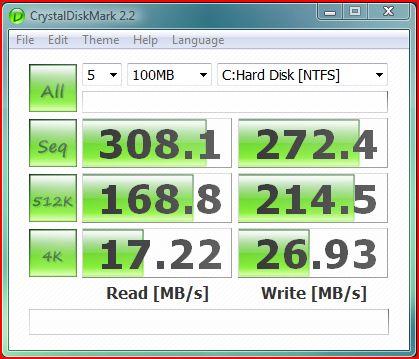
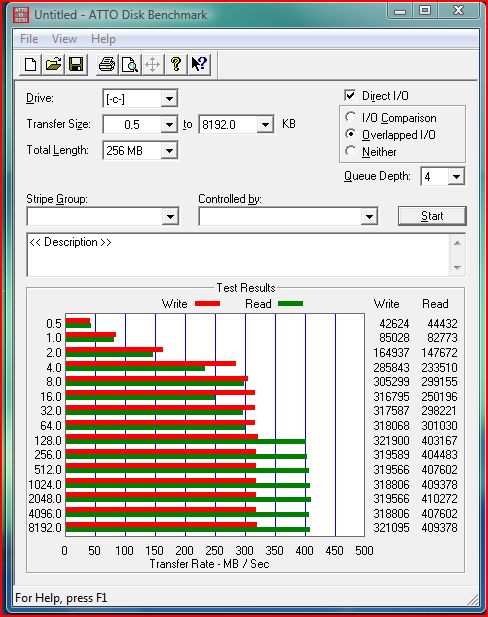
Downloaded CrystalMark, numbers not as impressive. Then i benched Atto again and they were down a hair, but last time i ran Atto from an external drive. This time ran it from my OS drive so that may account for the slight varience. And we all know a manufacturer is not specing there drives with the active OS on them...
Attached Files:
-
-
^^^ Nice...very good IMO for Mainstream drives. The numbers are what I would've expected. Congrats!
-
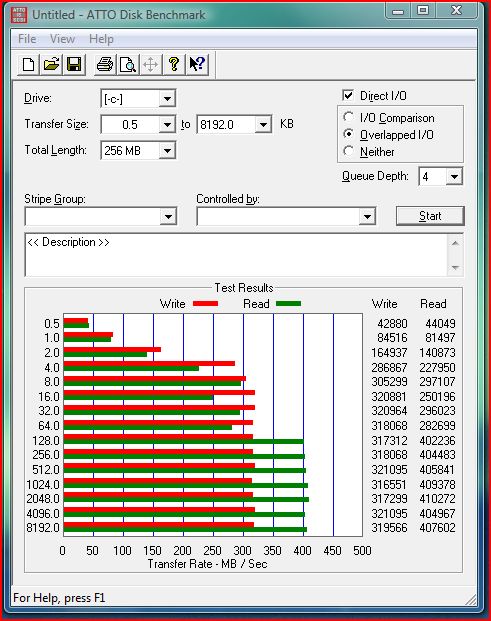
Just ran ATTO from my external HDD like i did before. results are similar to my above post. so it must just be that the drives aren't as 'fresh' anymore and some wear leveling could be going on...
Attached Files:
-
-
Well, yes if you focus on HD tune bench which is catastrophical. ATTO seems to be normal. Bench softwares give me completely different numbers. i'm under windows seven x64. So i'm a little confused cause it seems really fast in real world. I mean games, applications and windows loading look damn fast.
-
you know that write and read speeds don't matter at all?
my intel ssd has lower write speeds than my hdds, and still dances around the hdds. one example: ableton live update from 8.0.4 to 8.0.5 took for most people from half an hour to 1.5hours. it took 7-8min for me. and that's with that "terrible low write speed". get it? it doesn't matter. ssds are around a 100times (thats 10000%) and more faster than hdds in their best cases, which happen to be most of the time => hdd lose, no matter what. -
In fact, i have same results or so than this guy with his 60Gb ocz vertex in Crystalamark and ATTO. Benchies don't look very reliable...I mean write speeds are 150 MB/S in ATTO and 95 MB/S in crystalmark, read speeds 220MB/S vs 185MB/S...
look:
http://forum.notebookreview.com/showpost.php?p=5286128&postcount=8131
Now, will see if the upcoming Crucial firmware update will bring something new, but frankly, i'm happy with it. I mean when installing a 8GB game only takes a few minutes and then almost no loading when gaming, you can't be really disappointed ;-) -
![[IMG]](images/storyImages/raiddrive-2tb-super-talent.jpg)
it's comming!!! 2TB AND A FAN!! A FAN!!!!!!???!?!??
but it's coming (and can anyone help me if i have to write comming with two m, or coming with one m? i feel so stupid..)
i'd love to buy that thing..
-
Id love to see what the price is, product page probably says.
"We cant show you the ultra low price! To see your price add to cart!"
In the cart it will say something like.
1x 2TB SSD + $23.56 S&H
Total = 1 Arm & 2 Legs
Monthly payment plan available! -
it's 5000$ for the 1TB drive..
now think about the 2TB drive..
oh, and you can CLICK the picture, it's a link
they should build smaller ones, half a tera, a quarter tera, etc.. 128gb and 256gb ones for pcie would be lovely, being faster than sata could deliver. great for pcs. (i like pc's being more advanced than laptops. that, for me, just makes sense)
-
davepermen
you know that write and read speeds don't matter at all?
yeah you right
well, we all together what we using these benchmarks co confuse us and let us fall into the lies - oh we are all stupid why we just using it ? why they just don't stop making these completely false benchmark programs ..
but I agree . I tried ht tune when i bought seagate and it gave me totally stupid values and results and i just closed that stupid soft and uninstalled it
and I aimed on real HDD activity booting, installing , loading etc
anyway I already read artickle about that PCIe SSD .. from the 1.3GBps estimate to a 1.4GBps promise. speed thats beautifull but the price not gonna be beautiful ...
http://www.engadget.com/2009/09/16/super-talents-2tb-raiddrive-shipping-next-month-to-the-rich-and/ -
OCZ Agility 120GB on sale for $245 including keyboard:
http://forums.slickdeals.net/showthread.php?t=1559905
Pretty good deal, for a Indilinx based SSD. About $2/GB. -
The first one I got for $250 at Newegg a few weeks ago. The second one I recently bought last Wednesday for $239 through ZipZoomFly's eBay store. I had used Bing Cashback on both so in the end I would have only spent about $440.
-
I am all over this. http://www.tomshardware.com/news/Super-Talent-SSD-PCIe-RAIDDrive,8677.html
Nothing but the 2TB will do for me! Yes, I see it was already mentioned, but had to mention it anyways.
-
Hey, I was just wondering...there was some discussion in the Piriform and OCZ forums about using CCleaner to TRIM early generation SSDs using the "Wipe Free Space" option. Unfortunately, the techno-babble stuff went over my head pretty much...immediately.
Does it actually work? -
OCZ has a wiper software to do the same job as trim but it would have to be run on command or scheduled or something rather than run in real time like trim.
I am kinda tempted to grab the 120GB Agility for $245 but its freakin rebates to get that price and my check this week was short, so I really cant afford it. So I have to pass.
I think it will pay off in the long run though as I am bound to get a faster SSD or even a better deal as the market will be competitive soon when Intel is not so short on supply. -
No, it does not work because it writes zeros to the free space actually "filling up" your ssd.
-
I actually ran that Ccleaner wipe free space thing and it killed the performance of my ssd. Windows experience hard disk index went from 6.9 to 5.9. HDtune was pretty much flat lined at 168 mb/s. pcmark vantage overall hdd score went from a consistent +21000 to about 6800. Crystal disk mark really didn't show a difference.
Installed flashfire 32bit in compatibility mode and couldn't reboot. after about 4 bsod's went ahead and checked system restore option and all the benchmarks are back to normal.
Those zeros are still there, I think? but Windows and other programs just don't see them, is that why my performance was restored from system restore? -
-
Amazon has the retail boxed Intel 80GB G2 for $251.54 but not in stock yet.
http://www.amazon.com/Intel-Mainstr...1?ie=UTF8&s=electronics&qid=1253196131&sr=1-1
Look on the right for the Amazon.com offer. -
So, I am curious... how much difference do you think there would be in a system that uses a single 160GB Intel SSD vs two 80GB Intel SSDs in RAID 0? I'm thinking the difference would not be much difference in real-world usage, though I'm sure the benchmarks would be much better.
-
Benchmarks, yes.
Real world usage, I would say that it only matters on what you do. I do a lot, I mean a lot of multitasking. So having a couple of these SSDs in RAID has made a somewhat significant difference.
My boot time is probably a few seconds quicker, I never see the "Welcome" screen. It jumps from the Windows Logo straight to my desktop.
-
yeah, it does that on my raid0 setup with mtrons, too. it doesn't do that on my intel x25-m g1, though.. so there is something about raid0ed ssds
btw, i know those two guys in the pic (and i'm building a talkbox next week to sound like them
)
-
Hey guys, forget all my previous benchmarks, they were all false. All is due to RMclock. Don't know exactly how but when i close RMclock, my ssd finally runs at specified rates !!!! Will post some benchs.
That's crazy. I tried to change many settings in RMclock but couldn't manage to find the one which affects the ssd performance.I don't really understand, Rmclock should affect only the cpu theorycally...
Edit : when i uncheck the "use OS load-based managment" in RMclock, performances are better but not as high as when i simply close RMclock.
Anyone got an idea ???
Maybe some of you here have the same issue without knowing it. -
TADAAAAA !!!
Now i get this :
![[IMG]](images/storyImages/sanstitr.jpg)
And i went from 5.9 to 7.2 in Win7x64 evaluation :
![[IMG]](images/storyImages/sanstitreag.jpg)
with the ssd filled up to 35GB -
Wow, 6.5 for a 9600m gt, is it overclocked? My 9800m gts sli only gets 6.0--6.4 overclocked.
edit: nevermind, see the clocks in your sig -
I always get 6,5 for the gpu, overclocked or not. The score remains the same. I guess Win7 is generous with its evaluation. I had a lower score on Vista X32 about 5.5 if i remember well.
Edit : There is a bug for sure. How could a 9600M GT be better than a 9800M GTS...It doesn't make sense. -
I think the 9600M GT gets high 2d video scores and WEI probably puts too much weight in that area for an accurate 3d gaming graphics score.
-
Corsair P128 (CMFSSD-128GBG2D) 2.5" 128GB SATA II MLC
$307.99 after $25.00 Mail-In Rebate -
thats very good price for two!! how did u managed that ...
I just making best offer on this samsung :
http://www.samsung.com/global/business/semiconductor/products/flash/ssd/2008/product/overview.html
and IF I will accept offer it will cost me 185 GBP u think should I get it ? -
hi that GT9600m GT is not overclocked I have vaio and shows me win7 same score
and when I had vista graphic rate was 5.3 ..
in win7 they made this rating differently ... -
Does anyone know if there is a way to install an Areca RAID controller in a notebook and if so would it work on a system that does not support RAID in BIOS.
-
CPU magazine did several raid tests of SSD's about a year ago. The performance gain was about 20 to 50 percent.
-
I talked to Areca tech support guy and he said he'd never heard of such a thing as putting a RAID controller inside of a notebook but it would be an interesting project. He said that it would work if there is an open pci express port and if there was headroom for the controller.
He recommended the low profile controller, I think it is this one.
http://www.newegg.com/Product/Produ...cm_re=areca_controller-_-16-151-061-_-Product He said it was 64mm tall. I think there mey be headroom in my notebook because the graphics card is on the mobo creating "some" headroom.
I will be upgrading to quadcore extreme processor when it arrives from China and will verify available space. It does put out some heat but has it's own fan and heatsink. The tech guy said it will work without a BIOS option for RAID.
I have an Nvidia chipset that supports RAID but Toshiba does not have a RAID option enabled in BIOS. I well never buy another computer without BIOS options for RAID. -
eBay and basically waiting until it was in stock.
What SSD size are you looking at, the link shows the three different models.
I wouldn't recommend Samsung since their firmware support sucks, that is why most people stick to Indilinx based SSDs. -
Any Samsung drive that you get new will have the latest firmware that supports Samsungs version of garbage collection. Samsung has stated that there will be TRIM support firmware available before Win7 is released.
What's Wrong with Samsung? -
They have stated that they will support TRIM but it's a matter of when. Even in the article you listed, the author doesn't recommend an SSD with a Samsung controller.
-
I am not worried about the firmware because 1) it IS upgradeable and 2) I have vbm18c1q (background garbage collection)
What I am worried about, and so should any potential Samsung SSD buyer is the 4k random writes. Mine are around 7mb/s according to CDM. Is the poor random 4k writes a big deal and why?
![[IMG]](images/storyImages/capturevy.png)
-
The main thing is there's not much reason to buy a 128GB Samsung drive for $307 when you can get the same size OCZ Agility for $270 regularly and it is a much faster drive in the tasks that matter, while still keeping good sequential speeds.
-
OMG hasn't the importance of 4k random writes been explained enough??? I know u've been on this thread for long enough to know the importance. Daveperman explains it at least once a week
The new SSD Thread (Benchmarks, Brands, News and Advice)
Discussion in 'Hardware Components and Aftermarket Upgrades' started by Les, Jan 14, 2008.

![[IMG]](http://img2.imageshack.us/i/sanstitrejx.jpg/)
![[IMG]](http://img268.imageshack.us/i/sanstitre1cx.jpg/)
![[IMG]](http://img269.imageshack.us/i/crystaldiskmark22.gif/)
![[IMG]](http://img225.imageshack.us/i/sanstitre1fb.jpg/)
![[IMG]](http://img200.imageshack.us/i/sanstitrehy.jpg/)





![[IMG]](images/storyImages/atto.png)
![[IMG]](images/storyImages/cdmz.png)
![[IMG]](images/storyImages/hdtt.png)
![[IMG]](images/storyImages/hdt2.png)

![[IMG]](http://img16.imageshack.us/i/sanstitr.jpg/)
![[IMG]](http://img151.imageshack.us/i/sanstitreag.jpg/)

