Problems? See this thread at archive.org.
Crucial's new firmware which adds Trim feature has been released for those who are interested. Worked well for me. Will see if it's really efficient in the long run.
-
Link? Please.
-
You can go to newegg and get an 80GB for $239.. and cost per GB blended with the performance benefit.. it really is not that bad when taking into account the broader market pricing..
That is to say.. bang for your Buck.. Intel is kicking ..
http://www.newegg.com/Product/Product.aspx?Item=N82E16820167005
Verse the others who are the same or more expensive and perform a little worse to a lot worse.
http://www.newegg.com/Product/ProductList.aspx?Submit=ENE&N=2010150636 1421445225&name=80GB
and as Tiller reminded me.. it is hands free, fire and forget.. no forums to sift.. not beta wiper, trim and / or garbage collection to have to wipe your whole drive clean to install.. no going from 1.4 back to 1.3 and a sanitary wipe to boot..
IMHO.. and I will say I have been chicken blooded for a while now and done a little reading..
I hope this helped and be well, JW -
pretty simple, update utility will tell you if your disk is supported for fw update or not

-
Link to the Lenovo's firmware update:
http://www-307.ibm.com/pc/support/site.wss/document.do?sitestyle=lenovo&lndocid=MIGR-69806
Keep in mind, though, that the entire reason why I decide to give this update a go is because the SSD I bought from Newegg is a 1.8" variant of the drive, just like the Lenovo-branded one. You have here a 2.5" variant. While I don't think they change the controller, thus theoretically the firmware update will work, it's not a guarantee that there won't be any consequences.
Good luck either way.
-
read this
-
It's been a while since I updated the firmware of the drive, so I don't remember whether you get notified whether the drive's firmware is upgradable or not. If you're correct, then they do let you know, which means that there's almost no risk involved then. Thanks for letting me know.
-
Ooh Oooh!! Intel next! Intel next!!
Haha. -
Guys i need help:
primary hdd C: SSD (with win7)
2nd hdd D: Sata HDD
When i download smth and extract it with winrar, it will move the files from the .rar into the temp folder on C:/user/my_name/appdata/local/temp/ and then move it to the folder where u want it to be extracted in.
This means if u download a 10gb .rar file you:
Download + write 10gb on your ssd
When extracting you write 10gb on the ssd again (temp folder)
Write again 10gb to the folder you want it extracted in
+ delete temp files & .rar
so from a 10gb.rar file u write 30gb + delete 20gb.. wouldnt that decrease a ssd lifetime alot? Especially when u download alot (games,movies,..) ?
I got a intel postville gen2 on win7.
Also: Wouldnt it be faster to change the temp folder of winrar to the sata hdd instatt of the ssd? Especially since i download to D: , temp is on C: , desination folder for extraced files is again D: (i copy from D: to C: and then from C: to D: ).
thanks
-
zakazak,
Yes, this is a real annoying 'feature' of Windows (carried forward from Windows 1.0, I believe). The temp file pointer overrides where you say to download a file to and to top it off, instead of extracting to the same directory/partition you tell WinRAR to, it unRAR's to %user%\temp and then gets copied back to where you originally pointed it to, whew! Too much data is being thrown around needlessly - as you found out.
If you point the temp folder to your D drive, then you're effectively slowing down Windows (although your downloads and unRARing tasks would simply require the system to change the folder pointers (from D:\Temp to D:\Downloads, for example) instead of copying the whole file and thankfully, this happens almost instantly).
In your case, downloading and urRARing 10GB files regularly, I would take the small hit on the overall snappiness of Windows and point the Temp folder to D:\Temp. This would save you the wait of the system moving 10GB files back and forth when downloading and also while unRARing too.
As to decreasing the SSD's lifetime, you would have to be downloading at least 4 of these size files and unRARing them each and every day to approach Intel's claim of 100GB writes per day (and still be able to use the SSD for 5 years at this same rate), so unless you do do that kind of heavy duty downloads/unRARing, I wouldn't let it bother me as much as waiting for 10GB files to transfer from C: to D: constantly.
Yes, this %User%\Temp thing has bugged me for a long time, we either need Windows to be smart enough to ignore the temp folder and simply unRAR to where we point it to (usually the same directory/partition for me as the original RAR file) or, we need WinRAR to override the default Windows behavior and 'do the right thing' by unRARing directly to where we point it to.
Hopefully, as SSD's get used more and more, each and every program will get optimized in every possible way to use SSD's more efficiently and also with the least writes possible.
Hope this helped? -
ye that rly helped me.. thx
-
New reply from Samsung, I think it means if DELL doesn't release new firmware of samsung SSD, our SSD from DELL is not able to be upgraded.
.
-
Hey guys!
A glimpse of G2.5 and/or G3 specs?
http://www.dailytech.com/article.aspx?newsid=16549 -
That sounds to me more like Samsung leaves the responsibility of releasing the firmware update to the consumer to Dell. Dell will most likely issue an update like they did in the past. If they don't, then I'll probably look for a SSD alternative that supports TRIM instead.
-
What A Waste Of Money On 256g Ssd If No Firmware Upgraded
-
Just to let everybody know that RocketDisk has signed a new distribution agreement with RunCore, to distribute RunCore SSD.
So in addition to MemoRight & Mtron, we will be offering the full range of RunCore SSD on www.RocketDisk.com. Over the next couple of weeks, these RunCore SSDs will all also be listed at our eBay and Amazon stores, where I know a lot of you guys shop around.
As always, please let me know by sending me a personal message if anybody has any questions. That way it comes thru to my email & I will get to it quickly.
Thanks!! -
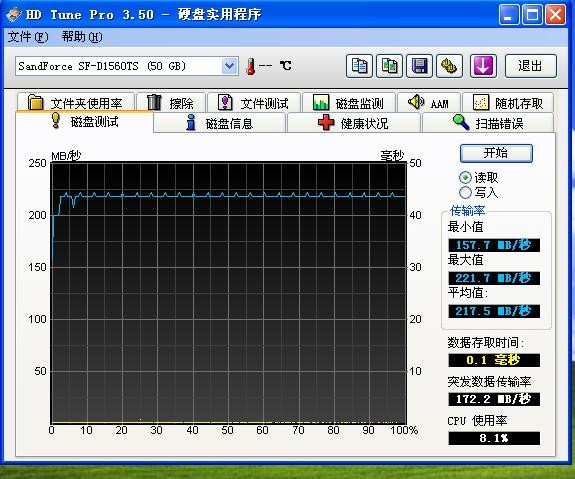
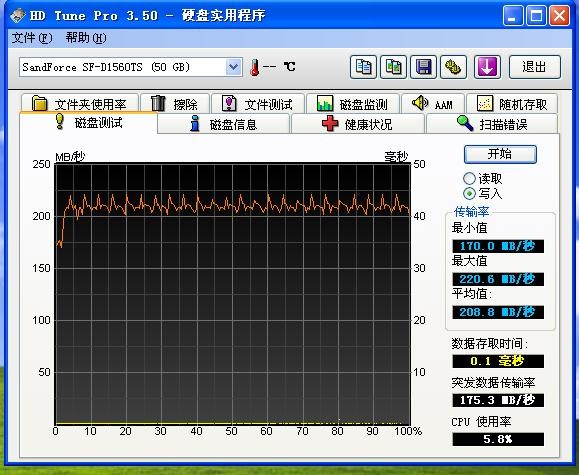
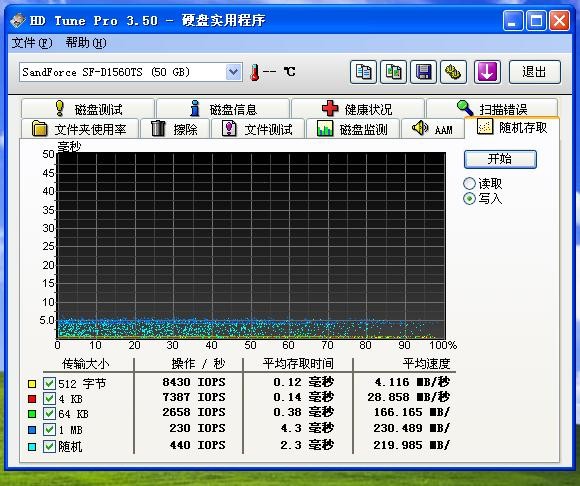
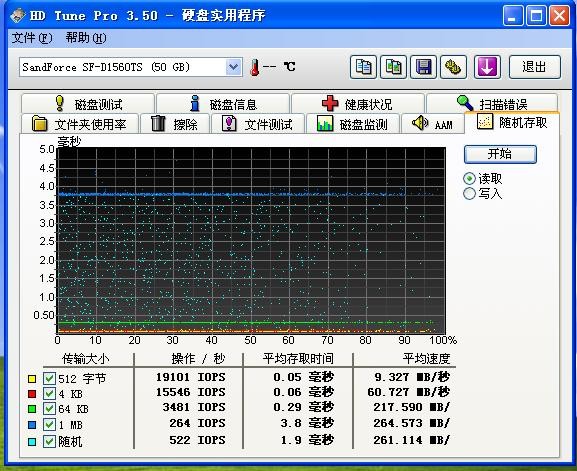
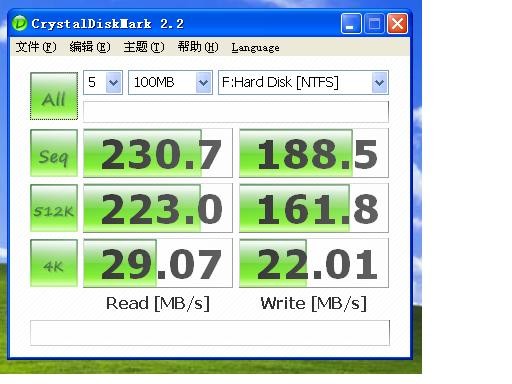
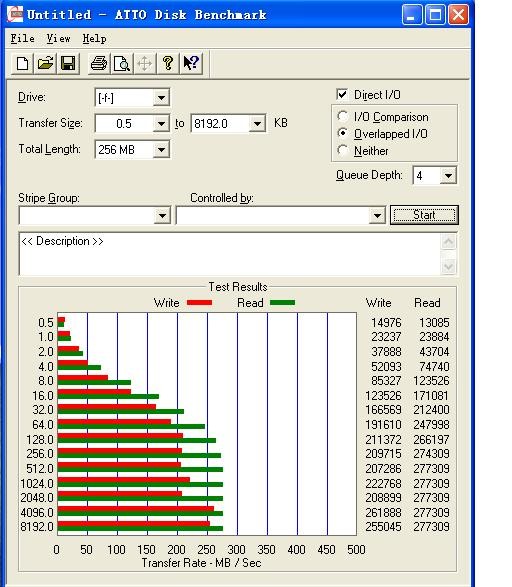
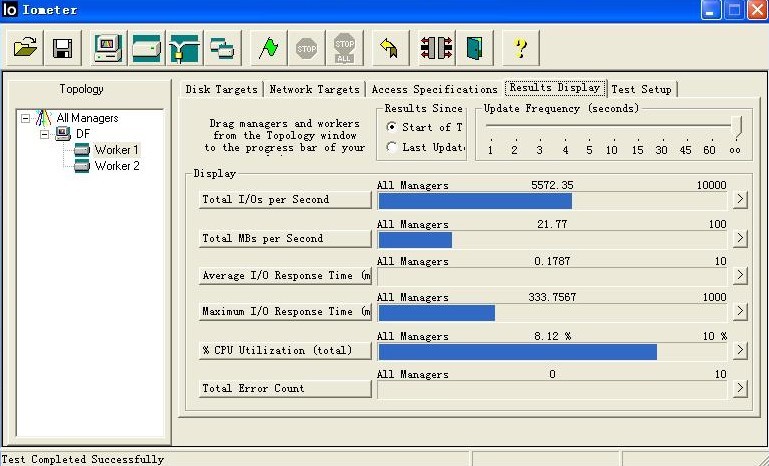
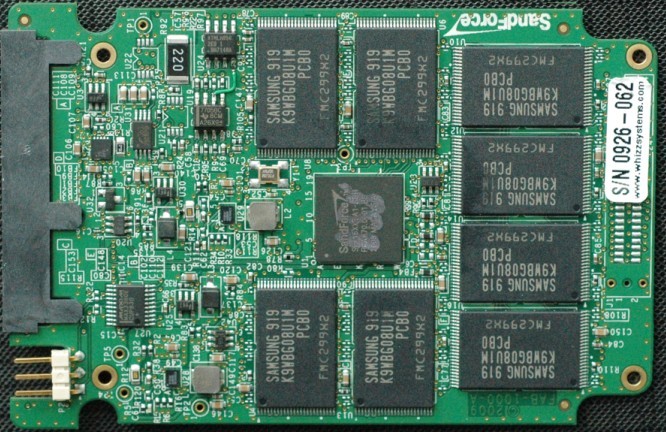
I just got files from my friend working at Solidata SSD, it has new Sanfroce SSD lines, and here are the primitive test marks:
-
How is the power consumption of the Sandforce drive?
-
ronan_zj,
Thanks!
These new Sanforce SSD's are starting to look real (and real good!).
Is there any other information on these besides the benchmarks? -
not sure the price right now coz the price he gave me was just for an engineering sample, so hope it wont be that expensive. however, we do know that when a new product gets into the market, the price is always higher. At tis moment, I only know 3 companies bought controller from Sanfroce, one of them is a well-known SSD brand, but they bought the consumer controller which may perform difference from the one i post.
-
I was just browsing around found the following, might not be anything new or already posted, but so many pages might be lost, seems pretty good stuff.
OCZ Vertex and Agility Garbage Collection works really well -
man !!
it reminds me again that my Samsung SSD doesnt have GC and TRIM...
-
You can always sell it and get a Vertex 256GB for a little bit more out of your pocket you know?
-
haha, that $200 more....
-
Looks like braidwood to me, not SSD...
-
Mormegil83,
I'm pretty sure they're talking about SSD's, you may be getting confused if you just skimmed it and read about the 16GB and 32GB densities per chip.
As far as I know, Braidwood will have a top size of 16GB which in my testing/fooling around with eBoostr (Beta v4) I can see why Intel is not going much higher.
I have reached just under 90% cache fill with an eBoostr size of 15268 MB so that translates to just under 13.5GB of actual 'cache'.
The article stated that MLC flash chips went to 30,000 writes (compared to 10,000 for today's chips) and SLC flash chips went to 300,000 writes (compared to 100,000 writes for current SLC chips). That's a pretty serious improvement (3x) in a year for Intel to achieve. -
Ah, it wasn't the size. I just misunderstood ONFI... I was thinking it was an interface for the chips to communicate with other hardware, not more specifically NAND controllers...
-
http://vr-zone.com/forums/497788/active-media-products-unveils-2.5-quot-predator-x7-sata-ssds.html
Round 2 for Jmicron. Hopefully stutter free and more competitive. -
depends on what JM they use, RAID0 JM SSD has been out for a long time already.
-
Maybe you should read the link. The controller is the new JMF612 (not just RAIDed JM602s), which is stated clearly in the article. It has 8 channels and 128MB cache.
-
Better be awesome if they want to fix their old rep for stuttering drives...still bitter about my jmicron based transcend mlc 32gb :/
-jess -
Hopefully this means that Intel and Indilinx have another serious competitor in the consumer marketplace to bring prices down even further. It is pretty ridiculous that Intel G2 drives are selling for so much above MSRP.
-
hope the review will out soon
but the price is kinda similar to OCZ -
MSRP isnt always accurate, it can drop (or rise, i know) but hopefully with the controller able to use different NAND (cheaper), that it can be cheaper than Indilinx/Intel based drives.
-
i've got a question to those who have flashed their Samsung SLC SSD with either Dell's or Levno's flashing utility.
If I have a drive that is connected externally using an enclosure (or something similar connected via USB) will the flashing utility still work? -
I use the dedicated SATA port in my laptop to flash the drive. I don't recommend flashing firmware of harddrive via USB port, even if doable.
-
Jackboot,
I agree with the sentiment, but the reality is that Intel does not post MSRP's, they post prices in lots of 1,000's.
The distributors/retailers are who are jacking up the prices. And the people that support those distributors/retailers that buy them at any price they can. -
I have a feeling the new Jmicron drives will drop in price. As long as people remember the first round of Jmicron controllers i don't see how given (basicly) the same price and specs as an indilinx drive anyone would choose Jmicron...
-
^^
The sheep and Joe Sixpacks of the world will take care of the JMicron sales for us
-
Meaning??? They'll all buy it cuz they don't know any better? or they won't buy it because others tell them not to buy it? or intel and samsung are just more well known?
I'm confused
-
whooha, Windows 7 gonna be released tomorrow, waitting for new frimware from samsung
-
^LOL
hope you get it soon!!! I'm going to upgrade my Agilities to 1.41 tonight if i have time!!! GC for RAID!!!!
-
Good lord, guys. I visited my friend at school yesterday, and we were talking about dream-machines and what we'd do if we had the money, and I told him I'd invest the majority of the money into several GB's of RAM and getting two SLC Intel SSD's - and he stopped me and said, "I thought you were making a tower, but yeah for a laptop that'd be good." And I said, "what do you mean?" And he goes, "well I thought the SSD's would only be good for a laptop but a waste of time for the desktop computer, since you're not moving the tower around."
He thinks the only advantage to SSD's is their shock resistance. I told him some mid-line SSD's crush a 10,000 RPM HDD. There are people who STILL think the cost of SSD's make them not worth it to upgrade from an HDD. I told him he couldn't be more wrong, especially coming from someone whose quadcore desktop can't even play 1080p videos without lagging, etc. etc. I can't spout off benchmark numbers because he doesn't know HDD benchmark numbers, so it's just going to fly over his head.
So, in your opinion, is there a video or demonstration on the web (first thing that pops into my head is the guy with the two Intel's in RAID running Crysis: Warhead on youtube posted last year) that I could/should show him to finally win him over? He's too illiterate to listen to bench numbers. Anything impressive with SSD performance would be very helpful in educating him. -
Next week, I may be upgrading a client's notebook computer to Win 7 on a Samsung SSD which I've wrote about here previously, and also install from scratch an Intel G2 160GB SSD in his tower (upgrade from XP x64) also with Win 7.
So I hope that both firmwares (Intel and Samsung) are out so that this will be the 'final' install for him on this hardware.
A little note about Win 7;
I've have been 'beating up' on an installation of Win 7 Ultimate x64 and am amazed how well the computer 'heals' after my abuse. I keep saying that after I 'kill' this test install, I will reinstall 'for real' and stop my experiments on the new O/S. This has been going on for more than a three month period (from July 13, to be exact) and this computer guinea pig just keeps coming back as good as new.
What kind of abuse do I do? Well, I had three antivirus products installed at one time (used it like that for about a week, yah, I was trying to 'kill' Win 7). Installed 3 versions of PS Suite (CS2, CS3, CS4) concurrently (used until about a month ago when I uninstalled CS2 and CS3). Also had three versions of Roxio Creator installed. (Also, note that I always install Suites as custom and 'Full' and do not skip out on any features that the software may offer). Installed and uninstalled numerous free/trial/demo software that I would evaluate and/or find equivalent/better ways with the software I already use. Tried a few Win 7/Vista registry 'tweaks' that supposedly should have made that system run faster (then I undid them (I think?) by running another .reg file that I blindly trusted to put the system back to 'normal').
I also downloaded the PerfectDisk disk fragging utility (not the defragger; I fragged the drive worst than what it was) and although the Win 7 defragger couldn't fully restore the drive to 100% like PerfectDisk can, it did 'bring it back to life' (I had left the fragging utility go until it was showing 48% fragmented drive).
The worst I did was not use antivirus on this build at all for the first 6 weeks - just used the computer normally (and not intentionally going to 'bad' sites to try to get infected on purpose). Then, to be sure that I was ripping Win 7 apart from the inside, I ran a couple of different registry cleaners after each uninstall I would do - the computer hiccuped, but it refused to 'die'.
Now, please note that I do not treat my computers like this normally - I really was trying to kill this Win 7 installation - to know the limits of this new O/S. Not only was this O/S much more impervious to my numerous attempts to destabilize it - it is still operating at a level where I would not say it 'needs' a reinstall. To me, this is amazing! (I could (and have) killed all previous versions of Windows to where a reinstall was needed - and this was at nowhere near the level of abuse this Win 7 installation has endured (usually, a single install (like a device driver, done improperly) could bring previous versions to the point where a reinstall was the only option).
I am looking to see the 'reinstall Windows every 6 months or at least every year' guideline finally be forgotten as ancient history!
I will wait to see how my clients computer are with their respective SSD's and decide which way I'll go (buy (Intel/Samsung) now, or continue using eBoostr and keep waiting).
Either way, by the end of this month, this looks like it may be the last and only time that I'll be installing Win 7 x64 on my current hardware.
Thank you Microsoft! Hello 2010!
-
OCZ Agility 60GB for $145, details here
-
Totally LOL. This guy's irrecoverable. You lose your time in my opinion.
-
From Samsung response:
-
It takes 8 minutes to install Windows 7 Ultimate x64 on my SSD--38 minutes on my Hitachi 7200rpm mechanical drive.
The new SSD Thread (Benchmarks, Brands, News and Advice)
Discussion in 'Hardware Components and Aftermarket Upgrades' started by Les, Jan 14, 2008.