Problems? See this thread at archive.org.
Thanks for the headsup, +rep.
Uhhhh..... i really want to update, just a couple of questions maybe someone can help me.
1) Would i lose all info doing the firmware update? If i do ill just wait for Win7 to arrive and do a backup of all files and do a fresh install so all is working good.
2) Anyone know if it could be done with a USB, i was reading the instructions and they say to use a cd, but just wondering if could flash the firmware like flashing a bios.
-
Abula,
As hooterbif's post shows, it seems to take one second and no data loss. Still, you should be doing a backup regardless, in any case.
You should also be fine with a USB. The main point is to Not boot up using the drive you want to flash.
Good Luck! -
@ hooterbif: I would say You ran it very successfully
-
What's the best 250GB 1.8" SSD?
If that's no avail., whats the highest 1.8" SSD avail.? -
Thx for the reply tilleroftheearth
Im not sure how if this is the biggest or fastest or if it supports trim, but certainly expensive
160GB X18-M Mlc Ssd 1.8"/5.0MM $718 -
You may want to see the following link;
http://anandtech.com/storage/showdoc.aspx?i=3667&p=1
What it basically states is that if your applications depend on sequential writes (video anyone?), then an OCZ drive may be even better than an Intel G2.
Both OCZ and Intel now support trim, but it's writes seem to be limited artificially (maybe not, the controller design may be responsible for these relatively low writes).
Anand states that waiting is not an option if you need SSD speeds now. Although I fit in that group of needing the most performance I can get - I will still wait for the G3's in a couple of months and decide then if its an Intel or an Indilinx based SSD for me.
What is interesting is an $85 G2 based 40GB Kingston drive he compares and also Anand's version of a 'real world benchmark'.
Sigh! More information to sift through and more decisions (meaning compromises) to make.
Hopefully, the more completely informed we are, the more chance we'll make the right decision for us.
QuadAllegory, hope this makes your decision easier. -
Somebody want to benchmark the 80GB G2 with the new firmware, pre-Trim for me? I've got the 80GB and I'm on OS X, so it really sucks that, apparently, this firmware does nothing.
-
Reviews on Intel G2 SSD's with TRIM:
PC Perspective
Hot Hardware
Legit Reviews -
Probably the Samsung one. Not many 256GB 1.8" SSDs.
-
But did I?
That is, I burned the firmware and then ran the TRIM tool and then ran the benchmark. I am not sure if the improved performance was due to the firmware update or from the TRIM operation (which took less than 1 second to run). I am skeptical about the TRIM because it ran so fast. Is that really possible?
By the way, the Intel tool let me schedule a re-TRIM every night. -
Of the three articles, I'm still confused as to whether or not W7 will run TRIM in the backgrund or if one still needs to run that Intel Toolbox optimizer program once a day.
-
From my understanding of all these new TRIM articles, yes, the TRIM operation is very fast, it also will not run unless you have the latest firmware on a G2 drive installed. If you run it again, do you see it say 'Passed', hooterbif?
Trim does seem to work 'by itself' on Win 7 as proven by Anand's test of doing a quick format and seeing an improvement. Why Intel is suggesting to also set the tool to run daily is simply to 'ensure' you are running the drive at the fastest speed possible at all times.
An example might be how I use my computer: I resume it from sleep, use it constantly for minutes or hours at a time and then immediately put it to sleep again.
Possibly, Win 7 will not run the Trim command when the computer is not allowed to idle as in the above scenario (Intel admits that it does not know how Microsoft has implemented TRIM), but the scheduled TRIM operation will take care of that situation.
Makes sense? -
Yes, all that makes sense. Yes, it says "passed."
The only reason I hesitate is because I vaguely recall someone doing a test with garbage collection in which they waited for 30 minutes while their drive idled to do a benchmark. Maybe they didn't need to wait that long? Or, maybe "garbage collection" is not the same as TRIM. -
I think I read that same passage, but GC is definitely not TRIM and depending on how bad the 'garbage' was on the drive, even 30 minutes may not be enough to 'collect' it all.
-
Thanks...and now I have learned something (and my SSD is freakin fast!).
-
Cool! Do you actually feel it faster than before?
If so, on what specific tasks? Boot time? -
SSD is already so damn fast, how can you possibly notice the half a second improvement.
-
LOL everyone waited for TRIM so much and finally it's so useless...
-
Well, half a second is still noticeable, but it depends on if it improved on a 1.5 second task instead of a 15 second task.
Kallogan, how is TRIM useless? These are pretty significant improvements I would say, not to mention the 40% increase in write speeds on the 160GB G2 (I think this is because the SSD was freed from checking if a cluster was used or not with the Intel controller).
Anyway, until Sata3 and true next gen SSD's arrive, these will be the improvements we can expect; incremental (although I wish all these 'incremental' improvements were on the order of 40% each, like Intel offered). -
Good point Tiller.
Depending upon which test you look at, moving from a fast notebook hard drive to an SSD is a 3000% to 5000% improvement in small block transfer speeds seen in real world use. From this point forward we are much more likely to see SSD improvements in the double digits. The lesson of the story seems to be: don't wait, just buy one. Indilynx, Intel, Samsung -- they're all so much better than an HDD it doesn't really make much sense in debating which one is best.
Of course, that isn't going to keep me from installing the new firmware and running CrystalDiskMark.
-
Well, I used to be able to barely pick my nose when saving a big file, but not anymore. I guess I'll pick my nose afterward - so it's freakin fast.
-
LMAO Maybe Intel can use your quote for their next ad?
-
Anybody tried the Toolbox and had the error message 'Error Connecting to drive'? I have this error for all three of my SATA drives. Hardware as in my sig. Haven't tried the firmware update yet, I'll give that a bash tomorrow.
-
You guys should download the Intel SSD Toolbox anyway even if you own the 50nm X25-M like I do. It shows useful info about the SSD. If anything, you'll at least know what the SATA transfer rate is(useful for laptops).
I'm thinking you would need the latest update for it to work and therefore the message "Error Connecting to drive". -
@tiller I don't want this to come off offensive to you and I hope I can say it tactfully, but I am a little concerned with you giving so much advice in this thread. I know everyone has a right to there opinion and the right to explain it, but it seems you are influencing quite a lot of people coming to this thread and it is all completely based on what you "presume" from what you read and aside from having "played" with a samsung device u have no real experience with SSD. Sometimes I think ur to caught up in the reviews and numbers and intel in general to see that intel is not the only option. While currently I agree intel is probably on top right now (and probably will be for a while) it is definitely not the only option and honestly as states before not always the best option (if you write a lot like photo editing).
Sorry this doesn't really play into the most current posts and you do seem extremely knowledgable about computers, but I think that is why so many people seem to be eating up your advice without question. And honestly I can't be on this thread enough lately to really actively participate, but I did want to put this out there.
I highly suggest people go out and to as much research on there own as they can and read as many forums as you can on the subject if you want to make an informed decission on which SSD is right for you.
And one more time, intel G3 won't be out any time soon I don't think intel has even leaked any info on a "G3" yet. The G2 refresh is said, however, to be releases in the next 6months or so, which includes the 320GB drive...
I again I hope you don't take this as offensive or mean... -
U seem like a truly good person and I believe you only mean to help. But giving so much advice on something you have no true experience with concerns me because until you actually get ur hands on one it is all just theory. I know you've never claimed to be "the expert", but by being over all knowledgable and posting so much, I think many people who pop in and out to check the thread do look at you as the expert. And that's a big responsibility especially considering you've never had an SSD.
I'm not saying I am the expert. I just think you are giving a little bit too much advice based purely on theory.
I truly hope you continue to post in this thread and believe you do contribute a lot here, so as I said please take this as constructively as possible and take no offense. Heck you can even ignore it if you so choose
-
New Anandtech SSD benches....
http://www.anandtech.com/storage/showdoc.aspx?i=3667&p=8 -
That "real world" test shows exactly what I would have expected pretty even across the board between the benches...
-
Here's a bench for the 160GB G2, with the firmware update and optimization software installed. Looks good to me.
Attached Files:
-
-
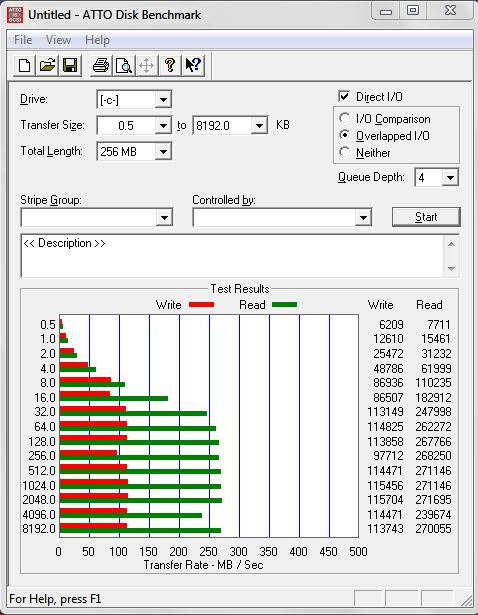
Heres my ATTO bench for my little $129 60gb OCZ Summit...doesn't really tell you much--PCMark Vantage HDD suite is a better benchmark.
![[IMG]](images/storyImages/capturemg.png)
-
I'm sure it is, but I'm too cheap to pay for it
Just wanted to confirm that the reported bump in Intel writes is accurate. Maybe even a bit conservative... -
Are you aware of that ??
Intel pulls SSD Toolbox for killing drives under Windows 7
http://www.engadget.com/2009/10/27/intel-pulls-ssd-toolbox-for-killing-drives-under-windows-7/
LOL
After OCZ and Crucial whose last firmwares screw write performances now it's intel's turn. TRIM my as* ! -
Serves them right for not give the 80GB G2 any kind of performance update. That they couldn't do even a little something is just pathetic. The drive is one of their two consumer SSDs that was just released three months ago.
-
seams that all g2 related stuff have some big issues ?!??!
-
Yeah lol G2 is kind of cursed apparently ;-)
-
I was thinking of selling my Super Talent MasterDrive SX and try Intel or Indilinx, but when i saw this:
no thanks!
We (users with Samsung RBB based SSDs) are angry because Samsung is "late" with new FW update and flasher, but I would be more angry if update is out killing our drives.
BTW: if I sell MasterDrive SX there is only one replacement == Summit (just because of support) -
Your's is better than mine. I wonder if my system is the bottleneck (Dell D830). I am using write caching.
![[IMG]](images/storyImages/ATTO%20pre%20firmware%20update.gif)
-
I think it is kind of funny that people were pushing the intel drives over the indilinx drives because the indilinx firmware wasn't "reliable." "You can trust intel."
With all their resources Intel still releases two faulty versions. -
If it has an Nvidia chipset then you definitely want to switch to the Microsoft driver. You might want to try it anyway... go to device manager>mine shows IDE ATA/ATAPI controllers if yours doesn't right click on what is there for SATA controller and select uninstall and check the box that says delete drivers for this device. You will have to reboot multiple times for the new driverto install so be patient.
-
if i buy an x25-m G2, and i don't use the newfangled update (just leave it the way it is), am I okay?
-
I would wait and I will wait when Samsung releases TRIM firmware @ the end of next month. I don't want to be the Guinea Pig for TRIM--my drive doesn't need it anyway, just go to sleep mode occasionally and it restores performance without TRIM.
-
No, there's a reason for it. The Gen 2 seems to have sacrificed potential faster sequential write speeds for even more random write speeds:
Random 4KB Writes: 80GB X25/X18-M: up to 6,600 IOPS (34nm): up to 3,300 IOPS (50nm)
Random 4KB Writes: 160GB X25/X18-M: up to 8,600 IOPS (34nm): up to 3,300 IOPS (50nm)
Look at the IOPS for the 34nm versions. The difference between 6,600 IOPS and 8,600 IOPS is exactly the difference in write performance between the two after the firmware update.
Regarding the firmware update problem Round 2...
Well it is pretty surprising to have a problem so soon after Round 1 of the problem, but it happens. Mistakes pave the way for better products in the future. After years of screw-ups(not just performance, but getting them on time, squashing bugs) with the Pentium 4, they came up with Core 2.
Guys like Samsung does have 1 or 2 years of more experience on actually making an SSD. -
The recent Intel reports seem to indicate that there is a risk of bricking the drive by installing the new firmware update. Is there any reason to think that the utility software that issues TRIM commands is also a problem?
I ask because I already installed the firmware. I can't un-ring that bell. The update software said there was a risk of drive failure, to back up data because Intel's warranty covered hardware only, etc. etc.
So I backed up the drive, installed the firmware and . . . . everything works great. I'm hoping that if there were going to be a problem, it would have already happened. -
Seems like the new Kingston SSDNow V-Series 40gb might be a good SSD for the price of $115 for retail price. 170mb read 40mb write.. It is known as the rebadged of Intel X25-X, low cost SSD or something.. hmm.. I wonder should I get that xD
-
That drive should be <$100 IMO.
-
Man...the G2 drives are awesome performers, but Intel just seems to keep screwing up in the firmware department. That Kingston drive should be around $85 at the Egg with rebates and specials
.
-
yup, $115 is just the retail price, guess newegg have a $30 rebate or something (basically rebates are paying the tax and maybe shipping if there's shipping charges for me).. but I'll see if I'll get it or not since I already own the Kingston SSDNow V-Series 64gb (slow drive)
-
now i'm confused.
say i buy the x25-m. I don't upgrade the firmware and whatnot, i just sit with the firmware it came with.... and let intel have time to fix the boo-boo. Am I OKAY, or does it affect the drive itself as well?
Jason -
actually when Intel was making the Core 2, they went back to the Pentium III as the base. they completely scrapped the Pentium 4 design (netbust etc.).
is it just me or has the price of these things gone up a lot lately? they now want 300$+ for the G1, even more for the G2. I bough 2 G1's for 225$ each two months ago. -
NewEgg has, in particular, been guilty of price gouging on SSDs recently. To the point that I they are the last website I look at for hard drive and SSD drive purchases.
The new SSD Thread (Benchmarks, Brands, News and Advice)
Discussion in 'Hardware Components and Aftermarket Upgrades' started by Les, Jan 14, 2008.