 Problems? See this thread at archive.org.
-
-
Nope, the 8530w has hardware RAID - which is why I chose it over the W500 or M4400.
The M is 80GB, but the SLC E is only 32GB. Both have nearly identical read speeds, but the E has much better write speeds. Unfortunately HD Tune's demo write test didn't play nice with the RAID controller in the 8530w, so I just posted the first read test I found.
Yep, but again the E is nearly identical to the M in terms of read speeds (the E is actually a tiny bit slower in the only same-system comparo I've seen.)
EDIT:
Unfortunately, the Mtron website doesn't like either of my serial numbers, so I can't download the firmware. My current firmware is 0.18R1H5; once Mtron support gets back to me, I'll upgrade to 0.19 and see what happens. -
they try to fix the page currently, it doesn't work for anyone. i don't know if i have the identical firmware you have, as i have the 3.5" version of the 64gb disks. else i'd send the mail to you immediately..
that's the modern web. i remember the days of a simple table with all firmwares clickable and downloadable without any "helping" gui
-
I want a SLC 128gb SSD...which is best?
-
memoright ..
-
Grats, there's no better drive for laptop in terms of performance and power consumption.
The MLC gets 11k IOPS at 4K but that's at IO Queue Depth of 1. With higher Queue Depth the IOPS figure will drop. The X25-E SLC gets 3300IOPS at queue depth of 32. -
The FusionIO drive drops in performance with repeated usage.
http://forum.ssdworld.ch/viewtopic.php?f=4&t=58
And that's SLC. -
Anyone want to do me a PCMark05 and Vantage with the X-25?
Any increases in Battery Life? What about the time it takes to open up, say, IE or PS?
I need to know these things to see if they are worth $700. -
New OCZ Vertex Series!
According to their Reps, they won't have the problematic jmicron controller!
http://www.ocztechnology.com/products/flash_drives/ocz_vertex_series_sata_ii_2_5-ssd
http://www.ocztechnologyforum.com/forum/showthread.php?t=47525 -
The Jmicron controller is the one causing the stuttering?
-
that's right hankaaron57
-
Ok, I have the Intel X-25M in my new Latitude E6400. The system is quite responsive, as one would expect. Am not getting the benchmarks reported earlier in this thread though.
CPU is a P8400, 2GB RAM, OS is XP Pro. Bios set to ACHI enabled. Tests done on battery power.
Any other tweaks I should be doing?
EDIT: Second set done on AC power. Bizarre results as some went up and some went down.
On battery:
![[IMG]](images/storyImages/crystalmark.gif)
On AC:
![[IMG]](images/storyImages/crystalmark2.gif)
On battery:
![[IMG]](images/storyImages/hdtune.gif)
On AC:
![[IMG]](images/storyImages/hdtune2.gif)
On battery:
![[IMG]](images/storyImages/hdtach8mb.gif)
On AC:
![[IMG]](images/storyImages/hdtach8mb2.gif)
On battery:
![[IMG]](images/storyImages/hdtach32mb.gif)
On AC:
![[IMG]](images/storyImages/hdtach32mb2.gif)
-
Do them on AC power next time.
-
Here's something to make people jealous.
(yes, those are real numbers)Attached Files:
-
-
heavyharmonies, why do you have 4 results for the HD Tune results?? Shouldn't there be only two?? Why are the first two so low?
In general, laptop chipsets have lower performance since they are architected to save power. You'll never get the results you see in desktops. Although with your results, you are fairly close. -
Each test was done twice: first time on battery and second time on AC power. They're each marked as such in the post.
-
You have two results for battery and AC.
-
Oh I see what you mean. HD Tach has 2 tests, a quick and an extended. The first 2 results are for the quick test and the second 2 are for the extended.
-
what do you have in there ? ... ramdisk
-
A 5400rpm HDD!
Hehe, you could call it a ramdisk. Actually, it's just EWF on top of my OS partition. Since cristaldiskmark writes a file before doing the read test, it got bounced to ram, then it read it from ram, that's why the reads seem so high. If it was just reading something off my HDD, as would be the case in say a bootup or starting a program, it'd be just a slow 5400rpm drive. The writes however are the real deal.
Just a proof of concept. In my opinion, EWF is better than steadystate as a solution to solving those stutters on bad SSD. Wanted to pique people's attention a bit with the bench.
I would see OCZ marketting jump all over this solution. "To fix stuttering issues with our SSD... buy more of our RAM!" -
The quick test results are vastly different from your long test ones. Mine is pretty similar for both.
NVM, that should stabilize after 3-4 weeks of usage. -
Here it is my Crystaldiskmark Results:
![[IMG]](images/storyImages/intelcssd.jpg)
-
Hey all, I just got a Samsung 64GB SSD (MCC0E64G5MPP) and I'm wondering how it fairs compared to the Mtron MOBI 3000 I've been eyeing for a while. I bought this for an extremely low price and I'm thinking of reselling it, buying a smaller 32GB MOBI 3000, and pocketing the change - but only if the Mtron offers significantly better performance. Any input?
Furthermore, I'm wondering if there are any other tests I should perform other than the HDTune disk-checker to make sure that the drive is working alright?
EDIT: This is my HDTune and CrystalDiskMark for the Samsung:
![[IMG]](images/storyImages/HDTune_Benchmark_SAMSUNG_SSD_RBX_Seri.png)
Sequential Read : 94.794 MB/s
Sequential Write : 86.774 MB/s
Random Read 512KB : 92.378 MB/s
Random Write 512KB : 68.579 MB/s
Random Read 4KB : 15.583 MB/s
Random Write 4KB : 5.387 MB/s
Test Size : 100 MB -
you should test for iops in random write. but generally, it looks quite good. an mtron would not be much better no.
-
I want to test IOPS, but I really can't figure out how to use IOMeter and I don't know of another program that'll measure IOPS...
-
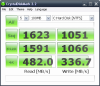
Yea see your speeds are slower than mine in all aspects, here's mine:
![[IMG]](images/storyImages/x25mcdmis3.th.jpg)
Yours is even slower than the guy with a Dell E6400 laptop couple of posts back.
How much space have you used on the drive?? See your random write results are 1/2 to 1/3 of the other X25-M results. With enough outstanding requests it might slow down enough to experience so called "stuttering.
HD Tune Pro shows another aspect of performance with the File Benchmark test. Just download the trial version of the Pro version. -
OCZ Vertex is available for pre-order on Amazon. $580 for the 120G version, $308 for the 60G.
-
His thinkpad's SATA transfer speed is capped at 120MB/sec for both read and write. The Dell E6400 has full SATA 3.0 support it seems. Hope this helps
-
$300 for 60GB would almost be worth it if it solves the stuttering and has fast random writes.
-
Anyone knows the power consumption of the vertex?
Nervermind, got it: 2W active, 0.5W "in standby" (don't know if that means computer has to be in standby or what). How much was the intel? A bit less? Idle is the important one. -
Yes, I will sure be interested in seeing some tests on this Vertex drive and the new Samsung which is due out any day. I believe the Samsung will be a tweaked MLC version as well. And the new Super Talent also!
-
http://www.intel.com/design/flash/nand/mainstream/index.htm
With proper power management:
Active: 150mW
Idle: 60mW
His write speeds are also slow. That's not capped by SATA speed limits. -
He's probably opened something else in the background that facilitated disc writing (superfetch, indexing, etc...) But I know for sure that his read speed is capped.
-
@inteluser:
My usage is 70GB out of 80GB. So I only have around 10GB of freespace.
I will do HDtune Pro benchmark once my Mtron 3500 SSD arrived. So I'd test it together with Intel X25-M -
You have seen: http://www.legitreviews.com/article/788/11/
where the performance drops as the drive gets full?? And somebody said its because its running out of space for the space to be used up for write levelling algorithm and the performance is being lost.
The X25-M has 20 4GB chips, yet the capacity comes out to be 74.5GB. Remember hard drives use 1,000,000,000 Byte=1GB, while in memory its 1024x1024x1024=1GB. They are using the leftover 5.5GB for the write levelling purpose that is permanently not accessible by the user.
This why the performance is being lost.
1st one, Oct 23, 2008
![[IMG]](images/storyImages/hdtunex25mly3.th.jpg)
2nd one November 4, 2008:
![[IMG]](images/storyImages/hdtunex25m2no1.th.jpg)
Test I did December 10, 2008:
![[IMG]](images/storyImages/hdtunex25m3laterhe0.th.jpg)
Notice how as the time progresses the performance bar smoothes out. The drop at ~20% shown in first two pictures doesn't exist at the last picture.
Remember Intel's claims about how their write amplification is very close to 1:1 level and so is their wear level efficiency?? Wear levelling is where the controller tries to spread out the writes to every single place in the drive before writing it again(the 2nd time) to preserve lifespan of the drive.
They also have a controller where it dynamically tries to optimize the drive according to usage patterns.
Now combine the controller and the wear levelling. It needs to write to the entire drive couple of times to determine the usage patterns. On the third pic, it has went through the entire drive several times and is finally smoothing out the performance. It took literally several weeks to do that.
X25-E does the same thing where the performance drops for certain time, don't mistake this is SLC vs. MLC thing: http://dcsblog.burtongroup.com/data_center_strategies/2008/11/intels-enterprise-ssd-performance.html
Maybe, but probably not. There's another user with a laptop+X25-M that says he freezes on MSN. I'd be willing to say its the difference between T60's SATA controller and others. NCQ are also features that might not be present on the T60 along with who-knows-what-else. -
@Inteluser:
Well I guess once my Mtron 3500 arrived, I would move more data into Mtron 3500 and use two harddrives instead. So I will have X25-M in the main bay, and Mtron 3500 in the Ultrabay.
Hopefully this helps with the wear levelling and the performance by reducing the space on the main harddrive. If this didn't help, I guess I would have no choice but to place Mtron 3500 on the main bay. -
Jlingo, read my post again. What I am saying is that whether SSD is full or not isn't determining your performance.
One thing is your laptop controller sucks and limiting the SSD, and another thing is the SSD controller has yet to get used to the usage patterns. Think of it, it'll need to write every section on the drive at least once to figure out usage patterns and optimize performance. It took 3-4 weeks for mine.
But again, your laptop controller is limiting the SSD not supporting features like NCQ and SATA2 along with who knows what else.
Any lag I felt weeks ago just isn't there anymore and the system is more responsive than ever! -
it may be that the mtron will behave better with the controller, dunno.
-
I thought I would post some benchmarks of my new OCZ Core v1 128GB in this thread in case some people missed the other one.
I installed Windows 7 build 6956 on the drive as a non-member disk of my Intel ICH8M RAID controller ensuring that I loaded the latest Intel RAID drivers at setup and everything is running absolutely perfectly. No tweaks. No Steadystate. No PC Safeguard (Windows 7 implementation of SteadyState). Windows installed in about 15 minutes flat and I can find absolutely no evidence of stuttering whatsoever. To put it simply it's the best $195 I've ever spent - the general speed of my laptop is now stunningly quick.
Benchmarks:
![[IMG]](images/storyImages/capturesb3.png)
![[IMG]](images/storyImages/capturewy0.png)
![[IMG]](images/storyImages/capturebx8.png)
![[IMG]](images/storyImages/capturesn8.png)
-
So windows 7 has fixed the stuttering issues on its own?
-
Not entirely sure as I have only tried it with Windows 7. However I would think it's more likely that it's due to the fact that I set the disk up as a non-member disk of my RAID array and used the latest RAID drivers at install. The changes that are being made in Windows 7 for SSDs are not that great and I very much doubt they would make a massive difference.
-
ah... thank you
-
I agree, Windows 7 makes changes that are mostly relevant for the worst of the SSDs. What they really should have done is change the file system to another one that's better off for SSDs.
-
Anyone see this announcement:
http://gizmodo.com/5112895/toshiba-512gb-solid-state-laptop-drive-come-to-papa -
holy crap that was fast! 256gb drives haven't even came out yet good and they already have a 512gb expected second quarter of 09. Wow by next X-mas we'll have 1tb SSD's it seems.
Well they've crossed the 500GB thresh hold that i was waiting for capacity wise so i guess as soon as this joker comes out i'll be picking up one.
By next X-mas a smoking fast 64gb/128gb SLC drive (for OS and applications) and a 500gb/1tb MLC drive for storage doesn't seem that far out of reach for most people
I expected SSD's to take over the market, but i didn't realize it would be this soon. The only thing mechanical drives have left at this point is very low cost -
Well, one of the biggest reasons Hard Drive technology lived so long in current form is the price...
-
/me likes. 1.8" 256gb. i hope 1.8" will be the next standard in notebooks, once ssd's get more commodity.
some of those 512gb together for an ultrasilent winhomeserver.. i'll take.. uhm.. 5 of them.. or should i take 10?
-
take 11, keep 10 and send the other 1 to me. Thank you.
-
you'd like to.. oh, and the 'old' mtrons i should send to you, too...
but i really like the 1.8" format.. would fit perfectly into the hp 2530p wich i still haven't but like to have...
"ohh that's cute.. but you sure have to sacrifice a lot on that small size".. turning on in some seconds, showing the quartertera storage.. having a HUGE e-*****
-
I'll take anything that's faster than 10K-RPM HDD, that means the 'old' mtron included.
I'm thinking you only like 1.8" format because you're using the 2710p. Otherwise you won't care if it's 5" form factor. what is it running on, some 1.2GHz ULV core 2 duo?
The new SSD Thread (Benchmarks, Brands, News and Advice)
Discussion in 'Hardware Components and Aftermarket Upgrades' started by Les, Jan 14, 2008.




![[IMG]](http://img53.imageshack.us/my.php?image=x25mcdmis3.jpg)


![[IMG]](http://img162.imageshack.us/my.php?image=hdtunex25mly3.jpg)
![[IMG]](http://img101.imageshack.us/my.php?image=hdtunex25m2no1.jpg)
![[IMG]](http://img101.imageshack.us/my.php?image=hdtunex25m3laterhe0.jpg)


