Problems? See this thread at archive.org.
I have my eye on the Vertex as a possible non-stutterer.
-
-
...but with relatively high power consumption. Might be great for desktops though.
-
Samsung SLC still no noted problems

-
Yeah, good point. And I just went all notebook. But it is at the docking station 99.9 % of the time
I hate heat though and really like to do what I can to minimize heat. I got the Intel graphics to keep the heat down.
-
my intel "stutters" 5-6 sec everytime when I login.
-
Yes, Samsung SLC is good, just not quite big enough. One more small jump to 128 and that will be a SERIOUS contender. Are you speaking of the NEW Samsung? I am continually unclear which product that actually IS, or even if it is actually available at this time except in a Dell.
-
AFAIK there hasn't been a new Samsung SLC since the 90/70 read/write models. To my knowledge there are four "lines" of Samsung solid states: first gen SLC 50/30, second-gen SLC 90/70, first-gen MLC 90/70, and second-gen MLC (forget the speeds, but the sequentials are fast). Each line has variants in 1.8", 2.5", and in various capacities. Or that's how I've come to understand it...
-
It is no wonder I am confused about that. Soon, at this rate, each "player" will have between 16 and 32 "lines" of SSD's. Between Samsung and OCZ alone, we have an absurd amount as the original ones which have been proven to pretty much NOT WORK are still in the channel, "competing" with all newer versions from the same and different companies. And we have yet to hear any more than a peep from heavies such as WD.
-
Does HDDErase3.3 gonna erase all data in my intel ssd ?
-
Yes.
10char -
may be suoerfetch. disable it, delete all stuff in windows/prefetch, restart and then enable it again. then do some redtsrts to ket it do first prefetching and test if the blocking is gone. i have to do this on quite some vista machines of all disktypes.
-
i disable the superfetch after I install vista in my intel ssd.
i think there is something wrong with my Lenovo software. -
Just lke the man said...
-
It says on the Intel X25-M datasheet that the drive will enable endurance features and adjust the write performance if too much writes are done(much greater than 20GB per day it says).
It's unlikely you'll write more than 20GB a day for most users however keeping reliability up are one of the reasons that the performance loss is greater.
Here's what write combining does. Write Combining is a computer term for bursting cached data rather than releasing it little by little. The Intel drive keeps write amplification low by bursting it only when the combined data size is close to the size of the block, in case of the X25-M that's 512KB. The benefit on CPUs is it can save bandwidth and on SSDs it will save the cells from dying fast.
Write Combining essentially keeps random write performance very high but the downside is if the workload is random enough the log table will be essentially be "optimized" for random writes and slow down sequential speeds. What might make it stutter is if the "garbage collection" becomes overwhelmed by the super high speeds. The slowdown will probably be sporadic in nature and keep changing as workload changes.
The nature of write combining might actually screw with partition alignment if not done right.
(The Intel drive actually does not do idle "defragmentation" for reliability purposes)
Guys I think there is a way of doing the "defragmentation" without clearing the drive. If you can adjust IOMeter in a way that simulates "less writes" being done, the log table should be updated and the performance up in theory. -
So you won't be able to get everything out of different SSD implementations. Reliability, Cost, Random Write performance, Sequential performance, one or more will probably be sacrificed to get other things faster.
Using multiple channel controllers to improved throughput will also affect this. Do you want to use multiple channels on everything or just certain operations?? If the 10-channel controller is actually used in random write 4K the burst size for the WC operation will probably have to be 10x the block. I'd assume less than max channels will be used for random writes so it doesn't have to be too "bursty".
The Write Combining technique is actually an almost guaranteed way to keep write amplification close to 1(meaning 4KB written and 4KB erased), but it has the problem of degradation. X25-E drives will be better off but stress it enough and you'll see similar degradation.
The controllers from other companies that have write amplification much higher than Intel drive will have less degradation(performance up) at the cost of reliability. They might use speculation techniques where the controller might try to predict the data sizes and keep write amplification down(of course the reliability can't be guaranteed because the controller will be wrong in certain cases). -
The latest samsung SLC's we know and love are actually 100/80 on spec sheet...
-
I'd take Wendy's reviews with a grain of salt. She "lives" in the OCZ forums and pretty much just backs up whatever Tony says, it seems... (hopefully she doesn't read our forums and get offended) -
Nothing to get offended about. Everyone's entitled to their opinion and it's a free country--usually
Frankly, I really cannot tell the difference in real world usage between my 2nd Gen MLC in the E4200 with my 1st Gen SLC in the M1330. They 'feel' the same. It's too bad the E4200 can't have access to the 3rd Gen MLC chips. Still don't know what weird proprietary connector it's using. -
It's not proprietary, I replied in the E4200 thread about it with a link to the specification, it's a standard 1.8" SATA connector, 2.5s use the same connector as desktops, 1.8s have their own unique connector.
-
Thanks for that. Guess, now we just have to take the drive out of its housing to do the upgrades
-
With the economy the way it is, is it affecting your SSD purchase? I want a high performance 120/128GB SSD for $300 or less for my main computer that I do most of my work on. Paying more than that in this economy is more than I want to spend for something that isn't really needed. Looks like the Vertex is out of that price range.
Has the economy affected your decision to buy or wait on SSD? -
economy not really, my car getting worked on... a little...
-
Quick question: Does reinstalling OS & programs and reformatting every few months slow down, or ruin a SSD?
-
Not really, knew where the economy was going to be headed years ago and prepared accordingly. That's left me with enough play money for finding the right SSD amongst other things.
In theory no, and considering I've reinstalled and reformatted multiple times on different SSDs and noticed no performance change, I'd say it's no for practice too. -
While the economy is in the back of my mind the price/performance/capacity ratio hasn't gotten to where it would have to be to get me to make a serious dive into a newer/bigger/faster ssd than the cheapie I got for my laptop. I guess I feel like right now you're still paying too big of a "cutting edge" premium for the technology and like everything it will continue downward.
-
What is the take on Expresscard SSD's? Are they always horrifically slow? Are they still USB 2.0 or can you get them in PCI?
-
they are horrible and have seen no improvement as far as i've seen, unlike the latest generations of MLC SATA2 drives
-
still no vertex but the 64g intel SLC is available on newegg for $859. (sorry if this is old news... not sure i saw it posted)
-
I hear someone's supposed to release a new generation of ExpressCard drives sooner or later... dunno if they'll suck as well.
Being a college student, the economic downturn hasn't really affected me that much: I don't think price, speed, and capacity levels at which I'd buy an SSD have changed that much in the past couple months. In fact, SSDs are probably an exception to the fact that I'm usually quite averse to buying cutting-edge anything.
Solid state drives I have purchased: Transcend 4GB CF, $45; Samsung 64GB SLC, $110; Samsung 64GB MLC, $200 (there was an OCZ in there, but I sold it to Jackboot for just a little less than for what I got it). If anything I'm willing to pay a little more these days; after you try one good drive, you just don't want to go back to the spinners... -
The Patriot Warp Version 3 is the same as the Titan and Apex.
-
I am still waitting for SanDisk SSD G3. my friend keep telling me to wait for his company product coz it improves alot and the price is hella cheap. around $500 for 256G, and with SD employee extra 20% off, it gonna be cheaper..
so i am still eyeballing the SSD from Israel.
still struggling on GSKILL titan, but worry about the heat problem. -
Yeah, I hope that doesn't get delayed.
-
NEED HELP! We have been trying to install a new SOLID in a Toshiba R600 - the current ultraportable flagship.
Via the USB connection and Management we eliminated all partitions, then used diskpar to set the alignment at 128 sectors. We then right-clicked on the driver to format it. Still with the USB, in various experiments we were able to save files and read them. Seemed to be ok.
Once the drive was connected to the internal bus, problems. I was unable to install a Macrium disk image. We loaded the linux-based startup, but it would not read the DVD. We could not even install the Toshiba OS restore disk (XP). The unit keeps asking if we wish to initialize the SSD... and when we say 'YES' it goes into a loop comprised of LOADING RAMDISK and then "Initialize or Quit?"
It is a PITA going into that unit, so we'd like next time to be the last time.
---Could it be a faulty SSD?
---The SSD says SATA II and so is the laptop - but could there be some obscure compatibility issue?
---Did we miss some key step in the preparation of the SSD using Diskpar?
---Was it correct to follow the prompt and format after Diskpar?
---Is there another possible procedural error, or a missing step?
Thanks! -
Vertex is available in Hong Kong and a user at OCZ forums picked two up, here are his benches:
HDTune, ATTO: http://www.ocztechnologyforum.com/forum/showpost.php?p=347461&postcount=11
IOMeter Random 4k: http://www.ocztechnologyforum.com/forum/showpost.php?p=347479&postcount=18 -
notaguru, I suggest you ask the people at the OCZ forums directly. They're pros at troubleshooting OCZ drives and can let you know where your problem is.
-
Are these Vortex drives faster in any way than the Intel X25-E 32GB?
BTW, I would be getting a Vortex 30GB so I don't know if it's performance will differ from the 256GB. -
Vortex.
And no, they're in no way faster than the X25-E. The X25-E is a beast. The Vertex is more of a big dog (and the original Core is like a puppy).
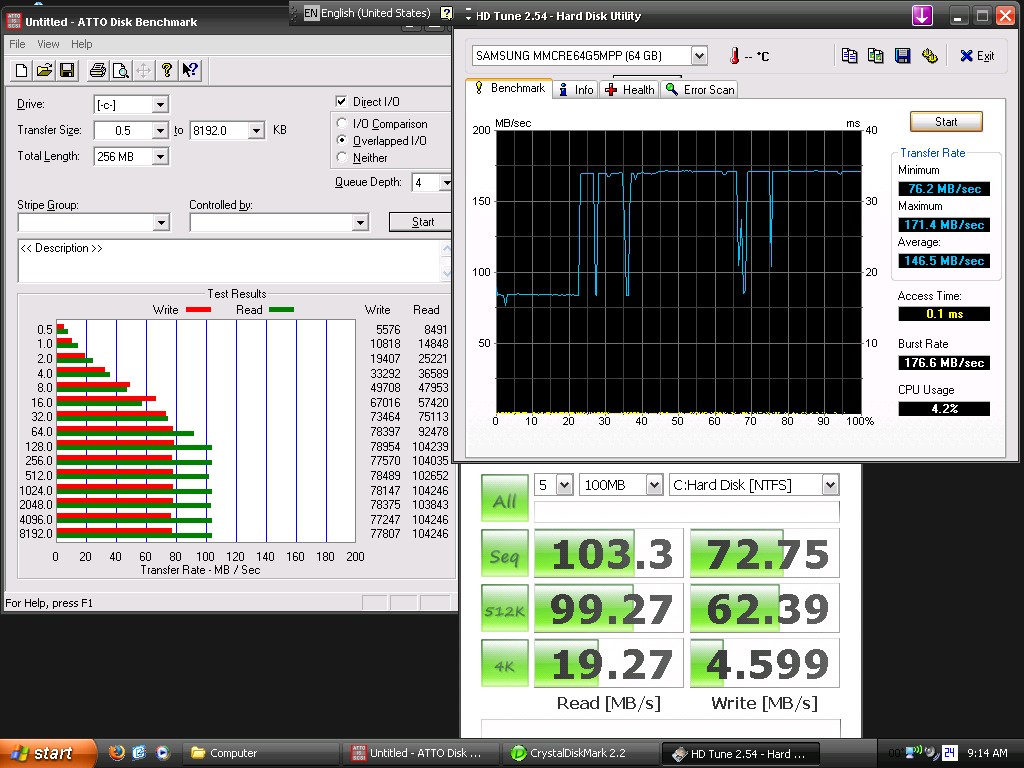
Also, for your viewing pleasure, Samsung 64GB MLC, MMCRE64G5MPP, on ICH9R (I don't really understand why HDTune records those monstrous reads for almost 75% of the benchmark):Attached Files:
-
-
As CW said, the X25-E is faster. I don't know about the X25-M, haven't seen any side by side comparisons. The 30GB and 60GB are slower than the 120GB and 256GB when it comes to read/writes but it's not supposed to be a big difference.
-
Since there is so much talk about Intel SSD, you guys should listen to the podcast from pcper and their follow up of the "Long-term performance analysis of Intel Mainstream SSDs" article and their thoughts on OCZ Vertex.
After listening to Ryan Shrout / Allyn Malventano experiment on Intel SSD and how they were about to mimic the same result with 3 Intel X25-M, I'm kinda speechless.
I'm beginning to wonder Intel lower their SSD price this month.
http://www.pcper.com/article.php?aid=411 -
OCZ Solid Series review
Haven't been able to find any benchmarks or reviews on it despite it having been available for some time now.
http://www.ocia.net/reviews/oczsolidssd/page1.shtml
The review is not in-depth at all but that's the only one I have found thus far! It is very interesting that the reviewer claims that his bootup times nearly doubled (from 14 seconds to 23 seconds) when he applied the registry tweaks that OCZ suggest on their forum (w+f?). -
Glad to see the Solid series getting a good review.
My Vista 64 notebook takes 19 seconds from BIOS disappearing to logon screen with my OCZ Solid 60GB SSD. I did most, but not all, of the registry and service tweaks. I also have a 400MB RAM disk that auto-loads at startup so I don't know if that added to the time.
It would be great to know exactly why his startup times increased though. -
Excellent link Thanks for the link, the review was great.
-
I have a question:
Is this a samsung 256G SSD?
Can anyone has samsung 256GB SSD confirm this?
http://accessories.us.dell.com/sna/...x?c=us&l=en&s=bsd&cs=04&sku=341-8981#Overview -
I am wondering if Intel SSD's will work better on a Macbook Pro over a regular laptop with Vista installed? Are there more problems or less problems with a SSD on a new Macbook than say a new Vista laptop??
I am looking at the new Intel X-25E 64GB and the new 160GB SSD from Intel. -
Hmm...Absolutely monster HDTune IOPS (for MLC), but crapola ATTO small xfer rates???
I'm confused. -
Holy crap. I'd jump on that so fast if I had the money...
-
Interesting... if you Google "SATA 5000", you get a bunch of hits for an old SanDisk SSD that isn't terribly remarkable. Furthermore, I doubt they'd have made those things with capacities up to 256GB.
I'd say that yes, this drive is the new Samsung, and that no, the picture is not of the new Samsung. The price seems to match and Dell has a habit of using the wrong picture to depict their items, so nothing new on that front, really... Just my guess, though.
EDIT: If you spec out the M1330 and M1530 with the 256GB SSD option, you can get a part number for the drive. On the M1330 the part number is 341-8649 and on the M1530 the part number is 341-8647. The part number for the bare drive is 341-8981, which is similar, but not the same. Don't really know what this means, but I'll put it out there for y'all. -
Oh that's nothing, when I was getting my dad's Dell E6400, just to be extra sure that they used Samsung SSDs I tried chatting with a sales rep. At first they tried to tell me they were Dell brand SSDs. When I asked for manufacturer info or read/write speeds, they led me in circles on the site, claiming the information I needed was there. They plainly had no idea what they were talking about, but kept trying to placate me anyway. Perhaps they have equally ignorant people maintaining their website.
-
yea, coz if i use 25% off coupon, this drive will eventually be $560. thats why I want to find someone who has the drive to confirm it, and I doubt this is how ppl sell their 256GB SSD on ebay
-
not sure what drive is, and need to check the return policy first. Otherwise, if its not Samsung, I can return it.
if we confirm its a samsung Drive, MAN, lets buy this with 25% coupon, and forget about ppl who sell for $900 on ebay.
The new SSD Thread (Benchmarks, Brands, News and Advice)
Discussion in 'Hardware Components and Aftermarket Upgrades' started by Les, Jan 14, 2008.