Problems? See this thread at archive.org.
no, no, and NO.
superfetch and prefetch are about preloading data. (and, are the same. prefetch is xp, superfetch is vista is prefetch++). nothing can beat preloading data into ram and be able to access it there. except if you have an ssd of the speed of ram (which will take some years).
defragging is about mechanical disks, so disable it.
indexing is about instant search results. you can't ever get instant search results without an index (except if you have only about 10 files in your system).
an ssd is faster, espencially in random access, but not suddenly faster than everything else. ram is still faster => prefetch helps. indexed data is still faster to search trough than non-indexed (and this by an order of magnitudes.. namely it doesn't scale linearly with file-count but logarithmically (or even better, if it is some funky radix-sort but i guess not).
so please, let that stuff on.
superfetch means the hdd is fully feeding the ram during the whole bootprocess. without superfetch, this won't happen, as it only loads when requested. the result: more idle time while starting up => slower start-up.
-
-
<s>Dave, do you have any experience with the X25-M? I've tried using it with both the services enabled and disabled and I promise the performance difference you're suggesting doesn't exist. I certainly have more than 10 files in my system and yet, with the drive not indexed, my search results do pop up instantly. My boot time and application loads times are just as fast with superfetch disabled.
If the services are as important as you're suggesting, why haven't I noticed a difference or a slowdown?</s>
EDIT: Heh, reading back I suppose that my post would be an argument in your favor. If there's no performance difference, why bother disabling the services?
I will take back the thing about indexing as I just did a quick back and forth with the drive indexed and not indexed and it does help a bit. But I stand by my position on superfetch, I don't feel that it's worth keeping with the X25-M. -
Indexing service is only useful if you search your files regularly for something, if you hardly ever use the search function in windows it's probably just as well to kill it. Also I agree with Dave's assessment of superfetch, but I disagree on prefetch (XP). Prefetch is supposed to load things up, but its not particularly intelligent, and its biggest "thing" is putting all the startup files in contiguous order on the disk, which is irrelevant in an SSD. Though I will tell you if I had a fast SSD I'd probably kill superfetch anyways. It's the #1 cause to vista's disk thrashing behavior as well as high ram usage and it drives me freakin nuts. It reads stuff off the disk that you commonly use until it's filled up the ram, and any time something pages that info out it immediately pages back in when the app shuts down. And quite frankly, if any of these windows technologies worked that well, no one would need to buy an SSD because the system would respond instantly all the time after startup if they worked as well as the "idea" says they should.
-
Agreed... if I had to make one concession out of that list of services it would be to keep the index for your SSD. But I think the disabling superfetch is more than fine.
darQ96: Disable defragging, disable superfetch. (i've repeatedly mentioned prefetcher because to disable superfetch in Vista you have to go into the registry and modify 'Enable Prefetcher') -
Update:
Just How Fast is OCZ's New 1 TB SSD?
http://www.tomshardware.com/news/ocz-ssd-soild-state-terabyte-madshrimps,7200.html -
I dunno about this thing... seeing as it's just four drives on a RAID controller it just doesn't get me excited; I mean anyone could put such a thing together. Like they were doing this kind of thing with the original Mtrons back in 2007 or whenever. And then there's a much more elegant PCI-E solution in the Fusion IO. If your RAID controller was fast enough, you could wire up four X25-E and you'd also be getting more than 1MB/s...
-
I generally agree, but if you want to fill up your hard drive racks with high capacity HDDs and have a faster drive, it's a decent option.
-
I like the idea of a simple but super-fast drive. I would definitely consider one for my next build... but would like to see a 256GB and 512GB variety at significantly less cost because I don't need 1TB of super-fast storage.
-
OK guys, I think DELL sells Samsung 256GB SSD on its own website now,
this is the link:
256 GB Serial ATA Solid State Hard Drive for DellXPSM1330/M1530/M1730/StudioXPS13 Laptops
No jack up price from ebay seller...
and it has 1 year warranty. -
Any1 have benches of the Vertex 30gb?
-
disabling superfetch makes my boot time immediately much longer. the trick is, superfetch starts loading your user-data while you haven't yet logged in. you can't get that, no matter how, without superfetch.
i do have autologin. if you don't have it, you may not notice it.
and no, i don't have the intel. but a raid0 of two mtrons doesn't have much difference to the intel, i'd guess.. -
That's pretty cool, but i don't have 800$ and i don't need 256gig. I'd go for the 128 if they were selling it. But they don't.
-
Should also be able to find Dell accessories coupons without much trouble (I see 10% and 15% all the time).
-
One question:
If You align partition with diskpar (diskpart in XP), do fresh install, make image with Acronis, does partition stay aligned after restoring image to Your SSD?
Just want to know if anyone try that.
BTW: I'm little darq96's brother. And yes, I was using 1.8" 16GB Samsung SSD, first generation (P/N:MCAQE16G8APR-0XA), 50-pin PATA interface and 50-pin to 44-pin adapter in Dell D600. Never done any tweaks and never had any problems, stuttering or something else.
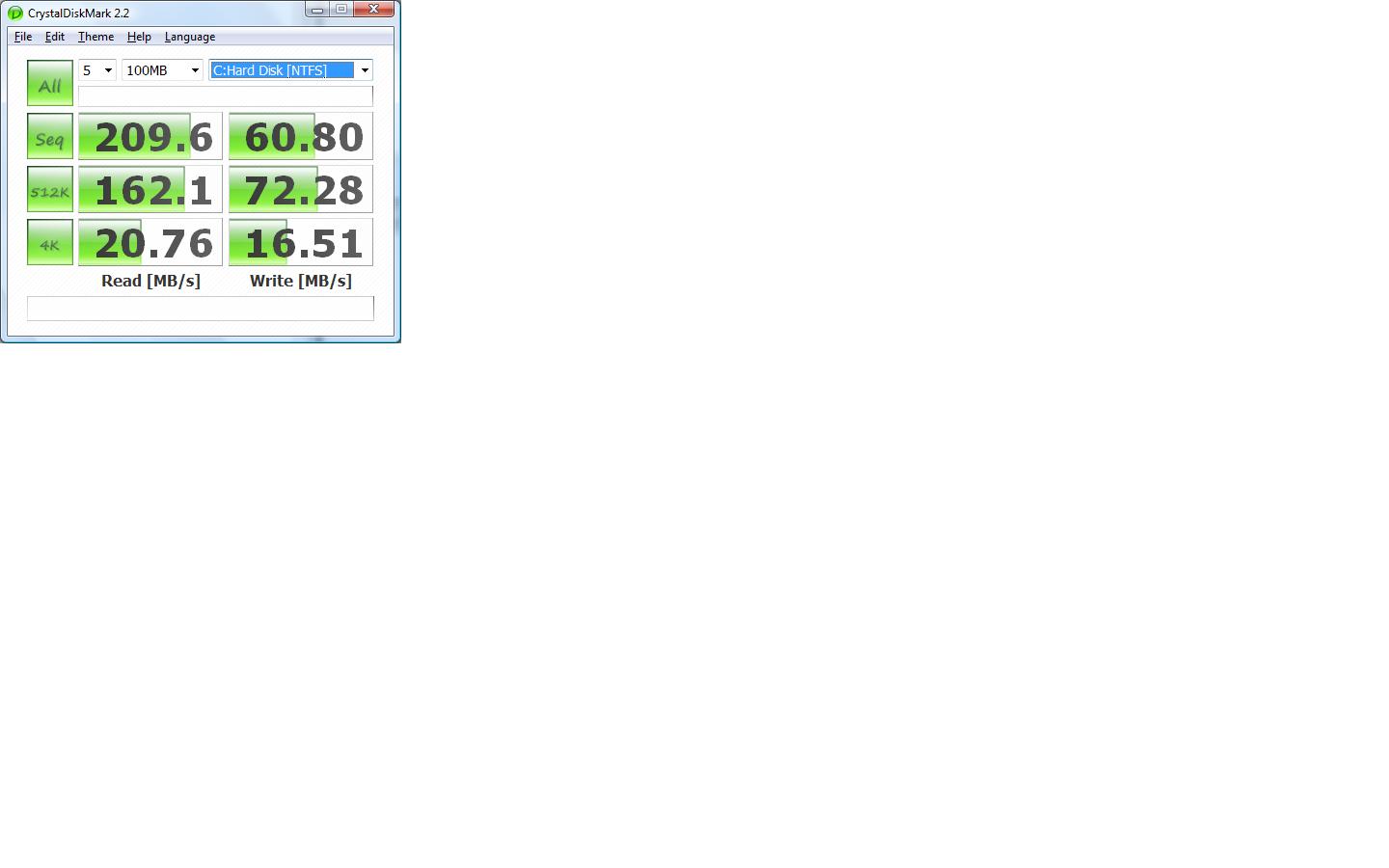
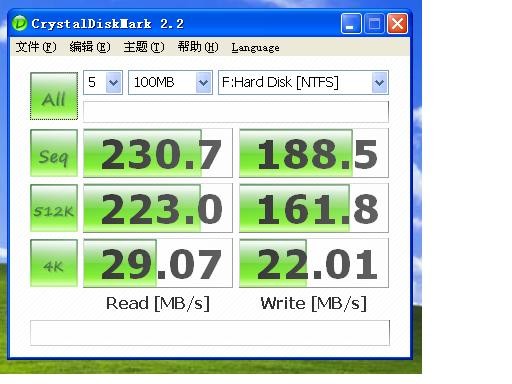
Results in Crystal Disk Mark (that is all I have)Attached Files:
-
-
Yes, I tried something like that and no, Acronis did not keep the alignment so I used Drive Snapshot instead of Acronis as talked about earlier in the thread.
-
Doesn't installing a Dell part in an authorized Dell laptop assume the warranty of the chassis itself? I recall that to be the case from the old days. Might be worth it for us XPS owners with more than a year of warranty left (if still true). On the other hand, I think the part keeps its warranty if the laptop's warranty is for a lesser period.
-
I just noticed. Page 404!
-
I finally decided and just placed my X25-E order.
-
Size? Price? :]
-
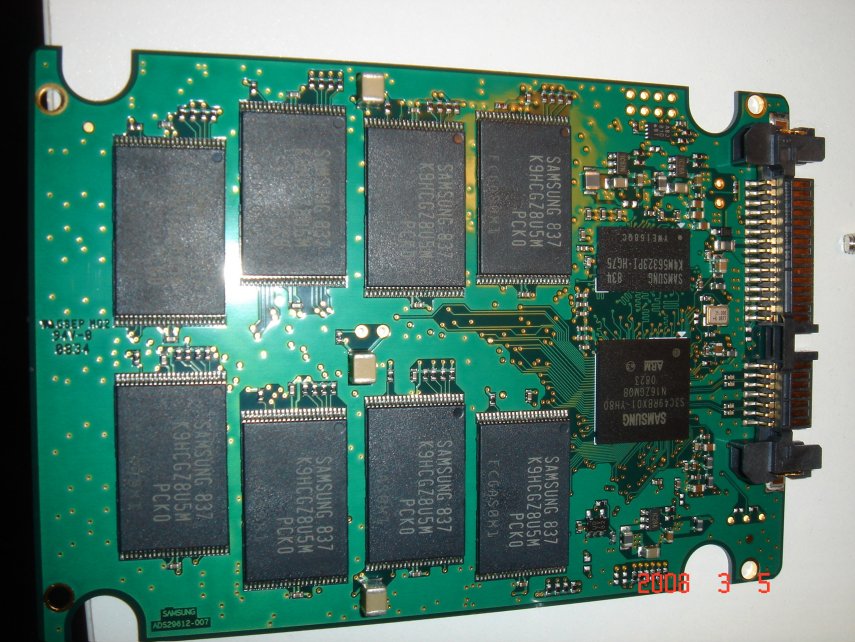
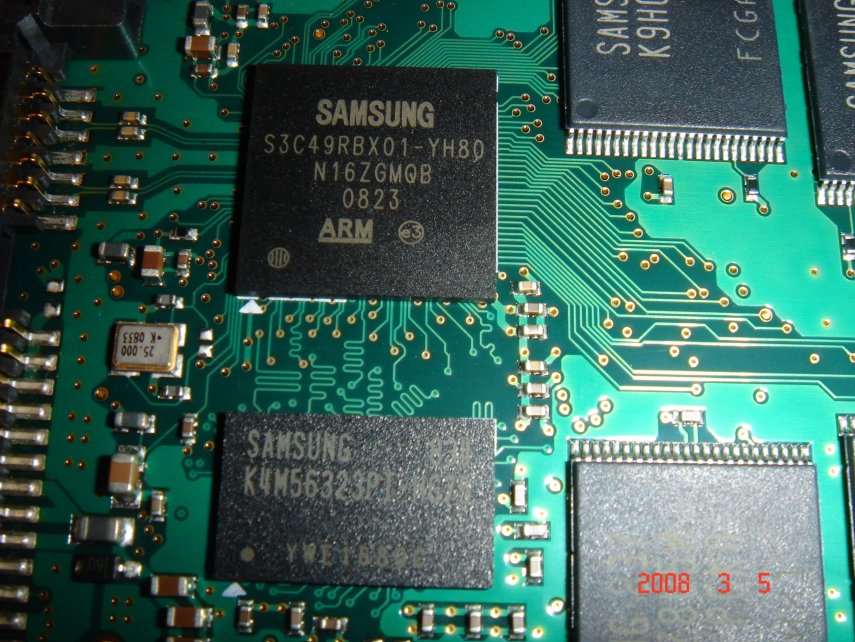
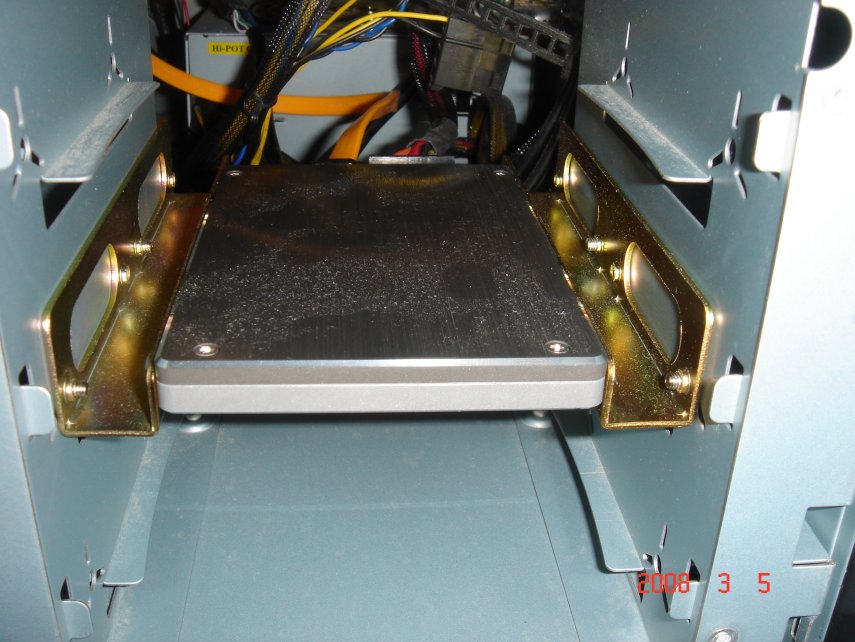
Well, I was messing around inside my desktop yesterday and I noticed my Samsung MLC didn't have a "warranty void if broken" seal. Not only that, the cover was held on by standard Phillips screws. So clearly I couldn't resist taking the thing apart and taking some pictures...
Attached Files:
-
-
Welcome to 2009 mate
Interesting photos though, I like how the ssd is held in place. Funny that there was no seal... I've never seen a drive without a seal. (And I've seen many drives) -
Yeah, not having a warranty seal is pretty strange... every SSD I've had so far has had one.
-
heavyharmonies: I noticed you posted your X25-M benches at the PCPer forums, just curious if you tried changing the SATA cable as suggested or rerunning ATTO with the different settings?
http://forums.pcper.com/showthread.php?p=4351675
Also, for any perspective buyers, here's what PCPer had to say regarding choosing an SSD considering the X25-M's issues: Even after writing the article, I still use my X25-M as my primary OS drive, even with all of the other SSD's at my disposal (including SLC units). Its insanely high IOPS performance makes it the best choice. -
Perhaps if you buy them in retail. My XPS drive doesn't seem to have a sticker and my E4200 drive? Well it's nakey to begin with
-
I don't have a seal on my samsung either. I was thinking maybe it's counterfeit like everything on ebay
but well if the picture says samsung on the chip, it must be the real thing.
-
Got a new 256g vertex ssd, fresh install of vista64 on dell e6400. What test/results do you all want to see?
Tom -
Just to inform You:
If You align partition, install OS, backup partition with Acronis, partition will be aligned after You restore image to SSD/HDD as it was when You done backup. -
Tom,
Could you run the crystaldiskmark?
Tuan -
Here you go, how do these compare?
Clean, patched, 64bit vista, achi mode with latest drivers.
TomAttached Files:
-
-
I second this request
Edit: doh, ninja'd -
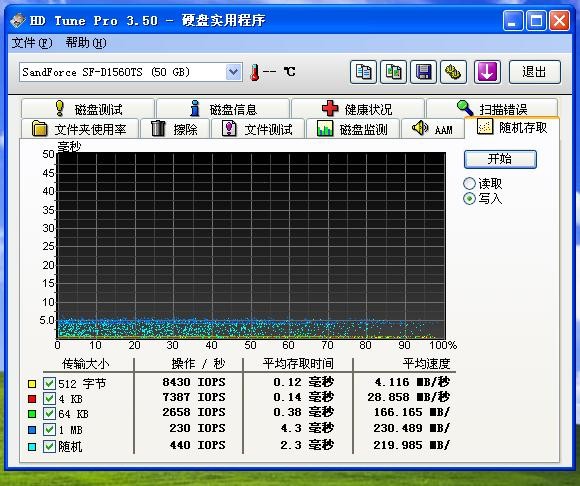
HDtune pro 3.50 on the ocz vertex 256gb ssd.
TomAttached Files:
-
-
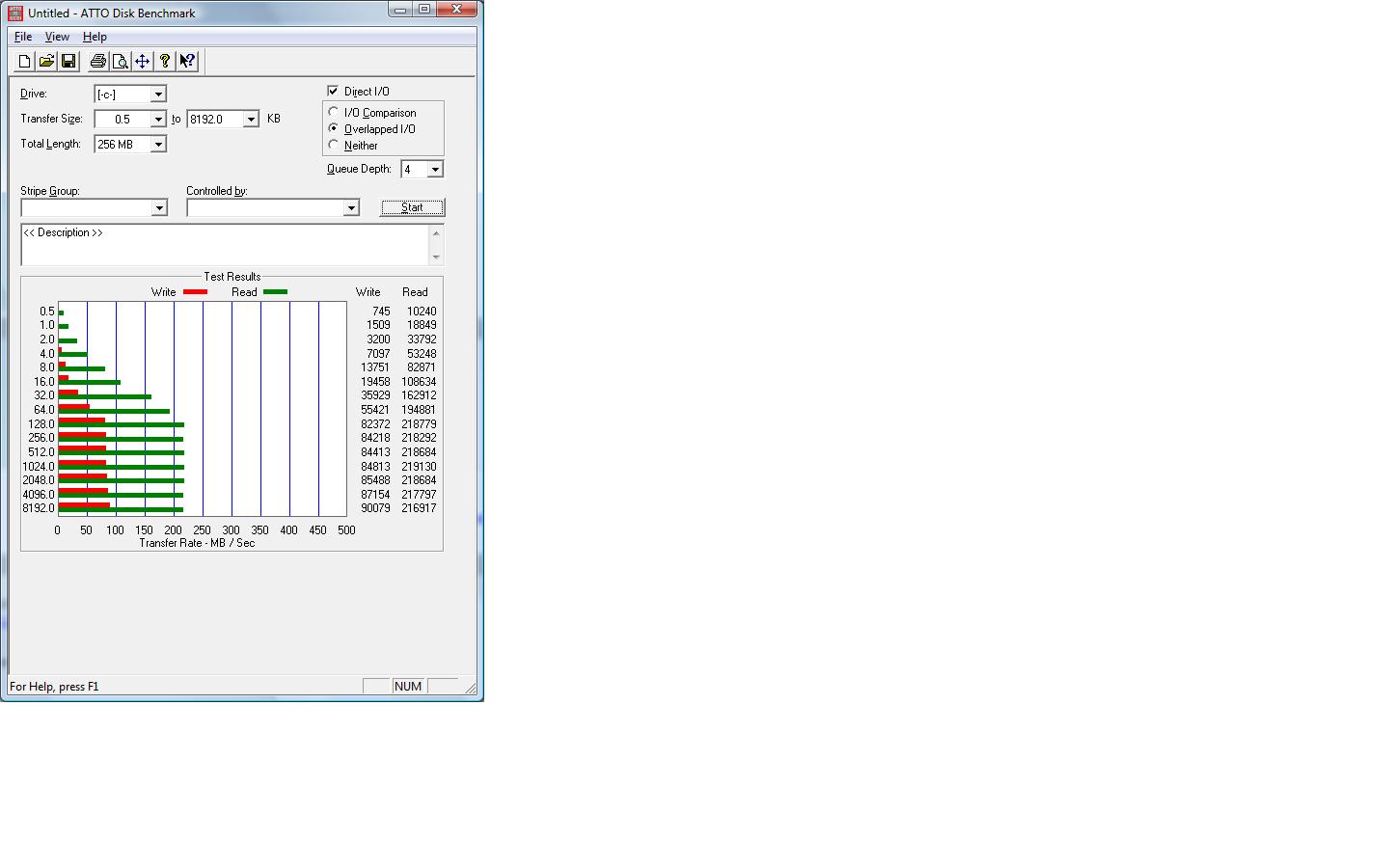
How about ATTO?
-
Here you go.
TomAttached Files:
-
-
Thank you TomK
ATTO is very low on this disk. I would never bought a SSD with such low scores on small writes. OCZ doesn't break the "tradition" of poor performance on SSDs (except the rebranded Samsung) -
Yep, this is exactly what I was afraid of - OCZ R&D is obviously a second league compared to Samsung / Intel / MTRON / Memoright / Solidata R&D, despite the marketing hype they created in the last months.
Honestly, I think Samsung today provides best value for money - they are not as fast as Intel, but they are always good enough and have very low power consumption (and best performance/watt ratio). -
I'm thinking of getting a couple of these 64GB SLC drives for RAIDing for my main system (suppose to be a good deal for SLC drives):
http://www.geeks.com/details.asp?invtid=MCCOE64G5MPP-0VA&cpc=SCH&AID=10440852&CJPID=1225267
But the upcoming 2.5" SSD RAID enclosures (that fit in 3.5" bays) don't seem to be available yet - at least not the name brand stuff. I don't trust the non-name brand stuff (unless there was one that has a lot of good reviews).
So... I would like to get a RAID enclosure for these drives... internal or external (eSATA). It looks like there are some options available but mostly for 3.5" drives. I'm not sure if they will properly mount a 2.5" drive due to the location of the connectors.
Any suggestions for a good RAID enclosure to use these with? And how would they mount? Thanks!
Oh yeah, don't want to use software RAID that requires any special OS drivers - unless the Gigabyte chip on my Gigabyte motherboard handles hardware RAID? May have to look into that... any comments on the onboard Gigabyte raid with the Gigabyte SATA controller on a P35-DS4 motherboard? -
That is rediculously cheap. Anyone ever buy from them??
-
Check the last few pages and you will have some answers. Link has already been posted.
-
While I'm awaiting my X25-E's delivery, I'm trying to find out what tweaks I'll run in W7 x64 7048.
Will any of these be bad, or do you recommend them?
-
disable defrag, and if you have a good backup solution (i have winhomeserver) disable system restore. all else is unneeded / wrong
-
Get an Areca card, then stack up 8x 2.5" inside your desktop... Voila Battleship Samsung! LoL.
-
I'm pretty sure the RAID controller on the DS4 is a hardware RAID controller... otherwise there wouldn't be the need for an additional chip, would there? Not sure about the RAID implementation on the Intel southbridges, though... I always thought those were supported at the hardware level as well, but I'm not sure.
At any rate, I think you'll be fine using either the Gigabyte RAID or the Intel southbridge RAID; the Samsung SLCs aren't that fast, so I doubt you'll saturate either.
Best. Idea. Ever. -
Hmm... I do need extra storage space as the 30gb is a little small. I already run without system restore, hibernate/sleep, and indexing.
I thought most people recommended doing those tweaks on a fast SSD?
-
There's no way you'll get to a part where your drive is actually full. On the default X25-M drive even at 100% capacity, the drive still has 5.5GB to do something(binary vs decimal capacity difference). The maximum you can get on the X25-M is 74.5GB/80GB or 93%
The drive manufacturers won't be totally stupid to allow a 100% full drive anyway in case you have a power failure then it'll have no space to put the data in your buffers/caches somewhere.
On the X25-E it likely has two chips dedicated to that purpose PLUS the decimal/binary difference. On X25-E the maximum capacity in percentages are: 29.8GB/40GB=74.5%
Plus, the degradation will be much less. You can see here even if the degradation happens the drive is fast enough that using the HDTach method you can see the recovery happening(which you can't on the X25-M): http://forum.ssdworld.ch/viewtopic.php?f=1&t=82 -
Thanks. I am not that familiar with RAID since I haven't used it. I am looking at my motherboard manual though and it says that OS drivers are required during OS install for both the Intel RAID or the Gigabyte chip RAID. Doesn't this mean it's software RAID or dependent on software? If it was hardware, then it wouldn't need a special software driver, right? Plus how would it boot from a RAID drive if it requires a software driver?
As for an Areca card, I have no available PCI-e slots since I have two video cards and unfortunately that disables all my PCI-e slots.
-
I broke down and bought a couple of those 64GB SLC Samsungs from Geeks.com. Total was about $380 with 2-day shipping after 10% off using a coupon. I am going to go ahead and try using my motherboard RAID capability and see if I can get that working but am concerned about running into issues.
-
Sry for the delayed response.
Actually, I was just thinking that myself. A little more cumbersome, but yeah, I suppose it would work. -
You won't regret your purchase... if you do, you can sell them to me
-
You should have bought 4 of these babes.
I did so a week ago (bought 4 64GB Sammy SLCs from Novatech.co.uk) and set them as raid0 in ICH10R. A 256GB (about 245GB real) superfast disk. See 5-10 pages back.
I have made a DIY "brick" of them (using 2 PCI-metal-covers) and screw them in my CM Stacker STC-T01 case. I don't need them to be hot-swap as they are in raid0.
Areca - LSI etc controllers are fine but for no-parity raid (like raid 0) the on-board ICH9 or 10R is just fine. -
Disabling hibernate is just a storage thing. You may want to do it because of space problems (my ssd isn't bigger as you see from my sig, but I don't actually know if hibernate is still on or off). Indexing, i still don't know what people think against it. It allows for instant searches in files. This is not (and won't ever be) possible without an index. You get close to instant searches for filenames f.e. on an ssd, but not for searching in files. It doesn't hurt your system (but there are tweaks to make it do less unneeded indexing), it makes your system more performant.
System Restore is a big space hog, and disabled here, as I have windows home server for that.
The new SSD Thread (Benchmarks, Brands, News and Advice)
Discussion in 'Hardware Components and Aftermarket Upgrades' started by Les, Jan 14, 2008.