Problems? See this thread at archive.org.
Dude, I feel for you.
-
What's the difference between the new Intel X-18 and the older X-25? I tried searching, but having to wait nearly a minute between searching is driving me crazy.
-
One is a 2.5" drive, the other is 1.8"
No points for guessing which is which.
-
Best computer ever
There are some in family chugging along in their fifth year.
Yep, I agree. I think the significant number of people with Intel drives in even further bandwidth capped Thinkpad T and R 60 machines attests to this.
The X25-M isn't 1.8"!? But yeah, everything else about the two drives besides the form factor should be identical.
-
I totally agree with you newkleer, random access is what makes SSD so great.
I just think it is not worth it from my point of view because I can not fully benefits the speed Intel intended due to MY hardware limitation.
Just want to clear things up because I also have ICH7-M chipset on my laptop. I would love to have a Intel X-25M too. -
Okay, now I know I'm sleep deprived.
-
It might not be worth it to get the Intel drive with capped systems. Jlingo said he noticed massive stuttering on his laptop with the X25-M but not on the desktop.
The power conserving settings and probably the SATA-150 cap also caps random write speeds. The random write speeds on the laptops were always lower than the scores of a desktop system like mine, like 1/2 the throughput. -
problem is, the disk may just get sort of "clocked down to half speed", means you're not just capped at the limit, but halfed everywhere.
i guess some other ssd would worth it more (or a new system without such crap cap). -
The ICH7-M FULLY supports SATAII 3.0 with 300MBps speeds. Generally the laptop chipsets do not reach the throughput of desktop chipsets for obvious reasons like lowering power consumption. Depending on the manufacturer though, it can be capped even greater.
One thing is sure. You will NEVER see theoretical throughput when you measure it. If the system achieves 140 or 150MBps it means its running SATA II 3.0 but with heavy power management features. And people assuming that SATA limits aren't reached because the random access throughput is much lower than theoretical SATA speeds are wrong. Throttling is generally done UNIVERSALLY.
The realistic throughput of a device that is not limited by power saving features is ~80%. -
I'd thought I might want to share with everyone my experience with an SSD drive I recently purchased.
Drive: G.Skill 256GB SSD 2.5" SATA (link: http://www.newegg.com/Product/Product.aspx?Item=N82E16820231243)
![[IMG]](images/storyImages/th_DSC00778.jpg)
![[IMG]](images/storyImages/th_DSC00776.jpg)
![[IMG]](images/storyImages/th_DSC00779.jpg)
Boot/Shutdown Times
![[IMG]](images/storyImages/boot-shutdowntimes.jpg)
HDTune Benchmarks
SSD in an external enclosure via ESATA
![[IMG]](images/storyImages/GSKILL256GBSSDESATA.jpg)
SSD in laptop
![[IMG]](images/storyImages/GSKILL256GBSSDinLaptop.jpg)
For comparison:
Samsung 500GB 2.5" SATA in laptop
![[IMG]](images/storyImages/Samsung500GB5400rpminLaptop.jpg)
Western Digital Caviar Green WD10EADS 3.5" 1TB 32MB in external enclosure via ESATA
![[IMG]](images/storyImages/WD1TBWD10EADSHDTune.jpg) Last edited by a moderator: May 8, 2015
Last edited by a moderator: May 8, 2015 -
Shouldn't the titan be getting faster than 100mb/s transfer?Last edited by a moderator: May 8, 2015
-
It does, but not on average I think. Here's another test I did with Crystal Disk Mark.
![[IMG]](images/storyImages/SSDCrystalDiskMark.jpg)
-
Sold mine few months ago and wanted to buy same one but with SXGA+ display, didn't because of IDE interface for SSD, and we all know the story with PATA SSD.
I bought D620 from eBay just because of SATA interface, but I still think I should bought D600 or maybe D610 because I was very happy with 1st generation Samsung PATA SLC (it was 1.8" with 50-pin IDE + 1.8" 50-pin to 2.5" 44-pin adapter). -
What is the story about PATA SSDs? I am afraid I missed that one and went to get 2 for my comp.
-
If You want PATA SSD You do not have too much choice.
That is my side of story for PATA SSDs. -
True about that. For a moment, I was wondering if there was a major flaw with PATA SSDs that I missed reading. There are more brands (OCZ, CFD, local makers) with IDE SSDs over in Japan but apparently they are using rebranded transcends.
-
The thing is, I've been inclined to think that the Transcend PATA drives are JMicron powered, since the MLC variants seem to fall within similar price ranges as their SATA counterparts (at least the few times I've checked on Newegg). It's hard to be certain of anything, though, since there really is a dearth of information (and benchmarks) on these drives.
-
intel begs to differ. page 191 of the ich7 datasheet here.
"3 Gb/s Transfer Rate - Supported (Desktop Only)"
and the defintion of 'desktop' is:
Desktop refers to the 82801GB ICH7, 82801GR ICH7R, and 82801GDH ICH7DH.
Mobile refers to the 82801GBM ICH7-M, and 82801GHM ICH7-M DH.
but the point i meant to make, is that even though the SSD isnt as fast on a (older) notebook as a desktop, all SSD's will be similarly affected - you still want to get the best value SSD regardless if you cant spend the money to upgrade (and when/if you upgrade, you'll get even better performance with it on the next system).
and FWIW, the seq/random write speeds are within 10% of desktop benchmarks, so id hardly consider that crippled. as for read speeds, apps opening in 0.4s rather than 0.3s isnt a big difference compared to taking 5s. -
![[IMG]](images/storyImages/CSSD-PM-04.jpg)
This might help. The inside of an OCZ PATA drive 32gb, which is the same as the CFDs that I got. As you can see, they are using jmicron. -
Is it just me of do I recall all the old SLC drives I've seen having consistent performance on HD Tune across the board. Whereas a lot of MLC drives have that jagged performance seen in the above G.Skill screenshot??
-
I want to say that it's usually the JMicrons that have the jagged line... but I feel like a lot of the X25-M graphs I've seen have also had the jagged line. I don't think it's all MLC drives, though; I'm fairly certain that my Samsung MLC gives a pretty straight line... though I'd have to double check to be sure.
-
I'm not so sure if the jagged lines are due to the MLC/SLC difference. SLC can also produce these jagged lines, but they do seem less volatile than the MLC in the Titan SSD that I have.
-
I would be interested if NBR had a sticky with say a table of results from different SSDs (maybe even compare to HDs), for example column headings could be:
Manufacturer
Model
SLC/MLC
Fireware Rev
User
HDTune: Min/Max/Avg/Access Time
CrystalDiskMark: 100MB Seq/512K/4K R/W (and/or 1000MB)
Notes (for other comments like: stutter noticed, battery life increased by 30 min, limited by Lenovo T61, etc.)
Under each model, we could have a individual results by user... NBR would be a greater resource if results were listed in one bit thread that people could refer to see if their model was normal or to get a reference point to compare drives. This would go a long way in cutting down repeated questions and users searching for random screenshots about a certain model.
edit: I would also be interested in having an accurate GPU-Z table, like the one in my link. I tried to get people to post up their GPU-Z results so I could tabulate GPU specs (since online written specs can vary), but I guess there was not a lot of interest there. I've updated my personal chart on Excel to include the newest nVidia and ATI cards but the info is not based on user input, which I find to be the most accurate. -
We also need to develop a custom IOMeter script that definitively tests for stuttering. Like on David's Crystal DiskMark test, it's already slow for 4k writes, I wonder what will happen if you add queue depth to that -- I'm guessing it'll drop like a rock
I'd be interested in seeing a full hard drive antivirus scan and then take the Crystal DiskMark run while it's active. -
... and you know what, I started to make a fatty Excel file like that, but no one was interested, so I stopped. It only goes up to posts made before the second of March.
Attached Files:
-
-
Okay, here's my Vertex benchmark.
This test was run in the middle of a full NOD32 anti virus scan on this hard drive (My OS drive), while browsing the web and launching programs. Zero stuttering, and look how high the 4K reads/writes still are.
![[IMG]](images/storyImages/crystaldiskmarkvertexnod32821.png)
-
I remember this! Great job. Too bad no one else really found it useful enough to continue.
-
The thing I figure is that the people who will find it most useful (the newbies as you say) don't know it exists. The people who know it exists (those who follow this thread) probably don't care much. After 400 pages you basically start committing the specs (or the general, relative performance of the drives, if not the exact figures) to memory.
If we could sticky it to the first page, I'd be more willing to update it, but the front page is already so outdated... well, if I have some free time this weekend. -
The reason why the 4k writes are horribly low is (i think) due to the RAID controller on my SSD. The Titan 256GB SSD is actually 2x128GB set in RAID0 with JM602 chips. SSDs that don't utilize this RAID setup will usually perform much better for the 4k test.
This is GREAT data! I think i this would be extremely helpful if post on the OT as you briefly mentioned in a latter post. I also think this paper will give more insight to SLC Vs MLC for people whom wants a deeper understanding between the 2 available SSD versions.Attached Files:
-
-
See, those are the kinds of things we need on the first post. I'll try to update the Excel file, but maybe it's time we made The SSD Thread 2009...
-
Ahh you got that right ok I see it. It does like from ICH8-M it supports in both mobile and desktop.
http://forum.notebookreview.com/showthread.php?p=4339848
Post #1968:
Capped SATA150
Sequential Read: 126.8MB/s
Sequential Write: 70.27MB/s
Random 4K Write: 34.30MB/s
Mine SATA2-300 desktop
Sequential Read: 249.2MB/s
Sequential Write: 78.28MB/s
Random 4K Write: 48.43MB/s
That was basically before steadystate. Jlingo's steadystate capped SATA150 random write 4K was 15MB/s while I was still at 40MB/s. And he said it stuttered a lot while on the desktop it didn't. Certainly there is a connection there.
Again, SSD is ALL about the steady state performance.
That has to do explicitly due to the SLC drives not in steady state plus being capped by something other than the drive(like for example the SATA150 limitation). Random up and down graphs are the REAL state of the drive.
Like here: http://www.mmu.co.id/intelssd.jpg
The capped drive shows a straight line. The straight line or predictable pattern benchmarks are way too "synthetic" to call how it'll perform. -
No, it's because it's using ****ty JMicron controllers, not because of internal RAID. Dual JMicron controllers are faster than 1, but when you're rock bottom at 0.02 MB/s transfer rate (In IOMeter), all you can go is up.
-
My OCZ Solid 250 GB bit the dust, will have to RMA for a replacement.
-
Has anyone sighted Samsung's 256GB drive in a 1.8" form factor yet? Articles indicated they were intending to produce these. How I'd love to have a Sony TT with a pair of those RAIDed inside it.
-
I'm looking at Sony Z, and there is something about Dual SSD 128GB x 2? I'm confused what is Dual Channel SSD?
-
The TT actually has two physical drives, probably linked together in RAID 0 by default.
-
What SSD drives are Dell offering right now for the XPS m1730 line?? I'll be talking to senior support staff Monday and since I can basically ask for anything, I figure I might as well aim high...
-
High Performance: 128GB Solid State Drive
RAID High Performance 256GB (2x128GB) Solid State Drive
Reliability: 128GB Solid State Drive plus 250GB SATA HD
Speed: 500GB SATA Hard Drive
Ultra Performance: 256GB Solid State Drive
The 256GB drive can only be the second generation Samsung MLC; the 128GB drive could be the first or second generation Samsung MLC. I'd say it's probably the first generation due to the fact that it's "High Performance", whereas the 256GB second generation drive is "Ultra Performance". -
I just got a samsung 128GB MLC SSD. But I've run into some problems.
I have a backup through acronis, but wether i try to clone or restore I cannot choose the SSD (already ntfs quick formatted) - it is either grayed out or does not come up. How can I transfer to the SSD ??
equipment wise I have a lenovo x60t tablet with a 500GB HDDD, a docking bay with a dvd drive/ HDD bay that i can switch, an external usb dvd burner.
software i am using acronis true image home 2009, I have a backup (27GB, full image 105GB). -
May be you want to try by putting your SSD into external HDD Case and then through USB to clone it?
-
I ve tried it with a usb enclosure and the HDD bay in the dock.
-
Finally had to reinstall windows from scratch to make it work, but I'm now part of the SSD owner club! Too bad lenovo gimped the SATA connection.
Considering I got it used and the number of times i tried cloning to the drive, I think I'm in a steady state value.
1st thing to do , DL firefox
2nd thing - crystaldiskmark since atto would not work.
roughly (100MB)
seq 94 read 51 write
512k 92 read 48 write
4k 8.7 read 5.9 write -
Yeah, I got jagged lines all over the map with my Samsung 1st Gen SLC. I think you see the straight line when you are capped and that makes a lot of sense in a non-synthetic benchmark.
-
I just realized, when rereading my previous post fantasizing about a Sony TT with dual 256GB Samsung 1.8" drives, that SSDs might drive more notebooks to using 1.8" drives. Whereas 1.8" hard drives are very slow compared to their bigger 2.5" brothers, SSDs have a consistent performance regardless of their form factor. Perhaps manufacturers will make the switch in their smaller notebooks where internal space is at a premium, or offer super fast dual drive RAID 0 configurations in more notebooks since it's easy to cram a pair of 1.8" drives into a notebook (if a Sony TT can, anything can
). Not any time this year certainly, but perhaps next year when SSDs have made more inroads into the mainstream.
This also gets me curious, do 1.8" SSDs use less power? -
You know, that's an interesting question. I'd say no difference or very, very little difference at best. Most 1.8" drives have a 2.5" counterpart and these drives should use the same controller and flash chips as their larger siblings. I can't see what other components would draw power besides the controller and flash chips... so the difference in power consumption would come down to like increased trace lengths or something, aka, not much.
-
That's what I was thinking, but 1.8" drives use a different power connector so it seems possible.
-
Thats my dream as well. When we can get 4 HD bays in a 17in notebook and all sorts of storage options become available.
I love how fast SSD's are but i'm kind of a storage fanatic. The more storage the happier i am. Hopefully the day will come very foon where 1-2TB is an easy option in a notebook (especially if SSD's bring the 1.8in drive into be the new standard)
I was kind of hoping PMC technology would have become available this year so we could have super fast SSD's as OS/app drives and the insanely large PCM drives for mass storage (1-20 TB capacities) -
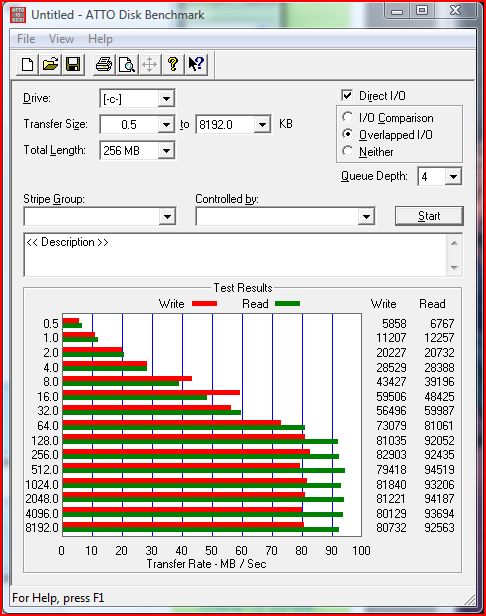
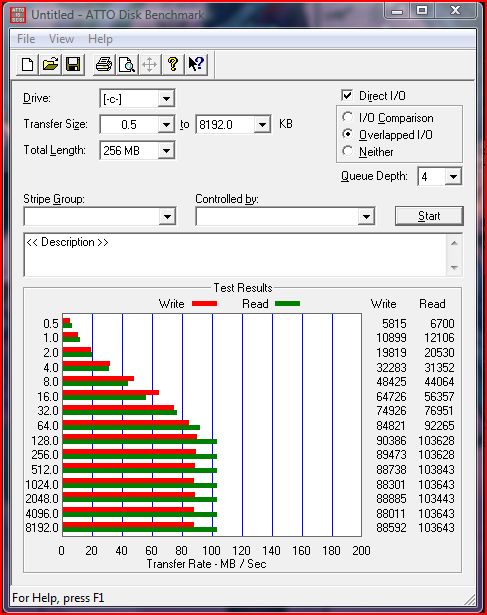
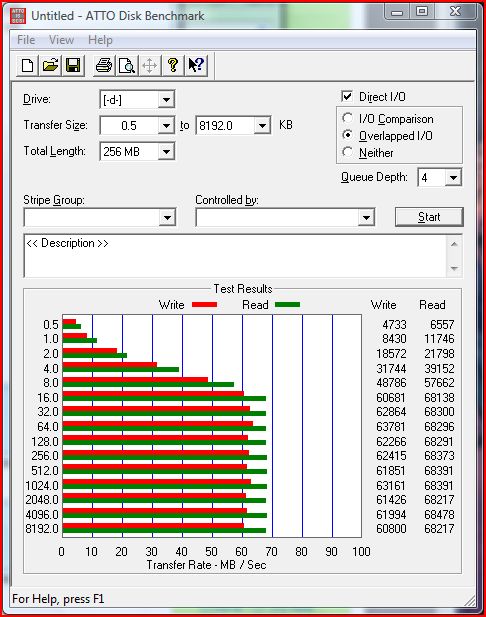
well i guess i'll finally post my atto results from the samsung slc i got from geeks... the first one was done right after i got vista installed the way i wanted it and the second was a week or two later. i think the first one may be low because i didn't turn off the hdd power saving option that allows the hdds to go into "sleep" (?) mode or something. and the third is my stock 200gb 7200k hdd.
i'm pretty sure the ssd was in steady state for both the benches considering i didn't bench it until i installed the OS and nearly 30gb in apps three times before running atto. So i'm pretty happy.
Now, does anyone know where i can get another samsung SLC for $200 or do i have to keep waiting on geeks.com?Attached Files:
-
-
So, I want to get two of those 128 GB Samsung MLC's from Dell to run in S/W RAID-0 on my computer (remember I asked a page or two ago about Dell SSD's). I'll be wanting to run this on XP Pro x64 (currently running x86, but want to try out x64 finally). IF I want to partition the drive (windows here, storage/games there, etc.), will it work just the same as partitioning a spinner? And I assume it doesn't matter in which order I install things (as in: ideally one would install big files/drivers/games sooner than later because the inside of the platter is faster access than the outside for the read head)?
Now I just have to refind the page in this thread about diskpart instructions for the RAID-0. I assume this applies just the same to a software-based RAID-0... -
You could ALWAYS get that drive from newegg but it's 1.8" form factor and uses different voltage so you need a converter cable. The info is in the reviews.
The new SSD Thread (Benchmarks, Brands, News and Advice)
Discussion in 'Hardware Components and Aftermarket Upgrades' started by Les, Jan 14, 2008.


![[IMG]](http://i275.photobucket.com/albums/jj284/davidli919/DSC00778.jpg)
![[IMG]](http://i275.photobucket.com/albums/jj284/davidli919/DSC00776.jpg)
![[IMG]](http://i275.photobucket.com/albums/jj284/davidli919/DSC00779.jpg)