Problems? See this thread at archive.org.
The screen is so bright that i haven't even noticed it. The logo is a darker red and is basically hidden. the beats logo on the back is also much darker than i expected.
-
the back logo's (hp and the B)don't light up for the beats edition right?
-
Yes they don't light up and they are actually a darker red than you'd expect and the lid is actually like a dark crome as opposed to straight black. Its one good looking laptop, nothing else comes close.
-
PUBLIC SERVICE ANNOUNCEMENT:
I added "beats" to the thread title so Beats owners will have a place too.
Ain't I a sweetheart? Yes, I know.
So make 'em feel welcome.
NBR Staffer, Deuce dot Zero. -
Welcome Beats owners! (Although I'm guessing most of you have already been here for a while.)
-
I have both the beats edition and the M11x, and I have to say the build quality on the beats edition is far better than my M11x. Ive gone through three screens and an entire replacement machine for the M11x for build quality issues. The replacement is by far the best of the bunch, but it still has problems: the bezel around the screen and other areas on the base arent snapped in properly, there were scratches on the panel under the screen and there are paint defects. The Envy has been solid from day one and is one of the sturdiest notebooks Ive ever owned.
The M11x is a fantastic machine and I love having such a portable powerhouse, but getting a well built machine certainly seems to be the luck of the draw. -
Guilty as charged :/
-
Hi spencerp,
Can you able to post some pictures of your beats envy 14.
Just would like to see how the screen looks and how the red hp logo below lcd screen looks ?
Thanks -
Envy 14
In reference to: Beats audio aka Intel "azalia" HD audio
The two 1/8" audio outputs on the envy, can these be configured as two separate stereo outputs?
For example as a dj I require two audio outputs, one to play out, one to monitor the next track (2 x stereo). There are two ports, wth are they for?
.l
-
There are two jacks, one is labeled with a headset/microphone (for VOIP calling or internet gaming) and the other is just for headphones. I've never tried using them both at the same time but now I'm curious...
-
Okay, just tried it! Plugged headphones into each port simultaneously and fired up Foobar2000. Each jack was outputting stereo sound at the same time!
-
Maybe someone has already asked this but does anyone have problems with Win 7 not remembering your wireless profiles on the Envy14?
It's extremely frustrating but it never remembers my PEAP (enterprise wireless networks) settings and seems to randomly forget WPA2 passwords that were once working successfully.
I'm asking in this lounge because I'm unsure if this is a common problem with Windows 7 or if this is somehow related to the onboard WiFi adapter. -
Mr Bubbles, I dig the soapy light speed response.
Although the dual same song output is a good sign, I would like to determine if a different song can be playing on each, essentially. This can be tested with Mixxx | Free Digital DJ Software open source dj software. It's 31mb, open source, and has an x64 bit version. Preferences > sound hardware > add second output to 'headphones'.
Supposedly this must be configured in the Intel HD Audio (Azalia) settings, ie 'play same audio' must be changed to 'two independent outputs.' A user suggested this, but did not confirm. I don't have my Envy just yet, but I'm hella curious, and want to know if I should order an audio interface asap.
Normally djs buy something like the following:
http://dominicfallows.co.uk/wp-content/plugins/wp-o-matic/cache/c2109_22jul09_audio2djws.jpg
But I love the idea of not needed an extra device to carry around if the quality is there.
.l
-
Thanks!
I assumed that making the recovery disks AFTER upgrading the bios would work since the problems listed earlier in this thread seemed to be with people who made the disks and then upgraded. Has anyone successfully made recovery disks after bios upgrade?
I will try to test everything I can this weekend. I actually can't get wifi from my house, as I require an air card for "slightly more than" low speed internet. You may infer from my sig (think zip code) that I didn't have much home time in the last couple days - having spent hours at work on on the I-90!!!!! We did make national news.....
-
I have tried that but as in my old tx2500 its not possible i beleive the only way to get 2 outputs is one through either or both headphones jacks (with the same output) and the second output being the HDMI jack. The best ive been able to do is get 2 different songs working at the same time with one being on laptop speakers and one on the headphones jack. Cant sem to be able to seperate the 2 headphones outputs though. also i havent tried the HDMI thing yet but planning to
-
I have the screen in a box. It is the standard Envy 14 screen (whole thing, including shell). I am not sure you would want to try putting a screen inside the existing shell on the BEATS edition.
-
Has anyone with the Intel X-25M G2 SSD updated their firmware? Is there a good reason to?
I stumbled upon the fact earlier today that my SSD has firmware version 2CV102HA rather than 2CV102HD, the latest. The release notes I found on the update from Intel indicate that it does something, but what exactly I couldn't pin down.
Admittedly I'm a bit apprehensive due to how involved the process is with burning an ISO and what not, not to mention the potential risk of doing something wrong. The same fear of doing something horribly wrong together with the inability to use recovery disks after the fact has kept me from updating my BIOS firmware for the time being also, considering that from what I have read the improvements in performance are slim to none.
On the one hand I really don't like having components with outdated drivers/firmware/etc. but on the other hand I am a bit gun-shy when it comes to taking what may essentially be unecessary risks.
So, has anyone updated theirs? Is there a good reason that I should update mine? Also, if there are significant benefits from updating the system BIOS that I have not read about, what are they? Should I update that as well?
Just how risky are the risks of doing such updates?
Thanks! -
Hi guys, i recently bought a SSD, i created recovery disks, installed the SSD and it was fine THEN it started acting up, it would freeze then shutdown then freeze other programs, i would get a blue screen aswell sometimes. so then i went to boot from my CD recovery THEN it was a blue screen AGAIN so i reformted the SSD with my desktop, put it back in ran the recovery disks. they were going fine till 11% then i got another blue screen.... this is really despressing me as i got my HP ENVY 14 2 weeks ago ...WHAT SHOULD I DO
please checkout my Flickr account ( blury photos sorry) the last picture of the blue screen (the clearest) is after i formated it and try to install it again.
IMG_0015 | Flickr - Photo Sharing! ( just check out my gallery)
Thanks A million
Patrick -
Help please..
Some transistor on my motherboard got fried the other day. My speakers got fried as well, but the rest of my computer seems fine. Its been working last 24 hours. But then something strange happened.
I lost some brightness on my screen. Doesn't matter what graphic card i'm using. I have ordered a new motherboard and speakers. Is this motherboard related ?
got it fixed by several restarts... weird! -
It would be in your best interest to get that transistor replaced. Should be easy to find and relatively easy to replace (based on the pic from another thread?)
Transistors work by switching and amplifying signals; you are only asking for more problems later.
So, either send it to HP, get a quote from an electronics repair shop, or do it yourself if you (or a friend) have the proper soldering skills. -
You could try running the memtest program in the diagnostic tools or in the BIOS. It says that the most common reasons for your particular stop error are either bad memory, or a misbehaving driver. From what I have read, it says the kernel detected some kind of critical kernel code, or data corruption.
What is STOP 0x00000109 : CRITICAL_STRUCTURE_CORRUPTION? - Fix Blue Screen Errors
This link has some information about your specific error.
Edit: The 0x000003B error that I noticed in your pictures says something about graphics drivers passing bad data to the kernel. -
I purchased the i7-740QM, 6 GB last week. Then discovered the issues graphic switching issues with the i7 for the first time today while reading notebookreview.com.
Having already destroyed a pricey gaming laptop before (cooked the GPU) my first priority is buying something that can handle heat.
So I called HP to change the i7 to an i5. They said its too late and offered me $50 to stick with the i7. At first I accepted it, but then soon called back to cancel the order all together. Once the refund goes through I plan on placing a new order.
Which Envy ya think runs the coolest... an i5-580M? -
The Envy 14 i5 has been designed to address the heat issues of previous models. Many reviews I've read include heat tests based on gaming it up with Crysis etc for a good chunk of time. The temperature measurements they've taken have turned up legit results. Maybe a bit hot, but way better than before. Plus the fans are quiet.
I actually think of the i7 upg as a change of computing class. It makes this machine more of a powerhouse for AC activity, no arguing with a quad core, but crappifies it to the extreme for use on battery. Personally, I want some balance between the two. Valve games apparently benefit from more processing power. All others, minimal gains.
The i5 and that 5650 are great combo imo. If you want to further minimize heat go for an SSD. After a rather long review, the clear winner $ vs performance value winner is the crucial realSSD c300. The x-25m g2 isn't as fast, but a solid option (the drive hp ships with at 160gb).
.l
-
I ran memory test in my bios and hard disk but it just said they passed. So confused cause in just installing win7 to a clean hardrive why would there be an error for drivers? -
Yes. Thank you. The post was deleted because of new acknowledge. I have ordered a new motherboard to be replaced. Should I have the laptop off until then -
Just checked my SSD and it also had the HA version firmware! I already had an ISO of the HD version firmware so installed it just to see if it made any appreciable difference. Sequentential reads and writes went up a bit but the overall score went down by about 3 points so my thought is it is really not worth the bother to install the latest Intel firmware.
To elaborate on your questions, the HA version firmware was the first release offered by Intel to let the drives use the TRIM commands inherent in Windows 7 and increased the read/write capabilities of the G2 drives a bit. Well, that version bricked (made unusable) many of the G2 drives when people tried to upgrade and caused quite an uproar. Fortunately, my desktop SSD took the upgrade OK and never had any problems with it.
Later on, Intel released the HD version firmware as a fix to the HA problems and it was suggested if the HA version had worked OK that one could keep using it; or upgrade to HD if they desired. Not sure it really made much difference but of course I did it just to have the latest firmware. I just now ran a benchmark on my desktop SSD and am amazed at how much the scores have dropped on it since the last time I ran benchmarks! Will have to check into that. Guess it is true what they say about time and usage slowing down an SSD--that one is a year old already.
You can download the Intel toolbox that will tell you the specs on your SSD and let you run TRIM manually should you desire. Curious how you found which firmware the SSD was using. I checked in Device Manager, driver deails, hardware ID. It now shows HD version firmware.
As to doing the firmware upgrade it isn't really hard. Just burn the ISO to DVD (Windows 7 will do that for you), set to boot first from DVD in bios, boot from the ISO, answer the y/n questions then follow instructions. Again, not sure it really is worth messing with as the HA version worked fine for most SSDs and seemed to be working as well as/better than the HD version in the Envy--suppose HP knew what they were doing when they didn't bother to upgrade the firmware!
I did update the Envy bios to a newer version but now find out I probably can't use the recovery disks I made originally. Other than that I can't see that the bios update did anything really. Kind of like if it's working don't mess with it unless there really is something to be gained by updating. I think the risks are the possibility of bricking your equipment--just ask the Intel G2 customers whose firmware upgrade failed. -
Windows 7 seems to be incredibly good at screwing up driver installations. I have read many people resolved this problem or that problem by reinstalling this driver or that driver, but the reason I mention it is because if you check one of the error code in your blue screen, it alludes to bad drivers or bad ram. Blue screens mean that there is either a piece of bad hardware, some kind of software conflict, or a virus.
I saw 3 different error codes in your pictures. I also saw that it made a dump file. If you take the dump file and upload it at the Microsoft forum to a knowledgable user, they can probably tell you exactly what is going wrong.
I see error codes:
0x00000109="The CRITICAL_STRUCTURE_CORRUPTION stop error code has a value of 0x00000109. This indicates that the kernel has detected critical kernel code or data corruption."
0x0000003B="Stop 0x3B: SYSTEM_SERVICE_EXCEPTION
The SYSTEM_SERVICE_EXCEPTION stop error code has a value of 0x0000003B. This indicates that an exception happened while executing a routine that transitions from non-privileged code to privileged code."
0x0000003A="Stop 0x3A: SYSTEM_UNWIND_PREVIOUS_USER
The SYSTEM_UNWIND_PREVIOUS_USER stop error code has a value of 0x0000003A.
This stop error code appears very infrequently."
Sorry I can't help more, this is what info I have found. -
Hey tordogs, thanks a lot for the thoughtful answer!
I too found my driver version using the method you described: Device Manager -> SSD Properties -> Details Tab -> Hardware Ids.
Based upon what you've said concerning the negligible, if any, improvements that result from updating from the HA to the HD firmware, I think that I will take your suggestion of "if it's working don't mess with it unless there really is something to be gained" to heart and leave everything as is. My greatest fear in all of this is definitely "bricking" the nice SSD that I paid $300+ for.
I think that I'll stick with the same philosophy concerning my BIOS as well. I've read that updating BIOS is a nearly zero risk procedure nowadays, but if there is no noticeable benefit from upgrading that either, compiled with the added deterrent that it makes one's recovery disks inoperable, taking even the slightest of chances seems unecessary.
I've considered downloading and playing around with the Intel Toolbox, but from what I gather with the G2 running on Windows 7 64-bit the TRIM feature is executed automatically unless (or so I've read) one has a specific unsupported RAID configuration, which I do not. If I am mistaken about the automatic TRIM, or if there are other useful features in the Intel Toolbox, I'd very much appreciate some information concerning that.
Otherwise, thanks again for such a thorough response. Such information is very useful in determining whether or not to make those updates. -
How's the screen quality on this?
-
If its got the brightview screen, then it should be the same quality/brightness as any HP you'll find at any of your local brick n mortar stores--which means...it's not that great. Brightness isnt as bright as HP used to make 'em, and max brightness isnt that bright altogether. And mostly, the 1366x768 resolution on just the windows7 desktop makes it look like a cheap small monitor, cuz of the large icons and little desktop space...
1600x900 is such a great resolution--anything higher is just wasteful and/or unnecessary (we're talking the desktop here). 1080p is always welcome for movies and such, but there's little to no diff on a 14.5in screen. See 14.5" HP lappies at bestbuy. They're not so bad sizewise, but the screens are cheapos and the resolution bugs me. -
Is it really the same as the other HPs, like in the Pavilion line? When customizing it, it says the Envy 14 has a "BrightView Infinity" display, while on the dv6tse, for example, it only says "BrightView."
-
I think it's the same, but you could check around on the specs maybe to make sure it's the same.
-
Anyone know how to disable EIST or C1E?? This might stop the whine from the motherboard...
-
It's not thst bad. It's actually better after reading this forum for a week and expecting your new purchase to come in and be something way worse than people make it out to be. I'm FINE with it.
-
Definitely agree.
The brightview is definitely a good display. Yes, the radiance is better -- and an Apple display is better than that.
My previous laptop was a Toshiba -- had better resolution, but the colors and brightness were terrible when compared to the brightview.
My point? Go to an electronics store and check out a model with the same display if possible and judge for yourself. -
According to all sources, when Windows 7 is set up properly it passes the TRIM commands to the SSD and works without any user input. With the prebuilt Envy we can only trust HP configured everything properly. With my desktop which I built it was quite another story getting proper drivers, configs, turning services on and off and so forth. When the G2 was released it couldn't use the TRIM commands so we had to run TRIM manually with the Intel Toolbox. That is where the firmware upgrades came into the picture--to allow the SSds to recognize the native TRIM commands built into Windows 7. All this being said, I still run TRIM once in a while from the Toolbox just to make sure. Think my mistake on the desktop SSD was in running CCleaner way too often and in having it set to do a 3-pass secure deletion; no telling how many needless writes were made to the SSD!
The Intel Toolbox is really harmless and easy to use. The new version has something I like very much which is the system configurator which will check and make sure things are set up properly for the SSD--defragging is turned off, Superfetch is turned off and do what it needs to make sure Windows 7 is running best for the SSD. I checked the Envy and some process was still turned on in Windows that needed to be turned off. Same thing with my desktop even though I was sure I had turned everything off manually. There is still discussion as to whether Windows 7 properly detects the SSD and makes appropriate changes. Glad the Intel toolbox will do that.
Also, the Toolbox lets you check all your drive attribtes, SMART attributes and shows time to wearout, writes to system, system time-up. Can also run diagnostic checks. I found I have over 1.5 terrabytes of writes to my desktop SSD and over 4,000 hours up-time so no wonder it is slowing down!
You might enjoy running the Toolbox at least once just to check the system configurator and check your SMART attributes. If you you don't see any need for it then just uninstall. As I have Intel SSDs on two machines I keep the Toolbox on both as it is custom made by Intel for Intel. Now don't I just sound like an Intel fanboy!
BIOS update is easier than before but HP still uses the Windows method which is never really the best and just one power surge or outtage in the process could result in an instant brick. Am still using the original year-old BIOS in my desktop because it still works and nothing I've done since has required an update. Too much time and money in that system to end up with an instant brick for no good reason.
-
RealTemp has boxes under "settings" to disable Turbo and C1E--EIST is grayed out on the version I'm using (3.4).
-
tordogs,
Thanks for another very useful response. Sounds like I'll have to check out Intel Toolbox for sure.
EDIT: Downloaded and installed the toolbox, read the manual, and ran all of the diagnostics and tests, and everything checked out. In hindsight had I really been curious about the status of my automatic TRIM I should have scanned my speeds and then executed the Intel SSD Optimizer, but I wasn't thinking, perhaps I will experiment with that in a week or two.
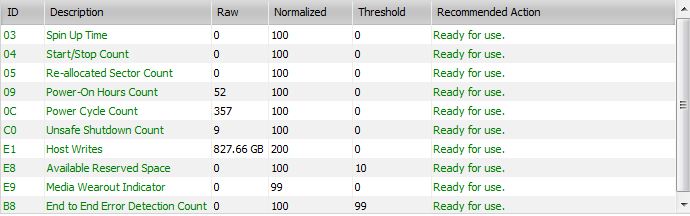
I am a bit confused about my Power-On Hours Count, however. The description of what this indicates wasn't entirely clear from the manual, but I'm assuming it can't possibly be a literal hour count seeing as mine reads 52 and I know that I have used for an overwhelmingly longer period of time than that.
I attached my readouts below. Any insight would be awesome!Attached Files:
-
-
Cool, thanks for the info guys. Unfortunately I did not like the screen of the dv6tse when I went to check it out (I haven't seen the Envy 14). Hopefully it's better.
-
Any links on the heat tests?
I'd like to compare the i5-460M, i5-580M, and i7-720QM. -
Yeah, the Toolbox manual/descriptions are a task in themselves. Am thinking my desktop SSD 4,350 hours up-time are close to literal hours; not so sure in your case. My Envy shows 27 hours up-time which could be about right as I hardly ever use it. Also 11 unsafe shutdowns already! Need to see what that's all about at some point.
Must confess that I am on the edge of understanding all the SMART attributes. If you are really interested, spend some time on the Intel communities SSD forum and those guys can answer all your questions. I lived there while buying/installing my first SSD. Have pretty much forgotten what I learned there and from other sites. Just know that the Intel has worked great all along.
The HP price for the 160 G2 in the Envy was a steal--that alone (and the Radiance screen) sold me on buying the Envy. I paid near $400 for the same SSD a year ago and the prices have pretty much held steady. Guess being able to buy in great volume gets HP a pretty good price cut. You can let us know what you find out about literal/virtual hours and how the Toolbox figures it. -
Anyone try out Flash 10.2 and IE9? Seems to crash everytime Flash is used for me. Tried reinstalling several times.
-
Hey is the Caps Lock light supposed to blink 3 times when you boot the Envy up?
-
I went on a rampage one night so many of those urls are buried.
Found some visited links.
One thing to note. The i7 does not come with integrated graphics, and is not switchable. Off AC power, you'd be running a quad core processor and dedicated graphics. Major hit on battery life, and potentially greater heat probs in time. As to 460m/580m, clock difference will prob generate some extra heat. Can't imagine it's a deal breaker though.
http://www.google.com/url?sa=t&sour...qbH3DQ&usg=AFQjCNHoV0fnWu6g3xwmc4oS7-qZEHnCcQ
HP Envy 14 review -- Engadget
http://www.google.com/url?sa=t&sour...1533DQ&usg=AFQjCNHoV0fnWu6g3xwmc4oS7-qZEHnCcQ
HP Envy 14 Review - Unprecedented Features For a 14" Laptop
HP Envy 14 Laptop Review, Performance & Specifications
.l
-
Thanks for the suggestion!
I did a little bit of research already and have yet to find a satisfactory answer to my extremely low Power-On Hours Count. I may have to dig into that further when I have some additional time.
I did stumble upon a post on the Intel Community boards, however, concerning Unsafe Shutdown Count which may be enlightening concerning my count of 9 and your count of 11. In the post a new owner of an Intel SSD stated that after just installing the SSD for the first time and running the Toolbox it already had 9 Unsafe Shutdowns. In reply an Intel representative stated that such a count was prefectly normal and due to internal Intel testing on the drive prior to sale. -
I think it's ok, mine blinks 3 times too.
-
I haven't, but someone mentioned something about hardware acceleration and the graphics drivers. I haven't had good Flash playback on this computer with IE8 and Flash version xxx. I've fiddled with settings, reinstalled/uninstalled. I can't get smooth playback ever. Audio never skips, just video.
I have also been having times where the keyboard seems to skip. When I am looking through the TV Guide it will pause and sometimes my button pushes don't register. I did a little bit of reading and found some people with different laptops saying it was the battery. When you take the battery out and use it on AC it doesn't skip. So far this seems to be what was wrong, but they were all saying their battery was going bad. My battery seems to be fine. I don't see why the battery would have an effect on the keyboard. -
Which ATI drivers are you guys using to update? I install the HP ones first and then I install the desktop variant of catalyst. For some reason the mobility ones on their site are only 1.1mb?
I think this might be why Im getting boot problems but not sure. -
Thanks for the info on how a relatively new SSD could already have 9-11 unsafe shutdowns. I had been curious.
-
Disk Cloning once the clean install is perfected
--------------------------------------------
I haven't even received my envy yet. But I know I'm going to spend a fair bit of time getting the clean install functioning properly, optimizing windows, installing util apps etc. I don't want to have to do it all again in the future. Did some research and found the following:
"EASEUS Disk Copy is a potent freeware providing sector-by-sector disk/partition clone regardless of your operating system, file systems and partition scheme by creating a bootable CD. The sector-by-sector method assures you a copy 100% identical to the original."
http://www.easeus.com/disk-copy/download.htm
In theory, I'll create a DVD backup of my boot partition on a usb drive or DVD, and basically clone it back to my ssd main drive should a clean install be in order in the future.
With some good karma, I'm hoping this process won't be anything like the Norton Ghosting shenanigans of old.
![[IMG]](images/storyImages/cloning.jpg)
.l
*HP ENVY 14 & Envy 14 Beats (1XXX series) Owners Lounge, Part Deux*
Discussion in 'HP' started by 2.0, Jul 22, 2010.