 Problems? See this thread at archive.org.
Any comments on the temps of the 5650?
-
I'll run the intel burn test shortly - I set the fan to turn off when it can. We'll see if it makes a difference.
In other news, this Bios is useless - No options for anything. I'm not sure how to mess with C-state options without it. -
Thanks. My Core2Duo had the whine which I could fix with the CStates but it was definitely an annoyance. Hopefully the 450M I ordered doesnt have the issue. Keep us updated on what works for the whine
-
You may want to try MSI's afterburner app. It works to control the GPU fan speeds on the gen 1 e 15 with 4830 but for some reason not on the gen 2 with 5830. A long shot but that's the only thing I've heard of that has worked...
-
Dont forget to test WoW and Tf2 if you can =)
-
Welcome to HP laptops.
-
I assume that it came with the F .2A BIOS from looking at the drivers page at HP. That means it uses the same BIOS as the E 15, which sucks, no way to change anything and you have to flash new BIOS within Windows
 .
.
Several people have tried to hack the BIOS with no success that I am aware of, so what you see is what you get, essentially no controls... -
Hey, anybody know if the hard drive's partitioned?
I would like to store all my documents on the D drive and have to format the C drive whenever my comp decides to eff up.
If not, anyone got good instructions for a noob like me? -
Partition it yourself if it isnt. I always store my docs and music etc on a separate partition so I can wipe my computer easily whenever I want. I havent had to since the XP days though
-
Intel burn test - stress level standard, ran 5 times. High of 69
![[IMG]](images/storyImages/Untitled.png)
-
Very nice. What is your room temperature? If you are in Alaska I imagine it will be low.
-
Wow those temps are great
-
im not worried about an extra 1-2 pounds really but does the slice much bulk to the laptop?
also, did turning off the always on fan fix that idle noise? -
I'm from alaska originally, now live between Utah and Texas. Room temperature is 73 F. This test was with the machine flat on my desk.
-
dang those are some nice temps.
-
off topic but isn't alaska right now at the point where they are getting daylight 24/7?
-
alaskajoel - Can you please confirm the SSD make and model. Thanks.
-
Oh really? I'm still using an XP (Never upgraded to Vista or 7. Envy14 will be my upgrade)
So, should I assume Envy14 will come with a partitioned drive? :] -
@JohnKelly
No big surprise here, but it's an intel 160 g2 Model number shown by Crystal Disk Info says:
INTEL SSDSA2M160G2HP -
Depends on where you are, but yes. The winter darkness is cooler than the summer light though...(at least when I was a kid). We'd go to school when it was dark, have recess in the dark, go outside For lunch (it would go from sunrise to sun set within 2-3 hours) and then go home and it was dark again. Night games at 330 in the afternoon was SO fun, but my parents made me sit under neath a stupid sun lamp whenever I watched TV. Drove me nuts...
-
Very cool. I've been dying to go to AK for quite awhile...
Apologies if you already mentioned this and I missed it, but do you have any kind of ballpark battery life numbers while you're doing the usual light browsing and whatnot? If I order the E14, my config is going to be similar to yours. -
Those are very impressive temps, then.
-
Here's my quick guide:
(1) Click start menu, right click "computer", select "manage"
(2) Under "storage" click "disk management"
(3) You will see a textual representation of your hard drive to the right on top and graphical representation of your hard drive as a horizontal bar to the right on bottom. Right click the partition you want to change and select "shrink volume".
(4) Enter the amount of space you want it to shrink, preferably amount of your new parition you'll create, and click "shrink".
(5) When that's done you'll have an open space for a new partition. Right click that and select "new volume". Tell it the new size you want and click "ok" (or "apply" don't recall which) and let it do its thing and you've got a new partition. -
For those inquiring about the wireless card, mine rocks a Centrino Advanced N6200!!
-
So do the graphics switch automatically or how do you switch them?
-
Seriously. I used Vista for 2 years and it ran without a hitch until I switched to Windows 7 Beta, then RC, then Ive been on the final version of Windows 7 for a year or so (Whenever it got RTM'ed) and it still runs flawless.
I dont know if the Envy will be partitioned or not though. I would think not since usually the second partition is for the recovery files and people are making their own recovery files. Theres plenty of free programs and the built in windows disk management for partitioning you can use though -
Wonder why they didn't go with the 6300. All the higher-end Dell laptops I've worked with recently ship with the 6300. Nit-picking, but still, for a premium laptop, I'd expect the best of the best particularly when the cost increase is negligible.
At least they're not throwing some Broadcom crap in there. -
Can anyone else comment on their experience with the fan noise during light use? (web browsing, playing music, etc)
-
I hope all you guys get your Envy 14's this weekend!
Another note... how would you feel if Intel came out with new processors, called Sandy Bridge, late this year? HP made this Envy roll out a very late project cycle anyhow, and considering the benefits of Sandybridge, I'd highly consider holding off on this inveltement unless I needed a notebook now. Im going to wait, as I greatly value being able to push 1 button on my notebook and have 1080p Video steam to my HDTV wirelessly! Now thats a Premium feature we've been waiting for! Cough...
Is a a 4-5 month wait worth it for:
-20% CPU performance
-2X Storage Speed with SATA 6Gb/s
-Anti-Theft Protection over 3G
-2X speed gains with Intel HD Graphics
-1080p Intel Wireless Display
Lets not forget about ATI/AMD dropping the ball on an intelligent graphics switching option like Nvidia's Optimus. We'll see that very soon!
No need to purchase old technology now! -
Actually, owning both, I can say that Broadcom's cards have some advantages over Intel's. Especially if you travel or use a lot of open wifi networks, they have better connectivity and sensitivity(range).
-
This is all I really cared about.
Correct me if i'm wrong, but wouldn't the 6300 require a third antenna? With the camera, 2 wireless antennas, microphone arrea and the WWAN antenna for verizon/att, etc. it's got to be pretty busy up in this display. -
LawyersRsharks - It wouldn't matter much to me, an i5 will handle all of my normal software with ease, and for games the video card will bottleneck long before the processor becomes a problem.
-
You would also be paying a lot more money for all of that.
-
While all that is nice, if one is determined to play that waiting game , one would never pull the trigger.
-
For me Broadcom is always dropping signals and getting knocked off of the network. I prefer Atheros over both because of their stability, at least in my experience.
-
That's correct, it would require a third antenna. But the antenna is just a piece of wire or a metal strip. Easy to accommodate.
-
Yeah I'm not in a rush to get Sandy Bridge, I'm fine with the current technology. Plus I need a laptop now.
-
Agree about the Atheros. Haven't experienced dropped signals with the Broadcom. 43xx series.
-
moar pictarssssss, alaskajoel!
-
hah! my thoughts exactly.
ive been doing that for 2 years already.
ooo....something new...
/wait
oh, what's this? something new...er? ooo...
/wait -
Your temps look good but that intel burn test does not come near fully stressing you CPU, I just ran it and look at the first image, it averages about a 60% on all 4 threads on the CPU, look at the task manager graph. FYI my 540M finished in 305sec at default test settings.
Now look at second image of the Everest stability test which actually loads all 4 threads at 100%. I have the Temp graph tab shown but if you look at the tabs you can also view power usage graphs and stats, the other tabs don't read. This app also gives you all the stuff shown on left side and those are just the headings of each detail page... If you run this test then check the option boxes as I have to really get to the maximum temps, enabling cache etc actually runs cooler...
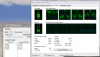
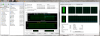
-
What wifi card is included in the Envy 14?
-
That is strange. IntelBurn puts all 4 cores at 100% for me, according to Task Manager, K10Stat, and CPUZ.
-
The only difference in the 6300N is that it has 3 antenna leads instead of 2 on the 6200N
-
Perhaps a video review too?
-
Sandy Bridge, espcially for laptops, will likely get pushed back. They're just barely rolling out the "2010 Intel Core" processors. The worldwide economic downturn has slowed the process of high-end PC component release - there isn't as much 1st world disposable cash as there used to be. My desktop is running a Core i7 920 platform. It came out a couple of years ago and is still pretty much the best one can get, on the 1366 socket. 1156 took a year afterward to arrive to provide mainstream offerings, and it took forever for mobile offerings to show up properly. I'm waiting for Intel's next 1366 Workstation/Enthusiast-grade offering and MAYBE they will debut by the holiday season of this year, but I wouldn't expect mainstream or laptop parts. Then again...I could be wrong..
-
Saw this just a little while ago on gizmodo. Might come in handy for some of you.
How to Take Full Advantage of Your Solid-State Drive -
@alaskajoel -> Does the sound you hear is like a morse code? I have this on my previous SONY F series and have to do the "mic fix", that is related to the mic but you mention this sound is related to PM55. I was wondering if it sound the same. I tell you that morse code sound on SONY F series is annoying.
Off course, the longer you wait..the better thing you get. However you might not get the best deal at that time, which means you might pay more premium to the price. For me, I think the i5-520,4GB,160GB SSD will serve me well for the coming years. -
Strange, maybe it's an icore thing?? I just ran it again at maximum settings and it starts out at 100% for like 15 seconds then the loads starts jumping all over the place. Here is another shot at max settings, note that it is maxing out my 8GB of memory, but not the CPU...
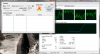
-
Ok so what is the difference between an intel 6200N and a broadcom 43224AG? In terms of real features and differences, and not subjective stuff like better signal strength??? They are the same no?
*HP ENVY 14 (1XXX series) Owners Lounge, Part 1*
Discussion in 'HP' started by 2.0, Jun 21, 2010.


