 Problems? See this thread at archive.org.
I really don't think rubber dries out that fast.
-
-
seriously. Im pretty sure before you purchased you could have looked up the specs of a 520 or looked at a picture of the touchpad
-
instead of the dumb scrollbar on the side, it uses two-finger scroll, which is much better in every scenario.
You can burn recovery discs and get rid of that partition.
Most people said the beats audio was good through headphones, not through the built in speakers.
The rubber is there so it won't scratch the screen when it is closed. I agree that it is dumb to go all the way around, but I have never had that material dry up and crack on me.
And you knew the CPU you were getting before you ordered. Turbo Boost only kicks in where there is demand and the CPU is within its operating range for temperature. The notion that any CPU running at 2.66 GHz are the same speed is just wrong. the iSeries architecture is significantly faster / hz then the core2 series. Just look at any benchmarks -
I'm fine with my battery munchin' CPU.
The touchpad leaves a lot to be desired out of the box. Even with tweaking I'm not liking it. Can you or anyone tell me the following?
How do you prevent the two buttons from being part of the mouse pointing area? It's driving me nuts!
I'm okay with the bezel because it helps with preventing a gap when closed and having the keys imprint themselves on the shiny screen.Last edited by a moderator: May 8, 2015 -
Does anyone know the brand of the 500 gb 7200 rpm hard drive?
-
you should be able to set up deadzones, iirc
-
The only valid complaint I see here is the lack of Windows 7 media. That I agree with. There are plenty of ways to get around that, though.
1) The i5-520M should be plenty powerful for whatever you need to do. This isn't an encoding / scientific modeling / rendering machine - get a quad core desktop for that. Who cares what the benchmarks say, they mean little for typical, everyday use. Don't like it? Buy an i5-540M or i7-620M off of eBay and do the swap yourself.
2) So, in regards to the bezel, you're saying that having the glass (or plastic, or whatever it is) making contact with the keyboard is acceptable? Or perhaps you'd like a couple of little pads that can leave impressions in the wrist rest, or fall off after they dry out and crack? The rubber strip is a brilliant idea, IMO; it protects the screen and evens out the pressure when closed. Thumbs up to HP for this one.
3) The touch pad isn't the best, but it isn't the worst either. I'd still like to see dedicated mouse buttons, but oh well. And guess what, all of the "premium" touch pads tend to be very large - look at the MBP for example. I personally find typing very comfortable, and with the palm check settings, I haven't experienced any cursor jump at all. My girlfriend's XPS M1530 was notorious for that, as was my UL30A to a lesser extent. If you don't like it, disable it and use a wireless mouse, or buy something with a small touch pad.
4) Beats audio is largely a marketing gimmick. The sound quality is significantly better than your average notebook (FAR less tinny), but yes, there are some notebooks that will still blow this thing out of the water. They're all also far larger from what I've seen, meaning they have plenty more room to fit a subwoofer. Who the hell listens to music all day on their laptop anyway? The supplied speakers are plenty adequate, and if you need more than that, grab some IEMs or some external speakers.
Go ahead and return it if you don't like it. All of your gripes are far outweighed by what the Envy 14 has going for it - excellent chassis, beautiful screen (better than my friend's MBP 13), good keyboard, and a lot of hardware packed into a relatively small chassis. -
CPU
Dude, just because its an i5 it doesn't mean it should run faster than your C2D! Do some research before buying. If you don't like the CPUs they offer just don't buy it. Instead of buying it and saying the machine is crap because I wish they offered a 620M!
Bezel
Who says it will dry up and crack? My Vaio FZ has rubber all around it and their still soft after almost 3.5 years.
BTW, the edge-to-edge glass doesn't "seal" anything.
Mousepad
What?! Their handing out free mousepads with the laptop?
Seriously, you can disable the touchpad when your typing.
Personally I love big touchpads. -
Hey-hey. Movin' on up. To the top. Deluxe position in the sky. Finally got a piece of the pie.
-
Good news. No. Unless you want it to.
-
I had to rebut all your claims mainly because it was clear you really did not give most of these items proper research up front or you neglected to actually install, setup or read the tips and guides that are readily available to get the best performance.... A post like your original just serves to really upset those who are awaiting their delivery or it will scare people away from ordering to begin with. And IMHO it was not a fair or accurate review compared to what the majority are reporting
EDIT: Ooops, sorry I didn't realize all the other rebuttals had posted before this, that's what happens on this thread when you get a phone call when typing a post, LOL, you end up a few pages late.... -
I've set palm check at max, sensitivity at max (or min or whatever) and sectioned off the "key" areas as disabled zones. The touchpad is better, but still doesn't allow you to rest a finger on a "key" - this registers as a click and hold, and things start zooming in and out.
I don't really care because I'm returning this anyway and probably going with an Asus, but I just thought people should know. My Envy 14 was a total bust though (body gaps, constant superloud fan), so maybe some people got good machines, which is what it seems like from the divided comments.
Or, people are just trying to resolve their cognitive dissonance in paying $1000 for a subpar laptop by ignoring its faults... -
gotta say, the beats audio is pretty mediocre
i usually run out from my laptop to my amp, and then on my headphones
plugged directly into the laptop....the sound is very tinny, and not very loud. jacking up the db in itunes to get it loud enough, but the bass is nonexistant and the mids are nowhere to be seen
is there something else i need to install to get audio sounding half decent on this thing? right now it sounds worse than plugged into my ipod! -
I'm thinking of buying some Mackie HRmk2 monitors for some quality music/movie playback. Do you think these speakers will sound good through the standard envy output, or would I need some kind of usb soundcard for it to sound good?
-
Try these tweaks. They are for the E 15 and mainly were to increase the volume and quality of sound from the internal speakers but if nothing else it will show you where all the adjustable parameters are 'hidden' in Win 7 and IDT / Beats controls...
http://forum.notebookreview.com/5668647-post3614.html -
Imageshack - dsc01696o.jpg
![[IMG]](images/storyImages/dsc01696o.jpg)
Yo how do you disable this?
It comes up as soon as I turn on my E14. Anyone? -
i cant find the "tone control" tab you speak of there...
also, i dont have the 'beats control panel' to boost the output -
Those have a built in amplifier but I could not find any specs on the input levels and impedance, this could be an issue depending on how the Envy's line out matches to the speakers amps line in. I would suggest contacting them with this question before ordering. If the I/O matches well they should sound great
-
Surprisingly cool under load.
![[IMG]](images/storyImages/TM.png)
-
Here is the Tone control:
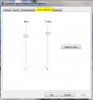
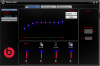
The 'beats panel' is the IDT audio control panel with a 'beats graphical theme' It should be accesible form the 'hidden icons' up arrow on the task bar or from the control panel (show all items) they both look just like the Beats logo. If not there then you must have not installed the IDT audio drivers, which would explain your poor sound quality...
Looks like this (you will have different colors):
-
LOL, 24% is not really that much load for an i7, try a 100% burn in test on all 8 threads and you'll get it up to around 80C..
-
doh, didnt have the correct drivers in
world of difference! -
That's HP Quick Web. Essentially an embedded Linux install designed to get you booted up and able to access the Internet in just a few seconds.
It can be disabled in the BIOS. I forget exactly what the key is to get there (F10?) or which BIOS screen the setting is in, but it's definitely in there. I disabled mine. -
is the audio output clean?
can it use soundfonts for midi?
how adjustable is the DSP, does it have options for adding chorus+delay, etc? -
Can some1 advice me here ?
Im not from US but I tried to buy an E14 from the HP US store .
It refused my order saying paypal did not authorise but the payment is pending .
its weird that HP is freezing my money when they did not even allow me to order . Now im stuck waiting and it has been 4 days . What email do i send to
so that i can ask HP to return my money ?
I want a Envy 14 so bad and opel_cadet stopped selling E14 . -
audio is a lot better now
had to put bass boost @ 12db though, and because that lowers the overall volume, had to compensate by throwing the itunes db boost up again....but sounds very very clear and full in range now
found the level control did nothing regardless where it was set a though, weird -
HP Envy 14 minireview after 4 days of use
Hello everyone, I thought I would put together a review of my Envy after using it for a few days. I havent had a chance to benchmark yet, so this review will only concern build quality and usability.
Product: HP Envy 14
Intel i520m processor
4gb ram
160gb SSD
I. Reasons for purchase
I was looking for a machine that had a good balance between power and portability. I travel with my computer a fair amount, run some fairly complicated analysis software on large data sets (4-5gb data string) and enjoy playing games on my computer from time to time nothing too intensive although I do plan to buy starcraft at the end of the month. Previously I bought a MSI GX640 and while the ATI HD5850 was far superior to the Envys video card, that machine ran hot! If you think the envy has loud fans then I suggest you stay away from the MSI, its idle state is almost as loud as my Envy under peak use.
II. Purchasing and Delivery
I configured the machine and bought it online through the HP website. There werent any major issues, the machine was delayed in customs for two days but the package was upgraded to overnight shipping and arrived by the time listed on the tracking site. The box was in good condition and the packing was more aesthetically pleasing than any other computer Ive purchases.
III. Build quality
Theres been a few people that have had problems, but Im happy to say the build quality on my machine is very good. The floral pattern is very minor and due to its slightly depressed etching, the surface is still smooth to run your fingers across. For anyone who hasnt followed the machine at all, theres also a small HP logo on the back of the screen that lights up when in use.
![[IMG]](images/storyImages/img1426a.jpg)
The ports are laid out on the left and right of the machine. The look is clean and minimalist, but the placement could have been better. The main culprit for me is the Ethernet port on the right side, directly in front of the vent. When I use a direct connection I find the cable blocks the vent to a degree, and I have to pull extra across the desk in order to avoid blocking the airflow. Also, note the intakes for the fan are on the bottom of the laptop. As others have noted its probably not a good idea to use it flat on your lap or on carpet, or Id expect internal temps to spike. The CD drive runs a bit loud but not any worse than my previous systems.
![[IMG]](images/storyImages/img1427x.jpg)
![[IMG]](images/storyImages/img1429z.jpg)
The trackpad is much nicer than my previous computer, and I prefer having one with a smooth surface as opposed to the textured ones that are becoming more popular. I use a mouse with my machine about 95% of the time so I cant comment on how it ranks in the grand scheme of touchpads, but I havent had any problems with accidentally clicking it or accidentally touching it while typing.
![[IMG]](images/storyImages/img1424c.jpg)
The screen is bright, really bright. Unfortunately taking the brightness down one click reduces the brightness significantly, it would be nice if there were finer steps at the top end. The picture below is the system beside my 14.1 Asus F8sn and the difference is pretty obvious. Also not how much taller the F8sn is due to the 16:10 screen and ugly/massive webcam enlarging the bezel.
![[IMG]](images/storyImages/img1431x.jpg)
![[IMG]](images/storyImages/img1432oc.jpg)
Ive also put up a few other pictures for comparisons notice how much cleaner the back is without having a port-laden rear, and how much thinner the system is (and my asus by no means feels or looks fat in general).
![[IMG]](images/storyImages/img1434a.jpg)
![[IMG]](images/storyImages/img1433r.jpg)
![[IMG]](images/storyImages/img1435n.jpg)
Overall impressions and notes:
+no build quality problems on my unit
+no whining/buzzing from the i520m
+bright clear screen
+clean design
+bloatware removal fairly painless
+no hibernation wake up problems
-wired Ethernet port causes cable to block port
-brightness controls need more steps at high levels
-screen tends to show strong reflections in well lit conditions -
What partition that HP use for HP QUICK WEB application?If we did clean install,do we need to disable this still?or it will be wiped out?
I think someone here is getting multiple E14 and wanted to sell one of those. Forgot who though. Why would you tried to buy it from HP directly if you are outside US? HP wont ship internationally and you know that, try to go around it using paypal is not going to work, your address still outside the US. -
Did you feel yous system is quicker after clean install?What is your thoughts of doing that?
Anyone can show on system resources how many app running after and before clean install. -
Yeah but there are very very few real world scenarios where you could use over 75% of an core i7.
-
aaaaaand im back to not loving the audio output
-
well, clean install with a ssd and no drivers or anything installed yet....it was booting in 10 seconds
now its like 27 seconds
i never bothered playing with it before the clean, and my stock installation was on the 320gb hdd, so a speed comparison wouldnt be fair -
This is a real world load, not synthetic and without running John, CowPatty etc.
-
New to the clickpad? I'd see tap to click is the way to go.
-
I followed this guide for audio output from JJB: http://forum.notebookreview.com/5668647-post3614.html.
Hooked up to my Klipsch Image S4's, the 3.5mm output sounds GREAT. The only difference between my configuration and his guide is that I left the tonal controls at 0 / 0, since they seemed to cause either too harsh highs (treble - literally wincing every time someone hit a cymbal) or a bit of distortion (bass).
If you have not done it yet, right click on the Volume icon in the system tray, select Playback Devices, right click Speakers and Headphones and select Properties, Go to the Advanced Tab, change the drop-down to 24 bit, 96000 Hz (Studio Quality). This will make a HUGE difference overall.
Tested with Sevendust - B****, Metallica - King Nothing, Styx - Come Sail Away, and Pearl Jam - Jeremy. All four songs sounded great. All were 320kbps MP3's.
If anyone's looking for a decent set of IEMs that won't break the bank, I highly suggest these for comfort / decent sound quality, or these (based on reviews, haven't tested myself) for overall sound quality. -
I thought the rubber dries when exposed to UV
-
Great review. Nice to see you got near-perfect unit.
-
yeah now that i've changed those beats settings, HOLY CRAPSKI, world difference
put on some van halen - finish what ya started, amazing range
-
*bookmarks some pages and makes a note to mes with those settings after he clean installs in a couple of days*
-
Yep. I've book-marked the touchpad and audio guides along with the 3-4 other E14-related threads. Hoping I can get any software hassles ironed out within 2 days so I can spend the rest of my remaining summer exploring SF and getting familiar with the public transportation.
-
Hmm, the windows battery meter is extremely inaccurate on the first run, lol. It took ~1 hour to go from 99% to 70% or so, then another hour to go from 70% down to 40%. When it only took another half an hour to get from 40% to 29% I was extremely disheartened, but now it's been sitting in the mid 20's for almost another half an hour. All the while, I was just listening to music.
I have no doubts this thing will do 4 hours of battery, perhaps 5. Just need to run it down to 5-10% and recharge.
-
Link to touch pad post? I missed it.
-
![[IMG]](images/storyImages/beavis-butthead-6-7-thumb-400x298.gif)
thank you JJB for the tips -
It's not on its own partition. It's a hidden folder in sw_setup. You can actually turn it off from the Start Menu; no need for BIOS as far as I remember. Go to All Programs, then HP Quick Web, and one of the tabs (i forgot which, I haven't reinstalled it yet) lets you turn it off.
-
Just wanted to respond to a couple of the more.. off, complaints here.
You don't seem to understand how turbo boost works. the 2.9 speed is the boost for a SINGLE core. The 2.66 is the boost for BOTH cores. If you are plugged in and using an application that only uses a single thread then you might see the clock speed of ONE of the cores boost to 2.9. This is how the turbo mode works on all the intel models that have it.
i.e.
i7 720 quad
base = 1.6
dual turbo boost = 2.4
single turbo boost = 2.8
quad turbo boost = 1.73
So this complaint was just off. And for the record, there is not going to be a massive difference in performance between this and the 540, there is a LARGE difference between this and a core 2 duo at similar clock speeds.
This is semi legitimate. The speakers are not best in class as far as loudness goes, that was never the point. The increase in audio quality is focused in the more important area, the headphone jack(s). If you plug in a pair of better headphones to this machine, it should sound better than the majority of laptops out there.
If you are pining for top notch laptop speakers, you are not thinking straight in my view. Even the best laptop speakers, are lackluster. This is like complaining about the quality of built in monitor speakers.
Terrible complaint, but if the speakers themselves are the biggest deal breaker for you, there are plenty of machines that have louder speakers, and terrible audio outs by comparison. Backwards preference in my view, but it is yours to have. -
On the first post of the thread.
-
All here.
Credit goes to JJB for this guide along with the audio tips.
Not sure if there are an guides for correcting any wifi issues beyond upgrading the drivers. I'll ask around if I ever encounter it. -
ok so the verdict on beats audio is? you hate it love it hate it love it
-
hm this audio still needs tweaking, just put on a song and 1 of the guitar tracks was almost silent, normally i can pick up on that riff a lot louder...
when i unplug my headphones, and play on the laptop speakers, i can hear the riff fine - what gives?
edit, now its gone, is going on now, my laptop is haunted by doctor dre!
edit: something to do with the headphone jack not connecting right... -
Don't bother. Get something with higher impedance. If you have very sensitive low impedance headphones all you will hear is HISSSSSSSSSSSS.
Also Beats audio seems like a gimmick to me. Although they have the gain set up really high in the laptop. Sounds ok with larger ohmed phones.
*HP ENVY 14 (1XXX series) Owners Lounge, Part 1*
Discussion in 'HP' started by 2.0, Jun 21, 2010.


