Problems? See this thread at archive.org.
Can you let us know the build quality? Check if there's any wobbles, keyboard flex, etc.
Sorry for being the guinea pig.
-
I ordered my E17 from NewEgg close to a week ago when they first appeared on the site. Mine does not exhibit the wobble people are talking about, but it does have pretty wide gaps in the metal chassis by the cooling vent on the top left side, and worse yet, a really annoying dead pixel towards the top roight of the screen.
Luckily enough, NewEgg was nice enough to send me a replacement which should arrive on Monday, but in all honesty, I'm not holding my breath as to the build quality. My roommate ordered an E17 on the same day. While his also does not exhibit the wobble either, and the gaps on his aren't nearly as pronounced as mine, he has a large piece of lint stuck behind the glass on his display. At first we thought it was two or three dead pixels side by side because iot was pretty long, and when the display is on, it looks completely black. NewEgg is sending a replacement for his unit as well.
It just seems to us these days that quality control is severely lacking or non-existent at all. While I feel the materials used to construct the E17 are top notch, the workmanship is quite inferior. Furthermore, it's pretty sad that HP considers even one dead pixel on a premium notebook with such a insane display even remotely acceptable. /facepalm -
Of course. It should deliver on Wednesday. Same day as my Envy 14.
-
Great post, thanks a lot for the insight. Here I thought Newegg's HP Envy 17 is flawless.
-
I can't believe this from HP...my DV7's screen has lots of dust trapped b/w the display...which suxs! Reason why I have it hooked on my HDTV. Nonetheless, this is their "premium, top of the line product", so there shouldn't be sooooo many flaws here and there. I do honestly hope these gets "fixed" or at least lowered, before I get the $$$ to get me one.
-
Let me make sure I understand.
You are saying that your roommate had a perfect Envy_17 with 1 small piece of lint and it was returned? And that is a reason to bash_HP & the built quality?
Did you try to tap on the glass to make it fall out of the way?
And what, you had only 1 dead pixel & it's "such a insane display even remotely acceptable. /facepalm"???
Surf the web for other laptop brands, dead pixels are not uncommon. It's a mass produced product to be able to sell it so cheap. 1920 x 1080 = 2,073,600 pixels and 1 was bad. OMG!
The 17 @ $1,900 was not competitive IMO hence the BCB & other sales & coupons gimmicks but @ Newegg's &_Amazon's current 17-1011NR prices, it becomes a really attractive deal considering the specs & extra battery IMO.
I dunno why you guys don't focus on the machine's performance itself instead of nitpicking about lint & whatnot.
What is causing that wobble thing exactly? Can't a rubber be added to DIY fix it? My friend had a wobbling_Dell. I just loosened the bottom screws to release tension between the two half of the body, grab two corners to make it straight and tightened back the screws & it was perfectly flat on the desk. His was perfect, no dead pixel nor any other defect so he did not want to RMA & risk a lemon.
Keep OEM prices low, don't play the RMA game for small stuff. @ $1,500 for those specs, who cares about some small cosmetic gaps? Overheating and/or throttling when plugged now that's things to test & check as that may affect real work which is the finality of that powerful machine after all.
-
First post. This forum has been very helpful in researching my purchase.
I received my envy Friday and had yesterday to play around with it a bit. Here are my specs.
i7-840QM
8GB DDR3
160GB ssd
1920x1080
Blu-Ray
Bought from hp direct using 30 percent bcb.
So far my expectations have been exceeded. No woble, no gaps, no excessive heat, no dead pixels (that I have seen). After fiddling with the synaptics control panel the utility of the touch pad resembles the MacBook air I'm used to.
I'll pull out my old gretag macbeth eyeone to calibrate the screen. I thought it was generally not a good idea to make gamma adjustments by eye, but I know more about ht than computer monitors, and if it works...
Anyway, thanks to all on this thread. -
It is very surprising that there is no wobble videos on youtube.com
Perhaps if someone has a defective unit they could shoot a video of it and post in on youtube.
Perhaps the bad publicity will force HP to review their quality control in China.
Personally I've dealt with Chinese manufacturers and laborers in the past. They are not the greatest. -
I'm thinking about buying an Envy 17 but cannot decide which model I should go for. My two options are:
1. i7-720qm 6GB RAM, 500 GB 7200 RPM Hard drive, DVD drive
2. i7-720qm 8GB RAM, 2 x 500 GB 7200 RPM Hard drive, Blu-ray drive
Option 2 above cost only ~$270 more than option 1, which I think isn't very much given what you get for paying a little extra. My concern though is that the second hard drive will bring down the battery time, especially when using RAID. Anyone who can comment on that?
I also have a question about this type of battery.
HP MU09 Long Life-batteri för notebook (WD549AA) specifikationer produkter - HP Hem och hemmakontoret
Is this battery an extra battery that you can use at the same time as the 6-cell battery that comes with the laptop (basically giving you a 15 cell-battery) or is it a replacement for the 6-cell battery?
What's the battery time when using 6-cell, 9-cell, or if possible a combination of the two?
Thanks in advance! -
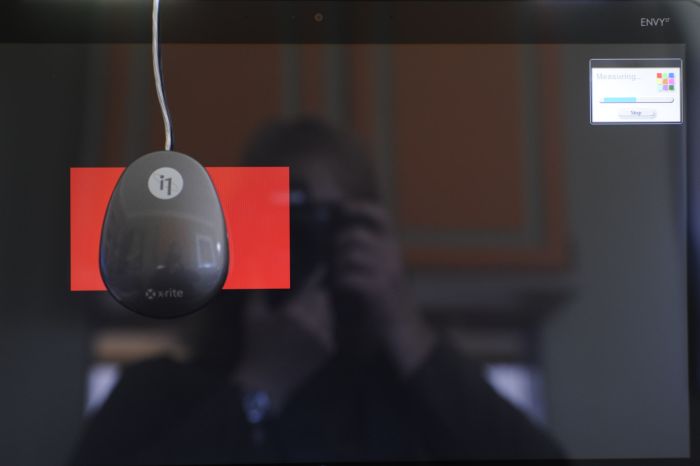
Before I get too much further into testing and writing about my newly received Envy 17, I wanted to post the color profile I created, since there have been several messages on the topic. Like others, my display's default setting was quite blue. I haven't played with the brightness yet, but I did slap on my X-Rite i1 and create a color profile for the notebook's monitor. It fixes the color cast, at least to some extent. Here is a zip containing the ICC profile, which may be a simple option for adjusting your monitor to something closer to reality.
Here are some pictures of the profiling process:
Attached Files:
-
-
Please see reply above in Bold
-
can you elaborate on the difference in return policy?
-
I'm getting mine on Tuesday. I am planning on doing a video review with a professional camera. I will be checking off the typical problems with the 17 so word gets out online (whether or not my actual unit has defects).
-
Hey Guys,
How did you update the BIOS correctly, I have heard a few different things... Can someone provide the instructions or direct me to them.
Also anyone who has updated the BIOS did it make a noticeable difference?
Thanks, -
I do understand you point, but this is the thing...some ppl are picky, and that's how they are, on my side, I have enjoyed HP's quality in their notebooks, and I don't doubt them, BUT premium systems, that come at a premium price should offer better build quality.
There are some things we as buyers expect from certain products. And me for example I would not be happy to see a small piece of lint trapped b/w the display. I have the DV7 i mentioned before full of it...and its not pretty at all.
Nonetheless, I will get the ENVY 17 because it mixes power, looks, and price in one machine, plus it's HP, which I prefer. -
Sweet!
Thanks man, I can't wait to try it. -
so, as it turns out, my unit had a defective optical drive. exchanged today, up & running on a new one, drive works fine (not sure if anyone actually followed my posts, this is a crowded thread).
no dead or stuck pixels in the new unit either ...
waiting on my 1920x1080 display next week ... hopefully that'll have no dead pixels either -
I agree. Wobbles, gaps, heat, and screen problems are all problems that aren't due to customer negligence or lack of knowledge. We as customers have a right to demand better quality.
-
I agree. This isn't some cheap $600 notebook computer. It's a premium notebook at a premium price. HP harps about the build quality of the E17, and I for one expect them to deliver on their words. As for the lint - keep in mind it was a large piece of what actually looked like the black cloth that the E17 comes wrapped in when you open the box. How it got stuck in between the display and the glass enclosure is beyond me. The gap on my unit is so large that I can actually slide the edge of my credit card into it! So I as a consumer should have to accept such blatant flaws in workmanship in order to keep OEM prices down? I think not..
-
Right now, we as customers exercise our power by simply returning the laptop and getting a full refund. HOWEVER, those buying from Newegg with the greatly reduced price cannot return. Let me repeat, if you buy the much cheaper Envy 17 from Newegg, you cannot return. We lose our power and voice if you guys buy from them.
-
$1,500 for the specs & extra battery of the 17-1011NR is a bargain, not a premium price IMO.
"The gap on my unit is so large that I can actually slide the edge of my credit card into it" - Why not post some photos to illustrate your point?
"How it got stuck in between the display and the glass enclosure is beyond me" - Well it was assembled by humans paid about $.50 an hour. -
If it's not defective, you can't play the order & return game @ newegg. That's one of the reasons why they have low prices: they eliminate those returns of non-defective merchandise costs that other merchants factor in their retail prices.
They do offer replacements for defective units. -
Will his return be denied? I think his replacement is already on the way though.
-
All sales are final @ Newegg. No refund. Make sure you want the stuff.
For a period of 30 days, they will replace a defective unit. After that you need to use the manufacturer's warranty & service support. -
I know but I don't consider his order to be defective. Sorry, I thought you were implying to him that his request for an exchange won't be accepted.
-
i wish i waited a week ... i bought the 1010NR last week at a store for 1365. with tax it came to just shy of 1500.
-
I'm sitting in front of my wobble free E17 right now. It's on my desk hooped up to a flat panel LCD TV. The LCD TV acts as a virtual extension of my desktop. (selectable by cycling Fn + F4) I have firefox open on the laptop screen, Lightroom and a blueray window on the LCD TV. CPUID monitor is showing the i5-540m at 46C, 45C on the cores and GPU 59C.
No wobble, no lint or dead pixels. I'm very pleased with my copy. This laptop is everything I was hoping for when I placed my order for the Sony Vaio F series (now returned) some time ago.
The Momentus XT hybrid HDD really dialed the performance up a notch. Lightroom, Office, Firefox and machine boot now load like that *snaps fingers*. I recommend this upgrade because it makes your most frequented stuff fly!
The E17 is now on my lap, one instance of firefox open, 34C, 40C on the cores; 51C on gpu.
Keyboard flex is so slight that I feel it's really a non issue if you're shopping.
Over the next few days I'll start weeding out some HP bloatware.
Good machine, thank you HP, thank you bing.com.
RE: clean install
I wasn't aware you could make a windows disc so I tried to do a clean using the HP discs. I was able to boot the machine bootsector /rebuildbdc but I still can't remove the OS choices menu with the failed windows install (I believe it says ramdisk [ems enabled]. I used msconfig to delete the startup option and boot directly to win7; so the E17 boots on selective startup. Also, my partitions were wacky, the 500GB HDD was recognized as 80GB, there was 357 unallocated/unmounted GB's floating around as well. I cleaned it up and extended partitions and patched things up.... not exactly a smooth start but all is well now. -
Good to hear NAZ, I can't wait for mine to come on Tuesday.
-
Has anyone gotten the lightscribe function to work. The specs for the TB23L bluray/dvd combo drive says it handles lightscirbe but threes no drivers for it to work.
I tried lightscribe.com but they didnt detect the drive -
Hey guys. Someone had asked for a video of the Envy 17 wobble. I made the video and it's up on youtube now. I plan to call HP Corporate in the morning and see what they say.
Here's the link:
YouTube - Envy 17 Wobble & Other Issues
Seems like the first 2 seconds of the video were chopped off. -
Youtube's not working for me right now. :|
Edit- 5 mins later.. it's working.
That's some serious wobble there. -
Not true. Although NewEgg's written policy is No Return / No Refund, they've offered me that option on a few occasions. You just need to call and speak with a customer service rep is all.
-
Good demonstration of the problem. I don't have it, but it would drive me nuts. Good luck.
-
Not make a Windows disk, I was talking about using the Windows 7 upgrade DVD (if you know someone who has one) to install Windows on the new drive.
When I tried doing it with the recovery disks it just wouldn't work. So once I figured out to use a Windows 7 DVD to do the clean install it went smoothly.
OCZ SSD works great. -
So your saying we're all "nitpicking" at a massive wobble, chasis gaps and general other issues? You have to be kidding.
The wobble thing CAN'T be fixed. It's absolutely unfixable, EXCEPT for adding one massive rubber foot on the front-right side. To me, that's ridiculous.
I paid NZ$3,499 for my 1st wobbly one, for all you US peps that's about US$2,500. That's what we have to pay for all electronics in this part of the world, NZ and Australia. For that price I expect nothing but perfection to be honest. Now I finally have a very good one, took 3 attempts.
I just can't believe no one from HP has actually called the factory hotline and simply said, hey look there quite a few of these notebooks coming out with a wobble! What is actually going on with quality control? Is there any at all? -
No, check my post above. I was talking about a perfect 17 with only 1 piece of lint that got returned.
Everything is relative.
Nobody tried my DIY wobble fix suggestions?
Did anybody ran some demanding benchmarks on the 17-1011NR to check operating temperatures & palmrest comfort or is everybody stuck @ the cosmetics level? -
You need to look at the big picture. You are one in a few out of thousands who have received a bad Envy 17. A great majority of those received their Envy 17 without any issues, stopped posting, and started enjoying their new laptop. You happened to receive 2 unlucky defectives. People are over exaggerating the quality control of HP. The discontent are always the loudest. I do feel bad for your troubles, but it's nothing to rage about. I mean, you did get what you wanted in the end, right? I'm not saying getting a defective is acceptable, and you have a right to return a bad laptop. It is very likely that the first and second batches of Envies coming out of China had defects due to a problem at the factory with the machines.
Oh, and OP has been updated, with some new stuff like Num Key fix, and other benchmarks, etc. -
guys......
i really really want an Envy 17. -
"...on a few occasions" - On laptops? Could you give more details?
-
I've seen this question posted a few times, but never answered:
Is it possible for those in Canada to purchase a 1920x1200 envy17? I really can't downgrade to a 1600 res after being used to the full HD display.
As well, I have no need for an i7 processor, does anybody know when the i5's will be available again on the envy's?
It looks like I will have to buy from a US website. Most sites (e.g. Newegg, Amazon) prevent Canadians from purchasing - has anybody tried ordering directly from HP US?
Thanks -
Jul 26, 2010 8:06 AM On FedEx vehicle for delivery ROCKFORD, IL
Well gosh, I guess I'll be getting mine today!
*crosses fingers*
@cdnsquirrel - Does Buy.com allow you to purchase one? ( http://www.buy.com/prod/hp-envy-17-...50m-2-40ghz-6gb-ddr3/q/loc/101/215884973.html) -
Did the BIOS update help with the heat? .. did yall get it off the HP site?....
What do you guys think is the best way to display your PC on your HD TV.. HDMI Cord? -
Woot! My laptop's here! Just a day early too.
Quick tests show that I have no visible wobble, and LCD screen seams are lined up. There is a very tiny gap on the hdd side, and a slightly larger one on the top right. I'm not going to worry about that. I'll be testing this puppy out in about an hour, when I'm on my lunch break.
Edit-
@LanceDaGod
Some HDTV's have HDMI ports made for PCs. My Samsung LN32A650 (1080p 32" ToC HDTV) has 3 HDMI inputs. Samsung specified HDMI2 as the PC input. If i don't do that, the details of everything looks like crap. Red letters are turned into weird glyphs.
I suggest glancing through your tv's manual to see if anything PC-wise is specified for HDMI. If not, just try using an HDMI cable. If it looks bad, use a VGA. VGA isn't quite as sharp, but it gets the job done.
-
Hi guys i got my envy 17 on Friday from amazon, I found no wobble nor gaps in the case but the back light wouldn't turn on. So i chatted with hp's tech support and none of their methods worked. I finally decided that I would have to send it back but before doing so i wanted to remove the keyboard. I popped it out and i found that one of the connectors on the keyboard wasn't connected, i plugged it in and everything works fine now.
-
Actually, metril got 3 wobbly laptops in a row over a period of several months. Is that simply a bad batch? If I got three in a row, I would incredibly pissed off.
-
Hey Ian thanks for the info...
Let us know how its performing... also whats your thoughts about the "heat issues" thats my only real concern..
Thanks! -
To anyone who is interested:
I ordered my Hp 17 Envy on 6/28/10. I just confirmed that is is on the truck and slated to be delviered to me today! Finally!
I am very nervous with all the negative things I have read over the last month about, heat, wobbles, spaces in the chassis, etc... I took 2 months to finally decide on the HP and do not want to go through sending it back.
In February I orginally purchased the Toshiba Qosmio X505-880 with a 64 GB SSD and 500GB HD with the Nvidia 360m. It was a very nice laptop and the sound was better than any other laptop I have heard. Problem was a bad sound driver that continually limited the volume and caused sound fluctuations. I returned it and bought a second one which also had the same problem. As of 2 weeks ago, toshiba finally released an updated sound driver? Who cares now...
I then decided to either buy the M17X Alienware or the HP 17 Envy. I choose the HP because it ended up being almost a $1000 less for what I consider to be slightly (and I mean slightly) better specs. I have listed my laptop specs here:
HP ENVY 17 customizable Notebook PC
Genuine Windows 7 Home Premium 64-bit
Intel(R) Core(TM) i7-740QM Quad Core processor (1.73GHz, 6MB L3 Cache) w/Turbo Boost up to 2.93 GHz
8GB DDR3 System Memory (2 Dimm)
800GB 7200RPM SATA Dual Hard Drive (SSD 160GB + 640GB 7200RPM)
1GB ATI Mobility Radeon(TM) HD 5850 Graphics
17.3" diagonal Full HD HP Ultra BrightView Infinity LED Display (1920x1080)
Blu-ray ROM with SuperMulti DVD+/-R/RW with Double Layer Support
HP TrueVision HD Webcam
Intel Wireless-N Card with Bluetooth
Corel(R) PaintShop Photo(TM) Pro X3 + Corel(R) VideoStudio(R) Pro X3
Full-size island-style backlit keyboard
50% OFF! One 6 Cell (standard) and One 9 Cell (over-sized) Lithium Ion Battery
Microsoft(R) Office Starter 2010
$1! SAVE NOW!! Norton Internet Security(TM) 2010 - 15 Month Subscription (activation required)
HP Home & Home Office Store in-box envelope
I also purchased a 2 year Accidental warranty and the Swiss Gear backpack.
I hope to do a video unboxing tonight and I will post it and updates on all the concerns we all have sometime within the next few days.
Keeping my fingers crossed,
Envy 17 - Keeper wanna be :laugh:
-
$1 for 15 months of Norton Internet Security? If true, that's a great deal! NIS10 is very resource friendly and seamlessly integrates without being intrusive.
Looking back, I wish I would have purchased the extra battery at 50% off. -
Okay, so after about 15-30 minutes of play, here's what I got so far:
I did notice a very very slight wobble, but it is only noticeable when the screen is open very wide, and nothing is weighing it down. I can slide only a piece of paper underneath and still feel the feet, so that's good. The left palm rest was warm, but still relatively cool. I am typing this on an nc6230 at the moment.
If there's one beef I have about the laptop, it's the touchpad. I am not used to touch buttons, and I think the multi-touch is a cool idea, but it seemed kinda frustrating to work with. I have a habit of keeping my left thumb on the left-click button [area] on laptops. When I do it with the envy, it's a touch button. It sometimes messes with the mouse pointer, so I have to get used to that. I'm probably just going to use an external mouse anyways.
By the way, the screen is B-E-A-UTIFUL looking one. I was amazed at the quality of it. I can't wait to test out a couple games on it! I have yet to find any dead pixels.
Another thing i thought was cool was that I got a free 2GB SD card (screw the files on it!), and the extra battery has this neat little button and 4 pin-sized LED lights to tell me its charge.
One thing I wish the ENVY had would be an optical out. Does anyone know if sound can go out through the envy's hdmi-out? -
You can get sound out through the HDMI, but your receiver must have an HDMI in. What I did for my Envy 17 when I had it was use a usb soundcard that had SPDIF out so I could connect it to my receiver.
*HP ENVY 17 & 17 3D (1XXX series) Owners Lounge*
Discussion in 'HP' started by L3vi, May 19, 2010.