Problems? See this thread at archive.org.
it's a pretty nice messenger bag. expandable, made of durable fabric, the straps alone look like they can support 100 lbs easy (if your shoulder can handle that) ... at the time i bought it it was the only bag able to fully protect the massive xps m1730 (other than the dell bag)...
-
i just discovered that HP issued a BIOS update for Envy 17-1011NR, F.13 A...8/24 release
i don't see any information on what this BIOS addresses, if anyone can please chime in on it ?
edit: clicking on the file link brings up some kind of error. anyone else have this issue ?
http://h10025.www1.hp.com/ewfrf/wc/...dlc=en&cc=us&os=4063&product=4229850&sw_lang= -
Does anyone know how do you make the DVDROM region free?
-
I don't believe you can. You have to choose a region and you're only allowed to set the region 5 times. I believe it's locked in the Blu-Ray/DVD/CD ROM firmware.
-
im one of the unlucky ones dang lol... i tested this thing out for 2 days and im starting to see minor flaws. the wobble has a big issue in some desks but other desks that i used it doesnt and i thought that itself was weird. when i play games like GTA4 it lags and it runs slow but when i did on low settings it works alittle bit better. sometimes the screen flickers when i play games like an hour or so. and the color was disoriented at the right top to bottom. but when i pressed the screen against it works ok. it does that sometimes.
i think i need a replacement for this laptop because i felt like its getting slower which was weird. its fast but at some sites that i go often it works slow.
can anyone give me advice for a replacement? do i have to pay more if i call them ? it has been less then 21 days and i started to see minor flaws that im concerned with.. i paid good amounts of money like everyone has in this thread...
-
If it is within 21 days just get an RMA and send it back. They will give you a full refund. You can try your luck with another Envy or choose to look elsewhere.
-
thanks for your advice but i like this laptop overall and it has potential.. its sexy and i want to use this as a replacement desktop. i can try replacing it. i just hope this 1st replacement is better... but my question is this will it cost me more to replace this laptop?
-
That's what I meant by using materials yourself. Some will be thinking they can send it back and HP can fix this problem, but it's un-fixable unless your prepared to use adhesive tape/paper/a couple of books to balance things up.
-
Yes, tried to download the file as well and it's broken. I'm going to ring them now and report it.
-
Yep, vents are free and clear. I've only had the notebook for two days. I suspect a bad temperature sensor. I definitely don't look forward to the tech support drill, but I guess it's a necessary evil if I want it fixed...
-
If you just do an exchange with HP it should cost you nothing. In terms of finding something with similar performance with another brand, it really depends. I had three defective Envys and decided to call it quits with HP for now. I am going to give the MSI GX660R a try. Even though it is a 15 it comes with a better processor and video card for a similar price.
-
yesterday played about 8h with my envy 17 and temperatures was normal, CPU like 50 C and GPU 60, i still dont get how ppl got 11k from 3dmark06 with this
edit: okay today runned it and 11k from 3dmark06 so its normal i think.
-
I believe if you use Media Player Classic or VLC they both ignore the region encoding of the DVD or Blu Ray.
The programs like Media Player and Power DVD will recognize the region, you will have 5 times to change regions after that it locks.
The only way I've found to fix this is through using VLC. -
well i was wondering if the cooler pads makes a differnce in heating issues. im thinking of getting one. i just hope it cools down my laptop because i am doing high end editing for my videos and such.... playing games too if i have time..
i am going to replace my envy because the screen flickers and the color was disoriented from parts of the right side. and it does runs slow on some other sites that i usually go too.. -
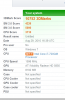
I ran 3dmark06 today and I got 10,752. Did anybody get higher?
Attached Files:
-
-
Benchmarks depend on what type of hardware you have. In order to make a comparison you need to post your specs.
-
Oh i'm sorry my specs are:
HP ENVY 17-1011NR NoteBook Intel Core i7 720QM(1.60GHz) 17.3" 8GB Memory 640GB HDD 7200rpm BD Combo ATI Mobility Radeon HD 5850 -
So for others that have contacted HP for problems with their new Envy 17, what can I expect? Will they do an exchange, or should I expect to send it in for service?
-
either. you can get a brand new one from hp for no cost if there are problems with yours.
-
The support staff that I spoke with was surprisingly helpful, they actually gave me a follow-up call today out of the blue to make sure everything went smoothly. They'll overnight you a box of packaging materials, and then pay for overnight shipping back to HP to service your computer. I'm happy with the customer service, especially given what I've read about HP, but wholly disappointed in what their producing.
-
That's cool. I'm keeping my fingers crossed. I've been very happy with my Pavillion dv9500 that the Envy 17 is replacing... I've never had to contact technical support before. Prior to my dv9500 I had a Toshiba Satellite which is still running after 6 and a half years, but I haven't been thrilled with the laptops they've been introducing lately. I had a bad experience with Dell a few years back, so I won't do business with them. If HP disappoints me, I'm not sure who I'd consider next.
-
the envy line of laptops must be real piles of trash ... i am getting really ticked off at this point:
playing back blu-ray or regular dvd while running on battery results in extremely choppy playback, to the point you can't watch the movie and the computer runs like molasses afterwards. only way i've been able to resolve is to plug back into power. what's the point of a laptop if i have to stay jacked into power ?
my wife's dv6 plays movies fine when on battery. previous laptops i've had with blu-ray play back fine on battery.
my patience is being tested with this machine, given the other problems i've had. -
Just played a DVD on mine under battery and no problems at all. Also ran a few other processes in the background that used up CPU and disk access.
Completely smooth. -
Try going to Catalyst Control Center and disable PowerPlay - I found that it helped me when using HDMI, and will likely help you too. Generally, im not dissapointed with the envy but with the drivers from ATI...
-
hey guys the hp said i have to return this first in order to process the replacement. is that true? i heard some of you guys waited the replacement and then returned it?
-
Hi Zero,
I have no problems watching a Blu Ray or Dvd Movie also on battery. It is either you have a bad blu ray drive or these is a problem with the disc. -
its happenng with dvds as well. what power plan are u guys using ? i also had avivo installed. this is strange ...
-
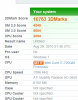
I ran 3dmark06 today and I got 10,763. Did anybody get higher? Please reply
HP ENVY 17-1011NR NoteBook Intel Core i7 720QM(1.60GHz) 17.3" 8GB Memory 640GB HDD 7200rpm BD Combo ATI Mobility Radeon HD 5850Attached Files:
-
-
@sammywantsya
You need to drop your unit off at Fedex. After 24 hours, HP will process a replacement unit. Make sure you get the RMA number and shipping label from HP first. -
Well guys after having my envy 17 for a week it had to go,the heat was way too much like i said in earlier posts it was causing warping in the keyboard making it bow upwards,and the gaps were driving me nuts,so i got rid of it and went for the asus G73jh w,6gb ddr3 ram,5870 ati(much better than envy's 5850),core i7 720qm.The build on this is perfect it is one nice laptop you can definitely see the quality of this compared to the envy,has an overclocking tool built in and EAX advanced hd 4.0,the sound on this blows hp's beats away! it has an all black matte finish,twin fans in the back,special effect lighting,backlit keyboard,high def screen.For those of you who get tired of replacements should go for this,better graphics and very fast with overclocking which the envy doesn't have.I loved the envy,but just couldn't deal with the issues not for $1500,this asus cost me $1400.So far i am happy with it,and asus customer service is suppose to be one of the best.
-
I got mine on high performance.
-
hp is telling me the same thing, set it to high perform and see what happens. maybe there are more settings in the ati ccc that could help this ?
-
Newegg is out of stock on the Envy 17-1011NR which might delay my RMA replacement process. I hope a better batch of Envys come out or I might just get a refund instead.
-
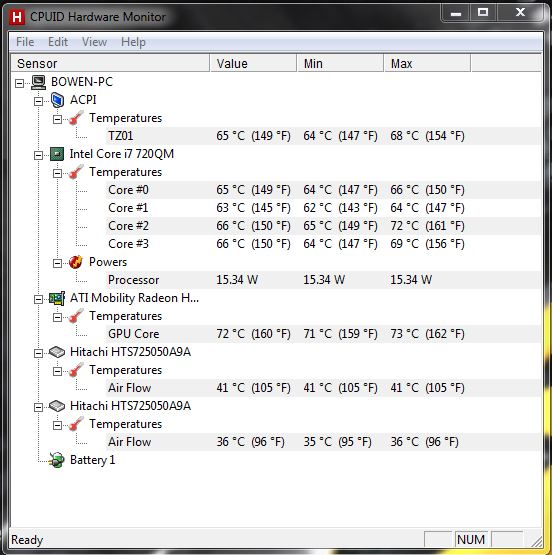
After struggling for 3 months, I finally manage to purchase my very own Envy 17. However, I am now concerning in the heat this power house produce... (I have my Envy's vent (left side) UNBLOCKED, on solid wood desk and 3 inch away, a small speaker.
My Envy 17 spec:
Intel Core i7-720QM
8GB RAM
1600x900
Blu-ray
2 x 500GB 7200rpm HDD
After idling for 90 minutes, the temperatures are shown in attachment below.
So it seems that these temperatures are quite average in contrast to the experiment BennyPac took. However, I ran Ashampoo HDD Control yesterday and got the health result of my hard drives with the help of S.M.A.R.T. data. The results were this:
C drive 97% health
D drive 94% health
Just a side note: There is NO data stored on the D drive
Today I checked, the results were different:
C drive 96% health
D drive 95% health
I ran the same program on my old laptop that I brought in 2006, and the result showed that the hard drive is still 100% healthy, I used my old laptop for at least 4 years from now. But now when I compare the result to my Envy 17 that I just brought last Wednesday brought me to a question.
Are the heat damaging my hard drives?Attached Files:
-
-
have you updated the bios? Is the fan setting in the bios set to run all the time?
-
I would have the Asus G73JH... except... it is far too large. It is also not built very well in my experience. Maybe it was just an early unit but my friend's had a lot of flex and the usb ports started going out on him. Then none of the function keys would work. He returned it.
If it was the same size as the Envy, there'd be no choice... but it isn't. That laptop is but isn't even remotely portable.
(However, if I get tried of replacing the envy, this is next on my list unless something better comes out.) -
Yes BIOS version is updated to version F.08
Fan is turned on, known as active in current power plan
So will this heat damage my HDDs? -
105F seems to be a hard drive temperature that others have reported. Certainly, I have used drives that run that high and more. My Envy 17 has the Seagate Momentus (ST9500420AS) 500GB drive, which appears to run cooler than other models: 30C (86F) right now and > 100F only when worked hard. I have two WD Caviar Black drives I use in an external dock and they work hard to 115F in the open air.
As for Ashampoo HDD Control and its percentage measure of "Health", well, I poked about their website, but couldn't find a description of what factors may influence their indicators by only a few percentage points. Maybe your Ashampoo HDD Control manual provides this information. For example, perhaps your new drives have a few already identified bad sectors that your old drives do not have. These would be found when the drives were originally formatted. Perhaps something like this is influencing Ashampoo HDD Control's indicator.
Hitachi may offer a range of acceptable temperatures for your drive on its website, but, by themselves, these two data points wouldn't cause me to fret. Do look to Hitachi for maximum temperatures, if you can find them--just to be sure. -
Havn't look at the Hitachi website yet, which I will do later tonight, but do you think I should get this unit replaced? Is there any software to test hard drive for bad sector?
-
First, I only mentioned a bad sector as an example. See Bad sector - Wikipedia, the free encyclopedia for an explanation how drives are designed to have "extra" sectors to replace failing sectors over the life of the drive. The real issue is what metric(s) is AShampoo HDD Control using to measure the quality of the drive.
Second, I would NOT say that the unit should be returned at this point. I do not anticipate Hitachi stating that 105F is too high for the drive, but it is always good to check.
Third, another way to look at it is this: What would you tell HP is wrong? If HP says that 105F is high, then OK, but any reference to an AShampoo HDD Control report would not influence HP.
I put it to the others in this forum: your thoughts? -
Well, Ashampoo uses S.M.A.R.T. data to measure the quality of the hard drive. However, just a few seconds ago, my D drive was rated as 100% healthy, but now its at 96%, meanwhile, C drive stays at 96%.
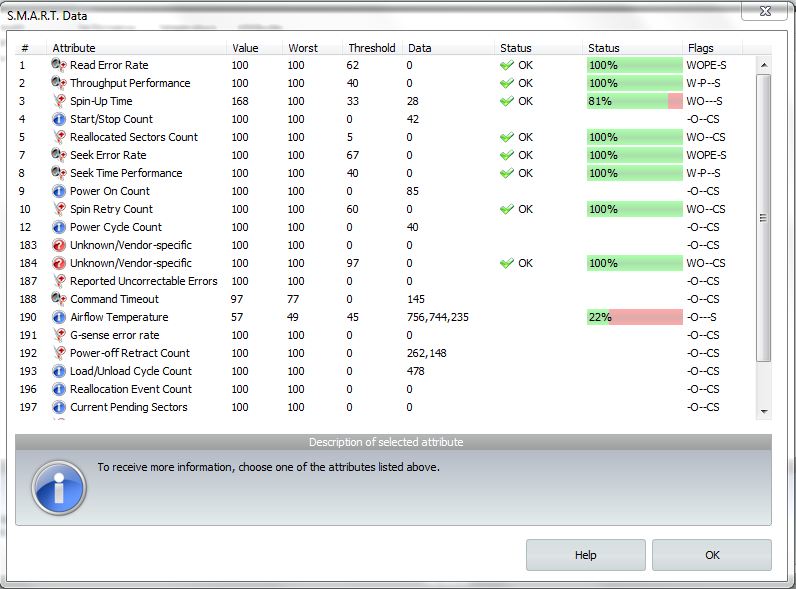
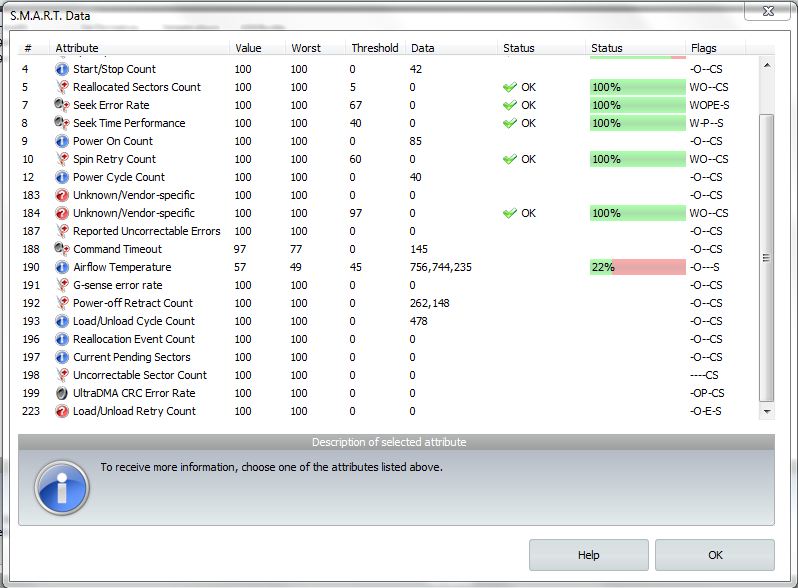
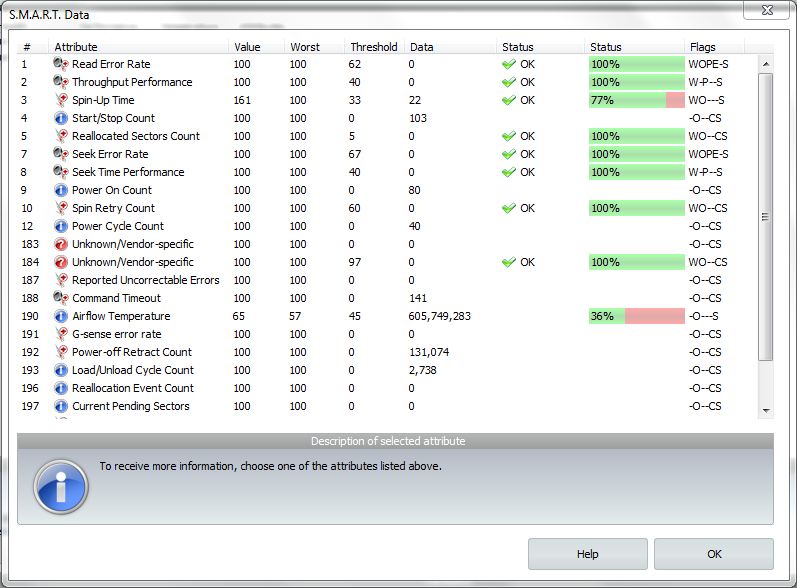
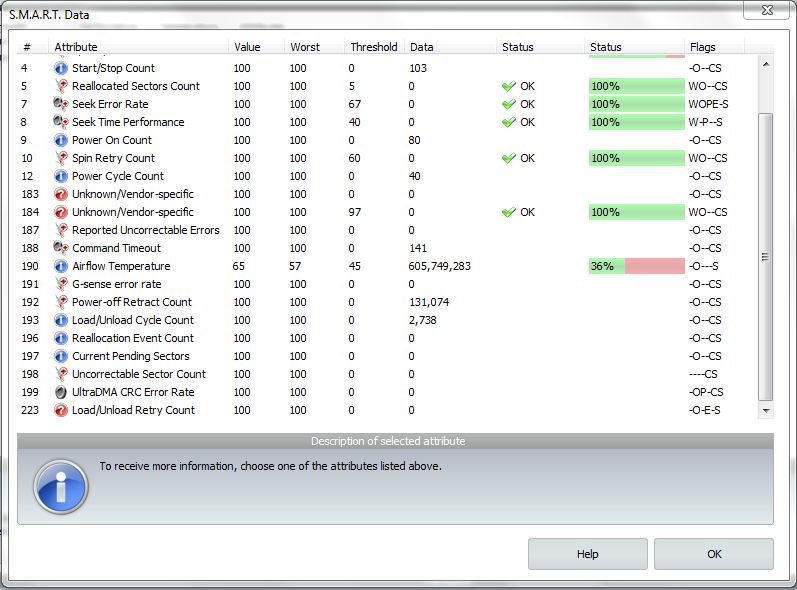
According to Ashampoo and it's S.M.A.R.T. data, the spin-up time of my C drive is rated with a 81% status and the airflow temperature with a 21% status. Nevertheless, they were classify as "Okay"
Follow below are pictures of the specific S.M.A.R.T. data for both of my drives.Attached Files:
-
-
Moreover, the operating temperature of the Hitachi hard drive is 5C-55C
-
OK then, if the Airflow "Value" is temperature in Celsius, then those are bad numbers.
"Slow spinup time" and "high temperatures" mean friction where friction has no right to be.
Are these temperatures? -
nope, they are percentages
But if I check CPUID Hardware Monitor, the air flow temperature for both of my hdd are as follows:
current min max
C Drive 42C 40C 43C
D Drive 35C 35C 36C
Well, these are the current air flow temperature after about an hour of Call of Duty online multiplayer game.
Is this normal? My GPU even reached to a max of 92C, currently at 73C though... -
In reverse order, your GPU temperatures are the same as mine when under load. As I recall, my heavy load temperatures reached 100C for the GPU and this is the high end of acceptable temps according to ATI.
Well, I'm a little confused as to the numbers displayed in your AShampoo HDD Control screenshots. In the first screenshot, for example, the columns Value, Worst, and Threshhold are displayed for "Air Temperature" as 57, 49, and 45. These are percentages? -
reventon, I would be less worried about your HD temps specifically as the temp of your system as a whole.
If those temps are at idle then you definitely have something wrong with your system, could be hardware or software.
I am not even running idle, I am playing a movie (8Gb) directly from my HD, have a load of other programs running, although they are not cpu intensive.
here are my temps:
I have the laptop on a stand that gives complete free airflow to the intake fan, and raises the back of the laptop around 6" clear of the desk. This makes a huge difference. When I have the laptop flat on the desk the temps are around 10°C Higher after 10 mins or so as the hot air starts getting sucked back into the machine.Code:Hardware monitor ACPI Temperature 0 50°C (122°F) [0xCA0] (TZ01) Hardware monitor Intel Core i7 720QM Power 0 15.34 W (Processor) Temperature 0 48°C (118°F) [0x34] (Core #0) Temperature 1 47°C (116°F) [0x35] (Core #1) Temperature 2 51°C (123°F) [0x31] (Core #2) Temperature 3 46°C (114°F) [0x36] (Core #3) Hardware monitor ATI Mobility Radeon HD 5850 Temperature 0 51°C (122°F) (GPU Core) Hardware monitor Hitachi HTS725032A9A Temperature 2 36°C (96°F) [0x24] (Air Flow)
Also I did replace one of the Hitachi HD's with an Intel SSD (does not show temp info for it). While I do not think this runs any cooler, it did mean I have a clean install of Windows without any of the bloatware that came as standard. I am pretty sure it ran hotter with the factory software config from HP. -
hey there are links on the first few posts in the first page..
EDIT: and short answer is yes..
-
I ran the free tests and I got 10,763. Thats a big difference from 11,449. Do you know of anything I can do to make it higher because I got the high end model of the envy 17 1011nr.
Specs
HP ENVY 17-1011NR NoteBook Intel Core i7 720QM(1.60GHz) 17.3" 8GB Memory 640GB HDD 7200rpm BD Combo ATI Mobility Radeon HD 5850 -
I just ran rdmark06 again and I got 10,946. Why does it keep changing/increasing?????
-
The highest end model of the Envy 17 is the i7-840Q - the i7-720 is the basic model.
When you do a benchmarking test, you do it several times and take the average. That is how you conclude the actual performance of your system.
*HP ENVY 17 & 17 3D (1XXX series) Owners Lounge*
Discussion in 'HP' started by L3vi, May 19, 2010.