Problems? See this thread at archive.org.
Ok thanks, I have the CCC on standard so I'll just leave it thenI just don't think my GTAIV runs as fine as I want it to do, I mean it doesn't lag and stuff but when I put it on 120hz full hd, when I like, drive really fast it feels like it can be a little choppy, just little while driving but it bugs me enough to give it up, and after reading all that has problems with gtaiv and win 7 I just gave up
-
I set everything to High within GTAIV and so far, not choppy. It takes a bit of experimentation...to get it looking good and smooth at the same time
-
Believe me I double checked!... Plus the noise was still on the internal display, so it definitely was on the AMD GPU!
Well I just tried to uninstall the drivers/use DriverSweeper in safe mode/reinstall the latest ones from HP, but still the same thing. Ugh.
-
I know that TV's refresh at a lower rate than the Envy 17 3D, unless you have a 3D Panel TV. It almost sounds like when your refresh rate is 60 HZ (Intel), your screen is fine. What about setting the AMD to 60 HZ and see if everything still looks good. Perhaps the AMD 6850 is having issues with higher refresh rates...not good!
-
Which patch do you have for it? That might be why mine seems to be a little choppy. Cos I played on my HDX, with lower settings of course but it ran smooth, and the envy is several times better then that. But the win 7 i had on my HDX was an update from vista that most people got when buying a laptop or desktop at the time, since win 7 was about to get released.
anyways, I won't waste much more time on getting gtaiv to work but maybe the patch I've used on the envy (never used that one on the hdx) may have something to do with it, not sure. -
I patched to 1.0.3.0 and that was pretty much it.
-
yea, I had that one on my HDX too, never a problem. On the Envy I've been using 1.0.7.0 and I'm starting to think that it might be why it's been like that.. maybe i'll try reinstalling and using the .3.0 instead.
-
Well *unfortunately* my Envy is a non-3D so the refresh rate is the same for the Intel & AMD GPUs anyway (as well as my TV)... I thought about this too but I can't change the refresh rate for the AMD GPU to see if it makes any difference as the screen only supports 60 Hz. :/
-
Do you mind sharing your settings on GTA IV? Mine is unplayable.
-
1920 x 1080
Aspect Ratio: Auto
Texture Quality: High
Reflection Resolution: High
Water Quality: High
Shadow Quality: Medium
Texture Filter Quality: High
View Distance: 32
Detail Distance: 70
Vehicle Density: 51
Shadow Density: 9
Definition: On
VSynch: Off
According to the Resource usage: 850/1024 MB
Try those. Shadows are always what cause slowdowns...that's why medium for me. You might kick water quality to medium and see if that helps, too -
Speaking of issues gaming. I've noticed on my system I cannot play anything lately for more than 30 mins it appears.
I played Left4Dead 2, default high settings and after a while, the game will start stuttering and going incredibly slow and laggy.
Anyone experience this? Also happens in Dead Space 2. I'm using the latest HP provided ATI driver, which as far as I can tell is kinda out of date by now.
Anyone have a modded driver of the latest ATI build? -
Hey Guys... I'm really keen on getting myself an Envy 173D (I currently own the original Envy 15 1021tx).
A couple questions (considering I'm in Australia and am considering getting a friend to get me one in the US since Australian online options are pretty limited):
- Are there SSD options available with the purchase of an Envy? They don't seem to show on the US HP website. If so, what are they and how do I include them in my order from HP?
- How long does it normally take for someone to receive their order in LA?
Thanks. -
What is your bios build? Hit Fn-Esc and it will tell you your current bios build. As far as updating drivers...get the 11.6 Cats and install on top of your current ones. When it asks...do a Custom and install everything except Catalyst Control Center...and it will keep your options for switchable graphics intact...
-
HP started to offer the 300 GB Intel 320 Series drives, then a flaw in the firmware was found that made some revert to 6 GB after use...so I believe they pulled them until Intel fixes the firmware. Not sure when the option will return. As far as shipping...no way to tell. Some here have experienced delays on shipping some have not. It depends on whether or not the factory in China has all the parts to build or not.
-
I believe I had my view distance much higher, which might have caused my slow down. I'll try with your settings later. Also, since I am playing through Windows live, it automatically applied the latest patch which I haven't heard good from.
On a different note. Got myself a MyBook 3 the other day (when it was on sale at Newegg). I can only recommend it. I was blown away by the transfer speeds on the USB 3. There is always the difference in between paper numbers and real numbers, so I was sceptical, but now the back up is fun and fast. -
Yeah, I got myself the WD Passport SE USB 3.0 portable 1 TB drive a few weeks ago. Read / Write was about 88 mbps...pretty nice with USB 3.0...it's for real!
-
Like you my view distance was a lot higher, never thought of turning it down, mine was almost on full haha. Maybe I should try it to, did it help for you?
Got that one too It's REALLY nice with the 3.0 speeds, loving it since I'm a photographer and often has lots of photos to transfer, makes it pleasant when it goes that fast.
-
Did not do anything for me. I even tried setting everything to medium and the game is choppy like crazy. Sitting in the car driving and it jumps all over the place. Must be the stupid patch. Unfortunatelty, it automatically applies the patch when I sign into Windows Games (and I have to to save the game).
Oh well. One more game that won't take up my time. -
Cool thanks ill give that a shot on the driver. I'll let you know how it goes. Hopefully everyone with the latest 11.6 isn't having similar issues.
Oh and I'm using F.15 Bios -
Good on the f.15, that means that whatever slowdowns you are getting are NOT due to throttling...since f.15 cured that. So it has to be drivers...
-
I tried what you mentioned on installing everything except the Catalyst Control Center, and it appears that nothing changed, no update was applied.
Can you tell me what driver is listed in Device Manager, so I can compare? Mine is listed as 8.820.5.1000.
Does 11.6 update this? -
Yeah finally ordered my envy too. Coupons are just great and 519 Dollars off are quite worth to wait all the time. While waiting I wanna prepare some stuff. Like I REALLY don't like pre-installed applications and at most I hate Norton, and because you always have trouble de-installing it, I just will make a new plain install of Win7.
Now a question, where google wasn't able to help me:
Is there any 3D Desktop out there? Like with cool 3D Animations and stuff like that? Might be cool to have frames on the Desktop watching you or maybe a 3D clock and Icons. Is that possible and are there Themes/Programs especially for that??
thanks,
vinc -
Should be 8.871
Somehow...your drivers didn't update...Hmmm! 8.820 are the June release from HP. Try one more time...go through the routine...choose "Custom" and first select everything. Then uncheck CCC and see if it takes this time.
Couple of other thoughts. Are you running games using TriDef? One thing I noticed about the 8.820 is that they don't clock the AMD card properly. Should refresh at 120 HZ and when you switch back and forth between Intel and AMD...refresh for 6850 is supposed to automatically revert back to 120 HZ. If not, you are going to play TriDef at 60 HZ, which basically gives you about 15 fps per channel. Check your refresh as well -
I'll try that, I didn't mess with any special settings, in game or in CCC. I re-tried different drivers and ways to just update the display driver only. No good. I'm trying to uninstall the drivers now, maybe a fresh install of the newer ones will work.
-
so far no luck, the weird issue I get when trying to uninstall the drivers, the screen flickers, then the screen goes black...dead..lcd panel is off...and I can't see anything...
annoying...if this doesn't work, I'm going to run a system restore, see what happens after that, but sucks I'll lose most of my data, trying to back up now. -
Try safe mode. I have never been able to clean install AMD drivers. Always had to do on top of the HP ones...only way it works on my system. Get into safe mode...run driver sweeper...and then reinstall the HP drivers in Windows if you can. Do everything you can to avoid restore and losing data...
-
Have you tried the link posted on this thread:
http://forum.notebookreview.com/hp-...-drivers-switchable-graphics-11-4-11-5-a.html
I had difficulty updating my drivers for my envy 14 and 13 before. If I download directly from the AMD website, what happens is that only CCC updates, but my driver remains the same. I was only able to update the driver through the links on that thread.
Just thought I'd mention, when I upgraded to 11.6 on my envy 13, I was stuck with a black screen, but my pc is still running (I hear the bell sound when I press a key), so I waited a couple of minutes, then made a hard shut down. On reboot, everything is working as normal, with my driver updated.
EDIT: I installed the updated drivers on top of my stock driver, I never uninstalled anything, if it helps. -
Thanks for the info. I'm going to give that a shot once a steam backup is complete, shouldn't take long, only 18GBs I'm saving in case I have to do a complete restore.
I'm grabbing driver sweeper now.
Zirdaj: I did the exact same thing as you did, I was lucky and did a full shutdown with my keyboard. Once I restarted my system, everything was back as if I never did anything. The driver was unchanged. -
Just wanted to give a quick update. Looks like something must of been hosed with the HP driver install. After following both of your advice, the driver is now finally freaking updated!!
My adapter is showing as a 6800m, which is ok right? driver version 8.861.0.0
Is this ok? I used the full Catalyst driver install I got from ATI directly, had OpenCL, CCC, DD packages together. I believe the regular mobility driver set only has CCC and DD.
Seems like I have a new issue, but I know now how to remove the drivers and re-do everything. Looks like CCC is dead on my system. I did not update it, but I'll first test out gaming to see if it resolves my initial issue. -
It can be a pain sometimes, but I think we need to try again. Use Driver Sweeper 3.0 (don't like something about 3.1)...in safe mode. Then go back to windows...install the latest HP drivers. Now get the 11.6 Cats here:
AMD Catalyst 11.6 WHQL (8.861 May 24) - Download & Discussion - Guru3D.com Forums
You want the 11.6 Catalyst Mobility 64 Bit. These are the full installers, posted by someone from within AMD. I don't know how you were able to download from AMD...but these are the full packages...not the hotfixes...maybe that is what you ended up with. Now...once you have the HP drivers installed...you should see switchable graphics by right clicking on the desktop. Version should be 8.820 (verify this by right clicking on desktop and choose "Screen resolution" then "Advanced Settings" and your adapter should read Radeon (TM) HD 6850M. Now choose properties and drivers...there is your version. Also check...monitor on AMD should say 120 HZ. With the 8.820 driver set...I have noticed 60 HZ...have to manually set to 120.
OK...now that we verify that the HP drivers are correctly installed (I actually had to install a few times to get it right...installer is funky)....now install the 11.6 cat package I sent you the url to. Choose custom and check everything except CCC. Should install nicely and when done you should see the driver updated. NOW...if you want to try to put the 11.6 Cap 3 on top...give it a try...if you installed the Cap 3, that explains why you didn't get a CCC from the install. This is just a driver update with more game profiles in it... -
Hi Bobmitch,
I was luckily able to get it all going, but I still have that issue of lagged slowdown during gameplay.
I was combing through this thread and noticed that maybe it's my power settings or coolsense causing the problem.. or possibly my Intel Wireless driver.
My coolsense setting is set to Auto, power setting is HP recommended, and I got the latest Wireless Driver off HP's site...
Do you know if any of these are factors you have seen have this issue?
What happens is while playing, I will get severe slowdown.. like the game is breaking, sound stuttering. The CPU fan is of course blasting away (not annoying loud). Once I can close the game, it the system continues along as normal. This is after maybe 20-30 minutes of gameplay....and it running smoothly. I use Left 4 Dead 2 as it doesn't require so much to play it...even a Raedon HD mobility 4000 series gpu can run it just about.
Thanks a bunch for your help though, I'll double check my stuff. I had to re-install .net and c++ drivers to fix my CCC, fairly common issue with ATI drivers to sometimes freak out on that from what I read. -
Sounds like you have Coolsense 2.0. I have 1.1 and I keep my setting on Performance all the time. Fan still kicks in and takes care of business...but from what others tell me...Coolsense will throttle your CPU down when temps get a bit high. Try turning it off...remember that your fan will kick in with bios settings, anyway...see if that helps. As far as wireless...many have had issues with v14.0 and the Intel wireless. Try the older v 13.5. You want the 40 MB download
http://downloadcenter.intel.com/Det...7, 64-bit*&DownloadType=Software Applications
It all adds up... -
The Envy 17 doesn't ship with much if any bloatware. Some people don't like the HP software in general, but I wouldn't consider this third party bloatware that sometimes come preloaded in excess on most consumer laptops. Unless you picked a Norton build, you won't have it installed as part of the delivery. You will get older versions of adobe and java but those are easy to upgrade. I personally didn't feel the need to reinstall my Envy from scratch when I first got it. I just removed the programs I didn't want. Good luck.
-
Yea seems like the patch seems to be the bad guy here, I think I'll just give up on that game too since mine is updating itself to like yours.
I just read here but where is the newest driver for the AMD? I'm just a little confused, you remember my PM's to you about the update I did and all. Mine says 03/31 (date) something on the AMD card and that's a while back now. Don't really know how to explain what I mean "/
But what exactly is the Catalyst you were talking about and how do I know if I have that? -
Should be driver version 8.861 dated May 2011. Check the url I send to 13th and follow the directions...should update your Drivers...
-
This one? http://downloadcenter.intel.com/Det...7, 64-bit*&DownloadType=Software Applications I don't get why it's still on 03/31 on the task manager.. well. And the Catalyst thing what exactly does that do and should I install that one too?
Feeling stupid, Catalyst is the CCC right? Control center.. oh well it's not easy to remember everything But I saw this link
http://forums.guru3d.com/showthread.php?t=346152 also I think last page where it says may on the latest there so I'll just wait till I know which link you meant
-
Go to an empty space on your desktop. Right click. Choose "Screen Resolution"...then advanced settings. On the adapter type page, you should see AMD Radeon 6850M. Click on properties...driver version. What is the driver version listed?
-
Date: 2011-03-31
Version: 8.820.5.1000
That's what I don't get -
OK...go here:
AMD Catalyst 11.6 WHQL (8.861 May 24) - Download & Discussion - Guru3D.com Forums
This is the FULL Catalyst 11.6 package. Run the installer...it will create a directory called C:\ATI\XXXX Let it create the folder...then the installer will run. When given a choice, choose "Custom" install. You will come to a window that gives you a list of things to install. Make sure that everything, except Catalyst Control Center, is checked. Do the install. Should reboot and drivers should get updated as well as a few other things. CCC from HP is good because it maintains switchable graphics. Install the drivers on top of the HP drivers, or it doesn't work.
Give it a try...let me know..my 3D Mark 11 score with HP drivers was 1849, the 3DMark 11 score with Catalyst 11.6...1950. -
Oh so this is actually better? But it's not bad to install the drivers from HP's own site is it? well I'll give it a try now and get back here with results
-
There is NOTHING wrong with HP's drivers. They are older by at least three versions. I think the 8.820 version is really something like Catalyst 11.1, which using AMD standards means Jan 2011 release. 11.6 is June 2011. The only caviats using AMD drivers directly is that your brightness button hotkey won't work and you have to manually set the AMD refresh to 120 HZ...no biggie since HP broke the refresh in the 8.820 release anyway. If you aren't comfortable doing this...don't...you won't be penalized or really lose anything except 100 points on a synthetic benchmark. No worries...
-
Sorry this went wrong "/
-
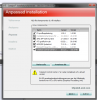
But I can't uncheck CCC, says it's already installed, I'll show a picture too.
Attached Files:
-
-
I have never encountered that...interesting. Are you installing the Swedish version? Maybe english version might be different...as I said...I have never encountered where I couldn't uncheck CCC. Wait...what drivers are you installing. By the looks and numbers on your snapshot...looks like you are reinstalling 8.820
-
Oh the brightness buttons I use them like all the time Maybe I should stay on the HP ones for now then? And wait till they release a new one, it just felt old with 03/31 and the one that is on HP site now says 06/11 I think but updating with that one doesn't change either date or version so I guess it's not a bigger update.
-
Yea it turned swedish by itself, but it says that the CCC is already installed? Well yea it is since I can use it but here it says Catalyst Control Center 2. Catalyst control center 2 is already installed and actual version.
-
If you use the brightness buttons...stick with 8.820...as I said...nothing wrong with them.
-
Wow this turns in to a lot of posts, but I took the drivers on the site you showed, catalyst 11.6 I think? I don't know why it's messing really.. but about the brightness keys since I use them a lot maybe I should cancel this and wait for HP to release a new driver update on their site instead, I mean if I don't loose anything it really doesn't matter? I just like to keep them updated that's why I started to ask about this hole thing
Edit: Yea exactly I use them a lot, okay I'm gonna cancel this one, since it seems like you said it's gonna install the drivers I already have which is weird I don't bother messing with it for now
-
Um, this is weird though because I downloaded the driver package from the link you provided Bobmitch and when I run it it gives the same versions numbers as MiRRe89 got, i.e. 8.820 for the AMD driver... not 8.861 ?!
Maybe only US residents can get this version... haha
-
That's weird... But we download the same thing as Bobmitch probably did so whatever language or laptops are in shouldn't matter right.
Bobmitch: How long do you think it'll take for HP to put it up on their site, 1 or maybe 2 months more? Guess it can be hard for you to know maybe you you seem to know everything haha
*HP ENVY 17 & 17 3D (2XXX series) Owners Lounge*
Discussion in 'HP' started by 2.0, Mar 14, 2011.