Problems? See this thread at archive.org.
Quick Question....I'm very confused about the point of copying the whole SWSETUP folder....
When I'm done doing my clean install of Windows 7....what happens next.
Do I just simply pop in the DVD DL that has the SWSETUP folder and just copy the entire thing into the C Drive?
And if so does Windows automatically just install everything or will I have to manually go in and do something in each folder?
For example earlier in this thread another member posted this for getting the TriDef software license...
""Make a backup of the TriDef3d folder from your x86 program files directory. Then run the file called HP.trideflicense from inside the folder.
This will install the license for all TriDef products that ship with the Envy."
So after that though I've got to go to their website and actually download the entire program/software correct?
But will I have to do the same thing for each program in the SWSETUP folder?
-
-
Do I just simply pop in the DVD DL that has the SWSETUP folder and just copy the entire thing into the C Drive? You could...or just keep the folder on the DL disc and save space on the HDD..
You will manually install each driver individually...(that is the only advantage to doing a total restore off the HP discs...it does the installations for you and recreates the SWSETUP folder...
So after that though I've got to go to their website and actually download the entire program/software correct?
YES...but make sure to copy the TriDef 3D folder to the C: drive first...then install 4.5.1 This should keep your license active. If you are in trial mode after install...doubleclick the HP file and it should license you -
Well formatting erases data, not firmware. But yes it is frustrating to not only get it working but then to make sure you are using the SSD to its full potential.
-
So are you saying I have 2 different options?
1) Copy the entire SWSETUP folder onto the C Drive.
2) Keep the SWSETUP folder on the DVD and then what?
Like if I do Option 1 does the laptop automatically install all the drivers and/or programs that are within the SWSETUP?
And if I go with Option 2 you're saying I have to manually go in and choose which drivers/programs to install on the computer....? And thus not even have an SWSETUP on the laptop but the drivers will be there.... -
Again...I recommended that for space saving purposes. I have two drives...C: which is an Intel X-25 SSD (160 GB) and 640 GB HDD D: I moved my SWSETUP folder to D: to save space on my SSD. I can still refer to the files and folders on the D drive now...
-
TheAtreidesHawk therre are a couple of good points here which were made very well but perhaps not emphased:
1. the purpose of copying your SWSETUP directory is because without it, the vanilla win7 install does not know how to make the hp-specific things work
2. copying SWSETUP from your optical disk back onto your C: drive after a fresh win7 install does not by itself update the drivers. like bobmitch said this this just gives you the driver installation files themselves and you have to go through each driver and install them manually (click on each .exe). You can see that rebuilding the HP drivers from the SWSETUP folder could be tedious -- so I would suggest that you get a working system with updated drivers (downloaded from HP site) BEFORE you copy SWSETUP away for the clean install. that way when you manually re-install the HP drivers via SWSETUP, they will be the latest ones.
3. the purpose of backing up the tridef directory and copying it back to the freshly installed win7 drive is becuase it contains a license file. that will enable to you download the latest Tridef bits themselves from Tridef
so -- I know you're upgrading your windows OS to win7 ultimate, and using the clean install method for that. here's my question to the win7 experts: Must Win7 ultimate be installed fresh, or can he not upgrade to win7 ultimate on top of the supplied win7 home? maybe its not a clean or reilable upgrade I don't know, or maybe its not even allowed... but the motivation here is to:
1. perform a system recovery from the HP disks. On that note, why not do a minimal recovery, which would take care of the SWSETUP thing automatically. (TriDef I'm not sure -- bobmitch you'll have to comment there)
2. get the SSD and all working by using the HP recovery disks
3. then upgrade to win7 ultimate -
Okay so assuming I updated all the drivers BEFORE copying the SWSETUP folder.
And then I copied it back onto the SSD after a clean install.
I would then have to
1) Go thru each folder and double click each ".exe" (executable file I know) and that would install the driver for that particular HP software.
2) But I'd still have to go to HP's website and download the programs themselves as well.
Am i understanding it correctly now?
Finally if I am understand it correctly does the SWSETUP folder contain every single driver...including the Intel Chipset, Switchable Graphics, etc etc or is it ONLY HP related stuff like the useless CoolSense and HP Quick Launch? -
no the SWSETUP folder contains all the driver executables themselves, and reflects any downloads/installs you did previously from the hp website. in other words, if you install from SWSETUP you don't have to install from the website. assuming SWSETUP contains the latest, of course.
only the HP specific stuff. Windows will alwasys try to apply a driver from its own library, but HP supplies a driver to either replace the windows driver or provide one that windows does not have.
I still don't know why you can't just upgrade win7 home to win7 ultimate, which would be simpler But if that isn't prefered, doesn't work, not allowed, or if you are simply committed to a clean win7 ultimate install, then you have to go the SWSETUP route. and like bobmitch said don't forget TriDef. -
2) But I'd still have to go to HP's website and download the programs themselves as well.
In some cases, YES...There are more up to date drivers on the website. Either that...or run HP support assistant and it will find and download the most up to date drivers for you...
Finally if I am understand it correctly does the SWSETUP folder contain every single driver...including the Intel Chipset, Switchable Graphics, etc etc or is it ONLY HP related stuff like the useless CoolSense and HP Quick Launch?
It will contain it all, except the TriDef...so yes... -
so -- I know you're upgrading your windows OS to win7 ultimate, and using the clean install method for that. here's my question to the win7 experts: Must Win7 ultimate be installed fresh, or can he not upgrade to win7 ultimate on top of the supplied win7 home? maybe its not a clean or reilable upgrade I don't know, or maybe its not even allowed... but the motivation here is to:
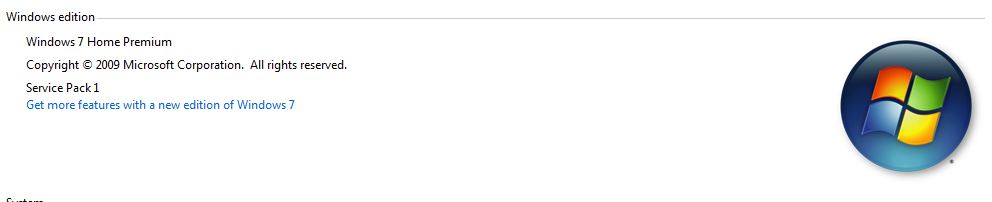
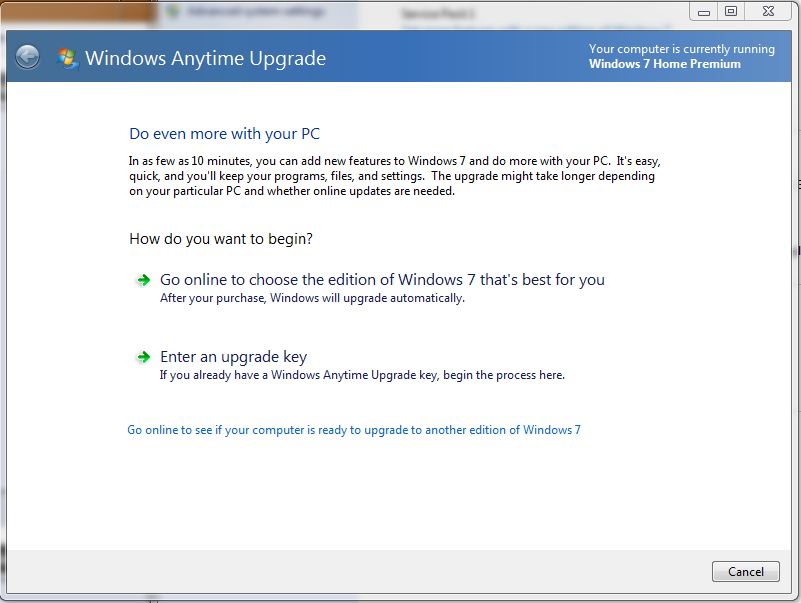
I believe that you can do a minimal restore from HP recovery disks...THEN...once done, you can either upgrade to Ultimate one of two ways: 1. Use the Anytime upgrade and insert your DVD key when it is time to do so, or 2. Go to "Computer" and right click...choose properties...there is a prompt for "Get more features with a new edition of Windows 7" Click on it and it runs Anytime upgrade as well.
By entering the DVD key...either the features are already installed and now are active, or Windows will download the files necessary for the upgrade. I have not done this on Windows 7...so it will be interesting...Attached Files:
-
-
Well, not arguing the merits of a win7 upgrade versus a clean install, it occurs to me that the Envy image is pretty clean by itself, and the minimal recovery option is indeed the bare minimum. So -- one could avoid the SWSETUP method by following the folloiwng steps:
1. build and configure as shipped
2. make recovery disks
3. update essential drivers from hp website. BIOS, chipset, graphics
4. test and play. when satisfied, move on:
5. copy SWSETUP and TriDef folders just in case
6. install SSD in secondary slot. flash and format
7. install SSD in primary slot
8. use the recovery disks to re-install the HP image. use minimal if desired
9. use HPSA to check for driver updates.
10. install HDD in secondary slot. format and move files as needed
11. upgrade Windows. SWSETUP and TriDef backups not used if all goes well
12 SSD optimization checks
13. test and play -
Okay I've got it. Thanks everyone.
-
Hey guys, new issue.
I'm taking an Envy with raided 750 gb harddrives and removed one and reset the raid array (turned it off). On boot up it says there is no bootable device. I use the 4 dvd recovery discs to do the recovery but at the very end when I reboot the system it says there was a failure. The message says "[205] UIA write FAILED 3 times ! ! !"
I've tried every restore option and always the same result. Any ideas? -
@mav99
Your image will look for the raid array. It is unable to find the array so it will always fail. This is HP's idiocy at it's best. Get a copy of Windows from one of the download links in this forum to install and then use your laptop key. Do not buy a restore disk from HP. It will also give you the same error. -
ya. if you want to use the HP image on the single primary HDD, you have to repair the master boot record of the primary drive with the vanilla microsoft disk first. Once you do this, then the HP restore should work.
worst case, and if you want to preserve the HP software and TriDef capability of your Envy, you'll have to recover some HP specific things. you'll have to put the RAID back, restore the HP image, then backup SWSETUP and TriDef folders before breaking the RAID again. With those in hand, do a fresh Win7 install, then restore those two folders. you can then re-install the HP-specific drivers individually from the restored SWSETUP folder. and you can download the latest TriDef bits from Tridef if you restored that directory to its original location (it contains a license file)
bobmitch wrote up a guide explaining all this. I'm just summarizing -
Follow the guide and you should have no more problems...
http://forum.notebookreview.com/hp-...ay-fix-hp-envy-17-3d-pavillion-notebooks.html -
Once in a whilse on my 3d SB HP I get the mouse into a locked mode with an orange light on. I guess this is to disable it, but... I've no idea how to unlock it other than to put the machine to sleep ansd wake it up. Any ideas ?
-
Yeah, I use the Synaptics drivers from here:
Drivers | Synaptics
Gives me greater flexibility with scrolling and more with Scrybe AND disables the ability to turn off my touchpad. Doesn't bother me that it is on all the time...I go between touchpad and Bluetooth mouse.... -
I just want to make sure that I have the correct versions of the software that comes with the HP Envy....this is what I have so far from what I've gathered...
Adobe Photoshop Elements 9
Adobe Premiere Elements 9
CyberLink PowerDVD 10
CyberLink YouCam 5
TriDef3D
Anything else noteworthy aside from the Synaptics and HP Software?
Also does the envy come with CyberLink Media Suite or is it just CyberLink PowerDVD....? -
Both Media Suite and PowerDVD are both in your SWSETUP folder...
As far as others...right on target...
TriDef will be 4.5.1 -
I don't see a download link for MediaSuite on HP's drivers website (which I'm looking at now to familiarize myself with what I'll need to get and from where).
However there is something called HP MovieStore. Although I doubt thats it.
But anyways so long as I have the PowerDVD thats the important one. -
@ metril, Bobmitch and dlleno
Thanks guys! -
In your SWSETUP folder there is another folder called CyberDVD...that is the Cyberlink Suite...NOT including PowerDVD, which is in it's own folder called
PDVD3D. Run the Setup app in the folder and install the DVD Suite...which includes burning. In particular, install the Power DVD from the folder...then upgrade using this link:
CyberLink PowerDVD 10 (2D/3D) HP ENVY 17t-2000 CTO 3D Edition Notebook PC - HP Customer Care (United States - English)
That should do it -
hey any of you Envy guys with SSDs -- Intel released a Sep, 2011 firmware update for the 320 series. I just updated mine.
the HP instructions are burried in here. basically you go to the Intel download center, download and build a bootable disk with the firmware update, boot from optical and the utility flashes your SSD with the latest. -
Is it worth installing an SSD i hav the 1.5 tb 5400 in raid0, my bud gave me his old OCZ agil 2. will i see a speed boost in os if i un raid and go 60g SSD/750g hhd 5400 ty in advance
-
 a SSD is the best upgrade to any modern computer that isn't RAM limited
 -
Hi all,
Does anyone have these problems? Does anyone know how to solve them?
1. The left hand side palm rest area gets very hot after a few hours of usage and gets extremely hotter when I'm playing games.
2. I noticed recently every time I wake the computer from sleep or after a cold boot up, the lan ethernet network couldn't be detected. So I had to keep unplugging - replugging the RJ-45 to get it to recognize network and internet connection (which is a big bother).
I have 2x 640 Gb HDD in Raid 0, if that matters.
Any help or suggestion would be gratefully appreciated.
Thanks. -
Hey Dr4quL4 :
1. The video card is located under the palm rest, to the left, if you are having heat issues that would raise a red flag for me, under normal usage, it never gets hot for me, in video games, it always gets noticeably hot, but not uncomfortable there. Try updating your drivers and see if that helps things. It should be noted that i have overclocked the video card as high as it can go, in 80+ ambient temp and had no problems, hot to the touch yes, but nothing stability wise occurred (no artifacts, missed pixels, no distortions, no dropped frames or laggy response)
2. Before jumping on anything complicated here, i would suggest updating to the newest firmware for the bios, and the latest drivers for the entire computer. I saw alot of my resume issues resolved with a simple bios upgrade. -
Thanks graf3x
I thought it would be the video card getting overworked when playing games. I just didn't expect it to be that hot after just watching youtube for a couple of hours.
Anyway, I did what you recommended and updated the recent BIOS release. I even updated the AMD Radeon update (optional) notified by Windows 7, but that wasn't the smart thing to do. After rebooting, the screen just went black. So I guess that's a fair warning to anyone attempting to updating AMD Radeon via Windows.
As for the heat issue, I'll see how it goes.
Thanks. -
Many of us learned long ago...to NEVER download anything AMD / ATI from Microsoft update...horrible when a software company thinks that they have a handle on hardware...other than their own. If need be, go to safe mode to uninstall the update...
Open Windows update...Choose "Update History"...at the top of the window is "To remove updates...see "Installed Updates" and remove the video drivers. The go here for the most up to date from HP:
AMD High-Definition Graphics Driver HP ENVY 17t-2000 CTO 3D Edition Notebook PC - HP Customer Care (United States - English)
Not to worry if you don't have the exact model I do...the drivers are for all 2xxx version Envy's
ALSO...make sure that Coolsense is on "Performance Mode" should help alot. -
windows update wont run in safe mode will it? Windows automatically created a restore point in my case and I just restored it to prior to the ATI update (from safe mode) -
It might if you boot with Network enabled as well. If not...restore point will help. At this point, you might want to use Driver sweeper to clean out all ATI / AMD remnants and install the HP drivers
Go here for Driver sweeper:
Phyxion.net - Driver Sweeper -
So is there a solution to make Wireless Display work correctly? My Envy 17 will freeze every 5 minutes and need to be rebooted while using wireless display. I have the pvt 2000 model from netgear and use the widi built in to the envy.
-
So in regards to AHCI for SSD's I've been searching multiple places and it seems like most guides show how to enable it AFTER you've installed Windows 7.
Cuz apparently it causes BSOD if you don't do it correctly....
Well off another forum I found this on Intel's website and it seems like it should work. I know someone mentioned what chipset we've got in the Envy 17 3D but I was wondering if someone could repeat that info for me one more time....
Intel® Rapid Storage Technology — Configure the BIOS for RAID or AHCI on an Intel® Desktop Board
List of Supported Chipsets
Intel® Rapid Storage Technology — Supported chipsets for AHCI
Also one last question...by enabling AHCI it won't affect my current set up right? Like even if I decided NOT to install an SSD or do anything afterwards enabling AHCI both thru Windows and the BIOS wouldn't adversely affect my system I hope...? -
The fresh Win7 install should take care of the AHCI question on its own. but if it were me: BEFORE I tell my BIOS to run AHCI, I want to make sure that the Windows ahci service itself is allowed to start!
-
You're referring to then....
Error message when you start a Windows 7 or Windows Vista-based computer after you change the SATA mode of the boot drive: "STOP 0x0000007B INACCESSABLE_BOOT_DEVICE"
So can someone explain to me why MS does this? I mean did they not know about AHCI when they were designing Windows 7? or is just one of those better to be safe and not unleash something that very few people will use or miss?
Lastly again so IF I do Steps 1 and 2 but I do not install an SSD or anything will my stock HP HDD still boot up into the manufacturer's Win7 without issue?
Or is a thing where once I've fully enabled AHCI I'm committed? -
yes. its a better safe than sorry thing. my DV7 came with AHCI enabled in the registry, and in all likelihood this is a non-issue anymore. but I'd just want to be sure -- the registry check takes 90 seconds
Windows disables drivers that are not used -- so if your Envy comes shipped in IDE mode, you can't be certain that msahci will be enabled without going into the registry. The bios will get cranky if it tries to hit the disk using ahci and Windows refuses to start up the msahci service!
but -- during your clean install I bet its all taken care of. only if you want to enable AHCI on the as-shipped Envy would you need to do this check imho. -
Someone here quickly convince me to cancel my DV7T-QE order and order an ENVY 17 3D instead.
Tell me things like "You won't regret it" and "ENVY ownz all".
*cry for help* -
just consider the things that are important. the essential benefits that the Envy brings to the table are:
1. best for high speed sustained wireless streaming and support for a/g/b/n formats (DV7 does not support a).
2. 3D
3. higher speed capable internal bus (1600MHz RAM if, processor and RAM agree to speak that fast, the Envy will support it. DV7 will not)
4. stronger GPU for gaming
5. less important but cool: backlit keyboard, slot-load optical drive
6. RAID 0 support for dual identical drives. no RAID on the DV7
THe above swamp the advantages of the DV7 , and if they are important to you then Envy ownz all and you won't regret it. but if the above are superfulous, then the DV7 brings the following to the table
1. a smaller, more affordable 160GB SSD vs the 300GB for the Envy. with the 30% coupon this is attractive if the SSD is important, compared to the dual HDD configuration.
2. bus off chip-alive technology that turns the GPU off when it is not selected. saves battery
3. substantially greater battery life
4. matte-finish 1080p panel. Envy is glossy
5. I happen to prefer the styling of the DV7. brushed black or aluminum look
6. runs cooler, owing to the weaker GPU
... and the manual graphics switching via CCC, in the DV7, is sweet. I don't even use the dynamic mode. I"m quite happy with my DV7, but none of the Envy'isms above are important to me, and I prefer the matte screen for photo editing. The affordable SSD tripped the trigger for me, as did the greater battery life. -
EDIT: Never mind. HP's website says they're not compatible....
-
I read your previous posts but am not sure what is not compatible with what that you're referring to
-
Thanks for trying to help but I got the info I needed in 5 seconds from HP's own website. Just a ques re recovery discs media.
Anyways there was a minor but very noticable defect ony first Envy 17 3D. So I returned it completely. Really hoping this new one is flawless. The screen on the last one was perfect. No dead pixels or anything. So hopefully I get the same excellent machinel minus the weird warping/jutting out of the side ports that I had with the first one.
Luckily I got my money back in time and I just ordered this:
Envy 17 3D
- Genuine Windows 7 Home Premium 64-Bit
- System Recovery DVD with Genuine Windows 7 Ultimate 64-Bit
- No Additional Office Software
- 2nd Generation Intel(R) Core(TM) i7-2820QM (2.3 GHz, 8MB L3 Cache) with Turbo Boost up to 3.4 GHz
- 1GB GDDR5 Radeon(TM) HD 6850M Graphics [HDMI]
- 12GB 1333MHz DDR3 System Memory (2 Dimm)
- 750GB 7200RPM Hard Drive with HP ProtectSmart Hard Drive Protection
- 6-Cell Lithium-Ion Battery (standard) - Up to 2.25 hours of battery life +++
- 17.3" Diagonal Full HD HP 3D Ultra BrightView Infinity LED Display (1920x1080)
- Blu-ray Player & SuperMulti DVD Burner
- HP TrueVision HD Webcam
- Intel 802.11a/b/g/n WLAN and Bluetooth(R) with Wireless Display Support
- Backlit Keyboard with Numeric Keypad
- Adobe(R) Photoshop(R) Elements 9 & Adobe Premiere(R) Elements 9
- HP 3D Active Shutter Glasses
- HP Home & Home Office Store in-box envelope
$2,348.99
- $ 704.70(Coupon NBNV1934)
= $1644.29
+ $110.99 (Tax)
+ $ 0.00 (Free Shipping)
Grand Total: $1,755.28
Expected Build Date: 09/16
Not bad at all if I do say so myself. I have the caddy kit for the 2nd hard drive bay, the WD HDD that I plan on putting in said bay. Now all I need is to wait for the new Samsung SSD to released and reviewed come October! But I'll be analyzing it carefully and of course comparing it to the Kingston HyperX series (recommended by dlleno of course). -
nice work TheAtreidesHawk holy cow 12GB and the 2820 you'll have plenty to enjoy before you put that SSD in!
also good work on using the HP website. there's lots of good info out there that answers many a question here! -
Good work. to re-state: DVD RWs cannot be used to create recovery disks. BUT -- think about it: whether or not they will work or not far is less important than the question of why would you want to put a recovery image onto a disk that can be erased?
Use DVD +R or -R. I just made recovery disks with +Rs. -
Does anyone know how long the 30% coupon (NBNV1934) is good for? I'm finding conflicting info when I search.
Just cancelled my DV7T-6100 order so I can order an ENVY 17 3D, but it might take a day or two to clear up the credit charge so I can re-order. I just hope the coupon is still active when I do. -
It's good till 09/11 from what I've seen.
-
Yeah, I've seen 9/10 and 9/11. Either way, I'm cutting it close.
I see myself ending up without either laptop. I'm fail like that. -
Well I hope you make the deadline man. If you call HP they may be able to give you a concrete date. However everywhere I've goneto says 09/1/ which speaking as American is kinda odd....but whatevs.
Anyways best of luck! -
Hello all - Long time lurker, first time poster. I have read literally every page of this thread, so I feel as if I've paid my dues though! I appreciate all of the tips and help that the other Envy owners out there have been able to provide.
I found this forum after ordering my first Envy 17 (non 3D, 2820, 8GB, 2x640HDD, 1080p screen) in early August. Thanks to you all I found that the 3D version was actually cheaper, and ended up sending the first Envy back for the 3D version (same specs, except as listed below), which was delivered this morning and is sitting at home while I count down the minutes until I leave work!
I ordered my first Envy with a 15% coupon, but I now had a 30% coupon code so I went to town and upgraded to the 300GB SDD + 750GB HDD and also to 12GB RAM. I have seen a few posts that have mentioned that 12GB RAM isn't optimal due to a dual-channel issue. I've been out of the loop computer-wise for the last 6-7 years, and I'm not sure what this may mean for my new baby. I just assumed that "more is better," but is there really a performance hit by going with 12GB instead of 8 or 16? I certainly don't plan on upgrading to 16GB anytime soon, but would I be better off sending this one back for a unit with 8GB? I'm not concerned with downgrading just to get a little money back, but if the performance hit is negligible I will sit back and enjoy this great machine (once I get home of course)!
Thanks again,
Kevin -
Hi,
I am thinking about selling my nearly unused 3D glasses for the Envy because I just don't use this feature. Would anybody be interrested in buying them? How much would you pay for them? I live and would ship them from Germany btw.
*HP ENVY 17 & 17 3D (2XXX series) Owners Lounge*
Discussion in 'HP' started by 2.0, Mar 14, 2011.