Problems? See this thread at archive.org.
If it's a fundamental design issue, of course they won't have a solution. But they can at least try to reproduce the same problem on different machines on their ends to find out. If it is just your laptop, they have no choice to send you a replacement. Otherwise they may lose a customer. Personnally, i would not settle with a repair....
I would be surprised i a company big as HP does not have a lab to support customer's technical issues.
-
That's bad. Do you get random rebooting too? I asked this question a few days ago and received no reply. I got the random reboots with my dv7 tqe that is why i ask. I hope it would not occur with envy.
What are you running when the random freezings occur? -
I just had my first wireless freeze!!!! Running the 14.0.2.2 drivers.
I personally won't stand to these freezing issues and I will not be downgrading my drivers. I will be calling HP up first thing next week to make them reproduce the error on their test machine.
Once Windows 8 rtms chances will be slim that we will be able to downgrade the drivers without issues. I rather have a working device.
It looks like the Intel Centrino 6200 has issues whilst under heavy load. I have tried this 3 times and always end up with a frozen laptop.
They better be able to offer me a 6300. -
I dont think i have seen hp laptops with 6300 chipset.. Personally if i have any trouble with the 6200 chipset, and i really mean any I will be getting a 6300 and putting it in... I have even played with the idea of getting that 3ed antenna that could be used with the 6300, installing it myself and pluggin it in
 Then again, i'm more comfortable than most taking apart a laptop.
-
Does the Dell Precision you tested has SB processors?
I start thinking about ordering XPS 17 (3D or non-3D) after hearing all your and other owner problems with the Envy. But seems like they have problems too.
I believe that all laptops would have issues here or there but they should not fundamental/design issues that make them not useable. (random freezing, throtling...). Not with laptops at these price range. -
I just checked the HP spare parts page. They do sell the 6300. I believe someone here already replaced their 6200 with a 6300 and it was not blacklisted in the BIOS.
The third antenna is not needed to install this card.
And you are right replacing this wifi module is as simple as replacing the hdd. It is user accessible and is located right next to the hdds.
All you have to do is take it out, pop the new one back in.. attach antenna cables .. done.
To test if the 6200 is giving you issues just fire up 5 torrent downloads simultaneously. That should stress the card enough. Make sure that these are high on seeds with loads of connections. (New trailers, linux distros etc)
Maybe it also depends on the internet speed. I can usually hit a solid 2,5 MB/s ... that in combination with a lot of connections causes the card to freeze.
If anyone knows of a better way to stress test the card please let me know!
http://h30094.www3.hp.com/product.asp?sku=10235865&sc=CNET&jumpid=ex_r2910_gps/compshop -
Ya i know but i'm one of those type of people that thinks, if a card can do something, in this case 450mb, then it should... it would bug me endlessly that i had something that wasn't fully functional but could be if i did a little extra work =)
The one thing i'v seen that stresses my download the most, on any connection i have had, is usenet, when i get my laptop i'll fire up a client and see how much i can pull down!
-- The other option is if you have another desktop/laptop on the same lan connection, there are local lan testing tools out there for testing bandwidth.. I cant remember if sisoft sandra lite has that or if you have to get the pay for version.. worth looking more into i suppose. That or just transfer some large files from my ssd in my desktop to the ssd in my envy when it arrives, that should max the pipe pretty easily. -
Those are the results I get out of the box on the 17 3D I received 2 days ago, but I was under the impression writing speeds should be faster, isn't that the case ?
-
Haha I know what thats like! I would also add a third antenna but don't really want to take apart the machine properly. I just dont have the time right now I suppose.
Don't have access to usenet I m afraid. I have tried normal HTTP downloads and normal torrent downloads and it works fine.
I believe it is the simultaneous connections that torrents create that make it choke. So HTTP and just a single torrent download shouldn't be an issue but a lot of opening connections through multiple torrents will make it freeze.
I will look into sisoft sandra but my other laptop has given up on life :/ -
Yeap, tried that one before, would not help me. My throtteling is unrelated to the temperatur. I first thought it was, but after much further testing, just as crimsoned as well, it has nothing to do with the temps and is completely random.
The support supervisor (after I wasted an hour with a regular tech guy) actually made the call that it might be some issue with the MOBO, but they can't tell remotely and would have to take it in for testing. I of course did not agree so he escalated my case to QM. I am expecting a call from them today. -
Yeap, driver fixed mine as well. But the thanks for that goes to Fiver5.
-
slotti, I do hope they send you a brand new system while you are allowed to keep your current one until the replacement arrives. I would not take another option! You have been put through a lot with HP, and they need to bend to your will. Heck, maybe the ECM (and if it really is an ECM its good and bad, since you will not be allowed to speak with anyone else at HP once you get one of those assigned to you) will allow you to build a custom Elitebook like they did for lovelaptops regarding the scandal over the Envy 14/Radiance....
-
It would make sense, but I also experienced the same issue on Prime95, and Fiver5 ran the same test as I, he did not have any throtteling, plus, I can't stress it enough, also I first thought it was temp related, IT IS NOT TEMPERATURE RELATED.
I have down throtteling at 60C. -
No, the Dell Precision was an Intel® Core i7-940XM Extreme. A Beast. It killed even every single desktop in our office.
I heard that Dell won't be offering the SB in the precision series anytime soon. >>> reliability issues for their premium clients
-
Not sure what to think. I have most of my write cycles being written to my 7200 rpm HDD. I wonder if the software is doing that??? Gonna have to play around...but you are right...Read is fine...write is below normal. Then again, maybe NOT!
http://www.legitreviews.com/article/1022/8/ -
Hahaha, I doubt they would let me configure an Elitebook. For a comparable processor, it would be around $3,000. If they do offer it, I would of course take it, even if I do not like the design of it, but the FX Quadro 2800 is sweeeeeet.
Seriously, all I am asking for is a repplacment, and hopefully with cross shipping (but I know you did not get that either). Now watch me sending mine back and they will come back to me with: "sorry, we can't replace your notebook. You tempered with the 3d glasses". Ok, I don't want to jinxs it, so I never said the former .
-
Slotti, did you get your C300 yet? I'm traveling and haven't been able to check mine out yet, but my friend got it and said it all looks in order. Of course, it hasn't been hooked up yet, so I was wondering how yours turned out.
-
I don't think I updated where I'm at. I finally got an order to go through, but of course the build date is many weeks later that the original one. I got an offer for a $50 credit last night when I talked about what a huge inconvenience this has been for me. I told the agent that I don't think that $50 is enough to cover everything that has happened, and then went on to tell my story a little more about the whole experience. At the end of the conversation, I asked again about the credit, and she immediately jumped in saying, "you declined that offer." I argued back and told her that I never said any such thing, I simply said that $50 isn't enough, but she was pretty rude about it and said that I lost the chance to get that discount.
At that point, I just gave up inside and simply asked how I would file an official complaint about this experience. She said there was no phone number but gave me an email address I could write to, it's the escalations department that others have talked about.
To date, I've made 18 phone calls to HP sales and resolutions since I ordered on April 8th, and I'm tired of wasting my time with them, so I wrote escalations and hope they will just take this over and offer some kind of resolution without any further battling from me. -
So far everything on my envy seems good. Slight trackpad raise on the upper left side, but nothing really to worry about. Performance wise everything seems to be working like it should. I did a fresh install on my SSD and am using my HDD for small programs and data storage.
I do have one stuck pixel to the far left. I'll try and get it going myself. It doesn't seem worth it to send it back and hopefully receive it in the same condition. Killa Joe, does this seem like a time to call resolutions and get a little compensation for my trouble? -
In theory the max RAM frequency for the 2630 is 1333MHz (So sayeth Intel). There was a hypothesis awhile back about the 2630 actually supporting 1600MHz RAM. While the ram should downclock for compatibility, it remains to be seen if you can actually get the 2630 to clock 1600MHz. Besides, I believe the performance bonus for the faster memory is in the single digit percentile range, so it's mostly useless for average users to pay the premium unless you want bragging rights.
Generally speaking, this is true of all manufacturers. You will always find a subset of users who are not content with their purchase/experience and thus will be very vocal about it. The ones enjoying their choice rarely post.
As for the freezing, I believe it has been attributed to a specific wireless chipset and driver combo. Honestly, this is to be expected in technology. Nothing is ever going to be 100% compatible 100% of the time. Why else do patches get released? In our case, it was determined how to fix the 6200 card given a common chipset in most WAP implementations. You can either employ the solution, change your WAP, or change your 6200 card. You can't get blood from a stone... so thus you will never get the aforementioned combination to work unless you are willing to change something. -
It is supposed to be in the mail today. But as it looks, my Envy is going back to HP. Not sure what happens from there on.
Ok, so I just was on the phone with Tolga. It's only HP QM and I don't think it has anything to do with ECM. He could not help me at all. His QM department is only responsible for repairs. He could try to expedite the repair but that is about it. He actually mentioned he would not accept a repair if he was me, since this is a brand new laptop.
He is connecting me to sales now (I am back to where I started). BUT, he mentioned usually the procedure is to sent the laptop back and theb the would start the new order for the replacement.
I told him it would be unacceptable. He just said that he can't really do anything about it from his side, but he wanted to stress the USUALLY part of his reply. So I am hoping that he hinted at some possibilty of at least getting a cross shipping (the starting productione). -
Who me?
I only complain when I have to. Lol, anyway, I like others would not live with a dead/stuck pixel. Someone just posted a day or so ago that by updating their BIOS they pixel was gone. Weird, but try it. If it won't work, you have option to ask for some serious credit back at least a couple hundred dollars, or send it back for an exchange.
KJ
-
Oh, too bad. I was sure it was Coolsense in your case as well, as the symptoms sounds like mine, with throttling back even if the CPU doesn't run hot.
Hope you figure it out, I can imagine being without a computer while waiting like crazy for another Envy. -
So here is the deal. NO DEAL. The sales lady was very ignorant.
They gave me a RMA number and told me I could keep my current Envy till I reveice the new one with an estimated build date of May 16th.
So far so good. The big BUT is, they would fully charge my credit card for the new build now and I would get the refund 5-10 business days after I return my current one.
They would be so generous to give me a free 2-day shipping. I asked if I could get any compensation for my trouble, and them charging my credit card into my next billing cycle which would I would cause interest charges for (they don't need to know that it won't ). Her answer was: We are already giving you a great deal by matching you old price, and if you want an additonal rebate, I can get your regular shipping and we can credit $22 to your CC when the system ships. Seriously $22.
I declined and told her I would have to think about it. I'll be calling resolutions a bit later today and see what they can come up with.
I have a feeling I am done with HP though. Especially after the sales agent said: "Your computer is still working, it is just slow, so you should be lucky that we even accept the return without restocking fees". What the Fu@#.
I have heard a lot of horror stories about HP before, but I really gave them the benefit of the doubt, even after my 3D glasses disaster. They redeemed themselves a bit after they sent me a new PSU overnight, but this is just beyond. I should be thankful that they let me return a brand new malfunctioning laptop without restocking fees? Are you kidding me. -
"Especially after the sales agent said: "Your computer is still working, it is just slow, so you should be lucky that we even accept the return without restocking fees"
WHAT?!?! Did that idiot ever hear of the 21 day return policy? You can call and say "I wanna return it just because I dont like you" and they HAVE to take it. Who is she trying to kid? -
Indeed, #$#@$@
I would be more than livid! Did this rep. come from the
Dell/Alienware side?
I mean,
restocking fees should not even be in HP's vocabulary. I'd complain to HP Resolutions about this rep. Hope you got her name/ref#, or badge ID.
slotti, I think time and time again, if nothing else, our experiences with HP shows that it really depends on who you deal with, which will result in various outcomes. I sincerely hope when you call Resolutions today, you get an "angel from Heaven" who will make miracles happen. I know, its a long shot, but everyone here is really cool/chill and deserves a great laptop build. I do hope you get yours...whatever it will be.
KJ
-
I know! I'm fuming at this right now.... A/C on, fan on, and drinking iced tea trying to chill, wow.... I know if
slotti got hold of the right supervisor this rep. might be looking for a new job, seriously.
KJ
-
Well, since I was fuming while I was on the phone, I totally forgot about getting her ID number and her name was one of these that I can't pronounce in a million years. But, since she actually issued a RMA number, I think her name will be logged with it. It is not my intention for her ot loose her job though. All I want is to have a laptop that I paid for in working order.
I even would be fine not receiving any additional discount (despite loosing all that time of having to reinstall all programs on the replacement, and being with a slow notebook till the new one would get here), but I am not willing for them to bill my credit card for weeks and weeks without getting anything for it. At a 20% interest charge on a cc that is $50 for the 6-8 weeks it will take till HP refunds for the old notebook. -
Slottie is your Envy issues based on a bad motherboard? Sorry I've been out of the loop recently and it seems like several people are having very weird issues ranging from all sorts of stuff...
Makes me anxious about the replacement I'm receiving. Although I plan on selling it asap.... -
Mostly most of the problems is within pre-installed software that HP have, simply too much useless software. On my E14, after I did a clean install, all the problems seems to be gone...its a battle at first to get everything works though. You really need to know what you doing, which software/driver you need to install, in what order as well.
I would think slotti issue can be fixed and you can avoid all the hassle dealing with HP, I wont even going to keep coolsense software installed on my gf envy, I'll just get a "REAL" laptop cooler. -
IDK if its practical, but I had a crazy idea. What if HP gave cutomers when ordering a custom laptop, the choice of what they actually wanted installed into their systems? To make it simple, HP can offer different levels of installations. I'm probably way off here, lol.
KJ
-
Ok, someone try this to see if they get the same result. Set your power settings to "power saver", change your switchable graphics to the integrated power saving card. Then don't touch anything for about 30 seconds. Now check to see if your sound still works by raising or lowering your volume. I can make my sound stop working everytime by doing this. But only in power saver mode. Weird?
-
Unfortunataly, they will never do that. That would require writing many different images to load on the hard drive. Too much manpower and time involved. On the Envy, we get minimal bloatware as it is. The only thing installed is Microsoft Security Essentials...which actually isn't bad. From there...you can selectively get rid of what you don't want. Mostly HP apps in conjunction with Roxio (see ya!) and Adobe Photoshop Elements and Premiere Elements (I really like those...very useful to me). I wonder Slotti...try something. Go here:
MSI Afterburner
Follow some instructions from here and you will even be able to overclock the card
http://forums.guru3d.com/showthread.php?t=343049
Download the MSI Afterburner. Then set coolsense to work minimally if at all. Set your fan speed through Afterburner...which will mainly ramp up your system fan if the video card heats up...not the processor. I wonder if by doing this, you circumvent the issue with Coolsense...worth a try...NO? -
I will give it a try later tonight. I really don't want to give up on it yet. The thing is that the tech guys in the end had no idea about what could be wrong. In the end I think none of these guys have really any good deep understanding that gies beyond the common user knowledge.
I am getting my crucial 300 in the mail today or tomorow and will also try a clean install, just for the heck of it. -
So....what is the bottom line guys? Are we saying that when playing CPU/GPU intensive games, we should turn off Coolsense or put it in optimization mode so the Envy won't throttle? (I've never really asked what is throttle, but from desciptions here, is it just when the CPU out is high/low erratically?)
Part of me is looking forward to trying all this out on the Envy, but the other part, just wants a great looking/functional laptop without any hassles....
KJ
-
I just leave it on optimized mode all the time, seems like it gives me a perfect combination of power, silence and cooling.
The only time I'd consider putting it in cool mode is if I were to have it on my lap for a while. -
So now that the madness of my CCDA is over (I passed BTW), I was able to spend some time on my Envy (ugh, had the laptop for almost a month now and am just getting around to working with it). I decided to stress test the CPU using Prime 95 (cpu intesive tests - small FFT). I had the following apps open: CoolSense, Intel SpeedBoost Monitor, Open Hardware Monitor, CPU Usage Gadget, Prime 95, whatever services shipped stock with the laptop plus some others like logitech that shouldn't matter to the tests.
I originally had CoolSense configured for Stationary: Performance / Mobile: Coolest. After running Prime95 for about a half hour, I noticed my CPU clock speed got reduced significantly. It was down to about 100Mhz for a bit. Core temps went down to below 64C and then the core clock increased to about 1.4Ghz. Some time later, the core reduced again, cool down of CPU's and then an increase! So I'm thinking, this is weird, my laptop does what your laptop is doing.
I then started playing around with CoolSense. Mind you this laptop is sitting on my desk at work so I was changing the Stationary setting. Not much was happening to the laptop. The fan audible level stayed fairly consistent and the core clock changed very little. Thinking this was weird, I set the Stationary and Mobile settings to the same... WOAH was I surprised. Even though this laptop is sitting perfectly still on my desk, the mobile setting is changing the behavior of the machine and stationary is doing nothing! Based on some cursory observations, here is how the Mobile CoolSense setting affected my laptop:
- Coolest - CPU's clock varies between 100Mhz and 1.4GHz, fan varies with temp (audible when cooling, low otherwise), core temps range between 60C and 64C.
- Performance - CPU's clock constantly at 1.8GHz, fan is very audible, core temps range between 68C and 74C.
- Quietest - CPU's clock varies between 1.4GHz and 1.8GHz, fan is barely audible, core temps range between 68C and 76C. Basically every so often the core clock would decrease to lower temp without increasing fan speed.
At no point could I get Prime95 to switch the CPU into overdrive, so I need to find a better way to push the CPU over it's limit.
Now on another note, all of the above tests were done on a 120W power supply. When I switched over to my slim TT 95W PS, the max clock frequency it would go to was 1.3GHz. The Coolest setting would still vary the CPU, but the other two settings were fairly cpu core clock consistent.
I'm a little worried about the slim TT PS now. While it works perfectly fine for normal business use of the laptop, I fear it will severely degrade gaming performance but I haven't had a chance to try that out yet. Then again, I don't blame TT since the HP slim adapter did the same thing on my old Envy. I guess there is truly no way to get a "mobile" 120W power block.
Did you guys with the CPU problems try setting your CoolSense profiles to "Performance" for both Stationary and Mobile? - Coolest - CPU's clock varies between 100Mhz and 1.4GHz, fan varies with temp (audible when cooling, low otherwise), core temps range between 60C and 64C.
-
I caught up with the thread and have couple of quick comments before I run out, no time to multiquote
-My envy came with the 2820, I didn't upgrade the CPU I'm nuts but not that nuts (yet)
-I see little to no benefit to the 1600 Mhz ram, earlier in the thread I posted comparison benchmarks. If you really want 8GB however, it would make sense to me financially to order the Envy from HP with 6GB and then put in your own 1600Mhz 8GB. The math works.
-I am convinced Slotti's machine is just plain broken
-I have performed long running bone crushing CPU stress tests, played Crysis 2 in extreme mode for 30+ minutes and done other sundry things to try to break the machine. All done with Coolsense enabled (performance mode). No throttling. -
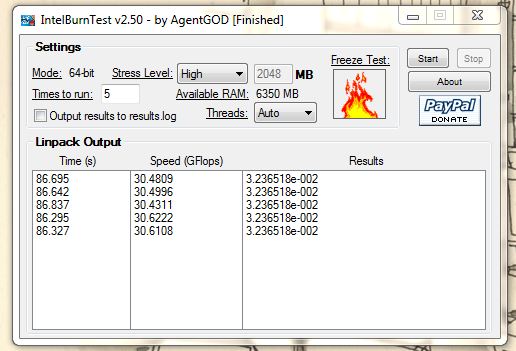
I'm re-running tests with the IntelBurnTest (v2.5) app. It's suppose to push the CPU's more than Prime95.
-
OK...
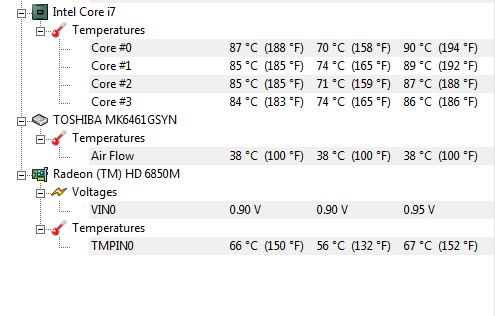
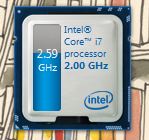
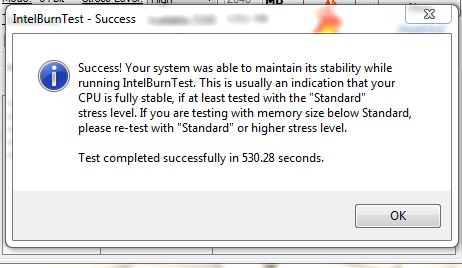
Based on Cam's post about IntelBurnTest 2.5. I downloaded it and ran in standard and High mode. 2630QM. Once I started the test...the processor kicked into Turbo mode and NEVER slowed down. I have Coolsense set to Performance on both power and battery. With that said...here is photos from "Standard Mode"
Will post the High mode nextAttached Files:
-
-
Now...here are the high settings:
Again...processor didn't budge below 2.5 GHZ turbo modeAttached Files:
-
-
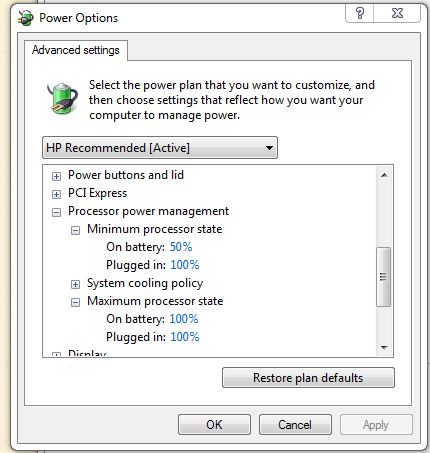
These are my settings in Power Management. I set the processor like a desktop...
I am not sure what is going on here. I have the low end processor...and it will peak at 90 degrees C and still not throttle down. Granted...I am not running the Burn software very long. All in all...with these temps...you would think that throttling would happen, no matter how long it goes onAttached Files:
-
-
What do you mean by very audible? I've always had mine set on the Performance setting and with a Zalman NC3000U (high setting) in tandem, the noise is not loud at all when playing games.
I'm also getting the same results as you guys when on the Coolest setting. The fans seem to run a lot more and is noticeably louder than the Performance setting. When gaming the CPU throttles frequently with huge FPS drops. Not sure why HP didn't just make the Coolest setting use the fans more but without CPU throttling. -
I know that HP created the Power scheme in control panel...How many of you have readjusted it? The original settings were something like 5% / 50% minimum and 5% and 75% maximum. My desktop i7 950 is at 100% / 100%. I set my Envy close to the same as desktop, except if it has to throttle down, then I allowed 50%. At 88C, my fans were blowin hard, though nowhere near as loud as my desktop can get with high temps. The minute the Intel Test was done...I saw almost an immediate 15C drop followed by temps dropping into the 50s range within 10 seconds. Coolsense works...but I think it is a combination of that and telling windows power applet NOT to throttle the processor
-
Rather than quote everything above me I would just say that running the IntelBurnTest yielded the same results. I still couldn't get SpeedBoost to activate on my laptop. Cores were running 100%, core clock stuck at 1.8GHz, temps never go over 76C. My power profile is set to 100% Max when plugged in. I'm at a loss to explain it.
Hey Bob, which version of the Intel SpeedBoost monitor are you running. I downloaded the latest from Intel and it looks different than what you are showing in your pics. -
Before I had the Envy...I tried out an Asus G73. Asus runs the actual Windows Gadget version 1.04. Uninstall yours...it is an actual app that runs heavier resources. Get the "Windows Gadget Version" here:
http://www.majorgeeks.com/Intel_Turbo_Boost_Technology_Monitor_d6335.html
Install it....then open windows gadgets and double click it...opens and runs from then on. I keep it open all the time -
I figured it out I think... The HP adapters we have at work are rated 90W but DON'T display the warning that you are using a lower power adapter when plugged in. This is bad because a 90W HP adapter is allowing my laptop to reach a 1.8GHz max frequency yet my 95W (120W Peak) ThermalTake is only allowing a max 1.3GHz frequency. Guess it's time to rethink my slim power supply. Sigh, I hate laptops.
-
I meant the speedboost monitor, not the test utility.
-
I fixed the post....I misunderstood. Go back...and the Majorgeeks download of 1.04 is there for you
-
Wait a minute. What is the power of your Envy PSU???? Mine is 120W. Am I misreading?
*HP ENVY 17 & 17 3D (2XXX series) Owners Lounge*
Discussion in 'HP' started by 2.0, Mar 14, 2011.