 Problems? See this thread at archive.org.
After 2 months on service they changed the cpu fan but it didnt help, neither did JJK solution. Im sending it back again..... I think the sound comes from the motherboard. Im mad
-
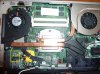
ENVY 14 WHINE LOCATED
The red zone, whatever it is, makes a high pitch tone, whine. The yellow zone makes a much quit tone than the red one.
After 2 months on service they changed the FAN, not fixing the real problem. Now I feel more for taking the trouble in my own hands...
And suggestion how to fix this ? Glue??
 Last edited by a moderator: May 8, 2015
 -
maybe some kind of heat resistant/fire resistant insulating foam ? or some other dense covering that can dampen out the sound and won't melt or affect the electronicsLast edited by a moderator: May 8, 2015
-
I had the whine problem so I send it in to the service centre to get it fixed. Just got it back today after two weeks and the problem is still there. The problem description written on the paper in the return box was not correct either, said CPU Fan problem. Not CPU whine problem which is quite different. The stuff that had been replaced were the heatsink (unspecified which but I am guessing CPU) and the hdd of all things. When I send it in I made quite an accurate description of the problem and clearly stating that it wasn't a mechanical sound and that it probably had something to do with components on the motherboard.
So now I am wondering if it is anyone that has had this issue AND got it fixed - either by themselves (glue?) or by HP? Because to me it doesn't seem worth it returning it for another repair if they do not know how to fix it.
Instead I am thinking about either claiming my money back or just live with. -
I just sent my computer to service in the States with a clear note that describes the problem. I'll update the proccess as soon as I know. But it looks like more and more people don't get this issue fixed.
-
Am I alone who's noticed the whine diminishing over time? From the first day to now, the sound went from almost unbearable (enough to cover the 8 or so fans in my desktop tower) to almost inaudible. JJB's fixes helped, but even since then it appears to have gone down a few more notches.
Could it be that there's some sort of break-in period..? Or am I just less sensible to it after all this time?
-
Yes please post results when you get it back. As far as I know, nobody has had it fixed by HP at least. How detailed were you in your problem description? Because I thought I was quite detailed, linked a youtube video with the whine, said that the sound wasn't mechanical and also told them about the theory that it might be some electronic component on the motherboard causing the noise when it receives a certain amount of voltage; the so called piezoelectric effect: " A voltage with the opposite polarity as the poling voltage will cause the material to expand, (d), and a voltage with the same polarity will cause the material to compress (e). If an AC signal is applied then the material will vibrate at the same frequency as the signal (f)." - quoted from:
piezoelectric effect causing whine - Sök på Google
Also see:
http://forum.notebookreview.com/dell/218815-who-has-bought-multiple-m1330s-cpu-whine-question.html the sixth post.
Thirdly my physics teacher has concurred that the "EMI" can produce audible noise.
Basically I wrote this as the "problem description" when I sent it in but they did not seem to have cared at all. :-(
So the question is if they can fix it if you send them the picture that champ5 took, thanks btw, and explain it more thoroughly? But I doubt it... -
Just read a bit further and it looks as it might not help replacing the components: http://forum.notebookreview.com/del...le-m1330s-cpu-whine-question.html#post2989505
And he also says that HP and Dell has stopped accepting returns on the basis of this error "within specifications". Personally I think that is outrageous, if you buy a computer in 2010, one would think that such issues should have been solved by engineers, especially since this is a high-end laptop! Furthermore, Apple has had similar issues (MBP) but it seems they have solved the issue by changing the design of the motherboard. Something that shouldn't be needed in HP's case since this is not the first generation Envy. -
I kinda wrote the same that you wrote, but I can't give them the photo. They will tell me that I have broken the warranty. Im hoping for a replacement because of both the whine and the dust inside the radiance screen. I'll have updates in about one week time. Take care
-
I just found out last night that the whine on my X201i only occurs when on Firefox so I almost turned over to IE permanently, but the fix worked beautifully.
Now that I know part of it is flash related I have much greater peace of mind that I have some sort of control over the coil whine. Now I have absolutely no doubts on my buying this laptop open box (...but at a pretty good price!...).
This thread is great. Thanks! Hopefully HP will do something about this; I had a similar problem with my recently sold Acer, and they did *nothing*. At least HP support did something, even if it did not fix the problem entirely. -
It is highly unlikely that the whine is due to the piezoelectric effect. The effect only occurs in certain materials, all of with are non-conductors of electricity, which means they don't belong on a circuit board. What could be happening is that a metal piece under the black cover is being magnetised by a direct current, and then made to vibrate due to the magnetic fields generated by alternating currents around it. It could be unique to that resistor due to the arrangement of the metal components inside it. The slightest change in the positioning of conductors will change the interaction of the magnetic fields, which could lead to a louder, softer, different pitched or no whine.
Anyway, as far as I know, Dells, Acers and Macs have had this problem, and my dad's core 2 duo has got the loudest whine I've ever heard. I doubt it's something hp can fix, unless they keep replacing that resistor till they get lucky, which they obviously won't do for cost reasons. Just try all the pseudo-fixes that you can find on this forum and you'll stop noticing it after a while. -
Hey guys I have CPU Whine aswell, does someone know if it can be fixed if we put a SSD in the laptop? Would it make any difference?
-
No. My envy 14 started to have a whine and i had installed a SSD. Sent it in for repair. Still waiting for it to be returned.
-
well my cpu whine was really starting to get on my nerves so i decided to search around for a solution. it turns out that if i disable both the usb host controllers, the whine is completely gone. it seems like a decent temporary fix for me but id really like the use of my usb ports.
has anyone found any other solutions to fixing the whine? -
No whine from my unit that I can tell - processor is a Core i5 460M.
-
plug something into ur usb 3 port and check again
-
Why is people telling the problem is with the low state CPU mode when USB connected hardware is the reason why this whine occurs ?
And for those who belive every ENVY got this whine, they don't. I have owned one ENVY 15 and one ENVY 14... only my E14 makes the whine. -
because it varies from computer to computer.
usually it's low power state.
sometimes the usb port causes it instead -
So far...it's been almost 50/50 for each processor. Quite fitting considering the issue.
-
it may be caused by power inverting circuits when something is plugged in ... not sure about the 14, but i know the 17 has a usb 3 port, along with an esata/usb port, so maybe somethings going on with that ...
-
Is it a noticeable whine cause I havent heard anything.
-
I have the 560m and have no whine.
-
Well you could be right, but I still got the whine and I have tried a lot of pseudo fixes but none of them seem to have worked. However I am getting sort of used to it and since there is little chance of having it fixed by sending it in a second time, I think I am going to try and live with it.
-
Just got my Envy 14 back from service. From the repair receipt it's stated that they replaced the motherboard.
Hard drive was restored to factory default factory settings. Everything else on the laptop remained the same. No marks or damage on the case and I reinstalled my extra memory and SSD.
Going to put my laptop through the paces to see if the whine has been resolved. So far i'm not hearing anything. Wish me luck. -
After a few hours of using the laptop web browsing and gaming, I haven't heard the whine. I opened up the bottom to see if there were any noticeable changes.
Below is a picture of the Envy 14 posted by champ5 earlier. My mother board looked like that before i sent it out. Note the marked area on the lower left.
![[IMG]](images/storyImages/p1060220j.jpg)
This is the picture i took of the internals after being serviced. Notice that there is a wireless card now in the marked area. The whine looks to be related to the wireless hard ware of the Envy 14. For people who have the whine problem, purchasing and installing a replacement wireless card might be the quick solution.
At the very least it seems that HP has the fix for the problem and sending in your laptop should resolve the whine if you are willing to go through hassle.
I hope this helps people experiencing this annoying issue.
props?
![[IMG]](images/storyImages/27904700.jpg) Last edited by a moderator: May 6, 2015
Last edited by a moderator: May 6, 2015 -
this might also be the case for the 17,since the noise is strong in the area where the wireless card is located.
but it doesn't explain how the noise disappears completely when i remove a usb device that was plugged in ... -
The wireless card was removed to indicate the area of the whine. It is the resistors or whatever beneath the wireless card that screams.
Props for letting us know that the motherboad is the reason why. That confirms everything. Im glad your laptop is working as it should
-
this message has been deleted
-
I get the CPU Whine, I have an i7 intel wifi. When i turn Wifi off completely, the whine goes away.
-
I have an Envy 14, still whines with WiFi enabled. Only unplugging all of the USB devices helps.
PS I think that once my warranty period is up, I'll just open up the laptop, see what whines, and try to cover it with something which will suppress the noise. -
Does the whine occur over time? Related to MB revision possibly? Or is it luck of the draw? I have not noticed any whine in mine the short few weeks I've owned it...
-
@skor99:
Haven't you read what champ5 said? He intentionally removed The wireless card when taking the 1st photo, because it covered some parts of the motherboard. And it was the motherboard that made the whine.
http://forum.notebookreview.com/hp-envy-hdx/501749-hp-envy-14-cpu-whine-poll-28.html#post6873328
PS Is disassembling and getting it up and running back hard? I think I'll have to do this in the next few months. Gotta find something to cover those whining motherboard resistors/chips/something. -
doh! yeah missed that. shows you what happens when you don't follow the entire thread. Disassembly? Not difficult. Follow the service guide and take your time. Make sure you follow Gertch's excellent guide here:
http://forum.notebookreview.com/hp-envy-hdx/499592-envy-14-uk-thread-55.html#post6695204, esp removing touch pad cable when lifting top cover...VERY LITTLE slack. Also follow his suggestion using small screw driver to push upwards from the underside, through the holes left by removing the fixing screws. Good luck I took mine apart to replace the BV with Radiance. Like other have said, it is a night and day difference and makes the laptop.
-
Few tips:
There's a flap on the bottom of the battery area that allows access to the TP connector. Helps a lot, also there's a little square that says "PUSH HERE" to pop off the palm rest. -
Thanks. I guess I'll try that even sooner (next weekend) since I discovered the "Processor idle state" tip I used to remove whine with AC plugged in does indeed increase fan cycling and overall laptop noise.
One last thing. I'm curious what champ5 said:
http://forum.notebookreview.com/hp-envy-hdx/501749-hp-envy-14-cpu-whine-poll-26.html#post6840241
Does that mean HP has no way of knowing if the laptop was disassembled or not?
I thought there's some sort of protection which was bound to be removed in order to disassemble the device (which would void the warranty, like in Xbox 360 and some factory-built desktop PCs)
HP Envy 14 - CPU WHINE POLL
Discussion in 'HP' started by Justos, Jul 20, 2010.


![[IMG]](http://img440.imageshack.us/i/p1060220j.jpg/)
![[IMG]](http://img3.imageshack.us/i/27904700.jpg/)


