Problems? See this thread at archive.org.
I hooked up mine to a dell U2410 just fine, put a picture over in the op as part of my review. I used a professional spyder 2 pro color calibrator to adjust all my colors. You should be able to find various calibrated color profiles for your monitor online through a simple search.
Keep in mind that the external monitor likely supports a much wider color gamut range than the envy so it's color may appear totally off but the final calibrated results should end up closer to "true" than the envy lcd.
-
Is it even possible to get 7 hrs with the add. battery, like hp claimed?
-
I very much doubt it, Im lucky to get 2 hours out of the standard 6 cell, thats with min brightness and bt off, wlan on and power saver mode on.
So I would think maybe 5-6 hours at very best with both batteries together -
hey quick question to fellow owners... I've been using the web cam with MSN Live messenger and noticed that when i turn the lights lower in my room the came turns to a purple/blue tint to compensate for the lack of light. Is there anyway to turn this off?
-
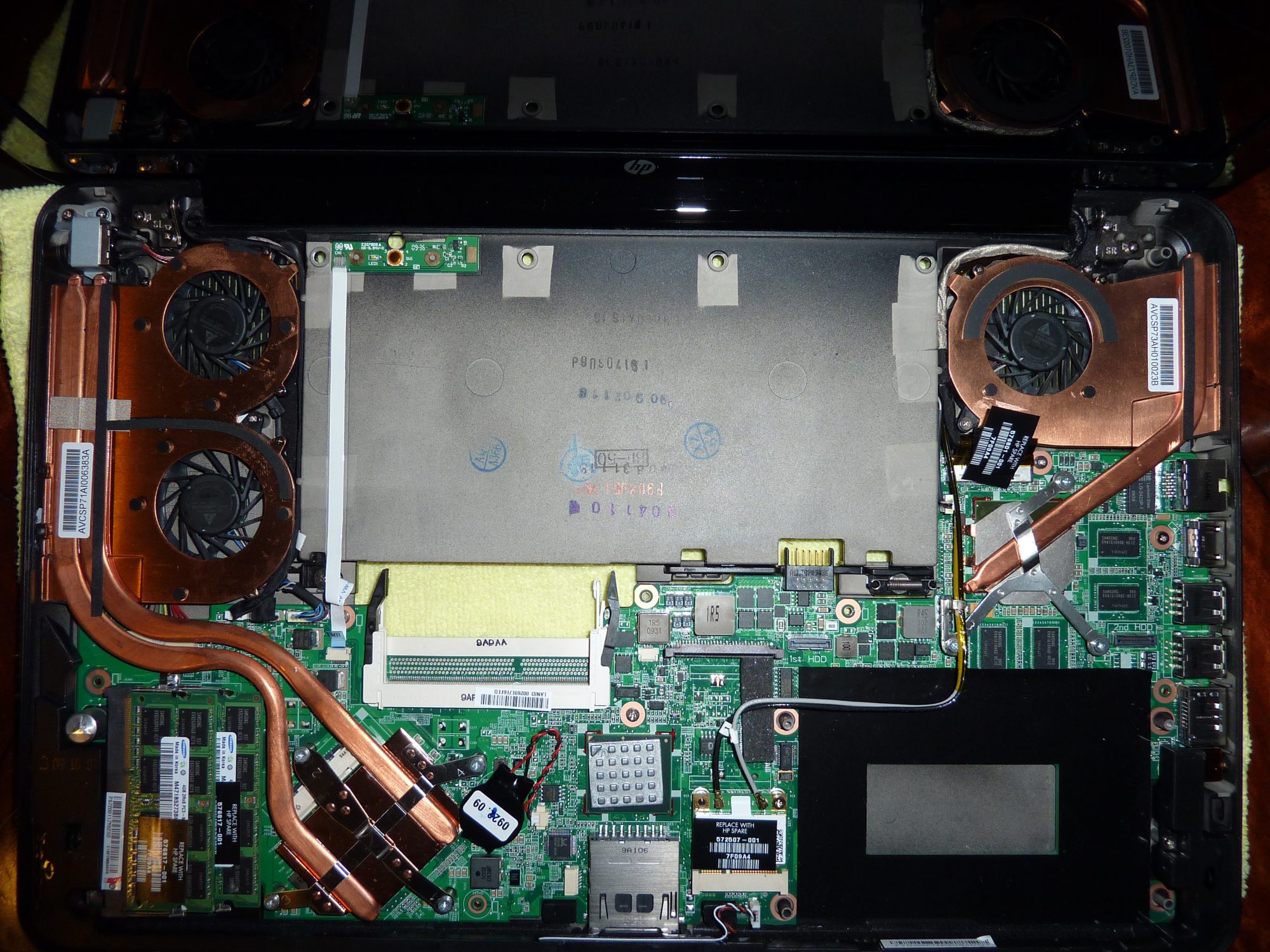
So I had this noise from the GPU fan, like it hit a loose cable or something, and opened up my Envy to see what's going on. I stopped taking things apart when I saw the tiny cable connectors inside (didn't want to break cables by mistake). However, I did get a good look at what was causing the fan noise.
The first picture shows the three cables I didn't want to pull (I did remove cable #1 but didn't touch #2 or #3).
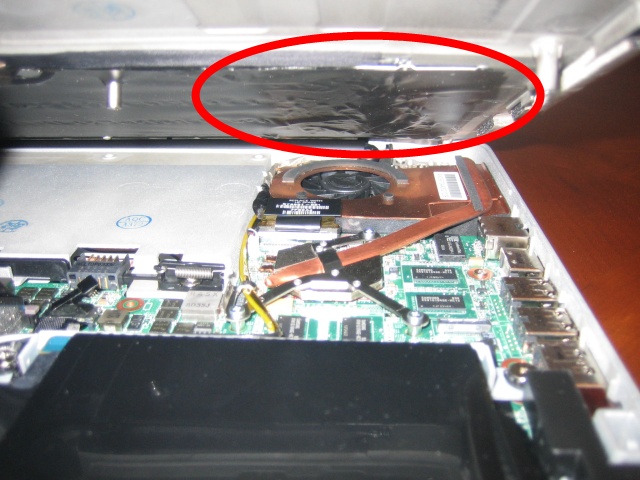
The second picture is a close-up of the GPU fan. There were no loose cables touching the fan blades. Right above the fan you can see air bubbles in the plastic that covers the underside of the keyboard. That plastic can touch the GPU fan blades, especially if you press down on the keys in the upper-right hand corner of the keyboard.
I tried to flatten the plastic out as best as I could (without removing all 3 cables) and put everything back together again. I made sure not to tighten the screws on the GPU side too hard. Then I booted it up again: no noise! But I think that I'll have to take off the keyboard and straighten out the plastic and glue it back on sometime in the future...
Note that I haven't used the Envy very much and the noise were there right from the very first time I booted it up. The air bubbles in the plastic were there from the factory.Attached Files:
-
-
What is the best way to store slice battery? I do not plan to use it frequently (most likely a few times a year), so what is the best way of preserving it? Should I charge it, or leave it as is?
-
Discharge it to around 40% capacity and store it in a cool dry place. Check out the link for more details.
http://www.batteryuniversity.com/parttwo-34.htm -
Ok, finally picked up my Envy yesterday from Fedex.
Overally I am pretty happy so far. Packaging and build quality is excellent, install was easy (not toomuch bloatware to uninstall). Screen is very good
Had no problems with the touchpad, but I am always tapping.
A few problems so far:
It's getting pretty warm even while doing almost nothing.
Functional buttons on left are annoying.
For whatever reason my external monitor shows black frame around picture. -
That looks like bad manufacturing! Or bad quality control. Im glad mine wasnt like this when i opened it to change hardrives.
-
Is your fan set to always on in the BIOS?
I noticed mine would get pretty warm if it wasnt. It doesnt affect battery life much when its always on and you cant hear it much at idle either. -
It is set to always on. I would say its getting almost hot allready after being up for couple days
-
I just imported the ready to ship US model from the states to the UK and have to say that anyone in the UK considering the ENVY 15 and wanting a great screen should either wait or do the same.
I saw the ENVY 15 UK model with the 1366 resolution screen and it was no very bright with average viewing angles.
The US 1920 version is SWEET.
The laptop gets a little warm gaming but nothing terrible and i'll be looking forward to the 2 drive adapter for faster HDD access but other than that this is best machine i've ever owned.
(dell xps m2010, hp hdx dragon, toshiba x305, sony AW 21xy/q)
The fact the screen has no E2E glass is of little consequence and is still beautiful!
Love this machine -
Another Battery Test result. I ran a DVD in the external drive (BT and Wifi radios on), the slice discharges 1st and then then the internal 6-cell discharges.
I got ~2hrs out of the slice (down to 5%) and then ~1 hour out of the six-cell (stopped @ 15% remaining). If you assume that the discharge would continue in a linear fashion this would translate to: Slice 126min & Internal 70min for external DVD playback in Windows Media player (fullscreen). -
I'm having an issue where even though I have the resolution set to 1920x1280 it's not taking up the full screen on my 24 inch monitor via HDMI? Any idea why?
Thanks,
Greg -
I went down to check today. The MBP keyboard is much much smaller than the Envy's
-
No one has had the "blue tint" issue with the webcam then? Can anyone help me out here? I just want my webcam to show regular color video even in low lighting situations rather than make me look like a smurf =(.
-
Sorry ndkkdn, I keep forgetting to try out the webcam... maybe I'll play around with it tonight...
Last night I did try out the built-in to Win7 XP Virtualation (VM), pretty cool. Never played around with VMs... worth a try. -
OP updated. Thanks Smedis.
-
Did you buy it from hp us? how much was the shipping?
-
At RodimusPrime98.
Done. Anything else? -
Serg, you can add my battery experiments if you want... I am likely to run 1 more this week while gaming. Also, note that the default settings scale back the gaming performance when running from battery. This weekend I ran the same Resident Evil Benchmark (previous "plugged-in" performance: DirectX 9.0c 1920x1080x32bit, AA-off = 36.7 fps average, rating 'B') and was getting ~14-18fps, as soon as I plugged it in the performance jumped above 30+fps. Not sure which battery/power setting is driving this, any suggestions are appreciated to speed up my running of the next test.
-
Nope from ebay but brand new from a seller called electronicexperts.
Machine was little under £1200, shipping was £120 and VAT was £170
Ordered it last friday and came Monday morning! -
Hi Greg
I'm running a 24" monitor off the HDMI port aswell.
To get rid of the black box I had to right click on the Destop.
Choose Screen Resolution.
Under Multiple Displays choose Extend these displays.
Then apply.
Both Screens will take their native resolution -
Just sat at work closed all the blinds and turned off all the lights, almost no light at all, everyone thinks i'm crazy but I didn't look like a smurf onscreen.
-
I will gladly post them.
Just send me the numbers, as raw data, I can organize it and post it well done. -
I already have it set that way..
-
I've been following this thread since it began (thanks Serg!) but have not chimed in until now. I came across the specs for a 15-1099xl model this morning (see link below) and couldn't help but notice that it's fully loaded (with dual 160gb SSDs). I've been holding off to make my purchase until there is an SSD option. Do you think this is a sign that dual SSDs will soon be offered?
http://www.notebooks.com/2009/11/06/hp-envy-15-unboxed-photo-gallery/ -
I simply wish this technology would be available for the Envy.... http://www.electronista.com/articles/09/11/09/lg.to.ship.15.inch.oled.set.this.week/
-
Hi there psippopla.
Welcome to the NBR Forums! And especially to this HP Envy 15 Owners Lounge. Feel free to post around (staying on topic of course and following the Forum Rules).
It looks quite an interesting thing those dual SSDs....I wonder if they are already shipping that or if that was a mistake... -
I have the same with my 42 inch Westinghouse. Still trying to figure it out
-
Hey all, on October 31st I became the owner of the Envy 15
I had to replace a Toshiba P20 (17", 9.9 lbs) which was bought in the fall of 2003.
So what I tried to replace it was the following:
dv7-2078ca
http://h10025.www1.hp.com/ewfrf/wc/...ry&lc=en&dlc=en&cc=us&lang=en&product=3919654
Price: 1999.99 CAD + taxes (best buy)
but I had to return it cause of a clicky plastic noise in the speakers
Then I got the Envy 15-1050CA (for 2199.99 CAD + taxes (best buy))
http://h10025.www1.hp.com/ewfrf/wc/...ry&lc=en&dlc=en&cc=us&lang=en&product=4041398
Sigh but I am undecided as wether or not I will keep it;
When I opened the box, its presentation was fantastic!!
I liked the way the notebook was constructed and such.
This was my first 15" laptop...and well...i found it very hard to adjust, and still am. I am used to the wide open area to rest my palms. I find myself resting my palms in the trackpad. Coupled with those side launch keys, my hand orientation really gets skewed. Furthermore having used an integrated number pad (although for a short period of time), coupled with 15", um yeah that is definitely not helping my cause.
But all is not bad. When I fired up a *.mkv file of South Park...yeah...I went through three pairs of pants!!
I find myself having to buy an HDMI to VGA (DMI) cable, and well because of the "lack" of storage, I will probably end up having to buy a Western Digital portable HD.
Now if I do return it..it will be for the following machine.
dv7-3098ca
http://h10025.www1.hp.com/ewfrf/wc/...ry&lc=en&dlc=en&cc=us&lang=en&product=4041801
Price: 2299.99 CAD + taxes (best buy) - this model was just launched so it should fall in price shortly (well I hope)
Now while this would probably suit my needs better, the step down in screen resolution (especially after watching that .mkv south park file) would probably kill me.
(I have considered the HDX18, but I don't want to lug around something that large...17" is my limit)
I really have absolutely no idea what to do; I have up until Saturday to decide
Oh yeah I am NOT a gamer, but do enjoy watching movie files and multimedia on a computer -
Too late for me im afraid, I still like this machine though full HD or not. I am used to the low resolution from owning 1024x600 netbook.
I must say ive had to adjust the ATI color and contrast a little because it looked slightly washed out by comparison to my netbook (asus N10J) Now its perfect!
Plus my vision is not so good so at least i dont have to squint too much to see the text. -
Did the colors on the video come out normally then? When i run webcam chats on msn the image is tinted blue/purple and the colors are faded. I noticed this only happened when the lighting level in the room went low... is there anyway to turn the feature off?
-
What did you do to improve the color balance? I'm curious to see the difference...
-
I did a clean reload of windows 7 ultimate x64 is the only thing i can think of short of hardware that may be different
-
I fixed mine by adjusting the scaling options in the Catalyst control center.
-
On mine ive changed the gamma to 0.75 brightness to -10 and contrast to 108
It might only make it better on the 1366 panel, I havent seen the 1920 version to compare -
Your not based in North Devon are you
Btw Did the SSD make a massive improvement or worth waiting for dual drive adapter? -
No im from the North-East England.
The SSD was originally in my DELL XPS M1730 which i recently sold without it.
Its a vast improvement in system responsiveness and gets rid of the HDD bottleneck and works well with the powerful components, I get about 220MB read and 150MB write speeds with virtually zero random access times.
Downside is it costs a fortune!
BTW what is the Dual-drive adaptor? -
Ok, fellow owners and people who have already played with the laptop.
Under suggestion of a member (and I think it is a great solution), I am asking for those who have done colour calibrations:
- What software did you use?
- What settings did you use?
- If possible a picture of the before/after
This way, for new owners we can help them get the colours right on their new laptops.
Send me a PM with the information please, so I can update it and give proper credits. Thanks! -
So if I made a cancellation order, and it's been 3 business days and I have no response what does that mean? They are going to ship me my laptop in like a weeks time, they are canceling my order but they are just slow, or am I just out 2k?
-
Which NVIDIA GPU does the 4830 in the Envy 15 compare to?
-
From what I've read on this forum a model in Hong Kong has shipped with an adapter to take 2 1.8" Drives in place of the 2.5" Drive and therefore enable RAID and of course SSD + HDD if you can get a decent 1.8" HDD.
If thats going to be available to every ENVY owner? I dont think anyone is sure? -
Around about the same as the 9800m GTS in actual usage I would say; perhaps a little weaker than that.
-
UPDATE: Added Battery Eater link ( http://www.batteryeater.com/download.html) for people. Test your battery runtime and report here if you feel like it. OP has the link too.
I am looking for a good colour calibration software, suggestions? To post on the OP and help others calibrate their screen. -
I wonder why it does so badly in 3dmark06?
I have a friend with Toshiba X300 with a 9700m GTS and his score is very similar in 3dmark06 but the ENVY is much faster framerates in all games ive compared it to with the same settings. -
Agreed, but it's a synthetic benchmark; which is why I prefer gaming benchmarks. It might be less than the 9800mGTS in some cases, and better in others. Certainly I would have expected more on a machine that costs this much, but then heat is a big factor, so they went with a cool running but moderately powerful GPU that can still manage decent framerates.
-
Is the 4830 better than a 250M? If so, by how much?
-
The 250m probably wins on this one.
Does anybody know of a program that will monitor the GPU temperature on the ENVY? every program ive tried will not tell me, only the CPU -
If none work it's probably a driver/software related problem that will be corrected when ati and HP release an updated graphics driver set.
*HP Envy 15 Owners Lounge! PART 1*
Discussion in 'HP' started by Serg, Oct 21, 2009.