Problems? See this thread at archive.org.
Has anyone gotten any Linux distro fully working or at least gotten over some of the existing problems with the new F.06 BIOS for the Envy?
-
NOTE: I lighten it a bit so it didnt sound to strong, but the core is the same.
"I personally find this review to be lacking to say the least.
The HP Envy 15 is a unique laptop. Please, someone point me out to a 15.6 laptop using an i7 and a 40nm GPU from ATI 4830HD (which was not even mentioned in this "review") and has up to 16GB of DDR3 RAM and comes with WUXGA for under 2K (if you go with the base model). I think before Arrandale comes out, nothing is going to be like this little laptop. Sure, it aint perfect, but the Mac is FAR from being better than this.
The base MBP is cheaper, yes, but the configuration is pretty basic, using only a 9400M G (there is one model that is IGP only). The next config reaches the area of the Envy, and the 3.06GHz version is even more expensive than the Beats Edition HP Envy 15. Now, let us do a small recount of hardware per money.
For around 2K you get an i7 720QM that gos from 1.6 to 2.8GHz. You get a faster and much better GPU with 128bit bus and 1GB GDDR3 built on 40nm! You get either a huge 500GB 7200RPM HDD or SSD+HDD on 1.8" or SSD+SSD 1.8" configurations. You get WUXGA from the basic model!
Now the Apple MBP15, for 2K you get a 2.8GHz C2D which is fast, but not as the i7. You get a 9400M G and a 9600M GT, the second being outdated for quite some time (and prone to failure due to it being based on the same core as the infamous 8600M GT). You get a soldered-on-board CPU and GPU (which cannot be replaced), an internal battery that if removed voids your warranty, a WXGA+ screen only. Sure the MBP15 is a very nice performer, but compare it to the Envy 15, for the same amount the Envy 15 has a stronger configuration. So, bang-for-the-buck, the Envy 15 wins.
Sure, the Envy 15 has no fancy glowing fruit on the back, nor an ODD nor E2E. But those are things that can be given away if you measure what you get instead. Battery life is low, and I guess the reviewer did not even know why. Lets make the math, shall we? i7, high-end GPU, 15.6 WUXGA, a large 7200RPM HDD, and not to mention this laptop has 3 fans to keep it cool, not like the MBP that when used (this is actually working on it instead of going to a coffee shop to show off your laptop), the MBP does get hot, and I should know, that thing (even the smaller 13") has almost burnt my legs when using it on my lap...
Something else I want to notice, the Envy 15 does not heat that much compared to similarly spec'd laptops.
Now, comparing a 15.6 laptop to a 18.4 monster is not fair. We are talking of two different segments of the market here. One is mobile, the other is stationary (I am sure you can guess which laptop corresponds to each segment). Comparable laptop would be the Studio XPS 1645 from Dell, which is larger and heavier and the previous revision (1640) had heating problems.
Next, basing the review on how much the reviewer did NOT like the design, due to it being like a MBP, is not a reason to bash a good system. The Envy 15 design is different, and if for X or Y reason does not appeal you, then dont go for it.
I think the reviewer failed to do its proper homework. Comparing the top-notch Envy 15 to a plastic-made laptop is just wrong. Oh, and the only Dell direct competition to this one would be the Studio XPS 1645, since the M15x weights almost double this one.
I still fail to see how this one can be called too expensive. Most i7 based laptops with good specs are expensive. And dont say the Studio 1557, the Y550p or the DV6t, since none of them compete on this niche. Good graphics, portable and powerful...there is none.
Something else, which was already noted. HP ships this laptop (if you configure it) with an additional 9 cell battery for a total of 15 cells rated at 7H30 by HP.
Also this review has failed to show anything else other than the reviewers despise to the model based on the outer shell, but technical data is not even provided, such as CPU specs, GPU specs, RAM frequency and speed, HDD specs, benchmarks, gaming proofs, FPS done by them...too bad.
Lastly, there have been 2 BIOS updates. It started shipping with the F.04, HP just released the F.06, the updated ClickPad drivers and some minor updates too."
I dont know if it is overclockable yet, but try RivaTune or ATITools. -
Thanks Serg, just asking cause he managed to clock it so was wondering if anyone could chime in on how. -
That's jacked. Gizmodo has lost respect from me. It's one thing to have a bad article once in a while...no big deal. it's another thing when you delete posts that call you out on the carpet in public. There is some shady stuff going on that I don't like...
-
Same for me RifterAD...one thing is if they contacted me about it, but not even that, it was deleted due to me exposing a bette point or at least different than that of the reviewer's. Such a shame...
Anyways, Back to topic (I could create a "Bash Gizmodo" thread but I dont know how long would it last...lol), has anyone fixed the bluish tint of the webcam? If so how?
Oh yeah, odd question, how hot does the adapter get? -
I have recently ordered an envy 15 and awaiting its delivery.
However, recently, it came to my attention that there are issues with the BIOS that affects heating on non-Windows OS's and freshly installed Windows installations:
http://h30434.www3.hp.com/psg/board...thread.id=22243&view=by_date_ascending&page=1
Has anyone managed to install a Linux distro successfully on the Envy 15 with no problems? -
it seems it was my fault.
The original link i provided was to the .au site (Australia) all comments are still there but only visible if you either click "AU" onteh left then search for the envy.
All original commens are still there accessable via the below link.
http://www.gizmodo.com.au/2009/12/hp-envy-15-inch-review/
Serg, will be best for you to repost your comments in the link Wretched Gnu posted. I'll be doing the same.
sorry about that, seems i get redirected based on IP, even if i try to go to the US site. unless i have the full URL. -
I was unable to access the RAID menu with my single drive Envy 15 unit. I tried with both the F.05 and F.06 BIOS. Either you need to have two drives attached to the system or the dual SSD Envy units ship with additional BIOS/hardware that the single drive units lack.
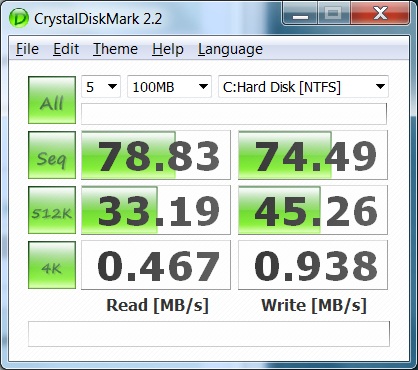
The BIOS update to F.06A did nothing to improve the 4k random read and write performance. Atttached is the Crystalmark DiskMark 2.2 results for my Intel 160 GB SSD (G2) in my Envy 15.
![[IMG]](images/storyImages/g2.f06_thumb.gif)
-
Uh oh...not good news. Once I get home and am able to image my system I plan to mess around with this so I can update to Intel's new 02HD firmware that was just released. I doubt I will see any difference in performance, but we'll see...
-
On a lighter note:
1) Does anyone have feedback on PC game play on the Envy 15? What configuration? Specifically interested in Modern Warefare 2
2) For the record, MS Customer Service manually posted to my Bing Account that my cash back is pending 56 days, and that I’ve earned $438.80 cash back….but its all in HP’s hands in 2 months. I’m not holding my breath…most of what I’ve read is that because my email was associated with an EPP account voids my authorization or cash back. This is not printed anywhere and makes the Holiday Promotion a real poor bait and switch ad campaign, borderline fraudulent. -
I wonder when they will have the option for Single SSD (128GB or 250GB) instead of the 500 GB 7200RPM drive and fingerprint and blacklite keyboard.
-
Thanks for doing the test. I see on thenextbench forum that the SSDs are HP branded and don't work with Intel tools. That's probably why the SSD option is being offered at a reasonable price. This is what tech support said about updating the firmware and TRIM:
"I would like to inform you there is no SSD firmware update available for your notebook because TRIM has been prepared in Linux, but not yet fully implemented in Microsoft Windows. So in order to the update the firmware of SSD you need to visit the manufacturer site of your SSD and check whether is available or not."
Seems like firmware updates need to come from HP not Intel if the drives are HP branded. -
Yes, I think you need to have two drives attached to be able to get to the RAID menu and I think it's Ctrl+I for all Intel chipsets.
-
For comparison, here is the CrystalMarkDisk 2.2 results for the single 500 GB HDD (in case anyone thought SSD was worthless):

Attached Files:
-
-
You overclock with AMD GPU TOOL however you must manually set the setting everytime your computer is booted into windows or when the profile changes like from going plugged to battery I generally set it before I play a game since the extra performance is nice.
-
Cool dude, you download this from their website? or is it already installed?
-
Update....
Been taking me forever to get my notebook set up, so far,
COD Modern warfare 2 has ran wonderfully, I almost got it to run on high settings at full 1080 resolution but was experiencing some lag. I havent really got the time to play much right now.
I am running the 1.73 processor, with the standard 500 G hard drive and 6gig of ram.
I take it back I can see the lines, but its not that big of an issue, video still looks beautiful.
I am having major issues with my nokia phone as I am beginning to believe this notebook is causing some type of radio interference with my 3G cellular signal, I turn the note book on and I immediatly lose my signal then turn the notebook off and the 3g comes right back, maybe I just have horrible luck.
I had to go back to my old computer so I could connect to the Internet.
Can some one look and see if there phones 3g connection remain open when the computer is turned on? -
No problem with iPhone on either 3G (US AT&T) or wifi. (Laptop on Wifi.)
-
That's a very misleading statement. Windows 7 fully supports TRIM.
Check out slide 9 from this Microsoft PPT presentation. -
My 4k read/writes in crystal are 14mb each. that is a single ocz vertex.
I will try running this on another box to see if they are different.
have you tried without raid? I know it would be a pain to image the drives then reformat them but I would be curious.
I could not find average vertex scores with crystal mark anywere else though. so i do not know if I am being held back with the system or my drive. -
I have the new DELL XPS 1645 with i7.
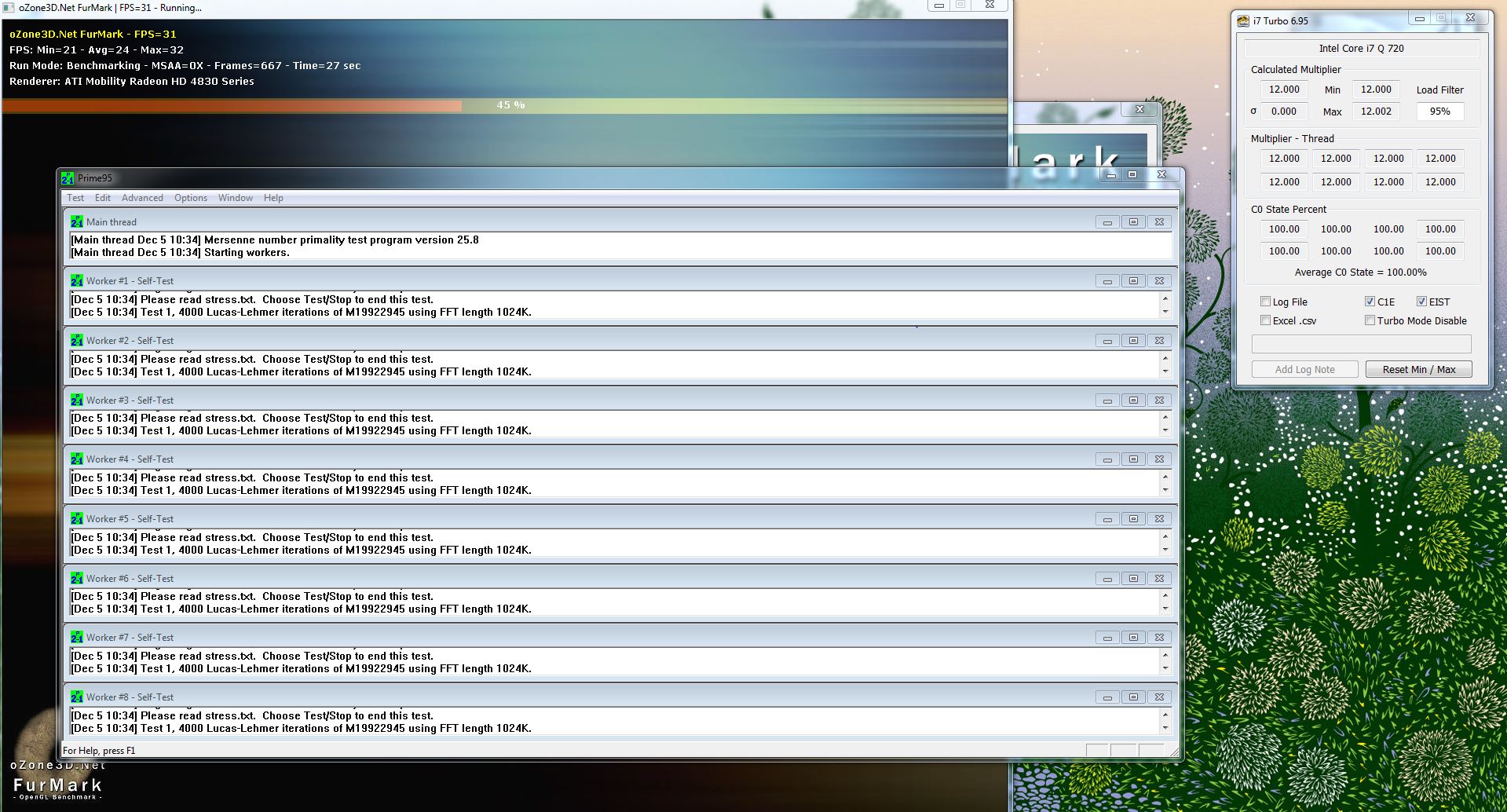
i7 should work at multipliers from 7x-12x or more under turbo boast, we have a problem that under stress the processor only hits 7x and stays there.
Could you please run
Furmark at the same time run Prime95 and monitor the multipliers using i7Turbo which is a program that comes with Real Temp 3.4.
Please post a snapshot of the multipliers or a just report it.
Thank you -
I just ran prime95 with i7turbo running and I see all of the threads pegged at 12x... see the attachment.
this is on an envy 15...
so this must be a cumulative multiplier? since when they were all at different amounts, some were over 19x...Attached Files:
-
-
Just wondering---does anyone NOT have the lines on the screen?
Anyone NOT have battery slice problems? (sliding out, disconnecting, causing system shutdown/reboot)
Anyone have no problems at all? -
Prime95 alone will not stress the CPU, could you please run it in parallel to furmark. Thank you very much.
-
Mine has no problems -- but I don't have a slice
I think I saw the lines once when I was squinting an inch from the machine when it was upside-down. Not a problem. -
I have no problems at all. My Envy is small and light. It's running fast, quietly, smoothly and is not too hot. Very efficient fans - after hard work it cools down extremely fast. No BSODs, etc.
However, my first Envy had one problem so I exchanged it (air bubbles in the isolation tape under the keyboard which interfered with the GPU fan). Otherwise it ran fine. I do not have the slice battery. It was bought with 25% Bing cashback which is still pending (Dec 18). I see absolutely no lines on my display; not on any of the two Envys I've had. I think it's in the eye of the beholder. They're probably there on every single Envy (and there is nothing to be done about it - don't even bother trying to send it in for any repairs or exchange), but only a few are able to detect it and be bothered by it. Others don't see it at all, or at least not in any normal usage cases.
My wishlist for improvements in the next hardware refresh is (in order):
- Backlit keyboard.
- Being able to angle the display further back.
- Higher quality webcam.
In summary, I do not think there is any other laptop - not for any kind of price tag - that suits me better than the Envy 15. It could be better, but a better laptop just doesn't exist yet (for my needs of course: performance, weight, size, no glossy chassi). -
I ordered one already from HP Direct, but that was assuming I would get 20% cashback, which doesn't look likely now. I'm thinking of canceling the order (or returning the machine if it gets all the way here) and trying again in six months or so. Actually, I would like to draw on the experience of people here to know how long to wait----typically when does a significant hardware iteration happen with a new model? I'm hoping the many problems reported here will be solved in the next iteration. But anyone have experience with this---will it be six months from now? three months? Wildly unpredictable?
Thanks,
Mike -
Looking at how often HP revs its laptop product lines, I'd say no less than six months. It's not like the Envy 15 has been a total disaster or anything - a few BIOS things to work out which seems to be the norm for all new product lines.
HP is investing heavily into the Envy brand - here in Stockholm it's impossible to miss the billboard ads, buses subway magazines etc. My take on it is that HP sees Envy as a real entry to a long-term share of the premium market.
If I was HP I would rev the product line in time for back-to-school season in August. Until then, minor tweaks are likely, like different SSD options. Just my own guess. -
Mike- did your bing cash back have your 20% showing yet with Pending? If not contact customer support via your bing account online file complaint .they will ask you for purchase date and copy of email order confirmation. This will get you on Bing Account properly the rest would be in HP hands. I finally got my account updated, it says that Ive earned $400+ back, but Im not going to count on it. I also complained to HP and they gave me $200 back for problem to go away. Good Luck
-
I would say expect for HM55/57 or PM55/57 on Q1 2010, using Arradanle switchable and finally getting the 7.5 hours promised.
EDIT: Wishful thinking and what I would do with the Envy line. -
Serg, is this based on anything beyond wishful thinking? There's always the risk with making predictions that you set expectations for readers here.
-
Yes, simply wishful, but rather what I would do.
-
Whoops -- my bad, then. Sorry, Gizmodo! Still a ridiculous review, 'tho. The Envy seems to touch a nerve with Mac fanatics....
-
I agree with you Wretched Gnu.
This laptop has taken the MBP look, and made it faster and better, and all those fanboys are scared now hahaha (sorry I am kinda biased) -
here's another running them together...
Attached Files:
-
-
I see no lines in your display...are my eyes bad?
-
My order with HP Direct for a customizable Envy 15 is now officially late, was supposed to ship yesterday (Dec 4). There have been no status updates, HP still says "Order in production". When should I start worrying?
-
hey Serg... not sure if you were referring to my screen grab, but, no I don't see any lines in my display. is there an easy test or something to look for specifically?
-
BTW, I gotta say this is a fantastic notebook... except the aweful touchpad... I would go so far as to say it's the best notebook I've ever owned, and close to the worst touchpad. I've had many many notebooks over the last 15 years or so, from many different manufacturers, including lots of macbook pros/powerbooks. if HP could fix the touchpad, this thing would be perfect for me (i don't/haven't used the slice since I'm almost always around power, so 2 hours on battery works fine for me)
right now I'm using an external mouse... if for some reason I had to use the touchpad and had no alternative, I wouldn't keep the machine, it's really that aweful.
I've tried the latest drivers, alternative drivers, etc... nothing helps. one disheartening thing I've found is that there's only one physical button to the touchpad and the driver determines which event to send based on which side you're pressing down, so you can't just put tape or something over the bottom portion of the pad. -
You can disable the multitouch and that would work better as some have reported here.
It is a firmware thing, with time (me hopes) HP fixes it. -
hey guys i really want to buy this lappy.......but its still not yet launched in india.........any idea when it will be launched..../???
-
I am planning to buy this computer, is there any usual deal around that HP offers for this like what is regularly offered for the DV8t, Dv6t, and DV7t?
I heard that they denied some people the bing cashback when it was initially released, is it the same so now?
Thank you
and Rep to the people who ran the stress tests -
I love my envy, I have the lines in the screen and only sometimes can i see it.
My battery slice has been a dream, i was picking my computer walking around with it putting it to sleep and just chucking it in my bag and it has been fine.
I found the touch pad awesome once i turned off all the multi gesture except for the scrolling. -
a little better, that doesn't solve the problem completely, unfortunately...
on a positive note, I've been using tap to click, tap to drag and mapped bottom right tap to be a right-click. along with two finger scrolling, it's a much better experience. the problem is that I really don't like tap to click/drag, but avoiding clicking the physical buttons keeps the cursor from jumping all over...
I'm just trying to decide which is less annoying... having to use an external mouse or having to use tap to click
-
I really dont understand the hype on the touchpad. The one I tested wasnt that bad, albeit I do type with my fingers in the air, and I am very used to tap the touchpad since it is faster than clicking most of the times. Taking that into consideration, I found the tested clickpad to be quite responsive, being only problematic when I would change the typing mode. And that happens with my current Synaptics Dell Touchpad where if I put 2 fingers on the touchpad the point would jump, still, when using the HP one, it was no different, in fact better due to the larger surface to move around.
The only thing I found strange, I must say is the right click...but I guess that is something to get used to...
One week to go for mine to arrive (dang) and then I will be able to write a full review on it. -
If you have any issues with the trackpad, make sure you set it up to fit your needs! Here are some ways to get to the settings:
- Double-click the red/white tray icon (bottom-right): ""Synaptics Pointing Device". Select right-most tab: "Device Settings". Click the "Settings..." button.
- Open the Control Panel (Start -> Control Panel), choose "Hardware and Sound", click "Mouse" (under "Devices and Printers"). Select right-most tab: "Device Settings". Click the "Settings..." button.
-
Hi everybody, first post here. I am eagerly awaiting my Envy with dual ssd's and 2x4gb ram.
What would be the correct model/make/latency for an additional 2x4gb? I want to match the originals as closely as possible.
For vmware use, should I keep the raid or split it? I could run different machines of different drives...just a thought. -
Cashback is not showing as pending, and I contacted Bing customer service with the order details. Waiting for a reply.
Thething is, I already had a registered email address with HP Direct and I've ordered from them before, so it seems on that basis they won't honor cashback, according to prior posts on this thread.
Thanks,
Mike -
Can you go into more specifics about what's wrong with the touchpad?
Thanks,
Mike -
Hi there! And welcome to the NBR Forums!
I think you could use CPU-Z and check the latencies and clocks of your sticks when you can. The link, if needed, is on the front page.
There is nothing wrong with the touchpad, just that it is hard to use. You cant rest both fingers on the touchpad since it will be registered as an attempt to use a gesture, and or the pointer jumps. It is a matter of correct configuration for it to work better.
*HP Envy 15 Owners Lounge! PART 1*
Discussion in 'HP' started by Serg, Oct 21, 2009.


![[IMG]](http://imagecloset.com/view28/e5af7042a0cc9b02b9859264c315687d/g2.f06.jpg)