Problems? See this thread at archive.org.
have you tried new cod black ops?
Is it playable on dragon ( I'm interested in multiplayer)?
-
Before the patch, it ran terribly. Completely unplayable. After the patch it runs great with the occasional stutter. another patch should be out by this weekend to eliminate the occasional stutter. You can max out detail without problems. Really fun game with LOTS of action.
Online still need a bit of polishing. But Treyarch is working on patches for that. -
Just did it, for the first time: changed GPU and put Arctic silver on the CPU.
Took me 10 hours because I did it with super extra care. Follow the steps, take your time, doublecheck everything. If you are like me half way through you'll wish you never started but then as long as you keep every piece in order with its screws things are fine.
Get a full set of precision screwdrivers, tweezers, alcohol (clean all the dust you can, while you are at it!), check exactly how every step is done on the videos (certain connections have tricky ways to be unlocked but nothing difficult if you just pay attention). Once you get to the GPU there are also thermal pads on it (not on the GPU itself but on the chips surrounding the GPU on the graphic card) - According to 2.0 you can reuse them on the new card. Also get some TAPE (!!), and a second PC to watch the videos.
There are videos on youtube about how to spread the arctic silver. The basic concept is not to put to much, just a thin layer is fine as long as it covers the whole surface, don't get it dirty, and don't touch it with your hands.
The only problem I had was the connector on the CPU fan, I had to force it a bit because it wouldn't come out of its plug on the mobo. The plug is a little deformed now, but works fine. (maybe I had to push something in order to unlock but from the video I couldn't tell) Make sure you don't break anything on the mobo that's a priority because it's expensive.
The videos are very well made. You just have to watch them all, the one on changing GPU for example skips all the passages on how to dismounts the other units, so you have to watch them individually.
I started at 2:30 PM and ended after midnight.
It's not difficult, just pretend you are having fun while you do it. -
The HDX dragon 9xxx killer notebook from Asus, with full HD and stereoscopic 3D support (NVIDIA GTX 460M):
Welcome to Republic Of Gamers! - News -
its not a hdx dragon. and it's only 17 inches...nothing to see here...move along.

-
LOL. You're too much Elle.
-
Try to enjoy it, learn all you can, and have fun. I've bought three systems in the last 5 months or so, and none of them worked right off the bat. One needed a BIOS flash and some fan cleaning and new paste. I also upgraded the CPU. The second one had the keyboard and another connection disconnected, and needed HDDs. I also cleaned it, re-pasted everything, and took the CPU from system one and put it into that system. The third one was totally dead. Still working on that one.
-
Even though I have no use for it, I still regret selling this laptop. It was the best machine I have ever owned and I doubt I will ever buy as good as the Dragon.
-
HAHAHAHAH ! I was just gonna say the same actually when I saw that...
-
I am thinking of selling it. Upgrading for example x9000 is very expensive. But I like the size of the lcd.
Maybe I'll buy the sff itx. -
Hi all.
I cant make a decision on which processor to upgrade my HDX to.
The 2 choices Ive made are the t9500 and x7900.
T9500 has 2M more L2 cache than the X7900, BUT its slower by 200mhz.
And can anyone pls tell me what SLAYX or SLAYY or SLAQH means?
--
Thanks in advance.
(attached links for the processors)
T9500
Intel® Core2 Duo Mobile Processor T9500 SLAYX TOP NEW on eBay (end time 02-Dec-10 02:46:28 GMT)
X7900
Intel® Core?2 Extreme Mobile Processor X7900 QZDX NEW on eBay (end time 03-Dec-10 02:26:45 GMT) -
SLAYX or SLAYY or SLAQH are just Intel product codes.
You can overclock the X7900 using unclewebb's Throttlestop program (see p1 of thread). But it will run hot if you do since it's a 65nm chip.
The T9500 is as fast as the X7900(stock, not overclocked) and runs cooler since it is a 45nm chip. -
I think this one may be a bit ahead
Malibal Nine X7200 Review | Notebook Video Review's
but I agree with the 20 inches or more requirement to enter Dragonhood. Maybe one could be made with this:
TVLogic ? 56" 10bit 4K LCD monitor -
That x7900 you have linked to is an engineering sample. You can tell by the ES written on the chip as well as the identification code begins with Q rather than SLA as the the retail OEM product has.
In the UK i've received stuff from ebay very quickly from Taiwan and Hong Kong but my experience with China has not been so good. But I'm unlucky, I know of people who did not have problems with China.
You don't read much about engineering samples but 2.0 replied to me once that x7900 ES "are no good". There are GPU ES on ebay as well. -
Good catch. I didn't see that the X7900 was an ES. Definitely one to stay away from. Those Q174 X9000s are good.
-
I'll never sell my HDX. It'll probably be an attic somewhere when they start making quantum 3d smellovision computers in the future and the HDX will be as hightech as a typewriter.
I still have my first ever laptop from 1996; an IBM Thinkpad with a 320 mb drive.
It has windows 95 and I run it once a year as an anniversary commemoration. -
I like your style.
-
My first computer ZX Spectrum 48 k
-
Commodore Pet 8k with cassette. In my garage.
-
Cheers! 2.0 and Burke for the Heads up!
Now makes sense why the x7900 was cheaper than the t9500. It was an ES.
I wouldn't have known.
I don't think I trust international sellers, never have.
I'm gonna look for some UK based companies that have these processors rather than ebay and stuff!
Cheers once again!
-
You can get them on eBay, you just have to follow the hints here as to which chipsets to avoid, and check the feedback, There is one for sale right now at a Buy it Now of $310 that I wouldn't touch. The seller has a feedback rating of 98.7 on several thousand transactions. That's a lot of unhappy customers, and I don't want to be another one.
-
Hi, I have a HDX9130EG for 2,5 years now and I love this machine! But now I need a better WiFi card than the 4965agn, want to give the 5300 a try but of course it's not in the whitelist. I found a link to ADDCC V3 in this thread but I'm a little bit scared to brick my machine (adding the 5300 into a running machine to get the ID) and I didn't manage to create a modded BIOS. Does anyone of you very skilled and very nice people already did it? Or does anybody know a way to avoid the whitelist check in the BIOS?
I have read almost all of part 2 of this thread (wished I would have found it earlier, it would had saved me a lot of time with Win7) but didn't found a word about BIOS modding.
Hope you can help -
Totally unnecessary. Simply put any wifi card you want into the 2nd slot. That's how we all do it. You only lose the ability to turn on/off via the touch panel. There are other ways to turn on/off including tray apps.
BTW, BIOS of HDX can't be modded. -
Correct me if I'm wrong someone, but if you want to use another WiFi card, don't you just use the second slot? My impression was that only the original slot required the whitelisted card.
edit: 2.0, to the rescue!!! -
@2.0 and kohai: Thanx a lot!!! Will try it immediately.
-
Hey, 2.0: I'm officially ready to call my ATI card re-re-flow a success. I'm not seeing any more hardware errors or bad behavior like flickers or boot/reboot freezes. I was tracking some driver errors, but I've DLd the latest driver, and my initial stress tests are showing that has stopped. I was getting the driver errors right up until about 10 minutes before installing the new driver, and that was just running the computer and browsing. Haven't had one for about 2.5 hours of use and Youtube videos.
-
Schiz - Don't forget to install this software so you can turn your new WiFi card card on. The touch controls don't work on the second slot card, as 2.0 mentioned.
-
It is unnecessary for usage of a better WIFI card as stated but Alphahex's talent has opened up the BIOS for white listing the last I checked. I have no idea how it works but I thought that was the latest news on it.
What sucks news wise though on the Microsoft non OEM (full) Windows 7 front is that I'm apparently expected to re buy a new serial for $10 if I decide to reformat and start over again.. each and every time. Anyone know if this would occur with an OEM version? Maybe I should have gotten an OEM version? -
Yeah, it was just to look at the list but not modify it. HDX's BIOS is a real tough nut to crack.
Don't know who told you that but it's not true. Product serial is tied to the machine so you can reformat and reinstall as many times as you want. The only thing that would upset that is if you made too many hardware changes since last you used the serial. RAM and HDD don't factor in as far as a hardware change.
Even the upgrade version allows you to format and reinstall many times. (Though, when using it as a clean install, you have to install it twice. The first install won't allow you to use the serial, but the second install does because it acts as an upgrade to the Win7 you just installed.) -
Yet another video card baking success story. Good job.
-
Hello! I'm new to this forum as well as to modding notebook computers in general (plenty of desktops just never a laptop). I have an HP HDX9300, Intel Core2 Duo T8100 2.10GHz, 4Gb ram, Nvidia GeForce 8800M GTS, Windows Vista Ultimate SP2 64 bit.
I love my Dragon but it is past due for upgrading it. I use it for 3D CAD modeling (Autodesk Inventor) as well as video editing (Adobe Production Suite). I would love to get more RAM but I am seeing mixed information on this. The start of this tread says it can be upgraded to 8Gb but most other sites like crucial.com indicate the max supported is 4Gb. Somebody please help me out with this. Also, what recommendations can anyone make on other mods to increase speed and performance...Windows 7 64bit?....upgrade CPU?...overclocking? -
Welcome,
8GB is correct. Many have done it without issue. The chipset supports it.
As for upgrades, everything you can do is on the first page and has been fully tested by many here.
I personally recommend upgrade to win7. You can use the upgrade DVD to do a clean install. You simply install it twice on a clean HDD. Google for detailed instructions on precisely how. -
I've installed Nvidia System Tools 6.06 but there is no OC option.
How do you oc the gpu? -
You have to accept the terms and conditions under performance in the Nvidia Control panel. Then you will be able to overclock.
If performance isn't there after you installed system tools, then you need to reinstall it w/o UAC on. -
Be warned, if you do move on, you will miss it.
-
I was getting ready to start on the mobo & gpu upgrade last night when I've opened the box in which the nvidia card was delivered and behold: the boneheads at spares4it.co.uk have put an ATI card inside it. The box has the correct part number. I couldn't tell what it was the moment it was delivered earlier in the morning because the chip was covered in grease.
Interesting though, this ATI is different from the one I have inside the chips are made by Samsung while mine are by Indilinx or a similarly named brand, I can;t read the font. -
Thx
3dmark06 197.45
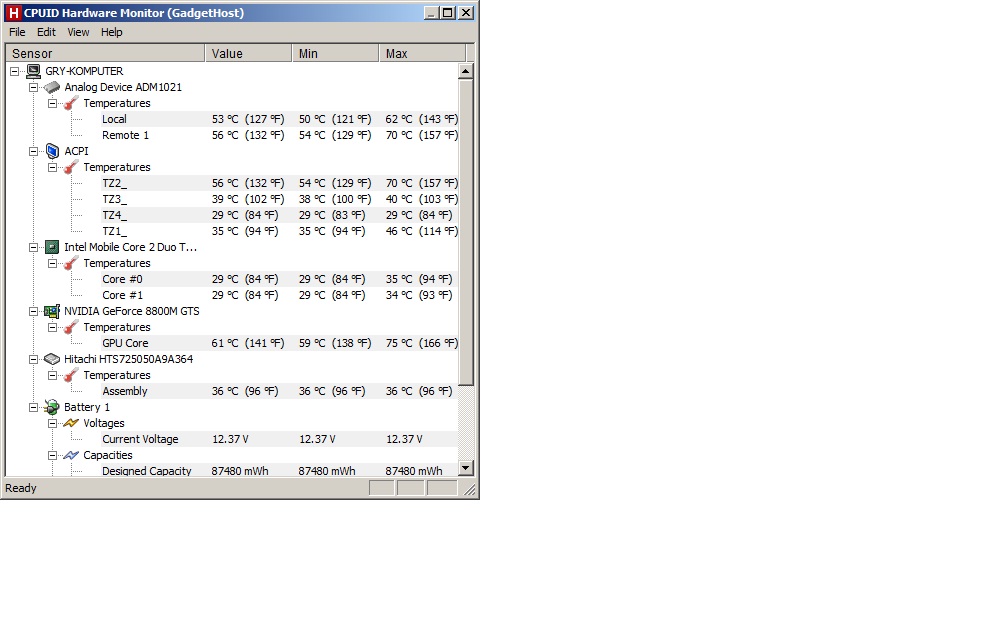
stock 500/1250/800 - ~7800 points, temp 71C
gpu@9800GTS 600/1500/800 - ~8400 points, temp 74C -
Very nice. As long as temps stay out of the 80's, you're good. If your OC is @ 74C with 3DMark06, then some games will bring temps to ~76C which is fine. Just remember to keep those fans clean.
-
You're missed Johnny. How's things? How's the Clevo working out? Gaming must be pretty sweet.
-
Do you mean Hynix RAM? The same thing occurs with the Nvidia cards also. In that they come outfitted with either Samsung or Hynix RAM. Both my HDXs with Nvidia card have one of each type. The Hynix seems to be a little faster as it consistently scores slightly higher benchmarks than my other HDX with Samsung. Game-wise the difference is imperceptible.
Anyway, that's a tough break on the wrong card. I'm hoping that they do right by you and get you the proper part at their expense. -
Ah ok, my bad. So you're saying his efforts just allows us to see which devices are specifically white listed?
A microsoft rep told me when I called them to ask what the dealio was with when I installed a backed up image of Windows 7 with all the software I previously installed with all its files. It said the serial was expired or invalid, and they told me that I had to pay $10 each time I wanted to reformat using my FULL Windows 7 Ultimate 64 bit OS. I got the FULL version of W7 and purposely didn't get an OEM because it would have been tied to one machine. -
They've done exactly the same to me! Unfortunately, I got the whole thing fully dismantled before I realised. I was not a happy bunny. Especially since I'm working in Thailand for 6 weeks and can't even return it! They even argued with me that they'd sent me the right part despite pictures and lots of internet links proving otherwise.
Let me know how you get on with getting a refund or a replacement?
CJ -
Yep. Can't edit the BIOS.
See here: http://forum.notebookreview.com/hp-...0-dragon-owners-lounge-2-a-6.html#post6702039
If it is going on the same computer it was activated on, the reinstall or re-image won't trigger any license activation issues. You can do it thousands of times. I've done it a few times without issue. For notebooks, if you change the mobo, you would have an issue. But a simple call to Microsoft would have that fixed, explaining that you had a recent mobo repair/swap, and they would tie the license to the new mobo for free. Only time they charge you is if you LOST the product key. But if you have an installed image, you simply use a free product key finder program to get the key.
The full retail disc still ties the key to machine, except it does it for 3 machines. If you bought a pirated or "discounted eBay" version, then that would explain why the key is invalid. Your key is being used by others.
In that situation, you only need to buy a new product key from MSFT... once (for $10). And you'll be able to use it for thousands of reinstalls/re-images on the same computer. -
You might want to mention to them that you post in probably the largest community of Dragon owners on the net, and that this isn't the reputation they want to have, the whole "shipping the wrong parts" thing...
-
I just tried cod-bo and had no stutter until Throttlestop didn't start up automatically. Seems strange though that the cpu would create that bottleneck--if it does--since the gpu is more limiting. (@ x9000)
cod-bo is a nice writeup, i gotta say -
after 1 hour of my best CoD2 MP
@9800GTS no drops under 60fps. Before it happend 49-50fps
COD4
76C maxAttached Files:
-
-
Good idea. I'll try that but they're not answering my emails at the moment!
CJ -
The SP44700 does not work for me (with Win7 x64), it shows the WiFi-Card always as deactivated. Seems it doesn't work with a WiFi-Card in the second slot (the first slot is empty).
-
What does it say in Control Panel/ device manager? You can turn the card on from there.
-
I am a bit more fortunate in the UK (same problem). It seems that spares4it.co.uk are helpful. They're sending me the nvidia card even before doing an RMA on the ATI they've sent me. If they stick to their word then they are a good source for parts in the UK, they have most hdx parts. I've called HP several times in the past 3 years and they are usualy out of stock.
*HP HDX 9000 DRAGON Owners Lounge, Part 2*
Discussion in 'HP' started by 2.0, Sep 3, 2010.