Problems? See this thread at archive.org.
Wouldn't I need to save/backup the BIOS first through the software or no? BIOSMAN would have HP BIOS tools no?
-
-
Who is replying here? And would this apply in context of doing physical mods/hacks of the CPU? -
No BIOSMAn wouldn't have the proper tools since HDX's BIOS has encryption. The BIOS mod is a lethal dead end that honestly shouldn't be explored unless you don't mind buying a new mobo if it doesn't load properly. And there's no telling how long HP will have a mobo available.
Anyway, the 280M GTX is a dead issue. HDX's BIOS stands in the way.
If someone else wants to put their money where their mouth is, by all means. But I wouldn't recommend it given the cost of an uncertain experiment.
Enjoy what you got.
-
I guess theres no such a thing as brute force decryption? Wasn't there someone in here that worked at an HP repair center..if so wouldn't that be a way to get past that? -
This is what I'm referring to concerning the heatsink and the 9800m/3700M/280M not being physically compatible with the HDX's heatsink. The edge of the heatsink is resting on the 2 square components which makes it impossible for the center of the heatsink to bond with the GPU's heatspreader. a gap of about 2-3mm or 3/32" will exist between the GPU's heatspreader and the copper center of the heatsink. If you don't address this, the GPU will overheat quickly and shut down. I addressed it by creating a square piece of copper the size of the GPU's heatspreader that is 2-3mm thick to fill the gap. Both sides of the copper will need heatsink compound.
![[IMG]](images/storyImages/IMG_0046.jpg)
-
No, because it's proprietary info that they can't give out. Even if they leak it, it doesn't mean it will help the situation. You will need an "s" load more info about the GPU's specs as well. And if you mod the BIOS and are 1 bit off, the HDX is bricked.
If someone does it for you but something goes wrong with the BIOS update, your HDX is bricked.
Lots of risk involved that frankly wouldn't be worth the effort all things considered. -
The guy who wrote SetFSB. It means we have to do a pin mod similar to what's being discussed in the hardware forum.
-
What kind of info does one need exactly? We'll at least you're not completely incapacitated with having opened one of your HDXs for the GPU upgrade..unless of course you need to have one HDX for each eye or something
-
A dremel would be my choice with that heat sink, measure the chips where they rest on the hitsink, then draw the outline and route out two shallow indentations to allow cleareance. You are not removing enough surface area to effect the cooling properties and not adding anything either that would make the unit sit higher than it should and possibly mis-align.
-
That was my first thought. You might be able to see the pencil markings on the heatsink. But the problem with that is avoiding perforation of the heatsink pipe. Not an easy affair. That's why I choose the copper plate method which worked perfectly. But if you don't have spare copper laying around...
In any event, sort of moot since the card won't work in the HDX. -
Not worth getting into since getting into the HDX BIOS is a significant hurdle, enough. Let alone modding it and not bricking the HDX. While modding it, you would also have to have the card of choice in the HDX to get the final required info.
So for now, don't give it another thought. Think of this route as closed until further notice. I can't impress upon you enough how dangerous this sort of undertaking is.
Explore other routes. -
Hi guys,
I just got my HDX Dragon and it's super nicee...
btw, I tried Street Fighter IV on it and it plays flawlessly
however when i hook it up to an external LCD running simultaneously
I need to lower the resolution but it still lags every once awhile...why's that?
I have the stock driver, do I need to update to a newer one?
Thanks in advance,
soda -
Are you rendering to one screen or both?
-
Don't be so afraid HDX bios is not a one monolitic bios. It is combination of modules. One of them is VIDEO BIOS. We need a tool which is able to understand BIOS format in HDX. We can then extract video bios and either update it or replace it with 280GTX BIOS. That is the plan
-
both screen but play on the external LCD.
I just have the sidebar and calendar on the laptop screen.
soda -
Are you using Aero?
If you are, try running basic and see if that fixes it.
Also, it could be possible the game just doesn't like having two monitors open. I remember Prey would run at 4fps until I disabled my 2nd screen. -
Just looking out for the community at large. These are things that one can't pay someone to do. Which means some might try to figure things out on their own and ruin their HDX in the process.
Had I not went ahead and bought the 280M GTX, we wouldn't have known that the 9800M/3700M/280M are not physically compatible with the HDX's heatsink. We might have relied on a third party summary report that things would just all work out and it would be a simple card swap.
It's like the hardware overclock discussion. Most here cannot execute it and attempting it will without proper skill and tools will destroy their HDX. And they can't pay someone to do it for them either.
Bottom line is, we need to be responsible and tone down the excitement of possibilities with fair and proper warnings. Not everyone has the technical skill, financial wherewithal, tools required or access to someone who does to do some of the things discussed. But many have a strong desire to increase the performance of their HDX while not fully understanding the risk involved.
In other words, let's watch out for our brothers. -
Sad but true I'm still working on the BIOS
-
I'm thinking about pulling the trigger on preordering Windows 7 Home Premium upgrade. I know some people have already installed it on their HDX's. Does it work well with the HDX - as far as drivers, compatability, and performance?
-
I've tried to extract video bios from HDX bios files using hexeditor - failed - looks like is somehow encrypted. I've tried to dump BIOS in DOS - was able, is better but still some parts of BIOS are encrypted (even when loaded!)
I'm very unhappy
-
Works very well with the HDX. Improves performance in a lot of areas. I believe the few issues that existed have been solved. You'll have to look back a number of pages.
-
No worries. The 280M GTX was sold on eBay. Went quickly.
-
I'm so pissed on HP !!!
-
I know, they go too far to lock down their systems. It's really unnecessary.
-
Definitely
-
Yea, Aero is on.
I guess I'll try that but I thought the dragon is powerful enough...
Thanks,
soda -
If it's any help top anyone, the ordered list of drivers needed for Windows 7 is on page 680.
-
what is the best build version of windows 7 64-bit? anyone has link?
-
Definitely understandable, but how would someone like myself definitely without the ability, nerve, or even financial resources (currently) even try it by myself? I would think it would be very daunting to even consider trying to disassemble this thing even WITH the videos. The only way I'd do it or have it done is if knew someone else who would definitely be able to do it, or if it was put into a step by step scenario like if you did a write up or something..but even then, I wouldn't want to do it. I know for myself, I like to just know it CAN be done, so it lets me know I can keep using my HDX if I could find someone to be able to do the upgrades for me at some point..otherwise it's kinda depressing to think I only have 1-2 more years of real use from my HDX..especially/particularly if HP won't be bringing back a 20 inch updated/better HDX Dragon.
-
i predict they will come out with a 20+ inch by the 1,000th page, so get posting! (j/k)
-
My small update on dumping video bios using debugger
Attached Files:
-
-
you mean you didn't even give us a chance to bid!?!!
seriously though, i hope you got a good price for it vs. what you paid. you must have sold it at bargain basement to go so quick. -
I got a very good price. Went quick because it's rare in MXM III format. It sold in 2 hours. Did a buy now listing. I hate bidding so I never list bid style.
-
o ok, I tackled down the problem and it was Everest that's tracking my cpu usage and temp which made it lag.
btw, does anyone use a dock or stand that could tilt the screen more forward?
thanks,
soda -
Haha sure thing buddy
-
So this means you could access the part that isn't encrypted then? -
Has anyone considered an 8800M GTX (non-SLI) upgrade? It has 96 shaders (vs. 64 in the GTS).
-
I wondered that also. I saw a guy in the NBR Marketplace selling a couple of them from an Alienware notebook, and the price was super cheap. I though those would probably have a better chance of working, but who knows!
-
So, about 10 days ago, I bought from ebay a HDX9494nr (T8100, 4GB, 320GB HDD, Blu-ray/DVDRW, WSXGA+) in a sealed box for $850 shipped. Just received it, and have to say that it is in NEW CONDITION! For an HP Refurbished unit, you couldn't tell it from new. So, I'm happy!
(I did sell the HDX Dragon in my Signature a few weeks ago, and made some good $$$, so now I am starting over...)
I see on ebay that T9300's are about $200 shipped. ($184 with bing.com cashback). Is that considered a good deal? I don't look forward to taking the HDX apart, and actually, with an SSD in it, the current T8100 ain't bad.
Suggestions? -
From pictures of the 8800M GTX, it too would require the same physical modification to properly mate with the HDX's heatsink. From what I've seen, Many of the alienware cards have a different BIOS version: 62.92.23.00.04 which may or may not cause incompatibilities.
But then again, I get higher 3dmark06 scores overclocking the 8800M GTS than the stock scores of the 8800M GTX with the same CPU. And there's no guarantee that it can be properly overclocked in the HDX given that it draws nearly twice the watts as the 8800M GTS.
280M would have been the sweetest if it worked. -
Reasonable price I think for a 20% performance boost. Really depends on what you are doing with it. The SSD is really the thing that cuts the storage bottleneck down big time. And if you're not gaming, "adobing" or encoding, T8100 is fine.
-
The consumption is almost the "same" for the GTS @ 50W and GTX @ 65W:
http://www.notebookcheck.net/NVIDIA-GeForce-8800M-GTX.8836.0.html
http://www.notebookcheck.net/NVIDIA-GeForce-8800M-GTS.6934.0.html
There should be enough "headroom" in the HDX to accommodate the power consumption difference, I think.
Dell also produces 8800M GTX (single), AFAIK; I found an offer (now ended) on eBay for less than US $300 for an 8800M GTX (not sure if it was a Dell).
And yes, probably a heat-sink mod will be needed too:
![[IMG]](images/storyImages/rock_x770_4.jpg)
Edit on this page, both the GTS and GTX look identical (top side):
http://www.hwupgrade.it/articoli/portatili/1848/geforce-8800m-gts-e-gtx-il-gioco-e-cosa-seria_3.html
![[IMG]](images/storyImages/gts_global.jpg)
-
It's not a question of power, you're just asking the card to update to two surfaces instead of one. Besides, you can just set the shortcut to disable Aero while the program is working, and it will re-enable when you close it.
Again though, that might not be the problem at all. -
Yea, I figured out it was an software issue and it was doing something in the background.
BTW, does anyone use an angled dock or stand that would tilt the screen more forward?
thanks,
soda -
Interesting. Leads me to believe that the HDX's 8800M GTS is a custom job. See here for a pic of the 8800M GTS used in the HDX (left) vs the 280M. You will see that the HDX's 8800M GTS is very much different than the stock photo of the 8800M GTX you posted. Not only that, but the BIOS is etched n the HDX's 8800M GTS clearly denoting that it is a custom proprietary MXM card.
Also, as for watts consumed by the 8800M GTS, by most accounts it's about 35w. Can't find anything official, though. Could be as high as 50w.
![[IMG]](images/storyImages/IMG_0043.jpg)
-
With overclocking Ive been getting it to seize up, where it will max out cpu cycles..then Firefox will crash.. I remember others saying it did that to theirs..but I can't remember the reason. So I uninstalled the NVIDIA overclock stuff and its been fine. Video pauses for a spec once in a while but its probably some program checking something. Do you remember/know what causes that?
-
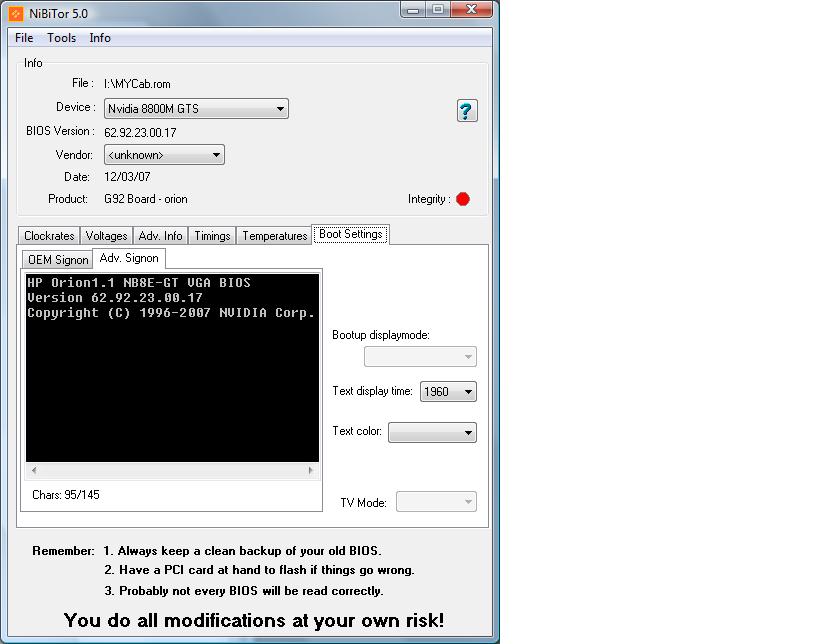
I'm afraid I have to agree with that. BIOS looks custom, has some common parts as you can see on my printscreen but is smaller and famous HP Orion inside is telling me that. I've asked author of nibitor software for help.
It can also be a case with custom mxm as 2.0 is saying as in desktop world producers were forced to go with nVidia reference design but in lapop world it was never the case
What is concerning encrypted BIOS I can say that when loaded into memory is not encrypted. I was able to dump C000 region which is Video BIOS and E000 which is man BIOS. In main BIOS you can find (C)Copyright Compaq Computer Corporation 1982-2000-All rights reserved
-
So...does that mean its decrypted then..?
-
Yes, it is decrypted in memory when loaded. We still need information how to decrypt BIOS file.
-
Is that the BIOS file the only portion that is encrypted? What kind of info do you need?
*HP HDX DRAGON Owners Lounge, Part 1*
Discussion in 'HP' started by J-Bytes, Sep 14, 2007.