 Problems? See this thread at archive.org.
Sorry, I remember reading it but didn't respond.
I don't have a blu-ray drive in my HDX.
I will say that now that I only use the WUXGA (since I sold the WSXGA+ HDX to a very nice buyer), I am completely used to it and cannot complain. That in and of itself, confirms what I said--that being side-by-side, you can definitely tell a difference, but if you've not used the WSXGA+ or only have the WUXGA, it looks ok.
-
Did you get both HDX's new, Lancorp?
Cheers -
No. I did originally have a new HDX w/WSXGA+ and the unit I re-purchased looked as I remembered my original--fantastic.
It was the use of the WUXGA, even before I had the 2nd WSXGA HDX that I realized I wasn't so excited about it. -
I'm glad you've noticed the SSD performance increase with the HDX Lancorp. It really is a big boost in performance. I was a little dissapointed when I played with the HDX for the first time, the HDD was just too slow. I would have suspected once I posted the benchmark figures, a number of HDX owners would have tried it.
Let us know if you're experiencing any 'stutters' which seemed to be common with MLC SSD models. I personally have not encountered them yet. -
Well, I think you didn't hit us over the head with a bat hard enough!
I wish I had tried it sooner...it is a big speed boost, especially starting Vista and apps! Writes in Vista to the SSD seem to be about the same or slightly faster than the 250GB in it as D: now.
I'm very happy with it. I'm going to keep my eyes out for good discounts on a 128GB. There is a G.SKILL 128GB for $259. I don't know if it's equal to the Patriot or not. Do you know of any good sites that compare the speeds of the various SSD's???
Thanks for your benchmarks, also. -
Here's some benchmarks of the Patriot 64GB SSD, the stock 250GB Hitachi, and a new 500GB WD HDD I just put in as the 2nd hard drive (D):
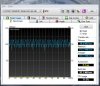
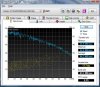
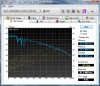
The Patriot SSD is about an average of 70% faster than even the WD 500GB!
And, so far, I do not notice any stutter in my normal usage. -
There are 32GB SLC expresscard drives out now too. I'm getting one just for games. The slot has no other uses anyways.
-
For those of you wanting a good review/comparison of SSD drives, a site called Bjorn3D did a review comparing the Patriot Warp V2 to the G.SKILL and Intel 80GB (proclaimed leader in the SSD race) and also to one of the fastest traditional HDD's, a WD Raptor 150GB.
Interesting review, and particularly useful considering the drives reviewed are exactly the ones I was interested in!
SSD Drive Review at Bjorn3d.com -
hey guys i have GSKill ram for sale for HDX lappies that i kept when i sent my 16t back to HP, its 2x2GB=4GB total. much faster than HPs ram. 35$ shipped, this is new. PM please need to get rid of it
-
Thanks for the link. Been researching about these MLC drives. The Intel has come down in price at NewEgg, and if you look often enough, you'll find 64gb slc drives at ebay for less than $300. Also, the Patriot 128gb MLC is $279 at Frys.com after rebate, which is the lowest I've seen. I've decided to wait until after the holiday season to get mine because I won't be around the second half of this month anyway.
Happy holidays folks. -
Actually, the G.SKILL is $259 at newegg. I was hoping for a better MS cashback and a better price on ebay, to ultimately get this thing for under 2 bills.
-
Hey, I'm new here and have an HDX9494NR. It has 4GB of DDR2 @ 667Mhz. I could not obtain verification from HP that this machine would run 800Mhz RAM at 800Mhz. This seems like a cheap way to improve performance if it would work, has anyone been able to verify this swap with benchmarks? Are there different motherboards in use across the HDX product line, or should a result from a slightly different model be applicable to mine?
Brief Specs of HDX9494NR:
Core2 Duo T8100 2.1Ghz
4GB PC2 5400 DDR2
Nvidia GeForce 8800M GTS
Toshiba 320GB 5400RPM
Matsushita Blu-Ray drive -
I believe it does work, but so that we don't have to rehash what has been discussed previously, 800Mhz RAM runs at a higher latency than 667Mhz. Higher latency = slower. So the trade-off of higher clock vs higher latency cancels each other out.
So, in effect, 667 RAM is fine, and not worth the upgrade. -
Thanks, I apologize if this issue has already been dealt with. I have read a lot on this site and attempted to use the search function but the sheer volume of material presents quite a challenge.
Perhaps future memory chip designs will achieve lower latencies and allow for higher performance from 800Mhz RAM. It's still unclear to me how to verify with certainty whether the chipset allows for the speed increase or not, and the voluminous yet redundant and often irrelevant documentation provided on the HP website does a poor job of addressing upgrade path concerns. -
Hi Everyone,
I have the SF Bags/ Waterfield Dsign (www-sfbags-coml]) sleeve for the HDX 20" with a flap and a strap that I want to sell. It is the horizontal version. I have not used it even once as after buying it I realized I did not have the need to carry the laptop around at all.
On the website they sell it for 90$ plus shipping.
I am located in the UK and am willing to ship it worldwide if needed.
I would be happy to sell for 60$ + shipping and post an ebay auction if needed.
Please PM me or send email to szadzik (at) gmail.com
Thanks
Szadzik
P.S. SOLD. -
What do people think of the HDX keyboard?
Any opinions on the feedback/travel and any flex?
Thanks! -
There's tonnes of comments in this thread about travel. Basically: It's heavy, but you can bring it with you if you have a bag.
For the keyboard, there's no flex really. -
Thanks for the reply.
I was thinking more about the feedback/travel of the keys lol!
-
I have to disagree with you. 667Mhz memory in our laptop is running with 5-5-5-15 timings. Having 800Mhz memory and using proper SPD settings or using memset in Windows we can run them 667Mhz but with 4-4-4-12 timing which will give you probably few percentage increase in performance.
-
Who are you disagreeing with, me, or crashtech? There is certainly plenty of Enthusiast memory products out there with lower latencies or higher clock speeds, but in general, for the inexperienced, average person, my statement holds true.
I think I even saw on Newegg some inexpensive 4-4-4-12 667 2GB modules. Overall, though, I think performance tests have shows that differences like this show negligible improvments...definitely not anything you would notice outside of sterile benchmarks. -
Now I agree with you
-
Should I take this to mean that you can't get RAM to run 800Mhz in your HDX, or that you did and there was no advantage, so you went back down to 667 with more aggressive timing?
-
You cannot get RAM to run @ 800 MHZ in the HDX because the chipset PM965's RAM controller doesn't allow for it. Max is 667mhz dual channel.
-
Thank you for the straight answer. 8GB of the fastest 667Mhz RAM it will be!
-
Oh, so you wanted a straight answer? Why didn't you say so in the first place?
-
BTW, I did an interesting test this weekend. I took the 8GB of RAM from my HDX18t and put it in my HDX and fired it up. Recall, I have a 64GB SSD drive in my HDX and super fast boot times. It seemed to take a bit longer to reach the login screen of Vista this time. So, I rebooted and did some timing. With 8GB in the HDX, it took almost 20 seconds longer to reach the login screen, but once I logged in, the rest of the process happened faster, and the total time was about the same.
I got rid of the page file, thinking the extra time had to do with updating a large page file, but still the same.
Interesting. (useless, but interesting...) -
Assuming that 4GB and 8GB memories had the same timings at 667Mhz then delay is connected with memory adressing and rewrting process (in fact it is not so simple, system needs to check that memory first - initialize it and rewrite addresses of devices to the memory hole above 4GB. Please remember also that the higher memory density then access time is higher)
-
WOOHOO! Thank God I finally just got my HDX in the mail today!
The only thing wrong I see is the plastic above the webcam seems to have a hairline crack, though barely noticeable, everything else seems perfect. I have finally joined the HDX ranks!
A couple questions though. Though I thought I bookmarked the page, it apparently didn't save the right one..and I tried to find it in the forum doing searches but theres a LOT of pages to go through..one question I had was how does one disable the Quickplay window that comes up like when you raise the volume or what not? It's lagging everything like crazy. I wonder if theres a way to make it show up for only a few seconds even cause it just stays up there forever.
Another thing I was wondering was what the BEST driver is to install I gues to normalize the Quickplay buttons in case they get wacked and for gaming?
The other thing I was wondering was wondering was should I install the x64 based systems(KB957321, "59108, "959130) windows updates?
EDIT: Last question: How do I delete a roaming user account? When I go to cmd from the search bar it shows the previous owners name and its attached I guess to the main folder for downloads and such. Thanks. -
Congrats!
Quickplay volume pop-up disable:
1. in search box of start menu, type msconfig
2. click startup tab and uncheck "HP Quicktouch on screen display"
3. click boot tab and check "make all boot setting permament"
reboot.
As for the quickplay buttons, if it works no need to do anything.
Best video driver? See Page 100 for the safest bet. HP signed driver.
As for those windows updates, if they aren't drivers, go for it. -
Reinstall the OS.
Or...
Control panel, user accounts, and create a new admin account. Then delete the old account when you're done. -
Awesome! Thanks so much 2.0! You rule man!
-
Jiminey Crickets.. I just checked the recovery CD and they got crushed..all scratched up..:/ Don't think they're usable. Is there any way to by pass the restriction in only being able to make one set of recovery cds or will I have to buy some more if I need to reinstall the OS?
-
guys if i m plugging in a 2.1 speaker set (one subwoofer and 2 small one) which port should i plug them into? The headphone port or the FRONT port which is located on the back of the HDX?
PS: my speakers connect using a 3.5mm jack -
Think about it...you can make your allowed one set, then just make duplicates of the one set so you have backups.
Or, you can purchase a set of recovery DVD's from HP. $16, shipped. -
i think there was a way too do it. I read about it here, will try to see if i can find it for u -
Thanks for the help Lancorp and umar.
I was busy trying to figure out why my Blueray drive wasn't showing up along w tech help (i think the same woman tech that helped with someone to get an HDX18 replacement for the messed up BIOS flash) I forgot about the recovery partition that has all that info there already, making the recovery cds not a necessity per se..but I guess I was trying to figure out a way to get everything working WITHOUT having to do a recovery and start all over again since I already set up the HDX closer to the way I wanted it..so both the partition and recovery cds are fine=equivalent. The BR drive thing, and then the internet going to crap made the format eventually unavoidable.
I'm thinking the owner loaded a bunch of new drivers before he sent it which made it wacked but whatever. I'm taking this time to make the recovery cds, and test out the different drivers. It seems all the drivers/updates on Microsoft and HP work fine. I'm going to test the different NVDIA drivers suggested from the pages way back, and try to find the best subwoofer drivers as well.
I cant believe I lost the quickplay before the recovery having done some of the updates that werent even drivers from Windows update, but now that I did all the drivers and updates it all works..I thought that was weird.
One thing I was wondering was if there has been any news on a Live 2.0 update for the BlueRay drive? I just bought the Dark Knight hoping to be able to see it last night after I picked it up from the release party at Moviestop but it doesn't work. The offer a digital version download as well but I want to make sure I have a good set up on the HDX before I do so in case it wont let you burn it somewhere for safe keeping. -
I thought of that but yea I didn't want to have to pay for recovery cds. I couldnt make the recovery cds because the previous owner already did, which is I why I asked if ju no what I'm sayan. The partition works fine enough.
OH about the WUXGA vs WSXGA contrast I agree with you that the deskop SXGA screen is more brillant/bright than the UXGA BUT the brilliance, while illuminous, the light doesn't seem as we'll controlled, anywhere near as detailed, and isn't as sharp as the UXGA one. The UXGA I'm finding to be very sharp, deep, rich, much more detailed, and very nice to look at for different reasons. Video looks very nice, and the sound is excellent. The brilliance of the SXGA kinda makes me squint and also makes my eyes tired. The SXGA is nice but I prefer the UXGA. -
Congratulations on your HDX, and kudo's for your patience in working through your device's issues.
How's your light bleed on your WUXGA?
Cheers -
Wot? Are you comparing 2 HDX's? If not, then it would be apples to oranges type-thing.
-
just passing by. i have not posted in awhile on this forum but i am glad to know that the HDXers here are very active and giving the HP DV5xxx owners a run for their money in the total number of posts :laugh:
i am still enjoying my HDX immensely but my new baby now is a netbook, specifically the Asus N10JC upgraded to 2GB ram, woooohoooo :wink:
-
Thanks. Trying to get used to this rubber keyboard cover..don't think I care for it just yet but anyways I haven't seen a movie, well, sat back and observed it for screen issues, but thus far I haven't seen any. Just ONE dead pixel on the far right side of the screen, barely noticible but other than that and the hair line crack above the webcam (must have gotten squished a little during transport), also barely noticible, I don't see anything wrong with it really. Once I tst the different drivers, like the NVIDIA, and see how it works ok, and do any other crazy stuff to see what this beast can handle Im gunna reformat again and test the movie..I believe the -one- The Dark Knight digital copy I'm permitted to dow0nload.
EDIT: Ok I do have a little bleeding but it doesnt look bad at all to me. It kinda looks nice actually, not distracting or annoying. I have figured out how to get rid of that stuck pixel via massaging the screen and tapping it, though it sometimes comes back, which I think is caused by the crack in the surrounding plastic that pinches/pressures the screen in a slightly different way from how it came before it was shipped. Either way I'm happy with my purchase. I'm now just trying to figure out the NVIDIA settings to see if I can tweak visuals and video, but it doesnt seem to help in terms of sharpness..well no option for it I guess even. Lancorp would you be so kind as to share what settings you chose please? -
Nah, its an older Apple (literally in this case) monitor with 1600x1200 resolution. So it would be comparing Apples to HDXs in this case I guess
If I can when I get the cold hard cyash I'll look into getting a WSXGA screen one and be able to compare it then.
I can say with the little I played with Warcraft everything is smooth BUT it looks washed out a bit with native specs. I believe I'd have to lower the resolution for it to look perfect like you said before. -
Hi, if you think the Dragon is heavy you should see the Acer 9805, a 20'' monster, bought one new for $500us ebay, next to my dragon the lid of the Acer is as thick as the overall thickness of the Dragon.. Both run great.
-
That thing looks pretty sweet, excellent price. How upgradable is it as far as for future use and gaming? Looks like Cser doesnt carry it anymore. I actually dont think the HDX is all that heavy at all I don't know why people whine about it really.
-
Sorry for being slow but do you mean this one?
http://h10025.www1.hp.com/ewfrf/wc/...&dlc=en&cc=us&lang=en&os=2100&product=3547191
Or should I do this one that was updated 2 months ago?
http://www.nvidia.com/object/winvista_x64_180.48_whql.html
One other thing I was wondering was there were drivers for the subwoofer/audio ones that made it boom best no? I think I remember seeing the discussion on it but I cant find it. -
The one from HP. Everything works with it.
The one from Nvidia won't work as is. You have to get it from laptopvideo2go. But unless you know how to swap infs and twiddle about, I don't recommend it. You'll likely lose your Blu-ray playback ability.
As for audio driver, if it ain't broke...
You may lose bass altogether and end up in a frustrating loop of install-uninstall. Especially if you have an HDX 9300-9400. If it's not installed yet, d/l and install the one off HP's site for your HDX model. That one works for everyone, regardless. The ones from the dv5/7 don't work for everyone. -
I think it is pathetic that HP cannot provide a compatible, updated driver that includes the IDT audio control panel (for the equalizer, specifically). I have been using the stock 5607 driver (I think that's the HP stock version), and haven't noticed the occasional audible "glitch" while playing music that I had with the other driver, but I miss the IDT control panel!!
There are so many IDT drivers out there, and most, if not all, have the IDT control panel...except the HDX.
-
Agreed. I tried to hack the 5607 to add that feature but it was a no go. Still looking into it though. Let you know what I come up with, if anything.
-
First off, if you don't use HP driver, you could lose Blu-Ray functionality. If you don't have Blu-Ray, or isn't a big deal AND have Vista32, go here and download the Vista driver at bottom of post:
http://laptopvideo2go.com/forum/index.php?showtopic=22137
Dox has made a fool proof installer to go with his drivers. This driver works great with my HDX. Unfortunately, no 64bit support.
If you have Vista64, go here and do the same thing:
http://www.laptopvideo2go.com/forum/index.php?showtopic=21983 -
What happened? I quoted and responded to a post that is no longer there!?!?!?! Weird things are a happenin....
*HP HDX DRAGON Owners Lounge, Part 1*
Discussion in 'HP' started by J-Bytes, Sep 14, 2007.


