Problems? See this thread at archive.org.
My guess it costs more than a new HDX!!!
Nice, but will be pricey.
-
Yep. Presents a bottleneck to the GPU when running @ 50%. Plus games will have calculation issues at 50% CPU speed. This should solve your probs.
-
Will a 100GB or 512GB SSD be able to work in the HDX?
-
Also in order to fix my mic and recording problem do I just use the audio driver on this page http://h10025.www1.hp.com/ewfrf/wc/softwareList?os=2100&lc=en&dlc=en&cc=us&lang=en&product=3547191
Or is there a better one? I'm afraid to mess with it as audio works, its juts that the mic doesnt seem to. -
As long as their SATA interface, any drive will work.
-
That driver, the 5607, works with all HDX's. It won't mess anything up. It's using audio drivers from other HP laptops that causes a loss of bass with some HDXs.
As for your mic, did you set the microphone array to default? That;s the mic above the screen. The other "mic" is an external mic you plug into the HDX. -
nice driver
-
![[IMG]](images/storyImages/capturero3.th.jpg)
Do you think the Intel chipset is responsible for the higher 2.0 scores? -
Sweet. While I'd LOVE a 512GB SSD I think $1000 is a bit much for right now
 I
I
d settle for the 500GB 7200.4 Seagates that are supposed to come out in February. -
Sweet but if the audio works but the mic doesnt does that mean its a driver issue or is there a separate driver for the mic and recording than for just regular audio? Also don't I WANT more bass/umph from the subwoofer? If the sound sounds good and more powerful from other drivers are there any you can suggest? I LOVE bass but muddled sound I guess isn't good if thats what you mean. And would I do a clean install of them or would I need to install the first one, the 5607, then the other one on top? Thanks 2.0.
EDIT: Haha man...ok I'm such a newb.. I tried installing Lenovos Veriface and didn't think of the fact that it would conflict with the fingerprint reader (works great btw)..so I accidentally did system repair..and I lost QuickTouch and QuickLaunch..I uninstalled them, ran CCleaner in safemode and reinstalled them and still can't seem to get them back. Could you please tell me the proper way to do this..? I also couldnt seem to get the audio done right as I uninstalled the IDT HD Driver and after restart its still there...even after running CCleaner...What the heck am I doing wrong? Please help.
BTW I didn't know there was a compatibility mode in Vista! Wow! Thats what allowed me to use the Veriface! I'm going to try it on the software I could only use in XP to see how it works!
EDIT: Duh....I somehow missed you saying I needed Aray set as default..that's probebly what it is...Thanks so much 2.0! If I can get the Quickcrap working I should be all set!
UPDATE: I downloaded MCEBuddy and it allow me to access my DVR!!! Woohoo!!! Will converting it to HighDef via the VistaCodecs x64Components 1.6.0 final will that make the video quality better than how it appears via S-Video? Somehow I think I remember the way it looked via Firefire on XP as looking better than how it is now straight in the recording without conversion. Is Firewire better than S-Video? Shoot..now the lights are off on the Quickplay buttons besides them not working..except for the movie button, that light is still on for some reason... -
Does anyone get a faint high-pitched whine from their screen when it's at max brightness?
If I press fn and f7 once to go 1 level lower than the max brightness then the whine stops immediately. If I press fn and f8 to max again then the whine starts immediately.
I notice the same behavior on AC power or on battery, only the whine is much louder on AC power, but the whine is still there on battery. -
Hey guys
Being a newbie to Vista and my Dragon, I would like to try to play some of my 16-bit software on my HDX. I saw there is a emulator called DOSbox - would that work, or is there a different-better way? Thank you! -
DOSBox is only for DOS programs really, so if you mean 16bit DOS 6.0 programs, it should work. Otherwise I'd say use some VM software and install an older windows.
-
Yep, happens after some time. It's just the screen warming up, it goes away after a couple minutes of being on.
As a side note, I recommend using 80% brightness anyways, because the screen has better contrast and color levels at that setting. I always run 80% in my RMClock profiles, and only manually push it up when I'm in a really sunny room. -
I do. I thought it happens when the processor is overworked..though the it coming from the screen kinda makes sense since it doesnt always do it when its overworked. I (always) keep mine at 100% brightness as well so yea it makes sense. -
doesnt on mine
-
I don't know if anyone has done it here yet, bu I decided to install Windows 7 last night as my main operating system after being impressed with it as a virtual machine. Here's my experience:
Installation was quick. Detected most of the hardware except for the finger sensor and one other unnamed device. I'm pretty sure it's the built-in IR.
I'm impressed with the lighter footprint. The 64bit version installation was less than 15gb. This is good for those that want to use a 32GB SSD. I'm using the Intel X25 and I appreciate the extra space. On a side note, I reran an HDTune benchmark with 512k blocks and it runs faster on Win7 with less CPU usage. Granted I probably didn't have all the same tasks running in the background, but it wasn't a huge difference.
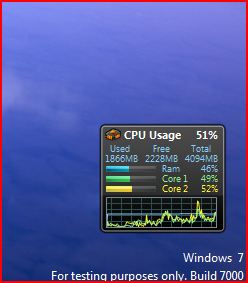
Speaking of tasks, the RAM footprint is also a smaller than Vista64. Right now, I have about 45% (of 4GB) usage while recording an HDTV broadcast via media center. In Vista64, I'm typically in the mid 50's.
User experience is a lot more pleasant. Start menu and taskbar are more easily customizable, as is the desktop appearance and gadgets. Love the rollover app preview of running apps as well. I'm not sure if the sidebar memory leak has been addressed, but I do like the gadgets implementation better. File transfers and movement seems faster. Everything just seems snappier.
Media center has some improvements. Before I forget, be sure to download the patch that fixes corruption of video and mp3 files. Quickplay buttons above the keyboard work the way they're supposed to. Vista64 would stutter whenever I'd change the volume.
This is a beta, but it's surprisingly stable. It actually feels more like a more refined Vista. I haven't come across any problems yet, but I've been on this for less than 24 hrs. I've installed most of my productivity apps (Office 2k7, Adobe Suite, Quicken, Quickbooks) and it's all been solid. I've never had any complaints about Vista, but it makes me wonder if it was a stop-gap release on the way to Win7.Attached Files:
-
-
The 5607 is the latest driver HP offers fot the HDX and works with all HDX's. It's the drivers for the DV7 that may or may not work.
Press the movie button. It's called theather mode. It dims the lights on the HDX so when you wtach movies in the dark you don't have all those lights glaring at you.
As for your Quicktouch and Quicklaunch... Don't know. Never had that problem. What exactly doesn't work? Did you try: battery out, unplugged, and holding down power for 30 secs? -
Has anyone installed the newest BIOS update?
-
Hi I am a Television editor and I want to import recorded TV from my HP HDX into Avid. However Avid doesn't recognise the Mpeg format that my HDX records? Any ideas? What is the codec that quickplay uses? I really dont want to convert the file as it takes way too long and I have hours of material that I need to deal with...
-
Sounds good. What do you use/how do you personally record HDTV..like which software and which input? I've been using Media Center via S-Video and it look ok I guess but Firewire looks way better..but I need XP to be able to run the Firestb to allow it to recognize and use firewire since firestb doesn't work in 64 bit apparently..unless u know something I dont.
-
Cool I['m using the 5607 one and it SEEMS like everythings working again sound wise. It took a couple of times uninstalling AND deleting, but I got rid of the others, and then used the swsoft folder to reinstall since no other way worked for some reason. If you could recommend the driver which produces the best most booming bass, I guess for the DV, just to try it out, which one would you recommend trying?
Awesome I didn't know that! Nice feature! Thanks!
As for your Quicktouch and Quicklaunch... Don't know. Never had that problem. What exactly doesn't work? Did you try: battery out, unplugged, and holding down power for 30 secs?[/QUOTE]
Hmm it SEEMS like everythings working again, except the lights dont change from blue to red when I turn things off, like when I mute. I tried taking the battery out but I'll try the power drain as well. Thanks 2.0
-
Quick question to anyone: Has anyone thought about trying to get HD quality video capture/recording to the HDX through something like using the Blackmagic Intensity http://www.blackmagic-design.com/products/intensity/ to a http://www.lecroy.com/tm/products/ProtocolAnalyzers/Accessories/PCIE2EXP.asp (though I don't know if we have an "intensity board") or maybe an HDMI converter to get high quality video capture to the HDX?
The cheapest way for me I think is using a dual boot XP to get firestb working and then use firewire but I'm trying to think of all the different ways to be able to do this. I have a Comcast Motorola DVR-3416 I want to record the videos from and can do it so far in Vista via MC but its only S-Video quality. -
I found the best overall bass to be the 5607. For certain music, I found the 5929 is better but it sucks for games and just about everything else. But I do not recommend that driver seeing as a lot of people have had problems with it including total loss of bass and uninstalling. So I don't recommend even experimenting.
-
In Vista, I used the S-video so it's not true HD. For now, I'm capturing OTA HD using the antenna. Quality is quite nice. One thing worth mentioning about Win 7 media center is that it aggregates your tuners into one guide. I haven't put in enough time to play with what combinations are possible (cable and antenna, digital and analog antenna, etc), but it's nice to have more options on the program guide from multiple sources.
-
Ok thanks I'll stick with the 5607 then. Oh it seems like the battery and power drain fixed everything! Yea I think all the Quick buttons work now! Brilliant! Thanks! -
I can't get any signal where I'm at unfortunately. Glad to hear it looks good at least. I wish WMC had firewire support! The overall look and feel of it is nice I agree though, the guide and everything. Do you know a quick way to stop recording? I'm testing different inputs to see what looks best, and am recording Headbangers Ball videos off my DVR, which are short and quick enough to convert to HD, but they are all looking..eh..so so. Firewire looked SO much better when I had access to XP and firestb and DVHSCap (if I recall the name correctly). Does anyone know a business company or person that we could possibly pay to make the INF file of firestb work with 64 bit Vista Ultimate? There seems to be quite a few on forums I visit that want this and I'm thinking we could put together donations or something..That would also save me a heck of a lot of money having to get some convoluted method to get HD video quality video capture. All I'd have to get is a much longer Firewire cable so it will be more convenient than having to carefully stack my HDX on top of my Xbox 360 to access the DVR.. I don't want any accidents.. I'm thinking a 10 ft cable. I had to sell my copy of XP :/ for now till I get another one I guess I'm stuck with S-Video quality recordings.
-
Glad to see someone else trying out Windows 7. I installed it this morning and as happy to find that everything working straight off the bat.. Almost. After a quick windows update my Quicktouch buttons worked a little better. (They worked to begin with but the lights themselves would not change, e.g. blue to orange when you mute etc..) Most of the others dont so I guess I'll install the HP update.
My questions are, with most of the things working, what do you suggest loading on from the HP dowloads and drivers site? I'd rather not clog up processes and space with rubbish it doesn't need. I'm really liking the 26% memory (4GB) usage on idle.
Also, I did the Performance test and got better scores apart from my HD. It's dropped to 1.9. Now all I did was format that one that Vista wasn't installe don and swapped them around, taking my vista install out so perhaps the drive itself is faulty? It does like clunking now and then but only one clunk at a time.
Lastly, the windows folder itself is over 10 gig. I'm thinking of getting a 30GB SSD drive but with MATLAB and SolidEdge etc.. I may be running low on space. Is there any sofware backups, files and such in the Windows folder that can be deleted to free up space? -
Hi,
Does anyone experience some kind of light leakage from the HP logo to the LCD screen, when the screen is off (not black, but "off" like powered off)? What I see is a dim light in the LCD when the it's off, and as soon as I turn it on, even while boot up that you get a black screen, it's (luckily!) gone.
My guess? While the screen is off, the transistors that compose the LCD are relayed (not active) and thus they let the light from the HP logo bulb to pass-through. As soon as the screen is powered on, the transistors activate again, and even if it's showing a black screen, they are actively blocking the light from behind.
Another "problem" I found is some screen uniformity issues at the lower half of the screen, specially when the brightness is fully cranked up and there is a black background displayed. If I turn the brightness a couple of levels lower, it dissapears. Plus, its barely unnoticeable, since you'd have to stare at a full screen black box to notice it!
When I got the HDX a week ago, it crossed my mind to return it for these two things... but since they might be habitual problems, I thought that maybe I could get a worse or equal unit, so it wasn't worth the hassle and actually, the issues didn't quite affect the usability of the computer.
Please, comment on these two things... do you have them too? Do you think I did good in not returning it? What would have you do? Thanks. -
Just curious to know if anyone knows if there's such a thing as an HDMI input Express Card for notebooks out anywhere?
Also, can anyone recommend a good but cheap/ is in inexpensive and easy to use 3.5 ESATA enclosure from NewEgg, Ebay, Amazon, TigerDirect or wherever please? I need it to work my the hard drive inside of my Lacie Porsche 500GB USB 2.0 Hard Drive that got messed up from a short fall..:/ The USB chord was shorter than I thought it was apparently.. Thank you. -
Going to try 5607 then...!
EDIT: I have 6017 installed... have you tried it? Can you comment on it compared to 5607? -
You should be able to recover extra space by turning off system restore. There's also a way to limit the amount of space system restore takes up if you don't want to completely turn it off. If you have hibernation enabled, there's a hyberfil.sys(sp?) that also takes up quite a bit of space. If you have a swap file, I'd move that to another drive or partition if you don't have one. If you have 4gb of RAM, I'd disable the swap file. Last that comes to mind is to configure windows to write all TEMP stuff (the temp directory) into another drive or partition.
Regarding the HP downloads, I haven't used HP update yet. However, I tried to get all my device drivers installed from the SWSetup folder. There are still a couple undetected: the finger reader and I believe the IR receiver. I'm going to do more playing and tweaking with the install the next couple of weeks when time affords, but suffice it to say that it feels like a faster system and stable enough to do my work on it.
Ditto on the low memory usage. -
I had a look into and did most of what you said. It was the winsxs folder that was the problem. Over 5GB in there from a fresh install. I had hoped MS would have fixed it post-Vista. Seems not.
Have you got yours up and running again fully? The intel chipset and matrix form the HP refuses to install and I'm having no luck at all with the fingerprint scanner. Did you use your old SW folder? -
In a related drivers topic... did anyone managed to update ALL the devices to what the applications such as DriverAgent, RadarSync, etc. show that there are new updates? I got like 5 drivers newer than the ones showing in HP support site, but I'm still missing some others...
-
Hows the bass sound?
-
When people reported losing bass are you saying they had to uninstall it because of that or they also had problems with uninstalling it? I was considering trying it then switching back and forth but if there were problems with uninstalling it I will just forget about that.
-
Anyone have an issue with the Treble/Bass buttons? When I try to use it it gives me "Failed while getting Trebel and/or Bass level".
-
As in there was no bass at all so they uninstalled it. In some cases, the uninstall had problems and restoring the original driver didn't immediately fix it. Problem is, it leaves behind registry entries.
Some people have no problems at all with the 5929. Likely there is a variation is sound hardware that allows it to work on their system without issue.
The draw to the 5929 is that it has an equalizer and a sound recorder loop. But I have found that you can't get better overall bass than with the 5607. -
Can you please post the link to the 5929 please?
-
I see. Then what makes the 5929 noteworthy in any sense if the bass isn't pronounced in it over the 5607? I'm debating on whether to wait a 1-2 weeks for when the 500GB 7200.4 Seagates will supposedly come out (..I called them today and they said their ETA is mid January..) or just get 320GB 7200 rpms x2 now and I was thinking if I can back everything up on to the external hard drive drive that I'm hoping will work in an enclosure I just bought, I'd like to test out a bunch of stuff I wouldn't normally since I will probably end up formatting the hard drives the HDX came with. I was JUST going to ask about an equalizer..man that would be sweet but if it doesn't raise the bass I don't think it'll be worth it. I think I remember you mentioning something about trying to get the equalizer to work in other drivers but didn't remember seeing any other talk about it. Is there a specific place in the registry we can just adjust a number value and raise the power or thump on the subwoofer possibly?
-
Sure thing:
http://h10025.www1.hp.com/ewfrf/wc/...&dlc=en&cc=us&os=2100&product=3744254&lang=en
It's from the DV-7T -
If it works on your system, and there's no foretelling if it will, some like the softer, smoothed out bass. Great for certain types of music. However, no good with games and movies which require punchy bass. Also if that driver works and you use external 5.1 setup, it can sound better than the 5607 since you have more control over the sound.
Get the 320's. They'll be cheaper when the 500's come out. Buying technology when it first comes out means you pay the highest price for the item during its selling lifetime. I always advise not being an early adopter of any technology. Technology is a wasting asset.
I couldn't finish working on that project. Was too busy at the end of last year. I might re-up that next month when I get back into the swing of things. I haven't found anything in the registry that's workable towards getting more bass. Likely it isn't possible or even reasonable given the low wattage of the subwoofer and the type of reflex enclosure.
Here's one thing I advise against; connecting the HDX to an actual subwoofer. You'll then see just how deficient it really is. And you'll soon realize that it amounts to nothing more than a rumble pad proxy while gaming.

-
Does anyone know where one can source the HP Recovery Manager software? I want to install it on Windows 7 but can't find it in my SWSetup folder. I looked online and foudn an XP version that didn't work.
After a 25 minute call to Customer Support, they seem to think it doesn't exist but I'm sure I saw someone mention re-installing it.
If not, any idea as to whether a disk recovery using back up disks and then an upgrade to Windows 7 instead of a clean install would work? -
Giga - sorry to hear that you have to part with your HDX. I picked mine up a few months ago so unfortunately I can't help you out there. I have, however, been looking diligently and quite unsuccessfully for the alienware backpack. If you still have it and are willing, I'd be interested in purchasing the backpack from you.
I take my HDX with me all over the place and get a fair amount of attention when using it. If anyone expresses any serious interest in purchasing one, I'll point them in your direction. -
TheOriginalGiga - sorry to hear that too.
Hope things go well from hereon so you can still get to keep your Dragon.
Thanks for your pieces of advice for me back then. It really helped me in convincing myself and making the purchase. I'm really happy with it. -
Ok. I don't plan on getting a 5.1 set up just yet but I'll keep that in mind. Yea somehow I doubt the 5929 would be great for heavier/metal music in that case then.
Yea I was leaning more towards the 320GB one just because theyre so much more inexpensive, but what do you think about the intro price for the 600GB drives at $160 in contrast? Wait just thought of something..if I got a clean install of XP on the first hard drive, could I still use the Vista Ultimate recovery disk for the second drive or would I be forced to do a clean install of Vista?
I wouldn't doubt you're a busy guy but I didn't know you actually did some work to try to get it working on the HDX. If it could work an equalizer would be sweet. I wonder how much different it would be than just using the treble and bass setting. It probably is just me but. you know, somehow I thought the subwoofer sounded more punchy when I first got it.
Haha its that bad? Wait if someone hooks it up to a 5.1 audio sound system wouldn't that have a sub woofer? -
Hi all
Got my highly impressive UK Dragon for a bargain £929 recently and been reading with interest all the posts on this thread. One question I have regarding the unit is: Is there a way to re-set the blu-ray region code more than the 5 times Quick Play allows?
Cheers! -
A program called AnyDVD by Slysoft is your friend. You can forget about region codes. Very highly rated software and is updated and maintained almost weekly!!
-
There were some fantastic deals on the Hitachi 320GB/7200rpm drives with rebates that brought the final cost down to $59 each. Not sure if that deal is still going.
BUT, looking at the pricing for the 500GB/7200RPM Seagate (when it is released), it isn't that much more than a 500GB/5400RPM drive is now! We're looking at $128 for a 500GB/7200RPM, and currently a 500GB/5400RPM is around $110. Personally, if I were shopping for new hard drives, the biggest and fastest drives for $128 each sounds pretty darn nice!
Just think...1 TERABYTE in your HDX!!
-
I might add is in its last week to be able to do LIFETIME MEMBERSHIPS, and will START to REQUIRE YEARLY MEMBERSHIPS after the 18th very likely. I bought all of them, been using AnyDVD for years, like lancorp said has very good support, and it includes support for Blueray/HD!
*HP HDX DRAGON Owners Lounge, Part 1*
Discussion in 'HP' started by J-Bytes, Sep 14, 2007.


![[IMG]](http://img73.imageshack.us/my.php?image=capturero3.jpg)