Problems? See this thread at archive.org.
I'm sorry to hear about you not wanting to deal with laptops anymore, and how the CS experience has been with HP. I've found that if you call in different times, which may get you connected with different areas of the nation, you can get some nicer reps than at other times..ie Verizon for example North East reps typically suck, dont want to help you, and try to save money for Verizon instead of being on the side of thecustomer..if I call in peak times I usually get the mid to west coast and they are a LOT better in that they are really on your side and bend over backwards to help you typically. I've gotten good customer service almost everytime I call HP but one time I didn't, so it does happen. You know, now that I think of it, I think that one time was a Canadian call center.. Hmm. One thing I was wondering was why not just purchase an accidental warranty or if out of warranty purchase an out of warranty repair they cost around the same but the accidental can go to up 4 years if you purchase the longest one? Is that not an option for you if you live in Canada? BTW with most companies and I know this of HP, you get a brand new PC of equal or greater specs if you have to return it for repairs 3 times.
-
-
Haha ok. Right, it begs to ask "best" for what or in what sense, as it must be relative or relational TO something. Yea, you obviously kept the UXGA for some reason, I think you said because you need to deal with pictures or what not? I actually found quite a bit of info review and other wise that I think backed up what Mobile and the tech said as well but its cool, you win
 I need my Dragon to be more so inclined for visuals with the high resolution for artistic purposes so I got what I needed either way. All I gotta say is stay away from the crunk juice, and especially keep it away from the HDX otherwise you may end up with Elmers problem. I'll need to keep in mind to always have backup external hard drive or two otherwise you'll run into a similar problem of not being able to access your data that you THOUGHT was safe and secure away from a potentially volatile situation with a laptop/notebook. Truly sucks..
-
RIght that's why I like to not JUST look at reviews but also comments/reviews on places like Newegg and Amazon like you said, as well as youtube and such. I like that Ebay just added a way to add a review for a product as well so you can know a bit more about what you're buying like you would at other places. I realize they get paid but reviewers still do say things that don't always make the product look good, sometimes they completely fillet the product as well. I didn't know that about the XPS screen..wow I can't imagine having to pay that much for a laptop to have a problem like that..I agree...but I wonder if we could muster up enough people from here to have HP make us another updated HDX 20 incher? Like maybe add a link to send the CEO an pre made email via a poll or something? And a bios update for the current HDX?
-
Precisely for the high resolution and screen "real estate". I love hi-res screens...my vision up close it fine, so the higher resolution, the better for me as everything looks sharper.
On my WUXGA, I just wish it were brighter...(although I'm used to LED backlit displays and their high brightness!) -
I installed Windows 7 public beta on my 9494nr. Certain things work, but it seems a bit sluggish. There are a few devices in Device Manager that were not configured or drivers were not found for them.
AVerTV
BaseSystem Device
BaseSystem Device
Fingerprint Sensoe
Unknown device
Could any of these cause the sluggishness? -
I didn't even got to try the magic packet because, even after that setting, when the computer enter sleeps, it "unlinks" from the router; the light in it is turned off. That means that the ethernet card just powered down too and thus it won't be able to listen to any packet at all to wake up the computer. If the thing worked, then the light in the router for that cable should stay turned on even after the HDX is off...
-
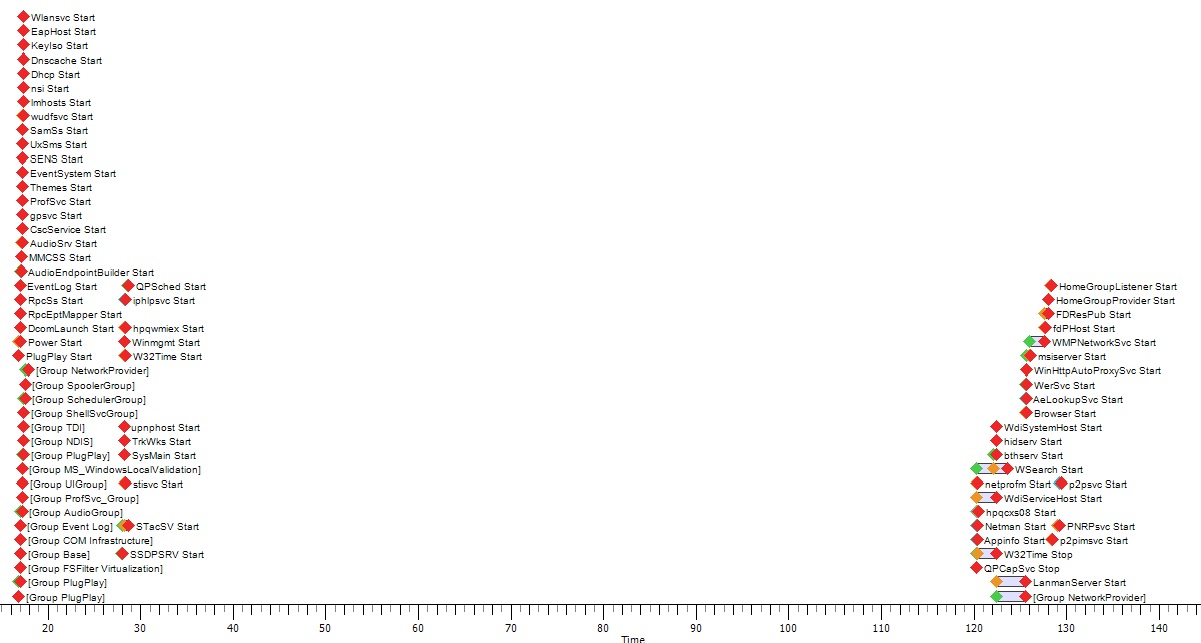
Has anyone had some random startup time increases with Windows 7 and their HDX? Starting yesterday it was suddenly taking a few minutes to stop loading.
rmClock used to appear the instant I logged in, it now takes forever.
I've attatched a pic of WPT capture of my services. Any ideas as to the sudden 90 second gap with the service startup?Attached Files:
-
-
I wonder if theres a way in the registry to make it even brighter? Theres usually a way in Pocket PCs to do this, it'd be cool if this was the case in the HDX. Couldn't hurt to be brighter I agree.
-
Having trouble with blu-ray on my hdx anyone help? disk drive wont read disks.
specs
hp hdx 9200 windows vista ultimate 64bit
intel core 2 extream x7900 2.80ghz
nvidia geforce 8800m gts
4gb ram
blu-ray
basicly every option possible -
I tried the 179.28 drivers but it displays too many artifacts on my system. Went back to 176.22 and everything look fine once again. Anyone else have the same outcome with the 179.28?
-
Have you tried to play CoD4 on WUXGA (native)?
Is it possible? -
It's definitely possible. The only question is @ what graphic detail setting.
-
Nope, that trick is exclusive to some PDAs.
-
Where are you noticing these artifacts? Desktop? Gaming? Movies? LCD or TV?
WUXGA or WSXGA+ LCD panel?
Also, is your GPU overclocked? -
can be medium without AA/AF.
I am interesting how many fps can I achive (min/avg)?
If you play cod4 on WSXGA please also let me know about your result in cod4 -
WSXGA+. Haven't done a fraps test. But all full graphic details, insane corpses and no noticeable slow downs, ever. So I assume the min is 24fps.
Driver 179.28.
Edit 1: D/L Fraps and ran it during level "charlie don't surf." Lowest FPS was 22. Highest was 85. Observed that it mostly hovered in the high 30's, low 40's.
EDIT 2: from the fraps log on level Charlie Don't Surf: Frames: 17038 - Time: 363214ms - Avg: 46.909 - Min: 24 - Max: 89
Stock clocks on GPU. -
Thanks 2.0
with AA/AF or not? -
With 4x AA and AF set mid way.
Other details; T9300 (2.5ghz), 4GB RAM , Vista x64. -
once more thanks.
BTW I am impressed. 1680x1050 and AA/AF - very good result
-
Starting to get an occasional popping sound in the speakers when idle or sometimes when mouse button is pressed. anyone else had this problem?
-
Wasn't the Xtreme X9000?
-
Bleh..How exactly does one overclock the GPU and is it desirable to do?
-
The X9000 is the Penyrn version. X7800 and X7900 are the Meroms.
Nvidia tools is one way of doing it. It's on their website. The other way is Riva Tuner.
As for desirable, I say maybe as long as you go in 10-25mhz steps and test, test, test stability once you pass +200mhz. Likely you'll get shearing and artifacts before then.
Currently, I don't have a real need to overclock. But perhaps next year, when graphics in games becomes a bit too much in some scenes and I want to play at native res, I'll look into doing it. But as it stands, everything I throw at the 8800M GTS @ WSXGA+ runs smooth. With the exception of Crysis. But Crysis warhead runs smooth at native. -
Typical just when i'm deciding if to buy a HDX9430ea or build a Matx setup they go and discontinue the 20" Range
http://h10010.www1.hp.com/wwpc/uk/en/ho/WF09a/321957-321957-3806904.html
. -
They discontinued it in the States early fall of last year.
There's a bunch on ebay UK. But most are refurbs with only a 90 day warranty. Not sure that's HP's international warranty. -
Someone mentioned they have lots in Australia..I wonder where at.
-
Hmm ok. Which is better you think Riva or Nvidias? I don't know that I'll do it if most games run fine, but just in case it would be good to know so thanks.
-
Thanks i'll go and have a look
-
Hey, gang, I've had some good fortune (and greatly increased my CC balance <ha ha>) and now need some advice. I was able to score an HDX X9000 after much searching and he came with some brothers and sisters. So now I am in the fortunate position of having an excess of Dragon's.
I have to get rid of some of them or my wife may get rid of me. LOL! I need some advice as to what's the going price for these babies. I got a T9300 which I think I'm going to keep if I can, and a couple of T8100's which I want to sell, and my original T5850 which got me into this mess, which I guess I will also sell. I'm going to try to sell them locally first, just because I've never sold anything on eBay and want to avoid the hassles if I can. I'll probably use Craigslist or local ads, I guess. We have a lot of geeks running around, so someone should be interested. (If not, I'll bite the bullet and try eBay. I have an account and I've bought a lot on there, so it should be fairly straightforward, I guess, if I have to go that route.)
Anyway, here's the T8100 config:
HP HDX (9494nr ?) "Dragon" with Core Duo T8100 (2.1 GHz),
4 GB RAM, 320 GB HDD, 20.1" WSXGA+ (1680x1050),
Blu-Ray DVD+/- R/RW DL, Nvidia GeForce 8800M GTS
and all the rest with Vista Home Premium 64 bit.
(HP refurbished, still sealed in the box, so I assume HP will honor the 90-day warranty, but don't know for sure. Does anyone here know?)
The T5850 has 2 GB RAM and 240 GB (2x120) HDD, WSXGA+ (1680x1050), and the regular DVD (not Blu-Ray), and the Nvidia 8800M GTS, and (I think) 32-bit Vista. (Also still sealed in the factory box and never opened.)
I can hardly believe I finally found an X9000 Dragon (I paid a premium price, of course)...I was beginning to think they were a myth.
Any advice greatly appreciated. I wish I could keep them all.
Thanks!
Bron
P.S. Just out of curiosity, has anyone else seen an X9000 HDX for sale anywhere? I swear, I couldn't find one anywhere. And I looked in all sorts of crazy places.
-
@Toolz
check cclonline they had for 750£ -
2.0 - It occurs when gaming and viewing movies (both blueray and DVD). Display is 1920x1200 on the Notebook and tried it on the HP w2558HC external display using HDMI and DVI @ 60HZ, single display. GPU 8800GTS is not overclocked. No problem when reverted back to old driver.
-
Where'd you find an x9000 at? New?
-
Neither is better considering the end result is the same. But The Nvidia one integrates into the Nvidia control panel. Some fo some reason, can't get the Nvidia one to run without it BSOD. Never had any problem with it myself. Don't know if it's because of clean install of OS or clean uninstall of drivers.
BUt if it doesn't work for you, you can uninstall Nvidia's and go with Riva. -
Right! Amazing, no?
No, it's not new, it was a refurb unit, but still sealed in the box from HP. I'm hoping the 90-day warranty will apply. I'm not sure if they (HP) will honor it or not. I'll register it and find out, I guess
I got it from an asset liquidation sale (business) - a fluke, really, caught me quite by surprise. I deal in tech gear locally (A/V, Audio, Computers, etc.) more as a hobby than anything. I opened it and it looks like it's OK, but I have not even fired it up yet. Too busy and don't want to be rushed, so it's sitting upstairs waiting for me to get a life.
I figured I could sell the 8100's and maybe make a few bucks to help pay for my habit (ha ha), but it's looking to be more trouble than it's worth at this point. I just don't have the time to fool with it. But I couldn't pass up on the unexpected chance to score an X9000 - like I said, I was beginning to believe they were all long gone.
I could actually get more 8100's, I think, but the price is high and I doubt I could make much off of them. There's a guy selling them for $2200-2500 on Amazon, but I'm not sure I can get that much around here. I'm thinking more like the $1800-2000 range and the profit won't be that great when all is said and done. So I'm probably just going to try to unload my excess units and be done with it. It's a shame though. If I were wealthy, I'd buy all I could get and wait for them to become prized collectors items, which I think they might well be.
-
P.S. In case anyone wonders why I needed the hot processors, well, gaming for one!
But the main serious app is video editing. I'm just getting into hi-def and HDV and AVCHD editing. If you think you have a powerful machine, take a crack at AVCHD editing in real time and be humbled! It's a real bear. The X9000 and the T9300 will be worth their weight in gold when it comes to transcoding and editing.
The T5850 and T8100 are probably fine for gaming. That hot 8800M GTS does most of the work. Can't wait to game on that 20.1" screen. Woo hoo! -
Haha you may very well be right, but I wonder how well the refurbished units actually work, or for how long. I see some on Ebay periodically but theyre all reconditioned/refurbished. You think you may turn it on within the warranty time period? I'd very likely do the same thing as you. I would love it if we could band together and demand HP to bring back the 20 inch Dragon.
-
It was Nowell at cclonline that told me they where End Of Line and no more are stocked at the main UK reseller.
But thanks anyhows
. -
If they did bring it back, I'd buy another new one. For sure. Its the best laptop I have ever owned hands down. It still rocks even more than my HDX 16t.
When the day comes where my HDX passes on, I'm throwing a freakin funeral complete with pallbearers and shiz. -
I've had good luck with HP refurbs. I bought several HP laptops a year or two back that were refurbished , one had a very minor problem, the other two looked brand new and worked fine. I bought a 1 year extended warranty on the most expensive one and never had a problem, of course.
I've had problems about as often with new units as with refurbs. I've purchased a lot of "recertified" A/V gear and never had any trouble. Often they're store returns. Never used. So, though I used to be wary, I am no longer. The key is that they are refurbed by the manufacturer and not someone else. Some refurb stuff is done by 3rd party shops and not always up to snuff. So I do try to be careful.
We'll see. Good point about making sure I test it out while still within the 90-day warranty. I think HP still gives you a chance to buy an extended warranty when you register, as well. Which I might do, though theirs tend to be pretty expensive. Might be worth it for this beast, though.
Yes, it's sad to see the Dragon line discontinued. They may be the pinnacle of laptops ever produced in many ways. But they seem to appeal to a special hard-core breed and not the world at large. Although, I think if HP had marketed them better they might have been more successful.
They sure are nice, though. I'm still trying to think of ways to justify keeping all of them.
-
I hear ya! They're definitely in a class by themselves. They're closer to the old 10-30K Graphics workstations I used to drool over than a notebook. In fact, I think calling them a notebook or laptop was a mistake. They are more like a work station or "portable desktop" to me.
And why didn't HP play them up more as high-end gaming rigs or A/V work stations? They rock at such applications and have little competition. I barely heard about them until the closeout. Oh, well, it's all been said and lamented on this thread many times. (In fact, it was this thread that got me so excited about the Dragons.)
Maybe HP should have had a special club for HDX owners. <ha ha> Might have helped. It's like I told a friend, if you have to ask, you don't get it.
-
It seems the people that design these unique systems really aren't qualified to be doing so! I mean, with all that "space" in there, a super high-end graphics solution would have been easy to implement. Cripe, even Dell, with their XPS M2010, which was a beautiful, unique and awesome unit (love that handle they designed in...hint, hint, HP!), was fatally flawed by the fact they designed in a wimpy ATI X1600 video card. For $4000, you think they could have used the TOP OF THE LINE adapter at the time, thereby insuring it wasn't obsolete the day it was introduced!
These "big boys" portables could be so much more. If makers like KillerNotebooks can jam Cross-fired 4870's into a 17" notebook, you'd think 20.1" of chassis should yield something stellar!!!
Idiots.
-
I had recently purchased a refurb Dragon on ebay from MertEnterprises (still selling them, I believe) and the thing was like new! Reboxed and everything like it had never been opened before. It seems HP does a good job refurb'ing those...as fate should have it, it was the WSXGA+ unit I had at the same time as my WUXGA, and it lost the contest and was resold.
-
Yea, crappy video cards have been a major weakness for laptops. I guess we should be glad they put the 8800M GTS in there and not something really lame. At least the 8800 is a decent card. I thought the 8700M GT was decent, too, for its day, but very few used by anybody. (I have a Toshiba with one and it does very well.)
But, yeah, they also could have done something truly spectacular, especially considering the price point when they first came out. But the pointy haired bosses always have the final say.
-
== Primarily of the "He with the most toys wins" school. (Lancorp)
HA HA! Definitely!
-
The X9000 is great for HD editing, but you might want to consider maxing out your RAM to 8g's as well - if you're using Premiere Pro and After Effects, even with the extra horsepower you need the extra RAM to help it along some. The 4g's I have are okay, but I'm going to add the other 4. It's amazing how the faster we get, we always want to go faster. I still remember doing stuff with 300 baud modems with the early 32-bit desktop Unix HP 9000's 20 some-odd years ago. Think system's are pricey? Those things ran 35k each - it cost $6500 for the power supply alone.
-
Thanks for the tip! Based on your earlier comemnts about it, I did go out and get Adobe Premiere Elements 7. I'll consider Pro later if I can afford it.
I've seen the posts about the 8 GB RAM upgrades. Even though I am a hardware klutz, I think I can do that. <ha ha>
Yes, I'm with you, I still have several US Robotics 300 baud modems around here somewhere. And I even have an HP UNIX workstation in my office upstairs all nicely wrapped in the closet. I forget the exact model and specs, offhand, I used it for software development when I had my UNIX systems and software business. I think I got it for around $15-20k via a special HP deal, came with a very nice Sony monitor and a whopping 100 MB (Yes, young friends, that's MB not GB) and HPUX 10 or 11, I think. Had digital tape and some other add ons. It's still in mint condition. Every now and then I think about pulling it out just for kicks, but too busy these days.
And to really tell my age, I also have an excellent 9-track Kennedy Tape drive in there with it as well. Loved the sound of that vacuum firing up!
I think I paid $15K or better for that baby as well. Still in mint condition, too. (I take good care of my stuff!) Only problem is I don't think I could lift it anymore! Weighs a ton.
Yes, it's truly amazing how far we have come. I still have a copy of the Sub Logic Flight Simulator for the Apple II+ - all wire frame and could barely run. One of my fondest memories from those days was playing around with Forth and writing some wireframe graphics routines to animate in realtime. Now we have fluid 3-D aerial combat! We've gone further than I ever thought I would see, for sure. And I'm loving it!
The easy to upgrade RAM and hard drives, the beautiful 20.1 display, the raw power of the processors, the full speed eSata external drive port, the snazzy looks and features -- this would all have been Sci-Fi back when you and I were scrumming around with this stuff way back when. LOL!
Best regards! -
300 baud was the .... back in the day. Fond BBS memories....
Compuserve. Ring a bell? -
First off - let me say that I LOVE my DRAGON!! But...I now have my eyes on the HDX 18 too. I am into quality movies and music video sound/playback on computers, as well as games like Crysis and the Call of Duty genre. Which is better - a dual core 2.8 GHZ or the Quad Core 2.0 HDX 18, both with 4GB RAM?? I can get a 2.0 GHZ quad core (4 GB RAM, 500GB HDD) off of a military store website for $1800.00 - is that a good deal?
-
Oh, yea, man, does it! I used Compuserve for many years. I loved the old BBS days. Really a community and lots of good times. A smaller, more focused group of people on-line then. Was actually easier in some ways to find good tech info - not nearly so much garbage to sift through.
Much more of an adventure. Is Bob's server working today? LOL.
But I don't miss the long download times.
-
Yeah, that was the only way to get drivers and all for those wonderful IBM 8086 and 80286 machines!! Then, manufacturers actually had their own BBS's to dial up to!! Hard to believe we got anything done at those slow baud rates! (of course, I suppose, drivers were much smaller back then, so it's probably all relative!).
Fortunately, the modem is DEAD.
*HP HDX DRAGON Owners Lounge, Part 1*
Discussion in 'HP' started by J-Bytes, Sep 14, 2007.