Problems? See this thread at archive.org.
Could anyone please be an angel and teach me how to do a fresh installation of Windows 7 without an external CD drive? I have access to an external hard drive, but I don't want to use it if I have to reformat the whole external to boot the ISO that will reformat my laptop.
I have the link for the Windows 7 Home Premium (x64) ISO if anyone wants:
http://www.mydigitallife.info/2009/...links-ultimate-professional-and-home-premium/
Thanks
-
Aesis, how specifically did you uninstall the Alps driver?
I think I did it from Control Panel > Uninstall a program > Alps. -
You shouldn't have to format the drive actually.
I've done this before with an external drive and I simply copied the contents of the ISO in the external drive and booted it up. It let me install Win7 without any problems! -
I went Control Panel -> Hardware and Sound -> Device Manager -> Mice and then clicked roll back driver button. It prompted me for restart, but after that, when I go to check the driver, it just says "PS/2 Compatible Mouse" for the device, before it had some "Alp" string in it.
I mean, I can tell the mouse works much smoother. The scrolly especially. I am much more pleased about the mouse pad now.
Phil, now if only you had the magic sauce for the battery, please share! -
How the does HP release a custom driver that is worse than the default? What an absolute disgrace. The mind actually boggles at the ineptitude of these ing bag sucking lazy neanderthal pricks.
-
Here is how to do it:
1. Device Manager > Mice and other pointing devices > Right click the Alps device and Uninstall -- check "Delete software for this device"
2. Restart in Safe Mode
3. Windows will install the PS/2 generic driver.
4. Restart -- Done!
Adjust the settings because it's really slow at first ... and the scrolling is really fast. I had to bring the "Wheel" settings to 2 lines instead of 3 because it was too fast. -
Oh man. I'm torn on the Microsoft driver.
Pros:
* Tap-to-click works more reliably with light taps
* Feels very sensitive
* Scroll is very smooth
Cons:
* Fastest speed is not fast enough
* No multitouch
* No middle-click (both buttons at once)! Anybody know how to enable it?
-
That did the tirck. Thanks and thanks to everyone.
When the touchpad is not smooth enough I put a little bit of Blistex (stick meants for lips) on my finger tip. Works well and it's less messy than olive oil. -
Does anyone in here know what type of hinges the HP DM3 uses for its keyboard? I need an "A" and the "menu" hinges. Or does anyone know where I can get them? I already tried machinaelectronics.com, and laptopkeys.com.
-
Alright guys, got my DM3T (sp9300/g105m) yesterday, threw in a new hard drive (WD5000BEVT), reinstalled windows and it's working perfectly. I absolutely love this machine.
But I have an issue...
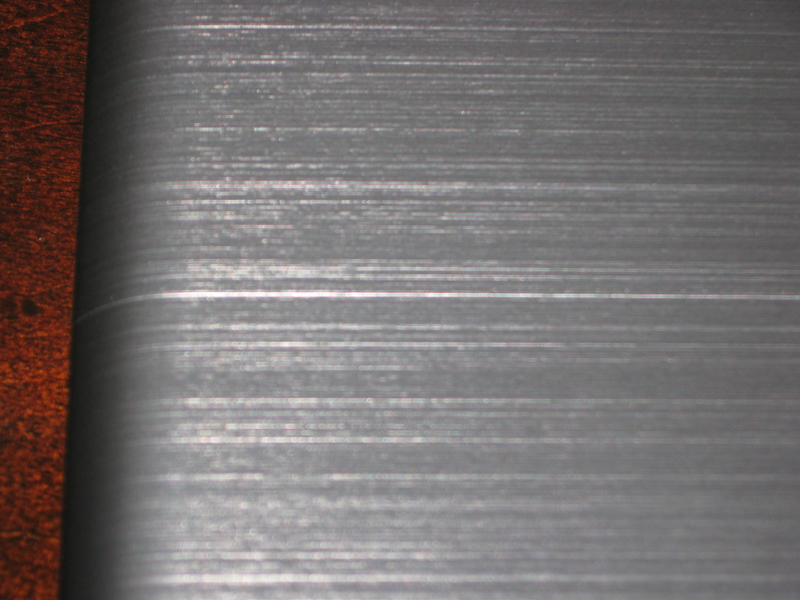
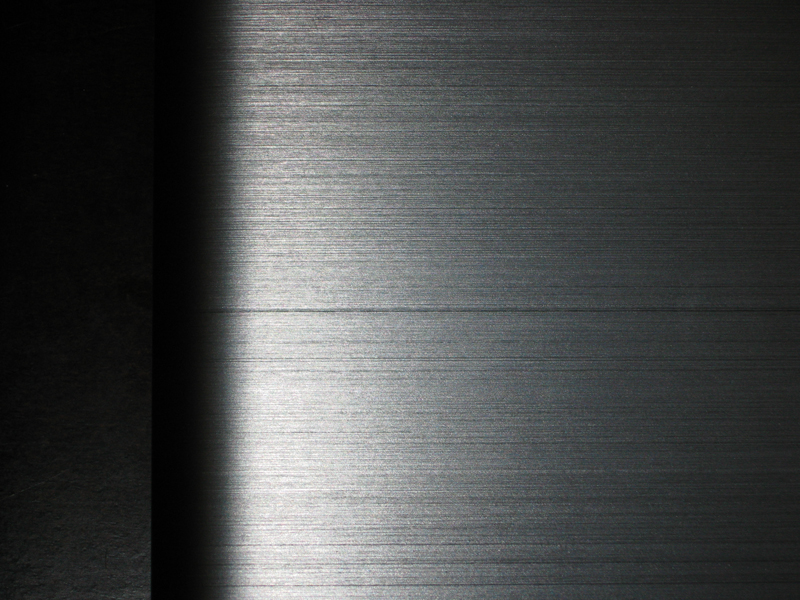
Along the top there's a line all the way across. To me, it seems whatever put the pattern in the top "cut" a bit too deep. Just think of all the lines in the brushed finish on the top; one seems to be deeper than the others. It's only cosmetic, but you can really feel the difference when running your finger over it. Everything else about this laptop is perfect, part of me says I can live with it, but part of me says I paid a lot for this laptop. See pics.
Now, should I exchange it or just learn to live with it? It's definitely not a big deal but it bugs me a bit. Opinions?Attached Files:
-
-
Probably a seam between two pieces of alu cladding that doesn't fit perfectly. See if you can exchange it if it bothers you...
-
That really looks like a machining defect if you ask me. You'd have to replace the drive again and return it and wait for another build if it bugs you.
I did a fresh install of Win7 also and cant believe how much better the machine runs now. I love it. -
I have the same 'cut' thing on my DM3z.
I think the lid is actually made of 2 pieces and that is where the 2 pieces join.
My 'cut' looks like its in the same spot as your.
My biggest concern is the fact that the chrome trim is already separating from the base... -
Yeah that bothers me too. I really don't want to wait for the refund and then another order. I'm not sure which way it'll go yet...
It's definitely an extremely capable machine with a clean install. I really love it.
@hypdotspec
I'm glad it's not just mine.
I'll keep an eye out for the chrome separating. -
Can someone post a pic of the external drive? Does anyone know if it's close to same as the TM2 drive?
-
I'm pretty positive the DM3 uses the same external as the TM2. Also the early adopters, got a different design of external drive than those who buy it now. The new ones are a little taller and have a metal top like the laptop itself. The previous version of the external drive was all plastic and in black.
-
TM2 has the etching design to match it on the external drive but other than that, it sounds like it may be identical. Still like to see a current pic though.
-
Alright, I decided to go ahead and return this one and reorder. There's a few reasons behind this:
1. I'm anal about things like the line on the top and it would have bugged me to no end whenever I ran my fingers over it. But this wasn't the biggest reason for the return. #2 was.
2. Right now until the 12th, there's a coupon for $250 off a laptop configured at $1099 or higher. This pushed me over the edge. When I saw this, I promptly called HP to see if they could place an order "on hold" until they received mine and I got the refund. The rep said he couldn't but I should have my refund by next thursday or friday. This works out since the coupon expires on friday the 12th.
One thing I didn't know until now is that HP doesn't need to receive the laptop back to process the refund; it only needs to be scanned into fedex's system. I'm taking it to fedex this evening, so when I get back I'm giving hp a call and confirming everything.
So now, I can get a machine with better specs than I originally got for less. The ultimate would be if bing cashback was still 20% at HP, but you can't have everything...
Other thoughts:
The dm3 really is built well. It feels very solid all around. I love it.
I didn't have any issues with the trackpad, but I'm more of a mouse person anyway.
The sound isn't really any worse/better than my inspiron 15 but whatever. I have plenty of headphones.
One last thing; installing Win7 via usb drive is hyper fast! No more disks for me. I couldn't believe the difference.
Thanks all!
EDIT:
At 8:04pm est I just got the refund confirmation from HP. The money will be back on my card in about 2 days. So it looks like monday I'll be reordering. Kudos to HP for their punctuality. -
D oh!!
I just looked at my lid closely and it has the same seam...I never noticed it.
I think it is where the two pieces join. -
It kind of matches...
![[IMG]](images/storyImages/img0672d.th.jpg)
![[IMG]](images/storyImages/img0673vo.th.jpg)
-
That's the one that ships with the dm3t if you order it? I thought it was the nasty glossy black easily scratched one. If this is definitely what ships with it I might be in for one. Is that dvd or BR?
Is there anyone who doesn't have the seam? I'm starting to think it's normal/common. If my replacement has it I'm not going to make a big deal over it. I'm more interested in getting that $250 coupon applied. Might have to call to get it done. -
I posted about that a few posts down.....if you bought the DM3t in the past, it came with the piano black external drive. HP has since changed the drives. If you buy one now, it comes with a similar metal top, not the exact same color, but similar.
-
FYI,those coupons do have an expiration date but if they are good...like this one, they are gone way before that depending on how many uses it's good for, this one is 1800 uses.
-
NiteWalker, I'm probably far more anal about little details. I'm on my 3rd dm3z if that tells you anything. Good to hear everything is working out well so far.
About the little "cut" thing; my first and second dm3zs both had it. Although in comparison to your picture, the "cut" was less deep.
This third one has a seemless lid.
I can confirm that the dm3 now ships with the new external drive as well. It's far superior in my opinion. The previous black gloss plastic scratched far too easily and was not pretty to look at after a few uses.
The dm3 also ships with HP Quickweb/Splashtop now. -
It's just the regular DVD. I'm not sure if it even has Lightscribe. I got it because it was only $49.00 and would have been $79.00 at the HP accessory store.
Also, the HP coupons are always posted on http://www.deals2buy.com. Keep scrolling down and you'll find the HP section. They are updated frequently, so dont get bummed the coupons are easy to get. For me the employee/student discount was better than the coupon ( you cant use both at the same time). -
I have 2 dm3's and both have the seam. I noticed it when i got my first one. I gave that one to my sister and bought one with the ati 4330 from craigslist and it has the same seam.
-
Some have the seam more noticeable than others. The very first DM3 I got did not have a noticeable seam. The one I got recently had it much more noticeable. I don't like it, but it's not really that important.
-
Since im here has anyone had trouble with a usb mouse after a bios update.
That stupid hp support assistant had me update bios. Then it wont boot in windows. Stays froze on black post screen. I take out the receiver do a hard restart and works fine. I just did like a roll back on the bios and all is well again.
Seems like the bios version was f22a if i remember right. -
I have a question about performing a clean install without an external cd drive.
I downloaded the Win7 Home Premium ISO from http://www.mydigitallife.info/2009/...links-ultimate-professional-and-home-premium/. Then, I mounted the ISO with Daemon Tools Lite and copied over all the files into an external hard drive. I rebooted the laptop, expecting the Windows 7 setup screen to pop up, but no luck.
Could the fact that my external hard drive was not pre-formatted be an issue? All the stuff from the Win7 ISO is lying among some pre-existing folders and files, but overwriting names weren't an issue...
I even tried pressing Esc while the computer was booting up and chose to boot from the external hard drive instead of the notebook hard drive. That didn't work either.
Ahhhh, I want to reformat. Help please! Thanks.
Here are the files that I copied out of the Win7 ISO (3.01GB total):Attached Files:
-
-
@ pandapark, use a USB key and Microsoft Windows 7 USB tool. It doesn't get more easy than that.
-
Problem is, I don't have a 4GB+ flash drive at my immediate disposal. I was hoping my external hard drive would suffice :T
I ended up reformatting the laptop to it's factory state using HP's recovery tool. The plus side of using HP's recovery is that it installs all the drivers for you. I promptly uninstalled the alps trackpad driver though, and boy am I happy. The Microsoft driver rocks. -
I have a question about the Dm3t if someone wouldn't mind answering?
I'm looking for a new notebook and the DM3t seems like a good match. I'd like to be able to run older games on it (Diablo 2, Age of Empires 2, etc...). Is the 1.3ghz core 2 duo processor good enough to run the older games without any frame rate issues? Gaming is not a priority with this computer, but it would be nice to know I could play some here and there. -
The dm3t would smoke those games, easily. Expect max frame rates on Diablo 2 / Age of Empires 2
-
Awesome! Thanks for the reply! Good to know, now to configure it!
-
Ok, reordered.
Don't think I did too bad.
I was between the dvd drive and the extra ac adapter but based on how unoften I use dvds and the fact that I already have win7 sitting on a flash drive ready for reinstall made me veer towards the extra ac adapter. I could have gotten a bigger HD but I'm swapping it out anyway. I had to throw the headphones in there to bring the order over $1099.
Though I do feel a bit of buyer's remorse already about not getting the dvd drive... I can always get it later on if need be.
I have a 500GB western digital WD5000BEVT I got from the $69.99 sale I'm going to put in there (have 3 others; 2 in ps3's and 1 in my laptop). might get this one though for the faster performance. Maybe when SSD's drop a little bit more I'll throw one of those in there.
I have a zeroshock III that should be here today or tomorrow and one of the dell 5 button bluetooth travel mice that I got when they were $12.
For comparison, the system I returned to get this one only had 3GB of ram, no extra ac adapter or headphones but costed $836.99 after tax. So I'm happy with this deal.
edit:
Had to phone in the order since the coupon wouldn't work. Once again, kudos to HP for satisfying their customer. The refund was speedy too. I got the email confirming the refund the evening of the 5th and this morning the money was back on my card.Attached Files:
-
-
I have been able to run COD4 w/ fps of over 50. Of course, I have turned off and down pretty much all settings. But still really playable and offering a ton of portable fun
-
Can I turn off fan always on on my dm3z in the bios? Is it dangerous to do that? I'm fed up of the noise it makes, especially when I'm trying to watch tv.
-
hm i keep getting skipped frames even by just playing a divx file on high performance.. might have to try and install new video drivers. kind of disappointing, since it definitely shouldn't be doing this.
or maybe i should do the codecs? -
I'd get either the klite codec pack or vlc player, which is what I use now.
-
I'm considering buying a dm3t soon and I was wondering what a good coupon amount is and how often HP releases them. Right now, my configuration is pricing at $950 before taxes which seems expensive given the specifications. Thanks!
HP dm3t
* Genuine Windows 7 Home Premium 64-bit
* Intel(R) Core(TM)2 Duo Processor SP9300 (2.26GHz, 6M Cache) with 512MB NVIDIA GeForce G 105M
* 4GB DDR3 System Memory (2 Dimm)
* 500GB 7200RPM SATA Hard Drive with HP ProtectSmart Hard Drive Protection
* 13.3" diagonal High-Definition LED HP BrightView Widescreen Display (1366 x 768)
* Webcam Only
* Wireless 802.11b/g/n Card with Bluetooth
* HP Color Matching Keyboard
* 6 Cell Polymer Battery
* Microsoft(R) Works 9.0
* HP Home & Home Office Store in-box envelope -
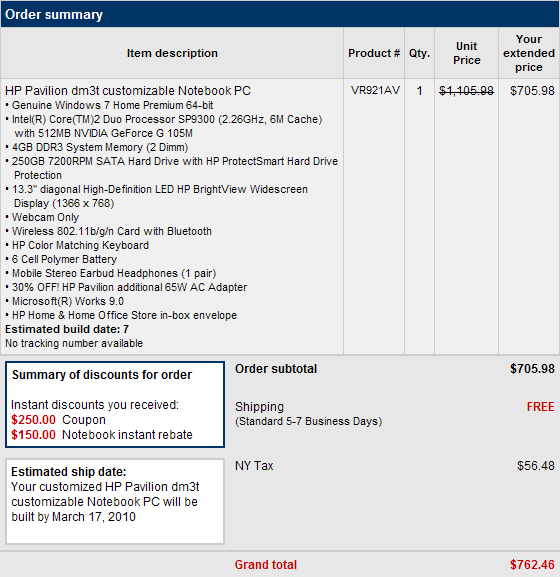
I got the exact configuration except I got an extra ac adapter instead of the 500GB HD. I also added the $6 earbuds for a coupon. My before tax total was $705.98, after tax, $762.46. I'm happy.
What you really pay for in this config is the processor upgrade. Comparable 13.3" thin and lights from other companies cost $700+ but that's usually with a CULV processor.
HP throws those coupons around pretty frequently. I'd wait for a good one. -
May i throw in a little Note.. =)
i just installed my UN2420 or in its native name, Gobi2000 card in my DM3 laptop it works like a charm, had a lil trouble figuring how to configure an APN point\connection. but i solved that after a short peak in setting [make a new profile, that allows you to set username and password and APN of your likes,and not a default Service provider] that's that. i will also need to install the antennas.. that will be abit of a hassle, will do that i guess tomorrow.. hope it'll go smooth wish me luck!
and according to what i understood, if you don't have a DMI tool or w/e to get your DM3 to accept different types of cards. i suggest, stick with the original and take the Gobi2000 WWAN card, it's the prime one and compatible card for DM3 laptops.. so yea. Cheers for now everyone enjoy! i know i will
(i just hit the roof
) Also, if anyone need any help, or have Valium for me to relax.. i'll be most happy to assist and recieve xD Take Care all!
-
Question if anyone knows...
Do the dm3t machines shipping now have 2 or 3 wires for the wifi card?
If 2 can I use an intel 6300 card and just use 2 of the wires? -
OK guys, I have a Windows 7 question.
I can't seem to get used to the look of the Control Panel window. I would rather it looked like it does in Windows XP. Is there any way to do this?
Also, I have Photoshop installed on my laptop and would like to access the Adobe Gamma controls but cannot find it in the Control Panel, where it would be in XP. Anybody know how to access it?
Thanks! -
Is anyone able to modify the MS touch pad driver so the pointer goes faster at the max. setting?
Would it be very difficult?
Other than that the MS driver is perfect for me. -
i just got my laptop and noticed the sounds seem to be coming more on the left side is that normal?
-
Yes that's normal.
The right speaker is towards the center. -
has anyone been able to get Quickweb working again after a fresh Windows install?
-
not trying to troll, but i don't understand why people opt for the higher CPUs on this laptop, since it's considered a midrange ultraportable. you won't see much of a difference with every day tasks, and this laptop isn't meant for gaming.. so why pay the extra $200? maybe people just feel better knowing they have a "faster" system, albeit marginally.
i guess i'm just a really cheap person
-
For overall smoother running operation. I have a 2.4ghz C2D in my home system so I feel I'd notice the difference when running apps like photoshop and multitasking in a lesser system. My general mantra: It's better to have and not need than to need and not have. If you're sure one of the lesser processors will be fine for you, go for it, put the extra coin towards an ssd or ram upgrade (what I would do anyway).
Besides, regarding the processor costing extra, great coupons come along all the time. I paid about the same (or a bit less depending on how you configure it) for my sp9300/g105 than I would have for all but the most basic configuration. I kept everything stock except the processor, RAM (4GB), wifi (added bluetooth) and I added an extra ac adapter and earbuds (for the coupon to work). My before tax total was $705. So all it really cost me was about 30 minutes of battery life.
A jump from a 1.3ghz to 2.26ghz is hardly marginal.
Like I said though, if it's not needed the upgrade $$ can go lots of other places.
*HP dm3 (1XXX series) Owners Lounge*
Discussion in 'HP' started by ubercool, Oct 22, 2009.





![[IMG]](http://img638.imageshack.us/i/img0672d.jpg/)
![[IMG]](http://img25.imageshack.us/i/img0673vo.jpg/)