Problems? See this thread at archive.org.
Unless the BIOS is providing this function (many are doing that but not the DV8), i don't think any software can do it.
There are many solutions from sleep mode (sheduled tasks and a lot of third apps)
But i don't know any software solutions for a cold boot.
-
I may be mistaken, but I thought you needed IE to download windows updates, etc. Could be wrong though.
-
Yea, you can remove it but its not a good idea, some sites require ie, and sometimes the ie compatibility extensions wont work.
-
Do you have a link pls?
For years, i used IE only to download Firefox after a clean install and i have never seen any website (except Windows update for XP but now Windows update is a stand alone app) asking specialy for IE (thx for Mac and Linux users...)
I'm not afraid for the firefox extensions or compatibily with anything. Take a look on the firefox extensions website and then compare it to the IE extensions website...
Many people doesn't like Windows, many people like Windows and everything coming with. I love Windows, but i hate most of the things coming with. IE, system restore, security center, anytime upgrade, Windows Debug or Windows Diagnostic. I just want the OS and then i want to use my apps, Firefox or True image are just a much better way to use a computer IMO (system restore is just a joke, any time i tried to fix a problem with this, never worked. A disk image i just the safest way to restore your settings).
So why should i let 2GB or more wasted by bloatwares? -
HP Long Life Notebook Battery - battery LASTS longer before BUYING a replacement. (3 YEARS instead of 1 YEAR).
DOES NOT provide LONGER battery power when UNPLUGGED!
"longer than with a standard battery" refers to BEFORE BUYING new battery.
From HP DV8t website:
"HP Long Life Notebook Battery with support for Extended Lifecycles
Get more entertainment and productivity from your laptop while reducing your total cost of owning it. Our Long Life Notebook Battery lasts up to three years, and it's also backed by an industry-first, HP three-year limited warranty--triple the time for most Li-Ion notebook batteries. Reduce your costs by buying fewer batteries over the life of your laptop. Enjoy entertainment and productivity features for longer than with a standard battery. Help reduce battery waste by using fewer batteries. "Last edited by a moderator: May 8, 2015 -
I personally just shut off the feature, but didn't delete the files...Some of my classes need IE for virtual Microsoft Office programs and other things for tests/exams/homework/etc.
I figured there couldn't really be a software solution.
Didn't know that you could accomplish this from the BIOS (except on dv8 like you said)....learn something new everyday.
I agree about the bloatware; I hate it.
System restore is nothing but a joke IMO. It has never helped me either, only caused more problems.
As for IE specific sites, there are some....see a couple comments above. I have ran into more stuff for school related things that require IE, and one other site, but I forget what the other one was as I refuse to use it after it said IE was mandatory. haha. -
I've completely disabled and deleted "system restore". It takes too much disk space (up to 10gb but i agree, you can set it), some resources on background and many keys on registry.
And for what?
Just for nothing. I tried 10's of times to fix a problem with this. Takes 1 hour to restore i don't know what, then reboot and nothing was solved.
The only way to be sure is a disk image once (or more) a week (sheduled task).The most important files are the ones i bring from my job with my USB stick and there is a bakup (or many backups) at office, in my USB stick and in my compuer... Don't realy care if my computer crash. 30 minutes later is working like before.
Notepad = Deleted and Use Notepad++
Wordpad = Deleted, no need
PowerShell = Deleted, cmd.exe is enought to remember the last century
Sticky note = Deleted, i use a Sticky notes gadget much better
System restore and many bloatwares like this (don't remember every single tool i deleted)= Deleted
Windows search indexing = Disabled (SSD)
IE=... Disabled, deleted and so happy without this BS
Windows Help, support, debug and everything like this = Deleted
I just want the Windows 7 core and few apps coming with like Windows Media Player, Windows Update and Management console. I don't need anything else from Windows.
Except for the XP mode coming with Windows 7 pro (nice feature if you really need it), i don't understand why people is upgrading to a more expensive, heavier and more bloated Windows 7 version. 35 languages coming with Ultimate... What's the point of this, unless the computer is a public computer on an airport? I wish one day Microsoft will sale just Windows and nothing else. -
I'm wondering if I will be able to add an internal SDXC reader to the dv8? Also, while we're on the subject of upgrading, how about a USB 3.0 port/s at some point in the future?
Thanks
-Tim -
No, this is a laptop not a desktop
-
There are Express Cards available with USB 3.0 ports and you can expect to see Express Cards with SDXC readers. It's not really internal but allmost
 .
.
-
he wanted to add an internal card, no external, although that is close.
-
Even if my english is far from perfect, i can read and understand what someone writes.
I know that he wanted an internal reader/USB 3.0 port and like most of the people here, we know that this is not possible on a laptop.
For this reason i just said that there are Express Cards for this and i specially added (the part you removed on your quote) that is NOT internal but almost...
I never wanted to say that you were wrong telling him that is not possible.
I just gave an info to help him if he really needs this kind of device on his laptop.
Beside this, can you tell me the difference between an internal SD card reader and an Express Card SD card reader?
Unless the remote inserted in the Express Card slot is so important for you , what the point of having an Express Card slot empty? I'll buy an SDXC card reader too to put it on the place of the useless mini remote and i'll don't see any difference with a "true" internal card reader... -
I was just saying that he wanted an internal card reader (like built in) i dont want him to confuse an expresscard (tends to stick out of the side of the laptop) with a smooth internal one.
-
I've only seen one usb 3.0 express card (startech's) but it doesn't support "full" USB 3.0 speeds, only 1/2. Still faster than 2.0, but it's more like 2.5 than 3.0.
-
I really wish hp would get theirs heads out of their asses. If i could find the Acer Aspire 8940G-824G100WN i would buy it, it has a 250gts and am i7-820m as well as a backlight keyboard.
if hp doesn't get a better gcard and a good backlight keyboard in this dv8; i may be looking into getting another laptop... -
I'm happy with new faster standards but the problem actually is that there is nothing using that speed. Even the fastest SSD isn't enough faster to need more than Esata provide.
Esata is more than enough for any actual hard drive.
When USB 3.0 makes sense for anyone the DV8 will be a pretty old laptop. -
If i was in US, i never buy HP. Here in Switzerland, HP is the only one who think that 1$ is 1 swiss franc.
For Acer or Toshiba, 1$ is something like 50 cents swiss.
2400$ for the same Acer sold 1300$ in US... I paid my HP 1500$, is why i have an HP. -
Something new happened right now.
I burnt my charger 5 minutes ago. I don't know how or why but it just stopped working...
How cool is that? Nice, i can spend 1 hour talking with HP support. Priceless... -
I really wish car manufacturers would get their heads out of their asses. If I could find a flying car, I would buy it. It flies!!
You're comparing a laptop which is readily available (and often on sale) to one which isn't. By the way, I would buy a Tank instead of a handgun if I could. -
I am considering buying a dv8 but I understand the unit gets very hot. I will be using the computer in different rooms in my home on different surfaces. Which surfaces is it safe to place the dv8 on?
-
Usually my DV8 is raised on his stand and the temp is around 45°.
Sometimes i just use it without the stand and no matter where i drop it, the temp is between 52 and 60 (CPU) and everything is running well. -
Its not like it unreasonable, most of the 18.4 laptops have the 250gts and backlight keyboards.
-
FPS AND THE HUMAN EYE....SOMETHING ALL GRAPHIC FANATICS SHOULD KNOW!!!
http://www.daniele.ch/school/30vs60/30vs60_3.html
Still waiting on my great Laptop with the best graphics card at the price and that doesnt eat up battery power consumption at the same time. -
So is anybody have any luck with bios F15 E for the DV8?
HP Advisor reports a new winflash with a new bios image. -
Just to add some info:
My new dv8t came in (sending my "old new one" back) - it came with 8gb of the 1333mhz ram and the F15 bios. I haven't checked to see if anything else is new or different though (I'll be using the "old new one" until the return box gets here) -
Looks like HP pulled the F.15E BIOS from the web site. It's no longer on the DV8T 1100 drive download page.
-
Anyways, how is your new laptop functioning with the latest BIOS?, does it work well. I recommend you check your WiFi card. When I received my new dv8t quad a couple weeks ago, I received Intel's latest Wifi card, the 6200 instead of the bad 5100. Hopefully you got the same =D
-
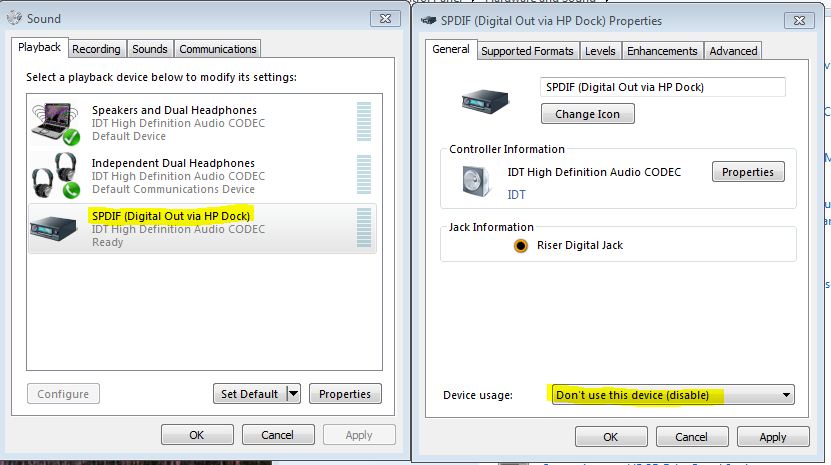
I installed the DirecTV2PC program on my dv8t and everything appears to be fine except when I stream the recorded video from my Direct TV receiver it fails to play and a message stating "The videos audio is protected and requires an audio driver with HDCP support; changing the audio output to analog might allow audio playback." Is this a setting change on the receiver or is a driver/plugin required on the dv8t?
I changed the audio output on the reciever to analog with no change.
Thanks -
What's wrong with the "bad 5100"? my "old new one" has that card and its worked fine
-
I am right in assuming that I could replace the wifi card in the dv8t in the future, correct?
-
tends to have connectivity problems with n routers
-
Just a message to say that thankfully, there are shops providing a much better support than HP.
I bought my HP DV8 from my phone, internet and mobile phone provider (Swisscom).
I rather call them than HP support. I just explained my issues with this laptop and with HP support and i told them that i'm thinking on returning it.
They are sending me (for free): A new charger, a new modem router and an Iphone... THIS IS CUSTOMER SUPPORT
Start to be intersting now
-
DAMN - that's crazy.
-
Yeah, I got that same error but forgot to mention it to you. You have to disable the SPDIF digital out on the DV8 via the control panel.
Hardware and Sound --> Manage Audio Devices --> SPDIF Digital out --> Properties --> Device Usage --> Don't use this device (disable)Attached Files:
-
-
Just checked it, it is the 6200. Thanks for the heads up!
Have only used it to check the ram, the bios (and just now) the wifi card. I'm trying to hold off until my keyboard cover comes in and the box comes in for my return. Figure I'd get some more use out of the "old" one. -
Hello guys,
I'm actually trying to decide on purchasing this laptop. I'm on the fence because I've heard some bad things about the dv8 and there seem to be a lot of people returning/selling their dv8's and getting other systems. I'm not a heavy gamer, but I would like some power just in case I become one.
I want a reliable system and I really want a large screen. Would this computer be a good choice? I've also looked at Toshiba's and Acer's and haven't be able to decide. I've looked over this entire thread and haven't been able to come up with a solid answer on whether I should but his laptop. Could someone please outline the pros and cons of this computer? It'd be much appreciated.
-
Bear in mind that the opinions voiced on this site represent a very small cross section of owners worldwide; with that being said, I would say the best way for you to decide is to compare the specs of all laptops you are considering and select the one that best suit your needs and budget.
As for me, I plan on ordering my dv8t either tomorrow or Monday, depending on when my bank makes the funds available! :yes:
:yes:
-
True kmbutts, the info here is just opinion, but that's actually what I'm looking for. A streamlined opinion, also known as a review. Interestingly there don't seem to be any reviews on this laptop done by "professionals", so user opinions are all I have to go on.
I've been looking at the Toshiba Satellite P505 and the Acer Aspire 8940G. I've heard good and bad about both. I'd like to place an order for something soon, so I'm just trying to see if I get tipped one way or the other. -
I definitely understand....I have been on the fence since December! I chose HP because of the reliability...the laptop I am using now I purchased back in 2000 when it first started shipping with Win XP....poor thing is hanging on by a thread now...I am not a pc gamer (That's why I have a PS3 :laugh: )!
I need the power that i7core can deliver, and with the options available, I don't think another manufacturer can match the price comparing feature to feature.
Plus I don't want to have to buy another laptop in 2-3 years. -
As a DV8 owner, I can tell you that it's the best bang for the buck, runs cool and can do video encoding as good as any laptop. It's not perfect, i.e. there is the bios F15 E which bricked some DV8, nitpicks about the volume and/or the treble-bass buttons, but for most part everything works.
Quanta, HP OEM builds pretty good laptops. -
+1 for me! i love this monster... 1 problem = graphics driver failure
-
Iv'e been looking at those as well.
---Keyboards----
I havn't seen the dv8 in person anywhere, but iv'e played with the dv7 and it seems that hp is using the same keyboards for both. They are non-backlight and seem to use the same layout as other numpad keyboards from hp. It has the best placement for the touch buttons (above the keyboard) and as such has the fewest mistouches.
I have not seen the acer in stores but i have looked up many reviews. The acer looks like it has the best keyboard of them all, its a nice island style keyboard that is backlight, heres a pic of it http://www.notebookreview.com/assets/47961.jpg
It removes the spaces between the fkeys to put 2 more keys on the board (print screen/sys req and pause/break) It has the worst placement of touch-sensitive buttons (3 to the left of the keyboard and media keys to the right) and as such has the most mistouches.
I have actually used the qosmio x505 in stores. It is led backlght. The toshiba/qosmio keyboard is so cheap feeling and has such inconsistent pressure points that its difficult to use. It does however have the largest arrow keys of these laptops. http://www.laptopmag.com/uploadedImages/review/laptops/2009/toshiba/qosmio_x505_keyboard_sf.jpg
The qosmios touch buttons are mid best placement (all to the left) and far enough spaced where you shouldn't hit them on accident.
---G-cards---
The hp is far behind the pack in this regard, it has a Nvidia 230m that is suited for mid setting games.
The acer has a pretty good g-card it has the nvida 250gts (with gddr3 unfortunately) It can handle more games at higher settings than the HP.
The qosmio has the best gcard of this group, it has the Nvidia 360m gts (with gddr5) and can handle alot of games at high settings.
---Processors---
The hp and the acer both have the option for the better i7 820qm.
The qosmio only has the option for the i7-720m
---ram---
All 3 can hold up to 8gb DDr3 1333mhz
The HP can be configured with 8gb ddr3 (luck of the draw on either 1333 or 1066)
The Acer only comes with 4gb ddr3 1066
The Qosmio comes with up to 6bg DDR3 1066
---ports---
The HP has 3 usb + 1 usb/esata + 1394 + hdmi + rj-45 + express 54/34 + expansion port 3 + vga
The Acer has 4 usb + 1usb/esata + 1394 + hdmi + rj-45 + express 34/54 + vga + displayport
The Qosmio has 3 usb + 1usb/esata + 1394 + hdmi + rj-45 + expresscard 54/34 + vga
---speakers---
The HP has 2 altic lansing speakers plus one subwoofer on the bottom. Of the three is has the second best sound spectrum and the worst volume.
The Acer has 5 speakers plus a subwoofer. The acer has the best sound spectrum and the second best volume.
The Qosmio has 2 harmon kardon speakers. It has the worst sound spectrum and the best volume.
---Battery---
The HP has an 8-cell
The Acer has an 8-cell
The Qosmio has a 12-cell -
Thanks for the response dwjp90, definitely helps.
-
Hahahaha. I liked this response Moko.
Mine never really got too hot except for when I was gaming for about an hour and had it in a spot where there wasn't too much breathing room behind it (I was at work in the Maintenance break room, not alot of room).
lol nice. Only way I'd get an iphone though is if it was free. heh.
Even then I'd jailbreak it and just use it for music/games.
But I'll save iphone bashing for another forum. Heh.
You're the first person I've heard saying anything bad about the keyboard pressure points. I've infact heard it was quite fluent and easy all around. Maybe it was due to abuse by customers? Maybe it was just that one defective product, maybe they're all like that? Dunno personally, but will know by friday of next week (if hp doesn't take the full 5days to refund me lol).
That's what I loved about the Qosmio. I want a sager in the future though, but I'm going to wait till they upgrade the gcard in their laptop with the dual graphics card running in sli mode.
It's only a .13 increase from the 820 to 720.....IMO I don't think it's worth the price to upgrade to that unless you get the 900 model.
I'm personaly going to get another 4gb card for the Qosmio.
They even sell it in the accessories section when you go to buy it at toshibadirect.com
What do you mean the worst sound spectrum?
Where'd you find this info?
I've heard nothing but good things about the speakers on the Qosmio... -
I never said anything about the hp being flimsy, the Qosmio was horrid. IMO it felt cheap, like very cheap plastic. And if you hit the edge of a key, it wouldn't register a hit.
Its also +2MB l3 cache and it also calculated pi to the 32 millionth place 2 mins faster, +300 points in 3dmark06 imo its worth it.
for comparison, going from a 2.8 to a 3.06 c2d it only increases +200 in 3dmark06
The qos has great speakers, but since the other 2 have more speakers they can produce a greater range of sounds. (theroitical) i haven't been able to hear the hp and qosmio in the same sound setting to acually test that but when hearing the two in slightly diff sound settings the hp appeared to have more bass levels (not volume wise) -
I was talking about the Qosmio....
You're still the first person I've found that has said anything bad about the keyboard....but I'll definitely have to check it out when I get mine.
Totally forgot about the +2mb l3 cache...
Thanks for the clarification....
The DV8 has it's own "subwoofer" which is probably why it appeared to have more bass. -
Thanks to Uncle Sam, I finally pulled the trigger on a HP DV8T with the following configuration:
Genuine Windows 7 Home Premium 64-bit
Intel(R) Core(TM) i7-720QM Quad Core processor (1.6GHz, 6MB L3 Cache) with Turbo Boost up to 2.8 GHz
$100 OFF! 6GB DDR3 System Memory (2 Dimm)
FREE Upgrade to 500GB 7200RPM SATA Hard Drive from 320GB 7200RPM SATA Hard Drive
1GB Nvidia GeForce GT 230M
18.4" diagonal High Definition HP Ultra BrightView Infinity Display (1920x1080p)
Lightscribe Blu-ray ROM with SuperMulti DVD+/-R/RW with Double Layer Support
Webcam + Fingerprint Reader with HP Imprint Finish (Espresso Black)
Intel Wireless-N Card with Bluetooth
HP Integrated HDTV Hybrid Tuner
HP Color Matching Keyboard
8 Cell Lithium Ion Battery
Mobile Stereo Earbud Headphones (1 pair)
Microsoft(R) Works 9.0
HP Home & Home Office Store in-box envelope
Estimated build date: March 1, 2010
Summary of discounts for order
Instant discounts you received:
$90.35 Coupon
$200.00 Notebook instant rebate
I waited as long as I could for another big coupon, but with an old laptop that crashes 1-2 times a week, I had to move! I am both excited and bummed....I was hoping for closer build date; oh well! -
greetings ... i have uninstalled my nvidia driver 195.62 cuz i wanted 2 restore the original nvidia driver 186.44( cuz i read that although it does crashes but it performs better ...is THAT TRUE ??) so when i tried installing i had a message saying that the nvidia driver was installed succefully but the nvidia control panel failed 2 install so some features wont be availabe ... i tried 2 access the control panel and it does open :S so is it really wokrin or there is somethin i have 2 do ???
and one more question i have noticed that after I did a fresh installation of windows 7 ultimate i have bios F.06 ... is it the right version for the dv8 ??
THIS MACHINE WAS A DISSAPOINTMENT FOR ME ... i have ordered it with the i7-820qm and an 8gb (1067 MHZ :S insted of the 1333 ) keyboard buttoms are fading even my 3 years old hp laptop keyboard is still new :S ... poor graphics , what can i say loool -
Latest release of HP drivers for the 230M graphics card... v87.66, released Dec 4, 2009. These will be posted shortly on the HP site.
ftp://ftp.hp.com/pub/softpaq/sp46501-47000/sp46506.exe -
this one is for dv6 & dv7
ftp://ftp.hp.com/pub/softpaq/sp46501-47000/sp46506.html
*HP dv8 Owners Lounge*
Discussion in 'HP' started by rageman, Oct 19, 2009.