Problems? See this thread at archive.org.
Yep! That's what HP provides in the Dv8t-1100 like mine, etc. I think the Envy uses 1.8 inch ones, though.
-
I have done exactly that ... works really well as you suggest.
Having done the SSD swap out, I can confirm the speed benefits of the SSD as primary drive.
I can also recommend the Vantec NexStar that comes in the same configuration as you described at the same or lower price ($29) through TigerDirect. I chose to go with the Apple-compatible version that supports everything you described and includes Firewire capability and cable.
Vantec ? Vantec NexStar Hard Drive Dock-NST-100UFS- 2.5"/3.5" SATA to USB 2.0/eSATA/1394a Hard Drive Dock -
Just a thought on the overheating issue......
Anyone who feels their system overheats.. As a test, try turning off your Antivirus.
AV is very cpu intensive and they are not created equal.
Without causing offense.... if you run nortons.. thats the first red flag.. McAfee's is close behind in being a resource hog.
Seems most of the crappy AV programs out there are the ones that advertise the most and market themselves in all electronics stores the most...
Everytime I'm in a staples or some electronic store and I see some unsuspecting "non techy" customer grab one of those programs I want to scream "NOOOOO!"
Unfortunately, advertising sells.....
I personally run Nod32 "64 bit" version and I can't tell it even runs for the most part its so light on its feet.
There are several other good AV programs out there that are light on their feet and very powerful and efficient.
Stay away from the older AV systems (10+ years).. most of them are written with old code and have become very heavy laden trying to keep up with todays complex scanning algorithms etc.
Pick an AV that has newer programming code.. it will be much faster. If computer geeks like it.. thats a good sign.
If computer illiterates like it.. thats a bad sign!
That alone could be the biggest heat issue.
If you do run a good antivirus.. turn of windows defender "comes with windows"... you don't need two AV programs scanning everything.. that too lugs down everything as they both check what each other is doing as well as both check every file and movement you encounter.....
Don't try to kill the service.. but rather go into windows defender "in control panel" and turn it off... once you've done that you can kill the service if you wish but really no advantage.
If you do it the other way around and try to kill the service without turning it off first, you will get an error.
I'm sorry, but computers straight out of the box are not designed to run like a racecar, but rather a big bus full of banners, adware, and monitorware full of screaming kids. -
OK - so I just purchased (2) 640gb 5400rpm drives, and (1) Intel G2 80gb drive
(One of the 640's is going into my PS3)
Now, I have a dv8t and a Dell Vostro 1400 that is a couple of years old. I'm happy with the speed of my dv8t, but I know the intel would make it ridiculous. However, my vostro could really use a speed boost and having an intel in that would make it an excellent backup computer (and easier to take with me)
Thoughts? I'm leaning towards putting the intel in the vostro, and just picking up another intel (bigger capacity) sometime in the future. But the dv8t with an intel has to be sick.....decisions decisions
-
Sounds like you have to stick with your plan or you will be even more frustrated.. unless you don't mind switching out drives later when you get the bigger for the Dv8T.... but thats alot of work.
By the time you get your Vostro all lined out, maybe you will be in good position to go ahead and get the bigger for the DV8T.
Of course, another thought is that you really don't need too much space on your primary drive.... use the intel for the DV8T now and use the existing drive in your DV8T for the Vostro.... again, could be lots of work.
If you had two cars in the garage and only enough parts to make one a Funnycar, would you comprimise and make both good basic racecars or one a family car and the other a funny car?
Thats according to how much thrill you get going 240mph! -
I would say it depends on two things:
1) How often will you be using the Vostro?
2) What do you think is slowing down the Vostro? If the hard drive is not the bottleneck, you may not see improvement, or at least not necessarily appreciable improvement from the SSD. (On the dv8, the HDD is definitely the bottleneck for many operations - though not all - and that goes all the moreso if you are installing those very large, slow drives.
We should all have such problems! -
@PMorgan:
Quote:
Having done the SSD swap out, I can confirm the speed benefits of the SSD as primary drive.Originally Posted by pae77 ![[IMG]](images/storyImages/viewpost.gif)
All in all, I'm glad I decided to do this. Now, I'm really looking forward to getting an SSD eventually and cloning the now much emptier C partition over to it and swapping it in to my system. From what everyone who has done it says, it's an awesome upgrade.
Phil,
If you put-in a large capacity SSD, say 160gb or 256, would it slow things down to partition it (can you partition an SSD?) and make one part the boot partition and the other for commonly used data files? (I'm guessing you can, or you would not have gotten such a large SSD, but just want to be sure.) Also, how do you ensure that any disk cache files (ie, virtual memory, are written to the SSD, or are they automatically written to the "primary drive?" Finally, based on the previous question, might it preclude a RAM expansion, if one is going over capacity with 4GB and seeing lots of pagefile operations on the HD, if those files are written to the SSD, which presumably performs much closer to the speed of RAM (how close?) vs. the HD? Thanks.
Peter, Phil:
Thanks so much for all that incredibly useful information. You may have guessed that I too am planning to get an SSD for my dv8. (Yup, decided to stick with it for the foreseeable future - can always "transplant" it if I do get a new DTR.) Based in part on the questions I ask above, and as a general question, does it make sense to get an SSD as large as 256GB, given that the OS and applications don't nearly reach even 160GB?
You should charge a consulting fee for the answers! Thank you.Last edited by a moderator: May 7, 2015 -
Does any one know where I can purchase a TPU Keyboard cover for the dv8t? I have the silicon version but it's not very clear.
Thanks,
Jay -
I agree with most of what you said in your post about AV software and coincidently, I also use ESET's Nod32 AV (latest version) and have been using it back since version 2.7 (many years). A great and light AV app, imo.
However, I don't agree about turning off Windows Defender. First, Windows Defender is not an AV program. It is an anti spyware app. While it is not advisable or recommended to run more than one standard AV app (e.g., ESET AV, Avira, Kaspersky, etc.) at a time, it is perfectly OK to run more than one anti-spyware app. So I keep Win Def. running and don't notice much, if any, impact on system performance.
(I was going to add some info about the other security stuff I run, but it got too long and boring.) -
About the SSD, I started researching them. So far it looks like the Samsung 256 GB one is the largest capacity currently available and it seems to have pretty good read write specs, almost as good as the highly regarded Intel. I see new ones (Lenovo excess inventory apparently) available on Ebay for $400 (BIN) which looks like a pretty good deal.
While I think most people could certainly get by with 80 or certainly 160 GB in the near term, one can never have too much hard drive space and by getting one that has plenty of excess capacity, it is likely to have a much longer useful life, imo.
Also, $400 for 256 GB seems to me to be a much better value than ~$279 for one that is half that capacity. -
I've never "ever" had windows defender find anything Nod didn't find first... even spyware is covered by Nod.
I have seen windows defender slug down slower laptops running vista etc and turning it off seems to help.....
While windows defender is supposed to be respectable spyware protection, I haven't used it for the last year and have never regretted it.
I do run spyware blaster that simply marks bad sites and prevents my browser from even trying to access them.. I"m not fond of too many things running realtime checking and probing everything and every file... most of the time, even if they play well together, the demand doubletime from the cpu.
I can't see hauling around more weight in the back of my new truck "computer" just because my engine is bigger and it will do it. It still affects performance for almost no payback. -
My point is simply that it's OK to run more than one anti spyware app. So running X anti spyware plus Nod32 (which also supposedly catches spyware) is perfectly OK.
I get that you don't like Windows Defender.
-
By default, the virtual memory is assigned to the primary drive... as you know assigning it to a different drive when using normal HDD's is better because it frees the primary up to just do programs and not mess with the virtual information too..
But when your primary is an SSD, its best to leave it on the SSD simply because the speed so far exceeds what putting it on another HDD drive could do.
I suppose if you have two SSD's you could put it on the second one... but making a new partition on the primary drive and assigning the virtual to that does nothing as its still the same physical drive so you will get no performance improvement.
If your primary will be an SSD and you want to check whats up... you can simply open "system" in control panel and go to "advanced system settings" , make sure you are on the advanced tab and go to setting under the performace area "its the first choice",
Now go to that advanced tab and pick change under virtual memory.
I have mine set "custom size" on 16 - 12273 rather than system managed so upon boot it makes a very small file initially completing the boot sequence "if it makes a larger file, it most likely will never use it, and it takes time to write it, and it also takes time to close it down when you shut down", so keeping the initial size small allows a faster reboot.
If you have plenty of ram most likely it will never grow to any bigger than your initial size anyway.
Make sure you hit the "set" button or nothing takes effect.
Before you do that.. make note which drive you have highlighted to perform the operation on. -
Not trying to banter back and forth but I've never seen windows defender produce any fruits..... its never caught anything????
And I've worked on slower systems "less robust, with 1- 2 gig of ram" and turning off windows defender helped get them out of the mud.
Exaggeration.....If someone has a computer thats powerful enough that they want to run the top 6 antispyware programs all at once and the top two AV programs, it seems they are forfeiting their performance for security.
We can always be so overinsured that we have no money to live on.
If I ever get anything on my computer NOD didn't catch, Ill worry about more insurance... until then.... just do regular system backups to another drive with windows backup or another one of your favorites... those don't splice into your realtime performance for everyday and every minute use.
I can't see going to extra lengths to get the perfect drivers and configuration "as that what this whole thread is basically about", just to toss it all for over insurance worrying about things that don't exist or at worst can simply be avoided by good common computer sense.
I have a buddy thats a major geek and he doesn't even run AV or antispyware at all.... while I'm not that bold, he knows what "not" to click on and where "not" to go. He's gotten by that way for years.
Just as in life, the more careless and less knowledgeable we are, the more insurance we need to make up the difference.
Thats not mean't as an insult, merely an observation of fact of life.
I keep NOD to cover what may slip between my fingers as I feel no one can know everything they are going to encounter before they encounter it... so yes, I believe in insurance... I just don't want to sell my soul for it.
If you service your kids computer and he or she ventures into all the unknowns without fear and knowledge, then they would need more insurance... another reason why insurance is more expensive for novice drivers as well as computer users.
A simple question... has anyone out here ever had windows defender actually protect them from anything?... and if so were you running nothing else at the same time? -
Thank you Alan. Got much more than I bargained for - most grateful. A few questions remain, but I will spare you - at least for now - depending upon your answer to this question:
Other than being sure I don't have too much allocated to virtual memory, does any of the advice you gave make a difference when I have only one physical drive (500GB 7200 rpm, OEM with dv8 new) and it is not an SSD? IOW, do the adjustments you recommended impact performance when all you have is a single HDD?
Again, many thanks. Jeff -
I love the way this thread kind of rambles from one issue to another, working one to death (eg, heat - or lack of it - in the dv8, now security software) ! It's not a criticism, I rather enjoy it. It's just a little different than others I frequent, where people are posting things from all over the map and there are 3-6 "main topics" going on at any one time. Actually, these "Owners Lounge Forums" make it more confusing when too many subjects are going on simultaneously; it gets hard to find the posts on one subject because they get buried under a flood of "controversy of the week posts! I like the way it's done on the Tablet PC "sister" site to NBR (confession, I have been "experimenting with tablets for my backup/travel machine - really liking them too, if only I could find a reliable one). Anyway, for the HP TM2 alone, there are some 15 individual threads, sorted by subject. Brings some order to the chaos and you can select things that interest you and avoid the rest.
Anyway, after waxing philosophical, I did have one point of possible correction to make on the subject of security products. Though there are many excellent - and free - product out there, I have read from many sources that, beginning with the 2009 product, Norton has done a complete backflip and is now not resource intensive at all and you can quiet it down so that you never even know it's there. It also scores way at the top of most comparos for effectiveness. I'm not a pitchman for Norton - in fact, don't use it myself - but in the interest of remaining at the vanguard of all subjects, I thought it should be mentioned in this forum that, unlike the Norton security products of old, and unlike present-day McAffee products, the current Norton security products are apparently an excellent choice.
Carry on! -
Well with one drive you will obviously be using that drive as your virtual swap file drive.
When you get a chance to, there are two better scenarios you could do:
1. one will be to get a second drive HDD or SSD if your laptop supports it and assign the virtual swap file to that drive. Keep in mind if you have plenty of ram, these suggestions are pretty much nill, simply because your rarely need or utilize the benefits of a virtual swap file anyway. Some people with lots of ram turn it completely off... but putting your initial setting to 16mb is the next best thing and by having a high head limit gives your computer the latitude to make it much bigger if it ever needs too in such cases when your doing something unusually crazy with photoshop or the like.
The negative to using the secondary drive for a place to put the virtual swap file is that windows will keep the drive at full speed spinning at 5400rpm or 7200 which eats lots of battery and makes heat.
2. The second "absolute best" thing to do is to get an SSD as your primary. This will improve speed above all else.
I have a Primary SSD and a secondary HDD and all the secondary if for is backup... I have no reason to assign the virtual swap file to it since its so slow... plus without anything assigned to the secondary drive "no programs installed either" it allows that secondary backup HDD drive to spin at a mere 30rpm's to conserve battery.
As before.. no benefits to making a separate partition on the same physical hardrive. By spitting your drive, you aren't growing more physical arms inside the drive to scan for information, so there is no benefit.. that one arm still has to access it all.
When using and SSD, its all electronic, so splitting is the same difference as not splitting into a different partition.... so no benefit either.
The only viable reason I can think of to split a HDD into more than one partition is if you only have one drive and can't expand, you can make a second partition to backup an image of your c drive to so you have a way to restore in case all else fails.... keep in mind since its the same drive, you will still be up the creek if the whole drive fails.
Not sure if I answered what you were asking since I made so many rabbit trails.
Basically with lots of ram you won't notice much benefit from the suggestions.. except that reboot time may be a little faster unless you run out of ram, then you have a place to go.
Cache is a tool, virtual swap files are a form of cache.... processor, browsers, music players, hardrives all use some form of cache to improve speed.
Without distracting the thread further one of the coolest things I've done to improve speed is to make my Firefox cache file in ram.. I spend so much time on the internet that alone makes my whole computer experience faster.
When they get the 64bit version working with flash it will be nasty fast... I refuse to use it till they get flash.
Googles browser is fast but not form functional enough and not yet mature as a browser IMO to be full featured.
Sorry for the rambling. -
Alan,
Well, this is hard to do but you have succeeded: I am speechless! Seriously, so much info to digest. I will do so and perhaps IM you with some follow up questions. I need to decide to bite the bullet and get that SSD, because as of now I only have the one OEM 500GB drive and you answered my question that there is nothing to be gained by logically partitioning that. Truth is, I had been wavering on whether to keep my dv8 or "upgrade" to an Envy 17 (would do the 14 in a heartbeat, but only one drive capacity) and it's no small investment in time to install the SSD, move data and prorgrams, optimize, etc, as you have proven with your "guide."
One question I do have is about making Firefox faster. You confused me by first saying you have found a way to make it "nasty fast," but then saying: "When they get the 64bit version working with flash it will be nasty fast... I refuse to use it till they get flash."
Would you kindly clarify and, if you were referring to Chrome (my suspicion) in the "refuse to" portion, would you kindly describe (I know it's brief - done it before but can't seem to find it now) how to allocate the cache to RAM.
Oh, last point, when you refer to not needing to do some of the things you suggest for mass storage "as long as you have lots of RAM" how much do you consider "lots?" I only seem to need 4GB in this machine at 1333mhz and given what I run, but even though I never seem to max out or generate pagefile processes on the HD, would adding RAM make a difference?
I find your answers fascinating and very helpful. When you have time to answer, I leave it to you whether to answer in the thread or in a PM. I happen think the questions I am asking are of interest to many.
And, +1 rep to you!
Thanks,
Jeff -
Hello, guys and thanks for all your help.
just sent an email to HP now that its summer and can afford, timewise, to let them see my laptop
[If there is an error message, please specify]
Several Blue screens, Kernel Errors, video and program crashes.
[Problem Description]
My computer is blue screening 3-7 times a day, sometimes they are kernel errors and it just restarts. It actually blue screened right out of the box, first start. It has blue screened twice during my attempts to write this email. During operation several programs crash frequently, including Microsoft Office, Firefox, Media Players(Windows Media Player , VLC, Media Player Classic Home Cinema), and several java programs. It does however remain stable with the games, bioshock and Starwars the force unleashed.
Most recently, after the installation of sp48392 for HP wireless assistant, 3 instances of Registry Corruption have occurred; Giving the error: "error (701) wireless module device not detected, or not functioning properly"
This is a problem because as a renter all I use are wireless internet connections.
Also the fingerprint reader is not detected when waking up from sleep.
Also I have had to disable screen savers, the video card driver crashes frequently when enabled.
[Please provide previous troubleshooting steps, or information that can help HP assist you]
I have kept up with all HP updates and check the driver page every day and they have reduced the average amount of blue screens from about 5 to 3 per day, I have also noticed the errors change over time. Below are the crash logs of the last 40 or so crashes. However there were ten kernel errors during this time without logs, where the computer simply turns black and restarts.
On Thu 5/13/2010 9:30:49 PM your computer crashed This was likely caused by the following module: ntoskrnl.exe
Bugcheck code: 0xA (0x588003E5F8C0, 0x2, 0x0, 0xFFFFF8000313AA2F)
Error: IRQL_NOT_LESS_OR_EQUAL
Dump file: C:\Windows\Minidump\051310-30669-01.dmp file path: C:\Windows\system32\ntoskrnl.exe
product: Microsoft® Windows® Operating System company: Microsoft Corporation
description: NT Kernel & System The crash took place in a standard Microsoft module. Your system configuration may be incorrect, possibly the culprit is in another driver on your system which cannot be identified at this time.
(forum edit: the log is really long here's one, there were 40)
These are my errors and their frequency since 27Apr10:
(x10)Error: IRQL_NOT_LESS_OR_EQUAL
(x6)Error: DRIVER_IRQL_NOT_LESS_OR_EQUAL
(x3)Error: SYSTEM_SERVICE_EXCEPTION
(x3)Error: PAGE_FAULT_IN_NONPAGED_AREA
(x1)Error: MEMORY_MANAGEMENT
(x1)Error: BUGCODE_USB_DRIVER
(x3)Error: UNEXPECTED_KERNEL_MODE_TRAP
(x4)Error: KMODE_EXCEPTION_NOT_HANDLED
(x2)Error: NTFS_FILE_SYSTEM
(x1)Error: IRQL_GT_ZERO_AT_SYSTEM_SERVICE
[Has anything changed since the unit functioned properly (installation of SW, settings, cabling, etc.)]
The computer has never functioned properly. Its record is 17 hours of active use. This occurred during a long session playing the game Bioshock. The moment I exited the game and started Firefox it crashed.
--------------------------------------------------------------
I got the crash logs easily from a program called "whocrashed" available here: Resplendence Software - Free Downloads
I'll keep you guys up to date on how HP responds.
if you are still getting blue screens I would implore you to do as I have done and contact HP and politely tell them your story, list the programs you use,and give a huge list of crash logs to get their attention. -
SirsPiffy.... normally I don't believe in using the system restore disk.. but you have so many issues I would either try going back to an earlier time "but you said it has never ran right", or doing a system restore and if it gives your problems then, its the hardware.
9 times out of 10 its never hardware.. usually user error installing wrong drivers or the wrong way or conflicting settings.
For instance, you can't have your hardrive set to go to sleep in 1 hours and then have other things try to run after that....
But getting everything back to basic default sounds like the best way to rule out if you've done something verses the hardware itself.
While you still can... I hope you've backup up all your personal stuff.
If and when you get it running right.. make sure you always set a "restore point" when you know its working perfect.. .then upgrade and tweak more and make sure another restore point is set.... name it so you know exactly where you are at.
If you have it on, the system will make them anyway, but I dont' always trust the system will make them in ofter enough intervals if I'm doing intense updating.
Try to so a whole system backup to another drive or partition "the only main reason for a another partition".. but putting in on a different drive covers you if your main physical drive dies.
I don't know where you are at tweaking with systems.. but a good rule of thumb is to explore but don't make changes till you've studied the implications first.
Too many things interact with each other to be impulsive.
We could get into lengthy trials of troubleshooting but you have so many what appear to be unrelated issues, you need to first rule out hardware. -
One question I do have is about making Firefox faster. You confused me by first saying you have found a way to make it "nasty fast," but then saying: "When they get the 64bit version working with flash it will be nasty fast... I refuse to use it till they get flash."
Simply making the cache file as ram.. that tweak alone makes FF nasty fast.
64 bit is definately faster than 32bit.. but it doesn't support flash yet.
I expect 64 running cache in ram would be "nastier" fast!
Would you kindly clarify and, if you were referring to Chrome (my suspicion) in the "refuse to" portion, would you kindly describe (I know it's brief - done it before but can't seem to find it now) how to allocate the cache to RAM.
I didn't run Chrome long enough to explore how hard that is to do. One of the main benefits of Firefox is its tweakability.
Heres how to turn the cache into ram in Firefox:
Instructions: Open Firefox -> Type about:config into the address bar -> Enter -> now you will see the filter bar to enter searches into....find and double-click on "browser.cache.disk.enable" to set the value to False, Note, if you simply copy and paste or type "browser.cache.disk.enable", it will find it for you -> Right-Click anywhere on the blank screen -> Pick "New" -> Integer -> Preference Name "disk.cache.memory.capacity" -> value memory size in KB. Enter 32768 for 32MB, 65536 for 64MB, 131072 for 128MB, etc. I use the highest setting of "131072" -> restart Firefox.
You can also go to the address bar enter "about:cache", now verify that your changes reflected in cache-directory name (Look for Cache Directory)
If you choose to use RAM you will see no directory pathway.
Now Go to Tools, Options, Advanced, Network tab, Offline storage and put to 20mb or so.
Next, Go to Privacy, check to clear history when Firefox closes, but then go to settings to define the parameters, make sure "cache" or "offline website Data" is checked and whatever else you want, hit ok. This will allow all the cached info in your ram to immediately clear and be removed when you close Firefox.
I know that may all sound confusing.. but try and see, it won't be as hard as you think.
Oh, last point, when you refer to not needing to do some of the things you suggest for mass storage "as long as you have lots of RAM" how much do you consider "lots?" I only seem to need 4GB in this machine at 1333mhz and given what I run, but even though I never seem to max out or generate pagefile processes on the HD, would adding RAM make a difference?
Thanks,
Oh yes, ram is always worth the money.. at least until you hit the sweet spot in the market to where it becomes cost prohibitive.
Right now thats at 8gig or "two 4 gig sticks" as once you go higher the cost really skyrockets.
Thats a tricky question.... almost as bad as "how much insurance do you need?"
If you never do anything unusual that demands tremendous amounts of ram, you will never deplete your ram requiring the need for a swap file that is cached somewhere else.
I think of Ram like your brains consciousness.... in order for you to be actively thinking about something.. it has to be in ram.
Your subconcious is like your hardrive "for long term storage access"
And cache is what you have in the "back of your mind"
BTW.. the older I get, the more ram I seem to lose!.. LOL!
I have 8 gig and I don't do intense graphics, or sound processing, etc on a regular basis.. so chances are, I could not even have a swap file and never know the difference.
But with only 4 gig of ram its a tad different.
If your running 32 bit win7.. I think it can only utilize up to close to 4 gig anyway so I would expect you should keep a swap file around.
If other words.. I may be wrong,.. but having more ram with win7 32 bit is little profit..
But win7 64 bit can utilize much more ram.
Here is a copy and paste from here:
The swap file is basically only there for and utilized if you were to run out or get low on ram.
Once thats utilized, the faster you can access it, the less likely your machine will slow trying to swap info back and forth in its efforts to create "fake ram" as it were.
Whether the ram is fake or authenic, without it your computer cannot "think"... give it too much to think about at one time, it has to put some of that into a swap file "in long term storage area" to free up ram.. then 30 seconds later when it needs it again, it has to access it.. all this swapping back and forth is cpu intensive as well as time intensive and wear and tear on HDD drives especially... SSD.. not so much.. but still "RAM" is golden!.
So much so, many feel SSD drives are like having "everything" in ram since its electronic and so fast. While not as fast as true ram sticks.. it so far superceeds the speed of HDD drives.. it might as well be ram when comparing the two!
SSD drives are definitely worth the little extra cash to have the same car with a hotrod transmission. The fast engine is of little good if the transmission eats up all the energy getting the power to the wheels!
-
"90% of this game is 1/2 mental"
"It gets late early this time of year"
"That place is so crowded nobody comes"
Lawrence "Yogi" Berra
You are in very good company.
Sorry, couldn't resist!
-
Here's a good tutorial on how to correctly move a user's data files (documents, music, video, pictures, etc.,) over to another location (i.e., disk or partition) while preserving the windows "pointers" that apps need to be able to automatically find and use these folders. It's very easy actually, but very important to do it correctly if you want your system to work smoothly and correctly.
Even without an SSD, there are still many advantages to splitting up the user's data and system into different partitions (preferably on different hard drives). It allows one to back up or reinstall the "System" (OS/Apps) partition, separately from the data partition. The two partitions can be backed up on different schedules, as may be appropriate. It makes the System and Data partitions each smaller than one big merged partition would be so that smaller hard drives can be used to back up to. This is especially handy if one has one those hard drive docks that was discussed in a previous post above and can then make use of old, perhaps smaller, hard drives (either laptop or desktop) that one may have lying around from previous systems. Or one can simply fit more backups on to a larger drive. Also, assuming the user backs up the separate System and Data partitions on different schedules, the time to make and/or validate each backup is greatly reduced since each one is going to be much smaller than before when there was one big System/Data merged partition.
When the System and Data partitions are separated, it povides the user with more flexibility in various scenarios, imo. And the final bonus, of course, is that by having a smaller System partition, the user can fit it on a moderate sized SSD.
I've dying to get one, it's just a question of when. . . or how long I can resist. I really want one of those 256 GB Samsungs which I think would be a lot more future proof than something smaller. -
OK. So I just installed Premiere Pro Cs5 and it tells me that my video card driver supports the CUDA engine but the driver is too old. HP still lists the video driver from last Sept on their site as the newest. Can anyone point me where to get an updated Nvidia driver that will work on here? Isn;t there a latopvideo site that had these or something? Anyone using any drivers that work?
thanks -
Check this site for all the latest drivers: http://forum.notebookreview.com/hp-...v6-gen-2-dv7-gen-3-dv8-hdx16-hdx18-intel.html
There is forceware v. 197.45 available there and it is working fine on my machine. This is much more recent than what HP lists on their official site and does include CUDA and Physix support.
Incidentally, this driver came to my machine via windows update which was very convenient and made it super easy to install. You may want to consider making sure your windows update is configured to receive optional updates.
-
thats good to know.....
But be careful, Windows update is notorious for screwing up your drivers...... Mongo doesn't always understand your needs! -
My laptop arrived this afternoon, 4 days early from delivery date! I just got home from work and was going to set things up. I pulled it out of the box and opened the lid. I heard this weird pop noise, kind of like when you push on cheap plastic/metal and it "pops" when you push it in and "pops" when you let go. I noticed around the corners, it appears the screen is not connected completely to the lid. There's a gap large enough to fit my fingernail in there. I tried squeezing to see if i could get it to snap but no luck.
I think I'm going to have to call and exchange it. Do they express ship the new computer for the inconvenience?
-
I think even HP's standard shipping is really Global Express. Mine came from China in just 2 days via HP's so called "standard shipping." Hence, I think paying extra (or being upgraded for free) to "express" shipping is a waste of money or meaningless.
-
Yeah I got mine in 5 days. I'm just bummed to send it back. This is my wife's new laptop and her old one is on the fritz.
-
I ordered my DV8T on May 4th. I feel like I got the shaft with shipping though
After reading the forums I thought cool I will get it by the day they said it would be built, the 14th! On the 10th FedEx received the shipping info and it said estimated arrival date May 13th, then it change to the 14th in a matter of hours. I was like alright that still fine. Then 2 days later it change to the 18th! It was in customs in Anchorage yesterday.
I chatted with FedEx and they told me that I would get it the day after it cleared customs. Then it cleared customs like 15 minutes after I was done chatting with FedEx and left for Oakland where it's been sitting there since 10PM yesterday
I'm excited to get it, I don't want to wait until Tuesday! Oh and I'm in Colorado Springs!
EDIT: It just left Oakland after I posted this (is it flying to Colorado or driving?) -
Unless you change the default view, all the times listed in the FedEx tracking info are local times of the various locations. This is sometimes a cause for confusion. Also, the estimated delivery date shown in the FedEx tracking is not necessarily accurate. Sometimes, the delivery occurs a few days before the date shown. You will know the day it is coming when you see it says it is on the truck out for delivery.
On another subject, does anyone know if the 1.8 inch SSD hard drives fit in the DV8 using the normal hardware that comes off the factory installed 2.5 inch regular type hard drive? I'm thinking of buying an SSD and need to know whether I can use the 1.8" size w/o difficulty or additional hardware. -
Holy!!!!
these BSODs are the exact same ones I have!!
same error messages + they are due to the same file!!!
I have a feeling that it's not just us who are having these issues.
hopefully HP will develop a fix for this problem -
I have exactly the same problem...
Did either of you perform a clean windows install? -
Me Three! But the frequency is down to 0-2X/day since I installed the 197.45 drivers. Have any of you downloaded these? I am inclined to think this problem we are all having involves more than the GPU, but that is an important contributor.
Is anyone in serious discussions with someone at HP that are going anywhere? I was getting some attention from the Online Crash Analysis Team ([email protected]), but they seemed to have lost staff and with it response time. Initially, they were looking at my log files and really trying to find answers.
I am really busy these days; anyone feel like investing a little HP time? -
FWIMBW, a good free program that makes it easy to access, view and helps to interpret the logs, minidumps, etc., from BSOD's is Nirsoft's " BlueScreenView." I find it to be a very helpful tool for analyzing what is causing BSODs. It's one of the apps I keep in my "toolkit."
-
Wow!.... you guys should "never" be getting a blue screen or all those errors unless there are major driver problems.
Wouldn't hurt to do a memcheck on your ram sticks......
When I see interrupt request issues... seems like it drivers.
I haven't had to mess with irq issues since windows 95. -
Hello to all in the forum. I should be receiving my DV8 on Monday and have been scanning the pages here. I'm curious as to whether I can expect HP to be using the updated drivers in their new builds or should I expect to be doing all that when I receive the computer?
-
When I got my latest DV8 about 18 or so days ago, most of the drivers, including the Bios and display driver, were not the latest version available from the NBR driver support thread. So, if you like to run with the latest drivers, you're going to have some updating to do. It's not hard though, and I highly recommend updating at the very least the video driver to 197.45. I personally updated everything to the latest available and am very pleased with the way my DV8 is running. (Just wish it supported RAID, and had a few more configuration options available in the BIOS, however.)
Congratulations and enjoy your new DV8. I think it's a great DTR type notebook and, overall, (despite a few very minor quibbles) really love mine. -
I must correct myself. I do not get blue screens and those are not the errors I am getting. I get black screens and frozen keys, but far less than before. I don't know if this makes me lucky or what.
-
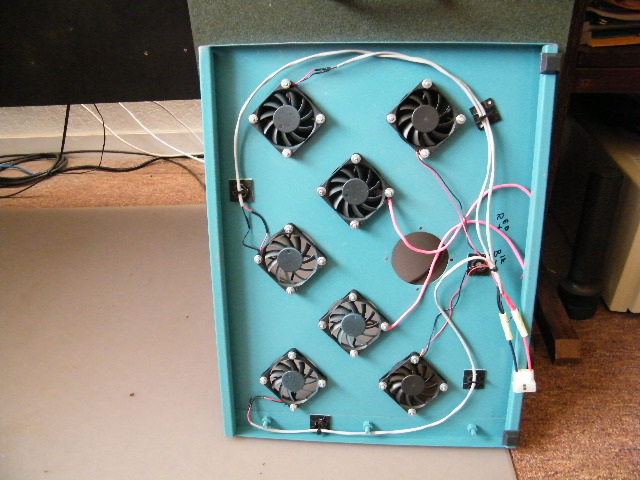
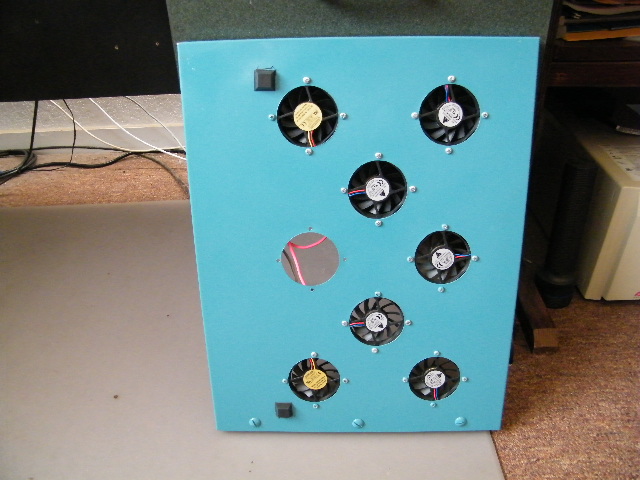
My crude homemade laptop cooler. It does a good job on my DV8T Quad.
18 inches wide by 14 inches deep. I only use the two top and three bottom rows of fan. The two in the middle are not hook up. I used a 12 vdc fans but the power supply is a 5 vdc to make it spin slower and quieter.Attached Files:
-
-
Very cool.
-
Just a FYI: In the past couple of days Justin has posted several new updates on his incredibly helpful NBR Latest Driver Thread (see first post).
" 05/13/2010 - Updated IDT High Definition Audio Codec driver to version 6.10.6276.0.
05/14/2010 - Updated Intel WiFi Link driver to version 13.2.0.30; updated Atheros Wireless LAN driver to version 8.0.0.316; updated Synaptics TouchPad driver to version 15.0.13.3; added HP Wireless Assistant version 4.0.6.0; updated JMicron JMB38X Card Reader driver to version 1.0.43.2 (thanks z3tor).
05/15/2010 - Changed HP Wireless Assistant to version 3.50.11.2; updated BIOS for dv6-2xxx and dv7-3xxx to version F.1B; updated Validity Fingerprint Reader to driver version 2.1.0.2 and package version 4.1.139; changed "HP Integrated Bluetooth Module" to "Broadcom 2070 Bluetooth"; updated Broadcom 2070 Bluetooth driver to version 6.3.0.4000."
The notes to the Intel WiFi Link driver update indicate they fixed quite a few issues, so I consider that one a fairly significant update.
The Bluetooth update also seems to be fairly significant, going from Bluetooth v. 2.1 to v. 3.0 (although I didn't read the fine print on that one and note that the driver itself has a different v. number). If you encounter difficulties installing that update, make sure you have Bluetooth turned on before attempting to install the update. The installer seems to have trouble "seeing" the requisite hardware unless it's turned on.
Anyway, fwimbw, I installed all the updates in the above quote that were applicable to my system, which was most of them (except for the BIOS and Atheros ones) and they all installed nicely and seem to be working fine. -
Well, don't know if anyone would be able to help me, but...
I heard about this Turbo Mode and my DV8 doesn't seem to be using it. So I read somewhere that you can enable it inside BIOS. I accessed my BIOS and was shocked to see that I can't do pretty much anything. Only change boot priority, order and that's about it.
Is this normal? All the other computers I had let me choose a world of options.
Can someone give me good advice on this matter?
And is this Intel Turbo Boost Monitor (widget) reliable?
Thanks in advance. -
The turbo boost that the CPU in your DV8 does is enabled automatically and does not require any additional software or drivers or even need to be activated.
However, Intel offers a free "turbo boost" monitor gadget or "widget" as you put it, that you can download and install which graphically shows you whenever your CPU's turbo boost is operating and how much boost is being applied. It is perfectly reliable, at least in my experience.
It's very true, and unfortunately completely normal, that the HP consumer notebooks, including the DV8, have BIOS' that don't have many configuration options. I was pretty shocked by it too the first time I looked in there. There are a few options I especially miss (like e.g., being able to set a hard drive password), but that's just the way it is. Considering how much computer you can get for your money, especially with the DV8, assuming one has taken advantage of one of the many sales (or coupons or BCB), HP has had lately, I can't get too upset about it. But it sure would be nice if there were a few more configuration options in the BIOS and I can't see why HP doesn't improve this since it wouldn't cost much, if anything. Maybe they are afraid the purchasers (or more likely HP's support people) would be confused by more options. -
Thank you so much for your answer, Pae77.
I was just wondering this thing about the Turbo Boost because I've installed GTA IV here and I just can't play at all. The game is VERY laggy, even when I lower the entire setup to the minimum. I didn't expect a computer built like this to perform so badly when playing a game. But I really don't know if I'm to blame the CPU or GPU. Or both. Or me. Hahaha
One more thing, if you may: should I update the BIOS to this new version HP has released (WinFlash for HP Notebook System BIOS - 2010-03-30 Version:F.21)?
Or a BIOS update should only be done when extremely needed? (my version is F.15)
Thanks! -
You're welcome. Glad you found it helpful.
Although I haven't tried to run that particular game and thus am not sure how well it should be performing on a DV8, I suspect the game should be running better than what you describe on a DV8. For example, on mine, CODMW2 runs very smoothly and nicely on the highest resolution and very high overall settings.
Using the older HP installed display driver could be part of the reason, but I suspect something else in addition is likely to be causing the slow performance. I would get that Intel Turbo Boost monitor installed as well as some other free monitoring software to look at all the sensor temps to see if the machine is running at normal temps. If something is running unusually hot, that may offer a clue as to where the problem lies. You can use a free app like PC Wizard, Core Temp, Speedfan, and possibly others I'm not familiar with to monitor the temp sensors for the CPU, GPU, and hard drives, iirc. Also bring up the Task Manager, look under the Processes tab and click on the CPU field (to sort the list by CPU usage) and see if anything (aside from the System Idle Process) is using an unusually large number of CPU cycles. If so, that app may need to be reinstalled or updated or possibly even uninstalled and removed if non essential and nothing else fixes it.
Also look at the Windows Event Viewer for error messages (you can just type "event viewer" in the Start, Search area (w/o the quotes) and hit enter to bring it up). Once in the Event Viewer, click on "Windows Logs" on the left side to expand the tree, then look for errors under "application" and "system." If you see a lot of errors or warnings, the details listed under them may give you a clue to some configuration problems/issues that may be causing the slower than normal performance.
About whether to update the BIOS or not, people have different opinions about that. Some people are of the opinion that "if it aint broke, don't fix it," etc. And, when updating the BIOS, as opposed to other things, there is always a slight risk that something may go wrong while flashing the BIOS that could leave you with a bricked machine that would have to be sent back to HP to be recovered under warranty, which could take a few weeks. And that would certainly not be fun.
On the other hand, BIOS updates usually are issued for a reason and contain fixes or enhancements and I think it's nice to be running with everything, including the BIOS, as up to date as possible, but that's just my opinion. The F.21 BIOS update improves the ability to detect fan error conditions, iirc. Doesn't sound earth shatteringly important but it certainly could be useful. In your case, with the machine apparently running slower than normal, I would recommend updating everything that can be updated to see if that might solve whatever is causing the slow performance.
But that said, generally I hesitate to recommend updating the BIOS to anyone because of the slight risks involved and I don't want to be responsible if something goes wrong and the machine gets bricked. But I will also say that personally, I did (and will continue to) update the BIOS when updates are available, perhaps waiting a few days after new updates come out before doing so to make sure no one is reporting any problems with the update.
The F.21 BIOS update has been out for a while now and I'm not aware of any problems with it or with updating from F 15 to F 21 (which I did w/o issue), although I'm sure a few machines out of many thousands that have applied the update have possibly been bricked in the process. I think HP's BIOS update procedure could be made safer if the update method performed the flash from outside of (instead of inside) the Windows environment. Anyway, if you decide to go ahead and update the BIOS on your machine, just make sure to do it very carefully following all the instructions to the letter (i.e, don't have any other apps running while doing it, make sure the battery is fully charged and you are connected to AC, etc.), once started don't interrupt the process, and hold your breath (and don't even breath on the machine ) until it's completely finished updating, and hopefully all will go well.
-
I received mine on Friday and it did not have the latest drivers.
-
Hey guys,
I was rockout26 but for some reason when I reset my password it wouldn't let me post on the forums anymore. Contacted mods but no one ever got back to me after a week +
So:
I installed the intel 80gb G2 ssd - and it's ok. Honestly not mind blowing like I expected. Yes, it starts up and shuts down rather quickly - which is a HUGE plus for me. But as far as apps opening up quicker....not really. Office 2010 64 bit is already blazing fast and there is no difference btw opening it up on a 7200rpm drive vs the intel. (The actual office 2010, thanks MS subscription). No change in iTunes, etc. Yes, I don't have any "intense" programs to fully test it out - so -Any ideas for some programs to put this baby to the test?
As far as doing the fresh install - everything went pretty smooth. Everything works - with the exception of (a) Treble/bass sliders (They DO work - but it doesn't come up as "treble" and "bass" - it's all blotchy and no text - but you can control it) (b) I've noticed watching youtube vids online goes incredibly slow and firefox crawls (and IE, and Chrome) - I updated to 197.16 (which worked flawlessly under my stock hdd system.
I decided to keep the 500gb drive in a safe place - just in case.
I put a 640gb 5400rpm drive in as a storage drive (picked up for $75). I LOVE IT - I threw all my movies, tv shows, and music on there and I have plenty of room still. I also changed the location of the desktop/my music/downloads/my videos/my pictures/etc etc folders to the hdd, instead of the ssd. Saving files is definitely smoother now than having to remember to save to the storage drive.
So:
1) Would like the treble/bass to actually come up more clear - but far from a dealbreaker
2) Would like to put the ssd to the test - but I do love the startup/shutdown times - even with Kaspersky installed
3) Fingerprint reader works! yay!
4) I have FF storing things in ram vs. ssd, and that seems to have helped the video playback. Might try installing the 197.45 driver at some point.
5) What I would really like: is to have the software for burning cds/dvds/blu-rays that originally came with my system. I liked whatever it was, served its purpose, and don't feel like purchasing something. Any ideas on how I can get back on my system? -
This doesn't answer your question but Imgburn is free and is an excellent burning app that you might occasionally find useful even after you figure out how to get the HP OEM software you want back.
I'm not sure since I've never tried it but assuming you made recovery disks before doing your fresh install, there might be a way to selectively reinstall some of the OEM software by booting to the first recovery disk and seeing whether there is an option for that among the available menu selections.
If I were you, I would also get an inexpensive hard drive dock that supports eSata so you can plug it into your eSata port for super fast transfers and then you could use the dock to connect your old 500 GB drive to the laptop and use it for either image backups or clones of your SSD. Actually, I would use it for making regular compressed image backups of both drives in your system using either the built in Windows 7 backup app (not sure whether it supports compression) or Acronis TIH, or the free versions of Macrium Reflect or Paragon. Might as well get some use out of that now extra 500 GB drive you have sitting around.
-
My SSD has a copy of the HP original factory install on a 500Gb Seagate 7200RPM HDD and has the same 4 partitions on it. I never ran it with fewer but, to answer your first question, the minimum would've been 2 partitions as Win 7 Pro installation installs a hidden partition (System partition for booting) as well as a regular C: partition. Partitioning does not slow down anything and everything installed to the SSD runs MUCH faster than it does on an HDD - about 3X as fast.
Edit: Since replying, I found a lot has been written on this topic so I apologize if this is redundant - just consider it a "second opinion" written after I was out of town for a few weeks.
Certainly, IMO, the 256Gb is my previous preference but, if I could get TRIM support on a 160Gb, I'd jump at that! After stripping out the bloatware and teaseware, but running my Paging file and Hibernation file on the SSD, I use only 30% (82Gb) of my 256 Gb drive as I believe lots of free space will prolong the life of the SSD (and hope to get TRIM support before the SSD clumps up and slows down). Just my opinion on that expectation...
Last edited by a moderator: May 7, 2015
*HP dv8 Owners Lounge*
Discussion in 'HP' started by rageman, Oct 19, 2009.