Problems? See this thread at archive.org.
You have to customize the 15in RTX model yourself and select it. There isn't a pre-built 15in that has the 2080MQ, but they added it as an option with the 9th gen CPU refresh. It's currently a +200$ upgrade from the 2070MQ.
It's also not even on the spec page for the 15 inch model. only the 17 inch page shows the 2080 as an option for some reason. I have no idea why it's pretty much hidden. They should have included a pre-built configuration that has it. I would have bought it most likely but they gave me a 30% off quote but it had to be one of the pre-configuration models. So it would have been more like +350$ for the upgrade instead of +200$. Oh well, I'm definitely happy with the 2070MQ.
-
-
How does this help, did you even read my post?
Unless you mean to say they swapped the filenames so the 17in is actually for 15 and vice versa?
As I even linked to the firmware I downloaded, kyb15fw02u, which is for the 15in. The 17in is aptly named kyb17fw02u.
This issue came up like a week after I downgraded my firmware so I doubt it's to do with that.
The main issue we were complaining about, and the reason I downgraded my firmware, was the default lighting effect being rainbow spiral on reboot, which the latest firmware introduces. -
First of all, it is not a solution. If you reboot your laptop, or logout etc, then you have the "dancing lights" until you log in, which is very annoying. (basically, icue software quits for any reason). I guess no one still has solution... Well, guess I should just wait then.
I am starting to get the impression that Lenovo hates its customers for some reason. First, the option to control the fans was removed for no reason. Then, this. Do they even check what their customers need or want before these "updates"?
BTW, I've read that it's better to use the NVIDIA drivers provided by Lenovo and not the ones directly from NVIDIA. Is it true? The problem is that they are seriously outdated. -
Not for GPU drivers, I always use GeForce Experience for the latest drivers and have never run into a problem.
It could be true for other drivers but I can’t see Lenovo putting in time for custom drivers. -
I posted a solution 2 pages ago, flash the previous firmware.
http://forum.notebookreview.com/threads/lenovo-legion-y740-17-15.827244/page-159#post-10955472 -
ahhh my mistake yeah that rainbow light is default .... it sucks i agree
-
Well, I decided to repaste and repad my system and used Thermal Grizzly Kryonaut and Arctic thermal pads. While gaming, I had consistently thermal throttled at 94*C, got PROCHOT in Throttlestop and had a core spread of over 10*C so I figure I may as well considering it is super easy to do (much easier than my previous Alienware). Pulled off the heatsink and sure enough they are still using the good blue paste, but the pads were a bit thick and 2 were completely missing. I replaced all the pads in red with 0.5mm pads and the single one in orange with 1mm pad as it was slightly lower, so made more sense to equalize it.
While gaming now in Black Ops 4, still on performance and overclocked with MSI Afterburner (curve and capped at 1780 MHz), now only hitting 85*C on the highest core and now a 7*C spread. Not perfect, no, but much better. I think the more even application with thinner thermal pads did the majority of the work to be honest.
So if anyone else is tired of waiting for Lenovo to fix the fan settings with a new BIOS, perhaps this would work for you too.kfxsti, Sacks, IKAS V and 1 other person like this. -
Is the heatsink on big unit connecting both the CPU and GPU?
Good job. -
I just ordered the new 1660 Ti version, but now I'm finding out it doesn't have G-Sync (even though Lenovo advertises it as having it). Would it be possible to hook up an external Freesync monitor for smooth gaming without using stupid V-sync?
-
Long as you're connecting to the monitor via DisplayPort, adaptive sync should work just fine.
-
Thanks. Can you recommend a 1080p 144Hz monitor that would be compatible? I know nothing about monitors.
Alternatively, can I just search for any Freesync monitor that uses a displayport? -
Also, is it possible to enable adaptive sync on the laptop's built-in 144Hz monitor?
-
This one is on the G-Sync compatible list and is only $180.
No, it isn't. The best way to handle this is to limit a game's frame rate to a few fps below the refresh rate using RivaTuner Statistics Server and playing with v-sync off. -
But won't you still get screen tearing
But won't you still get screen tearing with v-sync turned off? -
Look up afterburner scanline sync. It's essentially playing with vsync with less input lag and you can use it at lower frame rates
Essentially it forces the frames to tear at the bottom or top of your screen where it's less noticable -
Not if you set the game's frame rate to lower than the screen's refresh rate.
-
Serious question: why don't you just pay the little extra and get the 2060? G-Sync is worth it and the screen really is amazing. Additionally the 2060 does perform 15-20% above the 1660TI according to reviews I have seen.
Are you in the US? I have noticed their website no longer has loads of discounts available so I would really recommend holding back and waiting for these to come back. -
You also need to take frame time into account too. For example, if it's rendering at 120 fps but there is a small variance of frame time the experience will be a very subtle jitter. Riva statistics tuner can cap the fps and minimize this jitter of frame times so you'll get stable frames. Battlenonesense channel taught me that on YouTube, very great guides.
Sent from my Moto Z (2) using Tapatalk -
NVIDIA has a list of GSync compatible monitors
-
I ordered it from Newegg for an extremely low price (like $200 cheaper than the recent Lenovo discounts) and I believe Newegg charges a restocking fee. I may end up returning it, but if it works with an external freesync monitor, I'll probably just keep it. I would never game unplugged anyway, so G-Sync doesn't need to be a mobile feature for me if the external monitor is a viable option.
-
Was it this one? Honestly, unless you really like the form factor and desperately want RGB, the Legion Y545 from Costco is a better deal. It has pretty much the exact same hardware specs but is on sale through the end of the month for $1,050. Even factoring in the $60 for a Costco membership, you're coming out ahead plus you get to take advantage of the other perks, eg cheap gas.
-
Form factor is important to me, and I got the Y740 for $1169 during the recent "Shell Shocker" deal. Definitely worth the upgrade for me over the Costco deal.saturnotaku likes this.
-
That must have been the one day I didn't check the NewEgg Shell Shocker. I don't blame you for taking it over the Costco Y545.
-
I was pretty impressed the with the quality of Costco's Y545 demo model. It really is nice. Fit and finish were superb, the lid actually lined up with the body, etc. Even my old X1C6 didn't do that. Plenty of the 360* convertible laptops there were pretty busted up, however. Not as bad as my local Walmart's demo section, but still not encouraging.
-
For $1,050 on sale, it's a good deal. Configuring a similar model on Lenovo's website runs $1,350, which is still $150 more than the regular Costco price. That said, I did end up exchanging my Y545 for another as the first one had a problem with the headphone jack that was allowing static through. Fortunately, the new one has been fine.Last edited: Oct 19, 2019
-
Anyone got a rough estimate of what they think these will go for on Black Friday? The 17" premade on their site is sold out : (
-
Just check regularly, Lenovo usually has great sales.
-
I'm about to receive my Y740 15".
I opted for 9750h/2070 version with 500nit brightness.
I read a bit in the thread but I'm thinking, any suggestions to do besides undervolting?
I have also ordered 32gb ram to upgrade. I'm a photographer and have a powerful desktop for gaming, this laptop won't see much use besides photo/video editing. I went with 2070 to future proof this for at least 3 years. -
This would be interesting for me, too. I've also ordered the 9750h/2070 version. And additional, is it possible to overclock while undervolting the 2070? Is there any Temp-Limit, where the GPU starts to throttle?
Are there Game Benchmarks maybe from Whitcher3 or SOTTR in maxed Details with overclocked GPU?
Thank you in advance!Last edited: Oct 29, 2019 -
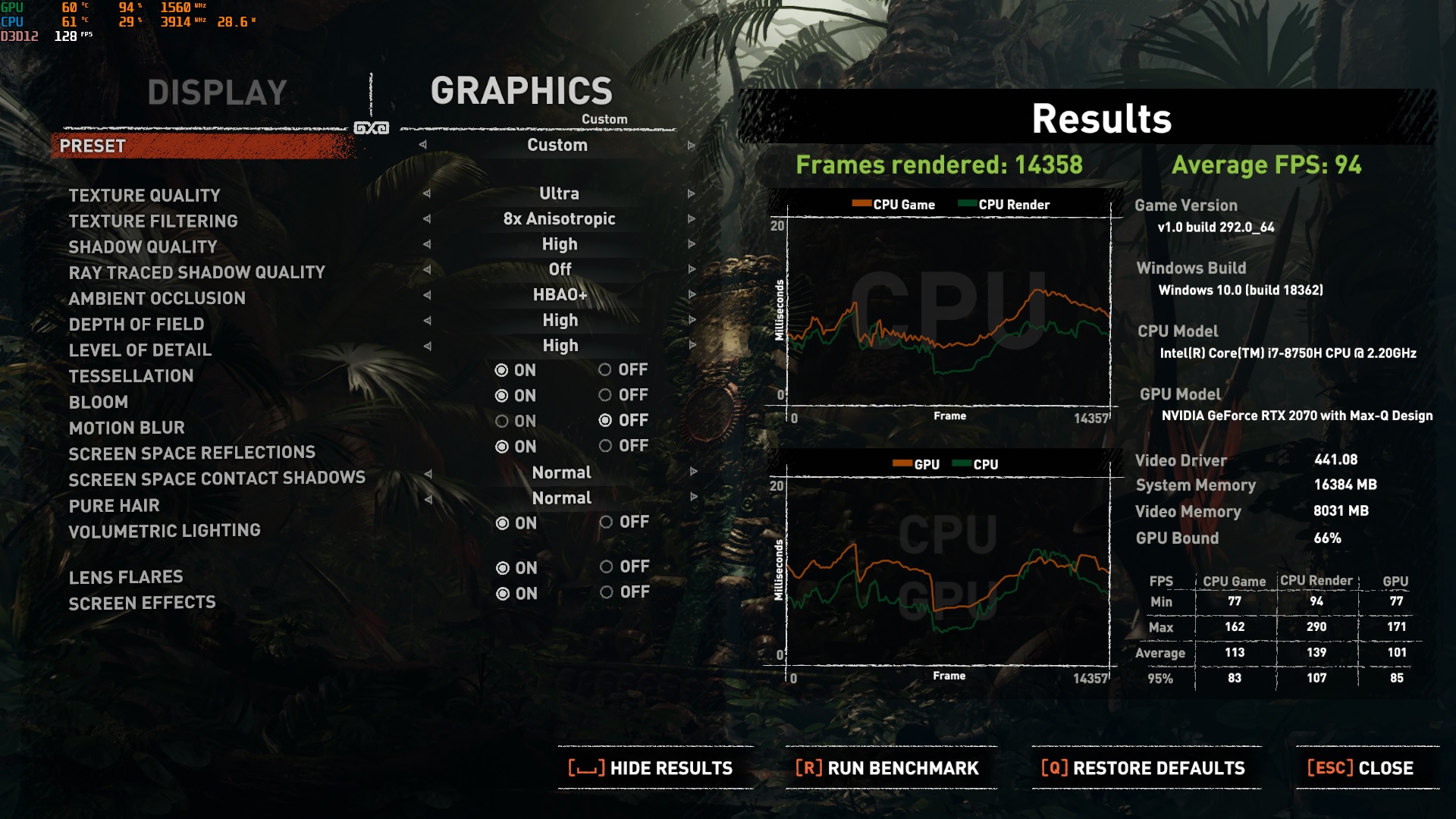
Generally, my gpu (i7-8750/2070mq) dont really throttle for me. Even after overclocking it through afterburner, it often ended up limited by power and temp is generally around 60s during prolong game run. The cpu, on the other hand gets to 96 C easy on synthetic benchmark (prime 95/cinebench r20), but its usually on the 80s during game run with max fan on. After repasting (yesterday), cpu temp went to 70s instead, which is awesome for me. My SotTR benchmark was 90 fps on taa/smaa2x, gets lower of smaa4x, highest everything else no ray tracing. (after gpu overclock though)
Attached Files:
Last edited: Oct 31, 2019 -
-
Man I really didn't want to repaste mine but I had the same experience as you. Those results you got are impressive.
-
@Etelmik
While checking my RSS feeds this week, Consumer Reports said that the 17" Y740 would be $1280 on black Friday, 9:00 AM EST.
https://www.consumerreports.org/lap...o-laptop-deals-for-black-friday-cyber-monday/
I'm absolutely loving my maxed-out 15" Y740.
It's been a beast running multiple VM's on Hyper-V at the same time. Alas, I don't have any games to really experience the power of the upgraded graphics card I got with it. I did download and run Unigine's Superposition and Valley benchmarks https://benchmark.unigine.com/ on it and the results are very impressive (to me) for a laptop without any (yet) undervolting work. It's a good showcase to brag to my non-tech family and friends with. I'm personally waiting for Microsoft Flight Simulator 2020 to get released and hoping it performs well on the laptop.
Eventually I'll draft an full-impressions post for the thread...been a busy Fall at work.
My only "gripe" is a common one here with the keyboard. The keys themselves are great to work on, but darn-it if I still have problems centering my palms underneath the keyboard! I'm going to try getting a piece of thin felt pad with adhesive backing and cut a narrow pin-stripe to make a pseudo-edge on the wrist-pad area just between the macro key row and the primary keyboard keys so I can use that for my left palm to rest against. Hopefully that helps me naturally center-up under the keyboard. I'm a touch typist, but I'm also regularly using a free touch typing program to run drills to practice getting comfortable with the keyboard on this thing for muscle memory.
As long as I've got the Y740 on my full desk, then I use either my USB mechanical keyboard and a Bluetooth mouse with it and it a full win/win. Keyboard only a bother when I'm using it away from my desk.
Cheers!
Claus V. -
I'm thinking about repasting my Y740 as well, what paste did you use?
On a side note, would liquid metal be a good choice for the Y740? -
I used Thermal Grizzly Kryonaut but I definitely think that Conductonaut (liquid metal) would be even better. Dropped the temperatures a bit and evened them out with Kryonaut but I'm sure they would be amazing with liquid metal.
Sent from my SM-G970W using Tapatalk -
Yeah the thermal paste application wasn't good (for me at least), no wonder my cpu temps went to 90s very often.
I used coolermaster mastergel instead of kryonaut. I thought liquid metal is quite difficult to work with and you'll need to repaste-it relatively often. And I feel like I dont need that extreme temperature drop for my y740 to works to my satisfaction anyway. -
Does anyone made modifications to the heatpipes, heatsinks to the y740?
-
Hi, folks. I just repasted my CPU and GPU with Gelid GC-Extreme. Anyone know what thickness thermal pads are on the NVMe drive and under the HS for the VRM's?
The pad on the chips seems thinner and softer than the one on the SSD.
Thanks, -
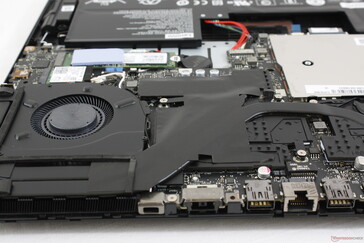
Hi guys, what is this black tape in the heatpipes?
maybe a heat transfer tape, from the plate to the heatpipes?
maybe insolating heat tape?Attached Files:
-
-
Has anyone found a decent laptop sleeve/case that fits the Y740 15inch?
-
For those of you who own the y740 17" with the 2080 Max-Q GPU, are you finding it sufficiently powerful enough to run pretty much any game? I had posted this question elsewhere, but I'm trying to decide between this laptop and the G703GX. I'm really torn on these two laptop options.
https://www.lenovo.com/us/en/laptop...n-y-series/Lenovo-Legion-Y740-17/p/81UJ0001US
https://smile.amazon.com/dp/B07N6PG...olid=2SXYJXG322NRK&psc=1&ref_=lv_ov_lig_dp_it -
Yeah, I've had my 2080 17" for about 1 month now and I haven't encountered a game yet where it struggled, minimum 60fps on ultra for most games I've played and it keeps surprising me.GooPuddles likes this.
-
I agree with this, have the 15" with 2080 Max-Q and have been really happy with all the performance. Been playing RDR2 with everything maxed out with no issues or stutters and rarely goes below 80FPS. Not sure if you can get free returns on the Asus but you can with Lenovo so I would recommend ordering and if you aren't happy send it back?
The ASUS for sure is more powerful as it doesn't have the Max-Q variant of the 2080 but it's massive and hugely more expensive so it depends what your budget and portability requirements areGooPuddles likes this. -
Does anyone know the model number for the fans for the Lenovo 740 15"?
Sent from my Moto Z (2) using Tapatalk -
I've recently encountered a problem, my Y740s shortcut key (FN+F5) brightness control isn't working for some reason? I don't know if I pressed something but has this problem been encountered before with a solution?
-
Sometimes for me it doesnt work when going to + brightness. After pressing - once (dimming the brightness), it starts working again normally.
Also, if you have the FN setting on from bios? So that you dont need to press fn key, just f5 etc. Meaning that FN+F5 is actually only F5, so they are inverted in sort. -
Is anyone else having an experience with coil whine? It's slight but noticeable in a quiet room, especially if the volume is low. I've already had to swap units afew times for other issues(mostly related to the screen) and it's really annoying to go through it again.
examples:
https://imgur.com/gallery/1yU3a68
https://imgur.com/a/v498a4m
Edit: Found a much more definitive test on a reddit post:
"Here's the utility: https://www.techpowerup.com/download/techpowerup-atitool/
When it first starts, it will complain about no kernel drivers, just click ok. Then click "Show 3D View" and it will start drawing a furry cube and you should (if you have coil whine) instantly hear a loud electronic chirping noise coming from around your keyboard."
Creates an immediate high-pitched scratching noise, but I'm curious if this happens with all units or just the ones pre-disposed to coil-whine. Would appreciate if anyone else would post their results.Last edited: Dec 4, 2019 -
Thought Id let people know who are interested about my bios revert. I posted this over on the lenovo forums but as not everyone has an account their i will post it here.
I got my bios flashed back to 1.03. I had to do it a second time, because, even though it seemed to work just fine the first time the bios version said 1.05 still. When I restarted my PC it said it was making updates to the system like it was automatically reverting back to bios.1.05. How can we stop the machine from upgrading to 1.05 bios when we restart? Anyone had this issue? Otherwise max fan is working fine now with Nerve Center.
I seem to have bested my previous best in 3dMark firestrike. This is with a overclock of the GPU and nothing else. Temps were icy cool the entire test aside from the CPU only test which reached in the 90s for a few seconds. I cant understand why they decided to remove this. It keeps the machine cooler which in turn causes less stress and failure on the system and would be less headache for them in the longrun from customers bombarding tech support with thermal issues and failure of components due to heat.
On a side note, I did install Nerve Center after I updated the first time, or reverted I should say ( It feels like an update even though were backflashing) and Nerve Sense did not show the extreme cooling section which is what made me look into the actual bios update to begin with and it showed I was still on 1.05. So yea, like I Said, for some reason I had to flash two times. I dont wana restart the PC now though because I think it will revert back to 1.05 bios. If anyone has any input on this it would be great!
PS: I should also mention I have version Legion Y740-15IRHg of this laptop, which as I have mentioned is the one with the i7-9750h w/2070. Their are different bios downloads for different models of this laptop. Check pages 2 and 10 for the different bios downloads before giving up cause you cant find the right file, that is if your looking to revert back the bios. This is on the lenovo forum for those notebookreviewers reading. Also, this SS of the firestrike was before I reverted to bios 1.03 that I tested today but it gave similar results just with much higher temps. Sorry for the large pictures, the image upload on this site is 20th century style archaic.
Last edited: Dec 5, 2019kfxsti likes this. -
What scores are you folks with an overclocked RTX 2060 getting?
I was debating between the 2060 or 2070 (the 2070 costing $150 more) and went with the 2060 since the fps difference is marginal at best. -
Ok after slogging through about 10 pages of threads.
It does handle 64gbs of RAM.
I installed it yesterday. replaced a Crucial Bastillix Sport kit.
Don't care too much for XMP profiles, mainly because I don't OC, I've read a lot these threads and undervolting/OC just have diminishing returns. I'm on the older version with the 8750h, I'm not going to bother moving on to the one with the 500nit panel.
This is the Kit I am using:
https://www.corsair.com/us/en/Categ...ies-SODIMM/p/CMSX64GX4M2A2666C18#tab-overview
only other kits out there are mushkin and samsung kits. -
Yeah, the cpu supports 32GB sticks of ram. The only reason the product page says max 32GB memory (as in 2x16GB) is that there were no 32GB so-dimm sticks available back when it launched / most laptop manufacturers are lazy so they only list what they've tested pre-launch. This has always been a "problem" with laptops and desktop motherboards since I started building computers with replaceable ram sometime in the middle of the 90's.
Lenovo Legion Y740 17" 15"
Discussion in 'Lenovo' started by victorgm, Jan 30, 2019.