 Problems? See this thread at archive.org.
Yes, using an adapter. HDMI/DP sort of the same thing.
-
View attachment hueyPRO ThinkPad Display -1111-1920x1080.zip
here is pantone HuePro color profile for w510 and w520 warm-clear medium-contrast.
in case someone needs it
-
Looks nice. I currently use this one.
-
Would you please teach me how to use the icc file in windows7?
Thanks!
-
Load it from the "Color Management" control panel.
-
That's it? Set to default? Will this affect the external monitor?
Thanks. -
You can set it just for the primary display - just make sure you have selected the 'Display: 1. ThinkPad...' in the Device drop-list.
-
cool, ill give it a try on w510 that doesn't have color cal inbuilt. it seems to have a bit different panel that adds "red" more.
-
Has anyone noticed the movement of the trackpad becomes jumpy when performing USB I/O operations? I've just recently starting noticing this when copying files to a USB drive or when syncing an iPhone/iPad. I don't remember it happening a few months ago. After the file copy or sync is complete, the trackpad works just fine.
-
Can someone help me to load this file. I done it with CM in Win 7 but I can not see file in the list when I do a load of icc file.
Thanks! -
yes same i cant trace it it happened as you said this month about~after thinkvantage updates. also for some reason it started stalling when trying to read from Gb connected network DVDRW drive not sure why would attemp to read over LAN cause the freeze
-
I was wonder if anybody knows what the deal is with the NVS 5100m
I just took a chance on an eBay auction and the poster didn't list the graphics card. I'm really hoping it doesn't come with a NVS 5100m because I'm getting it for 3ds max and other 3d programs
did the NVS 5100m w510 ever actually exist? or was it just a posting error in the original spec list? everything official has only stated it comes with the FX 880m but some sites still list the nvs5100m as being for sale with the w510
one site even lists both with fx 880m in the headline and NVS 5100m in the tech sheet.
does this configuration even exist? -
i have been through 3 boxes all said nvs5100 and all had FX880 so dont worry!
-
Hi all,
Have been using the W510 for some time with a 1366 x 768 (32 bit) (60Hz) display.
I am thinking of getting a WUXGA (1920x1080) Full HD panel online and installing it myself.
May i check with you guys if anyone have done it before and would there be any compatability issues with the change?
Thanks a lot!
Windows 7 Professional 64-bit
System Model: 4391CF6
BIOS: Ver 1.00PARTTBLX
Processor: Intel(R) Core(TM) i7 CPU Q 720 @ 1.60GHz (8 CPUs), ~1.6GHz
Memory: 4096MB RAM
Card name: NVIDIA Quadro FX 880M
Current Mode: 1366 x 768 (32 bit) (60Hz)
Monitor Name: ThinkPad Display 1366x768 -
I remember checking online that the display cable parts were exactly the same.
But you may need to make sure you have a "Genuine Lenovo panel" -
Thanks for the prompt reply.
Looked around and it seems that laptopscreen.com offers the best bang for the buck. Seems genuine enough.
What i do not want is that after buying the panel and changing it for a few hours and it would not work. Then i got to spend another few hours switching back the original....
It is a waste using 1366 x 768 with the Nivdia.
Thanks again. -
You will find specview test results here
http://forum.notebookreview.com/gaming-software-graphics-cards/610674-specview-test-results.html
sülearvutid workstation -
Just curious what any of the experts recommend in terms of Intel PROSet Wireless drivers. I'm currently running the latest ones off of Inte's site. I believe they are 14.1.1000 and have been up there for some time. I noticed that Lenovo recently released their driver package with version 14.02.0000. I don't recall ever seeing that version on Intel's page (as an older version) before so it seems to be a Lenovo-specific version. Is there an advantage to using the Lenovo version (with a lower number but I guess doesn't necessarily mean it is older) or are Intel's preferable?
-
I generally stick to the Lenovo supplied versions as it's possible they have specific tweaks that work better for them. The only reason I go to the manufacturer is if something major is missing or broken in the OEM ones.
-
Out of curiosity, does Smart Audio need to be loaded for the settings to be in effect? If you have the tray icon open, it eats 50MB of memory. If closed, are the equalizer and other settings still active? Basically, does it need to be open for enhancements to be in effect.
Also, out of curiosity, has anyone found a better Bluetooth driver than the one provided on Lenovo's site. I get random freezes on my Bluetooth mouse. A restart fixes the issue but it's annoying. -
I realize this thread is about 7 months old now, but since it's for Lenovo W510 owners, I fit into that category.
I have a W510 with a FHD WUXGA 1920x1080 screen (not the touchscreen). I would like to replace my current display with the touchscreen display, but buying it from Lenovo is crazy expensive ($1328 for just the display!).
The Lenovo FRU number for the display is 13N7298 or 13N7299 (same part with different numbers). Because the touchscreen is so expensive from Lenovo, I'm trying to source the screen directly (from a place like laptopscreens.com). However, 3rd-party sites cannot look up a screen based on the FRU.
I need to know the manufacturer and model number of the actual touchscreen. This would be located on the back of the LCD display. Would any of you happen to know that information?
Thanks! -
You might be able to find the FRU in the W510 Hardware Maintenance Manual.
-
Thanks, choder. I'm realizing I was ambiguous in my post. The FRU numbers I gave are the right ones that came from Lenovo Technical support as well as from the Hardware Maintenance Manual.
What I was trying to say was that 3rd party sites cannot look up a screen based on an FRU. They need the manufacturer and model number of the screen to be able to look it up. -
-
If you have a three year warranty, you should still be in warranty and have it repaired. You can check your warranty status at Lenovo Support - Check Warranty Status
-
thanks... but that information was checked by me before posting. its part of toolbox diagnostics.
problem is that im not in 3 year warranty. so if anyone know what are my chances? I wonder how much it costs say to repair/replace main board for w510 laptop at lenovo repair center? 100-200-300-newlaptop? -
Bummer. What temperature is the W510 when this is occuring? When was the last time you cleaned the intakes, fan, exhaust, etc. ?
I'm just wondering if there's any thing you can do to provide the poor thing some relief.
I have TPFanControl installed on my W510 and have it set to Manual 2 which forces it to run the fan about 3300rpm all the time. Keeps the temp at about 51C all day long. -
Temps are fine range 64-75 I also have TPfan installed and use smart mode 2
I think that's why my laptop lasted so long and previous I had to send back for replacement. I have problem persistent and looks like AA is off for everything and more videos you ran on screen the more pixilated they are getting. yet temperature is in the "safe zone". I'd say highest safe would be up to 78 (depends on room temp) -
I am having the problem where my W510 will not boot. It starts up and makes it to the Thinkpad screen and then stops. Last week I went searching for how to fix the problem. One thread on this forum suggested that it might be a corrupted BIOS that can be fixed by draining the BIOS battery. Not sure if I am explaining what I read correctly. But I did remove the main battery pack and then attempted to try to open the back cover, not knowing what I was doing. I removed all the visible screws on the back side, found I couldn't really get into the back and decided to put the screws back in. After I did that and reattached the main battery (nothing to do with the yellow BIOS battery that I never got to) the system booted. I theorized that maybe I somehow drained the BIOS battery when i removed the main battery and disconnected the computer from the AC charger and thought that maybe that is why it suddenly started booting again.
But this week I had the same problem, so I tried removing the main battery and disconnecting the AC charger. That alone was not successful.
Again I decided to go further and I removed the cover for the RAM and the cover on the hard drive and removed the 13 black screws on the back side and now the W510 is booting. Does anyone have theories about what is going on? BTW, I just followed the lenovoservicetraining link and watched the Disassembly tutorial so now I know what I was missing to be able to get the back cover off, if I end up needing to do that. -
Do you have a USB device of some sort plugged into one of the blue USB 3.0 ports at the time you try to boot?
-
Yes! I recently bought a Logitech wireless mouse with the little Logitech transmitter dongle that plugs into a USB port. It appears from a couple quick tests that when that dongle is plugged in at startup it will not boot. When I unplug it and restart it proceeds through BIOS and boots fine.
The W510 did not have this problem with a previous Logitech wireless mouse and its dongle. But I gave that other Logitech mouse and dongle to my wife and bought a new cheaper Logitech at costco to use on my W510. It didn't occur to me that it could be that new dongle because I plugged it in while the W510 was on and hadn't rebooted it for a few weeks after buying the new mouse/dongle.
What is the cause of the problem? Is it some slight mechanical difference between the connectors? or is it software in the BIOS? or something else? I do see a little difference in the back wall of the dongle.
also, my W510 is a couple years old. I don't think it came with USB 3.0, although I'm not sure.
Thank you very much for pointing me to the problem. What is the cause? -
You'll have to ask Lenovo that. The issue has been present since the W510 launched and Lenovo hasn't bothered to fix it. Lenovo isn't interested in fixing old problems. That doesn't create revenue.
-
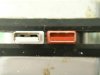
The strange thing is that it works with one Logitech USB mouse dongle but not another newer one. I don't think I've seen this problem with other devices, like a microsoft mouse, or usb thumb drive, or scanner, or apple usb cable to an ipod. It's just this latest Logictech mouse wireless mouse dongle which is mechanically different. Here is a picture.
__________________________
maybe this link will work:
Not sure if I can attach a .jpg to this message. So here's a link to a google album... Not sure if this works either.
https://plus.google.com/photos/104441606386400936492/albums/5767690804022512865
______________________________
the white connector causes the problem. the red one does not. Notice there is some metal contact seen in the back vertical wall on the white one but the back wall o the red one does not have that. -
I haven't tried to break it lately. I just avoid having anything plugged in at power on. After Windows is running, there is no issue.
-
I would go back to using my old Logitech Nano mouse so that I would't have to worry about putting it in and out with each boot, but I haven't been able to get that Nano mouse wheel to do some of the pan and rotate functions that I need for a CAD program but the new logitech M510 drivers with the new mouse work correctly with the CAD. Something tricky in the mouse drivers that's causing that different problem... Oh well, I guess I will put back on those 13 screws and live with it.
I am sure glad I didn't send it in to Lenovo for service and pay them $500 for the "repair". Thank you for the advice.
AND.... I just realized that there is another non-blue, non USB 3 port on the rear, so I'll use that for the dongle. -
should I start a court case against Lenovo Thinkpad legendary design? if I have two W510 one with nothing on the screen when starting up, and the other shuts down as soon as I start encoding video. debugging this two machines from day one.
w510 is shabby model from Thinkpad brand
their updates do more harm than good
and USB plug unplug is simply stupid
as far as im concerned I had:
screen replacement
keyboard replacement
machine replacement
and now machine dead
machine half alive
thats not what was on the tin -
uhm, sorry for digging this thread up.
I have a chance to get a W510 with the specs listed below for $500 (he wont drop the price any further)
I can't afford a new (worthy) unit and I'm wanting this for CAD work (Screen res)
My current machine is a Lenovo T61. It's been great, but getting slow with bigger files.
For the most part, this seems like a good machine?
-----
LENOVO Thinkpad W510 Laptop - Intel Core i7-720QM
Model: 4391-B49
Intel CORE i7-720QM 1.6GHz
15.6" 1920*1080 Full HD Screen
4GB DDR3 RAM
750GB HDD
NVIDIA Quadro FX880 1Gb Video Card
CD-RW/DVD-RW Multi-burner
Gigabit Ethernet
Intel 802.11 a/g/n Wi-Fi wireless
Webcam / USB 3.0 / Display port
9-cell battery
Microsoft Windows 7 Professional Edition 64bit -
I am still using that model and it's great for the most part. For pricing, I'd go to eBay and search for similar ones to get an idea of how much they are selling for. Use the search option "Completed items only" so you can see the final price that it sold for.
I would also recommend getting an SSD which will make a big difference in speed. It would probably also make a big difference in your current laptop, so it might be a better use of money to just do that instead. -
I agree. I am still using mine, along with an ultrabook. While the battery life isn't the greatest, except when you add the clumsy battery exension, it is still fast. Like you mentioned, an SSD would make a big difference. I put a Seagate Momentus XT 750GB hybrid drive in mine several years ago and it was a huge difference. Even more so, my wife's OLD Toshiba laptop that came out probably 2 years before the W510 is still running great with Windows 7 after I put a Gen 1 500GB Momentus XT in. SSDs weren't affordable then, and there weren't many with high capacity.
Lenovo W510 Owner's Thread
Discussion in 'Lenovo' started by ZoinksS2k, Jan 22, 2010.


