Problems? See this thread at archive.org.
If you are running in Optimus mode and run anything that is set to use the dGPU, it will use the dGPU. Run the W520 in integrated mode via BIOS if you don't want to use the dGPU at all. Alternatively, if you want to configure individual programs, do so via the NVIDIA control panel.
-
-
Turn it off in the bios.
-
I did...The problem is it decided to turn itself back on after a couple of restarts...
-
Turn off OS Optimus detection or whatever the thing's name is (the one under the mode to operate in).
-
If you need to disable nVidia only occasionally, e.g. when on the go, you can just disable nVidia in device manager. This causes some minor issues if you have USB video cards, but otherwise is simple and more convenient as does not require a reboot and trip to BIOS.
Can be done via a batch file too - DevCon Examples (Windows Drivers) -
Hi Community,
I've big problem with my Lenovo W520 and VmWare Workstation 8 (VmWare Image = Windows XP).
We uses one AdminClient @office, here we uses several VmWare Images. From this client I cloned WindowsXP and cleaned this image by VmWare Converter (to delete unnecessary drivers). Now I placed this image one the W520, but if I want to use this VmWare Image in Workstation 8, this image will be very slow. Every installation or harddisk write processes will be very slow.
I tested one clean new installation of windows xp in workstation, too. But I will get the same issue.
BUT However, I placed this image on one USB Harddisk which is connected to the W520, the speed will be beautiful. Every write process will be nice.
Where is the problem with the W520? I have installed every new driver for this Lenovo W520. Is there a known problem with the harddisk controller?
My W520 includes one Hitachi HDD:
HITACHI HTS727550A9E364
Manufacturer (Standardlaufwerke)
Modelnumber HITACHI HTS727550A9E364
Serialnumber 3JB700487HTAE8
Firmware JF3Z
Size 500GB
Can someone helps me?
Thanks a lot -
Hello W520 Owners,
Just wanted to let you know that I just installed a Samsung 128gb MZMPA128HMFU msata drive in my W520 and it's working very nicely.
I got the drive refurbished (probably pulled from a returned product) off a Chinese ebay seller for 165 bucks, where it was advertised as a Dell strangely enough - this seems to be the only place to find these babies online, and it seemed a bit sketchy, but I decided to take the plunge and I wanted to let y'all know that at least mine is in fact the real deal. CrystalDiskMark scores all correspond to benchmarks online, and according to CrystalDiskInfo the SSD has been lightly used: 54GB of writes, 323GB of reads, and 78% health (good). Looking forward to seeing it fly when I get the OS on there, and keeping my fingers crossed for no BSODs or the like.
One question: when I install the msata drive, the nook where it goes was covered by a plastic roof-like thing. I replaced the plastic cover after screwing in the drive, as it seemed like a sensible extra layer of protection. Was this dumb? Might it cause the drive to overheat?
Thanks. -
A small request for the Lenvo w520 laptop. Is there a way to hide the cap locks icon when cap lock is on? It's a big black square in the lower right hand corner with a white lined picture indicating caps lock is on. This image icon will not disappear. However, when you turn off the caps lock. The icon will indicate the caps lock is off and the icon image will disappear. This icon image is located in a bad spot on the screen and blocks some important information from the current program running. The image icon does not appear to be moveable and I have not located a way for hiding the image icon or uninstalling the Lenvo program that controls the icon. Thank you for your reply's.
-
Not sure if you could actually do that (same with the volume bar, etc). Even after a clean Windows install, I still get the CAPS icon, so I think it might be some sort of BIOS feature(?).
-
Kill the tpnumlk and tpnumlkd processes.
-
Tried killing tpnumlkd (couldn't find the other) and wasn't able to end the process from Task Manager.
-
Under the Display properties for Windows 7 there is a tab called On Screen Display that is created by the installation of the hotkey package. There are properties under this OSD tab for color, timeout, etc.
-
I use VMware 8 daily, with Windows XP and 7 images. The performance is great. I do have the VMWARE images on my local SSD and in runs slick.
Example VM is Windows 7, 8 GB memory 8 Processors, WEI 5.5
I have had issues where the Host AV was hitting the VMware disks, so I exclude them from Host AV scans. -
Side-By_side is the preference (thus no Esxi as an option).
eas -
So, prior to 'clicking' I though Pricey was gonna be $500.00 .....
Then I clicked .....
$1,299.00
WOW!
I am going to give the trial a shot and see how it compares to vmware WS 8. -
Are you Mr. P, too? Or are you just anticipating his answer?
The problem sounds like the VM. Since a cloning tool and driver "cleaner" were used, there's no telling really what kind of state the VM is in.
I was going to suggest a couple of things but I'll wait to see if Mr. P comes back. -
So, I'm pretty sure this is just a really basic BT question, but I'm stumbling around and thought I'd ask.
I am trying to stream audio from my phone (Nexus S 4g) using Bt to the W520 speakers.
I can get to the point where I can see the device paired, and in the Bluetooth control panel, and connected.
I can see audio reflected in the volume 'mixer' in the Bluetooth port and can see the little BT audio controller, and I can even change songs on the phone, but I don't hear any music out the speakers.
the Bluetooth port in the mixer reflects audio streaming, it has the pulse along with the songs, but again, nothing comes out the device speaker.
Drivers:
I did have some challenges with installing the drivers. I got an "You cannot install an older version of Bluetooth Software over a newer version of Bluetooth Software. [-349]" when installing :
ThinkPad Bluetooth with Enhanced Data Rate Software II 6.4.0.2900
From 7zwb06ww.exe
Microsoft Bluetooth Enumerator 6.1.7601.17607
Thinkpad Bluetooth 3.0 6.5.1.302 -
Nope, not Mr. P (?), but looks like we have two similar VM threads going! I was responding to your reply to my question!
-
I am unable to do anything that involves my W520's Discrete GPU (nVidia Quadro 2000M). Doing so results in a BSOD crash: STOP x'0...0116' in nvlddmkm.sys. Every time.
Actions that cause crashes include: running any program on the nv GPU; selecting the 3D Adjust image settings... option in nv Control Panel; selecting the BIOS = Discrete option (crashes on boot-up).
For a while, I couldn't even uninstall the then current nv drivers (270.61) drivers or install the latest Lenovo-nv drivers without a crash. It wasn't until I did a clean install using nv's latest drivers (290.76) that I could update the nv drivers without a crash.
In any case, I have a system that I can boot reliably now, as long as I don't use the Discrete GPU, whether deliberately or inadvertently (such as the 3D image settings mentioned above).
So, I conclude that my Quadro 2000M is faulty. The good news is that I have 700 days left of Priority Onsite warranty with Lenovo.
Am I right to presume that replacing the Quadro involves replacing the mother board? I haven't used Lenovo support before. I would greatly appreciate any tips and suggestions for handling this repair or replacement. Thanks.
I'd also like to give a shout-out to Thors.Hammer and zsero for their suggestions during these two weeks of, ahem, frustration. -
Tokend, a faulty GPU usually means a different kind of errors, not an instant BSOD crash. The only way to tell if it's a hardware error is to do a clean install of Windows 7 onto a spare HDD or SSD.
1. Update BIOS and set it to defaults. Remove any additional RAM modules, just leave the factory installed module (usually only one 4 GB module). Remove any USB/bluetooth peripherals and undock the computer.
2. Find a clean HDD or SSD and do an absolutely clean Windows 7 SP1 install onto it. Do not install any kind of Lenovo utility.
Install, in the following order:
3. Intel Chipset driver from Lenovo, restart.
4. Intel wired and wireless network drivers from Lenovo, restart.
5. Intel Graphics driver from intel.com, restart.
6. nVidia Quadro Notebook driver 296.70, from nvidia.com. restart
After all these, if your laptop has any kind of BSOD, then it's a hardware fault. If not, its caused by some software and/or added peripheral. -
Sigh. Thanks, zsero.
Unfortunately, I have neither a spare HDD/SSD nor a Win7 DVD. I got DVDs for MS Office and Adobe Acrobat with the system, but no Windows DVDs. Only the Lenovo Recovery partition, which I also have backed up to an external drive.
I have avoided restoring the HDD to its original state because I have a year's worth of app installations and updates that I do not wish to repeat. If I have to, so be it, but I'd rather try another HDD/SDD if there is any chance whatsoever of preserving my current set up.
I take it that the reason you did not suggest my calling Lenovo now was that they would probably have me restore my system from the Recovery partition. So, I would be back to square one even if it turned out to be a hardware error.
Presuming that I acquire another HDD/SSD, I'm not clear, though, on how to go about installing a clean Win7-64, devoid of Lenovo stuff. Even if I could use the Lenovo Recovery partition on the current HDD (and ext. HDD) to restore Windows 7, the restore would also include Lenovo stuff, wouldn't it? Do I have to buy a retail Windows to do a clean install?
Thanks again for your help. -
Yea, GPU's are soldered on the board I think.
You're welcome man. Sorry it didn't work out. -
You can download the retail .ISO of Windows 7 from Digital River. Or if you have a friend with a MSDN or TechNet subscription, they can download and burn an .ISO for you.
You do not need to buy Windows. You already have. There is a certificate and key under the battery, but you DO NOT need to activate to test.
- You would pull the current HDD/SSD. Set it aside.
- Install the new HDD/SSD in the primary bay.
- Boot from the Windows 7 DVD and install to the HDD.
-
AND ...
Hi@all,
no Mr.P. - that's me
I've used three ways to work with one VmWare Windows XP Image:
1. Cloned Windows XP of another Workstation (Client) without VmWare Converter --> placed this on one partition of the W520 --> performance = poor
2. Cloned Windows XP of another Workstation (Client) with VmWare Converter (to clean this image of unnecessary drivers in this image --> placed this on one partition of the W520 --> performance = poor
3. Lenovo W520 --> VmWare Workstation 8 creating one new VmWare Image by WindowsXP (complete new installation of the os "WindowsXP") --> placed on one partition of the W520 --> performance = poor
Yes, we've used AV (Symantec Endpoint Protection - our company uses policies to hide the AV settings for us users. But I've exclude the partition (where the VmWare images are placed) by the correct registry key --> but the problem isn't solved
I have had installed the newest drivers for the W520, so that I thought the W520 will be fine. The VmWare Workstation is installed to the W520 and all VmWare Images are placed on another partition. I have had also used several tipps by the internet, nothing is working for me.
If I placed the VmWare Images on one USB Drive ... all is fine. The performance is beautiful. But I wanna use the images on my W520 partition
So if you both have some tipps for me, I will test this soon
Thanks a lot
/Edit
I've forgot to say the following: If I used the VmWare WindowsXP Images from the partition (not from the USB drive) and I installed one applikation in this VmWare Image, the whole host (W520) is busy. For example: Internetsite will be loaded very slow
-
The problem is that you should really try it without that antivirus software, Symantec is one of the biggest resource hog! Working from USB but not from SSD or HDD seems very strange for me.
Do you at least have an SSD? For running parallel virtual machines it's a must! -
We using one admin client HP Workstation with VmWare Workstation 8 with the same VmWare images and our W520 in the company. Both clients uses AV SEP. On the HP Workstation there's no problem with speed.
We cannot uninstall SEP to look if the problem is still existing, sorry. But I know, that SEP will uses a lot of ressources, but I can't believe - that is the reason for my problem. Because the problem exists only, if there is one busy job in the windows xp vmware image.
The USB drive has one WD HDD with USB 2.0 speed, we have no SSDs. -
But what is the primary hard drive? If it's an HDD with loads of processes running on it, then it's obvious that the virtual machine makes it almost stalling. Possibly the HPs have SSDs?
-
The primary HDD is the Hitachi from the W520, and on one partition there are the vmware images
No, the HP Workstation includes only one IDE HDD. I've disabled the complete AV SEP Program by the registry. But this do not change the performance issue. -
Possibly the HP's HDD is less fragmented. If you've been using the W520 for a year with lot of installed programs and no defragmentation, then it's quite possible that it's so fragmented that a VMware operation is almost impossible. Invest in a 256 GB SSD from Intel 520, Samsung 830 or Crucial M4 for any kind of serious VMware use!
-
Sure, but the W520 is new. New installed and the W520 is maybe one week old. SSD will be one possibility, but not now. I want to know - why the controller of the W520 is too slow if there is one busy job.
-
It's unlikely the controller problem, multiple VMs run fine on my W520 on SSD, HDD, in Ultrabay or eSATA etc.
It must be AV and/or defective HDD and/or caching is disabled on the HDD or something else. Perhaps the registry disabling the AV does not quite completely disable it, and any write of the VM triggers the whole file rescan from the start? Windows resource manager and/or process explorer should help determining what processes are using I/O, and how much of it. -
If Windows and other applications are running fine, but VMWare Workstation and a VM aren't, then isn't it apparent where the problem isn't? If the HDD is behaving properly with the OS and other apps, it isn't the HDD. It's likely a configuration issue.
What BIOS | Security | Virtualization settings are being used on the W520? -
Thank you. Downloading now from DR--3.1 gigs worth. Est. time to completion: 7+ hours (~ 1Mb/s internet connection; the best available here). Alas, no friends at MSDN.
Suppose that the new HDD and Windows work out, and all my current problems go away. Would I have to remount the original HDD and deactivate Windows, or could I just activate the fresh Windows on the new HDD using the key under the battery?
This has been a nightmare. And, to think it all started when I tried to add a second monitor. You know, so I could be more productive. But, with the kind assistance of you, zsero, and the nice folks in this community, I'm keeping it together. So far. Barely.
-
Tokend, I hope everything goes well! To keep the activation data, just save the activation to an USB stick using ABR Backup:
ABR (Activation Backup and Restore) | directedge.us
Later, in the new windows, just run ABR Restore to restore the activation data. Much better than activating over the phone! -
Hi,
Bios = 1.37
Security = Firewall will be set by our company
AV = Symantec Endpoint Protection --> Partition is excluded from scanning
Virtualization settings:
WindowsXP.vmx:
Thanks a lotCode:.encoding = "windows-1252" config.version = "8" virtualHW.version = "8" memsize = "1024" MemAllowAutoScaleDown = "FALSE" displayName = "Windows XP" guestOS = "winxppro" floppy0.present = "TRUE" floppy0.autodetect = "TRUE" floppy0.filename = "auto detect" usb.present = "TRUE" vmci0.present = "TRUE" ethernet0.present = "TRUE" ethernet0.addressType = "generated" ethernet0.connectionType = "bridged" ethernet0.startConnected = "TRUE" ide1:0.present = "TRUE" ide1:0.autodetect = "TRUE" ide1:0.filename = "auto detect" ide1:0.deviceType = "cdrom-raw" ide1:1.present = "TRUE" ide1:1.autodetect = "TRUE" ide1:1.filename = "auto detect" ide1:1.deviceType = "cdrom-raw" scsi0.present = "TRUE" scsi0.virtualDev = "buslogic" scsi0:0.present = "TRUE" scsi0:0.fileName = "Windows XP-000003.vmdk" scsi0:1.present = "TRUE" scsi0:1.fileName = "Windows XP-0-000003.vmdk" buslogic.noDriver = "FALSE" ehci.present = "TRUE" priority.grabbed = "normal" priority.ungrabbed = "normal" ide0:0.redo = "" tools.syncTime = "FALSE" ide0:1.redo = "" virtualHW.productCompatibility = "hosted" nvram = "Windows XP.nvram" cleanShutdown = "TRUE" replay.supported = "FALSE" replay.filename = "" vmotion.checkpointFBSize = "33554432" policy.vm.mvmtid = "" vc.uuid = "" pciBridge0.present = "TRUE" tools.upgrade.policy = "useGlobal" pciBridge4.present = "TRUE" pciBridge4.virtualDev = "pcieRootPort" pciBridge5.present = "TRUE" pciBridge5.virtualDev = "pcieRootPort" pciBridge6.present = "TRUE" pciBridge6.virtualDev = "pcieRootPort" pciBridge7.present = "TRUE" pciBridge7.virtualDev = "pcieRootPort" extendedConfigFile = "Windows XP.vmxf" floppy0.startConnected = "FALSE" ide1:0.startConnected = "TRUE" ide1:1.startConnected = "FALSE" ethernet0.generatedAddress = "00:0c:29:68:dc:f1" vmci0.id = "-1821844239" uuid.location = "56 4d 02 42 8a 61 63 ec-f6 43 09 83 93 68 dc f1" uuid.bios = "56 4d 02 42 8a 61 63 ec-f6 43 09 83 93 68 dc f1" gui.lastPoweredViewMode = "fullscreen" unity.wasCapable = "TRUE" scsi0:0.redo = "" scsi0:1.redo = "" pciBridge0.pciSlotNumber = "17" pciBridge4.pciSlotNumber = "21" pciBridge5.pciSlotNumber = "22" pciBridge6.pciSlotNumber = "23" pciBridge7.pciSlotNumber = "24" scsi0.pciSlotNumber = "16" usb.pciSlotNumber = "32" ethernet0.pciSlotNumber = "33" ehci.pciSlotNumber = "34" vmci0.pciSlotNumber = "35" usb:1.present = "TRUE" ethernet0.generatedAddressOffset = "0" tools.remindInstall = "FALSE" usb:1.speed = "2" usb:1.deviceType = "hub" usb:1.port = "1" usb:1.parent = "-1" gui.viewModeAtPowerOn = "fullscreen" checkpoint.vmState.readOnly = "FALSE" checkpoint.vmState = "" usb:0.present = "TRUE" usb:0.deviceType = "hid" usb:0.port = "0" usb:0.parent = "-1"
-
I really doubt it's a hardware issue, so I don't think you'll find solution in this thread. I'd recommend asking in the VMWare forums and/or open VMWare support tickets.
-
FYI, I did some testing with an XP VM using VMWare Workstation 7.5 and 8.x yesterday evening. I was unable to reproduce any performance issues with Intel VT turned on or off. I was using a T420 for the test which is similar but different. The GPU could certainly be a player on the W520.
Yea, it's probably best to report the issues at VMware Communities: VMware Workstation
There's a new and similar thread at http://communities.vmware.com/thread/402969?tstart=0
I'm sure there are others. -
I have a new W520 with one 4GB stick installed underneath the keyboard. If I add another 4GB module, would it go in the other slot underneath the keyboard or in one of the two open slots on the underside of the laptop?
-
To get the dual-channel goodiness, you'll need to install the second stick under the laptop in Slot 2 (the 4GB OEM stick is installed in Slot 0). However, this barely helps with performance in anything other than benchmarking, so you can practically put the other stick wherever you want.
-
Thanks! I'll install it in the under keyboard slot because I know if I don't it will be bugging me that I didn't "do it right"
-
Only me that has issues with the CPU sqirling some high frequent noise that comes in 5 small beeps every 3-5 minutes?
-
Hey folks - I have a Samsung 830 in my w520 and love it (and the w520) I'm thinking about putting another SSD in my laptop using the DVD drive area.
What kind of Ultrabay hard drive adapter are you using and does it use a regular 2.5" SSD or one of the card type SSDs?
Thanks............ -
-
I've been fighting for a bit on this one, and was wondering if anyone had any ideas.
I get the following error trying to pair a Nexus S 4g:
Error: "Bluetooth peripheral device driver not found" when you try to connect a bluetooth device
The windows 7 Troubleshooter reports :
"Devices and Printers Publisher details Issues found Bluetooth Peripheral Device doesn't have a driver "
Tries and fails to download a driver.
Drivers:
I did try uninstall - reboot and installing the latest BT (Version: 6.5.1.2700 ) from
Bluetooth with Enhanced Data Rate Software for Windows 7 (32-bit, 64-bit), Vista (32-bit, 64-bit) - ThinkPad
But, I get "You cannot install an older version of Bluetooth Software over a newer version of Bluetooth Software. [-349]"
Current installed software driver is:
ThinkPad Bluetooth with Enhanced Data Rate Software II 6.4.0.2900
From 7zwb06ww.exe
Here are the drivers I show installed in device manager:
Microsoft Bluetooth Enumerator 6.1.7601.17607
Thinkpad Bluetooth 3.0 6.5.1.302
__________________ -
Where can I find a replacement for the GT33N in my W520 with one that supports Lightscribe?
-
Hello everybody, this is my first post here because I stumbled across a seemingly simple problem but I can't fix it.
I bought a caddy to replace my dvd-drive.
I just received a Crucial m4 128 gb and replaced the HDD with the SSD and I've reinstalled my laptop. I put the HDD in the caddy before reinstalling.
The problem: the HDD doesn't get any power. Which is really annoying cause without an HDD for data my SSD is almost useless.
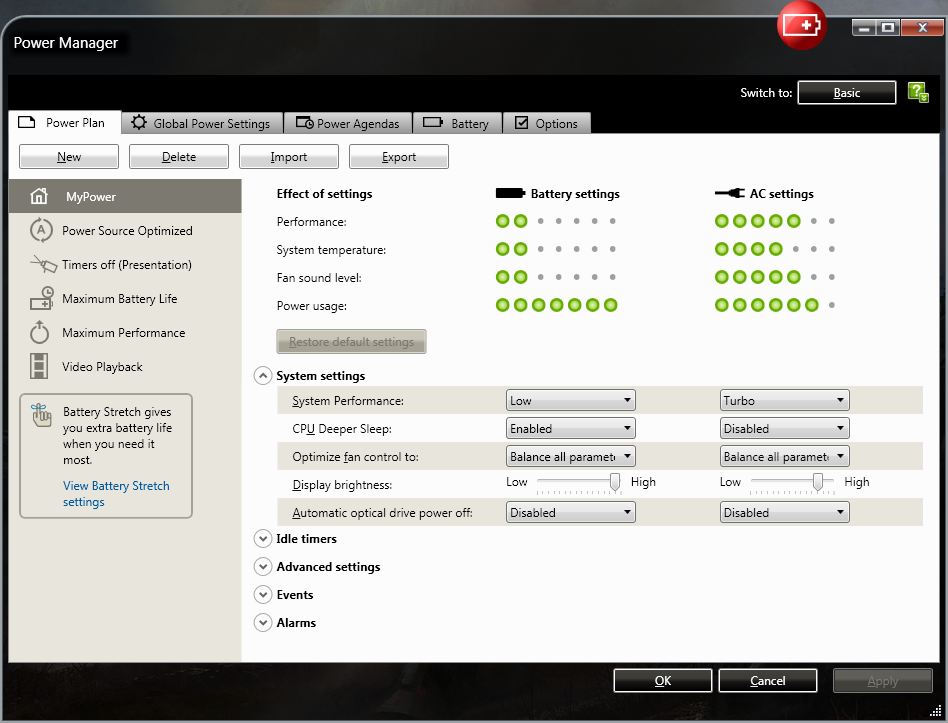
This is probably just because the laptop tries to save power by turing of the dvd-drive. I can remember seeing settings about this in the Lenovo power manager software.
However I can't find how I can turn the power back-on. I use the latest software and drivers downloaded from the Lenovo site. The power manager is version 6.30
I can only find the drive speed (slow, normal, maximum performance), but there should be some check box to automatically turn the power of the drive off.
Can anybody help me with this? I would greatly appreciate it! -
This note serves multiple purposes: (1) It lets Thors.Hammer and zsero, who were so generous with their time and suggestions, know that my problems of the last 3 weeks appear to be over; (2) it lets others know what fix solved a peculiar set of symptoms; and (3) it provides me with an outlet of relief. Phew!!
I am typing happily on my docked W520 with secondary monitor (Dell U2412M), extending my desktop into a vast expanse of lovely visual real estate. The IBM technician just left, and I can heartily recommend Lenovo's Priority Onsite Support.
Briefly, the problems seemed to be with the discrete nVidia Quadro 2000M adapter. Whenever I tried to launch an app off the nVidia, or whenever I did anything that woke up the nVidia, crash. Operations off the integrated Intel adapter worked fine. But, of course, plugging in the second monitor woke up the nVidia, and that's when this mess all started. Countless hours of uninstalling and reinstalling drivers did nothing to solve the problems. Nor, did restoring to a January disk-image backup. No, the problem really did seem to be hardware-related.
Just to add to the curious symptoms, I discovered yesterday that the system seemed to work OK when running off the battery. I could launch apps off the nVidia, and the nV icon would show "n Programs" running. Previously, I had incorrectly concluded that there was a problem when docked. That was true, sort of, but the problem wasn't the docking, it was the connection to AC power. When undocked and connected to AC, crash. When undocked and running on battery, OK.
In short, the Lenovo tech replaced the system board, which had the Quadro soldered on. His speculation was that the on-chip nVidia memory may have had a bad "patch." The adapter appeared to be OK, but when an app actually tried to use it, and hit that bad patch, blue-screen city.
Anyway, I'm up and running, loving my machine again, and mighty glad I opted for the priority onsite service. Thanks once again to Thors.Hammer and zsero for your many helpful suggestions, and mostly for your "Hang in there" encouragement. Cheers, y'all. -
Awesome. Glad you are up and running. Your W520 will be obsolete next week.
Totally teasing!!! Well, mostly.
-
I don't think this setting is causing your issue, but who knows. See the attachment for the location.
Attached Files:
-
-
Oh, you had to go and ruin my party, didn't you?
Totally kidding. Well, mostly.
Actually, I'm not a fan of chiclet keyboards, so I don't view the new W530 as highly desirable. The feel of the W520's keyboard was a large factor in choosing it over HP and Dell's mobile workstation offerings. True for the 17-inch MacBook Pro, too, though I did love the MBP's gorgeous 16:10 screen. I also didn't like that the MBP had only two RAM slots.
But, chiclet keyboards rub me the wrong way. I find myself looking at a chiclet keyboard often as I type. A keyboard that looks and feels right to me doesn't require nearly as much looking. Whether it's a natural response or an irrational bias, that's me.
I suppose the new keyboard layout could be OK; I just hope that they didn't screw up the feel of the keys.
Lenovo W520 Owner's Thread
Discussion in 'Lenovo' started by zacharyp, Mar 31, 2011.