Problems? See this thread at archive.org.
My keyboard came off extremely easily the first time, and every other time that I've had to remove it. In fact, I've used nothing but my bare hands.
-
-
Yeah mine came out relatively easily. Most of the effort is spent trying to pull it out while not noticing that one of the tabs is still engaged.
-
I usually use one of my tiny screwdrivers to help ply the keyboard out, but only because I have no nails and sometimes a tab gets a little stubborn.
-
I just push the keyboard towards the screen and then when I see that the tabs are all disengaged, I press on the bar at the top and it pops up.
-
That's what I expected mine to do. Figured it would take 3-4 minutes. But that was not the case. I build my own desktops & take my laptops apart frequently. This was the first time with my w520 other than sticking some memory in the rear slots when I got it. I read the manual, knew what I was supposed to do, but there was no give at all forward or backward, believe me I tried. Lenovo must have agreed with me as they are sending a new keyboard to me instead of just the one key we accidentally damaged.
Makes me a little nervous for my next project - replacing the 4 gb memory in my u300s with an 8 gb stick. -
Slight update on my W520 "countinous restarting after BIOS update" problem:
I was just denied warranty service... I'm raging. -
Of course, they never send just one key (or separate, random keys). Putting together a key, with its delicate spring mechanism underneath, is quite interesting.
BTW, the piece of plastic around the keyboard (which you slightly dinged) may also be replaced. If I'm not mistaken, it includes the palmrest. -
I'd like to know more about the story; although I can't say I am surprised.
I needed some advice on editing the Registry the other day, and Lenovo said they simply always reinstalled the operating system. (All that was required to fix my problem was to remove a single line in the Registry, which I ultimately did.)
These companies seem happy to sell us product; but, when it comes to support, there often isn't any.
Good luck! -
Just bought an Crucial M4 64gb SSD to build it into my W520 as main boot device and for the most important applications i use frequently.
But now i have no idea where to build it in.
My Ultrabay has a DVD-Player in it, and my primary 2.5-inch bay contains the default 300gb HDD.
Which leaves only the...M-Sata Slot? Is the SSD even compatible with that place? Or do i need to switch out the HDD on the primary bay with the ssd? (Which would suck because then i have no idea where to put the HDD)
Thanks in advance.
-
No. You need to buy special mSATA SSDs to fit in there.
Your options are either
1) return it
2) buy "12.7mm ultrabay caddy" and "SATA 13 pin cable" from ebay. To put the SSD into the caddy, and keep the DVD external.
I'd go for 1) as 64GB is really too small, and 2) will take a few weeks to arrive. -
25% Off Lenovo Computers - includes W530 - Ends Tonight at Midnight (ET)
Save 25% off ThinkPad T430, T430s, T530, W530, X230, X230 Tablet, Consumer K, Q, and H Series Desktops and B and C Series AIO's and A1 Tablets.
Ends Tonight at Midnight (ET)
MasterCard MarketPlace... -
Anyone of the w520 owners here experience the random shutdown sindrome about which I have read on the lenovo forums? I am looking to buy a new nb, and the w520 is the one that seems to meet my needs ( http://forum.notebookreview.com/what-notebook-should-i-buy/671758-i-think-i-found-what-i-need.html).
All that is holding me back is this random shutdown thing. -
I can't get mine to shutdown at all. <sigh>
I wish that mine *would* shutdown. I have to hold the power button down until it shuts down. -
It was a really quick "deal" from them.
I told them the situation that I got into, and that it was after a BIOS update. The support person stated that warranty does not cover any problems caused by updating the BIOS. Also he asked for my model number and S/N to see if I had accidental damage warranty, which I don't. That was it.
I also contacted the shop where I ordered it, they gave a pretty good idea, they told me to just make up something else as a cause (random shutdown, some sort of error).
Actually does anyone have any thoughts about this? Is it possible to send it in stating some other cause? -
It won't "Post." You could say that you can't get the machine to post, which you can't.
-
yeah but they will ask me why, what happened
-
I understand your situation but I believe that you can recover your BIOS!
Does anything happen when you've pressed the ESC, F1, ... F12 keys at startup? The ThinkVantage button?
Also, just tell Lenovo that you were updating the BIOS using the Windows updated and it caused you this. They have to fix the motherboard, and with the windows updater so many errors happen that it won't surprise them.
BTW, did you use the Windows or the ISO updater?
A similar story:
https://forums.lenovo.com/t5/W-Seri...W510-BIOS-FL1-or-WPH-Update-Files/td-p/732003
Plus I'd recommend you to ask this question on forum.thinkpads.com! -
Good luck! (These posts probably stay around *forever,* so I don't want to say anything incriminating!
Unfortunately computers are often nightmares. I think you could try to reflash the BIOS from a CD-ROM, which was the best suggesion I saw. -
Oh, and I forgot to write that buying a BIOS from eBay for $30 and paying for someone to resolder it is always an option. But if I were you I'd just play the "windows BIOS updater broke my computer" route with Lenovo until they actually fix your computer.
Update: here is an amazing place of BIOS experts. I think they will be able to help you how to create crisis disk for your W520, if it's possible.
http://forums.mydigitallife.info/threads/5866-LENOVO-(IBM)-Bioses-especially-Thinkpad -
I couldn't resist this offer, so I just ordered a W530, even though I don't really need to replace my 1-yr. old W520, which I use only in a docking station. If anyone is interested in buying a W520 in excellent shape, you can contact me at segel(at)msn(dot)com. It should be available in around 2 weeks.
W520 4276-2QU i7-2720QM @2.20GHz, 16 GB memory, 6.9 WEI, 320GB HD -
Yeah, just to make sure I did everything, I actually tried this, but there is just NO way to get the computer through POST. I can't get to the boot selection screen with either F11 or F12 (don't know the corresponding key by heart). Also tried removing my HDD so that CD would be next by default, but no chance. Also tried getting to UEFI with the blue button and F1.
So again my question to you, this is very important:
What is a plausable circumstance that I could tell support? Random restart? (the machines had/have those problems I believe) I so hate to do this but pretty much my only chance As a student, I worked through the whole summer last year to buy this machine, breaks my heart.
I will bring this up to Lenovo forums too... -
What is exactly happening? You start the computer and what's next? Does it react in any way to keyboard? What is you push a dozen keys continuously? Don't worry you'll be able to get back your computer to working!
-
Stick your 64gb ssd in the main hdd slot in the rear of your computer. Make this your boot device & put windows on that. Buy a caddy for your 300gb drive and put that where your DVD drive is now. Really, how often do you use your DVD drive? If you use it some just buy a cheap external dvdrw - I got a decent Asus for $20 to use with my ultrabook. It would have been simpler to just buy a 256gb ssd & put everything on there. I realize they are expensive but they are finally starting to drop in price. I ordered my w520 with the cheapest hdd they had and put a Samsung 830 256 ssd in it. If I run out of room I'll just caddy another ssd and put it in the DVD slot. I might just go ahead and do it anyway.
-
You can't boot to the bios and they won't RMA it? Will it let you downgrade the bios to the previous version? I would think they would RMA it if it won't boot to the bios. Have you tried booting to safe mode then restarting windows?
-
jmegas - would you try the following? I couldn't get my u300s to shut down after exploring their little button that takes you to the restore program. After that I would shut down win7 like usual, it would go to a blank screen, I would shut the lid. Noticed the next morning that the ultrabook was VERY hot. So I opened it and it was at a blank screen that had 3 options that had to do with boot order and the recovery program. So I booted to win 7 then shut it down and instead of closing the lid I watched it. Sure enough after 5-6 seconds it booted to that screen. Never could get it to shut down after that. I tried everything including restoring to factory image. Finally gave up, called tech and they were clueless and gave me a RMA. I was about to put it in the box to tape it up and send it off, but I thought, hmmm, there's one simple thing I haven't tried. I pushed the on button and held it down - that turned it off without it rebooting (tech didn't even suggest this). I then booted into safe mode, let it load completely, then shut down and booted to win7. Then I shut it down from within windows and all was back to normal. Shuts down when I tell it to from windows. I know that's simple but I've used it before on other problems and sometimes it works. Try it.
-
Hubert - just for future reference - where do you find these? I can usually get 10% for an email and I've haggled for an additional 10% but I haven't been able to find good ones like this. And I've bought a w520 & a u300s this year.
-
You can haggle + 10% email + ~10-13% Barnes and Noble discount. That brought down my W520 by 24% when I ordered.
-
You need to learn three key words.
"I don't know"
Because you don't know. You don't know for certain what is failing. That is what warranties are for. So that components that fail in the warranty period can get replaced. It's not like the W520 has a perfect history. You could have accidentally shorted a component on the motherboard just by touching it. Lenovo is on record with the static discharge problem already.
You don't know what failed. You just need the machine to work, "per the warranty terms".
Cluetrain -
Thanks for the tip! I think it is because of all the software junk I have loading upon boot and therefore having to unload upon shutdown. All the junk would not load during safe mode, that is for certain. I even added in the RAID driver for the Marvel controller, which I am not using. <dumb>
I think I may have to view all the processes which are running in the background, but you suggestion is worth a try. I did have it successfully restart after an update, which required somewhat of a shutdown. -
The tech will not care how it was done, no one is going to grill you, just tell them that it worked one day and now it doesn't. If it's a moral issue then ask how much it'll cost to replace the MB. Sh*t happens, no need to make a bigger deal about it then it needs to be.
-
Thats exactly what i had in mind, thanks! But do i only need the caddy? Someone mentioned, that you need some sort of cable too.
But man, these things are expensive... -
Buy this, you don't need anything else:
2nd hard drive Caddy F Lenovo Thinkpad T420 W520 T520 | eBay
The mentioned cable is only if you want to use the optical drive attached externally.
And about 64 GB: think about it twice before you start using it as your main OS drive. I've been using it in my desktop, but the only way it works is that I install big applications/games to the HDD. For example I have a Program Files in C:\ and in D:\, for the big ones. This means you need the HDD in the laptop all the time. On the other hand with 128 GB now I only need the HDD in the laptop if there is something media / work related stuff kept on the HDD, for everyday work it's not needed. -
From what I've learned from this forum, the "Newmodeus 2nd HDDSSD caddy adapter for Lenovo ThinkPad Ultrabay 12.7mmsimilar to 0A65623" fits better than the actual Lenovo part. I do not have one, so I am not absolutely sure. I have been to their site and they look attractive. All of them are expensive.
-
The Lenovo one is expensive, the Newmodeus is better, but I'd call the nimitz one a bargain. I'm using it and it fits absolutely perfectly.
-
The relatively expensive part is the SSD, which has gone down in price recently. This 128GB is an excellent one.
The UltraBay HDD caddy adapter is quite inexpensive (and good). No need to buy Lenovo part for this.
Remove the stock HDD from the primary bay (page 68 in the T/W520 Hardware Maintenance Manual) and replace it with the new SSD.
![[IMG]](images/storyImages/N8VKG.png)
Then pop out the stock ODD. Put the stock HDD in the caddy adapter and push the whole assembly in, just like you would handle the ODD.
![[IMG]](images/storyImages/RQqJ3.png)
You'll need to "recover" the Lenovo image or fresh-install Windows on the SSD. (Do this before you pop out the ODD.) The HDD will become a storage drive.
-
Just a quick reminder that some of the newest Lenovo W520s use 7mm SSDs. Fewer of the drives come in this height.
-
Good point.
![[IMG]](images/storyImages/ZFvwz.png)
-
I guess I'll just have to order one. On paper its the best nb I can find, seems to meet all the criteria I need.
-
Please post back what you think of it, as I am thinking about buying one too. I have an extra SSD to install.
-
I'm having an odd problem lately, wondering if anyone else has this
When I switch from wifi to ethernet, my internet stops working (the network is still connected though). If I do a restart it works fine.
Thanks -
Thanks! I ordered it.
I planed to install only Photoshop, 3DS Max and Zbrush on the SDD besides the OS of course. So 64 Gb should be enough. The 300gb HDD will hold anything else. -
I'm eager to hear what you think of the Ultrabay unit. I've heard they are good. I'm also interested in their customer service.
Thanks!
Good luck!
-
I don't know how much room those three programs take up, but if they are sizable, you still might be constrained on a 64 Gb drive.
SSDs need a little headroom to operate efficiently and maximize their lifespan. Some people recommend as much as 20%, but you can definitely get by with less than that. Also keep in mind than an advertized "64 Gb" drive will have less than 60 Gb of reported usable space straight out of the box, simply due to binary conversion.
Just make sure that you have enough usable space to operate with your OS, primary software, hidden system files (e.g., page file), and headroom before you open the package on the new drive. -
Trust me, in half a year you'll be thinking about that why did you not buy a 128 GB drive! I've tried, tried hard using a 64 GB SSD, but it's just pain in the ... And yes, leave at least 10 GB free, if not the SSD will slow down over time!
-
You did better than I did. <g> I made it four months with a 120 GB, which was a replacement of the original 160, and now I'm trying to add a 240.
The Intel 520 240's were on sale at Newegg.com, after a $100.00 rebate from Intel, for $209.00. That was difficult to pass up when I had paid $180.00 for my 120. I think the extra space will be nice, but I have had trouble getting it to work. I keep getting read/write errors from the cloned drive. I don't quite know why, because I am using the same software I used when I went from the 160 to the 120. -
You on DHCP?
try doing a: ipconfig /renewall from CMD as admin.
Perhaps the problem is with the DHCP server.
If this helped, it wouldn't hurt to press Thanks ;-)
from GT-N7000 via Tapatalk 2 -
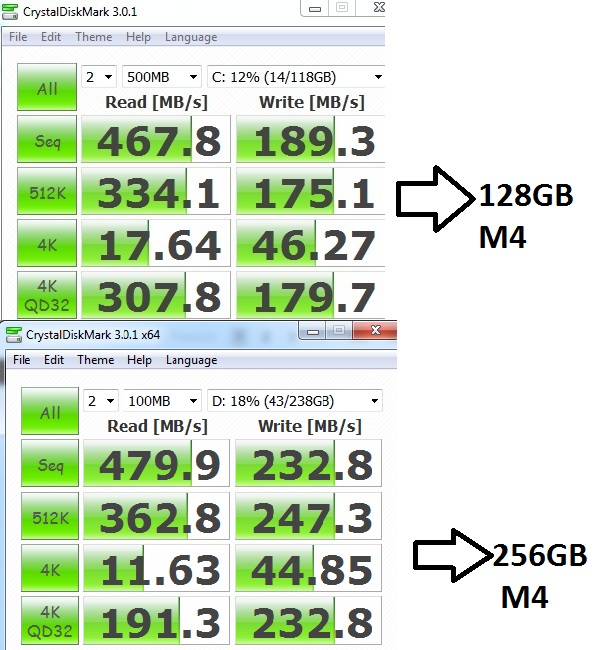
Seems like something wrong?
Alignment is right. How can the 128GB M4 be slower..?
Horrible write speeds? Or is that normal? Alignment is correct.
Attached Files:
-
-
Newegg has some Samsung 830 256gb for $189 through 6/28
-
That's even a better deal! I guess these SSDs are really coming down quickly in cost.
-
Where are you seeing this price? Have the direct link?
Lenovo W520 Owner's Thread
Discussion in 'Lenovo' started by zacharyp, Mar 31, 2011.