 Problems? See this thread at archive.org.
Lenovo quietly stops selling the ThinkPad W520...
This thread is on suicide watch.
-
-
Noooooooooooooooooooooooo!!!!!!!
-
I've been harassing the T530/W530 threads, trying to get a feel for double-precision floating point performance in CUDA, so I guess I thought I'd ask the W520 crowd as well. I'm laptop shopping for some CUDA development, and specifically need maximum double-precision performance. I'm guessing the old Quadro 2000M in the W520 is probably the fastest of the five (NVS 5400,1000M, 2000M, K1000M, K2000M). And because of that I'm considering shopping for used W520's instead of a T530/W530.
Could I bother a 1000M and/or 2000M owner to take 2 minutes to run CUDA-Z? Download cuda-z from SourceForge.net
I just need the Single Precision and Double precision MFLOPS from the Performance tab. Hopefully I can get all 5 and I'll post them all together so other CUDA programmers can have a nice comparison.
-
I'll probably be keeping mine at least until the W540 comes out...
Haswell looks pretty promising... -
Likewise, though I'm always open to any other laptops in the future.
Though I might finally get around to building a beast desktop if I need more performance than what my W520 will offer in the future. Been trying to find an excuse to DIY for *ages*. -
Intel claims that platforms built around its Haswell microarchitecture the successor to the today's Sandy Bridge, scheduled for 2013 will use one-twentieth the power of today's stingiest low-power platforms.
Intel promises '20X' power reduction with 'Haswell' chips ⢠The Register -
Neat
I won't hold my breath though. Let's see if Intel delivers. -
2000M
301.24, stock clocks:
Single-precision float: 280063 Mflop/s
Double-precision float: 35160.7 Mflop/s
301.24, 20% overclock
Single-precision float: 341184 Mflop/s
Double-precision float: 42846.4 Mflop/s -
Thanks very much Colonel O'Neill. Looks like 2000M is 50% faster at double precision than the K2000M, and about 84% as fast as K2000M at single.
With your OC, the Double is twice as fast as K2000M, and single is about even.
I still would love to see a Quadro 1000M if anyone has time. -
No problem. I'd like to see the K2000M gains from overclock for a more thorough comparison though.
-
I'm just curious, what do you have to do to overclock a 2000M?
-
I just use GPUTool; it sets clocks well enough and has a built in stresstest. The Find Max function is broken, though.
For reference, I go from 900/550/1100 to 1070/670/1340. -
It's crazy on my 1000M I get:
That's 6x slower! But I don't see how it's possible, the difference between the 2 GPUs is less then 2x. 2x the CUDA cores but much faster clocks for the 1000M. 900/550/1100 (2000M) vs 900/700/1400 (1100M). So there shouldn't be bigger then 1.5-1.8x difference!Code:Performance Information ----------------------- Memory Copy Host Pinned to Device: 1985.66 MB/s Host Pageable to Device: 1228.13 MB/s Device to Host Pinned: 1986.45 MB/s Device to Host Pageable: 1283.63 MB/s Device to Device: 4064.78 MB/s GPU Core Performance Single-precision Float: 51482.4 Mflop/s Double-precision Float: 6463.65 Mflop/s 32-bit Integer: 25829.4 Miop/s 24-bit Integer: 25552.4 Miop/s
Update:
Ok, here is the reason, it's different on battery power! Now with plugged in:
Code:Performance Information ----------------------- Memory Copy Host Pinned to Device: 6123.34 MB/s Host Pageable to Device: 2004.19 MB/s Device to Host Pinned: 6132.72 MB/s Device to Host Pageable: 2555.78 MB/s Device to Device: 11930.3 MB/s GPU Core Performance Single-precision Float: 177867 Mflop/s Double-precision Float: 22328.8 Mflop/s 32-bit Integer: 89215.9 Miop/s 24-bit Integer: 88604.8 Miop/s
-
A couple of questions about the web cam in the W520:
1) I use the program that came with it, "Lenovo Web Conferencing". Is there a better program to use?
2) I haven't found a way to record the video webcam sessions. Is there a way? Or again, should I be using another program to do that?
Thanks! -
Thanks zsero!
-
2000M faster than K2000M? Uuh...?!?
-
lol, this made my day xD
-
It's possible...look at the desktop side...the Keplar series suck at CUDA in comparison to the previous generation Fermi. nVidia apparently refocused their priorities.
-
Yeah it's the Fermi vs Kepler issue. Kepler seriously hamstrung double-precision performance. (Arguably because the priority is on gaming, arguably to drive up tesla sales.) From what I can tell, on mobile devices the double-precision performance was already pretty cut down, but...
2000M is about 50% faster than K2000M at double-precision. K2000M and 1000M are about equal at double. Even the NVS5400M is only about 10% slower at double-precision than the K2000M. The K1000M must really suck, but I haven't gotten anyone to run it for me yet.
Since double-precision was all that really mattered to me, I just got a T530 with the 5400M and saved a boatload. Otherwise I would have got a used W520 w/ 2000M, I suppose. -
Ah ok.
I just bought a W520 from eBay. Almost new refurb with 3 years warranty
Specs
-Intel 2860QM CPU
-1920x1080 95% gamut display
-nVidia Quadro 1000M
-2x4 GB DDR3-1333
-500 GB 5400 rpm HDD
-9 cell battery
-Intel 6205 W-Lan card
-Bluetooth
-Fingerprintreader
-Win 7 Pro 64 bit US English
-US English Qwerty keyboard
Including shipping and taxes; €1261 At the current (volatile) exchange rate that makes US$1545 Excluding taxes US$1297
In deciding between W530 and W520 I marked up the price of the W530 by €80 for a replacement 7-row keyboard. The resulting price difference was more then the gain in hardware is worth. The eSata/USB combo port (lacking on W530) also represents some value to me. Backing up data with eSata is much faster compared to USB. I also believe the W520's fullsize displayport to be more usable compared to the mini-displayport of the W530.
The 5400rpm drive might seem lame, but I'll add a Crucial m4 mSata drive (256GB probably).
For comparison:
This W520 cost me €1261
Cheapest W530 with 1920x1080 and 9 cell battery would cost me €1615
(K1000M, 3720QM, 2x4 GB, etc.)
If you add the cost of a 7-row keyboard to that you get to ~ €420 (or 33%) for the W520 > W530 upgrade. All you get for that is increased battery life under load and a very small general performance gain. [EDIT: and improved speakers (that I never use anyway).] Nah
And before the 7-row keyboard on the W530 is fully usable there would have to be a modified BIOS as well. -
If anyone is listed:
Newegg today only:
SAMSUNG 830 Series MZ-7PC256N/AM 2.5 Inch 256GB SATA III MLC Internal Solid State Drive (SSD) Notebook Upgrade Kit
SAMSUNG
SAMSUNG 830 Series MZ-7PC256N/AM 2.5 Inch 256GB SATA III MLC Internal Solid State Drive (SSD) Notebook Upgrade Kit
$219.99
With Promo Code: EMCYTZT1912
Free Shipping! -
The successor of the high-end Fermi will be GK110. Nvidia choose to first finish the "popular" chip, the high end gaming chip, used in GeForce 680, 670, etc. After this, they will release the high-end Kepler, called GK110.
From this:
AnandTech - GTC 2012 Part 1: NVIDIA Announces GK104 Based Tesla K10, GK110 Based Tesla K20
-
You can see my full eGPU (560 Ti) report here:
http://forum.notebookreview.com/e-g...51-diy-egpu-experiences-1085.html#post8723812
One line version: it took 5 minutes, it was a Plug and Play. Performance is awesome! 3dmark06, 11 and CUDA-Z report included. -
Wow! That is a fascinating report. I'm reading the intro pages to that thread now.
Do you have any photos available? Is it in an enclosure yet? I'd love to see what it looks like and how you have it set-up on your desktop.
Thanks for posting this! -
No photos, it looks extremely ugly)) My W520, behind it the card, behind it the power supply. Once I have some time, I'll make a nice wooden case for it with big ventilation holes. One tip: if you want an elegant setup, use a modular PSU. I'm using a Corsair 400CX as I had it around and it has 36A on 12V, but it's not modular. I'll have to do something with the mess of cables.
-
Understood. New projects like this always look messy after the first power-up. I'm sure you will get it cleaned up in due course.
Great card, BTW. The 560 Ti is probably the best-bang-for-the-buck in the mid-range right now.
That's good advice on the modular PSU. I can imagine the nest of extra cables from a non-modular unit.
What monitor(s) are you running? (And what was your target resolution for this project?)
I'd love to see some gaming benchmarks, but that's probably fodder for the other thread.
Finally, were there any particular reasons why you didn't go with a ViDock? -
Why should I have gone with ViDock? I didn't even think about it. The PE4L is well documented on this forum, it's very cheap, I had a PSU lying around, the whole setup costs me about 90 USD including international shipping. Monitor is always different. At the moment it's a Dell 2209WA (1680x1050), at an other place I have a NEC2180 (1600x1200 S-IPS, or I can even use the internal screen with the eGPU. Once the U2711 will go down in price I might buy one and use that.
-
I wasn't suggesting that you should have gone with the ViDock. It's just another alternative. Granted, it's more expensive, but it already has a pre-fabbed enclosure. I was more interested in whether there were any technical or compatibility reasons why you would not have gone with that solution with a W520, if the issues of pricing and components already on hand were equal.
Regarding the monitors, I was mostly curious whether you were looking at higher resolutions than 1920 x 1080, since that would be an obvious benefit to eGPU upgrade over my W520's native display. -
But for resolution alone (like coding), why would I need an eGPU setup? The W520 is one of the few notebooks what supports 2560 external screens, so I wouldn't need an eGPU for it. I use it work 3D work, where I get 4x the performance over the 1000M.
-
Different intended application, I guess. I'm more interested in the eGPU for gaming than for work. Although the W520 supports 2560 screens, the Quadro 2000M just doesn't have the horsepower to tap its potential in gaming applications.
-
My W520 reaches some worrisome temps whenever I game on it, especially Minecraft:
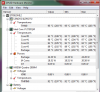
Not sure if I should repaste it myself, or let IBM take care of it for me (bought a 3yr TPP when I got the laptop). -
Fan worn out? The fan in my T61 broke down after 2.5 years. Now, another 2.5 years later, it's almost gone once again. I payed for a new one myself back then; I didn't want to send in the laptop.
If you can get IBM to do it for you free of charge: go for it. Otherwise I wouldn't hesistate to do it myself.
Another topic:
Received my W520 today. An almost new refurb with 1 cycle on the battery, lol. I don't know how it ended up with a Chinese-named seller in Germany, but it was refurbished in the US, has a US-Qwerty keyboard (oh yeah!) and came with a US powercord.
The HDD door wasn't closed the right way, but that was fixed quickly. I only need to buy another european power cord.
Does the W520 not come with three different trackpoint caps? It seems it's non-detachable??
One 'real' problem: I can't get my external microphone working. It's the headset of my S.E. Xperia X1 phone. (That is: 1 four-pole 3.5mm jack). Anyone an idea? For some it's great they switched to combo jack, but if it's not working with the same headsets that are used with phones... it's not great.
I have to say it's nice to use a new 7-row keyboard once again. The keys on my T61 have become shiny and smooth, especially the right half of the spacebar. The keys on my new W520 have a nice texture on them. The only downturn is the decreased space between the block of F-keys. I honestly believe the spacing on the T61 keyboards is better. The addition of a 'mute-microphone' button is great however.
The 'ditch' on the sides of the keyboard that mark the border between keyboard and speaker-area is less 'feelable' on the W520 compared to the T61. It was easier to blind find the Page-up on the T61.
The change of indicator lights also puzzles me. No Numlock indicator light? No battery light? On the other hand I think it's great they added indicator lights for 'sound muted' and 'microphone muted'.
EDIT: The HDD (Hitachi HTS727550A9E) seems to be 7200rpm, not 5400 as stated by the seller. It will become solely storage for big stuff when my Crucial m4 256GB mSata drive arrives.
-
I definitely don't hit those temperatures in Minecraft.
CPU maxes around 90, and GPU maxes around 75.
Are you running Optifine? -
Nope, not running Optifine, just a vanilla Minecraft 1.2.5.
I did do a lot of F@H a few months back nearly 24/7, maybe that might have affected the thermals inside the laptop? Running idle, I have CPU temps in the low 60C and GPU temps in the low 50C area. -
Go for it jarhead. I've been building mine the last dozen years or so. Every 3 years or so I tear it down, buy new components, sell the old stuff on eBay (continuously amazed with what I get for the stuff) buy the latest greatest, rebuild it. The last go round was motherboard (partial to Asus), processor, corsair psu,lian li case, nvidia video card, 32 gb ram, 600gb raptor, Samsung 830 256gb & a mushkin Chronos Deluxe 120 gb. I play with photoshop, coreldraw, graphics, etc so my current monitor is a NEC2090uxi and a cheaper Samsung monitor for toolbars, pallets, etc. I was able to build a very very quiet rig this go round. I don't do games so I don't go crazy with dual gpus or $5-600 cards. I think once you do it you will get hooked, so be forewarned.
The very first one I built I was ready to try it out, but waited until my wife went to work so she wouldn't have to listen to me cursing if it didn't work or caught fire. She left, I turned it on - nothing. Dang, sat there scratching my head for 5 minutes. Yea, I forgot to plug it in. Glad I waited until she left.
Anyway, do it, you will enjoy it. -
If you haven't cleaned out your laptop since you got it, it will be hot. I cleaned my laptop out in late April after about 1 year of ownership and the temperatures dropped by 15 C.
-
I was considering building my own desktop (recently considered a $400 or less build using an AM3+ board, 450 Rana to unlock to quad-core and OC, and stuff in a 7770 or something like that. Already have a 22" 1080p TV to hook up to, mouse, and I can get Win7 for cheap on campus. Maybe if I write a few more laptop reviews and save up I might, since I'd feel guilty for tapping into my college savings for a second computer.
I did forget about cleaning it out... Thanks. -
Can you share the cleaning instructions?
-
I'm curious about that too... Appart cleaning the fan, i don't know? There wouldn't be much dust in a year i think... What's normal temperature anyways? Mine is @~60C° when idle (which means many apps launched already... ~50 tabs (multiple browser), skype, steam, evernote... Then if launch a game, it will get to ~95C°.
Of course i'm talking about a modern game, if i play Counter Strike (first one) then temperatures doesn't change much... Even without all those apps i think it would reach ~95C°..? ANYWAYS i think it was reported already, function keys cause trouble while playing steam games, for example in CS/DOD pause/play music cause drop weapons... Any fix (appart changing keys!)?
PS1: I just checked notebookcheck review, they state 46.9C° for top and 43.7C° for back, fan area, well i guess they confused both cause bottom is much hotter... That's where i get ~48C°...
PS2: The board has changed, ok... Now, where the hell did the quick edit feature go?! -
I'm thinking of buying an mSATA SSD 256GB for my W520. Does it use SATA ll or SATA lll?
-
SATA 3Gbit/s.
-
60C would be normal for the application mix you described.
-
So it doesn't use 6Gbit/s. Why is it so popular?
-
The Crucial m4 is SATA 6 Gbit/s, but the mSata slot in the W520 (and W530 for that matter) are SATA 3 Gbit/s, so the whole combo is capped at SATA 3 Gbit/s
It really doesn't matter. Access time isn't capped and that is the biggest gain with an SSD. And real-life use of and SSD doesn't consist of 1 MB sequential reads. -
hi everyone,
I'm looking at a getting a W520 quad core with quadro 2000m. I heard that there were problems with throttling and not getting full power from laptop on battery. Can anyone help guide me as to what the situation is right now? Would be really appreciated.
I plan on using it for video editing (adobe premiere, after effects) and some gaming as well. What kind of issues can be expected? I may also do a diy egpu project later. -
The "throttling problem" got too much attention really, it was merely a default, and it was and is possible to control throttling precisely with a third-party utility (ThrottleStop) in single mouse click .
Default behavior seems to be have changed with the latest BIOS, but I personally still prefer ThrottleStop for more precise control. Battery life suffers w/o throttling quite a bit, of course. -
Sure, since ~50C° is what you get with NOTHING (almost) launched. Do you also go up to ~95C° when playing modern game (CSS or DOD:S for example, but get same for Max Payne 3, Skyrim, etc...)? I just downloaded ThrottleStop, how to use it with the W520? Other question: Is there a way to boot from the SD card? I can on other laptop (including older thinkpads), but not this one... Even using USB card reader. Very annoying since i have many SD Card and only very few usb flash drive!
-
Thanks for the response. I just want to make sure if its possible to get full power from this machine on battery till it runs out. Please let me know if that is viable.
Also, I also came across the w520 shutting down randomly thread here. W520 shuts off intermittently, no BSOD or shut dow... - Lenovo Community
I believe the issue is known as the SSS (Sudden Shutdown Syndrome). Since the community here seems to be more technically adept compared to the Lenovo forums, can anyone update me on that situation? I really cannot work on a system knowing that it could shut down at any time.
Thanks in advance.
<Editing again>
In the user comments for this review posted here: Lenovo ThinkPad W520 Review
A dude named Irfan claims this solves the problem:
The reason sudden shut downs happen :
I had the same problem, the tech support wanted to replace motherboard, so finally I had a technician come in and do that.
But hte problem persisted. I finally resolved the problem .. the issue is hte design of the RAM cover on the bottome of the laptop.
The cover has small perforations, dont know who thought up the stupid design. Electrostatic charge finds its way through the holes and zap the memory DIMM underneath causing a sudden reboot (or shutdown if no battery present).
I cut up a piece of anti-static material and stuck it on the interior of the cover. No problems since then. -
Yes, it is certainly possible and I use this most of the time with W520.
SSS has been semi-officially confirmed to happen to some users ( W520 shuts off intermittently, no BSOD or shut dow... - Page 127 - Lenovo Community ) and bending metal fingers on the DRAM door apparently fixes the issue. It could be environment/RAM amount/model related too, as I never had SSS with 4x8GB GSKILL sticks installed and the machine runs w/o reboots for weeks. -
You're setting fan to level 64 when gaming, right?
Lenovo W520 Owner's Thread
Discussion in 'Lenovo' started by zacharyp, Mar 31, 2011.


