 Problems? See this thread at archive.org.
AFAIK, LCD screens use sample and hold, so with a static page, there is no difference between 50Hz and 60Hz, or 1Hz and 1000Hz for that matter.
Anyways, check the power savings options of the Intel controls.
-
-
I think you don't understand how LCD's work. On a static image, like reading a text there is no such thing as refresh rate. The screen just stays on the same pixels. OK, it's 0 Hz, or infinite Hz, or I don't know, it's not 50 or 60. Even if the screen would only display 5 Hz, you would see the exact same image. There is absolutely no flickering or something.
If you see flickering, it's something else. Either the LED backlight, the cable or something is bad. When reading text, there should be absolutely no flickering. -
^^^ Basically, what he said. I'd also like to add that I've never had issues with flickering on video or tasks other than text viewing.
-
Thanks for the responses. I guess there is not much more to that. But I still am curious as to why it changes. I believe it also happens whenever I change the power profile.
-
Can you describe what do you mean by "changes"? For power profiles, the brightness values are linked to the profiles, so when you change a profile the brightness value is restored. But that's just the simple Fn + PgUp, Fn + PgDown effect nothing else. Have you tried setting your brightness with Fn + PgUp and PgDown?
-
Since yesterday that i've put it @60hz it didn't revert to 50hz. I didn't restart though, only slept... Resolution was changed also (games)... Feels the same!
-
Razorbak86 does you lg drive fit perfect or does it stick out a little? did you swap bezels? thank for your input.
-
It fits perfectly. Yes, I swapped bezels. See the link below for details.
http://forum.notebookreview.com/lenovo-ibm/566338-lenovo-w520-owners-thread-533.html#post8166213 -
Hey,
I did a bit of thread-searching and found some posts already concerning this.
I was shocked to find out, that the CPU in my W520 reaches up to 96°C, when the "Maximum Turbo" mode is turned on. To be honest, I did not expect this, as the program opened was SC2, which still runs fluid with the Turbo Mode turned off in the official Power Manager. The CPU load was low, as the task manager showed. So why is it overclocking all the time? (checked with CPUz)
It was mentioned to increase the fan speed with tpfancontrol to keep the temperature a bit lower, but as far as I know there are some random hibernating issues on the w520-machines... Is this still a problem?
Replacing the thermal paste was also one suggestion - does this brake the warranty? And, does it really help this much?
What got me to write this lines... playing Starcraft 2 I recognized some graphical errors in the last few games (not every time, in fact very rare): shadows and textures stretching and blinking all over the map. I know this behaviour from a broken graphics card I once bought many years ago, so I'm worried the high temperatures already damaged my laptop since they are both using the same heatpipe... Is there a way to check this?
My sys specs are nvidia quadro 2000m, the cpu is xm edition, i do not know the exact numbers for now and will add them later. -
Weird problem. Last night I was replacing a keyboard on my w520. I had screwed my old one up trying to get it out to put some additional memory in and remove what came with it. The keyboard was slightly out of spec and did not easily came out. I actually had to pry it while my wife gently lifted the corner so we could remove it. During the process we screwed up the back arrow button so Lenovo was kind enough to replace it.
Anyway, while doing that I had an Intel N6300 NIC that I was going to put in it as I already had that when I ordered my w520 so when ordering I just got the cheapest one they had. So I installed the N6300 (633ANH) with three antennae and used the colored wires as per Lenovo's hardware maintenance manual. After finishing I booted up and got an error message - NIC card is not permissible, please replace the NIC that is allowed and reboot. That is not the direct error message word for word, wish I would have written it down. I tried to go into the bios to see what was going on by pressing the blue thinkvantage button while booting but I was not allowed in the bios and I've been in there many times before.
Any ideas?
David -
Wireless cards have an infamous problem with compatibility (or lack thereof) with BIOS whitelists. Even though the 6300 can be sold with the W530, getting a non-Lenovo 6300 probably wouldn't work. Same problem for just about every laptop out there.
-
As stated above, it's the BIOS whitelist. An "Intel Advanced-N 6300" is not an "Intel Advanced-N 6300" as exactly expected by the BIOS according to the device IDs included in the whitelist. A device purchased on the market may not match the one (with same name) of a certain revision and/or meant for a particular market, chosen by the computer manufacturer.
-
My CPU idles in the low 60s (Fan Speed 1 on tpfancontrol, TPFC.73ti), and sometimes goes as high as 90-95 C in 3D games before TPFC switches to Fan Speed 64. It typically runs in the high 70s to low 80s during gaming sessions at 1280 x 720 resolution with graphical settings on High, which generally provides the best average frame rate in my gaming benchmarks. I have seen these temperatures right out of the box, before I re-pasted with Arctic Silver 5, and immediately afterwards. Re-pasting made no noticeable difference.
I play the following games on my Steam account: Assassin's Creed II, Batman: Arkham Asylum, Call of Duty: Modern Warfare 2, Darksiders, Driver: San Francisco, FlatOut: Ultimate Carnage, FUEL, Grand Theft Auto IV, Hard Reset, Just Cause 2, L.A. Noire, Mafia II, Metro 2033, Microsoft Flight, Red Faction: Guerrilla, and many more. I often have to adjust my graphical settings down just to manage heat on the laptop.
Unfortunately, these CPUs just run hot in the W520 because of the limitations of the single heat-pipe and fan.
For the record, my standard configuration has Optimus turned OFF and the 2000M turned ON in BIOS settings, and I am running the consumer version of NVIDIA's WHQL drivers (301.42) with all power settings on Maximum Performance. -
Check the lenovo forum (W section) it seems everyone's having different results in temperatures... I also reach ~95C° while gaming in turbo max mode. Turbo's same. Medium (equilibrate gives a ~7C° drop, and low mode is not for games or other heavy usage!
-
Hey, thanks for your answers!
So, to sum it up, this is normal or at least wide spread behaviour. I tested it again in Max. Turbo mode, and after about one hour of gaming (Starcraft 2, 1920*1200) the cores had an average temperature of 92°C, max 94°C with the fan speed maxed out in the power manager. The Quadro 2000m reached 83°C maximum. But, just if someone would like to know, gaming is still fluid with CPU set 'Medium' (German 'Ausgeglichen', turbo mode off) in the exact same game settings. Btw, I'm using the 2920xm.
Is tpfancontrol able to boost the fan even above the "lenovo turbo boost+"-mode? Is this a health risk for the fan? I wasn't able to find a new version of tpfancontrol, so im guessing the hibernation problem in battery mode is still an issue? But, on the other hand, you can turn it off anytime, even if this would be the main application to use it - the battery saving option keeps the temperatures low anyway. -
Yes, those temps are normal. I typically see 95 deg C when playing Minecraft and around 90 when I run benchmarks.
-
I have some "smudges" on my screen, WP 20120816 090245Z - YouTube (There are 2, but they are hard to see, I dont have anything but my phone to film it with) is there any way that it can be covered by onsite warrenty? It dont look like dead pixels and I have no idea if its pressure damages
-
If you wonder it's pressure damage, it means someday you applied pressure on it..?
-
Hey guys, I've been looking around SSD-wise, and would buy something next week as the prices really came down...
I've limited myself down to a 3-tier choice,
1. Intel 520 180GB (what about the Intel 510 warm boot delay problem?)
2. Samsung 830 256GB
3. Corsair Force GS 180GB
What kind of track records do these have in W520 machines? Which one is a solid buy?
Second question is related to the drive height, is 7 mm going to be a problem?
Third and last question: If I put the SSD in the Ultrabay (I bought an adapter from Nimitz/eBay) is it going to be as fast/stable etc as in the main drive compartment, or should I put my HDD in the ultrabay, and if I do, will the shock sensor and the airbag software work there as well? And will the software overlook shock detection on the SSD?
Sorry about all these questions, and they might have already been answered, but I don't have the time at my hands right now to go through hundreds of pages.
Thank you -
This.
7mm is good. (The UltraBay caddy adapter can take any drive height.)
SATA 6 Gbit/s. Stable. Even bootable.
The best "airbag" (and whatever mumbo jumbo about "drive protection") is backup. You do backups religiously, don't you? -
Hi there, yes SSDs have certainly gone down in price real quickly.
I have been running the Intel 520 (240Gb) for about 3 months now in my W520 without any issues. I would strongly recommend this model, though the Samsung 830 is great as well I'm sure. I haven't experienced any warm boot delay issues with this model.
My W520 came with a 9.5mm drive caddy. I believe that some models come by default with the 7mm caddy, so you'll have to remove the spacer if that's the case with your laptop. I do believe that most Thinkpads of this generation come with the 9.5 however.
Is there any reason why you would like to run your main (OS) drive from the Ultrabay? While both the Ultrabay and the main HDD bay are SATA III and theoretically should work exactly the same, the main bay is much more insulated against physical shock than the Ultrabay. The Ultrabay in the W520 is also 12.5mm, while the SSD would be 9.5mm, which would leave a big space in the bay. I much prefer the main OS drive to be more insulated against shocks.
As for the shock detection, I believe it works off an accelerometer located on the mainboard, so it should work on drives in both the main bay and the Ultrabay. You can manually configure it to ignore the SSD. In my case, I have both an SSD (main bay) and a 1TB HDD (Ultrabay), and I chose to simply not install the Active Protection software (since all I have on the HDD is data, and the SSD would not benefit from the airbag software at all).
Good luck with your SSD purchase, I'm sure you'll love the massive injection in speed and responsiveness! -
Most of the current-generation ThinkPads come with 7mm-height drives. To be absolutely sure, you must inspect the primary bay before purchasing a replacement drive.
It's not like the drive is floating and banging around in that empty space! It's tightly secure in the UltraBay caddy. -
Kaso and Mocha, thank you for your replies!
I wanted to buy an msata ssd at first, but I figured that I really dont use the disc drive that often, so now I built it into a little external housing.
I was really blown away by the speed of the SATA3 drives so I dont want to be limited by the SATA2 mpcie port.
The main thought behind putting the ssd in the ultrabay is that it can take the beating more than the hdd, and the hdd feels more secure in the main bay.
Also any hdd in the ultrabay causes some vibrations, certainly not too bad but noticable.
Unfortunately the caddy that I got does not have screw holes on the bottom, instead the drive is held in place with a relatively flimsy mechanism. Should I get the official Ultrabay adapter? It's pretty expensive where I live (about 90-100 USD). Guess it's worth it if it rectifies the problem of a possible data loss?
And Kaso, I do backups from time to time although I should do it a bit more often.
The Samsung 830 256 GB is currently at the same price as an Intel 520 180GB so I'll get the Sammy, I guess the extra gigabytes are worth more than the extra years of warranty. 3 years (vs 5 on Intel's part) should be more than enough for a storage device. Or...? -
The Samsung 830 is also doing very well in this thread chronicling SSD write endurance. So far, it's remained fine through 3.5 petabytes of written data.
-
It's not "flimsy": if you know how to use the two screws on each side and the snap-down plastic mechanism at the opposite end of the SATA connector, the drive is held securely in the caddy. If you want an alternative that provides 4 screw holes on the bottom, consider this one by Newmodeus. It's less expensive than the Lenovo part, and is well-constructed and also lighter than the one you have now. (It even has an activity LED.)
(I have the "flimsy" adapter in the ThinkPad that I'm using now and travel with many times a week. Also, I have the boot SSD in the UltraBay because I have more than one, each configured for a separate client project.) -
All right, I guess I'm a bit conservative with mounting mechanisms
(Yes I am aware of how it works)
I have a "last" question, and its also regarding memory. I'd like to buy the Corsair Vengeance 2x4GB 1600 Mhz SODIMM Kit.
Is it going to be OK with the W520? I think I've read somewhere that Lenovo had problems in the past with Corsair DIMMs. (if I remember correctly)
Thanks :thumbsup: -
It is debatable whether Sandy Bridge CPU can take full advantage of 1600MHz RAM. Even if it can (unofficially), it is debatable whether the faster speed will make your lunch, especially when you have paid big bucks for the NVIDIA card with its own fast memory.
I would buy 1330MHz RAM, like this pair. Works good, less expensive. -
Shouldn't be any problem, but as Kaso said, you wouldn't really benefit from 1600MHz RAM. That's mostly for improving iGPU graphics, though you have the 2000M as well, making that a moot point.
-
Does anyone here have any experience with the Sony notebook-slot Bluray writer?
Newegg.com - Sony Optiarc Black 6X BD-R 2X BD-RE 8X DVD+R 5X DVD-RAM 6X BD-ROM 5.8MB Cache SATA 12.7mm Slot Blu-ray Writer BD-5850H-01
I am considering getting one to replace the optical drive that came with my W520.
Any recommendations for or against?
Thanks. -
From BIOS 1.36 onward, RAM is throttled to 1333Mhz for the W520.
-
Thanks for all the input, by the time you've replied I've decided to order it anyway, so there's that. Worst case scenario is, I'll have two good looking DIMMs in there
I am aware of the 1333 Mhz cap from 1.37 so I remained at 1.36.
Or do you mean 1.36 is already capped? Isn't there a petition out there to reinstate 1600 Mhz "support"? -
check this
-
Thanks, looks like swapping the bezel is necessary.
-
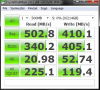
numbers from the ultrabay
-
I'm planning to buy the 256GB mSATA Crucial M4 for my W520. I've a 256GB Corsair Performance Pro SSD in the primary bay and 1TB HDD in the ultrabay.
Can the mSATA be my window boot up drive? What else do I've to know? -
Sure, you can set the mSATA up as a boot drive if you like. It's basically just preference at that point.
-
Thanks privatejarhead, is there any instruction on this forum on how to set up msata and install windows 7?
-
UJ-240, much cheaper
a guide for replacement
Primitive But Effective: Lenovo W520 and a Replacement Blu-Ray Drive -
Just plug it in the port and install Windows as you would with a normal disk...
-
^^^ ... and then set the boot order in BIOS to have mSATA SSD at the top of the list.
-
I have the "ThinkPad Serial ATA Hard Drive Bay Adapter III" and would like to put the DVD-Rom into an external case to use it as an external SATA DVD drive. Does Lenovo or anyone make a case for the Adapter so it can be used as an external drive? And also protected, of course!
-
Consider this one or this one, or something similar. This slimline SATA-USB cable comes with a handy pouch -- recommended.
-
Thanks for the links. I don't really need it to go to USB, since my W520 has an eSATA-p port. Are there any protective cases that have eSATA-p connections?
Sorry, I see now that the company from the first link also makes an eSATAp adapter. Never mind! -
Hey,
at the moment, I'm getting more and more of the graphic bugs. Here is a picture of how it looks:
ImageShack® - Online Photo and Video Hosting
Is this a problem caused by faulty drivers? I once had a similar looking problem with a brand new desktop graphics card, resulting in a exchanged card.
Do you use the offical Lenovo drivers or newer ones supplied by Nvidia?
Cheers -
Please post a link to the picture and not to a page full of ads...;
http://desmond.imageshack.us/Himg17/scaled.php?server=17&filename=sc2issue.png&res=landing -
Is there any Portable hard drive in the market that has eSATA port that I can use with my W520?
-
Seagate has an GoFlex series which allows the user to swap the interface.
-
Got a W520 with i7 processor, FHD screen, 2000M and 500GB harddisk. For some reason, the power usage is crazy. The 9cell battery can barely last three hours. When plugged in, the power usage is 41w just running a browser (plus anti-virus etc...) with level 10 brightness. When on battery, the power usage is above 30w. The weird thing is when I unplug the machine, the power usage drops to 10w and then jumps right back. CPU usage seems to be minimum although the machine is somewhat warm (34C for battery, vent feels warm).
Anybody else have this problem? -
Maybe Optimus is disabled and you're running only on the 2000M? I can last about 4 hours that way and 10 brightness.
-
Sounds like your BIOS, Windows Control Panel Power settings, or Lenovo Power Manager profile settings are cranked to high levels. Or, it could be a rogue process. The process can be identified easily with resmon.
Lenovo W520 Owner's Thread
Discussion in 'Lenovo' started by zacharyp, Mar 31, 2011.


