 Problems? See this thread at archive.org.
Sorry for the late reply. I think screenshots tell a thousand words:
![[IMG]](images/storyImages/ZOwel.png)
![[IMG]](images/storyImages/5ZEX5.png)
-
There is some windows functionality to find out what device didn't allow the sleep. Maybe it's even in the Event Log. Try googleing around that, or wait for some power management expert.
-
So its better to use the Nvidia base driver then Lenovo's one?
-
I'm using the nVidia driver since first install, never had any problems with it. For every upgrade I install a new one with advanced / "clean install" option and it takes care of all the options being properly reset.
-
nVidia just updates their drivers more often...
-
The event log does not clearly show a culprit. I see many VMWare entries before the crash, that might be it... Or not, i wasn't even running it... The search i made on google didn't point of someting reliable.
-
I'm having some problems with my battery. It's just over a year old now and Power Manager is telling me it's at 80% of it's original capacity (9 cell), however my battery life is no where near the ~10 hours I used to get (light browsing, low brightness) and is now around 3 hours. This jump happened very suddenly, about a month ago I was comfortably getting ~6 hours of light usage.
I've checked the optimus settings, and all seems fine. I've just performed a battery reset, waiting to see if it improves anything.
Any suggestions as to what could be causing this?
EDIT: Battery life is now reading worse after the reset, 2 hours at 60% brightness while idle... -
I had bad experience with nVidia drivers and Optimus, apparently failing to switch discrete off or smth. Restoring the original Lenovo drivers helped the issue.
-
My battery life is even worse. I bought the bigger battery which at first lasted 6 or more hours. Now I'm lucky to get 2 hours, and it's been less than a year.
Where are the Lenovo drivers for the video card? -
Hi!
Apparently some of my friends have pour some 2 liters (not really) of coke to my Lenovo.
Only parts affected were the mouse buttons. They all got somehow sticky.
Today I had this FixIt-feeling, and i went exploring how to disassemble those buttons. It seemed to be pretty easy, at first. All four came out REALLY easily, but... When it was TrackPoint middle buttons turn, it didn't come off that easy.
End of the story is, that I just broke the crane mechanism of my trackpoint middle button, and it cannot be assembled again.
Now I'm asking for your help. If anyone of you have one useless W520 compatible keyboard lying around, and are able and willing to send me only the middle mouse button, I would be happy to buy it!
Also, if you know someone online that would send me just that button, i would be happy to hear it too. I checked on eBay all ready, and I couldn't find anyone selling single keys or buttons.
I of course found some whole keyboards, and that would come pretty expensive.
My two cents for anyone disassembling the mouse buttons: all four main buttons go off lifting from down side. Only exception is the middle button. It comes off lifting from up side. I would also recommend taking the main buttons out first, and after that heading for the middle one. -
What is the best BIOS version for W520 ?
-
Thanks very much!
-
Sorry to bother but the computer keeps crashing @sleep randomly... I cannot see what's making it, and it's not VMWare as said earlier, i need your help, people!
-
Just after pressing the buttons to shutdown, or even some other times, i see the thinklight turned off notification on screen... I never turn it on so i have no idea how this thing started to act so...
-
Does anyone know whether the DVD/Caddy port on the w520 is SATA3?
-
Yes it is.
-
Do you think it will take a long time before we see the Update center for windows 8? Also I hope the dolby digital drivers are soon hacked so they work with W520 on Windows 8
-
Anyone migrated to Windows 8?
-
Nope. I think that a tablet OS doesn't belong on a workstation

-
I have a Windows Phone, so I am somewhat accustomed to the Metro UI...
But I also don't think a Mobile/Tablet OS have any place on a desktop either at least not until the majority of PC screens become touch-screen capable. -
Likewise (Nokia Lumia 900). Love it on the smaller form factor, but I'd prefer the Start Menu and taksbar over Metro UI on anything bigger than a tablet. Besides, a touch-screen laptops is weird imo.
-
After I updated the lastest graphic card driver for my W520 (Quadro 1000M), when I was playing PES 2013, Bluescreen error occured. Then I could not started my laptop with optimus or discrete graphic, I had to select intergrated card. I uninstalled the driver and reinstalled old driver so everything was OK. What's wrong with the lastest driver of Nvidia ?
-
My W520 crashed again after going to sleep!! DAmn annoying issue i can't figure out why it happens..
-
Unless you want to run Hyper-V.
-
Hope we soon get Update software for Windows 8, also as some said if you want to develop for Windows 8 / WP8 then you have to have Windows 8, and tbh I like the new start menu more than the old, try to imbrace it instead of just saying "I want my old looks now!" its so much faster to open software this way if you pin the software you need on your start screen.
-
In power manager, i set screen to NEVER SLEEP when on AC adapter, however it's always coming back to 20minutes (default setting?) after a while... So annoying! I'm using last version i think. What can i do to fix this?
-
1. Uninstall Power Manager
2. Install BatteryCare -
Hey guys,
Just out of curiousity, is there any way to change the boot screen/logo?
I believe it was possible on older systems (eg T60) -
Hey guys,
So far most of the problems/kinks have been resolved due to the great support and guidance from forum members, but there was one issue that i kept ignoring till now that it has actually started to annoy me. Often when I boot up the laptop, a BSOD flashes for less than a second and it reboots itself and then I see the screen where I must choose to repair windows or boot normally. I keep selecting boot to windows and after a few more similar annoying reboots, it finally boots to windows.
This happens some times but not all the times.
Any ideas why this might be happening?
I have win7 64 bit, uninstalled Power Manager and use battery care as suggested by zsero, and am on BIOS 1.34. can provide more info if needed.
Thanks in advance. -
prosetheus,
Do you have it often? Maybe try the latest BIOS.
If that does not work, try to capture the boot on video, that way we could figure out whats causing it! Why the video suggestion? You can't take a photo of anything that flashes up for a split second right? On the video, you could export the individual frame with the BSOD on it out of the... say 30 per second.
I don't think anyone could give you in-depth advice without some additional info. What is your configuration? -
Great suggestion thacount.
And I had success in replicating the problem the very first time I booted up today. I am really sorry for low quality video but I was in a hurry and my cell phone is pretty old, lighting was also bad. I uploaded on vimeo in the hope that it would be better than youtube.
here is the link. The video is long because it happened quite a few times and unedited because I wanted the phenomena to be observable as it occurs.
https://vimeo.com/53956122
the specs are:
2820qm,
8gb ram,
q2000m,
win 7 64 bit.
Hope I can get some answers. Its getting really annoying. -
Is there any "easy" way to get the minijack plug seperated? I broke the tip of my headphone jack in it (Just the outer tip)
-
Looking at the video, one thing that popped into my mind - if I remember correctly, there was an issue with the BIOS set to UEFI and using the fingerprint reader.
Per my last reply, please do the BIOS update and set defaults. You could try disabling the fp reader and set the boot to legacy only. Also check if it happens on BIOS GPU value set to integrated, discrete, or optimus. -
Last week I received Samsung 840 Pro SSD. I replace the old HD with new SSD on my W520. I install Windows 8 on it, but seems like my BIOS is not set to UEFI. I see ThinkPad logo when I boot. Is it possible to turn on UEFI without re-installing windows 8?
-
Slightly OFF Topic:
Looking for an advanced user to do a DIY for dummies upgrade/review/thread on a W520 for our new 256GB mSATA SSD that is coming in the mail on Monday. We have not even named it yet but it is going to be the lowest cost 256GB Solution to date with the quality and reliability of MyDigitalSSD product. Just PM me if you are interested and please include an overview of how you will go about doing the review. The person I chose will get a free 256GB mSATA
MyDigitalSSD -
Anybody please Far Cry 3 here?
-
Thacount,
I fiddled around in the BIOS and nothing seems to have changed, and that includes the setting bios to legacy instead of UEFI, the fingerprint scanner settings and setting the harddisk to be the primary boot device. Nothing worked. Just today, the laptop went through about 8 or 9 reboot cycles before letting me boot to windows.
I have decided to go with a bios update. I have never done something like this before and would really appreciate the most idiot proof instructions if possible. I know that a bootable cd is the way to go. What else is there to know? Should I also first set the bios to default (as I have also set the HDD to primary boot device?
Any and all assistance would be highly appreciated.
EDIT:
<Below issue is ON ANOTHER LAPTOP, NOT THE W520>
I have another problem with which I could really use some help with. In the process of transferring data to and from harddisks, I tried to make an image of my 320gb hard disk onto a 250 gb harddisk. In that process I used a plethora of tools (gparted, random disk management and partition tools) and the end result was failure.
However, it has become impossible to install windows onto that harddisk and I need to use that in my other laptop.
On trying to boot with USB bootable win 7, I get hit with this:
![[IMG]](images/storyImages/2lntjlw.jpg)
OTOH, I did manage to install Linux Mint on it. But even after that, windows installation remains impossible. Help with this issue would also be highly appreciated. -
Hi prosetheus,
Are you willing to reinstall the laptop from scratch and clean the hard-drive? First you should back up all your data. Don't use any data-recovery or similar tools, just put the hard-drive in an other computer and copy the important folders with Total Commander for example.
Here is what you need to do:
1. Create the latest BIOS update CD in any computer
2. Boot the W520 and go to BIOS
3. Load defaults, save
4. Boot from the CD, flash the BIOS (it's just 1 click, don't be afraid of it)
5. After the flash finished, go to BIOS and load defaults again. Save BIOS. No point using UEFI, just use the defaults.
6. Now you need to clean the hard-drive. It means removing all partitions and everything. You can do this with a live USB or live CD of Parted Magic. Do this in Parted Magic:
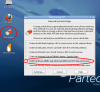
7. After this, just boot the Windows 7 installer and install Windows 7 as usual, to 2 partitions. -
My method of totally 'cleaning' a hard drive is to zero it by using DBAN or Killdisk and then install a fresh Windows or Linux OS. If you have the time read the product overview for killdisk as it seems to offer a very good explanation between formatting and zeroing. It is a couple of webpages so make sure you advance to the next page after reading the first one. Good luck
-
Man, that's what I call overkill. Just boot Parted Magic and clean the MBR / Partition table. Two clicks.
-
I consider it good practice
-
What, using government security erasing techniques running for hours and hours to simple clean a windows install?
-
I used to zero out drives before, but now that I'm SSD-only on my laptop, I'd rather save my write cycles
-
You have a choices in how many passes to use. I am merely offering an alternative to formatting. You do not have to use it if you do not want to. It is always good to have some alternatives. There might be others who are reading this thread that do not know a more secure way of erasing the contents of their platter drive. A simple format would not ensure complete deletion of all files. In OP's case ultimately he or she can decide what they want.
-
Have a separate thread for that specific subject.
Do you zero every file you delete? Do you encrypt every file in use? -
To make a long story short it zeroes out the entire hard drive and you are able to choose how many passes are used in the process. This is good for extra security if you have patience (can last an hour to a couple depending on level of passes chosen). For a quick format use a format method. If one would like a more secure disposal of data then this would be one of the better alternatives apart from physically destroying a platter drive. Only my two cents
-
Windows installation and use do not depend on zeroing out the entire drive. Not that Windows would trip on some dirty bit or something.
-
This is what I'm going to recommend from now on to people trying to do a Windows reinstall...
Lenovo W520 Owner's Thread
Discussion in 'Lenovo' started by zacharyp, Mar 31, 2011.


