Problems? See this thread at archive.org.
Done. Will flash and run benchmarks tonight. Thanks!
-
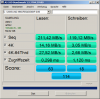
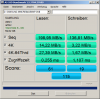
I just flashed the modded BIOS onto my Thinkpad T61 w/Windows 7 x64, and the modded BIOS seems to work! Here are the results:
*I have the 40GB version of the X-25M G2, so the sequential write speeds are capped at around 40 MB/s.
System Info:
2.4 GHz Core 2 Duo T8300, 4 GB DDR2, 40GB Intel X-25M G2 (Main bay), 640GB Samsung 5400RPM HDD (Ultrabay).
Drive Info:
![[IMG]](images/storyImages/Drive_Info.png)
Before flash:
![[IMG]](images/storyImages/Before_Flash.png)
After flash:
![[IMG]](images/storyImages/After_Flash.png)
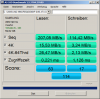
The performance of the Samsung hard drive in the Ultrabay seems to be unaffected:
![[IMG]](images/storyImages/HDD_AfterFLash.png)
The most interesting part is that the 4k read/write speeds seem to have increased as well. 4k random read/write performance is arguably the most important classifier of SSD performance. -
Use CrystadiskMark 3.0 for comparative benchmarking between sata-I and sata-II SSD performance. It has a 4KB-QD=32 simulating the multithreaded read/writes that occur during OS bootup. Enable AHCI to provide NCQ.
-
Your AS SSD numbers show a very impressive improvement! Middleton's BIOS patch suddenly made it interesting to buy a Micron C300 or a SandForce based SSD for use in a T61 (before the patch, the Intel G2 seemed to be the best choice).
When I get the time later in the week I will do a clean reinstall of Windows 7 on my T61p and install PCMark and Passmark.
I will then do a backup image of the system and do a secure erase of the SSD. Then I will restore the image and run the tests. After the tests are completed I will reflash with the standard BIOS and do a new secure erase. Then I will restore the image and run the tests again.
Thereby the two obtained test sets will be fully comparable against each other. -
I made several other tests like standby, hibernation, dock in & out there couldn't be found any problems. Seems to be ok to publish it...
-
Dear middleton
I can't use a PM. I sent you email thorugh list.ru . Would you check your email and send me a reply email? -
Wow, just found that thread and I'm impressed! I was already thinking about buying a new laptop supporting 3GBs SATA but if this is really working I would love to keep my T61 and X61!
Btw: Middleton if you need some more tests (T61 and X61) just let me know. You can download my vcard here in the forum from my user profile where my email address is available.
The bootable CD Iso-Image you have sent to XStoneX, is that the offical one from Lenovo?
THANKS! -
having searched for several years. It is happy that we got the solution.
Does anyone test the bios with x61?
because i am planning to buy a ssd for my x61 later -
Hello middleton,
I´m also a T61 owner (Model 7663-15G). I use Ultrabay HDD module, DVD-RW Drive and the Mini Dock.
I would also volunteer for testing and would post my Postville Benchmark results here.
PM does not work with my account here but maybe you can PM me?
Regards,
feuergrau -
It's the official CD-image from lenovo's site. I just replaced the BIOS file by the patched one.
The patch for X61 is being tested right now by one X61 owner. Guys please wait a little. I'll place here links to the modified BIOS-es very soon. You waited for years. I just ask you to wait one more day .
.
-
middleton - very impressive! as long as we don't see a string of bricked systems then you've done a great service here.
-
sounds good
one more question
do these bios include whitelist and " slic2.1" <-- i donno this keyword can be discussed or not
Thanks
-
It's very very hard question. Please understand me correctly: some people want white list and CTRL-FN swap, some want SATA II 3.0 without CTRL-FN swap, some want just SLIC 2.1 etc. I can't produce separate BIOS versions for each ThinkPad owner.
But if SATA II patch proves its reliability I'll combine white list, SLIC 2.1, SATA II 3.0 in one BIOS. And the only option will be CTRL-FN swap. -
Sounds phantastic! Happy to wait!
THANKS A LOT! -
By the way, the guy who wanted to test X61 BIOS just wrote me that he'll do it only tomorrow. Is there any X61 owner who wants to check the patch right now? Email for requests: [email protected]
-
Request send!
-
One tester is enough. To other X61 owners: Please don't send requests anymore.
-
Update on my X61 is done without any problems.
Intel shows me the harddrive connected via SATA II with 300MB/s.
Benchmarks will follow soon in about two hours!
Thanks a lot to middleton for this incredible work! -
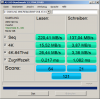
Ok, here we go with the benchmarks:
I done the benchmarks with AS SSD benchmark and different benchmarks for c: and d: partition and both once with the Intel Iastor driver and once with standard Microsoft MSAHCI driver.
The laptop I'm testing with is a X61 with Intel T7300, 2GB RAM and Win7 32bit. The harddrive is a Samsung MMCRE64G5MXP 64 GB.
Best regards
hisdudenessAttached Files:
-
-
Your benchmarks prove sata-II is active on the X61 via the patched bios since your sequential reads are > 130MB/s. It would help also to have back-to-back sata-I versus sata-II benchmarks on the same SSD to see what performance gains are had by the SATA-II bios.
-
I agree but unfortunately I patched the BIOS before I had a chance to benchmark with my SSD and the old settings.
But what I remember is that read speed was around 129MBs while write was something around 80MBs.
What confuses me are the huge differences between XstoneX tests and mine.
But I will dig further tomorrow. So far you all can see that the BIOS update is working also on the X61.
Best regards
hisdudeness -
Your benchmark result is normal. The Intel G2 is much faster in most chases. Here are the benchmark results from the most actual SSDs:
Alex Intelligent Software - Artikel: Typische AS SSD Ergebnisse
Your SSD got 133 AS-SSD Points from another user. So your results are okay!
Greetz,
XStoneX -
Would you need one more T61 tester? If so, I'm willing to put my T61 on the chopping block for testing purposes...
My T61's has the standard T7300 CPU, but I have 8GB of RAM, dual SSD's (one 60GB SSD in the HDD tray and one 64GB SSD in a SATA Ultrabay adapter), and an upgraded 1440x900 LCD screen. I also have access to a Lenovo docking base for testing purposes too.
One thing I'd like to see tested besides just raw speed is file integrity tests. I use this machine for audio recording, so I can create some large data files with it to make absolutely sure that removing the 1.5GB cap doesn't corrupt files.
I do have one question regarding this BIOS though. Is it based on the 2.26 or the latest 2.27 BIOS that was just released? -
The links to the patched T61/X61 BiOS-es will be available here tomorrow. All the patches are based on the latest official BIOS-es from lenovo.FFTMA likes this.
-
Ultimate R61/T61/X61/X300 BIOS (inc SATA-II)
DISCLAIMER: Use these modified bios at your own risk!!
These modified bios have been beta tested to confirm they do not brick the system after flash. However data integrity tests take time and it's up to the user to confirm there is no data loss due to the increased SATA-II interface speed. You will be solely responsible for any damage to your computer system or loss of data that results from flashing or using of the patched BIOS.
Lenovo have never tested or approved these patched bios and doesn't support them. They are provided "as is" without any warranties from Lenovo. These bios-es are completely unofficial releases.
Note: CTRL-FN swap is optional. Each BIOS package contains two versions of the patch. You can select the version without CTRL-FN swap.
ThinkPad model : machine type
modified
BIOS file
SATA-II
3 Gb/s
SLIC
2.1
whitelist
removed
Thermal
sensing
CTRL-FN
swap
Dual-IDA
support
X61, X61s 2.22-1.03 + + + n/a + + X61/X61s SXGA+ 2.22-1.03 + + + n/a + + X61 Tablet 1.25-1.02 + + + n/a + + X300 1.10-1.01 + + + n/a + + T61, T61p
R61 (14.1" widescreen with IEEE 1394): 7732, 7733, 7734, 7735, 7738, 7742, 7744, 7751, 7753, 7754, 7755
R61i (14.1" widescreen with IEEE 1394): 7732, 77422.29-1.08 + + + + + + R61 (15" normal screen): 8942, 8943, 8944, 8945, 8947, 8948, 8949
R61i (15" normal screen): 89431.24-1.00 + + + n/a + + R61e
R61i (15.4" widescreen without IEEE 1394): 76502.23-1.08 + + + + + + R61 (15.4" widescreen): 8930, 8932, 8933, 8934, 8935, 8936, 8937
R61i (15.4" widescreen with IEEE 1394): 89322.24-1.08 + + + + + + R61 (14.1" widescreen without IEEE 1394): 7732, 7733, 7734, 7735, 7736, 7737, 7738
R61 (15.4" widescreen): 8914, 8918, 8919, 8920, 8927, 8928, 8929
R61i (15.4" widescreen): 89182.29-1.08 + + + + + +
Acknowledgments:
nando4 for providing all needed information on SATA-II mod. I knew nothing about this issue in 2010 and didn't plan to make any ThinkPad BIOS mods (except for CTRL-FN swap). It was him who convinced me to solve SATA-II problem. Also he literally forced me to add dual-IDA support (he knows what I'm talking about).
andyp for his BIOS modding tools and other guys from forums.mydigitallife.info for making SLIC 2.1 integration possible.
Zender for finding the way of disabling wireless whitelist on ThinkPads. This significantly accelerated the work on the patch (otherwise I would have had to do it myself and it would have taken additional time).
Leokim for X61/X61s SXGA+ BIOS.
XStoneX for informing me about "Thermal Sensing Error".
unclewebb for the ThrottleStop utility which makes dual-IDA possible and kizwan for the "EIST Unlocked Example" guide.
Brave ThinkPad owners for readiness to test intermediate BIOS versions.Last edited by a moderator: May 7, 2015User32 likes this. -
in the readme file:
1. Run flash.bat (included in this BIOS update) as administrator, you'll see "Updating BIOS. Please wait..." message.
where is the flash.bat?
i search the whole folder and no this executable file@@ -
Sorry, I forgot to include flash.bat in X61/X61s archive. It's fixed now. Try to download again.
-
middleton: sent you a PM are you able to get those or does email work better?
sadaoakatsuka likes this. -
I read your PMs but had no time to reply. And yes, email would be better for me than forum PMs. Repeat your PM by email please.
-
Hey middleton, will the X61/X61s modified BIOS work for X61 tablet as well? Thanks for your hard work!
-
OK, here's the results of some early tests I did.
Hardware: T61, T7300CPU, 8GB DDR2 RAM, 60GB OCZ Solid2 SSD (main boot drive - firmware 1.5), 64GB Kingston SSDNow (in ultrabay, but not tested), 1440x900 LCD, Vista x64 Professional.
Going to the 2.27 patched bios didn't affect the screen being detected correctly. It didn't neuter my 8GB of RAM either.
Here's the benchmark tests in text format. There's an enormous increase in sequential read/write speed now. Vista definitely booted a few seconds faster after doing the BIOS update. Unfortunately I didn't use a stopwatch, but running the numbers below it's undeniable that it's loading data from the SSD faster now. Random 512k reads got a nice shot in the arm too.
with 2.26 unpatched BIOS
-----------------------------------------------------------------------
CrystalDiskMark 3.0 x64 (C) 2007-2010 hiyohiyo
Crystal Dew World : Crystal Dew World
-----------------------------------------------------------------------
* MB/s = 1,000,000 byte/s [SATA/300 = 300,000,000 byte/s]
Sequential Read : 132.196 MB/s
Sequential Write : 107.140 MB/s
Random Read 512KB : 114.941 MB/s
Random Write 512KB : 40.069 MB/s
Random Read 4KB (QD=1) : 16.701 MB/s [ 4077.4 IOPS]
Random Write 4KB (QD=1) : 5.717 MB/s [ 1395.7 IOPS]
Random Read 4KB (QD=32) : 67.191 MB/s [ 16404.0 IOPS]
Random Write 4KB (QD=32) : 4.910 MB/s [ 1198.7 IOPS]
Test : 1000 MB [C: 71.6% (42.7/59.6 GB)] (x5)
Date : 2010/07/22 23:23:29
OS : Windows Vista Business Edition SP2 [6.0 Build 6002] (x64)
with 2.27 patched BIOS
-----------------------------------------------------------------------
CrystalDiskMark 3.0 x64 (C) 2007-2010 hiyohiyo
Crystal Dew World : Crystal Dew World
-----------------------------------------------------------------------
* MB/s = 1,000,000 byte/s [SATA/300 = 300,000,000 byte/s]
Sequential Read : 196.842 MB/s
Sequential Write : 106.368 MB/s
Random Read 512KB : 155.151 MB/s
Random Write 512KB : 52.319 MB/s
Random Read 4KB (QD=1) : 15.889 MB/s [ 3879.1 IOPS]
Random Write 4KB (QD=1) : 5.260 MB/s [ 1284.2 IOPS]
Random Read 4KB (QD=32) : 69.936 MB/s [ 17074.2 IOPS]
Random Write 4KB (QD=32) : 4.813 MB/s [ 1175.2 IOPS]
Test : 1000 MB [C: 71.4% (42.6/59.6 GB)] (x5)
Date : 2010/07/22 23:36:20
OS : Windows Vista Business Edition SP2 [6.0 Build 6002] (x64)
I'll be doing some tests with large data files to make sure there's no data corruption issues. So far it looks VERY promising!
So Middleton... where do I send the check?
-
I flashed my T61P with this bios. Now the ultrabay hd is in PIO mode and I cannot enable dma.
-
What OS? Also, did you install the latest Intel Rapid Storage Tech driver?
For testing purposes, I swapped in my 320GB WD Blue HD into my ultrabay adapter (cheap generic ebay adapter from China). It shows up as UDMA being enabled in device mangler.
If you can't get it to enable, after you install the latest Intel RST driver, boot into safe mode and remove the device entries in device manager and then reboot. See if that resolves the issue. -
I have Winxp Pro SP3. Now it works. First I installed Intel Rapid Storage Tech driver. It didn't help.
I tried a quick solution from this site, and it works!
DMA reverts to PIO | Windows Problem Solver
Thanks! -
i have flashed this bios successfully, but found that it does not contain slic2.1
do this bios enable sata2 only? no whitelist and slic2.1?
-
You need separate BIOS patch for X61 tablet. Do you want me to make it?
See my previous post with links to BIOS.
I'm planning to wait a month to be sure that SATA II BIOS patch works stable and without issues. Then I'll add whitelist and slic. -
Sounds good, could be the "Ultimate BIOS" for our T61 & X61, optional with your CTRL+FN swap mod it would be unbeatable!
My last problem is the "Thermal Sensing Error" which I have because I pimped my T61 with a T9500 Penryn CPU. But my mainboard doesn't support the Penryns officially - see this post. A lot of T61 users have this problem, if we will get a solution to deactivate this error (we have to press "ESC" before starting Windows, otherwise the T61 turns off), it would be a dream which comes true...
BTW: I've done the donation as promised.
Greetz,
XStoneX -
If it's not too much trouble to you, that would make my life complete.
-
- X61T
please
- Waiting for the..
SLIC 2.1
Whitelist
for both.. X61T and T61
I'd love to test it out.
PS: People please post the T61, X61 & X61T models for which you have this working. With HDDs / Docking stations etc?? -
just don't use that BIOS on your X61s. even though it works in general, it's not compatible with bluetooth, ultrabase, and the thinklight status icon (among other things).
-
Did I ever mention that at times I'm blind as a bat? lol! Just saw it after you pointed it out to me.
[edit] I just donated $35 to you. [/edit] -
Yeah I know
Ideally I would give middleton the modified BIOS that leokim made, but I'm not sure if middleton is willing to mod a BIOS for a small number of people with X61s SXGA+ (But if you want to I can send you the BIOS in question via private message, middleton)
EDIT: Also referred to your thread from thinkpads.com forum. Hopefully this patch gets more exposure, and you get more donation. -
As I know, revision number 2.25 for sxga+ support a sata II speed , SLIC 2.1 , whitelist,etc. In my guess , you shoud get a permission to modify the bios that leokim made. you should better to keep in touch with him to get a revision number 2.25 bios.
-
I promise that I'll try to solve this issue.
The patch for X61 Tablet will be available tomorrow.
As for X61T see above. As for your other questions see below.
Feel free to PM me. I'll try to help you. And I hope you'll explain me why your X61s has so much issues running on almost official BIOS (only SATA II speed is changed).
To all:
Guys, I want to know your opinion. Should I wait some time to check that SATA II patch works without issues or it would be better to release SATA II + Whitelist + SLIC 2.1 BIOS as soon as possible? -
I think that one week awaiting time should be enough. I wrote the link of your download thread in the german Thinkpad-Forum.de, there are a lot of users using your BIOS now No one has reported problems so I think one week is enough.
Again: you are great!
Greetz,
XStoneX -
Oh wow, I guess leokim is really far ahead on his BIOS mod progress right now. The thing is that I tried contacting him a few times before via email, but he never replies, so I guess he's ignoring me
It seems like you have access to the newest BIOS that he distributes, so if it's not too much trouble, can you send it to me via private message? I have no intend of distributing that BIOS, only the one he made publicly available on 51nb a while back. I realize that you may not have permission from leokim to give to other people, so I completely understand if you decline.
I'll try sending the BIOS to you via PM or email tonight, as I don't have access to it currently. Essentially, this is a BIOS modified by a Korean modder name leokim, who included the SXGA+ microcode from the X61t bios to the X61s bios, so people can transplant the SXGA+ screen from the X61t to the X61s. As such, you should find a portion of the BIOS code identical to the X61t BIOS, while the rest is from the X61s BIOS. He also included the whiltelist mod to this BIOS, but no SLIC 2.1 -
delete 10char
-
hi
does any t60/t60p bios or patch work in progress?? -
The T60 intel chipset doesn't support SATAII mode, it is hardware limitation not a firmware limitation.
-
Wait until' you make sure that this patch works without any issues. It's better to be slower and get everything done perfectly then make mistakes.
T61/X61 SATA II 1.5 Gb/s cap - willing to pay for a solution
Discussion in 'Lenovo' started by dubak, Feb 14, 2010.