Problems? See this thread at archive.org.
Hello,
I am considering the ThinkPad W510 fully loaded with with i7-920XM.
Does it allow overclocking in the Bios?
Thanks
-
not a good idea to overclock the notebook
-
overclocking? in a stock thinkpad? NEVER!
-
I do that to mine. Why not?
If you have sufficient cooling, a little overclocking is fine. -
it already overclocks with Turbo Boost.
-
The multipliers are unlocked on the 920xm hence the crazy price tag.
I want to push it even more! -
A notebook cooler would be recommended

-
Already have one in mind.
Does the bios allow you to change the multipliers or not? -
Well the chip has an unlocked multiplier, so there should be a way to OC it easily
-
Just because the CPU is unlocked doesn't mean the notebook BIOS allows you too. From past trends, I'm going to bet against overclocking in the Lenovo - at least for now.
-
It will be cooled, thats not the issue.
The issue is sometimes I am doing urgent infront of a client (once a month) and I NEED the speed. So for about 30minutes it needs to be extremely fast! -
I have yet to hear of any software solution that allows over-overclocking of the i7/i5/i3 notebook CPUs, or anybody successfully doing it any other way. It sucks I know.
-
I could run normal tasks at 4.0Ghz on the i7-920xm. I can say 3.8ghz stable. I got it up to 4.2ghz.
fyi... If you guys wanna OC the CPU via software, use EVGA E-LEET tuning. You can move the multi. The stable multi is @ 27X
It loaded NBR forum within a sec , when I had it OC. You can say a blink of an eye. heheh I'm just rambling now. But of course I was using Alienware m17x-R2. -
I tried adjusting the multiplier with EVGA E-LEET on the W510 + i7 920XM I got. Windows 7 and Intel Turbo Boost Technology gadget reported no changes and I felt no change as well. It seems like the ThinkPad hardware wouldn't allow it.
-
you probably wouldn't want to overclock the CPU in your W510, it will affect the longevity of the components and probably cause overheating.
-
hi friends,
is this possible.. I have a w510 with 920xm don't want to spend 2000 on new laptop...please advice. -
It's not the CPU that is the limit on this laptop but the GPU so overclocking the CPU would not help nada.
-
I mostly use the laptop to encode videos etc. So a bump in speed once in a while would help me greatly. I am not sure if graphic intensive app..
-
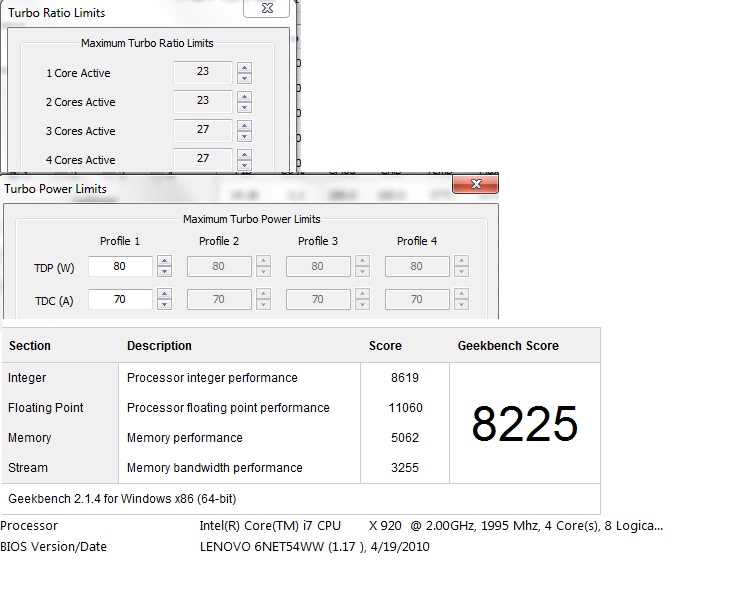
So yes..looks like the W510 can be overclocked. The TRL is adjustable and so is the TDP. Let the fun begin. I have the 920xm on W510.
-
With ThrottleStop 3.00, I followed Ronald Singh's advice on YouTube from this page Throttlestop Guide - Page 5 and could overclock my W510 + i7-920XM upto 3.73 GHz turbo-boosted. My Windows 7 64-bit crashed beyond this. Nice advice!
-
Glad you like my video and it helped. So that should clear up a lot of junk floating around about not being overclock-able.
-
Now someone try this out on the W520 with extreme CPU. Please tell us if it's adjustable just like the W510.
-
Thanks, Dharmaraja. I am not able to overclock as much as you did. My TRL is 29/28/22/22 for 1/2/3/4 active cores respectively. The TDP is 65 and the TDC is 55. My W510 + i7-920XM runs quite stable under a 2-hour Prime95 8-thread stress test. Max temperature is around 95 C. I had to disassemble the machine and replace stock thermal paste with Arctic MX-3, though.
-
Very nice.
Yea mine can go higher I think. I just need to replace the thermal paste. Upgrading the thermal paste reduced the temps by how much? Here is another test with higher TDP and Lower TRL. After a while it shuts down with Lenovo stress test, but I haven't upgraded the thermal paste yet.
Attached Files:
-
-
The stock paste could survive 29/28/22/22 for less than 5 minutes. CPU temp rose to 100 C quickly then the system shut itself down. With the MX-3, the temp drops by almost 10 C and the system survived the 2-hour test. I didn't pay much attention to the temperature difference; so don't trust my guesstimate on temp difference. From my experience with other machines I know that the MX-3 just works Actually, the present version of the paste is MX-4. The MX-3 used is a left-over in my cupboard.
-
Very Nice. I will need to get some and up the TRL. If I can drop the temps down even more I can go higher.
Stay tuned.
-
BTW: what method did you use to apply the MX-3?
-
1) I followed the Hardware Maintenance Manual to remove the copper heat sink.
2) I used cotton + isopropyl alcohol to clean surface of the CPU and GPU and the copper heat sink.
3) I put one half-rice-grain size of MX-3 on the GPU and two full-rice-grain size of MX-3 on the CPU.
4) I spread the MX-3 on the GPU and CPU evenly before I reassembled the machine.
I posted some pictures of the process on ThaiThinkPad.com ?????????? ??? ??????? overclock ThinkPad W510 + Core i7 Extreme ???? i7-920XM you might want to have a look. I'm sorry that the content is in Thai but you can look at the pictures! -
Sorry i didn't read your post regarding my question.
Ok i got BIOS v1.37 and getting the 940XM ES model, will i be able to OC with v1.37 BIOS?
What about temp sensors in the 940XM ES? i heard they were disabled, what is true or not? -
@Likvid, I am now using BIOS v1.38, the latest one; so yours should be alright. I don't have experience with the 940XM ES but it should work. Your 940XM is slightly better than my 920XM.
@Dharmaraja, attached is my result with your new config. It's slightly better than yours though
Attached Files:
-
-
Cool. Have you tried to increase the TDP and TRL? Whats the highest you can go on those setting? If we can hit 4.0
That's what I am wondering..You should run the Lenovos stress test it will really work the CPU and GPU. Please post your results after that. I am looking into getting the MX-4 Paste.
Ohh I am looking into buying the W520 with 2920xm CPU. If you know anybody overclocking those do let me know.
-
I've done this before, but never really noticed any change in temperatures... did you notice any yourself?
That last pic you have where you have the compound applied, is that how much you left on before putting the heatsink back on? Just wondering if it's too much... -
I ran Prime95 stress test last night and it shut itself down (perhaps due to excessive heat) after around 10-15 minutes. I didn't note the exact time because I was already sleepy I'll be experimenting with the optimal config in terms of speed and stability and will definitely share with you guys. People who can afford to buy the 2920XM option are rare. Let alone someone with W520 + 2920XM who are willing to overclock the machine! I'll keep you posted if I find some!
-
@dimm0k, I notice faster drop in temperature--the rate at which temperature reduces. I have experienced this in my other machines in the past. A friend told me that I put too much MX-3 on the CPU as well. I'll redo it next time I have a chance to open the machine Thanks for the note!
-
For the record, we can perhaps learn from the Dell Alienware guys here http://forum.notebookreview.com/ali...multiplier-overclock-tdp-tdc.html#post6726807
-
Nice, if the temps drop fast that means that we can prevent thermal shut down. I bought some MX4..will see when it gets here will do some testing. I noticed that the newer updated bios, which I installed actually helped with the temps..maybe runs the fans sooner and system seems to be more stable with the temps. I will need to see if really worth the upgrade to the paste..hmm
-
I heard the Bios on the W520 + 2920xm has a locked bios. So we might need to get past that with a hack..now I don't have the W520 yet..but when I get it soon.. I will most my results. I am hoping it's not locked and I can do a real video of overclocked w510 vs w520..will be a sweet video to make.
-
Hehe well I wasn't sure if I was putting on too little or not... might try it out on my W520 when I get some time, but when I tried it on the W510 I had a thin smooth layer. Like I said, I didn't notice any change so maybe I had on too little!
-
Thank you so much for the technical article!!!!! It was a fine example of what can be done
I have a 520 but I do not believe on overclocking generally at all personally.
Renee -
What can be done, but you decide what you want. Personally why drive slow when you can drive faster.
-
I was playing around tweaking the TDP and TDC this whole morning in a room with no Air Cond on. With lots of TDP (up to 80W), I got 8000+ Geekbench score; but it's not stable. Prime95 max heat torture test with 8 threads resulted in thermal shutdown within 3-5 minutes. Best values of TDP and TDC I have so far is TDP=65W and TDC=63A. I don't know the voltage applied to the 920XM in my W510 so I guesstimate it to be 1.025V which is the middle value according to the CPU spec. My present TRL config is 29/28/22/22 for 1, 2, 3, and 4 active cores, respectively.
I'm going out shopping for now. May have fun tweaking it some day later. -
Theres an answer to that. I'm renee and I used to be an OS devlopment engineer.
We never over clocked systems because to do so will cause negative responses in reliability. Our system were made to last and to be there when you need them. I can't br much more specific then that because obviously we are discussing something that is statistical in nature. I would rather drive than not drive.
Renee -
I'm ron, I am a dude that likes power. I mod cars and race them. We build stuff to test, blow them up and build it again. We aren't chickens.. we push stuff to the limits. We ain't scared of statistical crap, we know what we want and want to do and have an idea of how to do it. If it blows still we won't worry about it. If it ain't broken don't fix it. If not broken yet; break it.
-
Im not scared either but I am still running my five year old Extreme and it has better benchmarks than my W520 running an i7-2920XM. I don't blow things up, I just run them as they were designed.
Renee -
That's what she said.
-
While I'd agree to overclocking business machines, there is absolutely nothing wrong with overclocking personal computers if you are careful. Engineers design things to be robust and have a high tolerance. While there will always be manufacturing defects, the design of the CPU allows for some headroom and thus if you carefully test the limits of the CPU, you can maximize its output without jeopardizing any reliability. I've had my overclocked Athlon for 10 years and it still works without fail as it would have without the overclock and I can say the same for several other machines that I have built, overclocked, and tested.
-
I did some tweak a little bit this evening. It turns out that the present optimal config for me so far is TDP=67W, TDC=65A. TRL = 29/28/22/22. My W510 is now very snappy. Thank you everyone for making this happen!
-
"if you are careful"
Is exactly right. Of course if your cooling dies quietly then you have a big mess on your hands.
Renee -
Overclocking is pure scientific--just like modifying and fixing cars. You've got to know what you are doing; otherwise, don't mess with it
-
Yep.
Renee
ThinkPad W510 Can you Overclocking with i7-920XM
Discussion in 'Lenovo' started by tilhasbb, Feb 20, 2010.