 Problems? See this thread at archive.org.
Has Lenovo released the Win8 drivers and software to display the "time remaining" power bar on the taskbar? I know I enjoy having that bar in the corner and it helps simplify the battery reset cycle process.
-
Could someone link me the last X220 bios driver ?
I've downloaded it from official site but it seems to be not compatible with my system (X220 4290).

thks -
Just download it through Lenovo System Update.
-
Amazing-boy here you go.
BIOS Update Bootable CD for Windows 8 (32-bit, 64-bit), 7 (32-bit, 64-bit), Vista (32-bit, 64-bit), XP - ThinkPad X220, X220i, X220 Tablet, X220i Tablet
BIOS Update Utility for Windows 8 (32-bit, 64-bit), 7 (32-bit, 64-bit), Vista (32-bit, 64-bit), XP - ThinkPad X220, X220i, X220 Tablet, X220i Tablet -
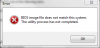
That versione is just the one I've downloaded and that, when executed, gave me a compatibility error.
I've a lenovo X220 4290 with win 7 ultimate edition (32 bit).
Which could be the problem ? -
Hello. Could you post the complete alphanumeric 'Type' from your ThinkPad? You have the first four- 4290 but there should be three more digits included. On the back of my X200 (older X-series but I am sure the X220 is similar with system ID) I have a sticker with a barcode and the seven-digit 'Type' can be found there in this format XXXX-xxx.
-
The complete code is 4290 2n4
And here the message I read when i try to install last bios:
-
@Amazing Boy. According to Lenovo Support and your 'Model' type this is the ISO you should burn to CD (slowly at a burning speed of 4X or 2X).
@Amazing Boy. Click here
It looks like rambler linked a BIOS update for the tablet version of the X220. The BIOS updates are separate and different between the non-tablet X220 and the tablet X220. -
edit:
successfully updated.
maybe the problem was that previously I had not checked the battery was fully charged. -
I'd love to hear from anyone using the X220 Tablet for digital art or web graphics. In particular, what software you find most useful and any special settings/drivers you may have needed. I recently purchased a 4298CW8 model with Windows 7 Pro (64-bit) installed.
-
I've been using a traditional tablet PC for digital painting for a number of years now, but I'm considering going back to a USB Wacom or trying a Cintiq.
I just wanted to take a moment to rant about how the gap between the tip of the pen and the actual screen makes it impossible (for me) to do anything accurate like actual drawing. Conceivably I'm just not pro enough, but that doesn't change the fact that the gap has gotten bigger with the x220/230t, which is ridiculous. Among other things, I really hope this is fixed with the Helix, but unlike the other things, I'm not holding my breath on this one. -
Sometime between installing the Lenovo Settings package, manually tweaking the charge levels with regedit, and installing the Hotkeys package for Windows 8, absolutely none of my Fn shortcuts work anymore except the Thinklight. I can't even change the brightness. Anyone have any idea what software I should be uninstalling/reinstalling to fix this?
Edit: should add that this persists between reboots/shutting down/going to sleep. I uninstalled both Lenovo Settings and that Hotkeys package, but still no luck in getting them to return. Incredibly frustrated right now as I just spent a few hours this morning doing a clean install and would prefer to not have to do that all over again
-
I just had my display in X220i replaced on IPS premium panel. (free of charge)
Well, colors, viewing angles are great - even better than on my E2370V-BF - but more importantly, the screen in-door effect is gone! Standard TN panel in my notebook was awful for my eyes because of it.
I would get the premium panel at start if not the price difference - X220i cost me 700euro (student discount) while the x220i with IPS screen was well over 900euro (can't remember exactly, bought it 1,5year ago)
TL;DR
get the IPS panel. great colors, viewing angles, no screen in-door effect. standard TN in x220 is awful! -
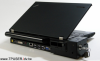
Is anyone using a minidock plus 3 with their X220? I just got one and it seems to greatly obstruct the vents. My temps are much higher than without the dock...
I can't get a great pic of it but here's one I found.
-
I was considering buying one of these, what an interesting design decision! There's no fan or opening for air from the left vent to leave through? Seems like it's additionally designed to restrict the already meager airflow.
-
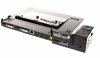
In the back there is a slot for air to flow through, but the very top of it blocks the top vent hole on the machine. On the side, there is around 1/8" clearance with the dock, and it looks like there is some sort of vent duct that is routed into the back to redirect air from the fan. It seems to fail pretty hard at this purpose, since there is barely any air coming out of that rear vent on the dock.
-
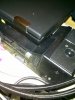
Hard to get a good pic, but you can see the vents and gap Groceries was talking about. For the most part temps were only marginally higher on the dock, even with my x220.
-
I normally idle around 46-48C, and I haven't seen anything under 55C since I docked. It's more low to mid 60s. :-/
i5-2520m here. -
FWIW I just got a refurb X220 from Lenovo's outlet dot lenovo dot com store (no www).
Wow what a pleasant surprise this little machine is!
So I must have gotten one with the IPS screen.
Anyway my thoughts so far:
I like the keyboard even better than my very new T530.
Even with only 2GB of memory it's got same snappiness as my new T530.
And wow all of the Win7 updates have worked.
One question I've got is Win7 Device Manager shows i5-2450M, but HWiNFO64 (ver.4.10) shows i5-2515E
What's with that?
And I'm toying with doing a thread titled something like: Bite the one/Lenovo you love
I still can't get over how much I really like this keyboard!!
I mean, I really like the KB on my T530, but this X220 KB is stellar!
Currently listening to Carminia Burana, with decent low power headphones, from quality .flac files ripped from one of the great CD recordings of it, via a very cheap/slow SD card (16 GB ~$10); another big wow! And the SD card snaps solidly into the slot. I'd already gotten an expensive high speed 128GB SD card for my T530 but it tends to fall out so it now has a semi permanent home in my X220.
I see that my X220 also has the same 3 NTFS partition setup that my T530 does. That'll go away when I get around to doing to doing a fresh install of Win7.
-
You should look up 600X's thread for installing Dolby v4 audio drivers rather than the conexant ones, they help the sound quality a lot.
-
I didn't know a 2515E existed until now. It looks like an embedded version of the 2450m. Dunno why hwinfo thinks you have one, though.
-
Found the thread at: http://forum.notebookreview.com/lenovo/657971-dolby-home-theater-your-thinkpad.html
Easy enough to go back if I don't like it.
Thanks!
-
HWiNFO's mapping from internal value to display name is buggy.
-
Could someone tell me if there is a simple way to make the battery firmer in its slot ?
It has a little "play" and it's not perfectly motionless. -
Fold a piece of paper and stick it in.
btw, it's supposed to do that, its a durability feature or something, so if it doesn't bother you too much just leave it wiggly. -
^^^^^
That's a kewl handle and a cool signature!
-
Or something? Stop spreading the urban legend, will ya?
The 9-cell battery does not fit well. It wiggles. PERIOD. -
My batteries could survive a nuclear blast and still not move an inch:
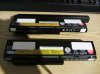
(click to enlarge) -
Don't you think those label stickers will negate the "durability feature or something"?
-
They keep the battery in place. They are so good at their job in fact, they made my X220 body "deform", so now it screeches horribly every time I hold it. Still, it was worth it.
Those labels are quite durable, I use them inside my ThinkPad as well. They serve as a cushion for my keyboard. Now, it doesn't even flex the slightest.
So far, they have been exposed to almost 100°C and some water and are still holding up fairly well, so I dare say they should last long enough.
-
Putting one or more label stick on the battery could, in time, enlarge the battery slot increasing the probllem ?
I was thinking about working to improve directly the closing mechanism making it firmer. -
It doesn't enlarge the battery slot. The X220 is made of Magnesium-Alloy. My battery has been connected firmly to my ThinkPad for quite some time now.
BTW, there are 5 layers. You'll need to experiment a bit though since the gap isn't the same size everywhere. -
Do You think I don't compromise anything verifying directly which "label position" work best in my situation ?
-
You're complicating the situation for nothing. I just fold a couple of "Post-It" pieces and put the thing between the battery and the battery bay. A business card would do, too.
-
My concern regards the possibility of force the bay.
-
As I said, you manage the thickness yourself. Don't use adhesive labels that are hard to remove. There is no "forcing" the bay with a small piece of paper. After all, if you're so concerned about this, just leave the battery as it is.
-
Anyone notice a significant change in battery life, for better or worse, after upgrading to Windows 8?
-
I did, my 6c used to last 4h with Win 7, now it lasts 6h. (45Wh)
A new 6c would last me close to 8h of browsing the web, a 9c perhaps even 13 or 14h. -
You gained 50% more battery life going to W8? How are you measuring this; is it idle or browsing or what?
-
I measured it by looking at the time at which I started using the X220 and looked at the time again after the battery hit 0%. Just some light browsing. No scrolling, just using the page up and down keys, it saves you allot of power. Brightness set to 6/15 which is about 150 NITS I guess, the scale is different from Win 7. Using Win 7, anything below 12 is unusable, it's just too dark while under Win 8 even 2/15 is very bright.
I'm also using an SSD now (Crucial M4) instead of HDD and an IPS Panel instead of TN.
Idle times are crazy under Win 8, sometimes I leave my X220 in the morning and just close the lid (stays on, no standby, WIFI still on) and when I come home again in the evening (10h later) I still have 20%. -
What is the your idle power draw with W8? I'm getting 5.5W (screen brightness at 1/15) with W7, but if W8 is a significant improvement, I'd be willing to suck it up on the UI shenanigans and change over.
-
With my current settings around 6W. I have a feeling the IPS consumes quite allot of power. As I just mentioned, switching it off gives me very high idle times.
Just so you get me right, when I use my X220 with a few tabs in Firefox my battery life is around 5-6h. I only reach a full 6h if there are some idle times in between, idle meaning screen on but not doing anything.
Also take into consideration that my CPU is running with 800MHz and I swapped my HDD for an SSD! Surely all of these factors also contribute to a good battery life. (except for the IPS display, I just turn the brightness down)
If I were you I wouldn't switch over, the upgrade program ended 31. of January, and I personally wouldn't want to fork out 200€ for a copy of Win 8 Pro, or whatever it costs in your country. -
Oh, I already got my cheap license from all the promotions and such, but given that it doesn't actually look like there will be an improvement in power consumption for me, I'm definitely not going to do it.
-
How's your boot time with that SSD?
That's with a fresh install of Win7?
FWIW the only thing I don't like about the X220 is it's limited I/O, but that goes with having a physically small laptop (12.5" screen).
My plan is to put in a 256GB mSATA SSD and leave the HDD bay empty most of the time, which saves 80gm (88gm minus M4 256GB mSATA weight of 8gm). Do a rare clone backup to a HDD that I temporarily put into the normally unused HDD bay.
When the new Crucial M500 SSD comes out, I'll give it a few months for pricing to come down a bit as well as see early comments by users like tiller, and then consider getting one of these new M500 480GB mSATA drives.
Given that early Win8 sales are so far even lower than that of early Win Vista sales, you can safely bet that M$ will be offering plenty of ongoing good deals for laptop owners to upgrade to Win8.
-
My boot time is about 5 seconds, maybe less. I'm using a clean Install of Windows 8 Pro. Ports are OK on the X220, I like the ExpressCard Slot. Currently I'm using a USB 3.0 card in it so I have 5 USB ports in overall. (2 are 3.0) I also have a GTX550Ti on my desk.
The Crucial M4 is a good choice. I can really recommend it. The normal version is a bit heavy though. If you're gonna use an mSATA and no HDD you should really feel the difference in weight.
I'd welcome more Win 8 offers, I really like that OS and wouldn't mind putting a few licenses aside in case I ever need some. -
Maybe, but only if the price is low enough.
It's not the same thing as never having enough memory or drive space.
BTW 5 seconds to boot a fresh install of Win8 is pretty spectacular.
Have you actually put a stopwatch on it recently? -
I used the my clock which also shows seconds to stop the time. Those 5s are nothing special, it's all thanks to Windows 8's quick booting option. Without it, it boots just as fast as Win 7, perhaps a tad quicker.
However, if it is activated the actual boot time of the OS is less than 1 second. Most of the time is used up by the BIOS.
It's usually stuck there for 3-5s. -
My wattage on Windows 8 is significantly higher than what you're getting. Are you using Lenovo Power Manager/the driver?
-
I am also having about 5 seconds, most of time with BIOS. I am using mSata SSD. It is definitely much faster than previously Windows 7 on same SSD.
However, not all thinkpad software/driver are available. I miss the bluetooth. Sometimes, it works; sometimes, it doesn't. -
Yes, the power manager is telling me this. You need to let it settle for a while before you get a somewhat steady value.
I don't have any missing drivers. Bluetooth is already integrated in Windows 8, it seems to work but I haven't tested it extensively yet, so I can't say whether it's stable.
If there are any other drivers missing I can help you install them.
ThinkPad X220 (i/T) Owners Thread
Discussion in 'Lenovo' started by Jayayess1190, Apr 9, 2011.


