Problems? See this thread at archive.org.
this looks great, any special tips on how to do it right? do you think i could apply it and leave the logos covered without it being too noticeable? they aren't especially raised or indented.
i do use the touchpad, can you tell me if it's noticeably less responsive? i'd like to cover the bottom mouse keys too since i never use them.
-
You can completely cover the lid if you want to, though I wanted to show the badges on mine to give it an OEM feel. I used a heatgun with relatively low settings and gently applied it on the logos, this will make the bonding substance softer and easier to peel. I used a craft knife to pry the Lenovo and ThinkPad logos off which will leave a bare indent on the lid.
From there on apply the vinyl, use the heatgun to soften it and massage it in especially where the indents are. Afterwards reapply the logos back on the lid and it should level out similar to the pictures I've shown. For wrapping corners, cut the vinyl in the style of trapezoids so you can fold the excess corners in cleanly.
The touchpad feels normal when I tested it, it's just as responsive as the stock surface. But obviously it feels a lot more pleasant with the Carbon Fibre finish. -
http://www.amazon.co.uk/LG-PHILIPS-...7?s=electronics&ie=UTF8&qid=1339912003&sr=1-7 ?
or does that mean replacement FOR the lp140wd2, and it's really the 'B140RW02 V.0'
also, where's the best place to get a decent 9-cell battery? as far as i can tell even lenovo doesn't sell it on their site which is weird -
You have to be careful when purchasing screens, if you read the description it says:
A lot of suppliers will provide the AUO Glossy screen in place of the LG panel. It's not bad as I have this in my T420 at the moment and it solves the graininess problem but viewing angles is pretty much the same as the matte one which is not that good.
As for batteries, I'm pretty sure Lenovo should sell them. Did you look at the Accessories page? eBay is another place to get some though like the screen panels, be careful of unofficial compatible ones. -
i'm pretty sure it's not on their site, unless i'm blind. they stock lots of batteries for older models even, but not the last or current generation which i don't understand. anyway the battery doesn't need to be genuine lenovo, i just want a reliable one and wondered if there are any more reputable sellers.
-
Hello!
I just recieved my brand new T420 laptop for very good price, main specs listed bellow:
Intel Core i5-2540M
14,0" HD+ LED 1600x900
4GB RAM
500GB HDD
Intel HD 3000
Win7 Pro 64bit
So far, I love my ThinkPad. The best laptop I've ever owned, a real joy to work on.
Unfortunatelly, there is one thing I am concerned about. The fan on the left upper side of the laptop is always running. Fan is pretty silent, but I can notice it. Temperatures are okay. Oh, and that fan is not the processor's fan. My Lenovo's Power Manager is okay and I have the latest drivers and BIOS.
Is that normal? For the first three days of using laptop (I am using laptop for light office work) the fans were completely silent (I would say they were off), but suddenly after installed Windows Update the fan kicked in and never stopped spinning yet.
Thanks in advance for any insight here. -
What RPM is it running at?
-
And there comes the strange thing - I dont know. I tried several diagnostic programs (HWiNFO, RivaTuner, SpeedFan, ThinkPad Fan Control) but none of them were capable to show the acctuall laptop temperatures or fans RPM, except processors. So I know a lot of info about my processor, but nothing else. Looks like other sensors are dead for diagnostic tools.
Am I doing something wrong or I am just missing something?
Really appreciate your help, thanks. -
I use HWiNFO64 from HWiNFO64 Download all the time.
-
I am using it as well, but the only RPM sensor which I can see is the CPU Fan RPM.
-
what about these:
LG Philips LP140WD2 (TL)(B2) LCD Screen, Call for Pricing -
I didn't get much luck with LCD4Less but if you use eBay then give these guys a message, they were very helpful in my buying process even though they couldn't get the LG Glossy Panel I was after. I was told that they can definitely get the Matte version of this screen as long you quote the part number LG Philips LP140WD2 (TL)(B1) in the checkout but I would contact them first just to be sure so you got the correspondences in writing.
-
That's all you are going to see for fan rpm. What is it spinning at?
-
DON'T MESS WITH UNRECOMMENDED DRIVERS
Bricked mine messing in the bios to switch from integrated to GPU on top of Intel HD 3000 drivers that were not a part of the Thinkvantage software recs. Had to do a system restore (system image restore runs very, very slow- now on hour two at just 1/3 completion)- good thing I already had my extra HDD installed in the ODD drive. Lesson of the story- don't download drivers that's not part of the recommended updates. Probably quicker to do a clean install but did not want to lose some files. -
heck- BSOD still- might have to send it in for repair. Restored BIOS to factory default- I think the intel driver is the culprit or not unless I did physical damage. Will try to do another clean install.
-
At 2000 RPM during writing this post.
After close inspection I can isolate two fan sounds. CPU fan sound is just fine, thats not the problem. But theres another fan which is running louder and all the time. Even if I disable CPU fan with TPFanControl to 0 RPM, I can still hear another fan, which is a bit annoying. -
1700-2000 rpm is very normal.
Yes, the fan always spins unless of course you want the temp to jump to 100C. -
Agreed. But like I said, for the first three days of using laptop there were no fan spinning at all and temperatures were just okay. So is continuously running fan okay and for the first few days it just needs to "settle down"?
-
Hi,
I'm wondering if eSata port in T420 has some speed limitation.
Currently I have internal SSD running @ 6Gbps. But If I connect my stock lenovo disk, which is 3Gbps, then both eSata and Ultrabay caddy negotiate 1.5 Gbps, when disk can do twice more.
from kernel:
ata4: SATA link up 1.5 Gbps (SStatus 113 SControl 300)
from hdparm disk feature list:
* Gen1 signaling speed (1.5Gb/s)
* Gen2 signaling speed (3.0Gb/s)
Is there some limitation on eSata or ultrabay?
BR,
Gregory -
has anyone succeeded in finding a better replacement panel for the t420? it almost seems impossible... i wish i had gone for the t520...
-
I would wait to see what the reviews like on the 14" X1 Carbon first, it is "rumoured" that this machine would have an above average panel compared to the standard offerings found on the T Series. The display which was used in the Russian review was a LG LP140WD2(TL)(E2) panel but I wait for a comprehensive analysis first.
-
Hearst, what Russian review are you referring to? I've only seen a Russian video on youtube, from which I can't really tell. The display does seem nicer, but it also seems glossy, which afaik is not the case.
-
This is the Russian review of the X1 Carbon.
-
I guess a lot of people are going to scream bloody murder over the proprietary RAM and SSD.
-
Why? Apple's going the same route, the sheeple will toddle along behind.
-
For most people it's probably not a big deal. But for those of us who like to save money (and those of us who rely on upgrades to get more life out of our gear), the reduction of the number of user-replaceable parts is definitely a strike against both machines. This sort of thing is part of the reason why I really dislike this "as thin as possible, damn the consequences" trend. It's quite a bad one for those of us who do more than show off our Facebook machines...
-
I hate Facebook, too. Utter waste of human energy.
-
The market will vote with it's wallet - but this is a disturbing trend. Hopefully my system will be enough for me until Rockwell in 2014 debuts.
-
For those of you who complain about AUO panels, my T430s contains LTN140KT03401 Samsung display. Although it is bright, contrast is pretty poor and vertical viewing angles are about 2 degrees.
As someone already mentioned, dialing down gamma helps somewhat.
[EDIT]: Sorry, wrong topic, although it might be useful here too. -
hi. I just got a Dell UltraSharp U2412M monitor and connected it to my T420 by the provided VGA cable. I hear connection thorough displayport is better? If so, what is the reason, and what cable do I need to get (I'm not sure and I don't want to get a wrong cable...).
Also what resolution would be best to use for this type of external monitor?
Any tips very gratefully received as its the first time I connect a laptop to an external monitor and I'm not sure I'm doing things correctly!
sorry for asking dumb questions... -
Generally a digital connection like DVI, HDMI and Displayport should be more stable and provide a consistent image compared to analogue VGA where signals can fluctuate causing degradation and noise. For your Ultrasharp monitor it's always advisable to run at its native resolution which is a rather useful resolution of 1920 x 1200 (this is actually better than Full HD resolutions you find nowadays). For an IPS monitor I would recommend using a Displayport to DVI adapter along with the standard DVI cable, it would be waste to use VGA connection on a screen like that in my opinion!
-
Would a Displayport-to-DVI setup be somehow better than a Displayport-to-HDMI setup? Or vice versa? I am looking to buy an adapter as well (for my T430s) to work with one of my 2 monitors, one of which had an HDMI port, and the othet a DVI.
Thanks. -
Both DVI and HDMI use digital signals so output should be the same. The reason I mentioned Displayport to DVI is because the Dell UltraSharp U2412M monitor can only accept either VGA or DVI connection, it doesn't have a HDMI port!
Which adapter however depends on which display you want to use, if you plan to connect to a TV then I would recommend Displayport to HDMI. The reason is that not only it provides a consistent video signal, it can also output sound so you don't need a separate cable for audio. PC Monitors and Projectors I would incline to say DVI since it's a common interface in this field, but I would check the equipment first to see if it can support HDMI as well so it gives you that flexibility should you want to run it on TV's as well. -
You should use the full size DisplayPort connection from your T420 to the Dell U2412M. DisplayPort is the very best connection type from your T420 to your LCD panel. Pure digital. That is what I use with my U2711.
Cables are not expensive. See Video Cables - DisplayPort -
thanks a lot for your very clear answers, very kind of you to take the time to reply to my probably very naive question. I was confused!
One more thing: as I live in the UK, would this cable be OK for my T420-U2412m?
MP 6Ft Displayport Male To Displayport Male 28Awg Cable: Amazon.co.uk: Electronics
I'm asking because it says "provides up to 1080p resolution with digital audio". Is this a limitation?
PS Great forum this one! -
I would probably get http://www.amazon.co.uk/Startech-DI...QQI4/ref=sr_1_3?ie=UTF8&qid=1340551742&sr=8-3 instead if I were you. It's only a couple of pounds more and allows for higher resolutions.
The cable you picked out states it has a limit of 1920x1080. Your screen is 1920x1200. -
Has anyone had any problems with the Lenovo Solutions Center software? Mine refuses to launch when I click on the notification icon on the taskbar and I have tried re-installing the software but no luck. I will try another re-install removing the lsc software first. I wonder if my windows anti-virus is blocking it.
-
I had trouble with the Lenovo software, once i had Adobe Air uninstalled, and another time i had hardened my Windows setup and the virus scanner or security rules were blocking some of the Lenovo software, a clean install did the job.
-
Thanks! Will try this out.
-
You could also try a registry cleaner after you uninstalled the software and then install it again,
or you could try and run the software as an administrator. -
Shoot! Still not working.
-
If nothing works then you could always do a clean install of windows that will do the job.
-
Anyone using the windows 8 ctp on the t420? thinking about installing it this weekend.....
-
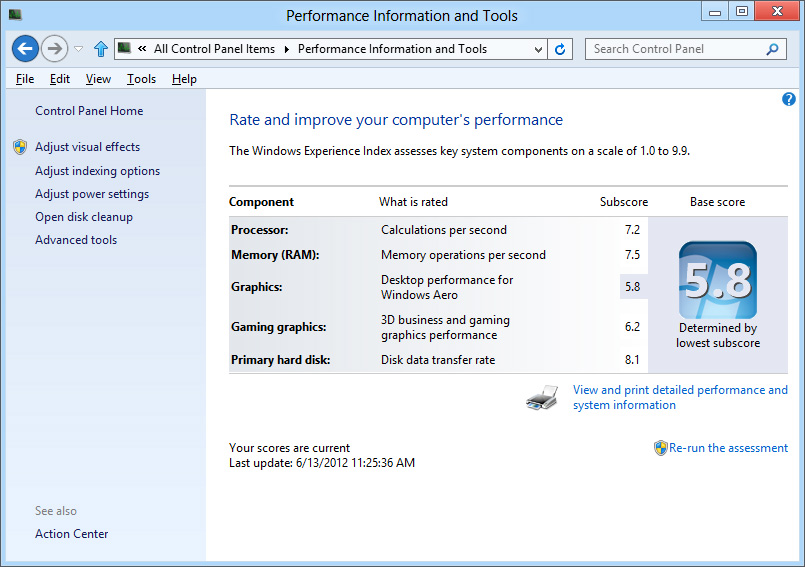
I am using the Windows 8 x64 Release Preview. Is that what you mean?
See attached. Works great.Attached Files:
-
-
I tried it also and it works great, i prefer Windows 7 and/or Ubuntu 12.4 LTS though.
-
thanks - i may grab an intel msata and stick it on that and dual boot it on the bare metal - bored of running it on a vm, I think theres a lot less value in metro if you dont have a touch device though. I only want to mess around with WinRT and some other dev stuff.
-
I'm not having a lot of luck with my T420 lately, the keyboard seemed to have malfunctioned so while the numerical and alphabetical keys are fine the Space/Enter/Backspace/Delete and Home keys no longer work which is frustrating.
I was a bit reluctant to call support given past experiences but I gave it a shot and Lenovo UK is sending me a new keyboard overnight! Needless to say my faith in Lenovo UK support went up a few notches after this! -
I don't like the metro interface at all it's only fun to mess around with in a vm, the thinkpads got great support for linux almost everything runs out of the box with the most relevant distributions.
-
Ubuntu is coyote ugly. Kubuntu is much better in my opinion, but I've always been a KDE fan.
-
Good experience coming from Lenovo UK. BTW, W530 with the latest quadcore's and K2000M (GT 650M equivalent) and 1080p screen is looking good - a jump in CPU performance from the i7-2820qm to an i7-3720qm of more than 20%- all for $1500 thru the Barnes and Noble Lenovo discount- ummm.
I wish for the future T440's with Haswell to have a better video card/graphic solution.
Thinkpad T420 Owner's Thread
Discussion in 'Lenovo' started by PatchySan, Apr 8, 2011.