 Problems? See this thread at archive.org.
I saw the same video ( http://www.youtube.com/watch?v=sAfYhlyRsCE) and the viewing angles did look great. From testing on the OTHER Russian hands-on, everything looks good except the black levels didn't seem up to par to some of the better displays out there. But it wasn't nearly as bad as say the 15" Samsung Series 9 which is almost gray.
So I hope it wasn't entirely accurate and the production model is better. I hope we see something this week.
-
-
Willing to bet money that this is, as also mentioned before, just the base model. It would be mental if their top model were on purpose born with such a birth defect.
But given I am sitting here in Europe, I do not expect to hold a machine in my hand before Sep, plus forget about good discount....
-
Well according to their chart they posted, even their top models have 4GB. I'm hoping it's just incorrect as we've seen Lenovo make similar mistakes a lot lately.
Hope you somehow find a cheap one, and earlier than Sep!
-
Just bear in mind this list is "only" the Topseller list and therefore not complete. There still is a possibility that regular and or CTO models will have different configurations.
Sent from my iPad using Tapatalk HD -
Thanks a lot!
That's an very interesting information, since I worked so far only with bootcamp. If the X1C should become a disappointment, which I do not believe however, I will test the MacBook Retina for a longer time! -
good to hear that there is again some activity in the romur section about the X1c. Especially as it seems I will really be eligible for an upgrade this fall! *Crossing every available finger for Dolby being correct with the IPS screen*
Oh, and I remember pretty well the out-of-the-sky of the info about the X220 having an IPS screen. It was quite ahead of the release date, bot there was no announcement during our meeting with the Lenovo sales staff, and most of the hype and rumors were about the original X1, since some day *boom* there was an IPS option for the X220, and I was sold
And, as the keyword keyboard appeared since my last visit, a short reminder that there is a dedicated spot to tell Lenovo what you think of the new keyboard, the loss of back, forward and the like, and their tactic of asking us 'to give in' on the change, and stop the mourning:
Change Is Hard: Why You Should Give In to the New ThinkPad Keyboard - Products - Lenovo Blogs
129 comments and counting!
cheers
Hecke -
That's exactly what I was asking about. I thought I remember someone saying something similar about the X220 getting a surprise IPS at launch when there weren't signs of it earlier on. I really really hope that's the case with the X1C since the Dolby page mentioned it.
On the other hand the Russian reviews pointed to an above average TN display and users are saying their connections haven't heard anything about an IPS display. -
Btw, have you received your review unit?
-
There's absolutely zero chance of 4gb ram being the limit. No way. That's not something anyone should worry about.
-
urbanglowcam, I am going with ThinkRob here:
forum.thinkpads.com • ThinkPad X1 Carbon
that the reviewed unit was not the final version.
Also the keyboard layout was reported in very differing appearances. So maybe, there is hope! I do hope. Beg.... -
I have to say that the Carbon looks beautiful. Shame I'm saving my cash for a W8 device to replace my HP Slate 500. Now, if the Carbon is released with an IPS display and battery life in excess of 6 hours, I may have to sell the family jewels to get one.
Otherwise, I'm sitting pat until Haswell is released next year.
-
I hope he's right. I don't frequent that forum, so is he someone with insider info? Or is he just generally saying not to look too far into it since the device isn't out?
-
Even the infamous Russian review had an X1C with 8GB, I would not worry about the 4GB listed for the base models.
Personally, I am happy with a 300nits TN display.
I am not a big fan of IPS displays where ANYBODY can watch what you are typing, whether next to you in a plane, standing behind you while you are sitting in the bus or on a bench and I hate to always put that idiotitic polarity privacy filter on. I have gone so far as to reduce the screen font to 7 and having a window with pxrn playing in the background just to shock the idiots away. Works in planes.
I just wish the display will be bright enough to work in sun light conditions.
From the specs that I see this will be a major upgrade from my 3 year old X301, quadruple CPU power, bigger screen, bigger resolution, yay \o/\o/\o/
[edit: I did not know p*rn is filtered as a word on this forum...] -
Yeah, 8GB of ram sounds more realistic than an IPS at the moment. I'd have to disagree about the preference on a display with poor viewing angles. For someone like me that needs consistency and accuracy in color throughout the screen, this is terrible. I can't argue with what you need it for as your needs are different. I guess that's the advantage of having poor viewing angles.
-
Just for me to understand.
I understand the Gammut stuff and the accuracy of colors etc.
The viewing angles are relevant as you otherwise would have to all the time adjust the screen to your sitting position?
Or because even when sitting optimally in front of it, the eg bottom-of-screen originating light(photons) would be emitted at an angle and would thus be a bit different in color?(no idea if that effect occurs.)
Or is it because when doing collaborative work some would always have to look at a ty picture due not being in the optimal position? -
I have a Samsung QX410 right now, which is an excellent machine, minus the display. As a web/graphic designer, my issue is that the display is very glossy so reflections obstruct the visuals I am dealing with and have an effect on my work. The viewing angles aren't the best either, so a lot of times, even when looking straight on, there are some variations in color towards the corner of the screen. It's very difficult to have a consistent picture throughout the whole screen.
Color accuracy on my display isn't nearly as good as the IPS on my BlackBerry Playbook tablet. So I tend to test my work on a 7" tablet rather than my bigger 14" laptop display because the color gamut levels are so much better.
On the other hand, the IPS of the Zenbook Prime and even PLS of the Samsung Series 9 (13") don't have nearly the same issues. I can work around a lot of these issues that I have, but it just makes it much easier without having to. Not to mention it's just nice to be able to see a clear picture consistently at any angle.
There's just little enjoyment for me in a display that shows a nice, white background for a website in the center of the screen and then a yellow hue in the corners for the same background. Not to mention blacks that look very gray in comparison to the deep, rich blacks of an IPS display.
Also, like you mentioned, better viewing angles helps in regard to showing my work off. There's nothing worst than sitting down, showing a client your work while they have to kneel close to you to see it. Or I have to turn it towards them. It's not the end of the world, but not preferable.
-
Thanks urbanglowcam, understood. I don't work with graphics/photos at all, text and numbers and the occasional film and thus do not have the "educated" eye for these issues. Probably best for my own happyness, ignorance is bliss...
Let's see what they will release
-
Well, not everyone will agree with me and I don't mean to sound like our needs are most important. I can see the advantage in not having others see your screen as well. I guess I'm just hopeful of the better screen. But yeah, we should find out very soon!
-
I dunno for sure, so I'll go and ask him:
forum.thinkpads.com • ThinkPad X1 Carbon
cheers
Hecke -
do we know RRP for X1C?
-
Ok, I'll bite. What the heck is RRP?
-
More good news guys. Lenovo just tweeted..
"Shooting an unboxing video today with a certain unreleased superstar #ThinkPad - tweet back if you know what it is pic.twitter.com/iIy3ZC4j"
Hope we see it soon.
-
Shooting doesn't mean we'll see it today, doh'
-
Unfortunately not..
But we're getting close! -
Let's occupy some time...
What do people think the base configuration in USD (before taxes) will be on day 1 (or preorder if available)? Pulling out of thin air, but I'm going with $1499. -
The first prices has been published, see X1 Carbon 34442HM notebook, prices - ShopMania
-
Link?
(The message you have entered is too short. Please lengthen your message to at least 10 characters.) -
I mean direct from Lenovo. $2300? Even that seems a bit steep, even for the caliber of this notebook. I don't think they could fetch that much without a FullHD IPS option and superb battery life (which I have a feeling will not be so superb).
-
It makes more sense to buy a rMBP if it costs that much. -
Those are the inflated AU prices, not USD.
-
As we discussed a few pages ago, that price from shopmania is in AUS $. Expect a 30-40% knockoff that price for the US.
zackiv31, IMO that $1499 base price doesn't seem too far off. Hope we see soon. -
At $1500++ I can deal with it, but at $2300++, then the rMBP is definitely the better choice.
-
I hope for God's sake it's not more than $1500, otherwise my credit card won't take it.
Come on, Lenovo, give us some concrete specs! I almost cannot wait anymore, this stupid HP notebook (yeah, I know, what was I thinking) is killing me!
-
Besides whether the display is going to be IPS or TN and battery life, all the specs are pretty much out there...waiting for price and an "order" button....
SOOOO angry that you cannot order CTO models in Europe and always such a fuzz to get a keyboard with US layout
Anybody know of a good address to buy them from, in the US?
European credit card and shipping address. -
You can order CTO models in Europe, in Germany (for example, the original X1): Lenovo - Konfiguriere dein ThinkPad X1
-
I would be careful about ordering right away , it's better to wait for user impressions. Thinkpads are not what they used to be.
I ordered a X230t just after it was available but after using it I found flaws that could have stopped me from ordering right way.
But for now I'm sticking with my X230t at least until the Fujitsu T902 comes out.
I already sold my good old Fujitsu T5010.... -
You are right, I remember. Not quite sure why I never did. I think delivery times and price was a bit off the charts some times. But I now even saw that you can configure US keyboards nice. But when I last checked, which was for the T430s, till I heard about the screen being the same as in the T420s, they did not have any new models online when they were already being sold by the shops. Maybe a bit more patience from my side required
[edit: Just compared online shop price for a T430s vs geizhals and the prices are about the same, very nice]
Agreed, but I need a new one anyhow and from the reviews, she'll be ok for me. My X301 is falling apart, after three years constant use, 1.5 yrs of power-on time on the ssd, a screen with red and wite areas, meanwhile about 30% darker at full brightness, than a new T430s, a breaking frame, no more paint on any of the edges(the silver metal is bare, not from falling down, just from constant use), a battery that's fully loaded at 50% original capacity, rubber feet gone, screw covers gone, including ten times overturning down a slope, while running and with open screen when jeep was hit by a landslide,...she has been good to me, but now it's time to move on
-
Although not directly related to the X1C, could you please elaborate on this? I would be curious what is wrong with the X230t that you think the Fujitsu T902 will remedy? Thanks!
-
X230t first impressions? Fail. Build quality issues. Two new Fujitsu devices Back to the Carbon watch.
-
The 8GB of RAM seems to be confirmed: Google Übersetzer
-
I don't have any inside info about the X1 Carbon. My comment was based on the fact that the one pictured there is very clearly a pre-production unit, and (more interestingly) not the sort of pre-production unit that one expects to see on review sites. That's all.
And my comment regarding the screen was just a (poorly-)educated guess since TN panel quality tends not to be Lenovo's focus...
Sorry to disappoint! -
It sure looks great. Earlier in this thread I read that the screen would be matte. But it definitely looks glossy there. Is this going to be one of those anti-glare-but-still-glossy screens?
Also, for those more familiar with Thinkpads (I've never owned one) - based on the images, will the X1 be able to offer a slice battery option or not? -
It also says the i5 version has 8GB of RAM and the i7 version has 4GB. I'm assuming that's reversed, and that the amounts are only defaults. Still, I can't fully trust a source that says the CPU upgrade gets you less RAM.
-
I understand and agree Lenovo's main focus isn't always their displays. Early tests at least show they're using a good TN panel, though not quite the levels of an IPS.
It's probably a semi gloss like a lot of the other anti-glare screens we've been seeing. There's still SOME reflection up close. The screen doesn't look all that impressive by those photos in the link just posted. It looked good in that other video review though. I hope it's just the photos..
More links
Lenovo ThinkPad X1 Carbon
Lenovo碳çºçµæ§Ultrabookï¼X1 Carbonæ¶å ç»èºäº®ç¸ - U-3Cé»è ¦
They also show the same odd 128GB/8GB and 256GB/4GB combo.
The 59,900/66,900 yuan pricing doesn't line up. The IdeaCentre A720 is 7,499. So they might just be wrong on both the spec combos and price. Otherwise this thing will be insanely expensive. I'm thinking it's just an error. -
? No, it is clearly matte, you can see that easily there.
-
@ibmthink: nice link
The conversions are New Taiwan Dollar to USD, 30:1.
Thus the core i5 NT $ 60000 yuan => USD2000 the i7 67000 => USD2215
It's matte, they chose an idiot wallpaper(which mimiques a reflection in some funny way) for the presentation/review. 2nd picture from the bottom(above the girl) in thinkibm's link, proves it. If it were glosse it would be reflecting then.
Also found a link for the t430u, incl price of USD849:
Google Translatororor
[edit: just gave it the proper currency name, NTD] -
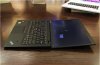
It's matte by definition, but has a slight reflection with close objects sometimes. Nothing that will give anyone issues though. It's the same as the Zenbook Prime in that sense.
-
Thats totaly normal on the newer matte screens. My L520 has the same effect with close objects.
-
Yep. No issue for me. I'm more concerned with the color contrast on this thing. The blacks aren't looking too good. I hope Anandtech or notebookcheck gets their hands on one soon.
Thinkpad X1 Carbon 2012
Discussion in 'Lenovo' started by xzybit, May 15, 2012.


