 Problems? See this thread at archive.org.
How long does it usually take for Lenovo to release the customize your own model after a new laptop is released?
-
Yes for the first one, but an emphatic no on the second: That keyboard is highly, highly unusual, period. That's not opinion, that's a fact. In my opinion, it is unusual and awkward enough to cost them sales, but we will see how that plays out.droyder likes this.
-
This is standard, and it's really an anomaly that you can still buy Win 7 so long after the Win 8 release. The typical way this is handled is through downgrade rights after you buy the system. You can see which Win 8 versions include downgrade rights to which other Windows versions here: Understanding downgrade rights
-
It's supported exactly as well in Windows 7 as it is in Windows 8, as long as you're talking about just one single screen. If you have multiple screens attached, then Windows 8.x tries to accommodate that to some degree, but word from users (see the comments in the M3800 thread over in the Dell forum) seems to be that the support in that respect is close to useless as well. As a general rule, there are quite a few Windows applications that will cause significant amounts of problems, to the point of being unusable, on high-DPI screens. Adobe products such as Photoshop are just one example for this. Given that the benefit of these high resolutions on such tiny screens is minimal to non-existent, I personally view those things as useless gimmicks at this point in time.
-
Yeah, we'll see, though I feel like those die-hard ThinkPad users will still have the T series. I believe the X1C has always been their more niche, risk-taking model anyways. What works and is successful on this line will trickle down to their more mainstream machines.
I think the biggest risk factor is the FN strip. I'll let you guys know how it is. -
I take it you never you the Insert key, either, since that one was removed entirely. Should be fun to reconfigure all those applications that use the key, and that allow you to reconfigure them at all...
-
I honestly don't. Though my use-case is probably different than yours, I rarely feel the need to. It doesn't even seem to work in every program.
In fact, it's even an annoyance for me as sometimes I accidentally press it and notice all my text is being erased. -
Nonsense. All business- and professional-class PCs, by all manufacturers are offered with Windows 7. As we have established by now, this includes Lenovo. Even more, many manufacturers, such as Dell, will ship all of such computers with Windows 7 by default, unless configured otherwise by the customer. They do so for a good reason: The vast majority of professional users at the very least prefer Windows 7 over Windows 8, and a very significant portion of them (yours truly being one of them) will not touch Windows 8 with a barge pole. A look at the adoption numbers for Windows 8 is all you need to understand reality: As a matter of fact, market share of Windows 7 is growing faster than for Windows 8. But, you are correct that there is a bit of an anomaly there, which is the disaster that is called Windows 8...
-
Well, it does work in such minor fringe pieces of software as Microsoft Office. Well, yeah, not too many people are using that anymore. Wait...
-
One sarcastic post after another.
Judging by your posts on this thread, you seem very bent out of shape with this machine. The PC industry is changing, and you don't like it. I'm sympathetic with that as I have my own frustrations with Windows 8, but why not go with the T series you obviously feel more content with? -
Well we all have different uses, Pirx, so I don't see how any laptop can be universally "bad" or "good." I run a company. Am mobile quite often, and use Word and Excel, and to be honest I never use F keys. I never use insert or home (except to undo an accidently press of said keys), and I never use caps lock. I'm happy to see them go. Unusual, yes. But unusual doesn't necessarily mean bad. Plenty of other computers out there.
Can someone tell me how they use, or how often they use their touch screen on a laptop? I can understand it on something like a Yoga or XPS12, but on a business machine....curious.
Also, how far off is Helix refresh, I'm a little disappointed by the lack of any sort of pricing promotion on X1C Gen 2 so far.urbanglowcam, SA_NYC and Hache-eLle like this. -
The Insert key function is still available by pressing FN+I, see this picture from the Userguide:
 urbanglowcam likes this.
 -
you mean 'touching' FN, thats not a pressable key anymore. I don't understand why they did not simply integrate the glowing stuff into the existing keys. The optimus keyboard has/had displays integrated into buttons before. With E-Ink it wouldn't even consume a significant amount of energy (properbly even less than the current solution that turns off for energy saving after a period of inactivity). Maybe they even had prototypes for that but some suit guy calculated that they'd spend $100 on real dynamic keys whereas the strip used now was only $10. Same for the missing sd-card slot. Space savings my a%&.The Fujitsu u904 has all the ports of this plus a 2.5" sata drive, a dimm slot, cardreader and a pop-out full size ethernetport inside a magnesium-chassis that's even slimmer (15.5mm).
-
I'm not a fan of Win8 either, but there's only so long that MS will put up with OEMs allowing people to buy Win7, and I think we're getting close to the end of that timeframe. As I said, this kind of need is typically handled by using the downgrade rights to let you legally install an older version of Windows. It is more of a pain, and that's part of the point. MS wants people to buy the new OS and they will slowly make it harder to buy the older one, even if the market doesn't really want it (such is life when dealing with a monopoly).
MS Office has not used the Insert key by default in many versions now. There is an option to enable it, but it's off by default. -
As a matter of fact, in contrast to you, it seems, I invest very little emotional energy in things as inconsequential as some new computer from some manufacturer. I really don't care personally, at all. I was just stating a simple, objective observation.
This is slightly different, and, yes, I don't like what I am seeing. Note, however, that the PC industry itself likes the picture even less. I also note that it is clear at this point that nobody has a very good idea of how exactly the industry is changing. A major factor is that the number of people who in fact need some sort of a PC has declined drastically with the advent of iPad and friends, and the accompanying software. There is a good majority of former PC users who never really needed the power that a PC offered them, and were in fact intimidated by it. All these people now have alternatives, and they flock to them in droves. As a consequence the traditional PC business is not only declining. I am tempted to go as far as saying that a better term to describe what we are seeing in this area is " collapse". However, Microsoft's attempt to retain these people by offering a crippled interface on top of their OS that is forced on everyone, thus alienating the very users that do, indeed, still need the power of a real PC, was a serious, serious mistake, and laughably naïve to boot. The correct response would have been to offer enhanced power for the professionals, while giving the masses a simplified interface as an option. Alas, history went otherwise...
Incidentally, we see similar mistakes being made on the hardware side: Machines that are meant to accommodate the less sophisticated users while compromising on functionality for the professionals, like those 16:9 screens for the clientele that does nothing but watch movies. Then you see the idiocy of offering exclusively 16:9 tablets on the Windows side of things, in which case it is entirely clear that this format is completely and utterly inappropriate for tablet use. More generally speaking, while it is true, as I said above, that part of the malaise of the PC industry is the assault of the cheap tablets, there is a part that is home-made: It is the fact that the industry, apparently, is unable to offer machines that people really want. Oh well...
Why go with a Lenovo at all? Dell's Precision M3800 is a very attractive machine, for example: Same thickness, roughly, as the X1, but with a 15" screen (and correspondingly larger footprint, of course). Sure, it's a bit heavier, but with quad-core i7, a discrete graphics card, and up to 1.5TB of possible storage space, it's a far more powerful machine. With a real keyboard, I might add...
But, back to Lenovo, and just to be clear: My pertinent point was that the T440 is physically extremely similar to the X1: Almost identical size and thickness, and only very slightly higher weight. Thus, I repeat, it is very hard to see why anyone would objectively choose the X1 over the T440: There is next to no objective benefit as far as size and weight are concerned, but a whole host of drawbacks as far as the functionality of the keyboard is concerned. Other than bragging rights, there's very, very little to recommend the X1 in that comparison.urbanglowcam likes this. -
Funny, I'm exactly the same way. I literally never use it. Then once in a blue moon I notice that text I'm typing is starting to devour other, existing text. I freak out for a moment, then eventually realize I must have accidentally hit infernal Insert. Personally I'll be glad to see it.urbanglowcam likes this.
-
You actually had me excited there for a minute--I've been waiting for a very light, Haswell-powered ThinkPad. Thought maybe I'd missed something with the T440, not paid close enough attention. So I just visited the Lenovo site and I see "Starting at 4 pounds". That's actually quite a big difference from 2.9ish, in my opinion. But if that weight works for you, that's great. For me, I'll take this new X1, with some slight trepidation over the virtual function keys, and positive feelings about the key layout changes.
Although by the way, I totally agree with you on the 16:9 aspect ratio, not a fan. It's a sad feeling, constantly reading laptop or monitor reviews that tout this ratio as "perfect for watching movies", which I'm pleased to say is something I have done exactly zero times on any laptop ever, a streak I hope to maintain intact for a long while yet! -
Windows 7 has extended support until 2020, and Microsoft has just removed a notice on their OS support timeline that had said that OEMs would have to stop selling Windows 7 after October of this year. It says "to be determined" now. Given the fact that right as we speak more Windows 7 machines are being purchased and go online than Windows 8.x ones, I think it's a safe bet to say that you're probably wrong on this.
There is no such monopoly. Microsoft would be destroying their market, not that they haven't done a pretty good job at that already.
In any case, it's now widely expected, and confirmed by reliable sources, that a near-full reversal of Microsoft is right around the corner, with the next version of Windows 8 coming very soon, featuring a full Start Menu, and the ability to run ModernUI stuff on the desktop; even Aero is rumored to make a come-back. In essence, with these changes the ModernUI interface that Microsoft had attempted to force people into will then have been officially abandoned. -
Ah bah, go lift some weights. One pound is nothing.

Seriously, though, you are right that it all depends on usage. In my case, I have no issue carrying those four pounds in my briefcase; and other than that, I have the thing usually on a desk/table, or on my knees, in which case the weight really doesn't matter, to me. -
The Ethernet port and dongle....
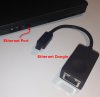
-
Yeah, I'm not sure how these shortcuts work without a a Fn "key."
Your comments did lead me to look at the Fujitsu u904. Aside from a rather silly logo on the lid and the graphics, which everyone has assured will make minimal difference, the Fujitsu brings everything the X1C does, plus more ports and possibly better battery life (website claims up to 10 hours).
Can anyone comment on the Fujitu's keyboard? I've never touched one. -
Yes, that would be greatly appreciated. What does the f-row do when not on Windows.
Greatly appreciated!!! -
Same here, interesting machine. However, I looked at their pricing and, man, that one does cost a bundle...
-
You forgot to mention those heavy, glossy ultra high res touch screens. Trying to make a clamshell notebook more tablet-ish is pretty retarded.
Many have replaced their PC for phones & tablets They are happy now and won't come back. Just focus on the professionals and their needs.droyder likes this. -
You better believe I invest some emotional energy on this one. I just dropped more than 2 grand on it! It's something I use everyday at my full time job as a graphic/web designer which is also a field I'm very passionate about. Don't let that confuse you with me getting offended by your displeasure with it.
I can agree with a lot of what you said. There is a whole discussion we can have on this but I agree that there is large transition period going on with the mobile / desktop industry and how they are in a way converging. My least favorite part is how fragmented Windows 8 feels compared to Windows 7. But I won't go into that since it's getting pretty off topic..
This does look like a great machine too. I'm not looking for a 15" notebook but it does look pretty stacked. On the other hand, I would rather have a full SSD rather than the hybrid solution and the QHD+ over the FHD display. Plus, I'm not sure if this is a glossy display, as I would prefer a matte. I do like that Nvidia Quadro GPU in there though. -
Samsung Ativ Book 9 (Series 9 Haswell successor) NP900X3G to be expected in February: http://forum.notebookreview.com/sam...cessor-ativ-book-9-not-lite-plus-haswell.html
X240s will hopefully appear soon too. -
Displeasure is a harsh word. I dislike some of the design decisions in that laptop, while I like others. At the end of the day, I think I am not going to buy this one, but I have no trouble believing that there are people who will be happy with this laptop.
Understood, and agreed.
I am not sure exactly whay you were looking at (the Dell website(s) you can go to for information on this are admittedly a mess, but that's again a different topic...), but you can configure this machine quite extensively. You can deck it out with three SSDs if you want. The QHD display is glossy, but the FHD is matte, I think. Like I said in other places, I am not convinced of the benefit of the high-resolution displays (but then my eyesight is not what it used to be, either...), and lots of applications have problems with it. I understand, however, that depending on your work, and your visual acuity, your assessment will be different. All I am saying is that high-resolution screens do not benefit everyone. -
X240s has already been in asia market for 3 month.
-
i saw that as well, but there is no non-touch matte WQHD display option here on their specs page:
New ThinkPad X1 Carbon Business Ultrabook | Lenovo (US)
i guess there's a small chance that option could be added later when custom building becomes available, but it's not there yet.
the only other option currently is their awful 900p TN panel. -
Based on the datasheet, I think the chance of being able to get a non-touch WQHD screen is pretty good. We are expecting a 512 GB SSD option and HD5000 graphics as well, and those aren't currently on the spec page either. I guess there's no guarantee that it will be matte, but that's been the trend for non-touch displays up to the this point in the T and X series.
-
The user manual someone else posted a few pages back also mentions a non-touch WQHD version.
-
a non-touch display wouldn't require the top glass layer, so hopefully it's indeed matte.
does anyone know if the same panel can be used for touch or non-touch screens? i.e. is it the glass layer alone that determines touch, or does the actual panel itself also have to be made specifically for touch?
i wonder who's making the WQHD panels for Lenovo. -
Since the new x1c has DP+HDMI, is it possible to connect two external monitors and make it triple-screen?
-
Oh I know it has all that. I meant price for price, the Dell would get quite expensive with all those additions.
-
Lenovo is saying mid-next week for the customize your own.
-
Ah, good to know, thank you. And a colleague of mine yesterday ordered one of the preconfiged models, so I'll let people here know how that turns out. I think the estimated ship date was Jan 10.
-
Agree, on all counts. I use Word and Excel all day and I never use insert, ever (I've never once touched it on my last 4 computers). The home/end keys are never used either--but given their new location, I would actually use them on this machine. Personally I like the changes to the keyboard, enough that I'd consider it over the T440S.
Well, I have a Helix that I use mostly in notebook mode, and I'm ambivalent about the touch screen for a laptop. Obviously, it's needed when I use it in tablet mode, but after the initial "playing around with it" stage, I find that I never use the touch screen in laptop mode. What I have noticed though is occasionally when I'm showing something to someone else, they'll use it, to scroll or zoom. So, if you're working in an interactive environment I can see some utility.
I'm also ambivalent about the glossy screen in general, regardless of touch. I thought I'd hate it in laptop mode, but the truth is it's not all bad. The screen is so bright on the Helix that the reflections really aren't bothersome--and things do appear more sharp. Still, at the end of the day I'd probably still prefer the regular, non-glossy screen. -
Is the touch screen expected to affect battery life?
-
I called them and asked that question. They told me that it supports combinations of 2 monitors. So either no monitor on the laptop + 2 externals or the laptop + 1 external.
-
Did you get that from someone in sales?
-
can someone change this thread title to X1 Carbon Haswell or something, and then merge all the other "new X1 Carbon" threads into this one?
-
I would if I could, but this forum does not allow me to change the title of my own thread...I will try and notify a mod.
Edit: Well, that was quick.droyder likes this. -
Guys,
A couple of questions on the new X1 Carbon, if anyone can please provide some color.
Battery Life
Does anyone know the impact of 1) higher resolution and 2) Touch on battery life ?
The quoted in the tech specs, up to 8.6 hours battery life, is for the lower resolution version (1600x900)?
Thickness
In Sunday’s product presentation and in the comparison to the previous version ( Meet the New X1 Carbon | Lenovo (US)), X1 is promoted as a 17.7mm thin laptop.
However, in the tech specs and in the user manual (page 13) the thickness is 1.965 (for the HD+ version and is slightly more for the higher resolution)
Which of the two is the correct thickness (at the thickest point) ? -
I was thinking about this earlier today. Most of us who buy this machine are buying it for windows purposes, which leads me to a few questions. But first, some context. Here's why I'm buying this machine:
1) The thinkpad trackpoint. I've used trackpoints literally since they were introduced and have not found another vendor who does it nearly as well as IBM did and lenovo does. I also have never gotten very good at using touchpads, such as on the macbook pro, which limits me to lenovo.
2) The high pixel density screen. I use an IPS FHD on my W510 and while it was a good screen 3-4 years ago, it's not as easy on the eyes as it once was. I love the resolution, however. I want high pixel density because, frankly, the macbook pro retina really does look fantastic. If macbook had a trackpoint, I'd consider buying one and install windows on it. That's the experience I want, but in a windows machine.
3) Its size. I'm tired of lugging a 6 pound machine with a 1 pound power brick to and from work.
4) The mini displayport and HDMI outputs (no VGA). Long story, but the short version is that I "hotel" a couple days a week at my office (no desk/office assignments) and all the monitors are HP ZR2440w's, and there's no way to plug the VGA out to the monitor (that I can figure out). I could plug in both monitors into the X1C with a keyboard/mouse and be good to go, though. With a VGA out (such as T440s), I could only plug in one of them.
I bought the W510 back in the day because of the screen and I was playing world of warcraft on the road. I no longer game, and what I gaming I now do is low rent. I use the laptop almost entirely for work purposes now, which means programming, web browsing, office productivity, and database administration.
With regard to the X1C, I'm pretty sure I can work around the keyboard limitations. I'm also fairly sure I can work around the lack of discrete buttons for the trackpoint, because really, what other choice is there if I want a new laptop with trackpoint?
I have nagging worries about pixel density, however. For Firefox and Office, I expect everything to be perfect. For my programming/DBA tools, I have concerns about blurry fonts and such when I enlarge them.
First, is this concern justified?
Second, my baseline is the W510's IPS FHD screen. Is the FHD IPS screen on the T440s pretty much the same quality as my W510, or
Third, I've read of people with other screens (such as the 3k on the T540) using a non-native resolution (such as 1080p) and having it look native/almost-native in order to get around the size issues. This goes against everything I've ever seen with regard to lcd panel capabilities, but I suppose it's possible. Does anyone have experience here to know whether the X1C would look good if you just ran it in 1080p or approximate resolution?
Thanks ahead of time. -
Quit relying on info from dumb sales and chat. Since at least HD4000(ivy bridge) maybe earlier intel has supported 3 monitors regardless of combination as long as the hardware had the ports. right now I would expect you can do 2 external (hdmi + mDP) and local screen, or possibly some combination of three external using the video ports from the one link or one link plus docks. Unless lenovo truly bunged the design up that is, expect to be able to do three externals(no local) regardless of the touch screen option.
-
New X1C from now listed in psref
most of your questions can be answered from it
screen from PSREF
higher PPI display impact depends from usage scenario. if we talking about only matrix energy consumption (~4W) difference - it's not really valuable comparable to others consumers (CPU, GPU, etc...). let's say it differs less than 1W (HD TN vs 3k IPS for same diagonal), 5% from total laptop consumption (from 20W in light usage)
about touch: usually Lenovo Haswell laptops with same hardware with touch works about 30min less from 6h than w\o it. is smth about 8% battery life
about dimensions - pls see my reply for previous question... -
Wow! Thanks for finding this. Seems the site above only lists configurations for the Win7 version.
http://www.lenovo.com/psref/pdf/tabook.pdf - last few pages has both the Win7 and Win8 configurations. -
I don't think we will see a HD5000 in this new X1 Model, according to all specs there is nothing mentioned that an i7-4650U or i5-4250u will be available,... but this is necessary for HD5000 graphics, which provides about 20% more power than HD4400.
The mentioned "Intel HD Graphics 4400 or 5000 in processor," is obviously a mistake, at least for the near future. How long should we wait for this? 2, 3 month? Broadwell comes closer and closer... -
Thats not correct: http://download.lenovo.com/parts/ThinkPad/x1_carbon_gen2_fru_bom_20140107.pdf The i7-4550U is listed there as an option.
-
Ohh no, not i7-4550U... It has only 1,5GHz (max.3GHz TurboBoost) instead of 2.1GHz (3.3GHz Turbo) and is also a lot slower then the i7-4600U
You can look up this desaster right here: ARK | Intel® Produkte vergleichen
But its good to know that it's not worth waiting for the i7-4550U Option...
Thanks ibmthink for this information!
X1 Carbon Gen 2 (Haswell)
Discussion in 'Lenovo' started by ibmthink, Oct 18, 2013.


