 Problems? See this thread at archive.org.
![[IMG]](images/storyImages/ey6KENd.jpg)
Well, I think I have a problem now. Geez.
-
I would hate to be in your shoes. Let us know how it goes.
And if you feel the difference in cost from the 1070 is worth it.
Sent from my BLA-L09 using Tapatalkhmscott likes this. -
The only problem I see is that you only have 3

Sent from my iPhone using Tapatalkhmscott likes this. -
Yeah, you are running out of desk space, more desks!!
 Kevin@GenTechPC and AWholeHam like this.
 -
More computers, more screens, and on the wall too!
-
Hi guys. I've got this laptop 10 days ago. Does it have option while charger is in and battery is already 100% and it doesn't make any damage to the battery. To extend battery life. And how to switch it on?
-
Yes, if battery is above 90% it won't charge
Sent from my BLA-L09 using Tapatalkhmscott likes this. -
-
Be happy that it is... Certain other brands that start with a G don't seem to do this, so your brand new Aero 15 battery degrades by 20% in a month...
-
Essentially that's true, but the level range at which the charging happens is varied by the battery management hardware.
The charging seems to maintain level (stop and hold) between 93%-100%, but that can change by model, so you might be seeing a different range for your laptop.
It can be a little annoying for some that want to unplug at 100% for maximum battery time, I wish there were an override to hold at a level the user determines, even if it's a set and hold once at custom level and then go back to the generic range - to keep users from abusing the battery by permanently holding at 100%.
Although there are some that think the hold should be lower, somewhere between 75%-80% for maximum battery life-span. Maybe there should be an option for this battery longevity mode as well.
There used to be BIOS options for many of these ideas years ago, but it's been auto-mized and put into firmware for a while now.ryzeki likes this. -
The CPU fan just died in my laptop, used it for 20-30 hours........ Damn that was quick!
Tried all settings in Dragon center, it's just dead. If I put it to "turbo boost" which makes all fans go crazy, cpu fan is completely dead and you can hear it try to "kick start" like it's scratching/rubbing into so something.
That is so dope quality right there Sending it back anyway, but this was a surprise
hmscott likes this. -
That was unexpected. Probably got a lemon? I think I have had many components die on me in all the laptops I have ever owned, but the fan was usually not a worry.ALLurGroceries, eucalyptus and hmscott like this.
-
Sorry to hear that man. You have been really unlucky with that unit.
Just sent it back in or have them mail you back a fan, if you feel knowledgeable to install it yourself.
Sent from my BLA-L09 using Tapatalkeucalyptus likes this. -
THROTTLESTOP QUESTION: I seem to have my temps under control using undervolt and reducing multipliers, however, I consistently get power limit warnings. After much googling, I can confirm the PL2 & PL1 yellow warnings occur when waking from sleep and I can clear them. The "EDP other" yellow warning never goes away, if I try to clear it, it comes right back. Running a XTU stress test shows no power limit throttling.
I have read that there are some bios settings that can be changed BUT I'm wondering if I can try adjusting some settings in throttlestop first to see if I can get this to go away before messing around in the bios. I tried changing the Iccmax to 200 (from 128) in cpu core but this did not help. I have rad that changing the values in PPO Current Limit may help but have found no guidance on what values to try. Current settings and warnings:
-
Hi all, new to forums here and can't even call myself a lurker since I've always owned generations-old, refurbed laptops and known exactly how to do whatever I need with them, so not needed forum help until now!
However plumped for the gs65 which I collected today, so that makes my new to both MSI (I mean seriously, the American flag pattern in led keys?!) and Win10.
I understand OC and UV though never bothered with my 3rd gen i3, and I'm wondering what you guys consider is your ideal setup list from out of the box, in terms of OS settings, laptop settings (I mean undervolting, etc) and utilities to have on board, like cpu-z or similar.
I have seen @Ultra Male's Phoenix tweak list on page 20, but am too unfamiliar with win10 to ensure I get everything I ought to.
TLDR: what settings do you make sure are made before making a backup image?
Thanks!! -
Welcome to the board!
It really depends on your usage and all. But if you are concerned about having a backup image for a "cleaner" set up, you might want to consider a clean windows 10 install. Anyways I mostly first uninstall any software I don't want or use, and that includes windows's built in apps that are just clutter. Some apps require commands to remove, or you can use software that was made to perform those actions but i usually avoid installing anything I don't need and do it manually.
Then disable all personalization from the OS as well as data gathering you dont want. Again, there is software out there you can use to perform this for you, but I rather do it myself. At the very least without using anything external you can dive to settings - privacy and put everything you don't want to "no". It's the minimal and doesn't ensure all but it helps. You can turn off DVR recording in settings-xbox as well as disable game mode, I am not even sure it does anything.
As for software I keep around I tended to favor HWmonitor but HWinfo is more popular, and I also keep Throttlestop and Intel XTU around (not installed, just on backup), and a copy of current drivers from the MSI page, all in a carpet and backed up to quickly reinstall anything I need.Phil21185 likes this. -
Thanks for the welcome and the reply! Yes, that sounds very familiar to every clean Win7 install I've ever done (lots!) I had a mental checklist of everything I'd need to do, User account controls, Windows update etc.
I'm trying to map where most things are in Win 10, and I'm just discovering PowerShell for the first time for the nitty gritty bits. I'm also fairly familiar with Regedit for other settings.
I could really do with a specific checklist of things similar to the one on page 20 (which I understand is a service offered to those who have purchased from HIDevolutions), but perhaps more exhaustive so I'm not missing anything basic that I'm not aware of from Win7 to Win10. For now, which generally undesirable programs to remove, which simple settings in control panel ought to be sorted and other things which need to be done via registry or powershell etc. would be a great start!
The first thing I'm going to be doing is getting a Win7 style start menu back!! Apparently ClassicShell is the way to go for that one. The second thing will be to grab a copy of the drivers as you say, but I think I'll repartition the drive (mine only came with a 250gb, even though it is an 8RF with a 1070...?) to a more suitable split until I manage a second SSD.
At the minute, I'm using the laptop out of the box and have tweaked several settings, but once I get a list together, I will likely do a fresh install of Windows, then re-apply.
Overclocking and undervolting I can sort out later if I decide it's needed!
Thanks!Last edited: Feb 7, 2019ryzeki likes this. -
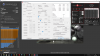
Hi all, a little update on my undervolt situation; Cinebench score (best run) 1246.
Here the TS settings (-0.131); I'm using it daily, and seems rocks solid on both idle/stress.
 Buda-T-, hmscott, JRey and 1 other person like this.
 -
New review from ultrabook review.
https://www.ultrabookreview.com/25084-msi-stealth-gs65-8sg-review/
I questioned the reviewer on reddit if he opened his unit or not because he’s showing the old cooling system from last year.
If that is what he got, then some of us are getting the old cooler and others are getting the new one...
Sent from my iPhone using Tapatalk -
That's wild, maybe working through the last of the production kits for the GS65 from last year? That's wild that the wattage decrease is so much that it can slip in a 2080 Max-Q using the same old cooling.
Also, thanks for posting this, he's got the RTX Port Royal score results for this Max-Q 2080 we can use to compare against the PC World results:
- 3DMark 13 – Port Royal (RTX) Graphics: 4197;
So that confirms the same gimped RTX performance in laptop RTX vs desktop RTX.
I hope someone with a 2070 or 2060 laptop RTX GPU will test and post their Port Royal score so we can fill out the graph for mobile RTX GPU's.
Also, if the Clevo 2080 is supposed to be a real full desktop GPU it should show the Port Royal score of a desktop 2080. Does anyone have one and can post their results? -
I took a closer look and it seems the reviewer used last years picture for the heat pipes.
When he shows pictures of the back cover, it shows the new fan on the GPU side.
Also, I plan to get Port Royal benchmarks today. Gonna reset my system to stock then with my tweaks on.
Sent from my iPhone using Tapatalkhmscott likes this. -
Not Clevo but this 2080 mobile is still on +RTX 2080 desktop level (compared to your chart).
https://www.3dmark.com/pr/40479 -
Finally, a non-Max-Q score from and RTX laptop!
Thanks, so it's the Max-Q crap that's gimped RTX Gigaray's off desktop, not mobile non-Max-Q, well that's great to hear, and good news for buying an RTX laptop, just don't get a Max-Q POS GPU.
Realistically that still puts the full RTX laptop GPU in the same lame RTX boat as the desktop GPU's, but at least it's not a Max-Q POS GPU gimped another 30%+ under desktop RTX performance. -
-
It's crippled alright, though I find it surprising how inefficient the GPU is when running the higher TDP versions up to a desktop. at 80W it's not far behind a GTX1080. that's not too bad for a GPU with one busted knee, three broken ribs, one arm missing and blind.toughasnails, hmscott and Papusan like this.
-
See... Last years Alienware’s 15R4 with oc’d 1070 (N) haven’t a proper upgrade path. The new thin Alienware m17 with 2080Max-Q showed lower graphics score in 3Dmark Firestrike.
-
-
If you want to compare... Firestrike link in my post
http://forum.notebookreview.com/thr...m17-owners-lounge.826893/page-5#post-10859910
How it feels...
http://forum.notebookreview.com/thr...m17-owners-lounge.826893/page-5#post-10861323 -
Well, after repair, testing and optimization (and passing the XTU stress test with flying colors, max temp of 79), I finally dug into a game. The results were bad, several crashes. I have the PC version of Call of Duty Black Ops 4. That game really stresses your cpu and my max temps consistently were in the 91-94 range. Seems that while loading and connecting is the worst and temps do settle down but again, game crashed a few times and computer crashed a few times so I did dial back my undervolt. I also dialed back my multipliers from 39,38.37 to 37.36.35. Those 2 things seemed to stop the computer crashes but the game still crashed once or twice.
So here's a question, how does COD compare to other games regarding CPU stress? How about on a 1-10 scale with 10 being the most stress a game puts on CPU. I'm hoping its a 8-9. If its a 5-6 then I definitely need to do a repaste, again, ugh! BTW the GPU max I saw was 79 and game play seemed fine when it didn't crash. I also left all/most game settings on high and am running the 1060, not 1070 -
COD BO4 is very tough because of AVX usage. Probably a 9-10. Somewhere there.
Before you continue with your undervolt, use TSBench to see if you get errors.
Use 1024.
If you do, reduce undervolt by 5mV and repeat. Once you get no errors, go up in 1mV steps until you error, then drop down.
Sent from my iPhone using Tapatalk -
Also, set a custom fan curve.
For me, CPU and GpU are the same.
0 > 60 > 75 > 85 > 95 > 100
Sent from my iPhone using Tapatalkhmscott likes this. -
I know it is a late reply, but i downloaded the NVIDIA dch drivers (not the standard), and then installed the control panel through Microsoft Store with a link from the internet somewhere... I have been able to update to the latest drivers since.
-
I have a question,
My MSI True Color stopped working after reinstalling intel graphics drivers from the MSI website. I tried reinstalling the MSI True Color and restarted my system but MSI True Color still would not work. Is there a way to fix this?
Thank you -
Check if you have intel graphics control panel installed.
I believe it is a requirement for MSI True colour to work.
You can try installing it from windows store.
If this does not work you might have to uninstall Nvidia and intel graphics driver using DDU and Install Intel drivers first and then install nvidia drivers.
While doing this make sure you are disconnected from internet so windows update does not install the drivers for you.
Hope this helps! -
2 Questions
1. anybody using any of the Nvidia drivers NOT from MSI? If yes, are they any better? I've seen Nvidia has several updates and MSI is lagging behind.
2. Is there anyway to add functions to the integrated webcam. Pan, Zoom, etc. The windows camera app has almost zero functionality.
Thanks for any help -
Could you share your current ThrottleStop.ini for stable settings, following your guide?
offtop: Also, what do you personally use (yes, I've seen your posts previously) in Power Options while on battery? While on battery, do you experience any lags/stuttering while browsing, or delays in opening something like Task Manager? I don't like performance even without undervolting. Factory stock Win10 1809 + drivers. Something what helps me - pushing the power profile (battery icon on taskbar) from "Better Performance" to "Best Performance", but it keeps CPU Frequency on 2.20 GHz all the time.
Would be very grateful for best practices.
PS. Unfortunately, I can't PM you.Last edited: Feb 13, 2019 -
Hello everyone, I've been trying for months undervolting with both xtu and throttlestop but with no success, I can undervolt low as possible until freeze with no change, do you think that my only option is to re-apply thermal paste? Or am I missing something with unlocking bios etc...
Thanks -
1. I can provide you some screen shots. But please remember I've already set AC / DC Loadline to 5 in the BIOS, so the Voltage offset does not translate to the same value as when using the default AC / DC Loadline set to 180. You may go down to -125mV or even further on the cache voltage offset when AC / DC Loadline set to 180, but with it set to 5, the voltage offset you can go about would be significantly less further than you did with AC / DC Loadline set to 180. However both result should provide identical temperature and wattage pulled when you have reached the sweet spot.
2. I'm using high performance plan so I'm not using the Balanced plan which comes with a slider appeared by clicking on the tray icon.This is my AC setting, I prefer not to have any temperature burst so I limit it between x35 and x37, please note that I also have had the followings set up in the Power Option and ThrottleStop EPP:
- ThrottleStop EPP set to 25, corresponding to the Processor energy performance preference policy set to 10%, just in case one wins the EPP war.
- Processor energy performance preference policy set to 10%, corresponds to the ThrottleStop EPP value.
- Processor performance core parking min cores set to 70%, allows maximum 2 cores parked.
- Processor performance core parking max cores set to 100%, allows all cores unparked.
-
This is my Battery mode setting, please note that I also have had the followings set up in the Power Option and ThrottleStop EPP:
- ThrottleStop EPP set to 25, because I've full control over the multiplier down to x8, didn't need to play much with the EPP value to lower the multiplier.
- Processor energy performance preference policy set to 10%.
- Processor performance core parking min cores set to 34%, allows maximum 4 cores parked.
- Processor performance core parking max cores set to 70%, allows maximum 4 cores unparked.
-
3. Going below 1.6GHz will bring a performance impact to app like Task manager / Chrome loaded with multiple pages at the launch of App, these programs activate the dGPU when launching is also one of the major reason causing the lag. The lag becomes more significant when you go below 1.1GHz.JRey likes this. -
@hackness
I see you’re changing the iccMax settings. What’re the benefits? I didn’t see that in your previous guides.
Sent from my iPad using Tapatalk -
Thank you very much on this details .
What is your settings of C-States, in BIOS and in ThrottleStop? -
Allows higher current limit, I've set VR current limit to 928 in the BIOS that's why in ThrottleStop it shows 232A.
I'm not sure if changing it via the ThrottleStop does anything though. But the highest allowed VR current limit in the my GS65's BIOS caps at 928.
CFG Lock is Disabled in the BIOS, laptop is boot up using C8, in Windows I use C1 for plugged-in profile and C8 for Battery profile via ThrottleStop. -
We have thermal throttling, power throttling and current limiting throttling. The system will throttle with TDP is reached, however, the current limit throttling prevents performance in certain circumstances.
We increased ICC current for loads similar to Prime 95 torture, which draws a huge amount of current. If you leave the ICC at default, it will auto throttle immediately. If you increase current max, you will be throttled by either temperature or power, but no longer current.
Basically its giving your CPU its full power withing its power limit envelope.ALLurGroceries and custom90gt like this. -
Oh, so instead of doing the bios IMON slope, you just do it in throttlestop
Sent from my iPhone using Tapatalk -
Hmm it's different. the ICC setting should also be available in the BIOS hidden menu. The IMON Slope is tricking the TDP to believe you are using less than it actually is, but you still have a current reading that has its own limits. For normal apps this limit is not a factor, and that is why upping the limit is the "safest" modification because you will still either thermally throttle or power throttle at full load.
But lower loads that require high current and lowish voltage and clocks, will be limited. There are very few programs that behave this way, so for most users they won't ever notice current limiting throttling. We noticed because a lot of us bench the system and torture it, so we wanted to torture it more.
It's one of the reasons that with irresponsible voltages and currents, my lowly 6820HK can exceed over 100W TDP with the right load, despite being only 4 cores.
EDIT: For example, my absurdly OC'd bench mode CPU scores near 1k in Cinebench. An 8th gen i7 has 2 more cores, but out of the box usually scores 1.15 or so, so 2 more cores (50% more resources) only produce 15% more performance?
But if you check people with i9s or desktop i7 tweaked and OC they are on the 1400 and 1500 range, which is 50% increase over my i7... so more in line with what is expected. -
I see. Can you explain the proper procedure to test iccMax undervolting? I’d like to play with that as well lol... #LaptopMasterRace?
Sent from my iPad using Tapatalk -
Current limit is based on amps, not voltage, so you will only be raising the cut-off value to the limit. Lets say you have a current limit of 100 amps, we will raise it to 200-300 amps. Similarly some thin laptops with the same i7 tend to have current limits of 30A and its a way to limit performance and temps, often having users confused as to why their same CPU in one laptop, is slower than another laptop, despite no thermal throttling.
anyways in hidden BIOS there is a VR Current Limit, you just need to type a big number. I don't know if the hidden BIOS menu is different over my GT73, but in mine it was easily accessible as ICCMax current limit, and it was in multiples of 4, so 400 was 100A, and 800 was 200A.custom90gt likes this. -
Oh I think I already did that then in the bios. It’s in the same area as the AC/DC load line. I set mine to 800
Sent from my iPad using Tapatalk -
There you go!
It seems someone was changing settings without understanding the consequences! Kidding But yeah, this is why the community is awesome. Falkentyne, hackness and many others, through testing and brainstorming, have figured out how to give us full control of our limited hardware to make it shine. Suddenly, laptop i7s are punching the realm of non K i7s.
ALLurGroceries and hackness like this. -
Lol! I didn’t realize throttlestop had some of those options now. I got all excited that I get to play with tweaks more...
Thanks for clarifying!
Sent from my iPhone using Tapatalk
*** The Official MSI GS65 Stealth Owners and Discussions Lounge ***
Discussion in 'MSI Reviews & Owners' Lounges' started by Skylake_, Apr 3, 2018.


