Problems? See this thread at archive.org.
A very very few laptops with 7820 coming with HM175 chipset. Most part laptops with the fully locked down 7700hq
You can see what Notebookscheck say in the Processor section in this review. I have seen some on the forum talked about max 56W as limits for 7820. But can't remember where I saw it. Maybe in the Clevo oc thread.
Edit. @Falkentyne For yoo my friend"It's so bizarre to see how an "unlocked" processor is so damn locked down"
-
-
why i see a .limit notice. on msi afterburner?
and it does not change even though I use turbo / sport mode
Last edited: Sep 6, 2017 -
Basically because pascal has three limits:
TDP - Card throttles to stay within power limits
Thermal - Card throttles to stay within thermal limits
Voltage - Card isn't throttling but can't go any faster because it's running the max allowed voltage.
AFAIK you can't increase max voltage on laptop pascal -
I believe you can increase the voltage point but it requires some work with the curves and setting a certain speed before using the curve editor (control F).
Then find the voltage point you want, and press control L to lock that point, which should make the card run at that voltage and speed. I've seen 1.025v on a laptop 1070 this way.
But a little more detail on what sirgeorge said:
POWER (TDP): affects base clocks, boost clocks, and automatic overclocking (boost 2) clocks.
If you are below TDP limit, and your card needs to do work (example: slow CPU is not holding you back), then your card will boost up to the maximum boost 1 clocks. Usually, the boost 1 clocks are equal to the base clocks + 200. If you exceed TDP, the card will downclock as much as necessary to run below the TDP limit. This could cause the card to run below the boost 1 max speed, or even in some cases, at the base clock speeds only, although this is rare.
LIM (Voltage) only affects boost 2 clocks. Boost 2 clocks is an automatic overclocking that exceeds boost 1 clocks, which is done if the card can do more work to render, is not being held back by the CPU, and is not at the PWR limit. I'm not sure what the limit to the automatic overclocking is, but I think it's 300 or so above boost 1 limit. Boost 2 clocks will try to go as high as possible, until it encounters the PWR limit, internal THERMAL (temperature) limit (which I believe is 54C), or voltage reliability prevents the boost 2 clocks from going any higher.
The boost 2 thermal limit does not show a flag. This causes a drop of 13 mhz every 5C increase off the boost clocks. I believe the boost 1 clocks are not affected by this.
Boost 1 clocks will not be flagged by this "THERMAL" flag for 54C or 44C.
The 91C absolute thermal limit affects all clocks and will cause a flag.Last edited: Sep 6, 2017Papusan and Donald@Paladin44 like this. -
Pressing L in the curve locks the core to the voltage and core speed. Even on idle btw.
Papusan likes this. -
does anyone experience slower internet speed i mean browsing etc when i turn on laptop its alwas slowing my speed especially when i m browsing i tried this on different locations and routers it seems to be happening from the sart for me im on 7re
-
1) Uninstall the Killer Network Suite then reboot
2) Install the LAN/WLAN/Bluetooth Drivers manually from Device managers (INF only) [either Intel or Killer WLAN depending on which Wireless card you have on your system]
LAN Killer E2500 Driver v9.0.0.45
- Intel WLAN Driver v19.70.0 / BT v19.71.0
- Killer WLAN Driver v12.0.0.325/BT v10.0.0.325Donald@Paladin44, Papusan and hmscott like this. -
THX PHOENIX, i have only killer drivers but if i unsintalled them a month ago i was constantly getting bsod.. ive upgraded so im gonna try it thank you
EDIT: nope, still the same :/Last edited: Sep 6, 2017 -
Guys,
IT is long time that I was busy and couldnt check this forum,
Any new driver/frimware/BIOS ?
-
what antivirus are you using?DukeCLR, Donald@Paladin44 and Papusan like this.
-
guys check this, I the overclocking / tuning settings have magically disappeared from my Dragon Center, they were there today morning who took them away?
![[IMG]](images/storyImages/2017_09_07_014129.png)
@PapusanDonald@Paladin44 likes this. -
1) put your system model / specs in your signature so we can better assist you in case you ever run into an issue so we don't keep asking. feel free to use my signature/logoes as a template
2) MSI GT73VR 7RF TITAN PRO DriversDonald@Paladin44 likes this. -
I'm sure you tried overclock past 4.3GHz and you got light corruption-freezing. You don't wanna admit it to yourself
 Or you got a Mickey from the Redmond HQ. Yoo remember you installed a
virus on your taptop yesterday?
Or you got a Mickey from the Redmond HQ. Yoo remember you installed a
virus on your taptop yesterday?
 @Lynx2017
@hmscott
Donald@Paladin44 likes this.
@Lynx2017
@hmscott
Donald@Paladin44 likes this. -
I can overclock my taptop to 4.4 GHz but the Mickey Mouse Center limits it to 42X every reboot. And with the latest update, they limited it to 41X. Today, the whole overclocking feature disappeared from my taptop
Last edited: Sep 6, 2017Donald@Paladin44, Falkentyne and Papusan like this.
-
Yeah, Never ever use OEMs Bloatware. Yoo have to hope the bloat disappear with next reboot Same as the Oc features
 Donald@Paladin44 and Spartan@HIDevolution like this.
 -
I just use Intel Extreme Utility, been at 4.2ghz on my 7820HK 24.7 for 4-5 months now with 0 issues or downclocking.
The Clevo Software is absolute junk. Also, when I do a clean install of a OS, I don't even have to install XTU again, my 4.2ghz still sticks 24.7 and temps are good, so yeah no complaints here, rock on Intel.
so imo screw PREMA bios, screw MSI software, just go XTU imo anyway.
I am currently mining Vertcoin on my laptop, gtx 1070 stays at 1976mhz on core, 9ghz vram, and 80 watt consumption with 67 celsius... freaking lovely. better than desktop 1070 mining
hmscott likes this. -
I was going for the latest version of GT73VR, because I thought it would be better, until I saw this thread and thank you guys for all the links your provided.
I need a little help right now cause I really feel panicked
on MSI specifications page I noticed many differences between the basic 425 and the newest 872, as:
Chipset: Intel®CM238 / Intel® HM175
LAN : Killer Gaming Network E2500 / Killer Gaming Network E2400
WLAN: Killer N1535 Combo / Killer N1435 Combo
Audio Port: 1/1 ESS Sabre HiFi / 1/1/TOSLINK
AC Power Adaptor: 330W / 230W ?????
upon your experience, is this a big downgrading?
I found that I can configure 425 on XOTIC, but it will cost more of course.
Can I know what do you think?hmscott likes this. -
If I was getting an MSI laptop or Clevo, the only choice would be to get it from HIDevolution.
Reason being, not only is their quality control and customization options better. BUT, MSI support is atrocious to say the least, but when you have HIDevolution's Tech Support as well, if they need to, they have direct contacts with MSI seniors to get you the right answers quickly. that's how I got my GSYNC not working issue fixed whereas when I called the MSI Tech support, every single agent was telling my screen is not GYSYNC and MSI never advertised it to be GSYNC even though every review and member here swear it is GSYNC. At the end, HIDevolution helped me fix the issue.
I suggest you email [email protected] and tell him your NBR forum username so you can get a small discount
Be smart...be like Phoenix....![[IMG]](images/storyImages/y0H0dMj.gif) hmscott, Donald@Paladin44, Elraey and 1 other person like this.
hmscott, Donald@Paladin44, Elraey and 1 other person like this. -
Thank you so much Phoenix, I got your pointhmscott, Donald@Paladin44 and Spartan@HIDevolution like this.
-
sure man, glad you'll be joining the MSI Gaming Team. Let us know how it goeshmscott, Elraey and Donald@Paladin44 like this.
-
Sure, Once I join it officially will let you know
Spartan@HIDevolution, hmscott and Donald@Paladin44 like this.
-
HI guys,
I keep reading, but i cant see nothing for HQ version of cpu.
I have GT73VR 7RE-494CA Titan and wonder if there is anything that i can do to get more out of single 1070?
So far i flashed 8A bios and thats about it.
Thanks in advance -
What is going on with MSI?
Why are they selling GT75VR's with 7700HQ's (and HM175 chipset)?
https://ca.msi.com/Laptop/GT75VR-7RF-036CA-Titan-Pro/Specification#hero-specification&sku_no=13277
And why are they selling a 7820hk version with the HM175 chipset?
https://ca.msi.com/Laptop/GT75VR-7R...Specification#hero-specification&sku_no=13276
Do people have to now pay special attention to make sure they get a 7820HK and a CM238 chipset even on the newest version? -
We only sell the Intel® Core™ i7-7820HK w/ CM238 versions.
Keep in mind that MSI is a Global company...all markets worldwide are not like ours.hmscott, Elraey, Spartan@HIDevolution and 2 others like this. -
Save on cost or put it the other way... Earn $2 usd more on every unit sold... Do your math, bruh
![[IMG]](images/storyImages/giphy.gif) Spartan@HIDevolution, Falkentyne and Donald@Paladin44 like this.
Spartan@HIDevolution, Falkentyne and Donald@Paladin44 like this. -
You would be suprised with how many people don't care about the specs as long as it says core i7, or think that turbo clocks apply to all cores by default etc. The reason BGA kept thriving is presicely because users simply don't care. Most of this forum is actually about people that care in different ways. But we as a whole are only a fraction of the total potential market and why we have shifts in tech that often seem silly.
There is a market for everything, but it seems the BGA, thin and light, cheap laptops are considerably more popular. From all manufacturers.hmscott likes this. -
Or lack of knowledge/don't know that there is better options out there.
Last edited: Sep 8, 2017hmscott likes this. -
Hi ryzeki!
Were you able to test the offset 10 value?hmscott likes this. -
Sorry, havent even turned on my lap today. But I already left it dissassembled. Will test tomorrow. (Upgraded my hdd to sdd and left the machine cloning the disks last night).
I also have my killawatt in handy so we will know tomorrow. Right now I am off to sleep and have a very long day writing maintentance reports...
Sent from my SM-G955F using Tapatalkhmscott and Falkentyne like this. -
I used to believe that. But sadly that isnt the cas most of the time. And the same applies to a lot of subjects. Some people just don't care.
Sent from my SM-G955F using Tapatalk -
-
-
Tbh, if all I wanted was a gaming laptop that gives me steady fps in my games, why would I care about i7 HQ or the HM chipset? Tuning voltage, clock speed and then making sure my temps are good is a PITA for most users. They just want to turn on the laptop and play Overwatch, BF, WoW, etc without tweaking all these settings at the hardware level.
-
Because you may wind up running into power limits and throttling on the HM chipset. I'm not sure if the HM chipset responds to package power limit settings, but if it doesn't, your shiny new 7820HK CPU can be throttling at *stock* speeds.
Then your typical "college kid" who wants to play BF1 and GTA5 and PUBG will be getting CPU throttling because he has no idea what undervolting or Throttlestop is...Donald@Paladin44 likes this. -
Throttling is called Lag by most non tech savy gamer lol. I bet this is why we do not have a riot yet.
-
So, are you saying 'lag' is Ok with the non-tech savvy user? They just say "Oh well, it is lagging again." and accept that without contacting tech support?
If so, I wonder how many users are like that. Elraey and Spartan@HIDevolution like this.
 -
Sadly this is what is happening. When you get power throttle or thermal throttle, there is nothing in windows notifying you about that.Donald@Paladin44 likes this.
-
Ok looks like for 6th gen (skylake) systems, the values are slightly different:
RW Everything EC (Embedded controller) RAM:
Offset E3: (E0+03)
GT73VR 6RD/6RE/6RF:
10=230W AC limit
11=330W AC limit
GT73VR 7RD/7RE/7RF
90=230W
91=330W
I need help from 1070 SLI users please (NOT GT83VR)
If you own a GT73VR 7RE SLI, or GT73VR 6RE SLI, please post screenshots of your entire RW Everything->EC (embedded controller) window.
(I would prefer GT73VR 7RE SLI users as that's alot more similar to 7RE single card).
Something is controlling the SLI flag and I have no idea what or where it is (460W power limit).
1080 users (6RF/7RF) need access to this to disable hybrid power draw by making their machine act like a 1070 SLI (2x230W PSU's).
Because GT73VR SLI and GT73VR single card 1070 use the exact same main offset value (E3=90 for kaby lake, E3=10 for Skylake). So something else is triggering an SLI value. -
NOD32, everything else nearly off im using q&qsu10Donald@Paladin44 likes this.
-
Check!
Attached Files:
-
-
Did you just mod a GT73VR MSI Vbios with an Acer laptop ? Man that shouldn't be allowed
Make sure you use RW Everything to mod EC offset E3 to 91 so you won't have CPU power throttling or excessive battery drain. What power limit did you set at maximum?Last edited: Sep 10, 2017 -
It was a good acer laptop and my first laptop.
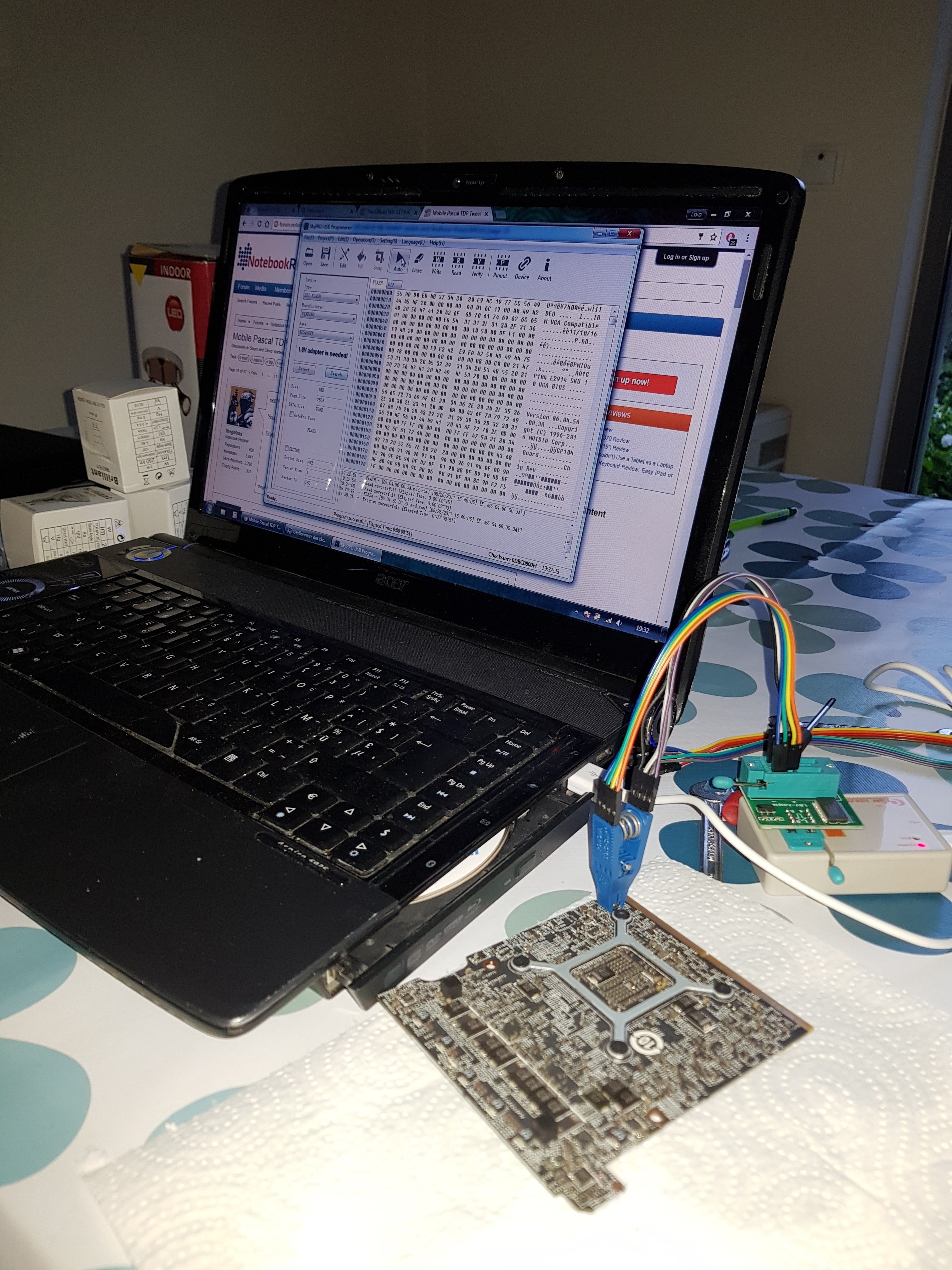
My msi boot normal (fom hdd light) but no sceen, only black screen :-( -
? It was working before you removed the video card?
Try doing the EC Reset (the pin hole button at the bottom right), then make sure you inserted the video card correctly and fully in the slot. Sometimes it has to be rocked slightly back and forth while inserting. I believe Deoxit D5 can also be lightly coated over the pins and brushed across (with something like a microfiber cloth) then inserted, but then you have to let it sit to dry.
You can also try the clear CMOS with holding down the power button for 45 seconds.
Usually a black screen after a hardware Vbios flash, however, means something went wrong with the flash, if the system actually booted into windows successfully. But usually a bad flash would mean the laptop would not boot at all.
You did use the 1.8v adapter on your flasher, right? (ok the picture shows the 1.8v).
Was the checksum correct?
How do you know the computer booted into windows succesfully and didn't just freeze at POST (with the HDD light or power light on?).
It looks like you did everything correctly.
Try doing a clear cmos (with the power button pressed down for 45 seconds). It might do one full freeze (after over 1 minute) with the power light "cycling" once, then start boot looping; you may have to do one manual power off and on during this, if it does nothing for 2 minutes.Last edited: Sep 10, 2017 -
So....
Thanks for the help.
It's working now! What I did :
Used the pascal bios editor and used the presed value. Boot without screen. Hdd blinking and noise prove the boot works
Flash back the stock vbios, screen work
Reopen the modded bios and change some values : No screen (neither on hdmi)
In the end, reopen the origonal bios and tune by myself and it's fine
-
You used "preset" on the 3A Vbios, right? And it black screened?
The checksum button was yellow (not white), right?
Hmm, Send a PM over to Coolane about that, because I'm not sure what went wrong.
I used "preset" on the 8A Vbios, then I changed the temp limit from 54 to 70 and saved it.Last edited: Sep 10, 2017 -
I'm not sure about where is the real problem.
I made something like ten vbios with different value.
For instance :
Stock except in first tab, target : 150W, limit 160W : NOK
Stock except in first tab, target 150W, limit 150W: OK
What's your exact values?
P.S. Yes, it's a 3A Vbios -
On 8A: after using "preset":
Target: 151000 (default 115000)
Limit: 170000 (default 115000)
Slider: Adjustable (default fixed)
Throttling temp: 71C (I changed this from 91C, I think 91C is not safe).
Rated temp:91
Max temp: 91
Fixed (adjustable temp does not work)
Extreme tab (this should be set this way when using "preset")
16200 (default is 14500)
242000 (default is 181000)
137600 (default is 76700).
These "Extreme" settings from "Preset" button will limit TDP to 200W (if you try to use a TDP slider higher than 200W, it won't work). This is normally the stock TDP limit For GTX 1080. To go higher than 200W (not recommended unless you have the money to buy new hardware), you should use the GTX 1080 "Preset" button values of 19200, 242000, 137600)--in this case the only change is 16200->19200.
I don't think this is the problem.
I think something is wrong with your preset values and the target/limit.
you should PM Coolane about your problem though.Last edited: Sep 10, 2017 -
I'll do some new test tonight and report the results to Coolane.
BTW, it was not that hard to flash.
Just the alignement of the chip with the clip.
I didn't use the second clip ( already wired) : http://m.befr.ebay.be/itm/272676851845 -
Hello GT73VR Experts,
I would like to get your opinion about a machine.
Maybe I want to buy one.
Now there is a used GT73VR with 7820hk and gtx 1080 in the local sale.
But this user is selling an ether mining rig too. So maybe he used this laptop for mining over 6 months.
Do you think that it would be ok to buy or should I avoid mining machines?
Thank you.
Hendrik
Gesendet von iPhone mit Tapatalk -
@Phoenix
I recently came across a weird behavior of GPU fan,
I done some upgrades, added 960 Pro and 4TB Seagate, did fresh install of Windows 10 Pro, laptop working fine...only weird thing I noticed that
if GPU not in use, Fan Auto, speed 1200 RPM, temp 40 to 44, depend on ambient temp.
GPU in use and fan speed increase e.g gaming etc, after the gaming session, GPU temp drop back to normal 40 to 44 degree depend on ambient temperature but Fan speed stuck at min 1800, it will not decrease to 1200 unless I restart the laptop,
Note: Since I bought the laptop, it was on factory default OS and I never did the reset or re-installation.
I'm not sure it has something to do with fresh Install, windows 10 pro or I'm using 7RF EC firmware
Since you did many fresh installations and using windows 10 pro, were you came across this GPU fan behavior or any idea why fan speed not decreasing to 1200 RPM min, when it should be.hmscott likes this.
The Official MSI GT73VR Owners and Discussions Lounge
Discussion in 'MSI Reviews & Owners' Lounges' started by -=$tR|k3r=-, Aug 16, 2016.