Problems? See this thread at archive.org.
My BIOS says the EC version is 1814EMS1.103 which is how it came out of the box. Just for confirmation, this one is the latest one right? No need to update? Thank you.
-
-
hedehede81 and ryzeki like this.
-
guys, have you located a decent seller (ebay/aliexpress) for a spare power adapter? There are a lot of Dell ones but their tip needs to be changed and the MSI/clevo ones are 2x-3x the price of Dell ones.
Last edited: Nov 28, 2016 -
You can't order from MSI? Or maybe even resellers? For 330w, you can also look for the "clevo" 330w adapter which is the same one, in the case of ebay.hmscott and hedehede81 like this.
-
Well, ordering from MSI or the genuine looking Ebay ones seem around or more than $190. Which is crazy, when 330w Dell ones are around $70-80. I found one aliexpress seller selling for $100 shipping included but not very sure of the quality.
-
I do believe that's what they cost. Around 150 to 200dlrs. I've bought original OEM PSUs before (180w) that cost me 150dlrs I think. I would expect the bigger PSUs to be around the price.
Unless you can find cheaper options around. Good luck hmscott and hedehede81 like this.
 -
Seems like you will have to gamble if you want to purchase it through aliexpress.
hmscott likes this. -
Well, you put it nicely, a 3rd party power adapter costed me a laptop before, so it indeed is a gamble I'm a bit hesitant to take now.
On the other hand, I couldn't even locate a source/name/datasheet for 4 pin female jack for the power adapter. Kycon seems to make similar ones but they have pins instead of holes. Unbelievable
Last edited: Nov 29, 2016hmscott likes this. -
Guys, I have a question about bandwidth. Does adding an M.2 SATA SSD to the empty slot or changing the 2.5" HDD to a SATA SSD affect the performance of the M.2 PCIe SSDs, GPUs or anything else? In other words, will it decrease the bandwidth of other components?
-
Yes. All I/O goes through the PCH which caps out at 3.93GB/s theoretical to the CPU.
-
This is relevant for all GT80 owners, a custom laptop cooler for those that want better temps. feel free to check it out:
http://forum.notebookreview.com/thr...vidia-gtx-1080s.794897/page-108#post-10413551custom90gt likes this. -
Has anyone tried to upgrade or change the wireless card? I was wondering how to get to it with least amount of disassembly. I understand it is in the hinge area? What needs to be removed? Thanks.
-
Hello just one question which is the best budget friendly option for m.2 upgrade, or just go and buy the 960 pro?
-
It's really up to where you get your joy from your laptop.
Do you get your joy from benchmark numbers, or from gaming and application usage?
The numbers from M.2 NvME drives is amazing, but as a ratio of improvement, it's not really enough to notice much of that speed improvement in day to day operations.
When the bump in speed was 10x, from 40MB/sec-50MB/sec HDD to 400MB/sec-500MB/sec SSD, along with the even larger ratio improvement in latency for access, the difference can be felt.
When the performance difference is 2x-4x, going from 550MB/sec to 1100MB/sec-2200MB/sec that's not enough to feel - not just because of the ration is lower, it's actually a slice of time that's insignificant when measured.
Applications only use IO a small fraction of the time, so if the time to execute a function is 100, and the IO portion is 5 units (artificially high for this example), then reducing that 5 units, or 5% by 1/2, or to 1/4 to 2.5% or 1.75% vs 90% by CPU/GPU then you won't actually feel the change.
So, if you want to get more storage for less $, then fill up with SATA drives, RAID0 them for fun if you like to get nearer to PCIE x4 speeds, and enjoy the savings.
Something like a Samsung X400 / X300, or Samsung on sale, anything that runs in the range of 500-550MB/sec Read/Write will do
Last edited: Jan 16, 2017hedehede81 likes this. -
The simultanous usage will share the bandwidth, but just the act of putting in another M.2 in that last slot, or a new 2.5" won't in itself slow down the other drive transfers while they are exclusively using the bandwidth.
-
Ok I'll be more specific I need to change the OS to window 7 ultimate, so I need just 1 512 m.2 ssd drive, price 100 to 250, also I want to know about which drives I'll need to install the w7. Model msi titan gt80s sli 002. Also any tip to save some battery or another tips for first time user. Thanks.
-
LOL my price increase for Kabylake to go to 1080 sli was not $50 like previously stated by $150 for 1080sli and $250 increase for 1070 sli...
*angry*
-
Hey could someone please clarify this SuperPort, Thunderbolt 3 thing? A little research has said that it isn't a Thunderbolt 3 port.. what gives?
Sent from my SM-G930P using Tapatalk -
it is thunderbolt for sure dont worry. Earlier models said superport because of licensing not completed or something like that but gt80s says thunderbolt and you can see the appropiate firmware and driver under support section. I believe earlier models also have tbunderbolt.
-
Hmmm. I'll take a look at the device manager tonight. I wish it was more clear.
Sent from my SM-G930P using Tapatalk -
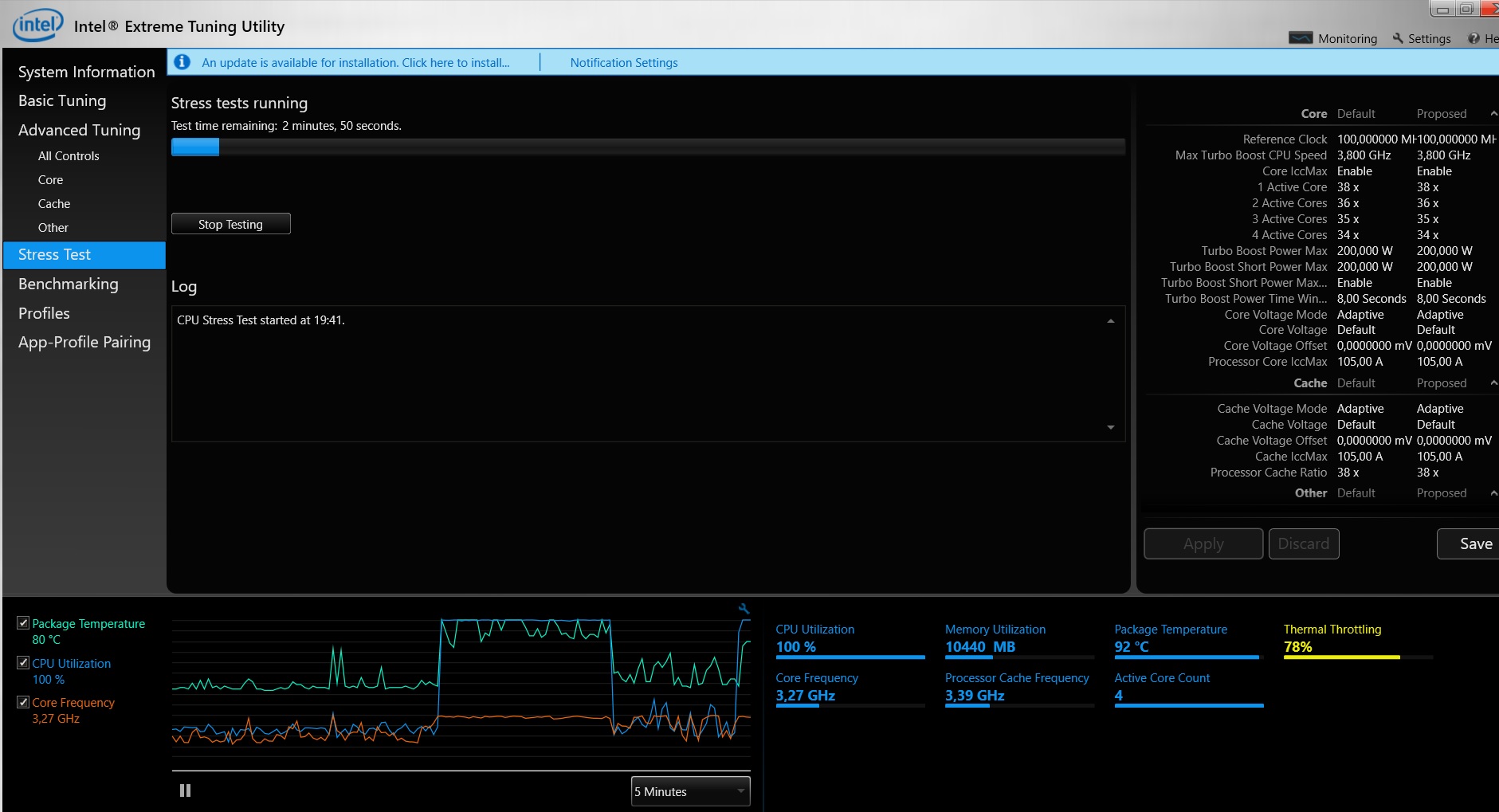
Hi, guys. I have a problem with my processor. My notebook was in service for cleaning and after that I see that my notebook start work not correctly, I have stupid lags and my coolers start work on maximum in all games. When I run stress test in XTU, I see temp throttling. This is problem in bad thermal paste?
Attached Files:
-
-
Yeah 92 celsius is hot enough, you are probably reaching a bit higher and thus constantly thermal throttling.
How much time does it take to reach that temp? I would recommend repasting, maybe they used too much paste, or too little, or the heatsink is not sitting properly. My GT80 did get hot, but my max temps during summer barely reached 90, so I never really had thermal throttling. Between 80 to 90 is relatively normal for this machine and throttling only during extensive 100% use. I don't think I managed to get Intel XTU to throttle my CPU before.
I would also recommend undervolting. -
Volting is default, I don't change anything in last time. It take this temp instant after run stresstest or game, but change one sec 84, another one 95 and all time changed from 85 to 97. When I run Memory test, I've got 90% throttling after 5second from start.
-
Yeah that's not normal, if you have such immediate temperature issues, then you are better off repasting.SellerDF and Spartan@HIDevolution like this.
-
Thanks for fast answer, I will try in other service
-
Recently I got a rival 700 cuz i didn't want to deal with separate software after my issues with Razer... The mouse came defective and the cords that snap in under the mouse touch the mousepad and drag.... and Gamesense only supports 3 games :0 This mouse was to replace my orochi which stopped working...
Should I exchange for another rival 700 or return and get a logitech G900?
thanks in advance,
Masonhmscott likes this. -
I'd grab the Logitech. I've never had any significant issues with them.
Sent from my SM-G930W8 using Tapatalkmason2smart and hmscott like this. -
Hello, I wonder which is the best option for me, buy just the 16gb ram module same specs (DDR4 2133) or buy the 32gb ram kit with more speed. Any brand or recommendation?
Also buy the mydigitalssd m.2 or samsung 960 evo used.
Thankshmscott likes this. -
RAM speed usually only shows up on benchmarks, our motherboard can only use 2133 speed even if you plug in 2400. Therefore, just get a decent brand with 2133mhz. I got 2x Crucial Ballistik sport 16gb 2400 mhz when they were in sale.
For SSD, may I ask why are you replacing the stock RAID SSDs? Why dont you get M.2 SATA SSD for the spare slot?hmscott likes this. -
Yes of couse...long story short, I brought it used even if the person said "is new".. the battery said OEM... so I'm concerned if the laptop is already used for at least 1 year... and yes I'll keep the stock m.2 for my OS, and the mydigitalssd model it'll be just for edit videos and games but many said it can't be install the win7 in this m.2 ssd model...so maybe is a better option the 950 pro used..
hmscott likes this. -
So is better just buy the 16 module ram from crucial (balistic or standard?) Plus the 24gb it'll be 48gb, Right?hmscott likes this.
-
Make sure if you have GT80S like in the title(Desktop GPUs) or an older model GT80. GT80 had 3 M.2 slots I guess but GT80s has only 2 M.2 NVMe slots and they are already used up, so you cant both keep stock SSD and add 950 pro with this model, I had to sell my 950 pro for this very reason. I added a 1TB M.2 SATA SSD (Crucial again) on the spare port.
For the RAM, if you have the budget, try to keep everything same size and speed. What you say generally works OK, mixing different sizes and speeds but I tend to stay away from that. If you have 24 GB installed I would try to sell them on Ebay and get 2x16GB instead. When you have more money you can get 2x16gb more and max out your system with 64gb RAM. -
Well the model oils msi titan gt80s Sli 002, so 4 m.2 slots (2×4 128x2); 4 slots for ram (3×4 2133). That why I think is a better option just buy one 16 module ram and 1 mydigitalssd or 950 pro or 960 evo (512) m.2 ssd as an upgrade to my latop...
hmscott likes this. -
The GT80 has *4* M.2 SATA slots, and 1 2.5" HDD/SSD area + the ODD could be replaced with a thing 2.5" storage device.
The GT80S has *3* M.2 slots, 2 of them are PCIE x4 NvME compatible and 1 M.2 SATA slot - but all 3 can be used as M.2 SATA slots for 3x RAID0, and the same 2 x 2.5" slots as defined above.
There isn't much cooling from air flow around the GT80 / GT80S M.2 slots, and PCIE x4 NvME SSD's get really hot - and throttle under sustained load usage. So it's better to save the $ and get a larger M.2 SATA for less money.
At the time I found 4x 500GB SSD's worked great, the Evo 850, M600, and BX200 were all great performers and with the transfer load spread out over 4 drives individual drives didn't get as hot - 1/4 the transfer time *approximately 3.2x* made the drives run cooler.
The benchmarks for cooled down PCIE x4 drives are great, but you won't notice the difference in normal operation, IO transfers are a small part of application use.
Save the $ and get huge 1TB Samsung Evo 850, SanDisk x400, Crucial MX300, or other M.2 SATA drives
alexandernigth and hedehede81 like this. -
If you have 4 M.2 connectors / slots, you have a GT80, not a GT80S...
-
OK, so you have the 256GB version with a spare M.2 NVMe slot? Just open the top cover(only 2 screws) and double check you have a spare NVMe slot before buying.hmscott likes this.
-
Ram module
Kingston Technology HyperX Impact 16GB 2133MHz DDR4 CL13 260-Pin SODIMM Laptop Memory HX421S13IB/16
M.2
950 pro
960 evo
MyDigitalSSD 480hmscott likes this. -
Yes 4 m.2 slots
Specs:
Slide the metal panel aside and you’ll find the optical drive, four M.2 SSD slots, two additional DDR4 RAM slots and a bay for conventional 2.5-inch SATA hard drive or SSDhmscott likes this. -
The GT80S still has the "cut out" for the 4th M.2 SSD, but it doesn't have the M.2 connector or the standoff to screw it in place...the GT80 has 4 M.2 connectors, 1 in each of 4 slots.
If you have 4 M.2 slots with 4 M.2 connectors, you have a GT80, and those M.2 slots don't support PCIE x4 / NvME, they are all SATA ports.Last edited: Feb 22, 2017mason2smart and hedehede81 like this. -
My 950 pros have been great. Also they are mlc drives which supposedly last better. Been using 2x 500 GB in raid and have had zero controller issues or speed issues. Can't vouch for the 850 evo tho...
-
So is a better option the 950 pro instead of the 960 evo? How much is a fair price to buy for a 950 pro used?? Or evo?
-
pro is mlc i believe evo is tlc... there have been many reported issues with TLC vs MLC... do some research its really up to u
I think my issues may be less due to my 850 evo and more because of a bad sata port/cable in my 2.5 in slot which is causing CRC errors... anyone else have an issue like this? -
-
Hi to everybody, i want to change the killer wifi module with an Intel 8260AC but i don't know where is it, can you help me? Thanks in advance
edit: found it after half day LOL.
![[IMG]](images/storyImages/R6igDYil.jpg)
![[IMG]](images/storyImages/qKqiOPkl.jpg) Last edited: Mar 13, 2017hmscott and hedehede81 like this.
Last edited: Mar 13, 2017hmscott and hedehede81 like this. -
is it enough to only remove the hinge cover to replace the card? I can see the screw of the card in the photo, after removing it the card can be slided out? any other thing needed? thanks.
-
no one screw to remove the plastic cover, wifi card just one screw and it slide out, very easy.
hedehede81 likes this. -
I wanted to change it before but a video showed it very complicated, almost entire frame disaasembly was needed. It is good to know it can be replaced easily. How do you slide the new card back without seeing the connector? any problems?
-
Just slide in witouth seeing the connector. It's most easy to do than to explain
Sorry for My English.hedehede81 likes this. -
and just to confirm, hinge cover is opened by just prying/pulling up and no screws needed right?
-
***The Official MSI GT80S Titan (w/desktop 980 GPU's) Owner's Lounge***
Discussion in 'MSI Reviews & Owners' Lounges' started by -=$tR|k3r=-, Dec 15, 2015.