Problems? See this thread at archive.org.
It works fine; the usb and esata on the damaged side are bent so you need to push hard to plug stuff there but other than that they still function.I'll be looking forward to the results your aluminum case project.
-
is anyone know how to reduce the heat on the laptop palmrest?
it's getting freakin irritating and hot when playing games. -,-
but a thick sticker and paste it on the palmrest? lol -
Custom case project thread:
http://forum.notebookreview.com/msi...20-gx630-custom-aluminum-chassis-project.html
Hmm. No.
Buy some thick thermal shielding or kapton tape and apply it to your motherboard on the other side of your CPU. Or improve the CPU cooling. -
hmm
apply em just bellow the cpu? -
On the other side of the motherboard which isn't normally accessible.
You have to disassemble the laptop completely. Its the only way.
Adding copper or aluminum where the CPU is might help, but it will still probably get hot under load. -
i see..
by the way i have an issue, my laptop freezed every 10-15mins when playing bff2.. may i know whats your highest and most stable clock + gpu voltage when playing bff2 or other games?
I just bought an Q1TN ES 1.73 GHZ Processor 820qm from ebay
looking forward to replace my i5 540m proccesor ! -
now im running bff2 (3 match) on directx 9 without freezing.
and finally! my tuniq tx-4 just arrived + 1 set of copper vram.
Previously I applied 2 set of copper vram on my gpu and it reduced quite a bit.
Now I just reapplied my thermal paste from as5 to tuniq tx-4. BIG improvement!
My temp reduced by 5c instantly! from 74c to 69c when playing bff2 (around 20mins clocked at 750/1000)!
and my cpu temp reduced from 78 to 71c!
Finally I applied the copper vram on gpu heatsink pipe and some on top of the cpu.
pretty happy with these temp!
the only problem that im having now, when playing bff2 about 15mins, it freezes, ctrl+alt+del doesn't work either. I need to shut down by pressing the power button and turn it on again..
Can anyone help me please? -
i too get freezes if i overclock but very seldom and it only freezes for like 15secs and returns to normal. im fine with playing bf2 on medium and low settings
-
Ah I think I just found the problem after reading on ea.com forum for quite some time..
Try to uininstall the realtek audio driver and punkbuster
Reboot and install the latest version of realtek driver and punkbuster!
I've been playing for an hour now without any issue.
I could run on max setting no anti anlising and hbao
Running at 40-60 fps silky smooth!
Never ever goes bellow 30 fps!
I'm starting in love with this machine! Haha
My idling temp went down too from 50c to 44c
I can't wait to get my i7 820qm es soon !!
edit: temp slightly went up again
reduced abt 1-2c only from as5 to tuniq tx-4 (still curing time currently 1 day)
-bff2 crashing again, it seems alot of players are having this issue =/ -
not much diff for me. i can play at high settings but i just prefer 60fps or near there and i never overclock
-
why don't you back off the OC and see if it still crashes.
850 is a high core clock for 1.05V. -
there are tons of ppl having this issue lol
PC Crash/Freeze cause and solution - Battlefield Bad Company 2 PC - Battlefield Bad Company 2: EA Forums
i have never ever crash on other games before though.
what is the best and most stable ati driver are you guys using>?
do you mind to send me the url link please? -
I always use the latest.
Just lower the clocks to stock and see if your freezing is OC-related. -
tried to lower down to 700/1000 doesn't work either.
single player runs awesome smooth at 850/1000
freeze only when playing multiplayer
so you are using 11.5/11.5a or 11.5b mate? -
my laptop randomly seems to drop the corespeed by more than half at itmes while I'm gaming and I'm not sure why.
I have eco set to gaming and I usually play fine but at times I get a huge fps decrease of about 50-60. I opened up CPU-Z and I noticed that I play fine when my
Core speeds are :
#1: 2660.3 mhz
#2: 2660.3 mhz
but then at random times it goes too:
#1: 1193 mhz
#2 1193 mhz
It makes a game unbarable to play and it usually goes back to the 2660.3 mhz after a certain amount of time... I don't know why it fluctuates like that
Anyone have any idea? -
Throttling to prevent overheating. Try to lover your temps.
-
I haven't changed anything on my computer overclocking wise and I also have a cooling fan underneath...
What more can I do ? : / -
Change Thermal grease or/and clean out the vents.
But first download Throttlestop and use it to log your temps and clocks. If the throttling comes when the temps rising, then its definately caused by heat. -
I'm using 11.5.
-
guys,
is it true that the msi gx640 cant play battlefield 3
i have here a test:
Battlefield 3 System Requirements - PC Game Battlefield 3 requirements
can someone say's iff this is right or not.
Greets,
Robert -
It's false, don't rely on those sites.
-
Has anyone tried playing Assassin's Creed 2? I only get around 30-60 fps on all high settings.
-
could anyone overclock your ati 5850 to about 800/1000 and run furmark for 10minutes please?
please let me know your highest temp.
i've been modding this laptop since last month..
your result will be helping me alot!
thanks! -
So, I want to maybe overclock the CPU to about 3.0 ghz. It currently OC's to 2.6ghz with eco on gaming...
Thing is, I am hesitant to do so because I already have a cool mat underneath my laptop and my CPU seems to throttle due to it getting hot which causes the CPU to go to roughly 1193.0 mhz while I'm gaming which reduces performance.. I fixed this by going into the gaming advanced setting and putting the CPU Cooling Systme to "PASSIVE" instead of "ACTIVE."
With that being said, is it even worth overclocking if my CPU is already throttling?
I've also heard that there is a way to significantlly reduce the temperature of the GPU and CPU by changing the thermal paste, or only reappling the CPU's thermal paste... does anyone know if it is worth doing and if there is a video guide for the gx640-260us or a thread about it? -
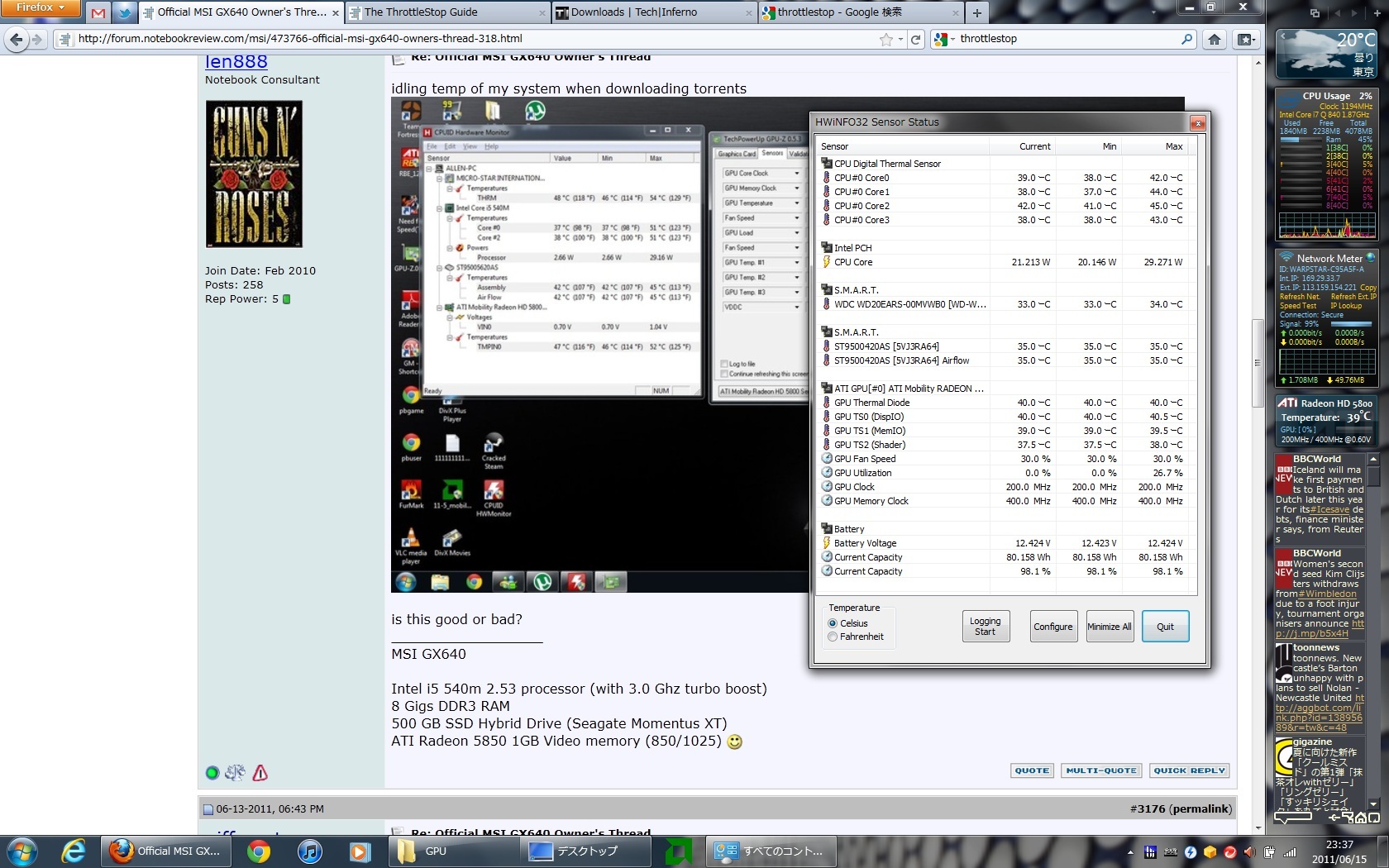
idling temp of my system when downloading torrents
![[IMG]](images/storyImages/idlingtemp.jpg)
is this good or bad? -
Idle temps are hard to control, no matter what.
If you lock it to the lowest clocks for example, it will end up running hotter because it wont handle the stress of scrolling down on a webpage.
YouTube - MSI Notebook GT640 --- Disassembling‏
Overclocking is probably worth it, but more worth it to buy an i7. -
Also so you are saying to overclock even though my CPU is throttling?
What i7 is ideal for this gx640-260us? I may just do that instead...
I have also heard updating the bios and the vbios can improve performance and lower temps, is that true? -
Also, wow... I haven't really done any overclocking to my CPU but my idle temps are already at 55 degrees and 56 degrees for both cores : /
I just tried opening up my computer to change the thermal paste and I was able to get all the screws off but the 2 screws next to the silver plating near the fan, they were so hard to get off that I just gave up.
I need a different screwdriver or something to take those 2 out. -
is it possible to upgrade the gx640 with one of the sandy bridge-cpus?
-
great video!
but is there any other method to open up the palmrest out from the laptop itself?
i just need to tape some thick tape to reduce my palmrest heat
-
just enjoy the heat lol
-
It looks quite nice, and I'm guessing your fan won't go into higer rpms even temporarily with those temps.
These are my idle temp when browsing lightly with my bottom lids off and with a notebook cooler under the laptop itself.Attached Files:
-
-
those temps are way better than mine haha..
my gpu was clocked at 100/100 and still get higher temp than yours which has 400/500 clock
what thermal paste do you use?
and do you use copper shim in between the gpu and heatsink? -
I'm using IC Diamond right now, just repasted couple of weeks ago.
As for shims, I use them on the GDDRs.
I took the thermal pads off the memory and now I have a thin piece of copper applyed between my heatsink and GDDRs instead.
I found that this achieved the best adhesion for both gpu and memory in my case.
And as niffcreature said before, idle temps are difficult to control
and I also agree that the lowest clock is actually too low resulting in high gpu core usage with the slightest of the task.
So, my personal recommendation would be 200/400 or 300/400 at the lowest voltage possible.
I have tried 100/[email protected] but it was painfully slow AND rather hot
I have mine running at 200/[email protected] for normal tasks and 300/400 for UVD btw. -
thanks for the reply..
by the way which one is the GDDRs?
is that the centre part of the gpu? or the black memories all around the gpu?
sorry im not that good at this lol
did you remove all the thermal pads around the gpu?
or use the stock thermal pads all around em? -
STOCK SETTINGS, look how high my temps are.. it is a very hot day today though.
That is when I'm gaming, my CPU keeps throttling as well which is killing my game performance.
I'm also starting to think a cooling mat barely does anything :0.
![[IMG]](images/storyImages/70728131.png)
-
Have you tried running without the backcover?
-
is that safe? lol
-
Yeah it is for sure, IF you use the coolingpad under
-
anyone?
by the way my i7 820qm es exactly same as this
Intel i7 820QM 820M ES only for Alienware M15x M17x | eBay
i changed my i5 cpu and installed this i7 but its not working!
when i power on it was just black screen..
nothing happen
could anyone help me? -
those temps are fine
-
GDDRs are the black square memories placed around the GPU.
If you are going to place an shim between the heatsink and the memory,
make sure that it is very thin.
Yes, I have removed all of the pads and none are in use. -
is it save to remove all the pads around the gpu?
do you paste any thermal compound on GDDRs?
by the way i couldn't use my i7 820qm es exactly same as this
Intel i7 820QM 820M ES only for Alienware M15x M17x | eBay
any idea?
it shows black screen only when i power on the laptop.. -
Most mods are safe to some degree if you know what you are messing with.
If you don't know what you are doing, it could be a recipe for disaster.
Having said that, the thermal pads are there for heat transfer purposes.
Therefore as long as you have an alternate way of dealing with it, it should not be a problem.
I looked at the ebay page but it does state that they are for alienware only
but I would be surprised if theres any cpu that only works with a specific manufacturer.
Do the pins on the CPU look authentic? No broken pins?
If not, try cleaning the cpu socket and the surrounding areas of the motherboard with rubbing alcohol.
If that doesn't work its probably DOA. -
when i had 4 gig ram, crysis warhead on all high settings no aa and native resolution runs at 20-30fps, i upgraded ram to 8gig, run crysis warhead on 64bit and still get the same fps. any help on this? some other games had improvements while some dont
-
any opinions?
-
Crysis is a VERY demanding game even now, even for desktop PCs at high settings.
So its probably CPU or GPU limited, probably both in fact.
Therefore increasing the ram has little effect on the games fps unfortunately
-
You can not upgrade to SB.
-
Does anyone believe the gx640 at stock settings will be able to run bf3? I'm skeptical because I was getting about 20-30 fps in The Witcher 2
-
How's your machine run Medal of Honor? (the latest) The Engine will be similar so if it run at high framerate maybe the BF3 won't be a problem on lower settings.
Official MSI GX640 Owner's Thread
Discussion in 'MSI' started by min2209, Apr 6, 2010.


![[IMG]](http://imageshack.us/photo/my-images/717/idlingtemp.jpg/)