Problems? See this thread at archive.org.
Dude, you were asking if it was possible to use copper shims?
A ton of people have done it. With much better results.
You should have read the thread. .8mm is too thick! In just the last page we were all talking about thicknesses and I said myself that .6mm is a little on the thick side, but someone got good results.
Now there really isn't much you can do but buy new shims. Or spend hours sanding them down. By the way, be careful about that conductive copper dust on your motherboard and graphics card.
Better yet, save some money if you already have some metal shears. K&S copper .025" is really well priced and its all you'll ever need.
Honestly... Reinstall the operating system from the recovery partition... If the problem persists, you should RMA it because that sounds like a hardware problem, like a dead card...
-
-
Okay, this is an odd question, but does anyone know if the contact surface beneath the heatpads covering the VRAM is copper or aluminum?
Planning to replace the default paste with Coollaboratory Liquid Ultra but this stuff causes a chemical reaction if in contact with aluminum. Or would this be problematic anyway as it's spread out very thinly and might not touch the heatsink itself?
-
thanks for your explanations, and your help, niffcreature (+rep!). I've actually spent some time sanding down the copper shim a bit, and got slightly lower temps. I think I'm going to spend a little more time sanding, it might be worth the time. what still worries me is that the cpu temps are much higher than I expected them to be. there are no mods to do but repasting, right? The paste spread well, so I think its not a matter of how much paste to use. do you leave your back plate off or do you just lift the back up a bit?
-
@Axeia: Nope, no aluminum on the 5850 heatsink. The gts 250m heatsink from the gt640 is aluminum.
A few people have run into used systems or maybe even a retailer using the 250m heatsink on the 5850. Its really a bad idea tho so you'd want to return it or complain if you that were the case. The aluminum heatsink is very obviously silver.
@panta!
Yea, I guess it might not take too much time... If you have a grinding bit and a drill it could happen instantly but that would probably require a near 600 grit bit and then you'd have to smooth it down again...Wire brushes work great but only at very high RPM.
I don't understand what you mean about the backplate. Backplates are on graphics cards to my knowledge. On this one its quite stuck to the motherboard and card which is a pain if you were to remove the card. But I dont think thats what you were talking about?
One problem that can happen with the CPU cooling is the thermal pads which cover some power components. If you changed the pads with copper shims (i don't know why you would do that since there aren't even thermal sensors there) you could have created some clearance issues.
Of course repasting is not the only mod... If you are incredibly ambitious and armed with a blowtorch you could exchange the aluminum radiator with copper, add heatpipes, etc. Or I could do it for you. lol
-
sorry about the misunderstanding. I was in a hurry and messed up the words
i was talking about the cover on the back of the laptop.
well, since I'm not that familiar with blowtorches, I think I'm gonna have to stay with the aluminium radiator. Why didn't they make a copper one anyway? financial issues? -
Oh right. Yes, definitely leave off the backplate/bottom cover.
I was just speculating on how to add a heatpipe with very simple means, such as an oven, clamps and solder. Would definitely void the warranty as far as technically, but also they might actually care enough to say its void if they saw something like this.
Yea, financial issues, you could say that lol. They used all copper on the gx630 which had an AMD CPU. But its older than the gx620.
I guess they have their reasons.
You can stick ramsinks all over your heatsink with thermal tape which is pretty easy but that only goes so far.
And on this laptop there is barely room for them anywhere. -
Speaking about room, do you know how to fit a full size mini pci wlan card in the wlan slot? If you put it in the other free slot, I cannot use the touch buttons to disable it anymore....
-
Its neither. The VRAM is bare under the heatpads.
Personally, I would advise against using cool labs liquid ultra on any kind of laptop. Defintetly not on this laptops VRAM, way too dangerous.
Its very watery and any amount of spill could potentially damage the board.
Trust me, I've tried;(
Cool labs liquid metalpad might be a better idea. -
 after seeing this it shutdown
all settings are default i5 450m 5850m (fan setting is @max)
running fah uniprocessor x1+ gpu(core 16) is this normal?
also i'm surprised that turbo boost didn't turned off all the way -
NOT bare under the heatsink...
These people have gotten rid of their heatpads sir. You just confused me for a second, made it sound like you had no heatpads
Yea, I actually didn't mind that... Makes it easier for other operating systems.
I don't know how you could get it in the other slot tho... would not be a good idea to try filing it down.
Actually, the easiest way to do it might be to desolder that mounting post. I resoldered one before, and I have a pointy solder tip so I just stuck it in the screw hole for a while.
Of course if the only reason you care is to turn off wifi for battery use, all you have to do is install the intel wifi drivers (given its an intel card) and right click on the driver icon to 'turn radio off' -
my CPU throttles way to much it is absurd : /. I have a cooling mat and everything but I can't even play a game for awhile without massive throttling aka a lot of lag....
Does this happen to anyone else?
I just tried the bf3 alpha and it runs at 30 fps constant at low. But within 15 minutes I get massive CPU throttle to 1197 ghz.
Is there a way to force it to stay at 2.66ghz? Even when set to gaming or high performance it goes down to 1197ghz. -
I have the Battlefield 3 Alpha and I get an average of around 30 FPS on high settings, and sometimes it is in the mid 40's when i'm underground. It's probably because of the i7 840qm that i'm using.
-
I was planning on repasting the CPU and GPU but as I was unscrewing one of the small screws got very deformed because I put too much pressure on the screw. That screw now doesn't come out so I'm not sure how to get it out...
Do you guys have any recommendations? I don't want to damage the board.
While gaming I reach 94 degrees on one core and 90 degrees on the other : / no wonder its throttling. -
where can i download Battlefield 3 Alpha
-
It's only for selected people who got the veteran-status in bfbc2 if I'm right. Congrats to the lucky guys I'm glad to hear it runs smoothly on a gx640 though!
-
Sorry for the misunderstanding I caused. I"m not a native speaker and bit crappy in English actually
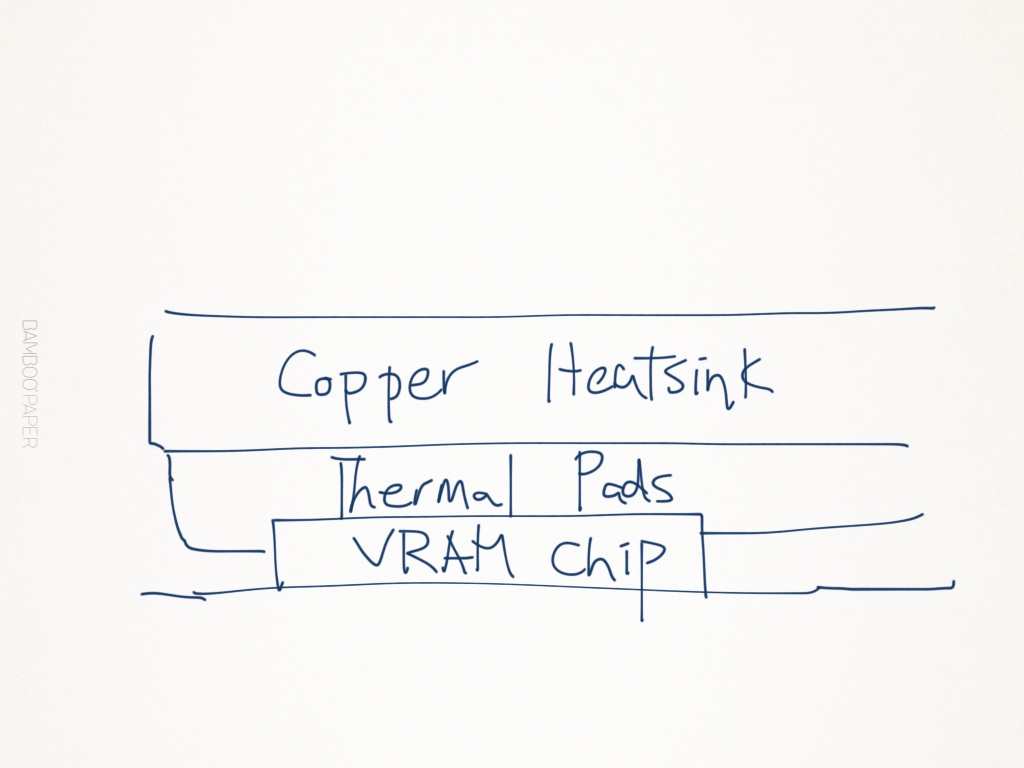
And I must admit I am crappy at drawing too.
Just to clarify, this pic should help understand the situation.Attached Files:
-
-
I got the invite even though I never play bfbc2 multiplayer... It runs pretty well on my gx640(720qm and 8gb of ddr3-1333).
-
Nice to know it'll definitely run well, I have the exact same specs on my gx640!
I want to ask, how much battery life are you getting on yours? I get one hour using the 6 cell battery, but I think it should be more. Or does the 720qm really suck up the battery that much? -
I went from almost 3 hours on a 9-cell to a little bit under 2:30h. Not too bad, taking into account that my battery lost about 5% of its capacity since I got it.
-
that happened to me when i had my alienware m17x r1. for 11months dell did not wana help me keep acting blur and wouldnt give me replacement, i just sell it off and get this laptop
-
lol that was a wonderfully articulate and descriptive sentence.
Why don't you guys try throttlestop>>? -
that's correct, throttlestop will help you with that issue. you can force both the multiplier and the clock modulations to your desired values.
for me this works vice versa as well: forcing the multiplier to 9 and throttling clock and chipset lets the cpu cool down much quicker after gaming. its a great tool. -
how are u guys able to play crysis 2 in hardcore/extreme at native res? im only getting around 30-40 fps at lowest setting =( other games kinda work fine though
-
Hi,
Just ask the system.cfg from the person who is be able to play crysis 2 in hardcore/extreme at native res
And i like to have the system.cfg two. I play at a costum config at 43-60 fps at the moment see my system.cfg:
--------------------------------------------------------------------------------------
; crysis2
sys_game_folder=GameCrysis2
sys_dll_game=CryGameCrysis2.dll
sys_user_folder=Crysis2
r_ShaderCompilerServer=192.168.14.180;192.168.14.181
log_IncludeTime = 1
sys_languages = "english,french,spanish,german,turkish"
log_verbosity = 0
r_displayInfo = 1
sys_PakLogInvalidFileAccess=0
sys_float_exceptions=0
g_language = English
g_skipIntro=1
sys_spec_objectdetail=1
sys_spec_texture=1
sys_spec_shading=1
sys_spec_shadows=1
sys_spec_postprocessing=1
cl_fov=55
pl_movement.power_sprint_targetFov=55
i_mouse_accel=0
i_mouse_accel_max=100
i_mouse_smooth=0
r_motionblur=1
g_radialBlur=0
cl_zoomToggle=0
r_UseEdgeAA=0
r_TexMaxAnisotropy=0
r_PostMSAA=0
cl_crouchtoggle=0
r_ColorGrading=0
r_SSAO=0
r_VSync=0
r_MotionBlurShutterSpeed=0.0001
e_shadows=0
r_Glow=0
r_HDRRendering=0
q_ShaderHDR=0
r_DepthOfField=0
r_WaterRefractions=0
r_WaterReflections=0
r_WaterUpdateFactor=0
r_WaterReflections_ForceParticles=0
e_WaterTesselationAmount=0
e_WaterTesselationSwathWidth=0
r_DeferredShadingHeightBasedAmbient=0
e_ParticlesReceiveShadows=0
e_TerrainAo=0
r_SSAO_blur=0
r_SSAO_downscale_ztarget=0
r_SSAO_quality=0
r_SSAO_radius=0
r_UseSoftParticles=0
r_WaterCaustics=0
r_WaterReflectionsQuality=0
r_WaterUpdateDistance=0
r_ShadowBlur=0
r_refraction=0
r_sunshafts=0
r_ShadowBlur=0
sys_physics_CPU=1
gpu_particle_physics=0
r_UsePOM=0
r_FSAA=0
r_FSAA_samples=0
r_FSAA_quality=0
r_WaterGodRays=0
q_ShaderTerrain=0
q_ShaderShadow=0
q_ShaderWater=0
q_ShaderFX=0
q_ShaderPostProcess=0
q_ShaderHDR=0
q_ShaderSky=0
e_Clouds=0
r_PostProcessEffects=0
r_HDRBloomMul=0
r_HDRBrightLevel=0
sys_maxfps=60
--------------------------------------------------------------------------------------
No Problem for the config
Cheers, -
Anybody had to run DPC Latency Checker on our laptop? I have some issues with big video files and was recommended to run this program. I get yellow bar (not big, just slightly above the yellow line) that repeats every 25-35 sec...
Is it normal for some yellow bars on our laptop or it can be really the reason of some drop-outs? -
Ok so I have been having problems with the heat with my aswome msi gx640 im not a computer tech so idk how to do all this mods and thermal paste and what not. So instead of having my setting at 625/1000 I put it at 625/500 and now I get 90c way better than I 100c I would get. My question is what is the very and I mean best way a I can cool my laptop, and also is 90c harmful to the msi gx640260us?
-
I was messing around with DPC Latency Checker and I was getting yellow spikes too. For me those spikes stopped once I took out the battery, it seems they were caused by the ACPI Battery driver or something related to it; although the spikes themselves didn't seem to be causing any dropouts in video or audio.
-
To those ppl who exchanged their thermal pads on the vram with copper shims: How thick should they be?
-
To panta!
I didnt have done that. But i have replaced my thermalpads for extreme ones. I used 1mm thick thermalpads and when i place them it will be squeezed to 0.5 mm so i think 0.5 or 0.6 mm copper shim will be oke
Cheers, -
Does anyone else have trouble with 25 man WoW raids with this laptop? I have to play on Low with particle density set to good in order to get about 20 fps constant during a fight : /
-
Yes thats dangerous and probably harmful.
The best way to cool it is to repaste it. Then it will probably be OK.
There is no way to cool it perfectly unless you become somewhat of a computer tech.
In any case a repaste is not ever considered a mod, rather regular maintenance .
Thats good to know..
Its worth mentioning that huggies was having problems with HD streaming video... I wonder if this will solve the problem.
^ correct! ^
Its also .025" and around 22 GA I think. -
finally say byebye to my msi gx640.
can't stand the heat of it
-
Thanks alot robert! havent tried max settings but at least i can play at native res with smooth fps lol. and i dont have to hide crysis 2 anymore when my friends are using my laptop xD
-
Haha indeed. Im glad it work.
-
has anyone ever tried to swap the fan in the cooling unit? I was wandering if there might be a more powerful fan than the stock one.
-
wat? u got it not long ago, did so much on it and u dont want it. =(
-
can't stand it already lol
-
I finally got rid of my temps-problem after repasting. I didn't realize that newer models of the gx640 like mine already have a little lifted area at the heatsink which works like a thin copper shim. I removed my copper shim and repasted the system, now the GPU-temps in furmark are constant between 93-95°C at stock settings without removing the back cover. My CPU peaked at 90°C. An hour of BFBC2 raised my temps to a max of 89/93°C. Before repasting, my system was shutting down after ~20 minutes.
conclusion after switching my i5-430m for an i7-840qm:
(back cover attached, stock settings)
3dmark 06:
[overall/cpu score, gpu/cpu temps]
i5: 11499/2533pts, max temps: 94/99°C
i7: 12559/3498pts, max temps: 79/84°C
I used IC diamond 7 thermal compund. Seems like its working really great, factoring in the additional heat from the i7-840! Thanks everyone for your help so far
-
robert, i just tried. still lag like crazy. sad.. ohh well anyway thanks for the help guess i just have to play at low res
-
I'd get a 16F2 barebone, MUCH better temps and the vents are in a really good position to use on your lap.
-
has someone else experienced flickering issues when running underclocked/undervolted? When I lower the voltages, I have some flickering at the top or bottom of the screen, especially when watching videos/playing games in windowed mode. I'm using catalyst 11.4 drivers, which worked fine for me so far. Should I consider an update?
-
My 640 seems to power down completely a while after sending it to sleep mode (closing the lid/screen). Im not talking about the issue where the screen wont go on again, instead my computer simply just boots up again and says that it was turned off in a incorrect way - and then asks if I want to boot it in a safe mode.
I dont know how long it takes for it to shut down completely after the sleeping mode because I go to sleep aswell when Im doing this
-
That happened to me when I messed around with overclocking when i used CCC. I switched to AMD GPU clock tool and it doesn't happen anymore
-
Have you underclock you graphics card? that can be the problem or it can be the CPU. My notebook have a i7 740qm in it, so that can be the difference why crysis 2 works fine by me.There are other settings on the internet for crysis 2. I dont have my notebook here so i cant test other configs at the moment. I hope this helps you. Iff i got my notebook back i will look for ya.
-
Um, you do leave it plugged in right?
-
Can someone tell me wheres the gpu and cpu in the msi gx640? I opened it and found nothing I want to apply some thermal paste but dont know how and where to find the gpu and cpu.
-
they are at stock clocks. ohh well doesnt matter. thanks anyway. just have to play at low res
-
the GPU is under the copper heatsink, the CPU is under the aluminum heatsink. Obviously you have to remove the heatsink to reapply your thermal compound. There are several guides to do that here in the forum. I think this one is quite helpful:
http://forum.notebookreview.com/msi/482836-thermal-past-upgrade-worth-12.html
post #4 on that page, the pictures were uploaded in order on page 16. Good luck! -
yeah, but when I change clocks with the AMD GPU clock tool, the vcore always switchs back to 1.05V. Several users seem to have good results with 0.8V and lower though, do these people have the same issues with flickering?
-
Unless the clocks themselves are unstable, the flickering is caused by a bug in the ATI 5000 series that causes the screen to flicker when the memory clocks change. Since the card dynamically changes it's clocks based on load, it can cause the screen to flicker during normal usage. The AMD GPU clock tool works as a workaround since it forces clocks to stay on one value, so no flickering occurs.
Official MSI GX640 Owner's Thread
Discussion in 'MSI' started by min2209, Apr 6, 2010.