 Problems? See this thread at archive.org.
You can contact Svet at MSI forum to achieve that.
-
-
i don´t think.... 192Bit vs 256Bit Memory Interface and 1280 vs 1536 Shaderunits can not be "fix" by OC.
-
Just got my gt60 today.
I notice a constant noise from my hard drive. It's low, but it's constant, even while idle. Is it normal? It's not a tick sound, it looks like it's reading something, but it never stops.
Another question. Doesn't the touchpad support multitouch gestures? -
Disable APM may resolve it.
AAM/APM Control -
There's too many reviews of the new GT72. But i've yet to see a review for the new GT60/70.
-
The reviews of the older models should apply. The 9x0 cards will just be cooler and faster.
-
Yeah, I disabled it. It actually worked. No more noise while idle. You are a genius. But am I missing something disabling it ?
-
Nope. Don't worry. That's the Advanced Acoustic Management/Advanced Power Management internal to the drive and controlable by software. Once disabled it gets controlled by the drive itself rather than an ATA command
 (windows btw)
-
I guess some noise when opening something is normal, right? I come from a macbook and that thing never makes any noise, so I'm not sure...
-
Anybody out there who owns an msi gt60 (16F3) and who also got a new Gt60 (16F4) dominator can swap this 980/ 970m card with the GPU heatsink if it's running with the older model? If yes, can you also post the bios version? I've got the 16F3 GT60 model with the udpated 51x bios but doesn't have the new one (16F4) .. Would appreciate it if someone can confirm it's 100% compatible... Thanks
-
There're a ridiculous number of GT60/70 variations and all of them have diff benchmarks and temps.
So they're still nowhere as useful as an actual GT60/70 with the i7-4710 and GTX 970M review. -
Hi guys, as a new gt 70 2qd owner, thought I'd sign up. The above quote is of interest to me. Temps are excellent for the 970, I never climb above 77-78 degrees C after hours of gaming and thats without hitting turbo fan.
So far I have maxed out the core clock in afterburner to +135, but I feel she can give so much more. Obviously with an unlocked vbios...............What do we know about this possibility? :thumbsup:Kevin@GenTechPC likes this. -
Best to check with Svet as he can push a lot of more of performance than stock BIOS.
-
Wots the difference though? Surely the software is there for a reason?
-
Also wot does the 2QD mean?
-
Its the model. I own the GT70 2QD. Lots of variations of the same thing, this one allowed me to install my own SSD instead of paying through the nose for the one's that MSI ship.
-
2QD is the most recent model.
-
That's obvious, what I'm asking is what each code means.
For example I've noticed that Q means its the GTX900M's (P seems to be the GTX800M's). And the D means it's GTX970M whereas E means it's GTX980M. No idea about the 2 though.
Is there a list anywhere which explains the model numbers thoroughly?
Also could anyone explain to me wot the purpose of the "line-in" and "line-out" ports are for? -
@GenTechPC
Kevin your inbox is full.. I can't send you a reply -
can you please tell me what kind of scores are you getting with 3dmark11 and 3dmark firestrike???
-
Hey, havn't run firestrike yet. But were the scores from 3d mark 11
That's the graphics score of a stock desktop 680 and I really don't think she is even breaking a sweat.
![[IMG]](images/storyImages/3dmark_zps4d67aeb6.png)
-
Is this stock score? Can you post a score with the +135Mhz OC on the core.
Also how does it handle OCs like that in games? Does the OC cause a crash in any games?
Thanks. -
Also while ur benchmarking if u can post temps without the turbofan that would be great too thanks!
-
how on earth you are getting these scores ??? what driver are you using? i keep getting this garbage score for no freaking reason

-
He is likely using the current limited overclock level.
-
Your scores seem to be normal for stock settings.
I just got done running 3DMark 11 and got:
P8629 Graphics Score: 9711 Physics Score: 6565 Combined Score: 6330 -
ty so much for the input even though many people seem to be getting over 9000 even with identical machines , it is driving me crazy !
-
What does current limited overclock level mean?
Becoz Gentech got a similar score of ~9300 and i think they used stock settings.
http://forum.notebookreview.com/att...70m-owner-s-lounge-msi-gt60-970m-3dmark11.jpg -
Also i have an led keyboard but whnever i plug it into my gt70 usb, the intensity keeps changin. So like once every few seconds like just a slight dim but noticeable and distracting. Does this mean there isnt enough power from the usb? Should i update usb drivers or...?
-
The bios "only" allows you to add 135mhz to maximum clock. Experienced overclockers who don't worry about the warranty are likely to target the 1.3-1.4ghz region.
-
Eh guys.. Whats the difference between an msi 16f4(Haswell) vs 16f3(Ivy bridge).. other than the proc.. will there be any differences in the structure like in bios especially when reading mxm gpu's? cos someone out there will post soon a successful upgrade with his MSI GT60-OD from a stock 780m gpu to a 970m.. He's just so excited about it..
Talon and Kevin@GenTechPC like this. -
The differences are the manufacturing process and hardware architecture. Haswell is supposed to be more power efficient and lesser heat generation. It is better performer than Ivy Bridge as matter of fact.
BIOS structure is the same, since both are UEFI-based BIOS. -
same bios means can upgrade to 9xxm gpu's then! Might as well find myself a heatsink first
-
Omega message majestermsi. Here is here on the boards. He also already has a marketplace thread started where he sells 780/880m heatsinks. You can also find them on eBay for cheap. I wouldn't buy anything brand new or perfect since you will have to make the small mod that I did.
And yes the upgrade went off without a hitch. I now have a 6GB GTX 970m Already tried out a few games and this thing is beastly and cool compared to my "old" 780m.
-
so you're 970m running on clevo bios right? If yes it means msi are 100% compatible then
-
Clevo cards do tend to run fine in msi machines, just not the other way round.
-
I thought both MSI & Clevo cards are usually compatible with a lot of machines out there, lol.
-
They are but clevo systems need clevo cards typically hence what I said that you can put a clevo card in an msi machine but not an msi card in a clevo machine.
-
New GT70 2QD owner here (spec below).
MSI GT70 2QD(Dominator)-2402UK, Intel® Core™ i7-4810MQ Quad Core Processor, 17.3" Full HD Screen, Microsoft Windows 8.1 64-bit, 16GB DDR3 RAM, 256GB SSD, 1000GB HDD, Blu-Ray, Dedicated GeForce GTX 970M Graphics, USB3 | HDMI | DisplayPort | Bluetooth, SteelSeries Backlit Keyboard.
I have a question to ask if it's possible to disable the intel graphics card that show's up in the laptop config?. How can I be sure I'm using the GeForce GTX 970M GPU? would it simply by selecting the GeForce in the Nvidia control panel? is it true that the power light changes colour if using Intel or GeForce?.
I was hoping to use my Oculus DK2 with the laptop but it seem's the HDMI is powered by the Intel card and not the GeForce..
Any BIOS tweaks? or latest versions folks can recommend? or any tweaks and tips in general to get the best performance?
Thanks for reading, and thanks in advance for any replies
Paul (Leeds UK) -
The power light changes orange if the nvidia is turned on. Disabling the Intel igp would disable the vga port and internal display. HDMI and DP are connected to the DGPU directly.
-
Thanks for the reply Meaker, so I know if the laptop is using the nvidia card if I see an orange power light, and disabling the on board intel gpu is a bad idea..
Thanks for your help!
Has anyone else got any good tips to share with me? -
You can't disable the IGD, but you can hook up an external display as Meaker said to use GPU only via HDMI/DisplayPort.
-
just checked on youtube minute 6:14
MSI GT60 Dominator - 1065 (970M) - Benchmarks by XOTIC PC - YouTube -
The GT70 that I bought from Gentech PC runs like a charm. They've done a real good job on the paste as well, seriously no matter how hard I try to stress my GPU (overclock, running Furmark stress tests etc) it's temperature simply REFUSES to go over 73 C, while the CPU rarely breaks 80 C.
I've never needed to run the turbo fan at all (which is ~4700 RPM), the only time I used it was to try out wot it's like. On the contrary, I apply Pearson's Fan Control's (PFC) auto profile automatically, which u will find makes the GT70 as quiet as the ASUS. I have an ASUS G53SW which is well known for it's quietness and cooling. With the Dragon Gaming Centre tool u can look at the fan RPM (the only program I've found which displays the fan speed). With default built-in fan profile it runs at ~1900 RPM at idle, which is audible in a dead quiet room. However once u apply the PFC auto-fan profile it runs ~1200 RPM which is almost inaudible. Also to note is that with PFC the fan speeds are really well picked, becoz even with the fan speed running to keep the aforementioned temperatures, it's still a LOT quieter than using turbo fan.
Anyways I've been able to very stably overclocked my GTX 970M using MSI Afterburner, with a core clock of 1173 MHz (which exceeds even the max core speed of a stock GTX 980M by a good 50MHz) and a memory clock of 1603 MHz. I found that doing benchmarks using 3DMark 11 isn't as good since it doesn't seem to take full advantage of the latest GPUs, using 3Dmark FireStrike is a far better idea. As a result u will see more improvement in ur score when OCing.
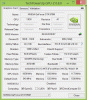
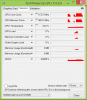
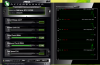
OC'ed Firestrike Score: NVIDIA GeForce GTX 970M video card benchmark result - Intel Core i7-4710MQ,Micro-Star International Co., Ltd. MS-1763 -
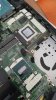
this is default factory paste msi gt60 , do u think its quite clean ?
-
They look fresh, and fully pasted.
Were you thinking to repaste them? If yes, then clean the existing paste well and apply the new one afterward. -
Yeah that's pretty standard for a factory paste job I agree, was it overly hot before or were you having issues?
-
Don't repaste if you don't need to since it is sufficient most of the time.
-
the auto fan setting temp kinda fluctuate, when i was browsing GPU temp could reach up to 55-58 C
i already repaste with MX4 artic now kinda stable on browsing 40-50 C -
Good to hear, yes the factory paste job is designed to always make contact and work rather than being the optimal application.
***The MSI GT60/70 Dominator 970M Owner's Lounge***
Discussion in 'MSI' started by matolati, Oct 15, 2014.


