 Problems? See this thread at archive.org.
No, it is just a general beta for any released os, it works with 8.
-
any RAM with Micron D9QVG or D9QBJ is capable for the stock model
-
Average settings do no good to overheating.Power consumption rises when FPS rises.
-
Can your guys send me direct link to purchase intel 7260 ac + bluetooth. I really want to replace with the new wireless adapter because I cant able to play game online with current wireless card, it's so much lag
-
I've found that GTX760M in GE20 cannot be runing over 850MHz,msi afterburner doesn't take the limit any higher.I think there's somekind of limit from BIOS.
OR have you discovered a way to make it run over 850Mhz? -
1. Does the GE40 have a single mSATA port? I bought configuration with 750GB HDD + DVDRW, can I add a mSATA SSD? (I know that version without DVDRW has a doughter board with 2x mSATA, but my version is different)
2. My laptop (bought in Poland) has a MSI warranty sticker on one of screws needed to swap the hard drive. Do you have this too?
3. Is there an upgrade to BIOS in Win7 version? I see Win8 only. -
I have the same setup as you, but Ive read in forums the model with the 2x mSTAT and 750HD have the HDD in the DVD slot and a piggy-back adapter that connects the two mSTAT's in the slot the HDD is in on our model. That said I removed my HDD and put in a 256GB SDD and an extra 8GB Raman plan on replacing the DVD with BR. And yes there is a sticker you have to punch through to do any upgrades. Other people have talked to customer service at MSI who have indicated that would not void the warranty if it was returned in 100% factory condition even with a broken sticker.
W8 uses a BIOS Key rather than the traditional paper key, I tried to do a W7 install on my SDD with my factory W7 DVD and it locked up every time. It can be done, maybe with a slipstream? But yes there is a W7 Bios for the MSI GE40 on MSIs website. -
So you havent't seen any mSATA port in your laptop? Only the HDD and DVD SATA ports?
Where? Can you give me the direct link? I can see Win8 BIOSses for AHCI and RAID mode, but none for Win7. And in my laptop there is 10B version of BIOS. -
MSI only privides UEFI bios for W8,but you can choose traditional LAGACY mode in bios settings,thus W7 setup won't be affected.
I'm running W7 on the latest W8 AHCI bios for no problem.
BTW if you want to use W7 you need to flash a W7 firmware,if don't some of the FN key functions may not work and the graphics switch may go wrong either.
GE20 has no mSATA port.
Here you have to pay attention that UEFI bios only allows boot from the sata port which the stock HDD was placed,SSD with OS installed must be put in the room for HDD and HDD is going to replace the DVD if you need to use W8. -
See #209 change bios setting should solve your problem.
IF THAT still doesn't work, you need another PC,put your SSD in a hard disk cartridge or directly sata-connect to the system,build partition and format the disk,set the partition you want to install OS as ACTIVE PARTITION, then use imagex tool. -
Sorry to De-Rail any on going conversations, I just registered to make this post about my experience and fixes with the ge40.
Found this laptop on craigslist for $750 with a 256gb plextor m5 I have the 2oc-009us version so I also have the 750gb hitachi.
The prior owner complained of a few problems with it primarily with the keyboard and mouse with ghosting and not able to use the touchpad and the keyboard at the same time.
So I wiped the drives clean and tossed on windows 7, got all of the drivers installed went to play a game and BAM! the Elan touchpad Disables itself when you use the keyboard.
So you can pop on into the options of the elan mousepad software and try to change it. But alast no settings that you can change will do anything.
You have two options;
1. Uninstall the elantech drivers and have a dumb touch pad without scrolling or gestures.
2. Registry edit. Read the instructions so you dont mess everything up please.
Registry edit. This method should work on win7 or win8 (I am unaware on how win8 works with elantech and its registry be warned)
On your keyboard hold down the windows key & R at the same time, the run window will open, type "regedit" hit enter.
Registry editor will now be opened I warn you now that you do not want to change anything or get curious or you will break things.
Navigate to; COMPUTER\HKEY_CURRENT_USER\Software\Elantech\SmartPad
Or search for "elantech"
Woah! what is all of this? Well my friend, these are all of the possible options the elantech drivers auctually have, but most are not adjustable in the settings.
Okay before you go changing all sorts of settings be aware that to have them take effect you need to open up elantech's settings and toggle an option on and then off again (or vice versa) and hit apply to "initiate" any of the adjustments made inside of registry editor, I was not aware of this until I had changed a dozen things inside of regedit.
0 means off, 1 means on
I changed the keys; Freetyping_enable and palm_always_enable and palm_enable
I also disabled all of the Disablewhentype keys (I was not aware of having to hit apply in the drivers)
I changed a bunch of stuff inside of regedit, And I am now able to play games with the touchpad and the keyboard (yay)
Now to figure out what is up with the heat problem!
Holy thermal paste of "insert religious figure here"!!!
Actually its not that bad, over thermal-pasting Will not hurt as bad as most people would think.
Say a perfect application gives u 30c thermals, 5 times the amount will give you 34c its not "bad" but getting a perfect application is hard to do, and time consuming.
Atleast msi did not forget to apply thermal paste /r/techsupportgore
I tossed on a nice layer of Artic Silver Ceramique and was about to call things good until I looked at the heatsink itself. *why i did not use as5 or x brand is due to the fact that as5 vs ceramique is not noticeable in realworld usage but the impact on the wallet is half.
The only retention are three little thin metal screw holding things that are all floppy, as one from the desktop realms I understand that pressure === lower temps, these retention screw things dont put much pressure between the spu and the heatsink at all.
To fix this, I tossed little plastic washers on top of each heatsink's screw hole, just to give it a little more "oomf" and a little less flex.
Prime 95 and furmark push this at a max to 90c with no throttling that I can notice.
And it seems to me that we are limited to heat dissipation at the end of the day the only way to go cooler is more fin density or a faster fan. (watercooling if your extreme)
Idle temps are around 25c-28c, but it does take a long long time for the thermals to go down below 30c after a session of gaming, but on boot and normal usage 26c is common.
Battery life is not to shabby, I get around 2 hours under a high gaming load and atleast 5 hours with average browsing. Granted 5 hours and a few hours of the laptop in sleep, I have just adjusted the lid closing to hybernate vs sleep so I would not be suprised at 6 hours or more. -
I just have upgrade 8g ram - 16 g ram but i got the message " your system does not appear to have intel rapid start technology enabled" Does anyone know how to fix this problem.
-
Very interesting thing about the screws, thank you for that. Mine is being repaired right now, and if the defect really was with the CPU I hope that they properly apply thermal paste once they've changed it. Once I get it back I might play around with undervolting to bring down the temps even more. Unless the W230ST finally reaches 4 hours of batterylife and gets a better fan profile, then I'd probably jump ship and go with that one.
-
Anyone please help me, I got this message " Your system does not appear to have intel rapid start technology enabled" after I upgrade to 16G ram
-
I'm so agree with you,found that" these retention screw things dont put much pressure between the spu and the heatsink at all"
Tring to fix it now
-
Yea just be very carefull
You only have one heatsink and i doubt that they will cover that under warranty.
I think the plastic "washers" i used are the same sorts that are used for rc hobbies like 1/10 scale cars between wheels and chassis/bearings. very small but you know not nearly as flexible as the stock metal bits, my theory was that it would apply pressure more to the heatsink, even though the washers definitly flexed, worst case scenario I figured would be that it didint do anything at all, and I wasted my time.
I ALWAYS suggest tossing on your on thermal paste, you can never do as bad as a job as the manufacturer and you are guaranteed a drop of 1-3c unless factory put magic unicorn paste on.
If you guys throw out interest, ill do some tests and tell you if adding a little more force helps at all. I did the added washers on the gpu, and the gpu cools down signifigantly quicker than the cpu by a noticeable amount.
The cpu is stock.
Also with the bios and windows 7, toss it into legacy mode.
Is the uefi a graphical uefi or is it still old school blue screen?
Also I did some crossreferencing with the battery, and I believe the ge40 uses the same frame/shell as the MSI X Slim 460 and 460 DX
So if you guys want better screens that are glossy, but are willing to drop in resolution its problably a safe bet to grab a MSI 460 DX lcd off of amazon for 45 bucks, as long as the connector appears to be the same on the ge40's you should be alright.
And my only negative on this laptop is that the speakers are tinny, but I have nice headphones. And maybe that the bluetooth card cannot be used with motioninjoy without a driver hack. wifi-wise this is pretty damn good, I get full bars outside of my house. lag seems to be average to what i feel is normal for wifi.
I do wish that they would have used better ram, I guess i cant complain as it is just a laptop.
SSD is slow? (again comparing to my desktop raid setup with 1gb/s read/write)
Does not make waffles?
Does not massage me to sleep, or make me breakfast after a "long night"? -
I have upgraded to 16G ram and everything is fine.Were you sure the ram you add is ADATA with Micron D9QVG or D9QBJ?
If the message is from windows you may just ignore it.
Or you can try loading default BIOS setting by pressing F10 in the BIOS settings. -
I got 8G ram from newegg
http://www.newegg.com/Product/Product.aspx?Item=N82E16820211755 -
that's the same ram as I fitted,should be OK
since bios doesn't list the control of intel rapid start technology,you can turn on or turn off intel rapid start technology in W8
the manul of BIOS flashing PART 2 tells how to operate this function.
http://cn.msi.com/files/pdf/Win8_UEFI_BIOS_Update_auto_en.pdf -
Hello all. I am actually considering purchasing a GE40 but I had some questions, I personally have never owned an MSI laptop, but the thin profile of this laptop with the specs sounded appealing to me. However, as small a detail as this is, I have heard that this laptop does not have a backlit keyboard. Can anyone confirm this for me? Also, if it does not, is it possible to get one with a backlit keyboard? I hate to see such a well-spec rig lack something as basic as a backlit keyboard. Can any owners shed some light on their ownership experience?
How would this compare to the Lenovo Y410p? I have owned the Y410p but returned it because I could not live with the glossy display and the touchpad. How is the build quality compared to the Lenovo? Other than the touchpad I thought the build quality was great on it. -
I read an article recently that indicated Microsoft was working with the big touchpad makers to improve touchpad operations under W8. I take the article to imply W8 was optimized for touch screens rather then touch pads and the recent reviews ive read all have complaints about the touchpads, confirming its a W8 problem.
-
My little review of MSI GE40
I bought it in Poland, GE40 20C-007XPL version (750GB HDD + DVDRW). I've moved the HDD to an USB 3.0 case and put my Samsung 830 256GB SSD in.
I was afraid of: screen quality, build quality, loudness and hotness while gaming, speakers.
My first impression:
Wow, it's fast. Wow, it's lightweight and slim, Wow, it's well built. OK, I feel the heat and hear the fan, but it's not bad.
My second impression:
Screen: Yes, it's rather poor. View angles are bad. But it's no a deal breaker. I can live with it beacuse I'm using my laptop alone for most part. But if you want to watch movies with someone or show photos often, then it's not cool. Brightnes is OK, nothing special but OK.
Build quality: It's good. My first impression was, it's perfect. But after time I see some gaps in parts connections. Nothing really bad. Keyboard is fine. It could be more stiff but it's fine. What a shame it's not backlit
Cooling system: It's 35 degrees of Celsuis in Poland since I bought this laptop so keep this in mind.
This laptop IS what I've always wanted. Light, cool, 5-7h batterylife machine when I'm using it to simple tasks (Web, email, chatting, coding, etc) and high-end beast when I need it (gaming, compiling, video encoding, zipping, photo editing etc).
It's pretty cool (almost) when you do nothing (not as cool as netbooks but it's OK). You can do chatting keeping it on your knees (and balls It can be online for 5-7 hours (regarding screen brightness and CPU load) in this type of load. On heavy load, while gaming it gets hot, not burning hot but hot. It could be much better if the hot air exhaust be at the back of machine, not on the left side where I used to keep my hand. The Nvidia card is very, very powerfull. Intel integraded 4600 is sufficient for a big part of games I play (Civ 5, The Raven, other adventure games, games like Bejeweled etc) so I make profiles to run it on Intel card - laptop is not as hot as on Nvidia card then. You CAN NOT play games with laptop on your knees (too hot) but I was not hoping for this. Fan loudness is "not bad not good". It's a little disturbing when you play long time on Nvidia card and you play a silent game (like adventures) - but I can live with it. And I can't really imagine how it could be done better in 14" lightweight laptop.
Speakers: Are weak. Comparable to my tablet speakers. BUT there is Creative software to enhance the audio and this is the first software audio enhancer that do it's job. This weak speakers with Creative ehancement are just like this what I call OK - can live with it.
So much "can live with it" with not so cheap laptop (at least in Poland)? Yes, beacuse there is no comparable laptop on the market. So flexible (energysaving and powerfull in one piece). Levono Y510p has no battery live (2 hours idle). Razer is too pricy and no available in Poland (Gibabyte is not avail also). So I took MSI and... I can live with it It's doing the job done!
PS. ...and Clevo 14" laptops are too ugly and to noisy
-
After reading the replies in the thread here I am still not sure whether it's possible to just buy an SSD, remove the DVD, put the stock HDD in the DVD slot and the SSD in the HDD slot and install a clean Win 7.
Can I do that or will that cause problems?
----
Reading this posting it seems to be possible to just install a normal SDD, but it sounds like the Win7 installation causes problems.
Is it possible already to buy this mSATA tray somewhere and get SSDs in Raid 0 configuration if the laptop originally didn't have it? Or is the only choice to go with one SSD? -
It will required a mSATA converter card, please contact any reseller in your area and request for that. Of course we don't recommend you to do the change without professional help.
Just FYI, the converter card only support mSATA SSD and not normal SSD. -
Thank you for your answer,
So this would be what I need if I want to use 2 mSATA SSDs in Raid 0 config, but I can still just use a normal SSD without buying anything additional like the mSATA converter card? -
You can install SSD in HDD bay, to use HDD in optical bay you'll need a caddy (ODD bay is 12.5mm I beleive and HDD is 7mm). For Win7 install, likely you'll need to flash firmware to win7 version and use legacy setting in bios.
-
Hi everyone, I recently bought my MSI GE40 (the one with the optical drive) in the US. I am very impressed by the performance and battery life, but I can hear the CPU whine. I have updated the firmware successfully, and I would like to update the BIOS. However, on the msi website, there is a 'RAID' version and an 'AHCI' version. What's the difference, and which one should I use?
-
The AHCI one, unless someone else inserted another drive and set up your notebook in RAID. Please tell us if the CPU whine disappears after the update, because it didn't do anything for me and I had to send in my notebook for repairs.
-
After all BIOS/FW updates, CPU whine is still in my laptop.
-
The repair staff emailed me and asked me to describe the defect once again because they couldn't detect it themselves. Worst case scenario they might claim that there is no whine and I'd be pretty ed. If you can still return your unit I would do so immediately
-
New firmware update MSI Global GE40 2OC Dragon Eyes
-
Interesting, but I've got no clue what it's supposed to do.
Davka, did you update to that firmware? -
Thank you, PaulNelson88. The firmware fixed the annoying bug on the keyboard. Great!
-
Will it be able for a consumer to buy the dual mSATA board? I've been trying to look for it but not even representatives from MSI UK could tell me where I could get it. I've looked at Amazon and eBay and they don't sell the dual mSATA board.
Cheers. -
Well I've updated both the firmware and BIOS to the latest versions. I can confirm that this did NOT fix the whine for me, though strangely enough I've noticed it's a lot less noticeable when on AC power compared to on battery. I can live with it, but certainly not ideal. I'm in New Zealand, and the only shop in the country which does official repairs for MSI under the one-year global warranty is 640km (300mi) away...
-
Is anyone able to download this BIOS file? I'm always getting an error file unavailable :/
MSI Global – Download Center -
Nope, looks like a broken link to me, maybe go on the MSI forums and ask for it.
-
So what is the average battery life people are getting with this laptop? Might be interested in this laptop.
-
just bought this badboy today, I was in love with it's earlier version the x460dx when I found out they refreshed it with all these parts I had to get it, it helps all my parts from the x460 work on the ge40 including the battery, adapter and the ODD loving it so far,
ngoing to revert back to win7 using the key from the x460 since it's now dead RIP dropped it
-
I'm just very interested to replace the GE40 for the MSI GS70 now... Very tempting to do so...
-
Doesn't have to be MSI branded one. Try aftermarket SATA to mSATA adapters, I'm pretty sure they'll fit into ODD bay. One example is on the M-Factor site but google search will bring up plenty.
-
FYI for anyone looking to upgrade the stock DVD with a BluRay drive or just populate an empty ODD bay with one, it takes a 9.5mm height drive and they are expensive (+$150 US).
-
question...since the screen quality seems to be the weak link on this has anyone looked into possibly replacing it with a higher quality screen like you can with the asus g46? I'm not really talking about a higher resolution screen, just a higher quality 1600x900 screen?
-
lolz, look at all other sub forums here. Screen quality is questioned pretty much on every laptop. You might as well take screen quality debates with a huge grain of salts.
-
Now looking forward to get an unlock bios for gtx760m on ge40.With current bios I can easily reach the top limit---850/4800MHz using Afterburner,results in P4200+ 3DMark11 score.
After overclocking I get about 80% frequency of GTX650 Ti and a memory brandwidth exactly the same as HD5770/6770,both of which are mainsteam desktop graphics cards.3Dmark11 shows that Overclocked gtx760m beats HD6850 in some way.
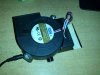
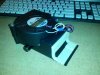
Temp problem solved with a cheap sucking machine as you can see below.It works amazingly good.
In room air temp was 28C,CPU loaded by only choosing "stress FPU" in aida64 stability tool soon reach 100C and throttling kicked in with no extra cooler.With the cooler it returned to 86C.
Loaded both CPU with aida64 AND GPU overclocked with Furmark 800*600 burn in,CPU:92C,GPU:62C--- Absolutely NO KIDDING!
This crazy cooler pumps hot air out of laptop.Yes it is a bit of noisy when working full on but you can adjust the speed of the fan to make a balance.
Sad news is that you can't buy it because it is made by some guys in China.
But I think you can steal the idea. :thumbsup:
-
Throttling affect Integrated graphic greatly,as you can find in 3DMark.


And also affect physics score greatly.


-
I am very interested in getting this laptop, the high heat profile is somewhat off-putting but I think I can get past it with a cooler fan attachment. I am mainly going to get this for gaming on the go, but wherever I am settled (military barracks) I will be able to bring my 22" ASUS 1080p monitor that I normally use for my gaming desktop. I read on a /r/suggestalaptop post that connecting to a monitor somewhat lessened the heat that was produced by the system, and I was wondering if any owner here had plugged their laptop into a monitor and used an external keyboard/mouse to play some intensive games and kept track of how hot the notebook got.
I am mainly getting this laptop for Steam games like Total War 2, XCOM EU, MWO, CSGO and Battlefield 4, pretty much all the gaming I will do will be on a 22" monitor if it turns out to be beneficial, otherwise when I am not playing graphically intensive games I will be using the 14" display for writing assignments. -
1) Are the SATA ports in the MSI version II or III? It should make a big difference if you get a SATA III adapter such as this one:
SSDMR (Dual mini-SATA to SATA RAID Adapter - SATAIII) - M-FACTORS Storage
2) Regardless of the above, this design raises a question -- will the dual mSATA get bottle-necked at the single SATA bus? (Especially in raid0?).
3) Is the one officially provided by MSI basically the same as this one?
This thing is pretty cool. I'm thinking of also getting one for my older notebook for instant raid.
Edit:
BETTER YET, can we skip this device altogether in the GE40 and raid 2 standard SATA SSDs? (That is, replace the 750GB HDD in the ODD bay with an SSD, and put second SSD where this mSATA adapter goes into, and raid them?).
Edit 2:
Based on HIDevolution's custom order page, it appears that we can raid 2 regular SATA drives, but not like I was suggesting above. The following, I believe, is the barebones version of the GE40:
MSI HID MH14GE-V1 14" Custom Built to Order Gaming Laptop
Wow. It seems all of the following storage configurations are possible:
- On mainboard: dual mSATA with raid option
- In HDD bay: dual SATA, or dual mSATA via adapter, with raid option
- In ODD bay: single SATA
Is this for real? Can you really have all three options (up to 5 drives) in one notebook? I wasn't even aware option 1) was available. But what I really care about and what surprised me was that the HDD bay can accommodate two regular SATA drives, not just dual mSATA via adapter. This means that I can get raid on regular SATA, and not have to pay a premium for mSATA. The GE40 looks more and more like my dream machine.
-
Hi Owners,
Today I went and looked at this laptop but I really want your opinion before buying. Could you kindly let me know how many hours of extreme gaming would it take before the CPU/GPU throttle back? (eg: Battlefield)
What about mild gaming? (say like AoE)
Also in the store, I ran the windows index thing that shows the scores and it gave a 5.1 for graphics cards. Would this means that although its a high end one, it conflicts with the system? What is the score on yours?
Appreciate your answers! -
I can't speak for BF3, but I did play Planetside 2 for 3h+. The CPU did not throttle as far as I can tell. Sure, it got hotter and hotter, but it kept trucking away at 2.9GHz. Unforunately I don't have access to my notebook right now, but undervolting the CPU should bring the temps down by a considerable amount. If you are serious about gaming for very long periods you should also look into repasting the notebook.
Another unit you could have a look at is the Clevo W230ST. That one is going to have a better screen and be probably a bit sturdier, but I haven't handled it yet. It also has a backlit keyboard and a better GPU. On the other hand is has short batterylife, and an (as of now) annoying fan profile. Keep in mind that comparing the CPU temps of those 2 right now is a bit unfair, because a lot of people have already undervolted and repasted their Clevos, while I can't remeber anyone doing this with their GE40 yet.
The Official MSI GE40-2OC Owner's Lounge
Discussion in 'MSI' started by Wonderdog, Jun 19, 2013.


