Problems? See this thread at archive.org.
FYI:
NVidia just released their first official WHQL-certified driver supporting the 6xxM series..... for WIN 7 and WIN 8:
GeForce 306.23 Driver, 13 Sept 2012
Enjoy!

-
-
Hi -=$tR|k3r=-, are we able to install this on our 0NE lappy's without a problem? Is so I'll give it a bash.
I installed the one from the MSI GT70 driver site the other day for Windows 8 (305.46) and it worked fine on Windows 7 as they are unified, but would be keen to try the new one! -
Just got mine in today from Excaliber PC. Typing on it now out of the box for about 15 mins.
First impression -
LOVE the keyboard - feel of the built in steel series is great to me for a laptop
Been a glossy fan for years I last year went with the HP ZR2740 2560 monitor that is matte so was already used to matte again and I like the screen on this for the few mins have used it - no dead pixels so far and hopefully stays that way
Size not as big as expected , not a bad thing , I wish the screen bezel was a little smaller but I imagine it makes it more durable having the plastic surrounding it instead of screen all the way to edge.
Anyway if anyone could give any tips or points to particular post for order of drivers to reinstall for an OS wipe - I'm it engineer with a technet account so I know what I'm doing , just didn't know if it had any particular quirks of MSI software/drivers I definitely want to reinstall or particular order etc (raid drivers needed etc )
Looking foward to really trying this thing out this weekend - and appreciate and tips/tricks anyone can give -
I haven't installed it yet, but you should have no problems. All previous NVidia betas versions have led to the development of this release. If you read the release notes, it will give you an idea of any known issues, fixes, and the enhancements this release brings.
I've been waiting on this one since I got my new GT70 0NE..... it's good to see NVidia is finally supporting the 6xxM series in their Verde program. I'll have it installed shortly!
-
-If you have RAID-0 setup then make sure your Windows 7 disk comes with SP1.
-For drivers installation make sure install Intel chipset first.
-For video cards install Intel HD graphics first otherwise you won't be able to install the nVidia driver.
- Steelseries keyboard, Microsoft .net Framework 4.0 are required before install the keyboard driver and it's not include in the drivers DVD:
Download: Microsoft .NET Framework 4 (Web Installer) - Microsoft Download Center - Download Details -
Very much appreciated , will make sure and use ISO with Sp1 slipstreamed in , good to know it has the raid drivers needed ( the horror going to back to NT 4 days and floppies with the F6 bit come to mind ).
An thanks for the heads up on .net 4 being needed first.
Likely will wipe this thing this weekend and do the latest Nvidia drivers and give Guild Wars 2 a go on it. -
The new NVidia 306.23 drivers rock! I have only tested them on 3DMark Vantage and I get a nice increase of 1241 points
3D Mark:
Before with Driver Version 302.75: 21528
After Upgrade to 307.23: 22769
Graphics score:
Before with Driver Version 302.75: 20704.72
After Upgrade to 307.23: 22258.09
Installed with no problems, detected my hardware and went right through installation. -
Hey guys I dont know if this is the place to post but, how is the build quality on the barebones model? Is it pretty durable? I have a Gateway P-6831 and was wondering how the build compares.
And does anyone know how it compares to the Sager NP9170? -
Hi Gentech and thanks for the tip.
I have been trying to look for newer drivers for the Steelseries keyboard that comes with this GT70 0NE laptop, but I do not have much success finding any drivers. Perhaps you could direct to a place where I would find it?
Cheers -
No, this really isn't the right place to post, but several bareboners feel better hang'in with the elite MSI branded crowd.
There are numerous differences between branded and non-branded units, and one most obvious of the barebones units, is an all plastic chassis construction. I would say they are as durable as need be, but you don't have plans on tossing yours around, do you? With reasonable care, and under conditions of normal usage, a barebones unit should be as durable as most. This would be a good place to begin your MSI barebones research:
--> The Official BAREBONER's Lounge <---
As far as making your comparitive decisions regarding the Sager NP9170, try here:
http://forum.notebookreview.com/sag...-clevo-p170em-sager-np9170-owners-lounge.html
There really is no SteelSeries driver, per se'. I think what Ken was referring to was the S-Bar 2.0 control software (located HERE), which requires Microsoft .NET Framework 4 be installed beforehand..... also found in the same S-Bar 2.0 link.
For SteelSeries keyboard lighting control, you will want to install the KLM LED Manager, also found HERE.
I hope this helps.....
-
Ah no no,
The reason I was interested in newer drivers for the keyboard, is simply because my keyboard is acting wierd.
But from what I can understand, a lot of people are having hardware issues with the steelseries keyboard for the laptop. So I would not be surprised if it's some kind of hardware error as well. Currently I am waiting for answer from MSI support. -
Ahhhh, OK. What issues are you experiencing? Yes, if you experience any keyboard issues whatsoever, I would seek an immediate replacement. Also, who was your reseller, as some of them can assist you in getting a keyboard replacement?
Good luck!
-
Described in my earlier posts, among things whenever I start up Windows, the keyboard locks up and prohibits me from doing anything on the screen with the mouse, until I first press a key on the keyboard.
Unfortunately I am working abroad atm, and would reaaaaally hate to be without any computer for the next 6 weeks. So if the issue cannot be solved with a driver update, I will just have to put up with this issue for half a year until the project is done and I travel back home where I have a stationary computer, before i send the laptop for RMA. -
Ah, ok, I had to go back and re-read your original post. Did you try what Ken suggested. Several folks have had issues because the keyboard ribbon cable is loose at the connector. If this is not your problem, then I would RMA the notebook for repair or replacement immediately. Again, if you purchased recently from a reputable reseller, they should be able to expeditiously assist you in resolving this matter.
-
Another quick question following these last few posts , when I wipe the laptop am I going to "neeed" the S bar software reloaded to get full functionality back , or for example , can just load the steelseries driver you mentioned couple posts back and manage the colors fine ?
Short version if the S-bar is purely a dock for ease of sake but adds no actual functionality I'd rather not have to put it back on -
Thanks again , you folks are great -
Hey Striker,
Ah I have no idea how i missed this huge tip from Ken, I have now read his post, and will check out the cable tonight.
I just want to say thank you very much for going out of your way by posting those screenshots in order to help me, thank you very much Ken! -
Again, there is no SteelSeries driver, per se'. The S-Bar software not only provides the on-screen dock, it also incorporates function with the touch control bar located above the keyboard. Prior to installing S-Bar 2.0, you need to install the Microsoft .NET Framework 4 software. Also, If you want the 'Turbo' button on the touch control bar to function correctly, you will need to install the NV VGA OC Tool, located at MSI downloads.
-
GAWD, I love this GT70 0NE-276US! It's just bad@$$ FAST!
Well, I just benchmarked the new NVidia 306.23 driver, and there is a decent improvement..... specifically in Vantage (DirectX10). Below is a comparison verses the original MSI factory release 302.75 driver. Keep in mind, on this system I am still running the factory installed load, with no tweaks or optimizations. Geez, I wish MSI would hurry up and unlock this GPU! Also, for those using FutureMark benchmarks, make sure you have the latest 'SystemInfo 4.11 (13 Aug 2012)' hotfix installed, as it can affect the benchmark scoring results.
ENJOY!
Before - 302.75 Driver:
![[IMG]](images/storyImages/680Mnoturbo.png)
![[IMG]](images/storyImages/3DMark11680Mnoturbo.png)
After - 306.23 Driver:
![[IMG]](images/storyImages/680M30623driver.png)
![[IMG]](images/storyImages/680M30623driver2.png)
-
Striker,
You can't hang, you need to upgrade that slow CPU of yours.
Per your post I will need to update my systeminfo but I cannot imagine it effects the score to much.
NVIDIA GeForce GTX 680M video card benchmark result - Intel Core i7-3820QM Processor, MS-1762 score: P22805 3DMarks
Edit: updated score with systeminfo updated -
Meh, just what I need, brag'in 'Smack' from a bareboner...... AND YOU NEED TO UPGRADE TO SuperRAID 0, BONEHEAD! Oh no, but wait, you can't! LOL!
You did notice that's factory load, no tweaks, no optimizations, didn't you? Also those score are without Turbo (TDE) activated..... pure stock. If you've been reading, I've already discussed upgrading my CPU (and more), but I am not going to do it in this notebook, UNLESS MSI UNLOCKS THE DANG GPU!
-
Thought I'd have a little fun.
But yeah I have been reading up and know you were thinking of upgrading.
My scores are pretty much stock as well, just loaded windows, drivers and ran a quick check to be sure everything is working with the CPU/GPU and the optimus stuff.
I looked at getting two of the Samsung 830's and raiding them, but in the end felt like the cost to benefit was not there. I Flight Sim so for me the CPU is what gives me the most bang for the buck. Anyhow raid costs a few CPU cycles that are sorely needed.
It was the building of my machine by Ken that found out the multi colored keyboard no longer works in the new style barebones, which was a bummer for me. I thought shortly about upgrading to the branded machine but again to upgrade my CPU would have been way too much to justify.
So I have to go through life as a bareboner.
-
Yep, all in fun..... it's all good......
If you are getting that score, stock and without TDE, you have a strong card. What's bothering me is TDE is doing very little with the locked GPU. Essentially the feature is useless, and this is why I haven't posted any of those scores yet.
What are you getting in 3DMark11?
-
What exactly does barebone mean for these gt70s? If i were to order a gt70 through a re seller and get an upgrade is it still officially a gt70 supported by msi?
-
Just got my GT70 0NE from GenTechPC, everythings working great except the WiFi connects but can't do anything on the network/internet, wired works fine though. ><
-
Barebones units are built keeping production cost to a bare minimum, and as such, are not logo'ed or branded by the manufacturer. Sometimes they are even sold incomplete or in part, allowing D.I.Y. end users to build or customize as they see fit..... and for some, this route provides an affordable option.
Further description can be found in THIS POST, wherein a member thought he was looking at a branded MSI unit, yet it was in fact a barebones unit..... built by MSI, but not branded as MSI.
Also known as 'whitebooks', info on these is available at the following website:
MSI Whitebooks (site appears down for the moment)
Yes, if you purchase an officially branded MSI GT70 with custom upgrades from an authorized MSI reseller, it is supported by MSI, and all benefits that accompany this. The exception here would be regarding the individual component customization. Components you have had changed from the original MSI model's SKU, would be supported by the reseller and individual component manufacturer..... i.e.: say you have your reseller upgrade the CPU to an Intel 3820QM. The support and warranty for the CPU itself, would be shared by the reseller and Intel, in accordance with their terms and policy. The rest of the notebook is still fully covered and supported by MSI.
Just curious..... the WiFi card is turned 'Off' by default..... are you sure you have it activated? Is the WiFi light illuminated on your touch bar above the keyboard? If so, perhaps try reinstalling to the latest driver for your wireless card.
-
Got everything working. The WiFi light was on, and it would connect to my wifi network, I had an IP and I could ping sites, but I could not load up any webpages. I reformatted and put Win 7 Pro on and everything appears to be working now, may have just been some DNS issues or something.
-
FYI:
This may be of interest to some........
SuperRAID Performance Fine Tuning
I have also added this HERE, in the 'How To' section.
SuperRAID models are already factory 'fine-tuned' by default, but this is good to know, should anyone need to re-establish their RAID volume.
ENJOY!
-
So I've got it wiped and reinstalled with 7 Ult 64. Looks like most drivers good to go (had to hit EU site on MSI site as US one never would respond.
Anyway quick couple questions.
1.App/driver called THX EQ - no errors clicking on it , but no actual visual response , this a tiny driver that should install that fast but no visual indication (THX Creative app works and thats a different install ).
2.Any way to verify I got sound, specifically subwoofer working ok (turned on SW boost under creative app but havent really tested) - didn't know if there was a realtel/creative app that ran through the diagnostics as I've seen before and verfied all speakers and subwoofers working ok
3.Last and important with my OCD Tips on removing that huge god awful MSI sticker with all the specs ? I don't mind the badges and will leave but that sticker has to go , started to peel and its stuck like crazy , don't want to use my goo be gone as it'll work on the residue after peeling but that orange smell will last for months - any past experiences on removing and then residue ? Alocohol maybe ? Just reall wish manufacturers wouldnt but massive stickers like that right on the palm rest -
-
Okay updated my Systeminfo and installed 3dmark 11. Looks like I got a small boast with the updated system info. I did turn off my Kaspersky anti-virus and disable gadgets for these runs, which may raise the CPU end of things by a tiny bit. Maybe I will rerun and see what the score is with those services still running just to see what effect it has.
Here is my 3D Vantage score:
NVIDIA GeForce GTX 680M video card benchmark result - Intel Core i7-3820QM Processor, MS-1762 score: P22805 3DMarks
Here is my 3D Mark 11 score:
NVIDIA GeForce GTX 680M video card benchmark result - Intel Core i7-3820QM Processor, MS-1762 score: P6273 3DMarks -
Holy, Dat MSI is a monster! lol
-
Maybe try a hair dryer, heat up the sticker/glue and carefully peel it off. Then clean up any residue with some Goo Gone or something. Usually how I remove stickers or badges from cars and what not.
-
Good stuff, checked and your right my stripe size is already 128k. One thing I did noticed was after the reinstall in the Intel Rapid Storage app the write caching was disabled on the mSATA raid drive, so make sure to re-enable that if you do a reformat, will speed you up considerably.
You normally done want to enable that on anything that doesn't have a battery backup on the controller, but since its a laptop it already has a battery.
1. Click on your Raid volume:
2. Click Advanced: Then next to Write Cache, click the disabled word and it should change to Enabled. Your all set.
-
1. You don't get any kind of indication it installs and no actual eq to use and adjust, its kinda bizarre, but that is the way that works. I looked into this as well and it is working the way it is supposed to, even though I don't really know if it is doing anything.
2. Go to the the sound settings in control panel and play around with the settings and listen to the test sounds to see for yourself it is working. Ken at GenTechPC suggests just setting the sound system to stereo speakers. I played around with it and everything is working good for me.
3. One of the benefits of the bareboner model is it only has the Nvidia sticker. I am kinda surprised you have sticky stuff left behind. I don't have any recommendations as you have to be very careful that you don't get anything on the plastic keyboard surround just above the where the sticker is. -
YES, those are some very nice numbers.
All of the branded 680M models appear to be locked or limited pretty much to stock clocks. Your barebones unit has me wondering if your MB/EC firmware is allowing higher clocks..... assuming we have the same Vbios. What scores are you seeing with Turbo (TDE) activated, and can you OC with AfterBurner? We cannot for the moment, and I am awaiting unlock code from MSI. When these 680M's are fully unlocked, I know they are capable of scoring 25 and 26K numbers in Vantage. I have seen the testing on this, and it seems MSI is playing safe with the branded models, but looking at your scores, perhaps not so much so for barebones units.
Can you do some screenshots of Vantage with TDE, then with AfterBurner, and with both, show GPU-Z on the side? Running AfterBurner or NVInspector should give an indication of how limited your clocks are. I am curious to know if the barebones 680M has been limited, and if so, to what degree?
Thanks in advance.......
Thanks!
I'll make a note to look into this as well.
-
Well, after much thought I pulled the trigger on an MSI GT 70 from GenTech. I have to admit I'm rather stunned by the Next Day shipping charge, but after all the good will from previous customers I figured it is worth it to deal with Ken. Hopefully I'll have mine next week and can join this exclusive club with my own Weapon of Mass Destruction.
Only upgrades I bought were the thermal compound and a Seagate Momentus 750GB data drive. The rest should last me for a while and provide a serious upgrade to my current Alienware MX15 w/nVidia GTX260m and 4GB model I'm using now...
Can't wait!
-
If you have placed your order..... YOU'RE IN! Welcome To The Party!
But wait.......Seagate Momentus? Just to be sure, which GT70 model did you buy?
-
Hi guys, has anyone tried to update the Intel Rapid Storage drivers to 11.2 and enable TRIM support for the RAID 0 disks?. Looks like it could be a huge benefit: AnandTech - Intel Brings TRIM to RAID-0 SSD Arrays on 7-Series Motherboards, We Test It
I'm not very confident about doing it, if someone gives it a go, let us know if it all installs ok!
I believe the download for us (win 7 64 bit): http://downloadcenter.intel.com/con...x64.zip&lang=eng&Dwnldid=21730&ProductID=2101 -
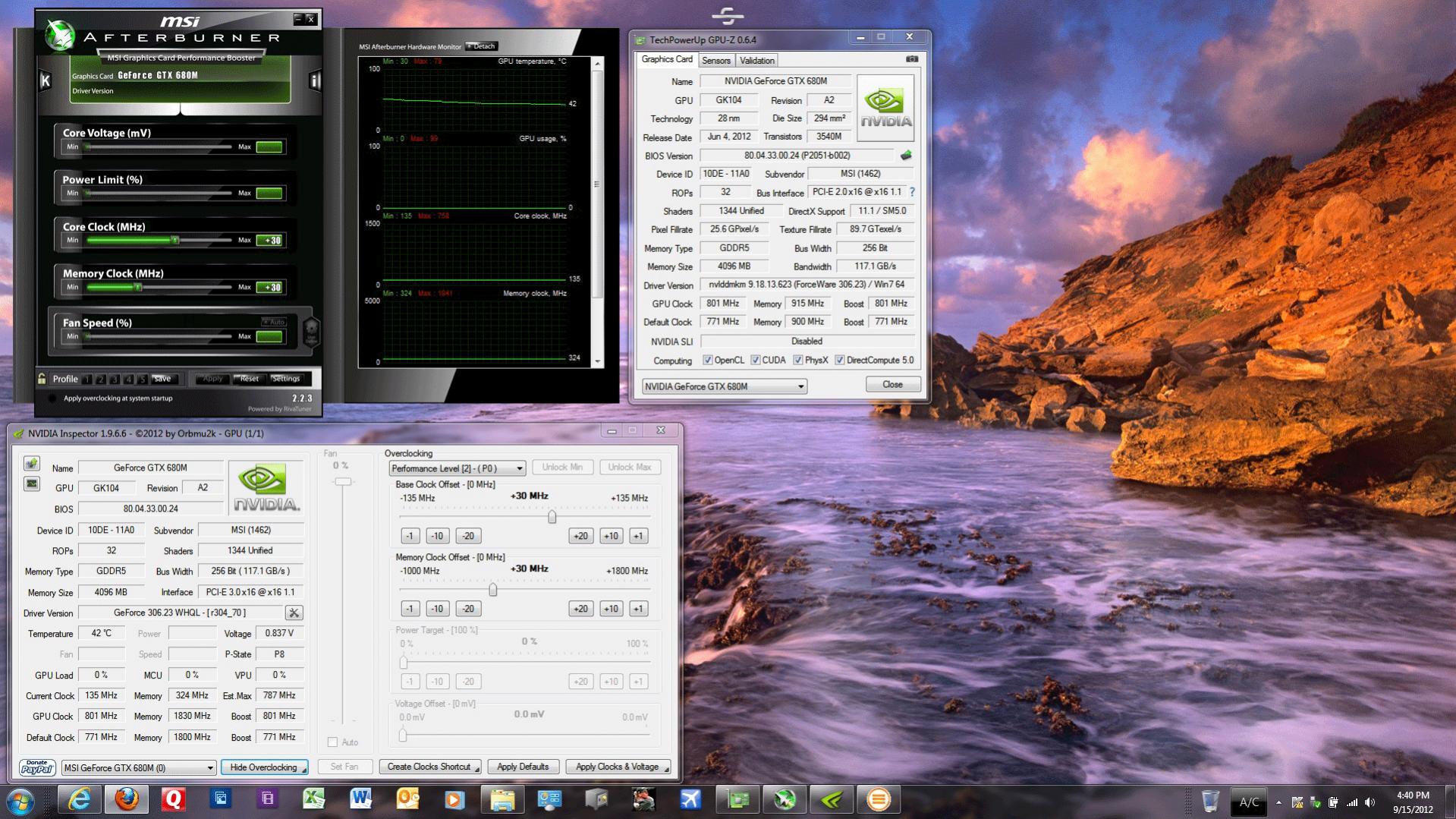
Well it looks like the MSI 1762 w/GTX680m Barebones has locked GPU clocks, but not memory clocks. At least that is what it seems to be doing.
Here is a screen shot of GPU-z, MSI afterburner, and NVidia inspecter.
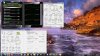
Also I have two new Vantage shots:
With +10 GPU core +15 memory
NVIDIA GeForce GTX 680M video card benchmark result - Intel Core i7-3820QM Processor, MS-1762 score: P22820 3DMarks
With + 30 GPU core +30 memory
NVIDIA GeForce GTX 680M video card benchmark result - Intel Core i7-3820QM Processor, MS-1762 score: P22989 3DMarks
With just another tweak I will easily get over 23000 score:thumbsup:Attached Files:
-
-
Ran some benchmarks with Write-back cache disabled, and enabled, here's the results:
Write-back Cache: OFF
![[IMG]](images/storyImages/write_cache-off.png)
and
Write-back Cache: ON
![[IMG]](images/storyImages/write_cache-on.png)
You can see a fairly huge speed increase from the 0.5 KB to 64 KB range (factor of 4-5 times), and then things start to even out once the file sizes match the stripe rate for the array, and also reaches its maximum hardware transfer rate. -
I'm coming from a Asus G51vx with a GTX 260m and 4GB and yes, it is a serious upgrade!
About the new 306.23 drivers. Its been a very long time since I installed new Vid drivers. Sorry for the noob question but can someone tell me the proper way to install these? Its an exe file so do I just double click and continue or do I need to uninstall the previous ones ... clean the old file out (cccleaner?) and install the new ones?
Little help please I don't want to hurt my favorite man toy! Thanks. -
yes, you can just double click to run, select default options - two minutes later it will ask to reboot and all good. No need to clean the old ones out.
-
Thanks very much.
-
IRST 11.0.0.1036 was factory installed and supports RAID TRIM, and it's already active. I see MSI downloads now has IRST version 11.1.0.1006, and I'll stick with that one for now. Nice read though.....
Nope, you are also locked or limited. If not, you would be able to clock much higher (GPU 1000+Mhz, Mem 2500Mhz) and exceed 25K in Vantage. (with the right VBIOS & driver)
Here's a good read for you on our MemoRight MS-701 mSATA's, and nicely covers benchmark testing them. I just wish the review covered them in RAID0:
Memoright MS-701 mSATA SSD Review SF-2281 Performance and 240GB Capacity Earns Top Marks
BTW, I confirmed write caching is indeed turned off, by default.
Yes, the newer NVidia drivers will install nicely right over the old ones. We no longer need to uninstall the older drivers first.
-
thanks for the tip about it already been at a good version and activated! I won't bother with upgrading this driver given our installed version already supports TRIM - rather not touch something that could break the operating system RAID drive unnecessarily....
-
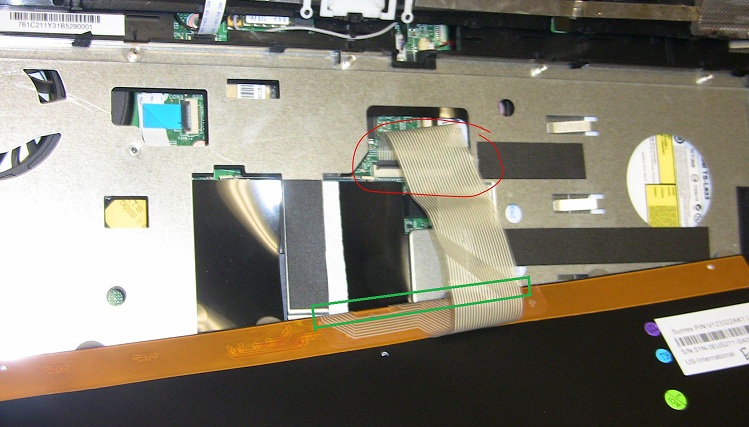
Have now done what GenTechPC suggested, it does indeed seem like there is a connection issue with the cable that are attached from the buttom of the keyboard. (highlighted in green on the attached picture).
I unscrewed the keyboard from the laptop, while the laptop was turned on, while holding the steelseries keyboard in my hand, when i unbended the flat cable, it now starts windows up normally without having to press any buttons, also now i can move my icons and folders in windows around.
I've reasembled the laptop, and some times the issue reoccurs, I then have to take keyboard appart and fiddle with the cable to make it work properly again. So definitely this Laptop gets sent back to MSI in half a year when I come back home, I am just relieved that I now know what the issue is.
Thank you Ken and Striker for all the help you two have provided.
PS. I wonder if it's possible to order spareparts for a laptop such as this? because the keyboard is in German as i ordered it from Germany, and I want a danish keyboard on it.Attached Files:
-
-
It sure looks like to me the memory is not locked just the core. I have pushed it up to 2000MHz to get a Vantage score of 23321. I was not paying attention to the current clock. It changes for about 1 second then reverts back to 135MHz, but the programs are showing the gpu clocks as going up. That must be a bug or something. Even the memory clocks with NVidia inspector exhibit the same problem.
NVIDIA GeForce GTX 680M video card benchmark result - Intel Core i7-3820QM Processor, MS-1762 score: P23321 3DMarks -
Hello..
I just wondering...On 0ne-276us' 2nd HDD bay, has SATA III or II ? Cuz I've ordered Samsung 830 512GB and gonna be at 2nd HDD bay.
I have read the manual but not say much but general info..got it from MSI online. -
Hi,
Sorry off topic I know, but I have been itching to ask for a month or so, WHERE'S WALLY (always wanted to say that), but seriously where is What's the Point these days? From someone who was almost as a prolific poster as your good self Striker he has just disappeared? Overly curios?
Cheers,
John -
I've had my GT70 0NE-276US for a couple of weeks now and have to say it's epic. Just some notes on things I discovered over that time:
Get ALL the latest drivers from the component manufacturers and install them, MSI seems to lag on the latest versions. In particular, update the Network driver. Out of the box, the installed driver was buggy and caused a few blue screens and app failures. As annoying as it is, keep the S-Bar app installed and running. As much as I hate crapware, the "Turbo" and disc eject buttons did not seem to work when it was uninstalled. The system does not seem to boot when my external SATA drive is hooked up and powered on. Powering it down does let the system boot. Hopefully a BIOS update will fix this.
Other than that, it's been a very pleasant out of box experience. All in all, for the price paid and the overall quality of the system, I am very very very happy. I am a professional developer by day and gamer by night. This system ticks every box I need. It is a fantastic machine for development and runs all of my tools like a champ. As for gaming, well, what can you say. Epic.
Just my 2 cents.
-gogman- -
HOLD THE PHONE! I may have been too hasty here, and now I am not so convinced.
Though the GT70 0NE certainly meets all the requisite hardware and software requirements for RAID0 TRIM, validating that it is actually working seems to be the problem. The SuperRAID speeds suggest that it is working, and when executing the DOS 'fsutil' command, the reported value indicates WIN 7 is set to send the TRIM command...... BUT, this really does not verify the command is passing through the controller, or if it is actually functioning.
Anyhow, after further review on the topic, I find the available information is spotty at best. In a later article, dated 27 Aug 2012, Real World Labs is suggesting that RAID0 TRIM is NOT working with version 11.2 of the IRST. They did state however, that they managed to get RAID TRIM working with version 11.5.0.1207 Production Version RST. Additionally they state, "Vantage Fill testing is the best method of real world TRIM validation".
Real World Labs - RAID0 TRIM Another Look
Some would argue that TRIM really isn't that big of a deal for RAID'ed SSD's, and given the current performance, I am not real concerned with this at the moment. I'll remain patient till the 11.5 IRST Final Release.
Yeah, obviously the barebones units are not nearly so limited...... NICE score! How are the temps? Can you have GPU-Z log temps in the background while doing another OC'ed Vantage run?
Primary bay = SATA III
Secondary bay = SATA II
LOL! Well you do realize he is a GT780 owner? Perhaps the newness wore off..... or it lost it's new car smell. Maybe he is simply disenchanted, busy, drinking beer, BBQ grill'in, or planning his next big notebook adventure. Who knows!
You miss him, don't you? That's cute!
***The Official MSI GT 70 w/GTX-680M Owner?s Lounge***
Discussion in 'MSI' started by -=$tR|k3r=-, Jul 20, 2012.