Problems? See this thread at archive.org.
how do you like it?
-
-
-
Hey guys, been trying to follow this thread but I am still at a loss. Currently. for the laptop I am planning to buy, the Alienware m17, I have 3 choices of WIFI cards and I am debating which one to go for.
- Qualcomm QCA6174A 802.11ac 2x2 MU-MIMO WiFi and Bluetooth 4.2
- Killer™ Wireless-AC N1550 802.11 ac/a/g/n 2x2 NGFF w/ Bluetooth 5.0 +$25.00
- Intel® Wireless-AC 9260 802.11 ac/a/b/g/n 2x2 NGFF w/ Bluetooth 5.0 - installed by HIDevolution +$35.00
-
Yeah 6174A has good range even at the corner. Its also called Killer 1535 and comes with BT 4.x support as well. If you want to get newer Killer Control center features then you need 1550 and above.
-
Well, I heard a lot of bad things in this thread regarding the KIller Networking Suite... I want something that just works right out of the box and would give me the least amount of problems, better if none at all. And yeah, I would like to be able to snipe WIFI signals even from a distance. Thanks to the state of the internet in my country, people often have to compete for WIFI signal.. >.> But yeah, the best possible range and reliability..
-
I'm using Killer Suite w/o any issues, but it depends from user to user. You can however use basic INF drivers if you hate Killer control center. Functionality wise you won't miss anything.
-
Best range and reliability = Killer 1535.
I haven't had any experience with the Qualcomm QCA6174A so I am not saying it's good or bad. You need to research that but what I do know from my personal experience if you've read the first few posts I made in this thread, the Killer 1535 has the best and most stable range.
And if you do get any WLAN card from Killer. Avoid the Killer suite with aa 10 foot pole. Only install the INF Driver manually from device manager.Last edited by a moderator: Mar 24, 2019 -
Hmm, still a bit skeptical over the Killer networking suite.. I have never used it before and so many people in this thread recommend to stay away from it.. I would like something that simply works and won't give me any complications..
Yes, I heard from posts here that the Killer 1535 is the same as the, Qualcomm QCA6174A . Hopefully, it is the same exact chip as the one being offered with the M17.
And well, so, avoid the Killer Suite.. hmm.. I guess it is a battle between the Qualcomm QCA6174A 802.11ac 2x2 MU-MIMO WiFi and Bluetooth 4.2 (Same as Killer 1535 I think) and the Intel® Wireless-AC 9260 802.11 ac/a/b/g/n 2x2 NGFF w/ Bluetooth 5.0. I am just perplexed on why the Intel 9260 is much more expensive as compared to the Qualcomm card. What does it offer that makes it much more expensive than the Qualcomm one if the Qualcomm actually has better range and reliability. -
See the test results here: https://www.tweaktown.com/articles/8453/investigation-wireless-nic-best-todays-market/index.html
I know it doesn't compare it to the Killer 1550/Intel 9260 but this shows you at the time it was released, it was the best and still is in terms of range and reliability.Papusan likes this. -
Intel or older Killer 1535. Case closed!
-
Uh-oh.. based on that article, it looks like this card is closer to the Killer 1435 and not the Killer 1535, unless I am mistaken.
According the article, the 1435 used the Qualcomm QCA6174A 2x2 , whereas the 1535 used the QCA6174A chipset.
The one on offer for the M17 is the Qualcomm QCA6174A 802.11ac 2x2 MU-MIMO WiFi and Bluetooth 4.2
Kindly correct me if I am wrong on this one.. and Is the 1435 still a good chip... hmm... at least compared to the choices that I have.Vasudev likes this. -
Anthony from Killer told me that 1535 and 1435 are same cards except for one difference 1535 has extended range of 1535 compared to 1435 and older M.2 WLAN/BT modules. You can ask HID. Also, there's Anthony from Killer aka Rivet NW rep in NBR @Killer_Networking
-
Yeah, I would double check. I hope they could give me the 1535 module, range is what I am very much after. Need to be able to snipe WIFI signals from a distance.Vasudev likes this.
-
If you want the best card it’s neither of these you mentioned, it’s the Broadcom 3x3 (3 antenna) card such as the Dell DW1830A aka Broadcom BCM43602, seen in some Dell Latitude laptops , better range (a little bit) and faster speeds at HT80. You need to buy a third antenna pigtail to make best use of this card.
Different people have had different experiences as you can see in the thread so it can get messy, in my personal experiences and corporate use experiences with 1000s of laptops we usually saw less AP/router compatibility issues Intel cards. Performance/range won’t be much different with the 9260 (aka Killer 1550) vs 6174A (AKA 1535/1435). Also one of the guys over at SNB Forums “SFX2000” is an actual Qualcomm engineer (retired), he generally likes Intel cards for cross OS compatability and pretty decent drivers.
Vasudev 2x2 just means 2 antennas and all these cards are 2x2 (2 receive/in x 2 send/out aka MIMO=Multiple In & Multiple Out). Difference between the 1435/1535 is probably some minor software feature.
Also some laptops antennas placement characteristics are better suited to one card over the other. In general at this point in time either one should be fine most issues for both cards are pretty much gone.
Avoid Killer Suite like the plague, it gimmicky and makes absolutely no sense to have such a QoS suite running on client side. Windows does a decent job by itself. This QoS suite makes more sense on a router. Who in their right mind would stream like a 4K video, run torrents at full bandwidth and surf the web and play a game all simultaneously on one laptop or PC that would necessitate an “advanced” QoS suite. That’s literally what one of their ads was like.
The 9260ac has HT160 support for 1733 Mbps link rate, I can hit 100-140 MB/s (800-1,120 Mbps throughout my home) but HT160 is more susceptible to interference and reduced range (but will seamlessly fall back to HT80 if interference occurs).Last edited: Mar 24, 2019Papusan, downloads, Vasudev and 1 other person like this. -
Interesting, thank you for the information. Yeah, I would go with either the Intel 9260 or the Qualcomm chip. I would get input from the folks over at HID and what they would recommend for someone such as myself.
Unfortunately, those three are the only chips on offer for the laptop. oh wells.. as long as the range and stability is good, then I should be fine. Internet speeds in my country are not really fast anyways.. -
You can get the Broadcom BCM43602 card online or the Dell branded version of it DW1830A , easy to do plus Dell at least never voided warranty for self upgrades.
As for the Intel/Qualcomm cards make sure to get the non Killer versions aka Intel 9260 or Qualcomm QCA6174A.Papusan likes this. -
Yeah 1435 lacks Wave2 when compared to 1535.
-
Will do, I would stay away from the Killer branded one. Hopefully HID would be able to help me out over which card they have on offer is better. I am not really the type to open up a laptop anyways.. Besides, I would have to worry about having a new card shipped to my country. I could probably settle with the Qualcomm or the Intel 9260... whatever is ultimately better.Aivxtla likes this.
-
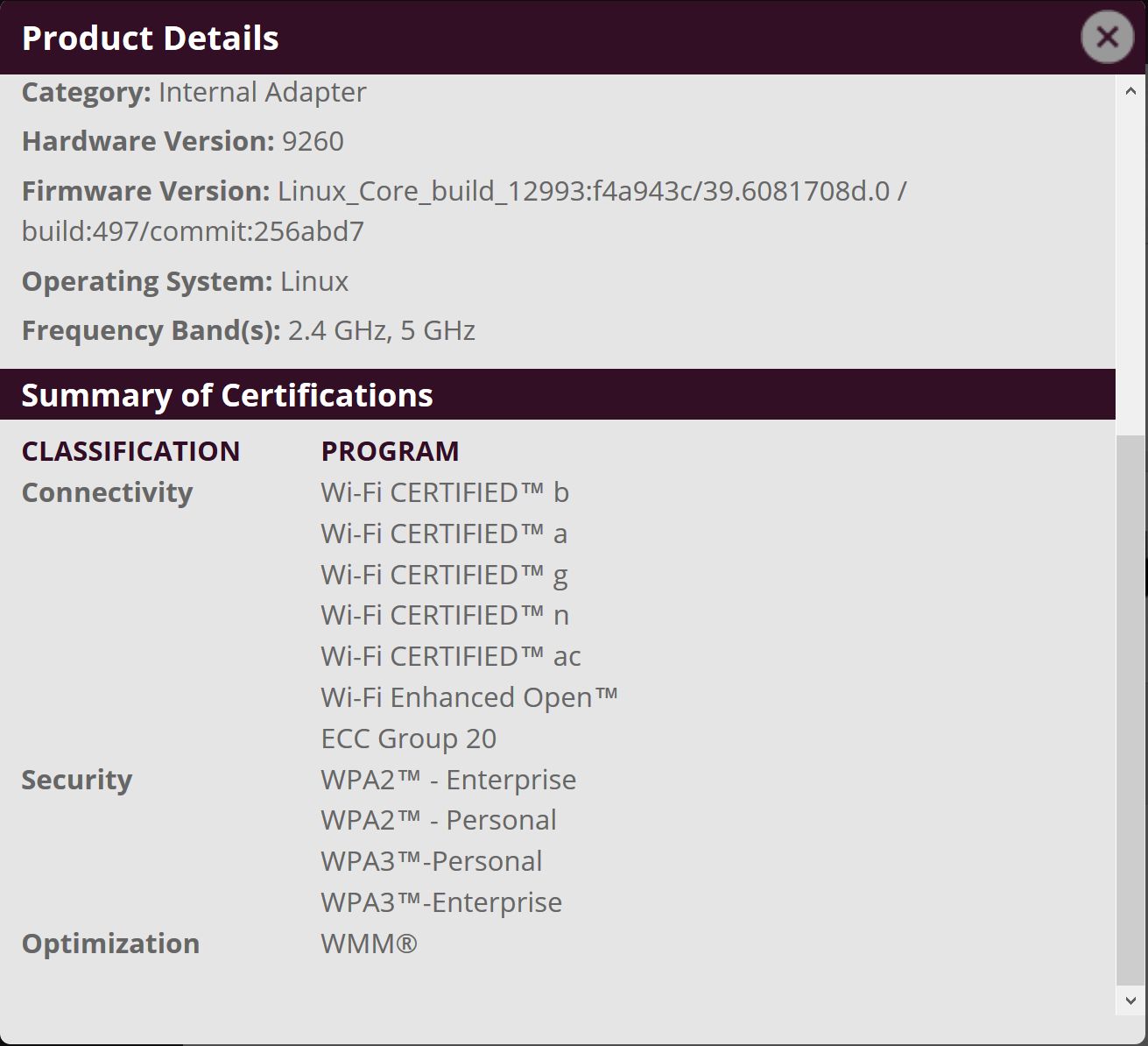
As a side note to the discussion above is that only 2 Wireless cards as of today have WPA3 certification,the Intel 9260 and the Marvel 8997-P
https://www.wi-fi.org/product-finde...sc&categories=1&capabilities=16&keywords=wpa3Attached Files:
Vasudev and Flying Endeavor like this. -
-
Hey guys,
To clarify on the 1535 versus the 1435 - the 1535 has built-in amplifiers on the 5 GHz radio. This will extend the range in some cases. It does not affect the 2.4 GHz radio.
The Killer Control Center is an extremely valuable tool if you are using wireless networks with poor signal strength. This is because the Killer Control Center bases its prioritization on a speed test done on each network. It saves this information separately for each network. It will also make some adjustments dynamically. Intelligently prioritizing packets based on the actual network speed of a weak wireless signal can make even very weak signals much more usable.
-- Anthony with Killer NetworkingLast edited: Mar 25, 2019Vasudev and Flying Endeavor like this. -
Thank you so much sir Anthony. Would you be able to clarify, is the Qualcomm QCA6174A 802.11ac 2x2 MU-MIMO WiFi and Bluetooth 4.2 the same chip as the Killer 1535 or is it the same as the 1435? I am after the best range and stability as possible given the incredbily slow internet connections in my country. -
Yes, I agree - whenever I tried to use that Killer Suite my performance actually got worse until I uninstalled it and the whole idea does not make sense - most people just run a single game when playing online without trying to run a bunch of torrents in background. Maybe also a Discord for communicating with other friends while gaming, but it has 0 impact on gaming without any QoS adjustments or third-party software.
-
The 5 GHz amplifier is only on our adapters. Qualcomm did not use it on their adapters, so you will not see the amplified 5 GHz radio without the 1535. Both the 1435 and 1535 use the QCA6174A chip, so you could say that it is equivalent to the 1435.
-- Anthony with Killer Networking -
The Killer Control Center is not primarily a QoS application, though it can serve that purpose if necessary. The real functionality comes from the packet prioritization. Latency-sensitive applications and services are prioritized above other applications and services in your outgoing data stream, which results in the replies for those applications and services returning more quickly, causing a cumulative reduction in latency. As modern applications and Windows itself all communicate online nearly continuously, this prioritization can be very effective at reducing latency in games, streaming video, and web browsing.
-- Anthony with Killer Networking -
That’s pretty much QoS.
Dennismungai, Spartan@HIDevolution, downloads and 1 other person like this. -
Copy, thank you so much sir Anthony.
 Killer_Networking likes this.
 -
QoS does not prioritize packets. QoS only throttles low priority data when you near your bandwidth limit.
-- Anthony with Killer Networking -
I still don't see a necessity for it, though. Like I said, many people just don't run anything else in background when playing games online, except some VoIP programs like Discord. And as far as I am aware Discord has its own way of prioritization of their own packets (so it's not necessary to use any third-party software to give it higher priority). Sure, Windows itself has some services which constantly communicate with Microsoft's servers, but other than seeing unexpected Windows Update notification - I have never noticed any negative impact on games or VoIP.
-
@downloads or anyone wanna chime in. Pretty sure traffic shaping falls under QoS.
Last edited: Mar 25, 2019Spartan@HIDevolution likes this. -
Yeah I guess Killer Networking's Prioritization does not like Microsoft Activation servers as seen in numerous threads all over the internet of people not being able to activate Windows until they uninstalled the Killer Performance Suite:
https://www.reddit.com/r/Alienware/comments/aeei34/new_m15_cant_activate_windows/
https://na.alienwarearena.com/ucf/s...15-cannot-connect-to-microsoft-for-activation (Advanced stream detect? For God's sake!. read the first post)
http://forum.notebookreview.com/threads/official-alienware-m15-owners-lounge.825553/watch-confirm
Jump to min 10:38 in this video
then see the same video and how he fixed it at min 52:
Killer Networking should seriously stop with this poor and buggy app that has caused nothing but issues since I have first come to know about the Killer Networking products (first poor experience was on my Alienware 18 with the Killer 1202 where the Killer Networking Suite caused a lot of BSODs)Aivxtla likes this. -
It looks like HID has a Killer 1535 available in their website.
Hopefully they would be able to install it on the M17 without any complications.. Otherwise I might as well stick with the Qualcomm Card unless they say the Intel 9260 is a much better purchase..
-
Traffic shaping does come under QoS.
I never had any issues with KCC v1.x whereas Killer Network Manager was garbage. KCC doesn't improve any speed but you can priority which packet or app or specific website is a top priority for download/stream/upload. I always felt uploading speeds to be very good when using KCC and felt it was giving consistent experience w/o affecting my browsing session on Windows. -
Yes, QoS is considered traffic shaping. No, most QoS solutions do not prioritize outgoing packets.
Another big difference is that QoS has to be configured by the user for each application, IP, and/or port, to define which traffic is high priority. Even then, it will not change the ordering of the packets in the data stream. It will only prioritize by throttling low priority data when necessary. The Killer Control Center orders data packets of latency-sensitive data at all times, which results in faster responses from high priority streams even when you're not at the edge of your available bandwidth. In addition, you can change priority on-the-fly, and specify exactly which applications need lower latency without having to manually input this information into a router setup configuration. In most routers, automatic QoS without configuration options either does nothing when you are not near your bandwidth limit, or causes a universal slowdown.
Honestly, the proof is in the pudding. I was skeptical when I first started working for the company. However, it was a pretty simple matter for me to test, and I saw no less than 10 ms less latency on my already low latency connection in World of Warships, WoW, and Star Wars: The Old Republic. With advanced stream detect on, my latency is about 30-40 ms, without my network being otherwise stressed or near my bandwidth limit. With advanced stream detect turned off, latency goes to about 50-60 ms. It works. If it didn't, I wouldn't bother answering threads like this.
I have yet to see an issue with the Killer Control Center blocking anything Windows-related that wasn't due to using a very outdated version of the Killer Control Center with a relatively current version of Windows.
-- Anthony with Killer NetworkingLast edited: Mar 26, 2019Vasudev likes this. -
Your Control Center is so good that i had to disable any service related to it because it was bottlenecking my internet, causing huge lag spikes on online games. Don't ******** us, we know what works best for our laptops and sadly Killer Control Center causes more issues than anything useful.
Dennismungai and Spartan@HIDevolution like this. -
Right i am not defending anyone here, nor do i use KillerNetworks Control centre (Due to using Wireless on a VMSwitch so its pointless as it doesn't work with bridge connections), however you say its bottle necking the internet connection you have. You haven't once stated thus far as far as i can see what your ISP speed is, what your getting or even what your router is, or even if your using a Wired or Wireless connection
Lag spikes can be cause by many things, other devices using the bandwidth (KNCC doesn't QoS anything other then the system its installed on), it could also be congestion on the ISP's network, packet loss, even if your using Wireless overlapped Wireless signals. Not forgetting i can be also compatibilty issues with the Wireless card and the mode/router your using.
So really there is no reason to be rude, speak to their customer support supply them with the info they require you may never know they might fix the issue. I have used tech support with them many of times due to issues with the Killer Network 1535 drivers which improved over time.
If you have other devices using the internet connection its always best to run QoS at routing level like i do know (The joys of OpenWRT on Linksys WRT hardware is a blessing).Killer_Networking and Vasudev like this. -
I don't need to tell you what's my ISP, my speed and my router. I have already solved the issues by disabling their crap. It wasn't caused by other devices connected to the net or anything, it was only their faulty software.
I call it crap because out of the box it never worked as intended, i'll tell you why real quick.
I have multiple posts in this topic and my laptop's lounge thread (and also a thread where i tagged them and they ignored it), the last issue i had was huge lag spikes in online games. Guess what it was? Killer Bandwidth Control service (which i found in services.msc together with xTend and more useless services) that somehow got installed with their INF drivers. Oh no, it's clearly an user error and not them including bloatware even inside INF drivers only version.
I had an issue with my Wifi card disappearing from the device manager when the laptop was put to sleep. I spent alot of time on trying to speak with MSI and them, they both blamed each other. Killer says MSI needs to update the BIOS but doesn't actually do anything else, i haven't seen them trying to get their attention on fixing this annoying bug, it should be in their best interests, MSI support is more incompetent than them and doesn't acknowledge an issue that was already present on GT73 series and solved with an update.
Guess how did i solve this one? By using an ethernet cable! My ethernet card doesn't disappear but that Wireless card still acts funny causing memory dumps from time to time because two companies do not communicate on this issue even though their customers have already spoken openly about it with both sides.
Also, you said you don't use the control center, that's why you probably had less issues than those with bloatware shipped on their laptops by MSI. Each time i had an issue i found out the solution by myself, they weren't helpful at all. Sorry if i seemed rude but i don't wanna put more time into this than i already have.Last edited: Mar 28, 2019Spartan@HIDevolution and Aivxtla like this. -
Where can I find the driver for killer wireless ac 1550 windows 7x64?
-
There is none and there won't be. Only Win 10 driver is available for Intel 9260/Killer 1550.Killer_Networking, Vasudev and FunkyLSD like this.
-
maybe someone modified the inf file
-
@downloads is correct. As the device was released after Windows 7 was no longer fully supported by Microsoft, there is no Windows 7 driver.
-
-
That's really unfortunate, bro. Seems like the tail is wagging the dog. Who gives a rat's ass what the Redmond Retards support. Screw 'em.
Killer needs to step up to the plate and make their drivers and to hell with what Micro$lop thinks about it. Micro$loth doesn't support Linux either, but that doesn't mean there are no drivers for it. It's none of their business. The production of drivers should be at the sole discretion of the hardware OEM/ODM. If Killer has decided to stop supporting Windows 7 on their own volition, then maybe customers should stop supporting Killer on their own volition, too. But, don't blame your company's bad business decisions on the Redmond Retards.alexhawker and Ashtrix like this. -
Its not KIller, Intel makes the drivers. From Intel's perspective it's not worth supporting an additional OS when they don't think they need to waste additional resources, especially as W7 official support ended in 15 and extended support ends in 20, this also works in MS favor. The 1535's drivers come from Qualcomm.
Last edited: Apr 1, 2019Killer_Networking, downloads, Papusan and 1 other person like this. -
Well, same applies to them, too. Screw 'em. I bet it would take almost zero effort to release a Windows 7 driver. They are not much different than Windows 10. In fact, some drivers work for Windows 7, 8 and 10. They are just being stupid and letting the tail (Micro$lop) wag the dog (OEM/ODM).
-
Nvidia released RTX graphics and with Win 7 support... How long after Killer and Intel's newest Wifi adapter? https://www.nvidia.com/Download/driverResults.aspx/145533/en-us
Sure. This is Microsofts work. Could Killer fix this themself?
-
EXACTLY. It's a choice, and the people that are being stupid and arbitrarily electing to allow the tail to wag the dog are making very poor (potentially fatal) decisions. And, they deserve everything bad that comes to them for their stupidity.Papusan likes this.
-
Exactly!!! This is forced by M$! Not even Nvidia did this stupid.
-
Of course they could. They are just being lazy bastards. Doesn't matter when it was released. All Intel CPUs and AMD CPUs support Windows 7 and all NVIDIA graphics cards support Windows 7. There is absolutely no legitimate excuse for a network card to not have a driver supporting Windows 7... other that just laziness and not giving a damn about their customers.
Like my daddy used to tell me... " Son, an excuse is just a reason surrounded by a pack of lies." -
-
Exactly... they need to man up and do the right thing and stop making up half-hearted excuses to cover their lameness.
Just because some people are willing to lick the boots of the Windoze Nazis doesn't mean everyone needs to fall in line and do the same.
Some people are living in a dream world and pretending Windows 7 is dead. It's going to be a long time before nobody uses it any more. It took 4 years for Windows 10 to barely exceed the number of Windows 7 users, and there are still far more Windows 7 users than all other OSes combined. If you add together all Mac and Linux installations, the count is still minuscule and the aggregate user base is absolutely dwarfed by Windows 7. The Redmond Retards are trying everything they can think of to strong arm Windows 7 users into ditching it for their latest abortion, and the hardware OEM/ODM that is complicit with their treacherous behavior is equally to blame and equally worthy of harsh treatment in return for it.Last edited: Apr 1, 2019
Killer Wireless-AC 1550 Review
Discussion in 'Networking and Wireless' started by Spartan@HIDevolution, Mar 3, 2018.