Problems? See this thread at archive.org.
This might help you: https://imgur.com/a/dlQ294n
Just FYI when the CPU is under full load the maximum multiplier when all cores are being used is 39. You won't see 41 when doing something like TS Bench because that is putting a full load on the CPU. If you open the FIVR window in ThrottleStop you can see in the lower left the different multiplier values based on how many cores are being used. You can try changing that but I'm not sure if it will work and it might generate a lot more heat and power usage, I haven't tried it personally.
-
-
Call me crazy but this seems perfectly acceptable after 10mins of a stress test... I bet normal temps are plenty lower!Installed64 likes this.
-
I bought the OP-1 with the i5-8300h. I applied liquid metal and did a little undervolting and I cannot get my processor or GPU to go over 75 degrees in synthetic benchmarks or gaming with fans on auto. I am getting pretty good scores in Cinebench(846) and Geekbench(5060 single, 17318 multi). This thing runs super cool and quiet and plays every game I have thrown at it with ease.
I know liquid metal seems a bit daunting at first but it isn't too bad. I have used it on all of my laptops and even a GPD Win, and the temps are always amazing afterwards(except my first gen Razer Blade Stealth that thing is a lost cause).B0B likes this. -
Man I LOVE that 8300h!
I just ordered that chassis again today because honestly for me, it's all I need. Add some RAM and install the bigger battery, i'm good to go. -
I saw your review about this chassis and I was encouraged by your results. Out of the box this thing was running in the low 90s under stress. Right now it is perfect. That 8300h is super underrated, it is an absolute beast. I am about to start seeing if I can make it do some VR, but I don't have high hopes.
-
So is there a bios that allows swapping he FN and CTRL buttons. It drives me crazy that the FN key is where the CTRL is on a normal desktop keyboard.
-
Walmart should offer you one for free! Read lot's of comments from people deciding to buy after your reviews on OP brand. Excellent work!Installed64 and B0B like this.
-
Hey guys, what's the overall experience with the Brown Switch Mechanical Keyboard on this laptop? Some people hate it, and others love it. Can anyone elaborate on those points?
-
It’s something where you have to test it out for yourself and see if you like it or not. Everyone has their own opinion on keyboard feel.thetraveler1 likes this.
-
That’s a tough call, after all it is a keyboard. My favorite gaming laptop keyboard this year is the gigabyte Aero 15X.
I’m sure many people here would disagree and they have every right to do so, it’s a keyboard. -
499 one back in stock.
-
I agree. I just hope they plan on servicing these in the future. I imagine their call volume has shot up in the last few days.
-
I got the 15+ from Walmart before it went out of stock. However, I plan to return it because I think there is something wrong with the power button. When it is on battery I need to press the power button 2-3 times to turn it on but just one time when it is connected to the outlet. It is something by design or I just got and bad unit? Please share whether your unit also need multiple presses or just one press to turn on when it is on battery. Than
-
It's been covered in this thread. When the laptop is on battery only you will have to hold down the power button to turn on. This is by design so that just in case you won't run out of power if you accidentally hit the power button.steberg likes this.
-
I just got my TG Kryonaut paste in today, and i'm experiencing the complete opposite of you. I originally repasted the machine with Arctic MX-4 and yielded terrible results with the CPU peaking at 90-91C while gaming (Overwatch)!!!
With the Kryonaut paste, i'm now peaking at about 82-83C. Huge difference; i'm sitting with much more comfortable temps now.
I didn't think the quality of the paste would make that much of a difference. I'm starting to doubt how i actually applied the MX-4, although it didn't seem bad at all when taking the sink back off for the TG stuff. (I never had an issue with GPU temps BTW)
Here's pics of the amount/application of TG Kryonaut i used
-
My 15 does the same thing. But the my 17 does not.
-
In case you haven't seen my post on the other thread: http://forum.notebookreview.com/threads/tongfang-gk7cn6s.825461/page-3
-
Thanks for the info, I'm fairly certain that I'll get used to the slightly cramped layout of the keys. However, what I am worried about the most is the consistency of the keyboard. In some reviews I read that some people were having issues with the key presses (mainly the space bar) not registering at times. Is this also the case for your laptop, and if so, is there a fix for it?
Thanks -
Shows OoS for me.
-
I've been playing Shadow of the Tomb Raider and 2 of my CPU cores hit 91 degrees Celsius. I am on "gaming mode" and running the game on high. I didn't update the BIOS or undervolt or repaste, but I guess I should. My old laptop would never get that high.
Otherwise, I've been using the laptop for about 2 weeks now and really enjoy it. The keyboard is alright. The inclusion of a numpad is nice, but I don't think it's absolutely necessary. The keys do feel a bit cramped. The keyboard is definitely audible when typing. -
They went pretty fast. I imagine resellers/flippers are picking them up quickly.
-
Thanks for the reply. I saw the posts you mentioned. However, my 15+ needs multiple presses, not a long press. I tried long press but it does not start. I like to keep the unit but want to know whether requiring multiple presses to start is a normal behavior as it doesn’t mention this in the manual.richierich likes this.
-
Mine is like that as well. Not sure why. As far as I can tell even when on plugged in to power if I do a shut down it takes 2 presses to turn back on.
I'll try a long press next time and see if that works too. -
When it comes to keyboards - as long as it’s not defective - is that it’s all about personal preference. Some people will love it and it may suit them more vs. others. You can come up with valid reasons to like or dislike any keyboard out there on the market.
For example I have a small hand, therefore I love the keyboard layout and clicks/responsiveness feel great to me compared to my Omen laptop which has more spaced out keys. The closer the keys, the easier it is for me to reach more keys with my fingers.
All of it really does come down to personal preference. You just have to try it out for yourself and judge it yourself.
(Same thing goes for many gaming mouse on the market. Some will call one too bulky, less responsive etc. vs. others when their hands are smaller/not fit for it, although in the grand scheme of things, they’re all good as long as they’re not defective. Your hand will just suit certain ones more.)
Sent from my iPhone using Tapatalk -
If your primary concern is the keyboard I would recommend the 17" over the 15" because I have heard the keycaps are not as good on the 15". I have gotten used to the more cramped key style, it's not bad at all, and much better than some other laptop keyboards I have tried, while still worse than others (namely business grade laptops).
The consistency is, indeed, one of the glaring issues with the keyboard. In a test setting, however, it is a very low percentage of keys that do not register for me. During the four minute typing test I just tried, only one out of 2,000 keystrokes failed to register. This was mainly due to the fact that I typed slowly and deliberately to ensure each keystroke was well placed. When typing loosely and with less care, this error rate increases.
The problem arises when you strike the key on the upper extremity. The key then will fail to register since the mechanism essentially flexes enough to miss actuating the switch. The spacebar is especially problematic because most users strike the key off-center, and the key switch is in the middle.
Is it really so bad? No. Several scissor-switch style keyboards I have used experienced the same problems. But if you are needing this laptop to type on 4 hours a day, it will be a strong factor. -
While it's true everybody has unique preferences on keyboards, there are still designs which have universal appeal. For example you'll hear very few people complain about the typing experience on a Lenovo X1.
-
The system comes pre-installed with the DCH drivers which as I understand it are UWP compatible drivers. You might have noticed that the Nvidia Control Panel is a Microsoft Store app rather than a normal x86 program.
The drivers you get from the Nvidia site are the standard drivers which cannot be installed over the DCH drivers. If you want to use the standard drivers you would want to use a tool like DDU to completely remove the current DCH drivers. Make sure to run DDU in Safe Mode as the program suggests. After that you can install the standard drivers from the Nvidia site. -
Thanks. I was on a fresh install, but after windows had updated, so maybe that's what happened. It seems likel it updated through GF Experience though. The version is right, but I'm wondering if it's still there DCH driver.
I might still try it the other drivers if there is a good reason to.
It's been a fun laptop so far, even though I haven't played any games on it yet. Looking forward to making whatever tweaks I can. -
Yeah I have to hold down my power button for about 4 seconds and then once I release the button that's when my OP 15+ starts to boot up.
-
I have to say this is wired as every one start the machine slightly different when it is on battery. To make it more complicated, when do a shutdown and wait for the green light to go off. I just need one press to get it boot again.
It seems like when the machine is off for a longer time, some static build up inside and first press discharge it and second press is able to start the machine. Just my guess after reading posts for other computers.
I like to believe it is normal behavior. However, if it is not, we are on our own as the Wal-Mart support is not very reliable. Please let us know if your machine can start with only one press of the power button when on battery. -
I just tried plugging my HDMI port into my Samsung 4k TV to play some Rocket League on the big screen =). Oddly the computer recognizes the 4k TV and all its attributes including refresh rate, resolution, color, etc but will not allow my laptop to extend its monitor. I tried going into my laptop display settings and reducing the refresh rate to 60hz to match the TV thinking they both needed to be in sync for it to work, but even that did not fix the issue. My desktop has no problem projecting via this HDMI cable but this laptop does not want to play ball. Does anyone have any thoughts? I bought two of these, and tried the other laptop with the shipping nvidia gpu driver and it was still on 1803 thinkng maybe it was a software issue. My next step was going to be to try turning off HDR on the input, but like I said my desktop with a 970 works just fine.
-
Your old laptop probably wasn’t an 8750h
Gaming mode for this chassis will allow the CPU to get that warm.
This is why my testing was with the max fan button ON.billycuth likes this. -
Yeah the 8750H is a totally different kind of CPU for laptops now. It just generates way too much heat with all of 6 the CPU cores packed so closely together in a small package.
B0B likes this. -
I highly suggest you repaste especially if you got it from walmart. The stock paste is crappy and theres way too much of it. The load temps after repaste really makes a huge difference in both fan noise and temps.
jppflg likes this. -
FYI, Walmart had nothing to do with the thermal paste... just saying.
Sent from my SM-N960U using TapatalkB0B likes this. -
Oh yeah definitely but the paste that comes from tongfang in all of them is kinda ****ty. Just some resellers do repaste at least, but not walmart so it pays off to do it.
-
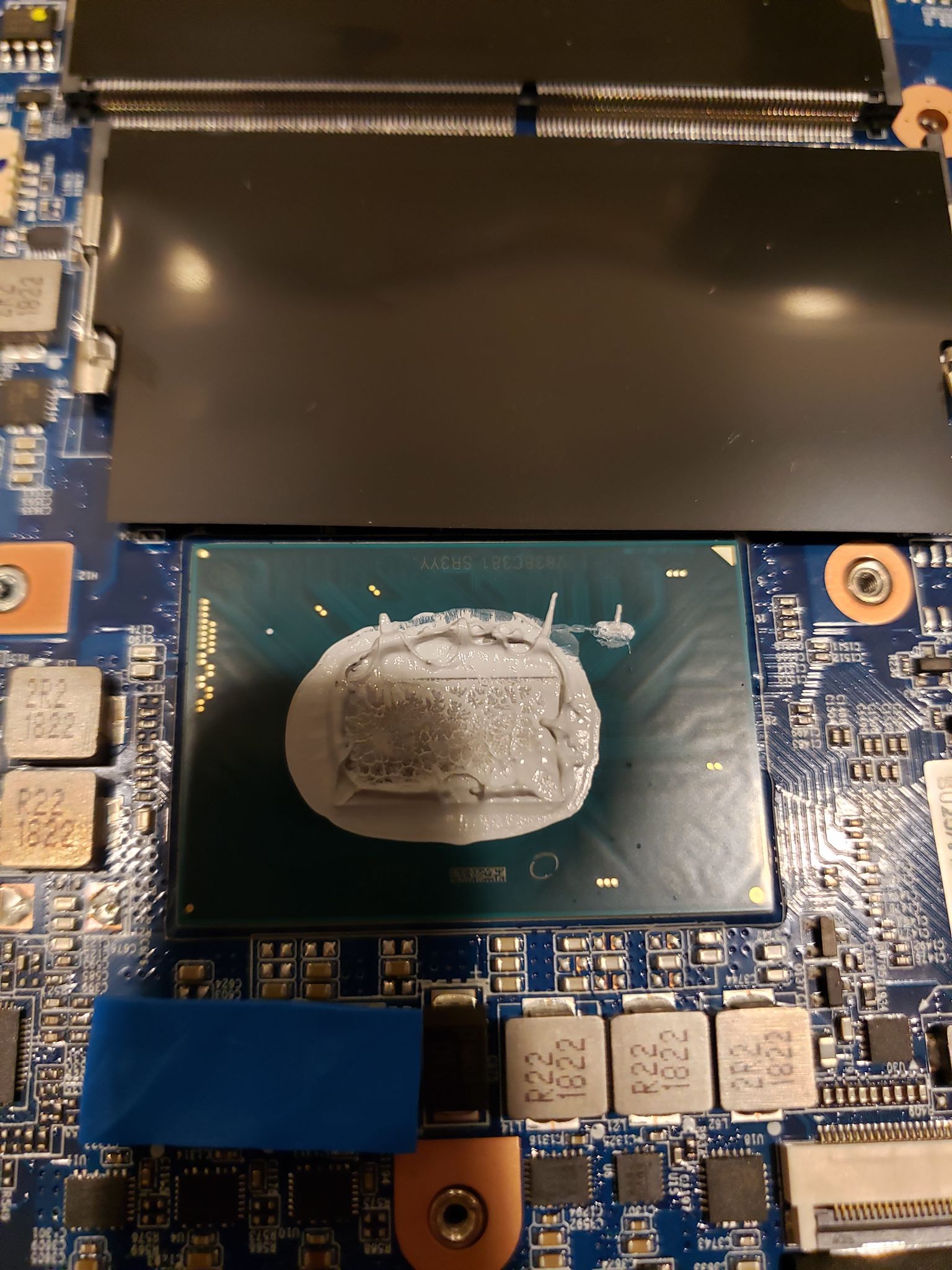
This should be one of the first things you do if you plan on running the CPU at the full load of up to 65W peak. With stock paste, i had an instant crash booting up OW saw that temp spike to 95C then died.
The stock paste job is not too bueno, they drowned that CPU in it; here's a pic of what the stock paste looked like after sink removalAttached Files:
richierich and Installed64 like this. -
-
As far as the power button, I have a similar experience of needing to hold it / hit it multiple times. Seems to just be an attribute of the laptop.
As far as the 15 is concerned, thinking about buying this 120w charger during the 15% eBay sale:
https://www.ebay.com/itm/120W-AC-Ad...8/352140867400?hash=item51fd3b3748:rk:15:pf:0
It matches the model# and specs of the included charger, just not sure how critical it is to get the exact same one? The included charger is a Chicony 120w (MODEL# A15-120P1A). -
The stock thermal paste on mine was applied way too heavy, I personally have no idea if it was "****ty quality" or not. All I know is that a TG Kryonaut repaste on my end helped a lot. Not sure how "Walmart" figures into any of it though.
Sent from my SM-N960U using Tapatalk -
That's the one included in the cheaper model with the i5-8300H and 1050 yes, the higher end 6Z with the i7-8750h and 1060 uses the A15-180P1A 180W brick. Just noting this here as to not confuse people because the 6Z will have issues if you try to use a 120W power supply.
-
Seems like the huge rise in posts here is due to everyone grabbing the walmart laptops (and asking similar questions which were answered before many pages ago), figured it would be a good reminder.steberg likes this.
-
Found this replacement battery link over on a rddt thread. Don't know if it will work but the interested folks could further check into it:
https://cheap-laptop-batteries.com/laptop-battery/getac-gk5cn-00-13-4s1p-0.htm -
Here's something that may be helpful that I didn't realize. If you are going to use your TV or a monitor with a HDMI cable and you notice a framerate lock you need change your display setting (windows key + P) to either extended display or second monitor. I have an LG Oled TV that I put in gaming mode and ran BF 5 just to check it out and noticed that it immediately capped out at 60 fps max. As soon as I chose second monitor only the fps was uncapped again.
Sent from my SM-N960U using Tapatalk -
Optimus laptops will use the iGPU as the laptop display and dGPU for external monitor.
It’s an annoyance as someone who wants to have a dedicated stream PC to showcase laptop performance on Twitch lol.stephanm74, richierich and clone1008 like this. -
Just managed to get a stick of matched GoldKey RAM using the current ebay coupon for 15% off anything. Might be good for people looking for an NVME SSD too. You can use it on multiple items as long as you check out all at once by 6pm PST. Code is POPUPSAVINGS
billycuth likes this. -
This is well known around here, and currently out of stock. I'm sure this thread will be blow up once the stock is replenished.
-
Still waiting for my second stick of Ram from eBay. Waiting to get that before updating my SSD and repasting.
So far the thing has been rock solid outside of those 3 odd blue screen crashes I got after I set it up a 3rd time. All seems fine. It still has power limit throttling while benchmarking or gaming, but other than that it's been smooth. The fans are mostly quiet too.
And I've gotten used to the keyboard OK. -
So I guess it's safe to assume that all the video outputs on here are wired to the 1060 and not the integrated graphics? That would probably explain why I don't see any external displays in Linux when I have Intel graphics on (have to force Nvidia GPU on to see any).
-
Should I chose 17+ over 15+? $200 difference for 1tb more hdd, 16gb more ram, less cramped keyboard and bigger display (about 20% bigger), should I get it?
Sent from my iPad using Tapatalk -
Depends on your needs. I am quite happy with the 15+ afterall. And I've been through a ton of laptops over the past 6 weeks or so.
TONGFANG GK5CN5Z / GK5CN6Z / GK5CQ7Z / GK5CP0Z
Discussion in 'Other Manufacturers' started by sicily428, Apr 22, 2018.