Problems? See this thread at archive.org.
you can force the Nvidia graphics over the Intel integrated graphics. Right click on the desktop and go to "NVIDIA Control Panel". There under "Manage 3D Settings" you can force the whatever executable to run on integrated graphics or the dedicated GPU.
THe SBUI is still a little buggy. I have to sometime launch the Synaspe utility and click on "Apps" to get everything to reappear.
-
Not with the beta drivers you couldn't. The option was greyed out and completely unselectable. This has apparently been an ongoing on and off issue with Diablo 3 combined with the battle.net launcher. If i understood the forums correctly, battle.net launcher has become a mandatory requirement for running Diablo 3 as of patch 2.04. Prior to that you could simply fix the shortcut and use administrative options to force it to discreet. Even THAT didn't work for me. *ONLY* rolling back the drivers helped.
-
Has anyone opened one of theses babys up yet i wanna know if you can still put a hdd in them and if anything internal has changed
-
The answer is yes. The 2.5 hard drive bay is still there. I took out my mSATA drive the day I got the laptop and replaced it with a Samsung 1TB EVO mSATA. I have another 1TB SSD 2.5 drive that I was going to install in the bay but now I am thinking I will just sell it.
-
how hard was it to access the harddrive? I did it before with my alienware but is the razer blade plug and use? or do you need to clone your drive onto it first?
-
As far as accessing, let's just say "I'm not ready to try it yet". I opened up the bottom with the intent of re pasting with AS5, and put it right back on. To get to the SSD [which is a card style] you'd have to pull the motherboard. That in itself isn't that horrible, but there are all these taped down cables >< it looks like whoever assembled it was really on the ball, but it's so tightly put together that I couldn't disturb it. . for now.
As far as adding a 2.5" drive, it LOOKS like everything is still there [I haven't verified the connector input on the motherboard, but the SPACE is still there]. Unfortunately, I don't have the correct adapter or a spare HDD lying around to attempt it.
Wow, such a tiny SSD...
SanDisk Goes Big, Launches Industry's First 4TB SAS Solid State Drive | Maximum PC
Sure, it's 2.5", not mSata, but SHEESH >< I wonder if I could afford it if I sold a kidney.... -
Not hard at all but you will void your warranty. The procedure is exactly the same as the older models and I used a thread in here to walk me through it. I used Acronis 2014 to make an image of the factory drive to a USB drive.
Then I used the image on the USB drive to load on the EVO. -
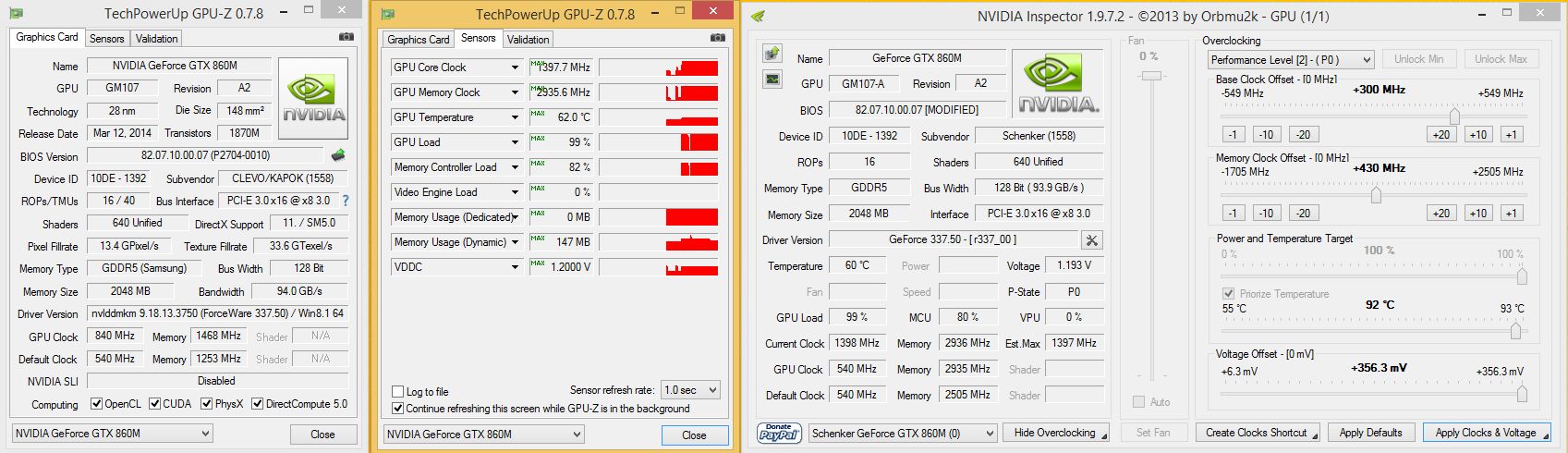
I am currently making an overclocking vBIOS Mod for a few GTX860M Maxwell Notebooks.
These chips run @ 1400Mhz and more...
If anyone here already has the system and wants to help please PM me asap.
THX!Attached Files:
-
-
What is that going to do to the power draw under load? [If anything]
My only concern is that it'd push the power draw over the edge for what the power brick can provide. . -
It adds about 5-15W depending how far you push it. It is all set manually by the users own choice and not forcing an overclock:
http://www.3dmark.com/3dm/2981759?. -
How is the fan noise under idle conditions with the RBP? Anyone reporting coil whine or obnoxious fans while just doing office tasks / surfing the web?
-
Slim to none.
To the post at large:
Last night I ran across some minor artifacting while watching NETFLIX [of all things] on my 2014 RBP. This morning while web surfing [Chrome--via Sandboxie] I got a random BLANK WHITE SCREEN. Physically powering off [long hold on power button] and restart did nothing. Unplugged it and waited 5 minutes, and it came back up normally.
For those unfamiliar with Sandboxie:
Sandboxie - Sandbox software for application isolation and secure Web browsing
I submitted a ticket to Razer support, but I thought I'd check here. I tried to do a forum search, but apparently my search terms are either too broad or I need my morning coffee. Anyone heard of/seen this before that might be able to point me at someone else's analysis?
I've seen driver issues, windows issues. . my work notebook has had 3 screens replaced because the cable kept shrinking and slightly coming out of the connector, but I have *NEVER* seen a screen go totally white like that.
If it's relevant, The past few days I've been relying on sleep mode over actually physical shutdown. *I* can't see how it'd be relevant, as I know a lot of people do this without issue, but it can't hurt to throw it out there. Hibernate is disabled on this machine. -
If anyone here with a 2014 Pro model could send me a BIOS dump of this system via PM that would be great:
https://mega.co.nz/#!TFd1wayZ!Nj04CugrYNeOYumET7dPvYJsjMbqLYukzCx945eao3s
Just run this software in Windows and hit the save button, then upload the file.
THX! -
Had my RBP 2014 for near to 2 weeks now. Loving it. But need to ask fellow owners here, how is the trackpad for you guys?
Mine is very sensitive on the right 3rd of the trackpad/screen, ok in the middle, but very bad towards the right 3rd of the screen. Making it practically unusable as a trackpad. I use it for work and run some vms, sometimes just wanna show some quick stuff to clients without taking out mouse but thats nearly impossible.
Theres a fellow owner here who started a thread on this. Don't know hows it doing now. Sent ticket/s to Razer support, seems response is slow, like 1 email reply a day...... -
Try going into the setting on the trackpad it seld theres an option for sensativity this might fix your problem
-
Thats the most obvious and have already set to max sensitivity. Got a little better result when reducing the palm rejection sensor in synaptics settings. Still not reliable though.
-
Which GPU was in use at this time? Temps? Sounds like the kind of behavior I was getting from my failing GPU - I got all of the things you mentioned - artifacting, black and white outs.
Could also be the video cable not power) to the LCD. It sounds more like GPU problems though. Does the machine appear to be functioning behind that white screen, or completely hard locked? -
I can't give you exact temps, but I can tell you the fan was silent and the chassis was cold on both sides. It *SHOULD* have been using IGP.
Under the white screen, it was functioning normally. I was actually able to restart, login, and watch the SBUI boot up successfully. After I FINALLY managed to recover the screen, I tried raising/lowering the lid for awhile to see if I could get it to happen again. . . but no luck. Of course, *NOW* it seems to be running fine, but Razer is taking no chances. They want me to RMA, so I'll let them play with it for a few days. If nothing else, maybe I'll get a repaste out of it
-
Prema likes this.
-
Thank you guys! If anyone has a newer BIOS than "REVE4035' just drop me a line.
-
Has anyone tryed running skyrim on this thing or hook up a 2560x1080 21:9 monitor to it im looking i using both together any opions would be helpfull
-
So are there anyone who is not experenacing a dead lower left corner of the trackpad or is this an isolated issue like in the other thread just curiuse if this is only a few or everyone
-
I've been playing Wildstar at Ultra-High while streaming with a secondary monitor at 2560x1080 with other stuff open, and I'm regularly over 100 FPS. I don't think Skyrim is much more demanding than Wildstar at 1080 and streaming at 1080.
Haven't had any issue with my Switchblade at all. -
Got an update available for Synapse 2.0 Today. It broke my touch pad / SBUI, and I had to pull my g700 out to try and fix it. Thanks Razer.
-
Got an update available for Synapse 2.0 Today. It broke my touch pad / SBUI, and I had to pull my g700 out to try and fix it. Thanks Razer.
-
Really? That update is supposed to *FIX* the macro button no picture issue that some of us have been experiencing.
Of course, I won't be able to report back on if it works or not until I get the thing BACK [which should be today]
Apparently they "replaced the motherboard" which, essentially, means they gave me a new machine in the old case ^^ Here's to hoping that it was a lovingly crafted HAND THERMAL PASTED job
-
I updated yesterday and it was all good but this morning the same thing happened to me. "Fixed" by reinstalling the software but now I notice my power LED has been off ever since.
-
Yup that's exactly what I did, but it was in the middle of my work day and took 30 minutes to find a mouse and uninstall/reinstall. Not amused.
-
24 hours after getting the notebook back, the icons for the SBUI custom macros went out again. After a night of WEB SURFING, shut down the thing, all was well. . . and now this morning booted to backlit BLACK screen. Power button kept wanting to restart the unit regardless of how long it was held. Carried it upstairs and it became backlit WHITE screen. I think I have no luck with this machine ><
it'd be different if I was stressing the thing, but C'mon, CHROME??? -
On my third 2014 Blade Pro, with a hope each time that the lower left hand corner of the Trackpad will be functioning appropriately. Still the same problem. Still don't have the fully functioning machine that I put down money for over a month ago.
And then, each time I get on this forum, I see people discussing the problems they constantly deal with with the SBUI. Unfortunate that one of the primary selling points of this machine is one of its primary reasons to not buy the machine. :/ -
I have yet to experience any problems with my SBUI not a signal one people have stated guess I got a good one. So hold out there's hope for a good one to come
2014 razer blade pro owners lounge
Discussion in 'Razer' started by Colto, Mar 16, 2014.